
A
licenseA
qualityD
maintenanceEnables AI assistants to search, read, and update recipes in Paprika Recipe Manager, allowing natural language interaction with your recipe collection including ingredients, directions, and metadata.
4
5
MIT

Provides an installation method for the MCP server on macOS systems.
Supported operating system for running the Paprika 3 MCP server.
Supported operating system for running the Paprika 3 MCP server.
This server does not currently have a deployable release on Glama. Follow the repository's setup instructions to install and configure it for your MCP client, including any required credentials and local dependencies.
A Model Context Protocol (MCP) server that exposes your Paprika 3 recipes as LLM-readable resources — and lets an LLM like Claude create or update recipes in your Paprika app.
See anything missing? Open an issue on this repo to request a feature!
Recipes ✅
Recipe Photos 🚧
create_paprika_recipe
Allows Claude to save a new recipe to your Paprika app
update_paprika_recipe
Allows Claude to modify an existing recipe
Related MCP server: mcp-paprika
✅ A Mac, Linux, or Windows system
✅ Paprika 3 installed with cloud sync enabled
✅ Your Paprika 3 username and password
✅ Claude or any LLM client with MCP tool support enabled
You can download a prebuilt binary from the Releases page.
If you're on macOS, the easiest way to install is with Homebrew:
brew tap soggycactus/tap
brew install paprika-3-mcpGo to the latest release.
Download the appropriate archive for your operating system and architecture:
paprika-3-mcp_<version>_linux_amd64.zip for Linux
paprika-3-mcp_<version>_windows_amd64.zip for Windows
Extract the zip archive:
Linux:
unzip paprika-3-mcp_<version>_<os>_<arch>.zipWindows:
Right-click the .zip file and select Extract All, or use a tool like 7-Zip.
Move the binary to a directory in your system's $PATH:
Linux:
sudo mv paprika-3-mcp /usr/local/bin/Windows:
Move paprika-3-mcp.exe to any folder in your PATH (e.g., %USERPROFILE%\bin)
You can verify the server is installed by checking:
paprika-3-mcp --versionYou should see:
paprika-3-mcp version v0.1.0If you haven't setup MCP before, first read more about how to install Claude Desktop client & configure an MCP server.
To add paprika-3-mcp to Claude, all you need to do is create another entry in the mcpServers section of your claude_desktop_config.json file:
{
  "mcpServers": {
    "paprika-3": {
      "command": "paprika-3-mcp",
      "args": [
        "--username",
        "<your paprika 3 username (usually email)>",
        "--password",
        "<your paprika 3 password>"
      ]
    }
  }
}
Restart Claude and you should see the MCP server tools after clicking on the hammerhead icon:
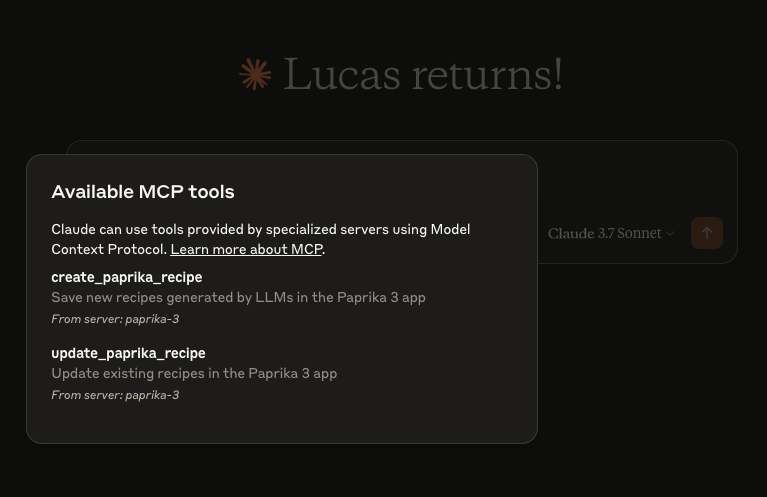
This project is open source under the MIT License © 2025 Lucas Stephens.
The MCP server writes structured logs using Go’s slog with rotation via lumberjack. Log files are automatically created based on your operating system:
Operating System | Log File Path |
macOS |
|
Linux |
|
Windows |
|
Other / Unknown |
|
💡 Logs are rotated automatically at 100MB, with only 5 backup files kept. Logs are also wiped after 10 days.
Recent tool additions, removals, and schema changes observed during successful MCP inspections.
Loading tool schema changelog…
This server cannot be deployed
Search, save, organize, cook, and share recipes with any AI assistant.
Save, import and edit recipes as interactive cards in ChatGPT and Claude, synced to your iPhone.
Your family recipe box inside ChatGPT and Grok. Save, scale, plan menus and share recipes.
Personal recipe manager: import from links and photos, meal plans, shared shopping list. EN/NO