Oracle MCP Server
Provides a ready-to-use Docker setup with Oracle Database XE and sample data for testing and development environments
Uses .ENV files for configuration management, allowing easy setup of database connections and security parameters
Enables GitHub Copilot to execute SQL queries, browse database schemas, analyze performance, and provide intelligent database insights through structured Oracle database interactions
Includes a comprehensive test suite with unit tests, integration tests, and utility tests for development and testing
Built with Python and provides comprehensive Oracle database interaction capabilities including executing queries, exploring schemas, and analyzing performance
Click on "Install Server".
Wait a few minutes for the server to deploy. Once ready, it will show a "Started" state.
In the chat, type
@followed by the MCP server name and your instructions, e.g., "@Oracle MCP Servershow me the top 10 highest paid employees"
That's it! The server will respond to your query, and you can continue using it as needed.
Here is a step-by-step guide with screenshots.
Oracle MCP Server
Oracle Database MCP Server - Execute SQL queries, browse schemas, and analyze performance.
Table of Contents
Chat Demo š¤
Related MCP server: OracleDB MCP Server
Overview
This Model Context Protocol (MCP) server provides comprehensive Oracle Database interaction capabilities for AI assistants and development environments. Execute SQL queries safely, explore database schemas, analyze query performance, export data in multiple formats, and get intelligent database insights through any MCP-compatible client.
Features
Safe Query Execution - Execute SELECT queries with built-in safety controls
Schema Inspection - Browse database tables, views, procedures, and functions
Performance Analysis - Get execution plans and query performance metrics
Data Export - Export query results in JSON and CSV formats
Security Controls - Whitelist tables/columns and enforce read-only operations
Query Execution Capabilities
The MCP server provides rich query execution with automatic safety controls:
Automatic Row Limiting: SELECT queries are automatically limited to prevent resource exhaustion (configurable via
QUERY_LIMIT_SIZE)SQL Injection Prevention: Built-in keyword filtering blocks dangerous operations (DROP, DELETE, UPDATE, etc.)
Smart Query Enhancement: Queries without explicit ROWNUM/LIMIT clauses get automatic pagination
Data Type Handling: Automatic conversion of Oracle-specific types (LOB, DATE, NUMBER) to JSON-serializable formats
Execution Metrics: Every query returns execution time and row count statistics
Example Query Response:
{
"columns": ["EMPLOYEE_ID", "FIRST_NAME", "LAST_NAME", "SALARY"],
"rows": [[100, "Steven", "King", 24000], [101, "Neena", "Kochhar", 17000]],
"row_count": 2,
"execution_time_seconds": 0.045,
"query": "SELECT employee_id, first_name, last_name, salary FROM employees WHERE ROWNUM <= 100"
}Schema Inspection Capabilities
The server provides comprehensive database metadata that helps LLMs understand your database structure:
Table Discovery: Lists all accessible tables with row counts, last analysis dates, and comments
Column Details: Provides data types, nullable constraints, default values, and column comments
Relationship Insights: Views and their underlying table relationships
Stored Procedures: Available functions, procedures, and packages with their status
Example Table Metadata:
{
"owner": "HR",
"table_name": "EMPLOYEES",
"columns": [
{
"column_name": "EMPLOYEE_ID",
"data_type": "NUMBER",
"nullable": "N",
"column_comment": "Primary key of employees table"
},
{
"column_name": "FIRST_NAME",
"data_type": "VARCHAR2",
"data_length": 20,
"nullable": "Y",
"column_comment": "First name of the employee"
}
],
"table_comment": "Employees information including salary and department"
}Performance Analysis Features
Execution Plans: Generate and analyze query execution plans with cost estimates
Query Optimization: Identify table scans, index usage, and performance bottlenecks
Resource Estimates: Cost, cardinality, and byte estimates for query operations
GitHub Copilot Agent Interaction
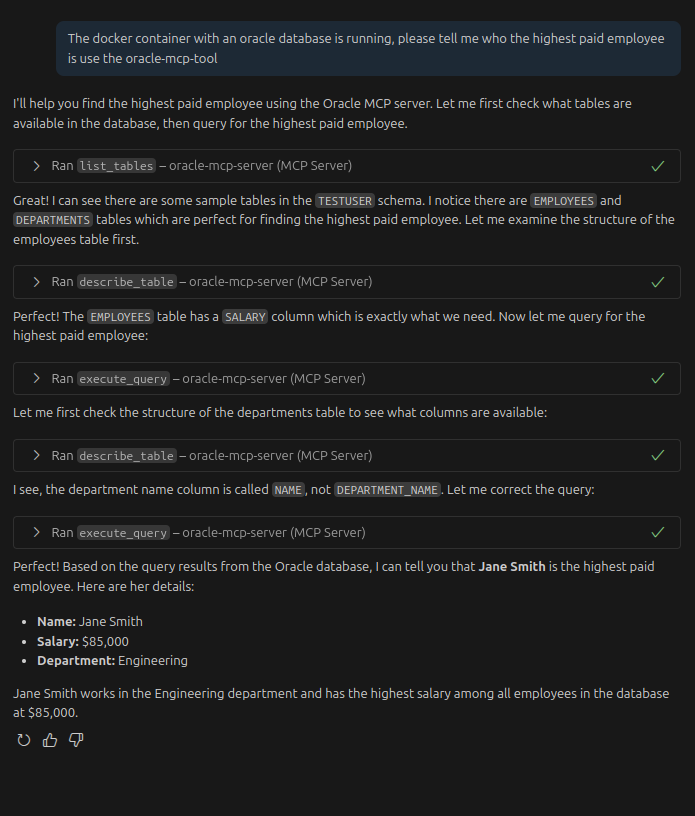
Example of the Oracle MCP Server responding to database queries through GitHub Copilot's agent model interface
When GitHub Copilot interacts with the MCP server, it receives structured data that enables sophisticated database assistance including query generation, schema understanding, and performance optimization recommendations.
Documentation
š Setup Guides:
Docker Example Setup - Complete Oracle database in Docker with sample data
Complete Setup Guide - Step-by-step instructions for any Oracle database
Quick Reference - Credentials, commands, and troubleshooting
š³ New to Oracle? Start with the Docker Example to get running in minutes!
Quick Setup
Prerequisites
Python 3.10+
Oracle Database access
Oracle Instant Client (for advanced features)
Installation
Clone and setup the project:
git clone <repository-url> cd oracle-mcp-server ./setup.shConfigure database connection:
cp .env.example .env # Edit .env with your Oracle database detailsTest the connection:
uv run oracle-mcp-server --debugAlternative: Use the startup script for automatic environment setup:
./start_mcp_server.sh --debugSet up VS Code integration: See the VS Code Integration section below for detailed setup instructions.
Chat Demo (mcp-chat)
š¤ Want to see how an LLM uses MCP tools step-by-step?
The mcp-chat demo provides a demo on how an agent can connect to and query your Oracle database. This demo shows the raw tool usage patterns that LLMs follow when answering database questions using the MCP server.
Features
Direct Tool Usage: Watch the LLM call MCP tools in real-time
Step-by-Step Progress: See each tool call as it happens
Multiple Model Support: Works with any OpenRouter-compatible model
Configurable Timeouts: Control how long complex queries can run
Quick Start
# 1. Set up your OpenRouter API key
export OPENROUTER_API_KEY="your-api-key-here"
# 2. Set up database connection (use Docker example or your own)
export DB_CONNECTION_STRING="testuser/TestUser123!@localhost:1521/testdb"
# 3. Run a simple query
uv run mcp-chat "What tables are in the database?"
# 4. Run a more complex query with a specific model
uv run mcp-chat --model openai/gpt-4.1 "Which department has the highest paid employee?"Example: Multi-Turn Tool Usage
Here's what happens when you ask "Which department has the highest paid employee?" - notice how the LLM makes multiple tool calls to gather information before providing the answer:
$ uv run mcp-chat --model google/gemini-2.5-flash --timeout 120 "What department has the highest paid employee?"
Using model: google/gemini-2.5-flash
āāāāāāāāāāāāāāāāāāāāāāāāāāāāāāāāāāā Welcome āāāāāāāāāāāāāāāāāāāāāāāāāāāāāāāāāāāā®
ā Oracle Database Assistant ā
ā I can help you explore and query your Oracle database. ā
ā Type 'exit' to quit, 'clear' to start over. ā
ā°āāāāāāāāāāāāāāāāāāāāāāāāāāāāāāāāāāāāāāāāāāāāāāāāāāāāāāāāāāāāāāāāāāāāāāāāāāāāāāāÆ
You: What department has the highest paid employee?
Processing your request...
Analyzing (iteration 1)...
Using tools: list_tables
Executing list_tables...
Preview: {
"tables": [
{
"owner": "TESTUSER",
"table_name": "DEPARTMENTS",
"num_rows": 3,
"last_analyzed": "2025-07-14T22:00:12",
"table_comment": null,
"tablespace_na...
Analyzing (iteration 2)...
Using tools: describe_table
Executing describe_table...
Preview: {
"table_name": "EMPLOYEES",
"owner": null,
"columns": [
{
"column_name": "ID",
"data_type": "NUMBER",
"data_length": 22,
"data_precision": 10,
"data_scale": 0,...
Analyzing (iteration 3)...
Using tools: describe_table
Executing describe_table...
Preview: {
"table_name": "DEPARTMENTS",
"owner": null,
"columns": [
{
"column_name": "ID",
"data_type": "NUMBER",
"data_length": 22,
"data_precision": 10,
"data_scale": ...
Analyzing (iteration 4)...
Using tools: execute_query
Executing execute_query...
Preview: {
"columns": [
"DEPARTMENT_NAME"
],
"rows": [
[
"Engineering"
]
],
"row_count": 1,
"execution_time_seconds": 0.002093,
"query": "SELECT * FROM (SELECT d.name AS departm...
Analyzing (iteration 5)...
Ready to respond
Preview: The department with the highest paid employee is Engineering.
Processing complete
Assistant:
The department with the highest paid employee is Engineering. Understanding the Tool Flow
In the example above, the LLM follows a logical progression:
Discovery (
list_tables): First explores what tables are availableSchema Understanding (
describe_tablex2): Examines the structure of EMPLOYEES and DEPARTMENTS tablesQuery Execution (
execute_query): Runs a SQL queryFinal Answer: Provides the specific result from the query data
This demonstrates how LLMs break down complex questions into discrete tool calls, gathering information step-by-step before synthesizing a final answer.
Command Options
# Use a specific model (default: openai/gpt-4.1)
uv run mcp-chat --model openai/gpt-4.1 "your question"
# Set custom timeout for complex queries (default: 60 seconds)
uv run mcp-chat --timeout 120 "complex analysis question"
# Enable debug logging
uv run mcp-chat --debug "your question"
# Interactive mode (no initial question)
uv run mcp-chat
# Get help
uv run mcp-chat --helpSupported Models
The chat interface works with any OpenRouter-compatible model, but you'll want to use one that is adept at tool calling such as openai/gpt-4.1.
Tips for Best Results
Be Specific: "Show me salaries by department" works better than "tell me about employees"
Watch the Progress: The tool calls show you exactly how the LLM is thinking
Adjust Timeouts: Complex analytical queries may need more time
Try Different Models: Some models are better at following multi-step instructions
Docker Setup for Testing
š³ New to Oracle? Get a complete test environment running in minutes!
We provide a ready-to-use Docker setup with Oracle Database XE and sample data. Perfect for:
Testing the MCP server
Learning Oracle database interactions
Development and prototyping
Quick Start
# 1. Start Oracle database with sample data
cd docker-example
docker-compose up -d
# 2. Configure MCP server
cp .env.docker ../.env
# 3. Test the setup
cd .. && uv run oracle-mcp-server --versionWhat You Get
Oracle Database XE 21c running in Docker
Sample database with employees and departments tables
Test user (
testuser/TestUser123!) with appropriate permissionsReady-to-use connection string for the MCP server
š Complete Docker Setup Guide ā
The Docker example includes detailed instructions, troubleshooting, sample queries, and management commands.
VS Code Integration
Prerequisites
Install VS Code extensions:
GitHub Copilot - Required for MCP integration
Python - Recommended for development
Setup Steps
Complete the basic setup (see Quick Setup section above)
Configure environment variables:
Ensure your
.envfile has the correctDB_CONNECTION_STRINGVS Code will automatically load environment variables from
.env
MCP Configuration: The project includes a pre-configured
.vscode/mcp.jsonfile:{ "servers": { "oracle-mcp-server": { "command": "uv", "args": ["run", "python", "-m", "oracle_mcp_server.server"], "env": { "DB_CONNECTION_STRING": "${env:DB_CONNECTION_STRING}", "DEBUG": "${env:DEBUG}", "QUERY_LIMIT_SIZE": "${env:QUERY_LIMIT_SIZE}", "MAX_ROWS_EXPORT": "${env:MAX_ROWS_EXPORT}" } } } }Activate the MCP server:
Open this project folder in VS Code
Restart VS Code to load the MCP configuration
The Oracle MCP server will start automatically when GitHub Copilot needs it
Using the MCP Server
Once configured, you can interact with your Oracle database through GitHub Copilot:
Ask database questions:
"Show me all tables in the database"
"Describe the EMPLOYEES table structure"
"What are the most recent orders?"
Query assistance:
"Generate a query to find all customers from California"
"Explain this query's execution plan"
"Export the results as CSV"
Schema exploration:
"What views are available?"
"Show me sample data from the PRODUCTS table"
"List all stored procedures"
Troubleshooting VS Code Integration
MCP server not starting:
Check VS Code's Output panel ā "GitHub Copilot Chat" for error messages
Verify
.envfile exists and has correctDB_CONNECTION_STRINGEnsure
uvis installed and available in PATHTry restarting VS Code completely
Connection issues:
Test connection manually:
uv run oracle-mcp-server --debugCheck Oracle database is accessible
Verify credentials in
.envfile
No database responses:
Ensure GitHub Copilot extension is activated
Check that
.vscode/mcp.jsonexists in the workspaceVerify environment variables are loading (check VS Code terminal:
echo $DB_CONNECTION_STRING)
Alternative: Using the Startup Script
For environments where the MCP server needs explicit environment setup, you can use the included startup script:
# Use the startup script instead of direct Python execution
./start_mcp_server.sh --versionThe startup script automatically:
Activates the Python virtual environment
Loads environment variables from
.envfileVerifies database connection string is available
Starts the MCP server with proper configuration
To use with VS Code MCP configuration, update .vscode/mcp.json:
{
"servers": {
"oracle-mcp-server": {
"command": "./start_mcp_server.sh",
"args": [],
"cwd": "${workspaceFolder}"
}
}
}This is particularly useful when:
Environment variables aren't loading automatically
Virtual environment isn't being detected
You need consistent startup behavior across different environments
Development with VS Code
The project includes VS Code-specific configurations:
Python interpreter: Automatically uses the UV virtual environment
File associations: SQL files are properly recognized
GitHub Copilot: Enabled for Python and SQL files
Debugging: Use F5 to debug the MCP server directly
Configuration
Environment Variables
Variable | Description | Default | Example |
| Oracle connection string | Required |
|
| Comma-separated list of allowed tables | All tables |
|
| Comma-separated list of allowed columns | All columns |
|
| Maximum rows returned per query |
|
|
| Maximum rows for export operations |
|
|
| Enable debug logging |
|
|
Connection String Examples
# Docker test database (from this project's setup)
DB_CONNECTION_STRING="testuser/TestUser123!@localhost:1521/testdb"
# Local Oracle XE (traditional format)
DB_CONNECTION_STRING="oracle+oracledb://system:password@localhost:1521/?service_name=XE"
# Oracle Cloud Autonomous Database
DB_CONNECTION_STRING="oracle+oracledb://admin:password@hostname:1522/?service_name=your_service_tls&ssl_context=true"
# Production with connection pooling
DB_CONNECTION_STRING="oracle+oracledb://app_user:password@db.company.com:1521/?service_name=PROD&pool_size=10"Note: The MCP server supports two connection string formats:
Simple format:
username/password@host:port/service_name(recommended for Docker setup)URL format:
oracle+oracledb://username:password@host:port/?service_name=service_name(for compatibility)
Available Tools
When integrated with GitHub Copilot, the following tools are available:
execute_query- Execute SELECT, DESCRIBE, or EXPLAIN PLAN statementsdescribe_table- Get detailed table schema informationlist_tables- Browse all database tables with metadatalist_views- Browse all database viewslist_procedures- Browse stored procedures, functions, and packagesexplain_query- Analyze query execution plans for performance tuninggenerate_sample_queries- Generate example queries for table explorationexport_query_results- Export data in JSON or CSV format
Development
Running Tests
The project includes a comprehensive test suite with unit tests, integration tests, and utility tests.
# Run all tests
uv run pytest
# Run only unit tests (fast, no database required)
uv run pytest -m unit
# Run only integration tests (requires real database)
uv run pytest -m integration
# Run tests with coverage report
uv run pytest --cov=src/oracle_mcp_server
# Run specific test file
uv run pytest tests/test_oracle_connection.py
# Run tests with verbose output
uv run pytest -vTest Categories:
Unit Tests (
-m unit): Fast tests using mocks, no database requiredIntegration Tests (
-m integration): Tests against real Oracle databaseSlow Tests (
-m slow): Performance and stress tests
For Integration Tests:
Integration tests require a real Oracle database. Set the TEST_DB_CONNECTION_STRING environment variable:
Using the Docker test database (recommended):
# Make sure Docker database is running
cd docker-example && docker-compose up -d && cd ..
# Set connection string and run integration tests
export TEST_DB_CONNECTION_STRING="testuser/TestUser123!@localhost:1521/testdb"
uv run pytest -m integration
# Or run all tests including integration tests
export TEST_DB_CONNECTION_STRING="testuser/TestUser123!@localhost:1521/testdb"
uv run pytestUsing your own Oracle database:
export TEST_DB_CONNECTION_STRING="your_user/your_password@your_host:1521/your_service"
uv run pytest -m integrationCode Formatting
uv run black src/ tests/
uv run isort src/ tests/Type Checking
uv run mypy src/Development Server
# Debug mode
uv run oracle-mcp-server --debug
# Use VS Code debugger with F5 or Ctrl+F5Security Features
Read-only operations - Only SELECT, DESCRIBE, and EXPLAIN PLAN are allowed
SQL injection prevention - Basic keyword filtering and parameterized queries
Row limiting - Automatic ROWNUM restrictions to prevent resource exhaustion
Table/column whitelisting - Restrict access to specific database objects
Connection pooling - Efficient resource management
Troubleshooting
Common Issues
Connection failures:
Verify Oracle database is running
Check connection string format
Ensure Oracle Instant Client is installed (if needed)
Permission errors:
Verify database user has SELECT privileges
Check access to system views (ALL_TABLES, ALL_TAB_COLUMNS, etc.)
MCP integration issues:
Restart VS Code after configuration changes
Check VS Code output panel for MCP server logs
Verify environment variables are loaded
Debug Mode
Run with debug logging to troubleshoot issues:
uv run oracle-mcp-server --debugLicense
MIT License - see LICENSE file for details.
Contributing
Fork the repository
Create a feature branch
Run tests and linting
Submit a pull request
Support
Check the Issues page
Review the Docker Example for sample queries
See Complete Setup Guide for configuration examples
Available Tools
8 toolsdescribe_tableB
Get detailed information about a table including columns, data types, and constraints
| Name | Required | Description | Default |
|---|---|---|---|
| table_name | Yes | Name of the table to describe | |
| owner | No | Schema owner (optional) |
TDQS
Does the description disclose side effects, auth requirements, rate limits, or destructive behavior?
No annotations are provided, so the description carries the full burden of behavioral disclosure. While 'Get' implies a read-only operation, it doesn't specify whether this requires specific permissions, how it handles non-existent tables, or what the return format looks like (e.g., structured data vs. text). For a tool with zero annotation coverage, this leaves significant behavioral gaps unaddressed.
Agents need to know what a tool does to the world before calling it. Descriptions should go beyond structured annotations to explain consequences.
Is the description appropriately sized, front-loaded, and free of redundancy?
The description is a single, efficient sentence that front-loads the purpose ('Get detailed information about a table') and specifies key details ('including columns, data types, and constraints'). Every word earns its place with no redundancy or unnecessary elaboration.
Shorter descriptions cost fewer tokens and are easier for agents to parse. Every sentence should earn its place.
Given the tool's complexity, does the description cover enough for an agent to succeed on first attempt?
Given no annotations, no output schema, and a simple input schema with full coverage, the description provides adequate context for a basic read operation. However, it lacks details on behavioral aspects like error handling or return format, which would be helpful for an AI agent. It's minimally viable but could be more complete.
Complex tools with many parameters or behaviors need more documentation. Simple tools need less. This dimension scales expectations accordingly.
Does the description clarify parameter syntax, constraints, interactions, or defaults beyond what the schema provides?
Schema description coverage is 100%, so the schema already documents both parameters (table_name and owner) with descriptions. The description doesn't add any parameter-specific information beyond what the schema provides, such as format examples or constraints. Baseline 3 is appropriate when the schema does the heavy lifting.
Input schemas describe structure but not intent. Descriptions should explain non-obvious parameter relationships and valid value ranges.
Does the description clearly state what the tool does and how it differs from similar tools?
The description clearly states the verb 'Get' and the resource 'detailed information about a table', specifying what information is included (columns, data types, constraints). It distinguishes from siblings like 'list_tables' (which would list table names) by focusing on detailed metadata. However, it doesn't explicitly differentiate from 'explain_query' which might provide execution details rather than structural metadata.
Agents choose between tools based on descriptions. A clear purpose with a specific verb and resource helps agents select the right tool.
Does the description explain when to use this tool, when not to, or what alternatives exist?
The description implies usage for obtaining table metadata, which suggests it should be used when structural details are needed rather than just listing names. However, it doesn't provide explicit guidance on when to use this versus alternatives like 'list_tables' for basic enumeration or 'explain_query' for query execution details. No exclusions or prerequisites are mentioned.
Agents often have multiple tools that could apply. Explicit usage guidance like "use X instead of Y when Z" prevents misuse.
execute_queryA
Execute a SQL query against the Oracle database. Only SELECT, DESCRIBE, and EXPLAIN PLAN statements are allowed for safety.
| Name | Required | Description | Default |
|---|---|---|---|
| sql | Yes | SQL query to execute (SELECT, DESCRIBE, or EXPLAIN PLAN only) | |
| params | No | Optional parameters for parameterized queries |
TDQS
Does the description disclose side effects, auth requirements, rate limits, or destructive behavior?
With no annotations provided, the description carries the full burden of behavioral disclosure. It effectively communicates safety constraints by limiting allowed SQL types, implying read-only behavior, but lacks details on permissions, rate limits, error handling, or result format. This provides basic transparency but misses deeper operational context.
Agents need to know what a tool does to the world before calling it. Descriptions should go beyond structured annotations to explain consequences.
Is the description appropriately sized, front-loaded, and free of redundancy?
The description is two sentences with zero waste: the first states the core purpose, and the second adds critical safety constraints. It is front-loaded and appropriately sized, with every sentence earning its place by providing essential information without redundancy.
Shorter descriptions cost fewer tokens and are easier for agents to parse. Every sentence should earn its place.
Given the tool's complexity, does the description cover enough for an agent to succeed on first attempt?
Given the tool's complexity (executing SQL queries), lack of annotations, and no output schema, the description is moderately complete. It covers safety and basic usage but omits details on result format, error conditions, or performance implications, which are important for an agent to use it effectively in varied contexts.
Complex tools with many parameters or behaviors need more documentation. Simple tools need less. This dimension scales expectations accordingly.
Does the description clarify parameter syntax, constraints, interactions, or defaults beyond what the schema provides?
Schema description coverage is 100%, so the schema already documents both parameters (sql and params) thoroughly. The description adds no additional parameter semantics beyond what's in the schema, such as syntax examples or usage nuances. Baseline 3 is appropriate as the schema handles the heavy lifting.
Input schemas describe structure but not intent. Descriptions should explain non-obvious parameter relationships and valid value ranges.
Does the description clearly state what the tool does and how it differs from similar tools?
The description clearly states the specific action ('Execute a SQL query') and target resource ('against the Oracle database'), distinguishing it from siblings like list_tables or describe_table by focusing on query execution rather than metadata retrieval. It explicitly mentions the allowed SQL statement types (SELECT, DESCRIBE, EXPLAIN PLAN), which further clarifies its scope.
Agents choose between tools based on descriptions. A clear purpose with a specific verb and resource helps agents select the right tool.
Does the description explain when to use this tool, when not to, or what alternatives exist?
The description provides clear context by specifying 'Only SELECT, DESCRIBE, and EXPLAIN PLAN statements are allowed for safety,' which implicitly guides when to use this tool (for read-only/safe queries) versus when not to (for DML/DDL operations). However, it does not explicitly name alternatives or detail when to choose siblings like export_query_results for output handling.
Agents often have multiple tools that could apply. Explicit usage guidance like "use X instead of Y when Z" prevents misuse.
explain_queryC
Get the execution plan for a SQL query to analyze performance
| Name | Required | Description | Default |
|---|---|---|---|
| sql | Yes | SQL query to explain |
TDQS
Does the description disclose side effects, auth requirements, rate limits, or destructive behavior?
No annotations are provided, so the description carries the full burden of behavioral disclosure. It states the tool returns an execution plan for performance analysis, but lacks details on what the output includes (e.g., cost estimates, steps), whether it requires specific permissions, if it executes the query, or any rate limits. This leaves significant gaps in understanding how the tool behaves.
Agents need to know what a tool does to the world before calling it. Descriptions should go beyond structured annotations to explain consequences.
Is the description appropriately sized, front-loaded, and free of redundancy?
The description is a single, efficient sentence: 'Get the execution plan for a SQL query to analyze performance.' It is front-loaded with the core action and resource, with no wasted words, making it easy to parse quickly.
Shorter descriptions cost fewer tokens and are easier for agents to parse. Every sentence should earn its place.
Given the tool's complexity, does the description cover enough for an agent to succeed on first attempt?
Given the lack of annotations and output schema, the description is incomplete. It explains the basic purpose but fails to address key contextual aspects such as what the execution plan output entails, any prerequisites (e.g., database permissions), or how it differs from sibling tools. For a tool with no structured behavioral data, this leaves too many unknowns.
Complex tools with many parameters or behaviors need more documentation. Simple tools need less. This dimension scales expectations accordingly.
Does the description clarify parameter syntax, constraints, interactions, or defaults beyond what the schema provides?
The input schema has 100% description coverage, with the 'sql' parameter clearly documented as 'SQL query to explain.' The description adds no additional meaning beyond this, as it only reiterates the general purpose without specifying parameter details like format or constraints. Given the high schema coverage, the baseline score of 3 is appropriate.
Input schemas describe structure but not intent. Descriptions should explain non-obvious parameter relationships and valid value ranges.
Does the description clearly state what the tool does and how it differs from similar tools?
The description clearly states the tool's purpose: 'Get the execution plan for a SQL query to analyze performance.' It specifies the verb ('Get'), resource ('execution plan'), and context ('SQL query'), making it easy to understand. However, it doesn't explicitly differentiate from siblings like 'execute_query' or 'describe_table', which might also involve query analysis, so it falls short of a perfect score.
Agents choose between tools based on descriptions. A clear purpose with a specific verb and resource helps agents select the right tool.
Does the description explain when to use this tool, when not to, or what alternatives exist?
The description provides no guidance on when to use this tool versus alternatives. It mentions analyzing performance, but doesn't specify scenarios (e.g., debugging slow queries) or contrast with siblings like 'execute_query' (for running queries) or 'describe_table' (for schema details). Without such context, users may struggle to select the right tool.
Agents often have multiple tools that could apply. Explicit usage guidance like "use X instead of Y when Z" prevents misuse.
export_query_resultsC
Export query results in various formats (JSON, CSV)
| Name | Required | Description | Default |
|---|---|---|---|
| sql | Yes | SQL query to execute and export | |
| format | No | Export format | json |
TDQS
Does the description disclose side effects, auth requirements, rate limits, or destructive behavior?
No annotations are provided, so the description carries the full burden. It mentions the export action but lacks critical behavioral details: whether this executes the query (implying read/write operations), permission requirements, rate limits, output handling (e.g., file generation or direct return), or error conditions. The description is minimal and misses key operational context.
Agents need to know what a tool does to the world before calling it. Descriptions should go beyond structured annotations to explain consequences.
Is the description appropriately sized, front-loaded, and free of redundancy?
The description is extremely conciseāa single sentence with zero waste. It is front-loaded with the core purpose and efficiently lists the formats. Every word earns its place, making it easy to parse quickly.
Shorter descriptions cost fewer tokens and are easier for agents to parse. Every sentence should earn its place.
Given the tool's complexity, does the description cover enough for an agent to succeed on first attempt?
Given the complexity (a tool that likely executes and exports queries), lack of annotations, and no output schema, the description is incomplete. It doesn't explain what happens (e.g., does it return a file, trigger a download, or include results in response?), success/error behaviors, or integration with siblings. More context is needed for safe and effective use.
Complex tools with many parameters or behaviors need more documentation. Simple tools need less. This dimension scales expectations accordingly.
Does the description clarify parameter syntax, constraints, interactions, or defaults beyond what the schema provides?
Schema description coverage is 100%, so the schema fully documents both parameters (sql and format). The description adds no additional meaning beyond stating 'various formats (JSON, CSV)', which is already covered by the enum in the schema. Baseline 3 is appropriate as the schema does the heavy lifting.
Input schemas describe structure but not intent. Descriptions should explain non-obvious parameter relationships and valid value ranges.
Does the description clearly state what the tool does and how it differs from similar tools?
The description clearly states the tool's purpose: 'Export query results in various formats (JSON, CSV)'. It specifies the verb ('Export') and resource ('query results'), and distinguishes it from siblings like execute_query by focusing on export functionality. However, it doesn't explicitly differentiate from all siblings (e.g., generate_sample_queries).
Agents choose between tools based on descriptions. A clear purpose with a specific verb and resource helps agents select the right tool.
Does the description explain when to use this tool, when not to, or what alternatives exist?
The description provides no guidance on when to use this tool versus alternatives. It doesn't mention prerequisites (e.g., needing valid SQL), exclusions, or comparisons to siblings like execute_query (which might return results without export). Usage is implied but not explicitly stated.
Agents often have multiple tools that could apply. Explicit usage guidance like "use X instead of Y when Z" prevents misuse.
generate_sample_queriesC
Generate sample SQL queries for a given table to help with exploration
| Name | Required | Description | Default |
|---|---|---|---|
| table_name | Yes | Name of the table to generate queries for | |
| owner | No | Schema owner (optional) |
TDQS
Does the description disclose side effects, auth requirements, rate limits, or destructive behavior?
No annotations are provided, so the description carries the full burden of behavioral disclosure. It states the tool generates queries but doesn't describe key behaviors: what types of queries are generated (e.g., SELECT, JOIN), how many queries are produced, whether they include sample data or are template-based, or if there are any limitations (e.g., rate limits or permissions required). This leaves significant gaps for an agent to understand the tool's operation.
Agents need to know what a tool does to the world before calling it. Descriptions should go beyond structured annotations to explain consequences.
Is the description appropriately sized, front-loaded, and free of redundancy?
The description is a single, efficient sentence: 'Generate sample SQL queries for a given table to help with exploration.' It is front-loaded with the core purpose and wastes no words, making it highly concise and well-structured for quick understanding.
Shorter descriptions cost fewer tokens and are easier for agents to parse. Every sentence should earn its place.
Given the tool's complexity, does the description cover enough for an agent to succeed on first attempt?
Given the lack of annotations and output schema, the description is incomplete for a tool that generates queries. It doesn't explain what the output looks like (e.g., a list of query strings, formatted results), any behavioral constraints, or how it integrates with sibling tools. For a tool with 2 parameters and no structured output documentation, more context is needed to guide effective use.
Complex tools with many parameters or behaviors need more documentation. Simple tools need less. This dimension scales expectations accordingly.
Does the description clarify parameter syntax, constraints, interactions, or defaults beyond what the schema provides?
The input schema has 100% description coverage, with clear documentation for both parameters ('table_name' and 'owner'). The description adds no additional parameter semantics beyond what the schema provides, such as format examples or usage tips. According to the rules, with high schema coverage (>80%), the baseline is 3, which is appropriate here as the schema does the heavy lifting.
Input schemas describe structure but not intent. Descriptions should explain non-obvious parameter relationships and valid value ranges.
Does the description clearly state what the tool does and how it differs from similar tools?
The description clearly states the tool's purpose: 'Generate sample SQL queries for a given table to help with exploration.' It specifies the verb ('generate'), resource ('sample SQL queries'), and target ('given table'), making the function unambiguous. However, it doesn't explicitly differentiate from sibling tools like 'describe_table' or 'explain_query', which prevents a perfect score.
Agents choose between tools based on descriptions. A clear purpose with a specific verb and resource helps agents select the right tool.
Does the description explain when to use this tool, when not to, or what alternatives exist?
The description provides no guidance on when to use this tool versus alternatives. It mentions 'to help with exploration,' but doesn't specify scenarios where this is preferred over tools like 'describe_table' for understanding table structure or 'execute_query' for running actual queries. There are no explicit when/when-not instructions or named alternatives.
Agents often have multiple tools that could apply. Explicit usage guidance like "use X instead of Y when Z" prevents misuse.
list_proceduresC
List all stored procedures, functions, and packages
| Name | Required | Description | Default |
|---|---|---|---|
| owner | No | Filter by schema owner (optional) |
TDQS
Does the description disclose side effects, auth requirements, rate limits, or destructive behavior?
With no annotations provided, the description carries full burden for behavioral disclosure. It states the action ('List all') but doesn't describe traits such as whether this is a read-only operation, potential performance impacts, pagination, or output format. This leaves significant gaps for a tool that likely returns a list of database objects.
Agents need to know what a tool does to the world before calling it. Descriptions should go beyond structured annotations to explain consequences.
Is the description appropriately sized, front-loaded, and free of redundancy?
The description is a single, efficient sentence that directly states the tool's purpose without unnecessary words. It is front-loaded with the core action and resource, making it easy to parse quickly, which is ideal for conciseness.
Shorter descriptions cost fewer tokens and are easier for agents to parse. Every sentence should earn its place.
Given the tool's complexity, does the description cover enough for an agent to succeed on first attempt?
Given the complexity of listing database objects, no annotations, and no output schema, the description is incomplete. It lacks details on behavioral traits, usage context, and what the output entails (e.g., format, structure), making it inadequate for an agent to fully understand how to use this tool effectively.
Complex tools with many parameters or behaviors need more documentation. Simple tools need less. This dimension scales expectations accordingly.
Does the description clarify parameter syntax, constraints, interactions, or defaults beyond what the schema provides?
The description adds no parameter information beyond what the input schema provides, which has 100% coverage for the single optional parameter 'owner'. Since the schema fully documents the parameter, the baseline score of 3 is appropriate, as the description doesn't compensate but also doesn't detract.
Input schemas describe structure but not intent. Descriptions should explain non-obvious parameter relationships and valid value ranges.
Does the description clearly state what the tool does and how it differs from similar tools?
The description clearly states the verb ('List') and resource ('stored procedures, functions, and packages'), making the purpose understandable. However, it doesn't explicitly differentiate from sibling tools like 'list_tables' or 'list_views' beyond the resource type, which slightly reduces clarity in a context with multiple listing tools.
Agents choose between tools based on descriptions. A clear purpose with a specific verb and resource helps agents select the right tool.
Does the description explain when to use this tool, when not to, or what alternatives exist?
The description provides no guidance on when to use this tool versus alternatives like 'list_tables' or 'list_views'. It lacks context about scenarios where listing procedures is preferred, prerequisites, or exclusions, leaving the agent to infer usage based on tool names alone.
Agents often have multiple tools that could apply. Explicit usage guidance like "use X instead of Y when Z" prevents misuse.
list_tablesB
List all tables in the database with metadata
| Name | Required | Description | Default |
|---|---|---|---|
| owner | No | Filter by schema owner (optional) |
TDQS
Does the description disclose side effects, auth requirements, rate limits, or destructive behavior?
With no annotations provided, the description carries the full burden of behavioral disclosure. It states the tool lists tables with metadata but doesn't describe what metadata is included, whether there are pagination limits, rate limits, or authentication requirements. This leaves significant behavioral gaps for an agent.
Agents need to know what a tool does to the world before calling it. Descriptions should go beyond structured annotations to explain consequences.
Is the description appropriately sized, front-loaded, and free of redundancy?
The description is a single, efficient sentence that directly states the tool's purpose without any wasted words. It's appropriately sized for a simple listing tool and front-loads the essential information.
Shorter descriptions cost fewer tokens and are easier for agents to parse. Every sentence should earn its place.
Given the tool's complexity, does the description cover enough for an agent to succeed on first attempt?
For a simple listing tool with one optional parameter and no output schema, the description is minimally adequate but lacks depth. It doesn't explain what 'metadata' includes or how results are structured, which would help an agent understand the tool's output despite the absence of an output schema.
Complex tools with many parameters or behaviors need more documentation. Simple tools need less. This dimension scales expectations accordingly.
Does the description clarify parameter syntax, constraints, interactions, or defaults beyond what the schema provides?
The schema description coverage is 100%, with the single parameter 'owner' clearly documented in the schema as an optional filter by schema owner. The description adds no additional parameter semantics beyond what's in the schema, so the baseline score of 3 is appropriate.
Input schemas describe structure but not intent. Descriptions should explain non-obvious parameter relationships and valid value ranges.
Does the description clearly state what the tool does and how it differs from similar tools?
The description clearly states the verb ('List') and resource ('all tables in the database'), making the purpose unambiguous. However, it doesn't explicitly differentiate from sibling tools like 'list_views' or 'list_procedures' beyond mentioning 'tables' specifically.
Agents choose between tools based on descriptions. A clear purpose with a specific verb and resource helps agents select the right tool.
Does the description explain when to use this tool, when not to, or what alternatives exist?
The description provides no guidance on when to use this tool versus alternatives like 'list_views' or 'list_procedures'. It mentions metadata but doesn't specify what kind or how it differs from other listing tools, leaving usage context implied rather than explicit.
Agents often have multiple tools that could apply. Explicit usage guidance like "use X instead of Y when Z" prevents misuse.
list_viewsC
List all views in the database
| Name | Required | Description | Default |
|---|---|---|---|
| owner | No | Filter by schema owner (optional) |
TDQS
Does the description disclose side effects, auth requirements, rate limits, or destructive behavior?
With no annotations provided, the description carries the full burden of behavioral disclosure. It implies a read operation but doesn't specify permissions required, pagination behavior, rate limits, or what 'views' entail in this context. This leaves significant gaps for an agent to understand how to interact with it effectively.
Agents need to know what a tool does to the world before calling it. Descriptions should go beyond structured annotations to explain consequences.
Is the description appropriately sized, front-loaded, and free of redundancy?
The description is a single, direct sentence with no wasted words, making it highly concise and front-loaded. It efficiently communicates the core action without unnecessary elaboration.
Shorter descriptions cost fewer tokens and are easier for agents to parse. Every sentence should earn its place.
Given the tool's complexity, does the description cover enough for an agent to succeed on first attempt?
Given the lack of annotations and output schema, the description is insufficiently complete. It doesn't address behavioral aspects like return format, error handling, or system constraints, which are critical for a tool with no structured metadata to compensate.
Complex tools with many parameters or behaviors need more documentation. Simple tools need less. This dimension scales expectations accordingly.
Does the description clarify parameter syntax, constraints, interactions, or defaults beyond what the schema provides?
The schema description coverage is 100%, so the input schema already documents the optional 'owner' parameter. The description adds no additional parameter semantics beyond what's in the schema, such as format examples or usage tips, resulting in the baseline score for high schema coverage.
Input schemas describe structure but not intent. Descriptions should explain non-obvious parameter relationships and valid value ranges.
Does the description clearly state what the tool does and how it differs from similar tools?
The description clearly states the verb ('List') and resource ('all views in the database'), making the purpose immediately understandable. However, it doesn't differentiate from sibling tools like 'list_tables' or 'list_procedures' beyond the resource type, which prevents a perfect score.
Agents choose between tools based on descriptions. A clear purpose with a specific verb and resource helps agents select the right tool.
Does the description explain when to use this tool, when not to, or what alternatives exist?
The description provides no guidance on when to use this tool versus alternatives like 'list_tables' or 'list_procedures', nor does it mention prerequisites or context for usage. It simply states what the tool does without indicating appropriate scenarios.
Agents often have multiple tools that could apply. Explicit usage guidance like "use X instead of Y when Z" prevents misuse.
Tool Schema Changelog
Recent tool additions, removals, and schema changes observed during successful MCP inspections. Dates show when Glama detected each change.
8 tool updates
- First observed
describe_table - First observed
execute_query - First observed
explain_query - First observed
export_query_results - First observed
generate_sample_queries - First observed
list_procedures - First observed
list_tables - First observed
list_views
TDQS
Each tool has a clearly distinct purpose with no ambiguity: describe_table focuses on table structure, execute_query runs queries, explain_query analyzes performance, export_query_results handles output formatting, generate_sample_queries creates examples, list_procedures lists procedures/functions/packages, list_tables lists tables, and list_views lists views. The descriptions make it easy for an agent to differentiate between them.
All tools follow a consistent verb_noun pattern with snake_case throughout: describe_table, execute_query, explain_query, export_query_results, generate_sample_queries, list_procedures, list_tables, and list_views. This predictable naming scheme makes the tool set easy to navigate and understand.
With 8 tools, the server is well-scoped for database interaction and exploration. Each tool earns its place by covering distinct aspects like query execution, metadata listing, analysis, and export, without being overly sparse or bloated. This count aligns well with the server's purpose of providing safe Oracle database access.
The tool set covers core database exploration and query tasks effectively, including listing resources, describing structures, executing and analyzing queries, and exporting results. A minor gap exists in the lack of tools for modifying data or schema (e.g., INSERT, UPDATE, CREATE TABLE), but this is likely intentional for safety, and agents can still perform read-only operations and analysis without dead ends.
Resources
Unclaimed servers have limited discoverability.
Looking for Admin?
If you are the server author, to access and configure the admin panel.
Related MCP Connectors
A comprehensive Model Context Protocol (MCP) server that enables AI assistants to interact with yoā¦
List datasets, schemas, run APL queries, and use prompts for exploration, anomalies, and monitoring.
Query your warehouse or a CSV with Claude/ChatGPT over MCP, governed by table-level ACL + audit.
Query your org's data in natural language ā read-only MCP access to SQL, NoSQL, files & warehouses.
Related MCP Servers
- AlicenseNot gradedqualityBmaintenanceA Model Context Protocol server that enables secure and structured interaction with Microsoft SQL Server databases, allowing AI assistants to list tables, read data, and execute SQL queries with controlled access.58MIT
- AlicenseNot gradedqualityDmaintenanceA Model Context Protocol Server that enables LLMs to interact with Oracle Database by providing database tables/columns as context, allowing users to generate SQL statements and retrieve results using natural language prompts.35Apache 2.0
- AlicenseBqualityDmaintenanceA Model Context Protocol server that enables Claude to access and interact with Oracle databases through natural language queries.32MIT
- AlicenseNot gradedqualityDmaintenanceA Model Context Protocol server that provides AI assistants with comprehensive access to SQL databases, enabling schema inspection, query execution, and database operations with enterprise-grade security.467MIT
Latest Blog Posts
- Who's Calling? MCP Hosts Are an Identity Blind Spot (And the Spec Knows It)By Om-Shree-0709 on .mcpAgent IdentityOAuth 2.1
- Your AI Chatbot Just Exposed Your CEO's Salary to an InternBy Om-Shree-0709 on .Agent IdentityMCP SecurityOAuth Delegation
- Why MCP Servers Need Execution Sandboxing (And Why Your Current Stack Isn't Enough)By Om-Shree-0709 on .Agentic AiPrompt InjectionWebAssembly
MCP directory API
We provide all the information about MCP servers via our MCP API.
curl -X GET 'https://glama.ai/api/mcp/v1/servers/smith-nathanh/oracle-mcp-server'
If you have feedback or need assistance with the MCP directory API, please join our Discord server