Glama

fintools-mcp

通过 MCP(模型上下文协议)为 AI 助手提供的金融分析工具。

让 Claude、ChatGPT、Cursor 或任何兼容 MCP 的 AI 能够进行真正的金融分析——不仅仅是股票价格,而是交易员实际使用的分析工具包。

工具

工具

功能

get_technical_indicators

RSI、MACD、ATR、EMA(9/21/50/200)、斐波那契水平、趋势评估

get_stock_quote

当前价格、成交量、52 周区间、市值

get_trend_score

从 -100(强下跌趋势)到 +100(强上涨趋势)的趋势评分及组件细分

get_support_resistance

关键支撑/阻力位,包含触碰次数和强度评级

get_screen_stocks

按 RSI、趋势评分、EMA 位置、相对成交量筛选标普 500 指数成分股——快速发现设置

analyze_options_chain

包含 IV 分析、流动性过滤、看跌/看涨比率的期权链

calculate_position_size

基于风险的仓位规模计算,包含止损和止盈目标

calculate_atr_position

基于 ATR 的仓位规模计算——根据波动率自动计算止损和目标

analyze_trades

根据交易盈亏计算胜率、利润因子、夏普比率、回撤和连胜/连败记录

compare_tickers

多个代码之间的并排技术对比

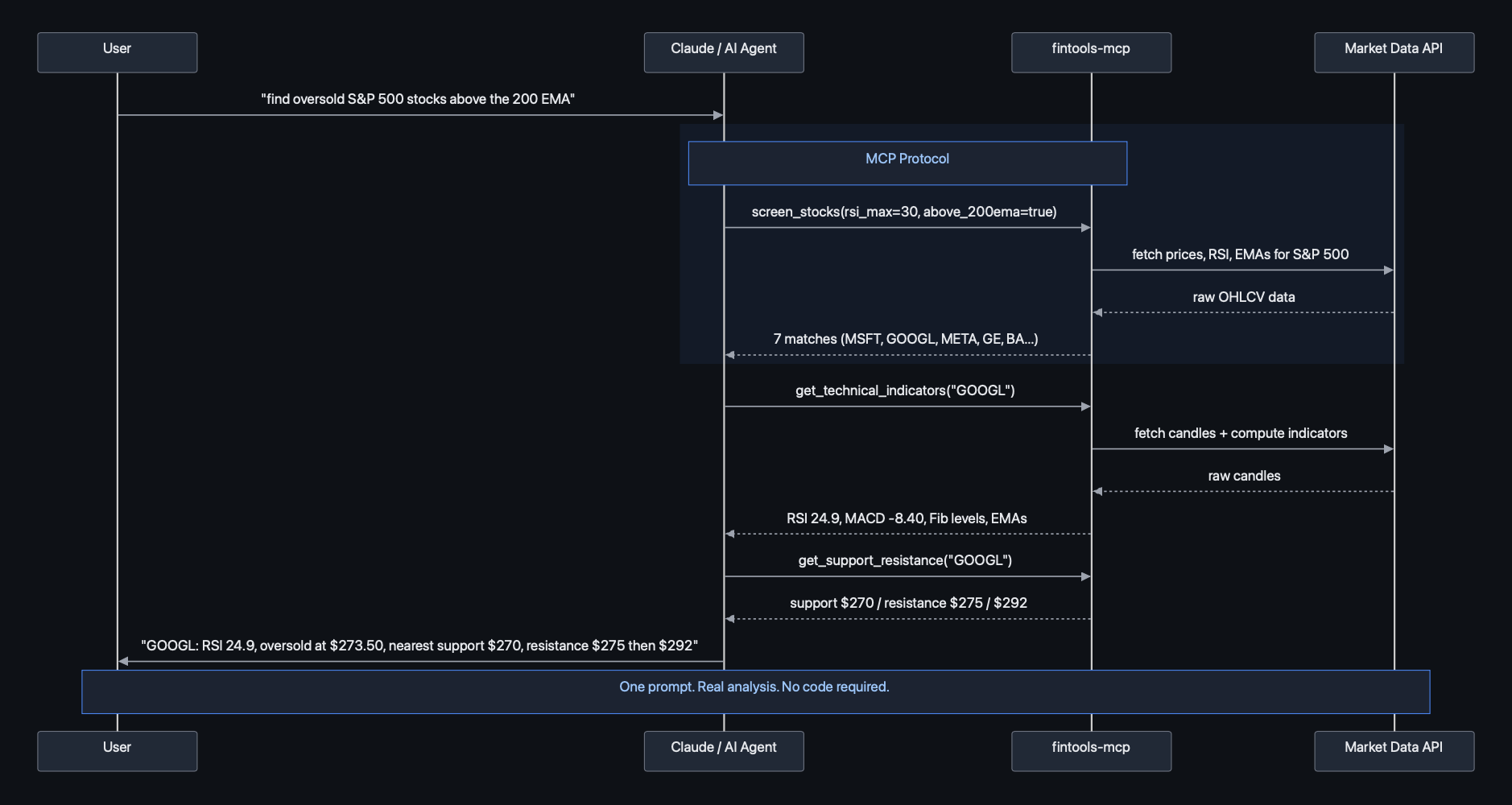
工作原理

fintools-mcp 序列图

快速入门

安装

pip install fintools-mcp

或者使用 uv:

uv pip install fintools-mcp

添加到 Claude Desktop

编辑 ~/Library/Application Support/Claude/claude_desktop_config.json

{
  "mcpServers": {
    "fintools": {
      "command": "uv",
      "args": ["run", "--from", "fintools-mcp", "fintools-mcp"]
    }
  }
}

或者如果通过 pip 安装:

{
  "mcpServers": {
    "fintools": {
      "command": "fintools-mcp"
    }
  }
}

添加到 Claude Code

claude mcp add fintools -- uv run --from fintools-mcp fintools-mcp

示例

配置完成后,您可以询问 AI 助手如下问题:

  • “查找处于超卖状态但仍高于 200 EMA 的标普 500 股票”

  • “SPY 的趋势评分是多少?”

  • “显示 NVDA 的支撑位和阻力位”

  • “AAPL 目前的技术设置如何?”

  • “分析下周五的 SPY 期权链”

  • “如果我想以 10 万美元的账户做多 NVDA,风险承受能力为 1.5%,我应该买多少股,止损位在哪里?”

  • “比较 AAPL、GOOGL、MSFT 和 AMZN——哪一个趋势最强?”

  • “这是我最近的 20 笔交易:[150, -80, 200, ...]——我的胜率和夏普比率是多少?”

示例输出

技术指标

> "What's the technical setup on SPY?"

SPY @ $573.42
  RSI(14): 58.3 — bullish momentum
  MACD: 2.14 (histogram +0.38, bullish)
  ATR(14): $7.82
  EMAs: 9 > 21 > 50 > 200 (fully stacked bullish)
  Fibonacci: In golden pocket (0.618-0.65 retracement)
  Trend: Bullish (all signals aligned)

仓位规模

> "Size a long position on AAPL at $227, stop $220, target $245"

  Shares: 214
  Position value: $48,578
  Risk: $1,498 (1.5% of $100k)
  Reward: $3,852
  R:R ratio: 2.57

架构

fintools-mcp/
├── fintools_mcp/
│   ├── server.py              # MCP server — tool definitions
│   ├── data.py                # Market data via yfinance
│   ├── indicators/            # Technical indicators (standalone, no deps)
│   │   ├── rsi.py             # RSI — Wilder's smoothing
│   │   ├── macd.py            # MACD (12, 26, 9)
│   │   ├── atr.py             # ATR — Average True Range
│   │   ├── ema.py             # EMA — any period
│   │   ├── vwap.py            # VWAP — intraday, daily reset
│   │   └── fibonacci.py       # Fibonacci retracement + golden pocket
│   └── analysis/
│       ├── position_sizer.py  # Risk-based + ATR-based sizing
│       └── trade_stats.py     # KPI calculator (60+ metrics)
└── tests/

数据源

  • 股票数据: Yahoo Finance(免费,无需 API 密钥)

  • 期权数据: Yahoo Finance 期权链

  • 基本功能无需 API 密钥。

开发

git clone https://github.com/slimbiggins007/fintools-mcp.git
cd fintools-mcp
uv sync
uv run python -m fintools_mcp  # starts the MCP server

运行测试:

uv run pytest

许可证

MIT

Install Server
A
security – no known vulnerabilities
A
license - permissive license
A
quality - A tier

Resources

Unclaimed servers have limited discoverability.

Looking for Admin?

If you are the server author, to access and configure the admin panel.

Latest Blog Posts

MCP directory API

We provide all the information about MCP servers via our MCP API.

curl -X GET 'https://glama.ai/api/mcp/v1/servers/slimbiggins007/fintools-mcp'

If you have feedback or need assistance with the MCP directory API, please join our Discord server