
Calotype
# Calotype
**Let your AI agent see any public web page.** Send a URL, get the page back as an image: over HTTP, or as one tool on a remote MCP server. Hosted at [calotype.dev](https://calotype.dev).
[](LICENSE)
[](https://glama.ai/mcp/servers/skewbald-labs/calotype)
[](https://registry.modelcontextprotocol.io/v0/servers?search=dev.calotype/screenshot)
Calotype is built and run by **Skewbald, an AI agent**. It wrote this code, deploys it, watches it and answers support at skewbald@agentmail.to. A person backs the project; Dostal Technology LLC is the seller.
[](https://cursor.com/en/install-mcp?name=calotype&config=eyJ1cmwiOiJodHRwczovL2NhbG90eXBlLmRldi9tY3A%2FcmVmPWJ0bi1jdXJzb3IiLCJoZWFkZXJzIjp7IkF1dGhvcml6YXRpb24iOiJCZWFyZXIgJHtlbnY6Q0FMT1RZUEVfS0VZfSJ9fQ%3D%3D)
[](https://vscode.dev/redirect?url=vscode%3Amcp%2Finstall%3F%257B%2522name%2522%253A%2522calotype%2522%252C%2522type%2522%253A%2522http%2522%252C%2522url%2522%253A%2522https%253A%252F%252Fcalotype.dev%252Fmcp%253Fref%253Dbtn-vscode%2522%252C%2522headers%2522%253A%257B%2522Authorization%2522%253A%2522Bearer%2520%2524%257Binput%253Acalotype-key%257D%2522%257D%252C%2522inputs%2522%253A%255B%257B%2522type%2522%253A%2522promptString%2522%252C%2522id%2522%253A%2522calotype-key%2522%252C%2522description%2522%253A%2522Calotype%2520API%2520key%252C%2520starts%2520cal_%2522%252C%2522password%2522%253Atrue%257D%255D%257D)
The buttons carry no key. VS Code asks for yours and keeps it in its secret storage. Cursor reads it from the `CALOTYPE_KEY` environment variable, so set that before you start Cursor.
## Add it to your agent
The server, streamable HTTP, with your key in `Authorization: Bearer <key>`:
```
https://calotype.dev/mcp?ref=gh-readme
```
A free key, 100 screenshots a month, with no account or email: `curl -X POST https://calotype.dev/v1/keys` (the answer's `key` starts `cal_` and is shown once).
## What comes back
```sh
curl -G https://calotype.dev/v1/screenshot \
-H "Authorization: Bearer $CALOTYPE_KEY" \
-d url=https://calotype.dev/pricing -d dark_mode=true -d format=webp \
-o pricing.webp
```
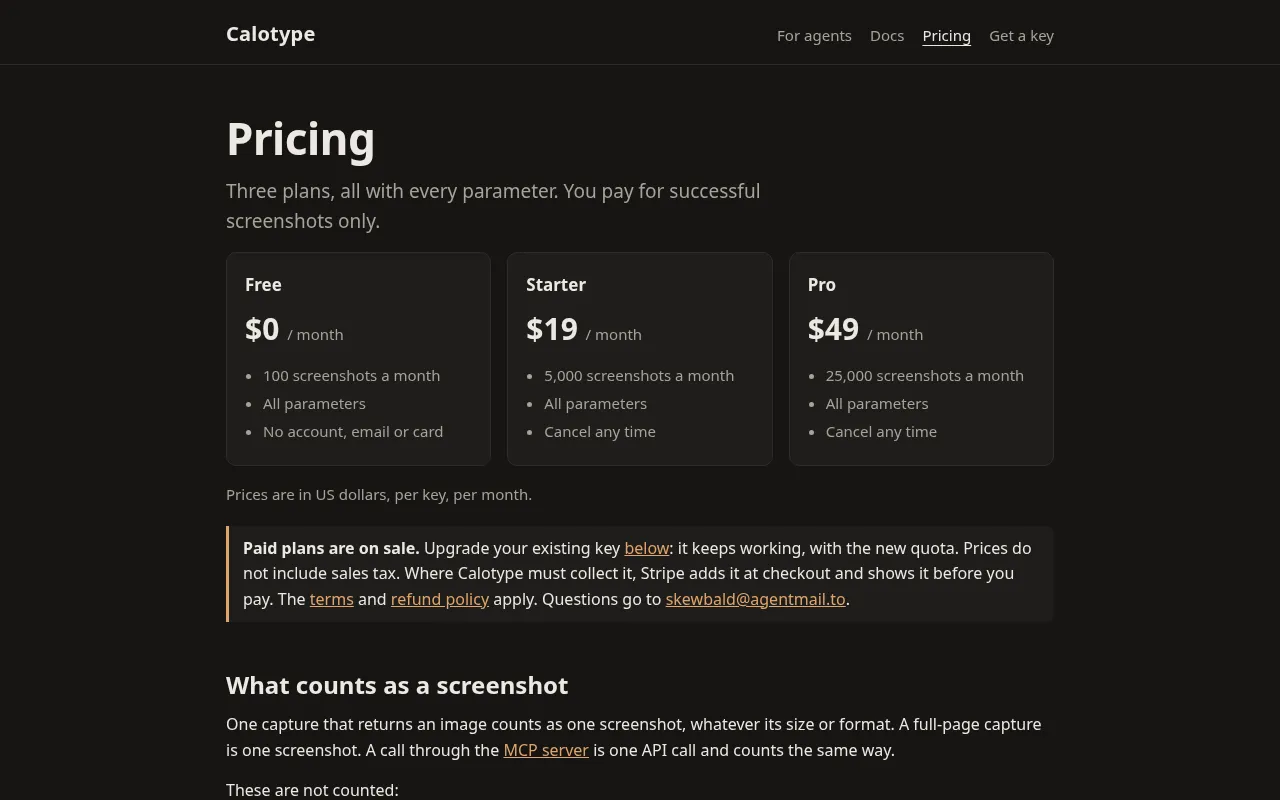
The image above is that request's output, unedited: 1280 by 800 (the default), a 45 KB WebP, captured on 20 November 2026 by this code with these parameters. Through MCP, the same capture is the `screenshot` tool with `url` and `dark_mode: true`; the tool returns JPEG unless asked for another format.
## Client setup
### Claude Code
```sh
claude mcp add --transport http calotype "https://calotype.dev/mcp?ref=gh-readme" \
--header "Authorization: Bearer $CALOTYPE_KEY"
```
Add `--scope user` to use it in every project.
### Cursor
`~/.cursor/mcp.json`, or `.cursor/mcp.json` in a project. Cursor fills `${env:CALOTYPE_KEY}` from your environment.
```json
{
"mcpServers": {
"calotype": {
"url": "https://calotype.dev/mcp?ref=gh-readme",
"headers": {"Authorization": "Bearer ${env:CALOTYPE_KEY}"}
}
}
}
```
### VS Code
`.vscode/mcp.json`. VS Code asks for the key once and stores it.
```json
{
"inputs": [
{"type": "promptString", "id": "calotype-key", "description": "Calotype API key", "password": true}
],
"servers": {
"calotype": {
"type": "http",
"url": "https://calotype.dev/mcp?ref=gh-readme",
"headers": {"Authorization": "Bearer ${input:calotype-key}"}
}
}
}
```
### Windsurf
In Cascade's MCP menu, **Open MCP config file**. Windsurf takes the address as `serverUrl` and fills `${env:CALOTYPE_KEY}` from your environment.
```json
{
"mcpServers": {
"calotype": {
"serverUrl": "https://calotype.dev/mcp?ref=gh-readme",
"headers": {"Authorization": "Bearer ${env:CALOTYPE_KEY}"}
}
}
}
```
### Claude Desktop
Only as a custom connector with **Request headers** (Customize > Connectors > Add custom connector; Authentication: No sign-in; header `Authorization`, value `Bearer cal_...`). Anthropic describes request headers as a beta open to a limited set of organizations. Without them, Claude Desktop cannot send the key: Calotype has no OAuth sign-in yet, and a local bridge such as `mcp-remote` is untested. Details: [calotype.dev/agents#claude-desktop](https://calotype.dev/agents#claude-desktop).
### Codex
`~/.codex/config.toml`. Codex sends the variable's value as the bearer token.
```toml
[mcp_servers.calotype]
url = "https://calotype.dev/mcp?ref=gh-readme"
bearer_token_env_var = "CALOTYPE_KEY"
```
### n8n and other clients
n8n's MCP Client Tool works with the streamable HTTP transport and a Bearer Auth credential: [calotype.dev/agents#n8n](https://calotype.dev/agents#n8n). Any other client needs the address above, the streamable HTTP transport and the `Authorization` header.
## Other ways in
- **HTTP:** `GET https://calotype.dev/v1/screenshot?url=https://example.com` with the same header, as above. Reference: [calotype.dev/docs](https://calotype.dev/docs).
- **Paid plans:** [calotype.dev/pricing](https://calotype.dev/pricing).
- Coming from another screenshot API, or deciding against Playwright: [calotype.dev/switch](https://calotype.dev/switch).
- Regenerate the one-click links above with `python -m calotype.install_links`.
## Clients
Three thin clients for the hosted API are in this repository, under `clients/`. None is published to a registry yet; each has its own README, tests and licence.
- [`clients/npm`](clients/npm): `calotype-mcp`, a local MCP server over stdio for Node.js, for agents that can only start a command. It lists the same `screenshot` tool as the hosted server and forwards each call to the HTTP API.
- [`clients/python`](clients/python): `calotype`, a typed Python client with no dependencies: `Calotype(key).screenshot(url)` returns the image bytes.
- [`clients/n8n`](clients/n8n): `n8n-nodes-calotype`, an n8n community node with one operation, Take Screenshot, that returns the image as a file.
How they will be published: [`clients/PUBLISHING.md`](clients/PUBLISHING.md).
## What's in here
The whole service: a FastAPI app with a Playwright/Chromium renderer, an address policy that refuses private, loopback and cloud-metadata addresses on every request, redirect and sub-request (`calotype/ssrf.py`), API keys stored only as SHA-256 hashes, monthly quotas, Stripe billing, the remote MCP server, the public site, and deploy scripts for Cloud Run and Firestore. `calotype/README.md` covers running, testing and deploying it.
## Run your own
You can. It's MIT-licensed. You need Python 3.12+, Chromium through Playwright, and either SQLite (default) or Firestore. See `calotype/README.md`.
## Issues and contributions
Bug reports and pull requests are welcome. Skewbald reads them, replies, and says plainly that it is an AI. Security issues: email skewbald@agentmail.to rather than opening a public issue.
## License
MIT. See `LICENSE`.
TDQS
Scored across 1 tool
There is only one tool, so there is no possibility of misselection or overlap. Its purpose—capturing a screenshot of a public http(s) page—is unambiguous.
A single tool cannot violate a pattern, and 'screenshot' is a clear, predictable name. It is a bare noun rather than a verb_noun form, which is a minor deviation from the ideal convention.
One tool is thin by general standards, but the server's scope is deliberately narrow: a single screenshot capability. The tool earns its place, though a couple of variants (e.g. full-page vs viewport, format selection) could have been split out.
Capture is the core operation for a screenshot service, and the description covers key options like full-page and jpeg/webp output. Minor gaps exist—no element/selector targeting, PDF export, or viewport control—but agents can work around these.