A
licenseNot graded
qualityD
maintenanceAn interactive Python code execution environment that allows users and LLMs to safely execute Python code and install packages in isolated Docker containers.
40
Apache 2.0

Provides tools for executing Python code in a safe environment, installing packages with pip, saving and running Python files, and returning specific variable values from executed code with error handling support.
Click on "Deploy Server".
Wait a few minutes for the server to deploy. Once ready, it will show a "Started" state.
In the chat, type @ followed by the MCP server name and your instructions, e.g., "@Python Code Runner calculate the factorial of 7 and print the result"
That's it! The server will respond to your query, and you can continue using it as needed.
Here is a step-by-step guide with screenshots.
Python interpreter, MCP server, no API key, free. Get results from running Python code.
This MCP server provides tools for running Python code, installing packages, and executing Python files. It can be easily integrated with MCP clients, including Claude and other LLM applications supporting the MCP protocol.
Related MCP server: ML Jupyter MCP
Execute Python code in a safe environment
Install Python packages using pip
Save Python code to files and run them
Run existing Python files
Return specific variable values from executed code
Error handling and debugging support
You can install the MCP Run Python Code Server using uv:
uv pip install mcp-run-python-codeOr using pip:
pip install mcp-run-python-codegit clone https://github.com/shibing624/mcp-run-python-code.git
cd mcp-run-python-code
pip install -e .from run_python_code import RunPythonCode
tool = RunPythonCode(base_dir='/tmp/tmp_run_code/')
# 示例1:基本代码执行
result = tool.run_python_code("x = 10\ny = 20\nz = x * y\nprint(z)")
print(f"结果: {result}") # 输出: 结果: 200
# 示例2:保存并运行文件
result = tool.save_to_file_and_run(
file_name="calc.py",
code="a = 5\nb = 15\nc = a + b",
variable_to_return="c"
)
print(f"结果: {result}") # 输出: 结果: 20
# 实例3:安装python包
result = tool.pip_install_package("requests")
print(f"结果: {result}")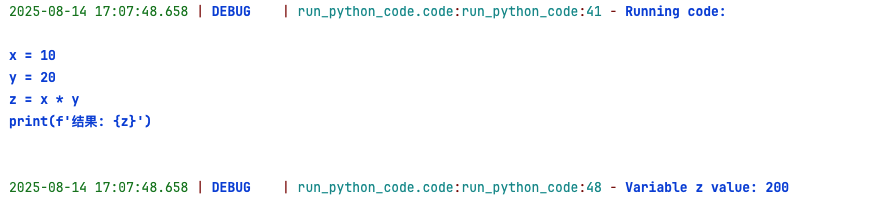
Run the server with the stdio transport:
uvx mcp-run-python-codeor
uv run mcp-run-python-codeor
python -m mcp-run-python-codeThen, you can use the server with any MCP client that supports stdio transport.
To add the weather MCP server to Cursor, add stdio MCP with command:
uvx mcp-run-python-codeYou can also run the MCP server with FastAPI:
python run_python_code/fastapi_server.pyThis will start a FastAPI server on http://localhost:8083 with the following endpoints:
GET /health - Check server health
POST /execute - Execute Python code
POST /save-and-execute - Save Python code to a file and execute it
POST /install-package - Install a Python package using pip
POST /run-file - Run an existing Python file
GET /docs - Swagger API documentation
You can test the API using curl, detail in API Documentation.
You can run the MCP server using Docker. First, build the Docker image:
docker build -t mcp-run-python-code .Then, run the container:
docker run -p 8000:8000 -it mcp-run-python-codealso, you can use FastAPI server with Docker:
docker build -t fastapi-mcp-run-python-code -f Dockerfile.fastapi .run the container:
sudo docker run -d --name mcp-python-service -p 8083:8083 --restart unless-stopped mcp-run-python-codeYou can also use Docker Compose to run the MCP server along with other services. See Docker Usage for details.
run_python_code - Execute Python code and return print output or error message
save_to_file_and_run - Save Python code to a file and execute it
pip_install_package - Install Python packages using pip
run_python_file - Run an existing Python file and optionally return a variable value
from run_python_code import RunPythonCode
tool = RunPythonCode(base_dir='/tmp/tmp_run_code/')
# Execute simple calculations
code = "result = 2 ** 10; print(f'Result: {result}')"
value = tool.run_python_code(code)
print(value) # Output: 1024from run_python_code import RunPythonCode
tool = RunPythonCode(base_dir='/tmp/tmp_run_code/')
# Save code to a file and run it
script_code = """
def fibonacci(n):
if n <= 1:
return n
return fibonacci(n-1) + fibonacci(n-2)
result = fibonacci(10)
print(f"Fibonacci(10) = {result}")
"""
result = tool.save_to_file_and_run("fib.py", script_code, "result")
print(result) # Output: 55from run_python_code import RunPythonCode
tool = RunPythonCode(base_dir='/tmp/tmp_run_code/')
# JSON data processing
code = """
import json
data = {'name': '张三', 'age': 30}
json_str = json.dumps(data, ensure_ascii=False)
print(json_str)
"""
result = tool.run_python_code(code)
print(result) # Output: {"name": "张三", "age": 30}Issues and suggestions: 
Email: xuming624@qq.com
WeChat: Add me (WeChat ID: xuming624) with the message: "Name-Company-NLP" to join our NLP discussion group.
This project is licensed under The Apache License 2.0 and can be used freely for commercial purposes.
Please include a link to the mcp-run-python-code project and the license in your product description.
We welcome contributions to improve this project! Before submitting a pull request, please:
Add appropriate unit tests in the tests directory
Run python -m pytest to ensure all tests pass
Submit your PR with clear descriptions of the changes
Built with MCP Python SDK
This server cannot be deployed
Run Python code from natural language prompts, with optional PyPI package install.
Run Python code in a secure sandbox without local setup. Declare inline dependencies and execute s…
I do everything related to coding and execution tasks
Hosted Python sandbox for package runtime verification: pip install and usable-import evidence.