
F
licenseNot graded
qualityD
maintenanceEnables AI assistants to interact programmatically with Autodesk Fusion 360 for creating parametric 3D models through simple API calls.
18
-

Enables natural language control of Autodesk Fusion 360, providing 64 CAD tools for sketching, parametric modeling, and the generation of JIS standard components like bolts, bearings, and O-ring grooves.
Supports importing SVG vector graphics into Fusion 360 to facilitate 3D modeling workflows from 2D designs.
Turn natural language into 3D models in Fusion 360.
An MCP (Model Context Protocol) server add-in that connects Claude to Autodesk Fusion 360 — giving you 64 CAD tools controllable through plain text.
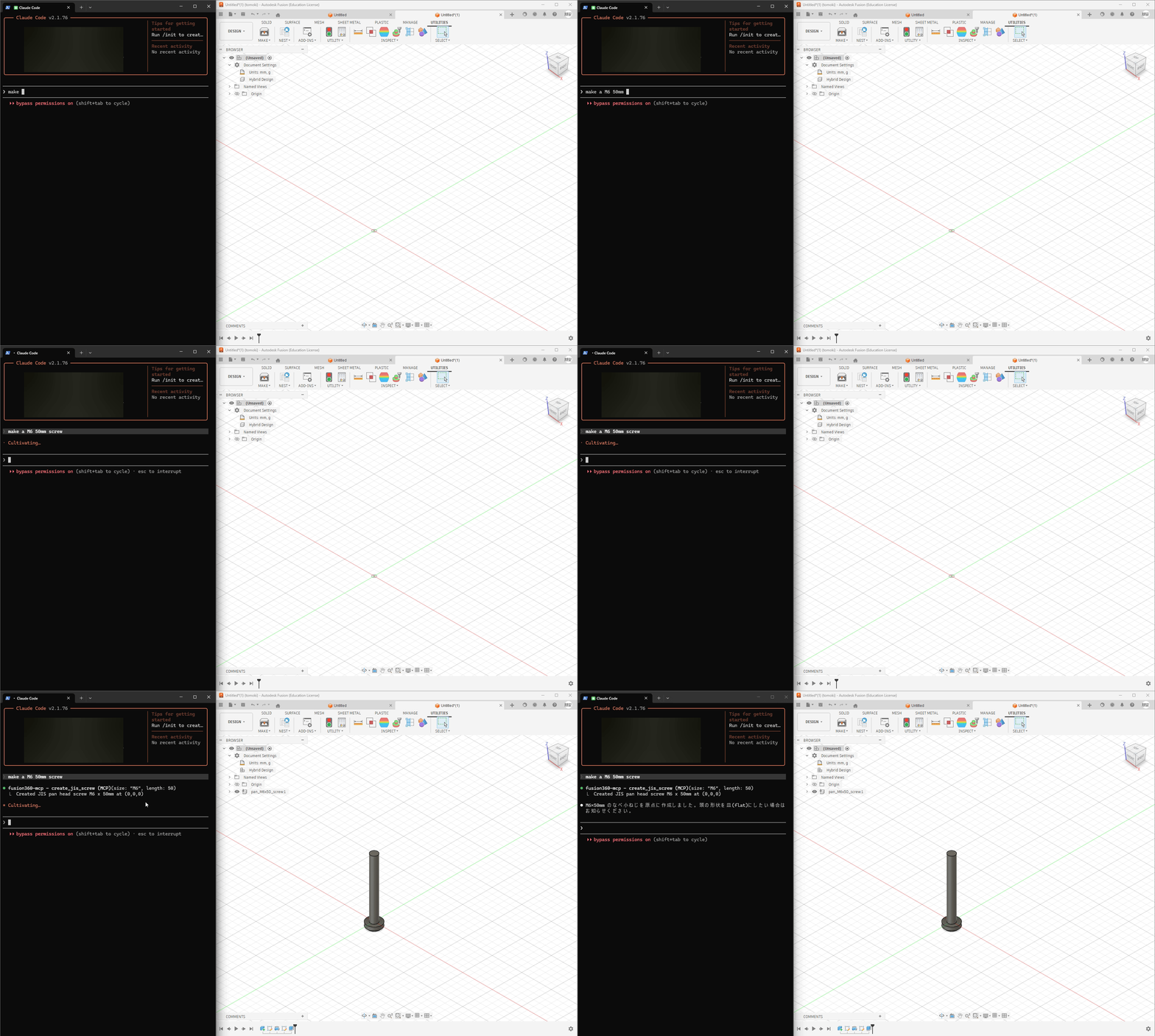
Natural Language → CAD — Describe what you want, Claude builds it in Fusion 360
64 MCP Tools — Sketches, extrudes, fillets, sweeps, lofts, booleans, patterns, and more
JIS Standard Parts — Generate bolts, nuts, screws, washers, keyways, bearings, and O-rings with accurate JIS dimensions (ISO equivalents planned)
Full Parametric Workflow — Sketches → features → modifications → export (STEP/STL)
Works with Claude Desktop & Claude Code
Related MCP server: Fusion 360 MCP
Node.js (for npx)
Clone this repo into Fusion 360's add-in directory:
# Windows
git clone https://github.com/mikan-atomoki/text-to-model.git "%APPDATA%\Autodesk\Autodesk Fusion 360\API\AddIns\TextToModel"

# macOS
git clone https://github.com/mikan-atomoki/text-to-model.git ~/Library/Application\ Support/Autodesk/Autodesk\ Fusion\ 360/API/AddIns/TextToModel
In Fusion 360: UTILITIES → ADD-INS → Scripts and Add-Ins → Run TextToModel
Connect to Claude:
Claude Desktop — add to your MCP config (claude_desktop_config.json):
{
  "mcpServers": {
    "fusion360": {
      "command": "npx",
      "args": ["-y", "mcp-remote", "http://127.0.0.1:13405/sse"]
    }
  }
}
Claude Code — run:
claude mcp add fusion360-mcp --transport sse http://127.0.0.1:13405/sseThat's it. Open Claude and start modeling.
Create an M8x30 hex socket head bolt at the originDraw a 50mm × 30mm rectangle on the XY plane, extrude it 20mm,
and add a 3mm fillet to the top long edgesDraw a 20mm diameter circle, create a revolve, then add a keywayCategory | Count | Tools |
Sketch | 7 | circle, rectangle, line, arc, spline, polygon, create sketch |
Features | 4 | extrude, revolve, sweep, loft |
Modify | 6 | fillet, chamfer, shell, mirror, variable fillet, draft |
Patterns & Combine | 3 | circular/rectangular pattern, boolean combine |
JIS Fasteners | 4 | bolt, nut, screw, washer (with JIS standard dimensions) |
JIS Holes | 3 | threaded hole, counterbore, countersink |
Mechanical | 3 | keyway (B1301), bearing hole (B1520), O-ring groove (B2401) |
Construction | 4 | offset/angled/mid plane, construction axis |
Inspect | 5 | list edges/faces/sketches/planes, bounding box |
Surface | 4 | patch, thicken, offset, boundary fill |
Split | 2 | split body, split face |
Transform | 3 | move, scale, copy |
Import | 2 | SVG, DXF |
Constraints | 3 | geometric constraint, dimension, list entities |
Appearance | 2 | body color, rename body |
Utility | 9 | design info, list bodies/components, parameters, undo, export STEP/STL, execute code |
Claude Desktop/Code ←→ MCP (HTTP/SSE) ←→ Bridge (CustomEvent) ←→ Fusion 360 APIThe add-in runs an HTTP/SSE server inside Fusion 360. Claude sends tool calls via MCP protocol, and the bridge executes them on Fusion's main thread using a CustomEvent-based synchronization mechanism.
MIT
Fusion 360 を Claude Desktop/Code から直接操作できる MCP サーバーアドイン。 テキストの指示だけで 3D モデリング・JIS 規格部品の生成が可能です。
64種類のMCPツールで、スケッチ作成・押し出し・フィレット・JIS ボルト生成など、幅広いCAD操作をテキスト指示で実行できます。
セットアップ方法や詳細は英語版をご参照ください。
Add a geometric constraint to sketch entities. Supported types: coincident, tangent, perpendicular, parallel, horizontal, vertical, equal, concentric, midpoint, colinear, smooth.
| Name | Required | Description | Default |
|---|---|---|---|
| sketch_index | Yes | Index of the sketch (0-based). | |
| constraint_type | Yes | Type of constraint. | |
| entity1_index | Yes | Index of the first sketch entity (curve or point). | |
| entity2_index | No | Index of the second sketch entity (if required by constraint type). |
Does the description disclose side effects, auth requirements, rate limits, or destructive behavior?
No annotations exist, so the description must cover behavior. It lists supported constraint types and parameter roles (e.g., entity2 optional), but does not mention side effects, failure modes, or parametric behavior.
Agents need to know what a tool does to the world before calling it. Descriptions should go beyond structured annotations to explain consequences.
Is the description appropriately sized, front-loaded, and free of redundancy?
Two sentences with no extraneous words. Front-loaded with the action, followed by a clear list of types.
Shorter descriptions cost fewer tokens and are easier for agents to parse. Every sentence should earn its place.
Given the tool's complexity, does the description cover enough for an agent to succeed on first attempt?
Given 4 parameters and no output schema, the description covers the core purpose and parameter conditions. Lacks details on return values or error handling, but is largely complete for the tool's simplicity.
Complex tools with many parameters or behaviors need more documentation. Simple tools need less. This dimension scales expectations accordingly.
Does the description clarify parameter syntax, constraints, interactions, or defaults beyond what the schema provides?
Schema coverage is 100%, so schema already documents parameters. The description adds value by clarifying that entity2 is 'if required by constraint type', which is not evident from schema alone.
Input schemas describe structure but not intent. Descriptions should explain non-obvious parameter relationships and valid value ranges.
Does the description clearly state what the tool does and how it differs from similar tools?
The description clearly states the action ('Add a geometric constraint') and the resource ('sketch entities'), and lists specific constraint types, differentiating it from sibling tools like add_sketch_dimension.
Agents choose between tools based on descriptions. A clear purpose with a specific verb and resource helps agents select the right tool.
Does the description explain when to use this tool, when not to, or what alternatives exist?
The description provides no guidance on when to use this tool versus alternatives, such as when to apply constraints after sketching or before dimensions. Usage is implied but not explicit.
Agents often have multiple tools that could apply. Explicit usage guidance like "use X instead of Y when Z" prevents misuse.
Add a dimension constraint to sketch entities. Supported types: distance, radius, diameter, angle.
| Name | Required | Description | Default |
|---|---|---|---|
| sketch_index | Yes | Index of the sketch (0-based). | |
| dimension_type | Yes | Type of dimension. | |
| entity1_index | Yes | Index of the first sketch entity. | |
| entity2_index | No | Index of the second entity (for distance between two entities or angle). | |
| value | Yes | Dimension value: mm for distance/radius/diameter, degrees for angle. | |
| text_position_x | No | X position for the dimension text in mm. | |
| text_position_y | No | Y position for the dimension text in mm. |
Does the description disclose side effects, auth requirements, rate limits, or destructive behavior?
With no annotations, the description should disclose behavioral traits. It only mentions adding a dimension but does not explain effects on existing constraints, potential errors, or whether changes are reversible.
Agents need to know what a tool does to the world before calling it. Descriptions should go beyond structured annotations to explain consequences.
Is the description appropriately sized, front-loaded, and free of redundancy?
The description is a single, clear sentence with a list of supported types. It is concise and front-loaded, though it could benefit from slight structuring.
Shorter descriptions cost fewer tokens and are easier for agents to parse. Every sentence should earn its place.
Given the tool's complexity, does the description cover enough for an agent to succeed on first attempt?
Given 7 parameters and no output schema, the description is too minimal. It lacks details on return values, error handling, and usage context with sibling tools.
Complex tools with many parameters or behaviors need more documentation. Simple tools need less. This dimension scales expectations accordingly.
Does the description clarify parameter syntax, constraints, interactions, or defaults beyond what the schema provides?
Input schema has 100% coverage with descriptions for all parameters. The description adds no extra meaning beyond the schema, which is sufficient for parameter understanding.
Input schemas describe structure but not intent. Descriptions should explain non-obvious parameter relationships and valid value ranges.
Does the description clearly state what the tool does and how it differs from similar tools?
The description clearly states the tool adds a dimension constraint and lists supported types (distance, radius, diameter, angle). However, it does not differentiate from the sibling tool 'add_sketch_constraint', which may add other constraint types.
Agents choose between tools based on descriptions. A clear purpose with a specific verb and resource helps agents select the right tool.
Does the description explain when to use this tool, when not to, or what alternatives exist?
No guidance is provided on when to use this tool versus alternatives like 'add_sketch_constraint'. Prerequisites such as requiring an existing sketch or entity indices are not mentioned.
Agents often have multiple tools that could apply. Explicit usage guidance like "use X instead of Y when Z" prevents misuse.
Fill a closed volume defined by surfaces/planes with a solid body. Select the cells (volumes) to keep.
| Name | Required | Description | Default |
|---|---|---|---|
| tool_bodies | Yes | Array of body names that form the boundary. | |
| cell_index | No | Index of the cell (volume) to keep (0-based). Default 0. | |
| operation | No | Boolean operation: 'new_body', 'join'. | new_body |
Does the description disclose side effects, auth requirements, rate limits, or destructive behavior?
No annotations exist, so description must fully disclose behavior. It indicates a fill operation but does not mention what happens if the volume is not closed, whether it modifies existing bodies, or any side effects. Lacks details on operational constraints.
Agents need to know what a tool does to the world before calling it. Descriptions should go beyond structured annotations to explain consequences.
Is the description appropriately sized, front-loaded, and free of redundancy?
Two sentences, front-loaded with the action, and no filler. Efficient and to the point, though slightly more detail could be added without harming conciseness.
Shorter descriptions cost fewer tokens and are easier for agents to parse. Every sentence should earn its place.
Given the tool's complexity, does the description cover enough for an agent to succeed on first attempt?
Given the complexity (3 parameters, no output schema), the description is minimal. It does not explain the result of the fill, how operation parameter affects the outcome, or provide context for the cell_index. Incomplete for an agent to use confidently.
Complex tools with many parameters or behaviors need more documentation. Simple tools need less. This dimension scales expectations accordingly.
Does the description clarify parameter syntax, constraints, interactions, or defaults beyond what the schema provides?
Schema coverage is 100%, so the description adds marginal value beyond the parameter descriptions. The phrase 'Select the cells (volumes) to keep' maps to cell_index, but does not enhance understanding of tool_bodies or operation meaning.
Input schemas describe structure but not intent. Descriptions should explain non-obvious parameter relationships and valid value ranges.
Does the description clearly state what the tool does and how it differs from similar tools?
The description clearly states the tool fills a closed volume defined by surfaces/planes with a solid body, and mentions selecting cells to keep. It uses a specific verb and resource, and distinguishes it from other creation tools like extrude or sweep, though more explicit comparison would boost clarity.
Agents choose between tools based on descriptions. A clear purpose with a specific verb and resource helps agents select the right tool.
Does the description explain when to use this tool, when not to, or what alternatives exist?
No guidance on when to use this tool versus alternatives like extrude, loft, or sweep. It does not specify prerequisites (e.g., surfaces must form a closed volume) or exclusions, leaving the agent to infer usage context.
Agents often have multiple tools that could apply. Explicit usage guidance like "use X instead of Y when Z" prevents misuse.
Apply a chamfer to one or more edges of a body.
| Name | Required | Description | Default |
|---|---|---|---|
| body_name | Yes | Name of the body. | |
| edge_indices | Yes | Array of edge indices to chamfer. | |
| distance | Yes | Chamfer distance in mm. |
Does the description disclose side effects, auth requirements, rate limits, or destructive behavior?
No annotations provided. Description lacks disclosure of behavioral traits such as whether the operation is destructive, modifies the body in place, or requires specific permissions. Only states basic functionality.
Agents need to know what a tool does to the world before calling it. Descriptions should go beyond structured annotations to explain consequences.
Is the description appropriately sized, front-loaded, and free of redundancy?
It is a single concise sentence, efficient but lacking detail. Front-loaded with key action despite being brief.
Shorter descriptions cost fewer tokens and are easier for agents to parse. Every sentence should earn its place.
Given the tool's complexity, does the description cover enough for an agent to succeed on first attempt?
For a geometry modification tool with 3 required params and no annotations, the description is too sparse. Does not explain edge indexing, unit assumptions (though hinted in schema), or return values. Incomplete for reliable invocation.
Complex tools with many parameters or behaviors need more documentation. Simple tools need less. This dimension scales expectations accordingly.
Does the description clarify parameter syntax, constraints, interactions, or defaults beyond what the schema provides?
All parameters have descriptions in the schema (100% coverage). The description adds no additional meaning beyond schema, so baseline 3 is appropriate.
Input schemas describe structure but not intent. Descriptions should explain non-obvious parameter relationships and valid value ranges.
Does the description clearly state what the tool does and how it differs from similar tools?
Description clearly states the tool applies a chamfer to edges of a body, using specific verb and resource. The name 'chamfer' distinguishes it from similar tools like fillet, but no explicit differentiation in text.
Agents choose between tools based on descriptions. A clear purpose with a specific verb and resource helps agents select the right tool.
Does the description explain when to use this tool, when not to, or what alternatives exist?
No guidance on when to use versus alternatives (e.g., fillet), no prerequisites mentioned, and no context about edge index validity or body selection requirements.
Agents often have multiple tools that could apply. Explicit usage guidance like "use X instead of Y when Z" prevents misuse.
Create a circular pattern of bodies around an axis.
| Name | Required | Description | Default |
|---|---|---|---|
| body_names | Yes | Array of body names to pattern. | |
| axis | Yes | Pattern axis: 'X', 'Y', or 'Z'. | |
| count | Yes | Number of instances (including original). | |
| angle | No | Total angle in degrees. Use 360 for full circle. |
Does the description disclose side effects, auth requirements, rate limits, or destructive behavior?
With no annotations, the description carries the full burden but only states the basic operation. It does not disclose whether the pattern creates new bodies or references originals, what happens to existing bodies, or any side effects (e.g., boolean operations). This is insufficient for a mutation tool.
Agents need to know what a tool does to the world before calling it. Descriptions should go beyond structured annotations to explain consequences.
Is the description appropriately sized, front-loaded, and free of redundancy?
The description is a single sentence, front-loaded with the key action and resource. It is concise but could be slightly expanded with behavioral details without losing conciseness.
Shorter descriptions cost fewer tokens and are easier for agents to parse. Every sentence should earn its place.
Given the tool's complexity, does the description cover enough for an agent to succeed on first attempt?
Given the tool's simplicity and complete schema coverage, the description provides a minimal but adequate understanding. However, it lacks details on return value or behavior of patterned bodies, which would help in a CAD context (e.g., are they separate bodies?).
Complex tools with many parameters or behaviors need more documentation. Simple tools need less. This dimension scales expectations accordingly.
Does the description clarify parameter syntax, constraints, interactions, or defaults beyond what the schema provides?
Schema coverage is 100%, so the input schema already documents all parameters. The description adds no additional meaning beyond the schema, meeting the baseline of 3 but not exceeding it.
Input schemas describe structure but not intent. Descriptions should explain non-obvious parameter relationships and valid value ranges.
Does the description clearly state what the tool does and how it differs from similar tools?
The description clearly states the action (create) and the resource (circular pattern of bodies) with the specific attribute (around an axis). It distinguishes this tool from siblings like 'rectangular_pattern' by explicitly mentioning 'circular.'
Agents choose between tools based on descriptions. A clear purpose with a specific verb and resource helps agents select the right tool.
Does the description explain when to use this tool, when not to, or what alternatives exist?
The description gives no guidance on when to use this tool versus alternatives like rectangular_pattern or mirror. It merely states the action, leaving the agent to infer usage context. A sentence like 'Use for equal-angle arrangements around an axis' would improve.
Agents often have multiple tools that could apply. Explicit usage guidance like "use X instead of Y when Z" prevents misuse.
Combine multiple bodies using boolean operations (join, cut, intersect).
| Name | Required | Description | Default |
|---|---|---|---|
| target_body | Yes | Name of the target (base) body. | |
| tool_bodies | Yes | Names of the tool bodies to combine with target. | |
| operation | Yes | Boolean operation: 'join', 'cut', 'intersect'. | |
| keep_tools | No | Whether to keep the tool bodies after combining. |
Does the description disclose side effects, auth requirements, rate limits, or destructive behavior?
With no annotations, the description must disclose behavioral traits. It omits critical details such as whether the operation is destructive, how original bodies are affected, or what happens to the keep_tools parameter expects.
Agents need to know what a tool does to the world before calling it. Descriptions should go beyond structured annotations to explain consequences.
Is the description appropriately sized, front-loaded, and free of redundancy?
Single sentence with no wasted words. All essential information (action and operations) is front-loaded.
Shorter descriptions cost fewer tokens and are easier for agents to parse. Every sentence should earn its place.
Given the tool's complexity, does the description cover enough for an agent to succeed on first attempt?
No output schema and description fails to explain return values or side effects. Important context like the effect of 'keep_tools' on original bodies is missing, making it incomplete for a boolean combine tool.
Complex tools with many parameters or behaviors need more documentation. Simple tools need less. This dimension scales expectations accordingly.
Does the description clarify parameter syntax, constraints, interactions, or defaults beyond what the schema provides?
Input schema covers all parameters (100% coverage), and the description does not add meaning beyond the schema descriptions. Baseline of 3 is appropriate as no extra value is provided.
Input schemas describe structure but not intent. Descriptions should explain non-obvious parameter relationships and valid value ranges.
Does the description clearly state what the tool does and how it differs from similar tools?
Description clearly states the tool's action ('Combine multiple bodies') and lists the specific boolean operations ('join, cut, intersect'), distinguishing it from sibling tools like chamfer or fillet.
Agents choose between tools based on descriptions. A clear purpose with a specific verb and resource helps agents select the right tool.
Does the description explain when to use this tool, when not to, or what alternatives exist?
No guidance on when to use this tool over alternatives or any prerequisites (e.g., bodies must intersect). The description implies a use case but offers no exclusions or comparisons to sibling tools.
Agents often have multiple tools that could apply. Explicit usage guidance like "use X instead of Y when Z" prevents misuse.
Create a copy of a body, optionally into a different component.
| Name | Required | Description | Default |
|---|---|---|---|
| body_name | Yes | Name of the body to copy. | |
| target_component | No | Optional target component name. Copies within the same component if not specified. |
Does the description disclose side effects, auth requirements, rate limits, or destructive behavior?
No annotations are provided, so the description must carry the full burden. It states 'create a copy', suggesting a non-destructive operation, but does not disclose potential side effects, required permissions, or the fate of the original body—all of which are critical for agent decision-making.
Agents need to know what a tool does to the world before calling it. Descriptions should go beyond structured annotations to explain consequences.
Is the description appropriately sized, front-loaded, and free of redundancy?
The description is a single, well-formed sentence with no unnecessary words. It efficiently conveys the core function and key option.
Shorter descriptions cost fewer tokens and are easier for agents to parse. Every sentence should earn its place.
Given the tool's complexity, does the description cover enough for an agent to succeed on first attempt?
For a simple tool with two parameters and no output schema, the description is reasonably complete. However, it omits the return value (e.g., created body ID) and error conditions, which a higher score would require.
Complex tools with many parameters or behaviors need more documentation. Simple tools need less. This dimension scales expectations accordingly.
Does the description clarify parameter syntax, constraints, interactions, or defaults beyond what the schema provides?
Schema coverage is 100%, with both parameters documented. The description adds no new semantic meaning beyond restating the optionality of target_component. It does not compensate for any missing schema information.
Input schemas describe structure but not intent. Descriptions should explain non-obvious parameter relationships and valid value ranges.
Does the description clearly state what the tool does and how it differs from similar tools?
The description clearly states the action (create a copy) and resource (body), with an optional destination. It is specific enough to distinguish from most siblings, though it does not explicitly contrast with alternatives like 'move_body'.
Agents choose between tools based on descriptions. A clear purpose with a specific verb and resource helps agents select the right tool.
Does the description explain when to use this tool, when not to, or what alternatives exist?
The description implies usage for duplicating bodies, optionally to a different component, but provides no explicit guidance on when to avoid this tool or which sibling to use instead (e.g., 'move_body' for relocation).
Agents often have multiple tools that could apply. Explicit usage guidance like "use X instead of Y when Z" prevents misuse.
Create a construction plane rotated around a line/axis from a base plane.
| Name | Required | Description | Default |
|---|---|---|---|
| base_plane | Yes | Base plane: 'XY', 'XZ', 'YZ', or 'face:{body_name}:{face_index}' for a planar face. | |
| axis | Yes | Rotation axis: 'X', 'Y', 'Z', or 'edge:{body_name}:{edge_index}'. | |
| angle | Yes | Rotation angle in degrees. | |
| component_name | No | Optional component name. Uses root component if not specified. |
Does the description disclose side effects, auth requirements, rate limits, or destructive behavior?
No annotations are provided, so the description carries full burden. It only states the creation action without disclosing behavioral traits such as whether it is non-destructive, any authorization needs, or what happens if parameters are invalid.
Agents need to know what a tool does to the world before calling it. Descriptions should go beyond structured annotations to explain consequences.
Is the description appropriately sized, front-loaded, and free of redundancy?
The description is a single sentence of 11 words, containing only essential information. It is front-loaded and concise with no superfluous content.
Shorter descriptions cost fewer tokens and are easier for agents to parse. Every sentence should earn its place.
Given the tool's complexity, does the description cover enough for an agent to succeed on first attempt?
Given the tool's complexity (4 parameters, no output schema, no annotations), the description is too brief. It omits details about return values, constraints on angle, and behavior of the optional component_name parameter. More context would be helpful for proper usage.
Complex tools with many parameters or behaviors need more documentation. Simple tools need less. This dimension scales expectations accordingly.
Does the description clarify parameter syntax, constraints, interactions, or defaults beyond what the schema provides?
The input schema covers all 4 parameters with 100% description coverage, and the schema descriptions are clear (e.g., specifying allowed values for base_plane and axis). The tool description adds no additional meaning beyond the schema, so a baseline 3 is appropriate.
Input schemas describe structure but not intent. Descriptions should explain non-obvious parameter relationships and valid value ranges.
Does the description clearly state what the tool does and how it differs from similar tools?
The description clearly states the verb 'Create' and the resource 'construction plane', and specifies the rotation around a line/axis from a base plane. This distinguishes it from sibling tools like create_midplane and create_offset_plane, which create planes differently.
Agents choose between tools based on descriptions. A clear purpose with a specific verb and resource helps agents select the right tool.
Does the description explain when to use this tool, when not to, or what alternatives exist?
The description provides no guidance on when to use this tool versus alternatives. It does not mention when not to use it or indicate alternative tools for different plane creation scenarios.
Agents often have multiple tools that could apply. Explicit usage guidance like "use X instead of Y when Z" prevents misuse.
Create a bearing bore hole sized to JIS B1520 standard bearing dimensions. Specify a bearing number (e.g., 6204) to get the correct bore dimensions.
| Name | Required | Description | Default |
|---|---|---|---|
| bearing_number | No | Standard bearing number (e.g., '6204', '6305'). Either this or bore_diameter is required. | |
| bore_diameter | No | Alternatively, specify bore diameter in mm to auto-select a 6200 series bearing. | |
| x | No | Center X position in mm | |
| y | No | Center Y position in mm | |
| body_name | No | Target body name. | |
| face_index | No | Face index for bore placement. |
Does the description disclose side effects, auth requirements, rate limits, or destructive behavior?
With no annotations provided, the description must fully disclose behavioral traits. It only states the action (create a hole) but does not mention whether it modifies existing geometry, requires a target body, or any side effects. Minimal transparency.
Agents need to know what a tool does to the world before calling it. Descriptions should go beyond structured annotations to explain consequences.
Is the description appropriately sized, front-loaded, and free of redundancy?
Two sentences, front-loaded with the primary action. Every word is necessary; no filler. Highly concise and well-structured.
Shorter descriptions cost fewer tokens and are easier for agents to parse. Every sentence should earn its place.
Given the tool's complexity, does the description cover enough for an agent to succeed on first attempt?
The description covers the core functionality but omits placement context (e.g., x, y, body_name, face_index) and hole depth. However, since the schema fully describes these parameters with 100% coverage, the description is adequate but could be improved by noting that a target body is required.
Complex tools with many parameters or behaviors need more documentation. Simple tools need less. This dimension scales expectations accordingly.
Does the description clarify parameter syntax, constraints, interactions, or defaults beyond what the schema provides?
Schema coverage is 100%, baseline 3. The description adds value by explaining that bearing_number maps to JIS standard dimensions and that bore_diameter auto-selects a 6200 series bearing, which is not in the schema parameter descriptions. This provides meaningful context.
Input schemas describe structure but not intent. Descriptions should explain non-obvious parameter relationships and valid value ranges.
Does the description clearly state what the tool does and how it differs from similar tools?
The description clearly states it creates a bearing bore hole sized to JIS B1520 standard dimensions, specifying a verb ('create') and a specific resource ('bearing bore hole'). It distinguishes from sibling tools like create_sketch or create_counterbore_hole by focusing on bearing dimensions.
Agents choose between tools based on descriptions. A clear purpose with a specific verb and resource helps agents select the right tool.
Does the description explain when to use this tool, when not to, or what alternatives exist?
The description implies use for creating bearing holes with JIS standard sizes, but does not explicitly state when to use this over alternatives like create_counterbore_hole or create_countersink_hole. No exclusions or when-not-to-use guidance is provided.
Agents often have multiple tools that could apply. Explicit usage guidance like "use X instead of Y when Z" prevents misuse.
Create a construction axis from two points, an edge, or a face normal.
| Name | Required | Description | Default |
|---|---|---|---|
| mode | Yes | Creation mode: 'two_points', 'edge', 'face_normal'. | |
| point1 | No | First point {x, y, z} in mm (for 'two_points' mode). | |
| point2 | No | Second point {x, y, z} in mm (for 'two_points' mode). | |
| body_name | No | Body name (for 'edge' or 'face_normal' mode). | |
| edge_index | No | Edge index (for 'edge' mode). | |
| face_index | No | Face index (for 'face_normal' mode). | |
| component_name | No | Optional component name. Uses root component if not specified. |
Does the description disclose side effects, auth requirements, rate limits, or destructive behavior?
No annotations provided, so description carries full burden. It does not disclose side effects (non-destructive), error conditions, or permission requirements. The description is minimal beyond the action.
Agents need to know what a tool does to the world before calling it. Descriptions should go beyond structured annotations to explain consequences.
Is the description appropriately sized, front-loaded, and free of redundancy?
A single sentence of 13 words, efficient and front-loaded with the action and resource. No extraneous information.
Shorter descriptions cost fewer tokens and are easier for agents to parse. Every sentence should earn its place.
Given the tool's complexity, does the description cover enough for an agent to succeed on first attempt?
Missing information about return value (is it an axis ID?), error handling, and constraints. While schema covers parameters well, the description does not provide operational context for a complex tool with conditional parameters.
Complex tools with many parameters or behaviors need more documentation. Simple tools need less. This dimension scales expectations accordingly.
Does the description clarify parameter syntax, constraints, interactions, or defaults beyond what the schema provides?
Schema description coverage is 100%, so baseline is 3. The description adds minimal value ('from two points, an edge, or a face normal') beyond what the schema already explains per parameter. No contradictions.
Input schemas describe structure but not intent. Descriptions should explain non-obvious parameter relationships and valid value ranges.
Does the description clearly state what the tool does and how it differs from similar tools?
The description clearly states the verb 'Create' and resource 'construction axis', and lists three specific creation modes (two points, edge, face normal). This distinguishes it from sibling tools which are other modeling operations.
Agents choose between tools based on descriptions. A clear purpose with a specific verb and resource helps agents select the right tool.
Does the description explain when to use this tool, when not to, or what alternatives exist?
No guidance on when to use this tool versus alternatives like create_midplane or create_offset_plane. Also missing prerequisites (e.g., existing body for edge/face modes).
Agents often have multiple tools that could apply. Explicit usage guidance like "use X instead of Y when Z" prevents misuse.
Create a counterbore hole sized for a JIS socket head cap screw (B1176). Automatically uses correct head diameter and depth.
| Name | Required | Description | Default |
|---|---|---|---|
| size | Yes | Bolt size: M2 through M12. | |
| hole_depth | Yes | Through-hole depth in mm. Use 0 for through-all. | |
| x | No | Hole center X position in mm | |
| y | No | Hole center Y position in mm | |
| body_name | No | Target body name. | |
| face_index | No | Face index for hole placement. |
Does the description disclose side effects, auth requirements, rate limits, or destructive behavior?
With no annotations, the description carries full burden. It mentions automatic sizing but does not disclose side effects (e.g., body modification), required context, or error conditions.
Agents need to know what a tool does to the world before calling it. Descriptions should go beyond structured annotations to explain consequences.
Is the description appropriately sized, front-loaded, and free of redundancy?
Two sentences, front-loaded with purpose and key behavioral trait (automatic sizing). No wasted words.
Shorter descriptions cost fewer tokens and are easier for agents to parse. Every sentence should earn its place.
Given the tool's complexity, does the description cover enough for an agent to succeed on first attempt?
Given no output schema, the description provides the core purpose and key automation, but lacks detail on return value, error states, or which parameters are optional when body is selected.
Complex tools with many parameters or behaviors need more documentation. Simple tools need less. This dimension scales expectations accordingly.
Does the description clarify parameter syntax, constraints, interactions, or defaults beyond what the schema provides?
All 6 parameters have schema descriptions (100% coverage), so baseline is 3. The description adds 'automatic head diameter and depth' but does not enhance understanding of individual parameters beyond the schema.
Input schemas describe structure but not intent. Descriptions should explain non-obvious parameter relationships and valid value ranges.
Does the description clearly state what the tool does and how it differs from similar tools?
The description clearly states the tool creates a counterbore hole specifically for JIS socket head cap screws, with automatic sizing. This distinguishes it from siblings like create_countersink_hole and create_threaded_hole.
Agents choose between tools based on descriptions. A clear purpose with a specific verb and resource helps agents select the right tool.
Does the description explain when to use this tool, when not to, or what alternatives exist?
The description implies use for JIS counterbore holes but does not explicitly state when to use this tool versus alternatives. No guidance on prerequisites or when not to use it.
Agents often have multiple tools that could apply. Explicit usage guidance like "use X instead of Y when Z" prevents misuse.
Create a countersink hole sized for a JIS flat head screw (B1111 皿小ねじ). Automatically uses correct head diameter and angle.
| Name | Required | Description | Default |
|---|---|---|---|
| size | Yes | Screw size: M2 through M10. | |
| hole_depth | Yes | Through-hole depth in mm. Use 0 for through-all. | |
| x | No | Hole center X position in mm | |
| y | No | Hole center Y position in mm | |
| body_name | No | Target body name. | |
| face_index | No | Face index for hole placement. |
Does the description disclose side effects, auth requirements, rate limits, or destructive behavior?
Without annotations, the description mentions automatic selection of head diameter and angle, but lacks details on mutability, side effects, or success indicators. It does not contradict any annotations as none are provided.
Agents need to know what a tool does to the world before calling it. Descriptions should go beyond structured annotations to explain consequences.
Is the description appropriately sized, front-loaded, and free of redundancy?
The description is concise, with two sentences that convey the core purpose efficiently. No unnecessary words, but could be slightly more structured.
Shorter descriptions cost fewer tokens and are easier for agents to parse. Every sentence should earn its place.
Given the tool's complexity, does the description cover enough for an agent to succeed on first attempt?
Given no output schema, the description does not explain what the tool returns or the effect on the design. It covers the basic behavior but misses details like return value or feature type. Moderately complete.
Complex tools with many parameters or behaviors need more documentation. Simple tools need less. This dimension scales expectations accordingly.
Does the description clarify parameter syntax, constraints, interactions, or defaults beyond what the schema provides?
The input schema has full coverage (100%), so baseline is 3. The description adds no additional meaning beyond what is in the schema; it does not elaborate on parameter usage or constraints.
Input schemas describe structure but not intent. Descriptions should explain non-obvious parameter relationships and valid value ranges.
Does the description clearly state what the tool does and how it differs from similar tools?
Clearly states it creates a countersink hole for JIS flat head screws, specifying the standard and that it automatically selects head diameter and angle. This distinguishes it from siblings like create_counterbore_hole.
Agents choose between tools based on descriptions. A clear purpose with a specific verb and resource helps agents select the right tool.
Does the description explain when to use this tool, when not to, or what alternatives exist?
The description implies usage for JIS flat head screws but does not explicitly state when to use this tool versus alternatives like create_counterbore_hole or create_threaded_hole. No exclusions or context provided.
Agents often have multiple tools that could apply. Explicit usage guidance like "use X instead of Y when Z" prevents misuse.
Create a JIS standard bolt (socket head cap screw B1176 or hexagon head B1180). The bolt is created as a new component at the specified position.
| Name | Required | Description | Default |
|---|---|---|---|
| size | Yes | Thread size: M2, M2.5, M3, M4, M5, M6, M8, M10, M12 | |
| length | Yes | Bolt length in mm (shank length, excluding head). | |
| bolt_type | No | Bolt type: 'socket_head' (B1176 六角穴付き) or 'hex_head' (B1180 六角) | socket_head |
| x | No | Position X in mm | |
| y | No | Position Y in mm | |
| z | No | Position Z in mm |
Does the description disclose side effects, auth requirements, rate limits, or destructive behavior?
No annotations are provided, so description must fully disclose behavior. It only states that a new component is created at a position, lacking details on side effects, error handling, or any constraints. Minimal transparency for a creation tool.
Agents need to know what a tool does to the world before calling it. Descriptions should go beyond structured annotations to explain consequences.
Is the description appropriately sized, front-loaded, and free of redundancy?
Two succinct sentences convey the core purpose and effect. No wasted words; front-loaded with the key action. Excellent conciseness.
Shorter descriptions cost fewer tokens and are easier for agents to parse. Every sentence should earn its place.
Given the tool's complexity, does the description cover enough for an agent to succeed on first attempt?
Given no output schema and simple creation, description is largely sufficient. It could mention that the bolt is added to the active design, but overall covers essential context for a tool with fully documented parameters.
Complex tools with many parameters or behaviors need more documentation. Simple tools need less. This dimension scales expectations accordingly.
Does the description clarify parameter syntax, constraints, interactions, or defaults beyond what the schema provides?
Input schema has 100% description coverage, so baseline is 3. Description adds the context that the bolt becomes a new component, but does not enhance understanding of individual parameters beyond what the schema already provides.
Input schemas describe structure but not intent. Descriptions should explain non-obvious parameter relationships and valid value ranges.
Does the description clearly state what the tool does and how it differs from similar tools?
Description clearly states creation of a JIS standard bolt with two specific types (socket head B1176 or hex head B1180). It distinguishes itself from sibling tools that create other fasteners like nuts, screws, and washers.
Agents choose between tools based on descriptions. A clear purpose with a specific verb and resource helps agents select the right tool.
Does the description explain when to use this tool, when not to, or what alternatives exist?
Description implies usage for creating bolts but does not provide explicit guidance on when to use this tool versus alternatives like create_jis_screw or when not to use it. No exclusions or context for decision-making.
Agents often have multiple tools that could apply. Explicit usage guidance like "use X instead of Y when Z" prevents misuse.
Create a JIS B1181 hexagon nut. Created as a new component.
| Name | Required | Description | Default |
|---|---|---|---|
| size | Yes | Thread size: M2 through M12. | |
| style | No | Nut style: 'style1' (standard) or 'thin'. | style1 |
| x | No | Position X in mm | |
| y | No | Position Y in mm | |
| z | No | Position Z in mm |
Does the description disclose side effects, auth requirements, rate limits, or destructive behavior?
Discloses that the tool creates a new component, but no annotations are provided. Lacks details on side effects, required design state, or return behavior beyond creation.
Agents need to know what a tool does to the world before calling it. Descriptions should go beyond structured annotations to explain consequences.
Is the description appropriately sized, front-loaded, and free of redundancy?
Two concise sentences with no unnecessary words. Front-loaded action and clearly scoped.
Shorter descriptions cost fewer tokens and are easier for agents to parse. Every sentence should earn its place.
Given the tool's complexity, does the description cover enough for an agent to succeed on first attempt?
For a fastener creation tool with 5 parameters and no output schema, the description is minimal but covers the essential purpose. Lacks explanation of defaults, orientation, or what the output component looks like.
Complex tools with many parameters or behaviors need more documentation. Simple tools need less. This dimension scales expectations accordingly.
Does the description clarify parameter syntax, constraints, interactions, or defaults beyond what the schema provides?
Input schema has 100% coverage with descriptions for all parameters. The description adds no extra parameter context beyond what the schema already provides.
Input schemas describe structure but not intent. Descriptions should explain non-obvious parameter relationships and valid value ranges.
Does the description clearly state what the tool does and how it differs from similar tools?
Clearly states it creates a JIS B1181 hexagon nut as a new component, with specific verb+resource. Distinguishes from sibling tools like create_jis_bolt or create_jis_washer.
Agents choose between tools based on descriptions. A clear purpose with a specific verb and resource helps agents select the right tool.
Does the description explain when to use this tool, when not to, or what alternatives exist?
No explicit guidance on when to use this tool versus alternatives like create_jis_bolt. Context implies it's for nuts, but lacks when-to-use or when-not-to-use details.
Agents often have multiple tools that could apply. Explicit usage guidance like "use X instead of Y when Z" prevents misuse.
Create a JIS B1111 machine screw (pan head or flat head). Created as a new component.
| Name | Required | Description | Default |
|---|---|---|---|
| size | Yes | Thread size: M2 through M10. | |
| length | Yes | Screw length in mm. | |
| head_type | No | Head type: 'pan' (なべ) or 'flat' (皿). | pan |
| x | No | Position X in mm | |
| y | No | Position Y in mm | |
| z | No | Position Z in mm |
Does the description disclose side effects, auth requirements, rate limits, or destructive behavior?
With no annotations provided, the description carries full burden. It only states 'Created as a new component,' which suggests an additive action, but lacks details on permissions, undo behavior, side effects, or what happens to existing components. This is insufficient for a creation tool with six parameters.
Agents need to know what a tool does to the world before calling it. Descriptions should go beyond structured annotations to explain consequences.
Is the description appropriately sized, front-loaded, and free of redundancy?
The description is a single sentence with no wasted words, front-loading the core purpose. However, it could include brief usage notes without sacrificing conciseness.
Shorter descriptions cost fewer tokens and are easier for agents to parse. Every sentence should earn its place.
Given the tool's complexity, does the description cover enough for an agent to succeed on first attempt?
Given the tool's complexity (6 parameters, no output schema, no annotations), the description is too minimal. It does not explain the return value, the relationship to similar fasteners, or any prerequisites, leaving significant gaps for the agent.
Complex tools with many parameters or behaviors need more documentation. Simple tools need less. This dimension scales expectations accordingly.
Does the description clarify parameter syntax, constraints, interactions, or defaults beyond what the schema provides?
Schema description coverage is 100%, so the baseline is 3. The description adds no additional meaning beyond the schema's parameter descriptions; it merely restates the tool's purpose.
Input schemas describe structure but not intent. Descriptions should explain non-obvious parameter relationships and valid value ranges.
Does the description clearly state what the tool does and how it differs from similar tools?
The description clearly states the tool creates a JIS B1111 machine screw, specifying head type options (pan or flat), and that it results in a new component. This distinguishes it from sibling tools like create_jis_bolt or create_jis_nut.
Agents choose between tools based on descriptions. A clear purpose with a specific verb and resource helps agents select the right tool.
Does the description explain when to use this tool, when not to, or what alternatives exist?
The description implies usage when a JIS screw is needed but provides no explicit guidance on when to choose this tool over siblings (e.g., when to use a screw vs a bolt). No when-not-to-use or alternative suggestions are given.
Agents often have multiple tools that could apply. Explicit usage guidance like "use X instead of Y when Z" prevents misuse.
Create a JIS B1256 plain washer. Created as a new component.
| Name | Required | Description | Default |
|---|---|---|---|
| size | Yes | Nominal size: M2 through M12. | |
| series | No | Series: 'normal', 'small', or 'spring'. | normal |
| x | No | Position X in mm | |
| y | No | Position Y in mm | |
| z | No | Position Z in mm |
Does the description disclose side effects, auth requirements, rate limits, or destructive behavior?
No annotations are provided, so the description must bear the burden of behavioral disclosure. It only states the creation action and that a new component is created, but does not mention any side effects, required permissions, or what happens to the existing design. The phrase 'Created as a new component' adds some context but is insufficient.
Agents need to know what a tool does to the world before calling it. Descriptions should go beyond structured annotations to explain consequences.
Is the description appropriately sized, front-loaded, and free of redundancy?
The description is very concise with two short sentences. It wastes no words, though it could be slightly more structured (e.g., stating the purpose first). However, for the simplicity of the tool, this is efficient.
Shorter descriptions cost fewer tokens and are easier for agents to parse. Every sentence should earn its place.
Given the tool's complexity, does the description cover enough for an agent to succeed on first attempt?
Given the schema covers all parameters and there is no output schema, the description should provide additional context about return values or post-conditions. It does not mention any output, side effects, or integration with other components, leaving the agent with incomplete information.
Complex tools with many parameters or behaviors need more documentation. Simple tools need less. This dimension scales expectations accordingly.
Does the description clarify parameter syntax, constraints, interactions, or defaults beyond what the schema provides?
The input schema has 100% parameter descriptions (size range, series enum, positions), so the description adds no extra meaning beyond what is already in the schema. Baseline score of 3 is appropriate.
Input schemas describe structure but not intent. Descriptions should explain non-obvious parameter relationships and valid value ranges.
Does the description clearly state what the tool does and how it differs from similar tools?
The description clearly specifies the action ('Create') and the resource ('JIS B1256 plain washer'), which distinguishes it well from sibling tools like create_jis_bolt or create_jis_nut. The addition 'Created as a new component' confirms the output context.
Agents choose between tools based on descriptions. A clear purpose with a specific verb and resource helps agents select the right tool.
Does the description explain when to use this tool, when not to, or what alternatives exist?
The description provides no guidance on when to use this tool versus alternatives (e.g., other washers or fasteners). There is no mention of prerequisites, constraints, or when not to use it.
Agents often have multiple tools that could apply. Explicit usage guidance like "use X instead of Y when Z" prevents misuse.
Create a JIS B1301 parallel keyway (shaft keyway) on a cylindrical surface. Automatically determines key width and depth from shaft diameter.
| Name | Required | Description | Default |
|---|---|---|---|
| shaft_diameter | Yes | Shaft diameter in mm (6-75mm). | |
| key_length | No | Key length in mm. If not specified, auto-selected from standard lengths. | |
| position_z | No | Z position (along shaft axis) for the keyway start in mm. | |
| body_name | No | Name of the shaft body. Uses first body if not specified. |
Does the description disclose side effects, auth requirements, rate limits, or destructive behavior?
No annotations provided, so description partially compensates by stating automatic determination of key width and depth. However, it does not disclose side effects (e.g., whether it modifies the shaft body), error behavior, or outcome indication (e.g., success response).
Agents need to know what a tool does to the world before calling it. Descriptions should go beyond structured annotations to explain consequences.
Is the description appropriately sized, front-loaded, and free of redundancy?
Two short sentences clearly convey the tool's purpose and key behavior. No extraneous information; every word serves a purpose.
Shorter descriptions cost fewer tokens and are easier for agents to parse. Every sentence should earn its place.
Given the tool's complexity, does the description cover enough for an agent to succeed on first attempt?
The description lacks information about return values, error conditions, or what the operation does to the shaft body (e.g., does it create a cut?). However, the schema covers all parameter constraints, so overall it is minimally complete but could be richer.
Complex tools with many parameters or behaviors need more documentation. Simple tools need less. This dimension scales expectations accordingly.
Does the description clarify parameter syntax, constraints, interactions, or defaults beyond what the schema provides?
Input schema covers all 4 parameters with descriptions. The tool description adds that key width/depth are auto-determined, which is redundant with schema hints. With 100% schema coverage, the description adds marginal semantic value.
Input schemas describe structure but not intent. Descriptions should explain non-obvious parameter relationships and valid value ranges.
Does the description clearly state what the tool does and how it differs from similar tools?
Description clearly states the tool creates a JIS B1301 parallel keyway on a cylindrical surface, specifying a specific standard and geometry. It distinguishes from sibling tools like 'create_bearing_hole' or 'create_threaded_hole'.
Agents choose between tools based on descriptions. A clear purpose with a specific verb and resource helps agents select the right tool.
Does the description explain when to use this tool, when not to, or what alternatives exist?
No explicit guidance on when to use this tool vs alternatives (e.g., other key standards). Description implies usage for cylindrical shaft keyways, but lacks context for prerequisites or exclusion cases.
Agents often have multiple tools that could apply. Explicit usage guidance like "use X instead of Y when Z" prevents misuse.
Create a construction plane midway between two parallel planes or faces.
| Name | Required | Description | Default |
|---|---|---|---|
| plane1 | Yes | First plane: 'XY', 'XZ', 'YZ', or 'face:{body_name}:{face_index}'. | |
| plane2 | Yes | Second plane: 'XY', 'XZ', 'YZ', or 'face:{body_name}:{face_index}'. | |
| component_name | No | Optional component name. Uses root component if not specified. |
Does the description disclose side effects, auth requirements, rate limits, or destructive behavior?
The description implies the tool requires two parallel planes/faces, but does not disclose error handling if inputs are not parallel or if component_name is invalid. No annotations provided to fill gaps.
Agents need to know what a tool does to the world before calling it. Descriptions should go beyond structured annotations to explain consequences.
Is the description appropriately sized, front-loaded, and free of redundancy?
Single sentence that front-loads the action. No wasted words, efficient and clear.
Shorter descriptions cost fewer tokens and are easier for agents to parse. Every sentence should earn its place.
Given the tool's complexity, does the description cover enough for an agent to succeed on first attempt?
For a simple tool with full schema coverage and no output schema, the description is mostly complete. However, it does not mention what the tool returns (e.g., plane ID), but that is a minor gap.
Complex tools with many parameters or behaviors need more documentation. Simple tools need less. This dimension scales expectations accordingly.
Does the description clarify parameter syntax, constraints, interactions, or defaults beyond what the schema provides?
Schema description coverage is 100%, so the schema already documents parameters. The description adds minimal extra meaning beyond restating the tool's purpose.
Input schemas describe structure but not intent. Descriptions should explain non-obvious parameter relationships and valid value ranges.
Does the description clearly state what the tool does and how it differs from similar tools?
The description clearly states it creates a construction plane midway between two parallel planes or faces. It uses a specific verb and resource, and distinguishes from siblings like create_angled_plane and create_offset_plane.
Agents choose between tools based on descriptions. A clear purpose with a specific verb and resource helps agents select the right tool.
Does the description explain when to use this tool, when not to, or what alternatives exist?
No guidance on when to use this tool versus alternatives (e.g., create_angled_plane, create_offset_plane). No mention of prerequisites like the planes must be parallel.
Agents often have multiple tools that could apply. Explicit usage guidance like "use X instead of Y when Z" prevents misuse.
Create a construction plane offset from an existing plane or planar face.
| Name | Required | Description | Default |
|---|---|---|---|
| base_plane | Yes | Base plane: 'XY', 'XZ', 'YZ', or 'face:{body_name}:{face_index}' for a planar face. | |
| offset | Yes | Offset distance in mm. Positive = along normal direction. | |
| component_name | No | Optional component name. Uses root component if not specified. |
Does the description disclose side effects, auth requirements, rate limits, or destructive behavior?
Without annotations, the description carries full burden. It discloses the core behavior (offset from plane/face) but lacks details like error handling for invalid base_plane, behavior with zero offset, or whether the plane is added to the design. The parameter description for offset adds some context but not comprehensive behavioral insight.
Agents need to know what a tool does to the world before calling it. Descriptions should go beyond structured annotations to explain consequences.
Is the description appropriately sized, front-loaded, and free of redundancy?
The description is a single concise sentence with no wasted words. It is front-loaded with the essential action and resource, making it easy to parse quickly.
Shorter descriptions cost fewer tokens and are easier for agents to parse. Every sentence should earn its place.
Given the tool's complexity, does the description cover enough for an agent to succeed on first attempt?
For a 3-parameter tool with no output schema, the description is minimally adequate. It explains what the tool does but does not cover return values, side effects, or logical constraints (e.g., offset direction interpretation). An agent could use it but would lack details for robust invocation.
Complex tools with many parameters or behaviors need more documentation. Simple tools need less. This dimension scales expectations accordingly.
Does the description clarify parameter syntax, constraints, interactions, or defaults beyond what the schema provides?
Schema coverage is 100%, so baseline is 3. The description does not add meaning beyond the schema; it repeats the idea of offsetting. The parameter descriptions in the schema are already clear, so no additional value from the description.
Input schemas describe structure but not intent. Descriptions should explain non-obvious parameter relationships and valid value ranges.
Does the description clearly state what the tool does and how it differs from similar tools?
The description clearly states the tool creates a construction plane by offsetting from an existing plane or planar face. The verb 'create' and specific resource 'construction plane' with the method 'offset' distinguish it from sibling tools like create_angled_plane or create_midplane.
Agents choose between tools based on descriptions. A clear purpose with a specific verb and resource helps agents select the right tool.
Does the description explain when to use this tool, when not to, or what alternatives exist?
The description implies the tool is for offsetting planes but provides no explicit guidance on when to use it versus alternatives like create_angled_plane or create_midplane. No exclusions or prerequisites are mentioned, leaving the agent to infer usage from the tool's name and basic purpose.
Agents often have multiple tools that could apply. Explicit usage guidance like "use X instead of Y when Z" prevents misuse.
Create a JIS B2401 O-ring groove on a cylindrical surface. Specify the O-ring number (e.g., P20, G50) for automatic groove dimensioning.
| Name | Required | Description | Default |
|---|---|---|---|
| oring_number | Yes | O-ring designation (e.g., 'P10', 'P20', 'G50'). | |
| groove_type | No | Groove type: 'shaft' (piston seal) or 'housing' (gland seal). | shaft |
| position_z | No | Z position along the axis for the groove center in mm. | |
| body_name | No | Target body name. |
Does the description disclose side effects, auth requirements, rate limits, or destructive behavior?
No annotations are provided, so the description carries the full burden. It discloses that dimensions are automatic based on O-ring number, but lacks details on side effects, error handling, or creation method (e.g., sketch vs feature).
Agents need to know what a tool does to the world before calling it. Descriptions should go beyond structured annotations to explain consequences.
Is the description appropriately sized, front-loaded, and free of redundancy?
Two sentences, no unnecessary words, front-loaded with action and target surface.
Shorter descriptions cost fewer tokens and are easier for agents to parse. Every sentence should earn its place.
Given the tool's complexity, does the description cover enough for an agent to succeed on first attempt?
Given 4 parameters, no output schema, and no annotations, the description covers the main purpose and parameter usage, but could mention what the tool returns or creates (e.g., a groove feature).
Complex tools with many parameters or behaviors need more documentation. Simple tools need less. This dimension scales expectations accordingly.
Does the description clarify parameter syntax, constraints, interactions, or defaults beyond what the schema provides?
The input schema has 100% description coverage for parameters. The tool description adds minimal value beyond repeating the O-ring number example (e.g., 'P20, G50'), which is already in the schema. Baseline 3 applies.
Input schemas describe structure but not intent. Descriptions should explain non-obvious parameter relationships and valid value ranges.
Does the description clearly state what the tool does and how it differs from similar tools?
The description explicitly states the tool creates a JIS B2401 O-ring groove on a cylindrical surface, specifies the O-ring number for auto dimensioning, and distinguishes it from other creation tools in the sibling list.
Agents choose between tools based on descriptions. A clear purpose with a specific verb and resource helps agents select the right tool.
Does the description explain when to use this tool, when not to, or what alternatives exist?
The description mentions specifying the O-ring number but does not provide explicit guidance on when to use this tool versus alternatives, nor any prerequisites or limitations.
Agents often have multiple tools that could apply. Explicit usage guidance like "use X instead of Y when Z" prevents misuse.
Create a new sketch on a construction plane (XY, XZ, YZ), a user-created construction plane (by index), or a planar face (by 'face:{body_name}:{face_index}').
| Name | Required | Description | Default |
|---|---|---|---|
| plane | No | Construction plane name: 'XY', 'XZ', or 'YZ'. Ignored if construction_plane_index or face_ref is provided. | |
| construction_plane_index | No | Index of a user-created construction plane (0-based). Overrides 'plane'. | |
| face_ref | No | Planar face reference: 'face:{body_name}:{face_index}'. Overrides 'plane' and 'construction_plane_index'. | |
| component_name | No | Optional component name. Uses root component if not specified. |
Does the description disclose side effects, auth requirements, rate limits, or destructive behavior?
No annotations are provided, so the description carries full burden. It discloses plane precedence and parameter behavior but does not mention side effects, failure conditions, or that the sketch starts empty.
Agents need to know what a tool does to the world before calling it. Descriptions should go beyond structured annotations to explain consequences.
Is the description appropriately sized, front-loaded, and free of redundancy?
The description is a single, efficient sentence that front-loads the main purpose and includes necessary detail without wasted words.
Shorter descriptions cost fewer tokens and are easier for agents to parse. Every sentence should earn its place.
Given the tool's complexity, does the description cover enough for an agent to succeed on first attempt?
Given no annotations or output schema, the description covers parameter behavior but omits prerequisites (e.g., being in a design) and return value. It is adequate but not fully complete.
Complex tools with many parameters or behaviors need more documentation. Simple tools need less. This dimension scales expectations accordingly.
Does the description clarify parameter syntax, constraints, interactions, or defaults beyond what the schema provides?
The input schema has 100% description coverage, so baseline is 3. The description summarizes parameter behavior but adds no new meaning beyond what the schema already provides.
Input schemas describe structure but not intent. Descriptions should explain non-obvious parameter relationships and valid value ranges.
Does the description clearly state what the tool does and how it differs from similar tools?
The description clearly states the tool creates a new sketch on specified planes or faces. It uses specific verbs and resources, and distinguishes from drawing tools among siblings.
Agents choose between tools based on descriptions. A clear purpose with a specific verb and resource helps agents select the right tool.
Does the description explain when to use this tool, when not to, or what alternatives exist?
The description implies usage for starting sketches but lacks explicit guidance on when not to use it (e.g., for drawing entities) or comparison with alternatives like draw_line.
Agents often have multiple tools that could apply. Explicit usage guidance like "use X instead of Y when Z" prevents misuse.
Create a threaded hole (tap hole) on a face. Uses JIS metric thread dimensions for the correct tap drill diameter.
| Name | Required | Description | Default |
|---|---|---|---|
| size | Yes | Thread size: M2 through M12. | |
| depth | Yes | Hole depth in mm. Use 0 for through-all. | |
| x | No | Hole center X position in mm | |
| y | No | Hole center Y position in mm | |
| body_name | No | Target body name. Uses first body if not specified. | |
| face_index | No | Face index on the body to place the hole. Uses top face if not specified. | |
| through_all | No | Whether the hole goes through the entire body. |
Does the description disclose side effects, auth requirements, rate limits, or destructive behavior?
Without annotations, the description carries full burden but only mentions the thread standard. It does not disclose important behaviors like error handling, whether it creates a parametric feature, or how it interacts with the body.
Agents need to know what a tool does to the world before calling it. Descriptions should go beyond structured annotations to explain consequences.
Is the description appropriately sized, front-loaded, and free of redundancy?
The description is concise at two sentences, front-loads the purpose, and contains no unnecessary words.
Shorter descriptions cost fewer tokens and are easier for agents to parse. Every sentence should earn its place.
Given the tool's complexity, does the description cover enough for an agent to succeed on first attempt?
The description lacks important context such as return value, error conditions, and the relationship between 'depth' and 'through_all' parameters, leaving potential confusion for a 7-parameter tool.
Complex tools with many parameters or behaviors need more documentation. Simple tools need less. This dimension scales expectations accordingly.
Does the description clarify parameter syntax, constraints, interactions, or defaults beyond what the schema provides?
The input schema has 100% description coverage for all 7 parameters, so the description adds minimal value beyond clarifying that the 'size' parameter uses JIS metric thread dimensions.
Input schemas describe structure but not intent. Descriptions should explain non-obvious parameter relationships and valid value ranges.
Does the description clearly state what the tool does and how it differs from similar tools?
The description clearly states the tool creates a threaded hole (tap hole) on a face and specifies the use of JIS metric thread dimensions, which distinguishes it from other hole creation tools.
Agents choose between tools based on descriptions. A clear purpose with a specific verb and resource helps agents select the right tool.
Does the description explain when to use this tool, when not to, or what alternatives exist?
The description implies the tool is for creating threaded holes with JIS metric threads but does not provide explicit guidance on when to use it versus alternatives or when not to use it.
Agents often have multiple tools that could apply. Explicit usage guidance like "use X instead of Y when Z" prevents misuse.
Apply a draft (taper) angle to faces of a body, typically for injection molding.
| Name | Required | Description | Default |
|---|---|---|---|
| body_name | Yes | Name of the body. | |
| face_indices | Yes | Array of face indices to apply draft to. | |
| plane | Yes | Pull direction plane: 'XY', 'XZ', or 'YZ'. | |
| angle | Yes | Draft angle in degrees. |
Does the description disclose side effects, auth requirements, rate limits, or destructive behavior?
With no annotations, the description should fully disclose behavior. It only states the operation without detailing side effects, topological changes, or undo behavior.
Agents need to know what a tool does to the world before calling it. Descriptions should go beyond structured annotations to explain consequences.
Is the description appropriately sized, front-loaded, and free of redundancy?
The description is a single, efficient sentence with no redundancy, but it could include more useful context without becoming verbose.
Shorter descriptions cost fewer tokens and are easier for agents to parse. Every sentence should earn its place.
Given the tool's complexity, does the description cover enough for an agent to succeed on first attempt?
For a 4-parameter tool with no output schema, the description is too minimal. It lacks explanation of draft effects, prerequisites (e.g., body must exist), or typical use cases beyond injection molding.
Complex tools with many parameters or behaviors need more documentation. Simple tools need less. This dimension scales expectations accordingly.
Does the description clarify parameter syntax, constraints, interactions, or defaults beyond what the schema provides?
Schema coverage is 100%, so the description adds no further parameter meaning beyond the provided field descriptions. Baseline of 3 is appropriate.
Input schemas describe structure but not intent. Descriptions should explain non-obvious parameter relationships and valid value ranges.
Does the description clearly state what the tool does and how it differs from similar tools?
The description clearly states the tool applies a draft (taper) angle to faces, with a specific context (injection molding). It distinguishes from siblings like chamfer or fillet, but lacks explicit differentiation.
Agents choose between tools based on descriptions. A clear purpose with a specific verb and resource helps agents select the right tool.
Does the description explain when to use this tool, when not to, or what alternatives exist?
The phrase 'typically for injection molding' implies a usage context, but there is no explicit guidance on when not to use or alternatives to consider.
Agents often have multiple tools that could apply. Explicit usage guidance like "use X instead of Y when Z" prevents misuse.
Draw a 3-point arc on a sketch.
| Name | Required | Description | Default |
|---|---|---|---|
| start_x | Yes | Start X in mm | |
| start_y | Yes | Start Y in mm | |
| mid_x | Yes | Mid-point X in mm | |
| mid_y | Yes | Mid-point Y in mm | |
| end_x | Yes | End X in mm | |
| end_y | Yes | End Y in mm | |
| sketch_index | No | Sketch index (0-based). Uses last sketch if not specified. |
Does the description disclose side effects, auth requirements, rate limits, or destructive behavior?
With no annotations, the description carries the full burden but only says 'Draw a 3-point arc', omitting any behavioral details such as whether it modifies an existing sketch, error handling, or side effects.
Agents need to know what a tool does to the world before calling it. Descriptions should go beyond structured annotations to explain consequences.
Is the description appropriately sized, front-loaded, and free of redundancy?
The description is a single sentence, very concise with no wasted words, but could be expanded slightly to include more useful context.
Shorter descriptions cost fewer tokens and are easier for agents to parse. Every sentence should earn its place.
Given the tool's complexity, does the description cover enough for an agent to succeed on first attempt?
Given no output schema and 7 parameters, the description lacks completeness by not specifying return values, side effects, or the effect of optional parameters like sketch_index.
Complex tools with many parameters or behaviors need more documentation. Simple tools need less. This dimension scales expectations accordingly.
Does the description clarify parameter syntax, constraints, interactions, or defaults beyond what the schema provides?
The schema covers all parameters with descriptions (100% coverage), so the baseline is 3; the description adds no extra meaning beyond what the schema already provides.
Input schemas describe structure but not intent. Descriptions should explain non-obvious parameter relationships and valid value ranges.
Does the description clearly state what the tool does and how it differs from similar tools?
The description clearly states the action ('Draw') and the object ('3-point arc on a sketch'), distinguishing it from sibling tools like draw_circle or draw_spline.
Agents choose between tools based on descriptions. A clear purpose with a specific verb and resource helps agents select the right tool.
Does the description explain when to use this tool, when not to, or what alternatives exist?
No guidance is provided on when to use this tool versus alternatives like draw_spline or draw_circle, nor any conditions or prerequisites for use.
Agents often have multiple tools that could apply. Explicit usage guidance like "use X instead of Y when Z" prevents misuse.
Draw a circle on the active or most recent sketch.
| Name | Required | Description | Default |
|---|---|---|---|
| center_x | No | Center X coordinate in mm | |
| center_y | No | Center Y coordinate in mm | |
| radius | Yes | Radius in mm | |
| sketch_index | No | Sketch index (0-based). Uses last sketch if not specified. |
Does the description disclose side effects, auth requirements, rate limits, or destructive behavior?
No annotations are provided, so the description carries full burden. It fails to disclose behavioral details such as whether it modifies an existing sketch, auto-selects a sketch, or any side effects. The description is too minimal for a drawing tool.
Agents need to know what a tool does to the world before calling it. Descriptions should go beyond structured annotations to explain consequences.
Is the description appropriately sized, front-loaded, and free of redundancy?
The description is a single, front-loaded sentence with zero waste. Every word contributes to the core purpose.
Shorter descriptions cost fewer tokens and are easier for agents to parse. Every sentence should earn its place.
Given the tool's complexity, does the description cover enough for an agent to succeed on first attempt?
Given no output schema and no annotations, the description is too sparse. It does not indicate prerequisites (e.g., an existing sketch), return values, or how it interacts with the sketch environment. Incomplete for a tool with many siblings.
Complex tools with many parameters or behaviors need more documentation. Simple tools need less. This dimension scales expectations accordingly.
Does the description clarify parameter syntax, constraints, interactions, or defaults beyond what the schema provides?
The schema has 100% coverage for its 4 parameters, describing them adequately. The description adds no additional parameter-level meaning beyond the schema, so baseline score of 3 is appropriate.
Input schemas describe structure but not intent. Descriptions should explain non-obvious parameter relationships and valid value ranges.
Does the description clearly state what the tool does and how it differs from similar tools?
The description clearly states the verb 'draw' and the resource 'circle', and specifies the location as 'the active or most recent sketch'. However, it does not differentiate from sibling tools like draw_rectangle or draw_arc, which share similar context.
Agents choose between tools based on descriptions. A clear purpose with a specific verb and resource helps agents select the right tool.
Does the description explain when to use this tool, when not to, or what alternatives exist?
The description implies usage on the active or most recent sketch, providing some context. But it lacks explicit guidance on when to use this tool versus alternatives, and does not mention prerequisites or exclusions.
Agents often have multiple tools that could apply. Explicit usage guidance like "use X instead of Y when Z" prevents misuse.
Draw a line between two points on a sketch.
| Name | Required | Description | Default |
|---|---|---|---|
| x1 | No | Start X in mm | |
| y1 | No | Start Y in mm | |
| x2 | Yes | End X in mm | |
| y2 | Yes | End Y in mm | |
| sketch_index | No | Sketch index (0-based). Uses last sketch if not specified. |
Does the description disclose side effects, auth requirements, rate limits, or destructive behavior?
No annotations are provided, and the description does not disclose behavioral details such as error handling for invalid sketch_index, whether the line is added to a specific sketch layer, or if it returns an entity ID.
Agents need to know what a tool does to the world before calling it. Descriptions should go beyond structured annotations to explain consequences.
Is the description appropriately sized, front-loaded, and free of redundancy?
A single, front-loaded sentence that is efficient and contains no extraneous information.
Shorter descriptions cost fewer tokens and are easier for agents to parse. Every sentence should earn its place.
Given the tool's complexity, does the description cover enough for an agent to succeed on first attempt?
Given the lack of annotations and output schema, the description is too sparse. It does not explain return values (e.g., whether the line gets a reference ID) or behavior in edge cases like duplicate points.
Complex tools with many parameters or behaviors need more documentation. Simple tools need less. This dimension scales expectations accordingly.
Does the description clarify parameter syntax, constraints, interactions, or defaults beyond what the schema provides?
The input schema already provides 100% coverage with clear descriptions for each parameter. The description adds no additional meaning beyond the schema.
Input schemas describe structure but not intent. Descriptions should explain non-obvious parameter relationships and valid value ranges.
Does the description clearly state what the tool does and how it differs from similar tools?
The description 'Draw a line between two points on a sketch' uses a specific verb and resource, clearly distinguishing it from siblings like draw_arc or draw_circle.
Agents choose between tools based on descriptions. A clear purpose with a specific verb and resource helps agents select the right tool.
Does the description explain when to use this tool, when not to, or what alternatives exist?
No guidance on when to use this tool versus alternatives (e.g., draw_arc for curves), nor prerequisites like having an existing sketch.
Agents often have multiple tools that could apply. Explicit usage guidance like "use X instead of Y when Z" prevents misuse.
Draw a regular polygon (3-12 sides) on a sketch.
| Name | Required | Description | Default |
|---|---|---|---|
| sides | Yes | Number of sides (3-12). | |
| radius | Yes | Circumscribed radius (center to vertex) in mm. | |
| center_x | No | Center X in mm. | |
| center_y | No | Center Y in mm. | |
| rotation | No | Rotation angle in degrees (0 = first vertex at top). | |
| sketch_index | No | Sketch index (0-based). Uses last sketch if not specified. |
Does the description disclose side effects, auth requirements, rate limits, or destructive behavior?
With no annotations, the description bears full burden for behavioral disclosure. It only states the tool draws a polygon, but does not disclose side effects like requiring an active sketch, overwriting existing entities, or whether it modifies the sketch in place. The parameter description for rotation gives some behavioral hint, but the tool description itself contributes nothing beyond that.
Agents need to know what a tool does to the world before calling it. Descriptions should go beyond structured annotations to explain consequences.
Is the description appropriately sized, front-loaded, and free of redundancy?
The description is a single sentence that succinctly conveys the tool's purpose. No extraneous information is included, and it is appropriately sized for the tool's simplicity.
Shorter descriptions cost fewer tokens and are easier for agents to parse. Every sentence should earn its place.
Given the tool's complexity, does the description cover enough for an agent to succeed on first attempt?
Given that the tool has 6 parameters, no output schema, and no annotations, the description is too minimal. It does not explain what happens when sketch_index is omitted, how rotation uses the default, or any error scenarios. A more complete description would clarify these points.
Complex tools with many parameters or behaviors need more documentation. Simple tools need less. This dimension scales expectations accordingly.
Does the description clarify parameter syntax, constraints, interactions, or defaults beyond what the schema provides?
All parameters have descriptions in the input schema (100% coverage), so the baseline is 3. The tool description does not add any additional meaning beyond what the schema already provides. It does not explain relationships or provide usage context for the parameters.
Input schemas describe structure but not intent. Descriptions should explain non-obvious parameter relationships and valid value ranges.
Does the description clearly state what the tool does and how it differs from similar tools?
The description clearly states the tool draws a regular polygon with 3-12 sides on a sketch. It uses a specific verb and resource, but does not explicitly differentiate from siblings like draw_rectangle (which draws a 4-sided polygon) or draw_circle (infinite sides).
Agents choose between tools based on descriptions. A clear purpose with a specific verb and resource helps agents select the right tool.
Does the description explain when to use this tool, when not to, or what alternatives exist?
No guidance is provided on when to use this tool versus alternatives such as draw_rectangle or draw_circle. The description only states what the tool does, not when it should be chosen.
Agents often have multiple tools that could apply. Explicit usage guidance like "use X instead of Y when Z" prevents misuse.
Draw a rectangle defined by two corner points on a sketch.
| Name | Required | Description | Default |
|---|---|---|---|
| x1 | No | First corner X in mm | |
| y1 | No | First corner Y in mm | |
| x2 | Yes | Second corner X in mm | |
| y2 | Yes | Second corner Y in mm | |
| sketch_index | No | Sketch index (0-based). Uses last sketch if not specified. |
Does the description disclose side effects, auth requirements, rate limits, or destructive behavior?
No annotations are present, so the description must disclose behavioral traits. It fails to mention that the rectangle is likely an outline, how it interacts with the sketch (e.g., adds to current or last sketch), or any side effects. This lack of transparency is critical for a tool with no annotations.
Agents need to know what a tool does to the world before calling it. Descriptions should go beyond structured annotations to explain consequences.
Is the description appropriately sized, front-loaded, and free of redundancy?
The description is a single, clear sentence of 12 words with no fluff. Every word contributes to conveying the core purpose, making it highly efficient.
Shorter descriptions cost fewer tokens and are easier for agents to parse. Every sentence should earn its place.
Given the tool's complexity, does the description cover enough for an agent to succeed on first attempt?
Given the complexity of the tool (5 parameters, no output schema, no annotations), the description is too sparse. It omits essential details like what the tool returns, error handling for invalid sketch_index, or whether the rectangle is filled or outlined. A new agent would have to infer too much.
Complex tools with many parameters or behaviors need more documentation. Simple tools need less. This dimension scales expectations accordingly.
Does the description clarify parameter syntax, constraints, interactions, or defaults beyond what the schema provides?
Schema description coverage is 100%, meaning all five parameters have descriptions in the input schema. The tool description adds minimal value beyond stating it draws a rectangle by two corner points, which is already implied by the parameter names and descriptions.
Input schemas describe structure but not intent. Descriptions should explain non-obvious parameter relationships and valid value ranges.
Does the description clearly state what the tool does and how it differs from similar tools?
The description explicitly states 'Draw a rectangle defined by two corner points on a sketch.' It clearly identifies the action, the resource (sketch), and the method (two corner points), effectively distinguishing it from sibling tools like draw_circle and draw_line.
Agents choose between tools based on descriptions. A clear purpose with a specific verb and resource helps agents select the right tool.
Does the description explain when to use this tool, when not to, or what alternatives exist?
The description lacks any guidance on when to use this tool versus alternatives, such as draw_polygon for other shapes. No context is provided about prerequisites or appropriate usage scenarios.
Agents often have multiple tools that could apply. Explicit usage guidance like "use X instead of Y when Z" prevents misuse.
Draw a spline through a series of points on a sketch.
| Name | Required | Description | Default |
|---|---|---|---|
| points | Yes | Array of [x, y] coordinate pairs in mm | |
| sketch_index | No | Sketch index (0-based). Uses last sketch if not specified. |
Does the description disclose side effects, auth requirements, rate limits, or destructive behavior?
With no annotations, the description carries full burden. It provides no behavioral details beyond the basic action, such as whether points must be in order, if the spline appends to existing geometry, or any side effects.
Agents need to know what a tool does to the world before calling it. Descriptions should go beyond structured annotations to explain consequences.
Is the description appropriately sized, front-loaded, and free of redundancy?
The description is a single concise sentence with no wasted words. It could benefit from slightly more structure, but it is effective.
Shorter descriptions cost fewer tokens and are easier for agents to parse. Every sentence should earn its place.
Given the tool's complexity, does the description cover enough for an agent to succeed on first attempt?
Given the absence of output schema and annotations, the description lacks completeness. Important details about behavior (e.g., error handling, sketch requirement, point ordering) are missing.
Complex tools with many parameters or behaviors need more documentation. Simple tools need less. This dimension scales expectations accordingly.
Does the description clarify parameter syntax, constraints, interactions, or defaults beyond what the schema provides?
Schema coverage is 100%, so the schema already explains the parameters. The description adds little beyond 'series of points', but it does not contradict or obfuscate.
Input schemas describe structure but not intent. Descriptions should explain non-obvious parameter relationships and valid value ranges.
Does the description clearly state what the tool does and how it differs from similar tools?
The description clearly states the action (draw a spline) and the resource (series of points on a sketch), using a specific verb and resource. It distinguishes from sibling tools like draw_line and draw_circle.
Agents choose between tools based on descriptions. A clear purpose with a specific verb and resource helps agents select the right tool.
Does the description explain when to use this tool, when not to, or what alternatives exist?
No guidance on when to use this tool versus alternatives like draw_line or draw_arc. There's no mention of prerequisites or when not to use it.
Agents often have multiple tools that could apply. Explicit usage guidance like "use X instead of Y when Z" prevents misuse.
Execute arbitrary Fusion 360 Python API code. Use this for operations not covered by other tools. The code has access to 'app' (Application) and 'design' (active Design).
| Name | Required | Description | Default |
|---|---|---|---|
| code | Yes | Python code to execute. Has access to variables: app, design, root (rootComponent). |
Does the description disclose side effects, auth requirements, rate limits, or destructive behavior?
No annotations provided, so description carries full burden. It discloses code has access to 'app' and 'design' (plus 'root' from schema), but does not mention potential side effects, errors, or safety implications of arbitrary code execution.
Agents need to know what a tool does to the world before calling it. Descriptions should go beyond structured annotations to explain consequences.
Is the description appropriately sized, front-loaded, and free of redundancy?
Two sentences, front-loaded with purpose and usage, no wasted words.
Shorter descriptions cost fewer tokens and are easier for agents to parse. Every sentence should earn its place.
Given the tool's complexity, does the description cover enough for an agent to succeed on first attempt?
Covers purpose, usage, and variable availability. Lacks mention of error handling or execution context, but sufficient for a catch-all tool given sibling specificity.
Complex tools with many parameters or behaviors need more documentation. Simple tools need less. This dimension scales expectations accordingly.
Does the description clarify parameter syntax, constraints, interactions, or defaults beyond what the schema provides?
Schema description coverage is 100%, so baseline 3. Description adds minimal extra meaning beyond repeating available variables already in schema.
Input schemas describe structure but not intent. Descriptions should explain non-obvious parameter relationships and valid value ranges.
Does the description clearly state what the tool does and how it differs from similar tools?
Description clearly states it executes arbitrary Python code and is for operations not covered by other tools, distinguishing it from many siblings.
Agents choose between tools based on descriptions. A clear purpose with a specific verb and resource helps agents select the right tool.
Does the description explain when to use this tool, when not to, or what alternatives exist?
Explicitly says 'Use this for operations not covered by other tools,' providing clear when-to-use and implying when not to.
Agents often have multiple tools that could apply. Explicit usage guidance like "use X instead of Y when Z" prevents misuse.
Export the design as a STEP file.
| Name | Required | Description | Default |
|---|---|---|---|
| file_path | Yes | Full file path for the STEP export (e.g. 'C:/output/part.step'). |
Does the description disclose side effects, auth requirements, rate limits, or destructive behavior?
With no annotations, the description should disclose behavioral details. It only states the basic function, omitting side effects (e.g., file overwrite, required permissions).
Agents need to know what a tool does to the world before calling it. Descriptions should go beyond structured annotations to explain consequences.
Is the description appropriately sized, front-loaded, and free of redundancy?
Single sentence with no extraneous words. Efficiently conveys purpose.
Shorter descriptions cost fewer tokens and are easier for agents to parse. Every sentence should earn its place.
Given the tool's complexity, does the description cover enough for an agent to succeed on first attempt?
Low complexity tool but description is minimal. Lacks details on results or constraints, making it barely adequate.
Complex tools with many parameters or behaviors need more documentation. Simple tools need less. This dimension scales expectations accordingly.
Does the description clarify parameter syntax, constraints, interactions, or defaults beyond what the schema provides?
Schema coverage is 100% with file_path described. The description adds no extra meaning beyond the schema, meeting the baseline.
Input schemas describe structure but not intent. Descriptions should explain non-obvious parameter relationships and valid value ranges.
Does the description clearly state what the tool does and how it differs from similar tools?
The description 'Export the design as a STEP file' clearly states the action (export), the object (design), and the format (STEP), distinguishing it from sibling tools like export_stl.
Agents choose between tools based on descriptions. A clear purpose with a specific verb and resource helps agents select the right tool.
Does the description explain when to use this tool, when not to, or what alternatives exist?
No guidance on when to use this tool versus alternatives (e.g., export_stl). The description implies usage for STEP export but lacks explicit context or exclusions.
Agents often have multiple tools that could apply. Explicit usage guidance like "use X instead of Y when Z" prevents misuse.
Export the design or a specific body as an STL file.
| Name | Required | Description | Default |
|---|---|---|---|
| file_path | Yes | Full file path for the STL export (e.g. 'C:/output/part.stl'). | |
| body_name | No | Optional body name. Exports first body if not specified. | |
| refinement | No | Mesh refinement: 'low', 'medium', 'high'. | medium |
Does the description disclose side effects, auth requirements, rate limits, or destructive behavior?
With no annotations provided, the description fails to disclose key behavioral traits such as side effects (file creation, overwriting), permissions needed, or performance impact. It only implies output generation but lacks detail.
Agents need to know what a tool does to the world before calling it. Descriptions should go beyond structured annotations to explain consequences.
Is the description appropriately sized, front-loaded, and free of redundancy?
The description is a single sentence of 12 words, efficiently conveying the core purpose without any extra verbiage.
Shorter descriptions cost fewer tokens and are easier for agents to parse. Every sentence should earn its place.
Given the tool's complexity, does the description cover enough for an agent to succeed on first attempt?
Given the tool's moderate complexity (3 parameters, simple output), the description covers purpose and basic parameter behavior but omits return value, error handling, and file creation details. Adequate but not complete.
Complex tools with many parameters or behaviors need more documentation. Simple tools need less. This dimension scales expectations accordingly.
Does the description clarify parameter syntax, constraints, interactions, or defaults beyond what the schema provides?
Schema coverage is 100%, so parameters are documented. The description adds minimal value beyond summarizing the schema (e.g., 'Optional body name. Exports first body if not specified.'). Baseline 3 is appropriate.
Input schemas describe structure but not intent. Descriptions should explain non-obvious parameter relationships and valid value ranges.
Does the description clearly state what the tool does and how it differs from similar tools?
The description clearly states the verb 'Export' and the resource 'design or a specific body' to STL format, which distinguishes it from sibling tools like 'export_step' that export to STEP.
Agents choose between tools based on descriptions. A clear purpose with a specific verb and resource helps agents select the right tool.
Does the description explain when to use this tool, when not to, or what alternatives exist?
No guidance on when to use this tool versus alternatives (e.g., export_step for STEP, or other export methods). No exclusion criteria or prerequisites are mentioned.
Agents often have multiple tools that could apply. Explicit usage guidance like "use X instead of Y when Z" prevents misuse.
Extrude a sketch profile to create a solid body. Supports symmetric, one-direction, or two-direction extrusion.
| Name | Required | Description | Default |
|---|---|---|---|
| sketch_index | No | Index of the sketch containing the profile (0-based). Uses last sketch if not specified. | |
| profile_index | No | Index of the profile within the sketch (0-based). Uses first profile (0) if not specified. | |
| distance | Yes | Extrusion distance in mm. | |
| direction | No | Extrusion direction: 'positive', 'negative', or 'symmetric'. | positive |
| operation | No | Boolean operation: 'new_body', 'join', 'cut', 'intersect'. | new_body |
| taper_angle | No | Taper angle in degrees (0 = no taper). |
Does the description disclose side effects, auth requirements, rate limits, or destructive behavior?
No annotations provided, so description carries full burden. It mentions creating a solid body but omits behavioral traits like boolean operations (join/cut/intersect) or taper angle behavior. Does not disclose failure modes or effects of different direction modes.
Agents need to know what a tool does to the world before calling it. Descriptions should go beyond structured annotations to explain consequences.
Is the description appropriately sized, front-loaded, and free of redundancy?
Single sentence, front-loaded with action, no wasted words. Efficient and clear.
Shorter descriptions cost fewer tokens and are easier for agents to parse. Every sentence should earn its place.
Given the tool's complexity, does the description cover enough for an agent to succeed on first attempt?
Given tool complexity (6 parameters, boolean operations, taper, multiple directions), description is too sparse. Does not explain two-direction extrusion, operation types, or taper angle. No output schema, yet no hint about return value. Lacks key details for correct use.
Complex tools with many parameters or behaviors need more documentation. Simple tools need less. This dimension scales expectations accordingly.
Does the description clarify parameter syntax, constraints, interactions, or defaults beyond what the schema provides?
Schema coverage is 100%, so schema already describes parameters. Description adds no extra meaning beyond the schema. Baseline of 3 is appropriate.
Input schemas describe structure but not intent. Descriptions should explain non-obvious parameter relationships and valid value ranges.
Does the description clearly state what the tool does and how it differs from similar tools?
The description clearly states the verb 'extrude' on a 'sketch profile' to create a 'solid body', distinguishing it from sibling tools like revolve or loft. It also mentions supported directions (symmetric, one-direction, two-direction).
Agents choose between tools based on descriptions. A clear purpose with a specific verb and resource helps agents select the right tool.
Does the description explain when to use this tool, when not to, or what alternatives exist?
No guidance on when to use this tool vs alternatives (e.g., revolve, loft). Does not specify prerequisites or when not to use it. Only states what it does without contextual advice.
Agents often have multiple tools that could apply. Explicit usage guidance like "use X instead of Y when Z" prevents misuse.
Apply a fillet (rounded edge) to one or more edges of a body.
| Name | Required | Description | Default |
|---|---|---|---|
| body_name | Yes | Name of the body. | |
| edge_indices | Yes | Array of edge indices to fillet. | |
| radius | Yes | Fillet radius in mm. |
Does the description disclose side effects, auth requirements, rate limits, or destructive behavior?
With no annotations, the description bears full responsibility for disclosing behavior. It does not mention side effects, failure conditions, or whether the modification is in-place, leaving significant gaps in understanding.
Agents need to know what a tool does to the world before calling it. Descriptions should go beyond structured annotations to explain consequences.
Is the description appropriately sized, front-loaded, and free of redundancy?
The description is a single, front-loaded sentence that is efficient and wastes no words.
Shorter descriptions cost fewer tokens and are easier for agents to parse. Every sentence should earn its place.
Given the tool's complexity, does the description cover enough for an agent to succeed on first attempt?
For a simple tool, the description is adequate but minimal. It lacks context about unit consistency, error handling, or specific behaviors, which would be helpful for an AI agent.
Complex tools with many parameters or behaviors need more documentation. Simple tools need less. This dimension scales expectations accordingly.
Does the description clarify parameter syntax, constraints, interactions, or defaults beyond what the schema provides?
Schema coverage is 100%, so baseline is appropriate. The description adds no extra meaning beyond the schema, but it doesn't need to since parameters are well-described.
Input schemas describe structure but not intent. Descriptions should explain non-obvious parameter relationships and valid value ranges.
Does the description clearly state what the tool does and how it differs from similar tools?
The description clearly identifies the tool's function: applying a fillet (rounded edge) to one or more edges. It uses a specific verb and resource, and distinguishes from siblings like chamfer and variable_fillet.
Agents choose between tools based on descriptions. A clear purpose with a specific verb and resource helps agents select the right tool.
Does the description explain when to use this tool, when not to, or what alternatives exist?
No guidance is provided on when to use this tool versus alternatives such as chamfer or variable_fillet. The description does not specify context or prerequisites.
Agents often have multiple tools that could apply. Explicit usage guidance like "use X instead of Y when Z" prevents misuse.
Get the bounding box of a body (min/max/size/center in mm).
| Name | Required | Description | Default |
|---|---|---|---|
| body_name | Yes | Name of the body. | |
| component_name | No | Optional component name. |
Does the description disclose side effects, auth requirements, rate limits, or destructive behavior?
The description does not contradict any annotations (none provided). It reveals the tool returns bounding box measurements in mm, but does not disclose error behavior (e.g., if body doesn't exist) or whether the operation is read-only, though the verb 'get' strongly implies it.
Agents need to know what a tool does to the world before calling it. Descriptions should go beyond structured annotations to explain consequences.
Is the description appropriately sized, front-loaded, and free of redundancy?
The description is a single, concise sentence that conveys all necessary information without extraneous words. Every word adds value, and it is front-loaded with the core action.
Shorter descriptions cost fewer tokens and are easier for agents to parse. Every sentence should earn its place.
Given the tool's complexity, does the description cover enough for an agent to succeed on first attempt?
Given the tool's simplicity and full schema coverage, the description is nearly complete. It explains the return data adequately. However, it could briefly note that coordinates are in global space or body-relative for absolute completeness.
Complex tools with many parameters or behaviors need more documentation. Simple tools need less. This dimension scales expectations accordingly.
Does the description clarify parameter syntax, constraints, interactions, or defaults beyond what the schema provides?
The input schema provides 100% coverage with descriptions for both parameters. The description adds value by explaining the output format (min/max/size/center in mm), which is not captured in the schema, aiding in parameter interpretation.
Input schemas describe structure but not intent. Descriptions should explain non-obvious parameter relationships and valid value ranges.
Does the description clearly state what the tool does and how it differs from similar tools?
The description clearly states the tool retrieves the bounding box of a body, specifying the returned properties (min, max, size, center) and units (mm). This uniquely identifies its function among sibling tools, which are primarily creation/modification operations.
Agents choose between tools based on descriptions. A clear purpose with a specific verb and resource helps agents select the right tool.
Does the description explain when to use this tool, when not to, or what alternatives exist?
No guidance is provided on when to use this tool versus alternatives like get_design_info or list_bodies. There is no mention of prerequisites, scenarios, or exclusions, leaving the agent to infer usage context.
Agents often have multiple tools that could apply. Explicit usage guidance like "use X instead of Y when Z" prevents misuse.
Get information about the current Fusion 360 design including document name, components, and bodies.
| Name | Required | Description | Default |
|---|---|---|---|
No parameters | |||
Does the description disclose side effects, auth requirements, rate limits, or destructive behavior?
With no annotations, the description carries full burden. It indicates read-only behavior but does not disclose the exact output format, whether it includes nested data, or if there are any constraints (e.g., requires active design). Minimal transparency beyond basic info retrieval.
Agents need to know what a tool does to the world before calling it. Descriptions should go beyond structured annotations to explain consequences.
Is the description appropriately sized, front-loaded, and free of redundancy?
A single 14-word sentence that is concise, front-loaded, and immediately conveys the tool's purpose. Every word earns its place with no redundancy.
Shorter descriptions cost fewer tokens and are easier for agents to parse. Every sentence should earn its place.
Given the tool's complexity, does the description cover enough for an agent to succeed on first attempt?
Given no output schema, the description should provide sufficient detail about the return value. It lists three items (document name, components, bodies) but omits potential other elements like sketches or construction planes. Incomplete for a comprehensive 'get info' tool, but adequate for a minimal overview.
Complex tools with many parameters or behaviors need more documentation. Simple tools need less. This dimension scales expectations accordingly.
Does the description clarify parameter syntax, constraints, interactions, or defaults beyond what the schema provides?
No parameters, so baseline score of 4 applies. No parameter information is needed, and the description does not need to add meaning beyond the empty schema.
Input schemas describe structure but not intent. Descriptions should explain non-obvious parameter relationships and valid value ranges.
Does the description clearly state what the tool does and how it differs from similar tools?
The description clearly states the tool retrieves information about the current Fusion 360 design, specifying document name, components, and bodies. This distinguishes it from siblings like list_bodies or list_components, which focus on individual elements.
Agents choose between tools based on descriptions. A clear purpose with a specific verb and resource helps agents select the right tool.
Does the description explain when to use this tool, when not to, or what alternatives exist?
No explicit guidance on when to use this tool versus alternatives such as list_bodies, list_components, or get_parameters. The description implies a general overview purpose but does not clarify exclusions or preferred contexts.
Agents often have multiple tools that could apply. Explicit usage guidance like "use X instead of Y when Z" prevents misuse.
List all user parameters in the design.
| Name | Required | Description | Default |
|---|---|---|---|
No parameters | |||
Does the description disclose side effects, auth requirements, rate limits, or destructive behavior?
No annotations are provided, so the description must carry the burden. 'List' implies a read-only operation, but the description does not explicitly state it is non-destructive or safe. It lacks details on potential performance implications or whether the listing is complete.
Agents need to know what a tool does to the world before calling it. Descriptions should go beyond structured annotations to explain consequences.
Is the description appropriately sized, front-loaded, and free of redundancy?
The description is a single sentence of 6 words, with no unnecessary information. It is maximally concise while still conveying the essential purpose.
Shorter descriptions cost fewer tokens and are easier for agents to parse. Every sentence should earn its place.
Given the tool's complexity, does the description cover enough for an agent to succeed on first attempt?
Given no output schema, the description does not specify what information is returned (e.g., names, values). It also lacks any mention of sorting, ordering, or filtering. However, for a simple list tool with zero complexity, it is minimally complete.
Complex tools with many parameters or behaviors need more documentation. Simple tools need less. This dimension scales expectations accordingly.
Does the description clarify parameter syntax, constraints, interactions, or defaults beyond what the schema provides?
There are no parameters in the input schema, and schema description coverage is 100%. According to the rubric, 0 parameters baseline is 4. The description adds context by clarifying it lists 'all user parameters', which goes beyond the empty schema.
Input schemas describe structure but not intent. Descriptions should explain non-obvious parameter relationships and valid value ranges.
Does the description clearly state what the tool does and how it differs from similar tools?
The description 'List all user parameters in the design' uses a specific verb 'List' and clearly identifies the resource 'all user parameters in the design'. It distinguishes itself from siblings like 'set_parameter' (modifies) and other list tools (different resources).
Agents choose between tools based on descriptions. A clear purpose with a specific verb and resource helps agents select the right tool.
Does the description explain when to use this tool, when not to, or what alternatives exist?
The description provides no guidance on when to use this tool versus alternatives like other list tools (e.g., list_bodies, list_sketches). It does not mention any prerequisites or context for its use.
Agents often have multiple tools that could apply. Explicit usage guidance like "use X instead of Y when Z" prevents misuse.
Import a DXF file as sketch curves onto a sketch plane. The DXF is imported as 2D sketch geometry.
| Name | Required | Description | Default |
|---|---|---|---|
| file_path | Yes | Absolute path to the DXF file. | |
| plane | No | Target plane: 'XY', 'XZ', or 'YZ'. | XY |
Does the description disclose side effects, auth requirements, rate limits, or destructive behavior?
With no annotations, the description carries full burden for behavioral disclosure. It mentions importing 2D sketch geometry but does not cover limitations (e.g., layers, spline conversion), side effects (e.g., overwriting existing sketches), or error conditions. This is minimal for a file import operation.
Agents need to know what a tool does to the world before calling it. Descriptions should go beyond structured annotations to explain consequences.
Is the description appropriately sized, front-loaded, and free of redundancy?
The description is two short, front-loaded sentences with no filler. Every word contributes meaning.
Shorter descriptions cost fewer tokens and are easier for agents to parse. Every sentence should earn its place.
Given the tool's complexity, does the description cover enough for an agent to succeed on first attempt?
Given the tool has two parameters and no output schema, the description covers the core functionality but misses contextual details like whether it requires an active sketch or creates a new one, and does not mention the return behavior (e.g., creating sketch entities). It is adequate but not comprehensive.
Complex tools with many parameters or behaviors need more documentation. Simple tools need less. This dimension scales expectations accordingly.
Does the description clarify parameter syntax, constraints, interactions, or defaults beyond what the schema provides?
Schema coverage is 100%, so baseline is 3. The description adds no extra meaning beyond the schema's parameter descriptions; it reiterates the concept of DXF file and sketch plane without providing additional context like file path formatting or plane orientation semantics.
Input schemas describe structure but not intent. Descriptions should explain non-obvious parameter relationships and valid value ranges.
Does the description clearly state what the tool does and how it differs from similar tools?
The description clearly states the verb 'import' and the resource 'DXF file' into 'sketch curves onto a sketch plane', distinguishing it from sibling tools like import_svg by specifying the file format and output type.
Agents choose between tools based on descriptions. A clear purpose with a specific verb and resource helps agents select the right tool.
Does the description explain when to use this tool, when not to, or what alternatives exist?
No guidance is provided on when to use this tool versus alternatives (e.g., import_svg). There is no mention of exclusions, prerequisites, or preferred scenarios.
Agents often have multiple tools that could apply. Explicit usage guidance like "use X instead of Y when Z" prevents misuse.
Import an SVG file as sketch curves onto a sketch plane. The SVG is imported as sketch geometry that can be extruded or used as profiles.
| Name | Required | Description | Default |
|---|---|---|---|
| file_path | Yes | Absolute path to the SVG file. | |
| plane | No | Target plane: 'XY', 'XZ', or 'YZ'. | XY |
| x_offset | No | X position offset in mm. | |
| y_offset | No | Y position offset in mm. |
Does the description disclose side effects, auth requirements, rate limits, or destructive behavior?
No annotations provided; description fails to disclose whether the tool adds to existing sketch or creates new one, overwrites data, or requires specific design context. Only states the result type.
Agents need to know what a tool does to the world before calling it. Descriptions should go beyond structured annotations to explain consequences.
Is the description appropriately sized, front-loaded, and free of redundancy?
Two sentences, front-loads action and outcome, no redundancy. Efficient and to the point.
Shorter descriptions cost fewer tokens and are easier for agents to parse. Every sentence should earn its place.
Given the tool's complexity, does the description cover enough for an agent to succeed on first attempt?
Explains purpose and output type, but missing usage guidelines and error handling. Adequate for a simple import tool given schema descriptions, but lacks broader context.
Complex tools with many parameters or behaviors need more documentation. Simple tools need less. This dimension scales expectations accordingly.
Does the description clarify parameter syntax, constraints, interactions, or defaults beyond what the schema provides?
Schema has 100% coverage with clear descriptions for all 4 parameters. Description adds no extra meaning beyond schema; baseline score 3 applies.
Input schemas describe structure but not intent. Descriptions should explain non-obvious parameter relationships and valid value ranges.
Does the description clearly state what the tool does and how it differs from similar tools?
Clear verb 'Import' and resource 'SVG file' with specific result 'sketch curves onto a sketch plane'. Differentiates from sibling tool 'import_dxf' by file format.
Agents choose between tools based on descriptions. A clear purpose with a specific verb and resource helps agents select the right tool.
Does the description explain when to use this tool, when not to, or what alternatives exist?
Implies usage for creating geometry for extrusion/profiles, but lacks guidance on when to use vs import_dxf, preconditions (e.g., active sketch), or when not to use.
Agents often have multiple tools that could apply. Explicit usage guidance like "use X instead of Y when Z" prevents misuse.
List all bodies in the design or in a specific component.
| Name | Required | Description | Default |
|---|---|---|---|
| component_name | No | Optional component name. Lists all bodies if not specified. |
Does the description disclose side effects, auth requirements, rate limits, or destructive behavior?
No annotations provided, so the description carries the burden. It describes a read-only operation without side effects, but doesn't mention authorization, rate limits, or other potential behavioral traits.
Agents need to know what a tool does to the world before calling it. Descriptions should go beyond structured annotations to explain consequences.
Is the description appropriately sized, front-loaded, and free of redundancy?
A single sentence that is clear and to the point, with no unnecessary words.
Shorter descriptions cost fewer tokens and are easier for agents to parse. Every sentence should earn its place.
Given the tool's complexity, does the description cover enough for an agent to succeed on first attempt?
Given the simplicity of the tool (one optional param, no output schema), the description is largely complete but could mention the output format (e.g., list of body names).
Complex tools with many parameters or behaviors need more documentation. Simple tools need less. This dimension scales expectations accordingly.
Does the description clarify parameter syntax, constraints, interactions, or defaults beyond what the schema provides?
Schema coverage is 100% with one parameter described. The description mirrors the schema without adding extra meaning, so baseline 3 is appropriate.
Input schemas describe structure but not intent. Descriptions should explain non-obvious parameter relationships and valid value ranges.
Does the description clearly state what the tool does and how it differs from similar tools?
The description clearly states it lists all bodies, with an optional filter by component. The verb 'List' and resource 'bodies' are explicit, and it distinguishes from siblings like 'list_components' or 'list_sketches'.
Agents choose between tools based on descriptions. A clear purpose with a specific verb and resource helps agents select the right tool.
Does the description explain when to use this tool, when not to, or what alternatives exist?
No instructions on when to use this tool versus alternatives (e.g., search vs list). No exclusions or when-not-to-use guidance.
Agents often have multiple tools that could apply. Explicit usage guidance like "use X instead of Y when Z" prevents misuse.
List all components in the design.
| Name | Required | Description | Default |
|---|---|---|---|
No parameters | |||
Does the description disclose side effects, auth requirements, rate limits, or destructive behavior?
No annotations provided, and description does not disclose behavioral traits like read-only nature, performance implications, or expected output structure. With zero annotations, the description should compensate but remains minimal.
Agents need to know what a tool does to the world before calling it. Descriptions should go beyond structured annotations to explain consequences.
Is the description appropriately sized, front-loaded, and free of redundancy?
Single sentence, no wasted words. However, it could be structured to include typical output or usage context without being verbose.
Shorter descriptions cost fewer tokens and are easier for agents to parse. Every sentence should earn its place.
Given the tool's complexity, does the description cover enough for an agent to succeed on first attempt?
With no parameters and no output schema, the description is adequate for a simple list tool but lacks context on what constitutes a component, leaving ambiguity alongside sibling tools.
Complex tools with many parameters or behaviors need more documentation. Simple tools need less. This dimension scales expectations accordingly.
Does the description clarify parameter syntax, constraints, interactions, or defaults beyond what the schema provides?
Input schema has no parameters, and schema coverage is 100%. Description adds no extra meaning beyond what the schema provides. Baseline score of 3 is appropriate.
Input schemas describe structure but not intent. Descriptions should explain non-obvious parameter relationships and valid value ranges.
Does the description clearly state what the tool does and how it differs from similar tools?
Clearly states it lists all components, but does not differentiate from sibling list tools like list_bodies or list_sketch_entities. The tool name and action are clear, but the scope of 'components' is ambiguous.
Agents choose between tools based on descriptions. A clear purpose with a specific verb and resource helps agents select the right tool.
Does the description explain when to use this tool, when not to, or what alternatives exist?
No guidance on when to use this tool versus alternatives such as list_bodies or list_faces. Lacks context for selection.
Agents often have multiple tools that could apply. Explicit usage guidance like "use X instead of Y when Z" prevents misuse.
List all user-created construction planes in the design.
| Name | Required | Description | Default |
|---|---|---|---|
| component_name | No | Optional component name. |
Does the description disclose side effects, auth requirements, rate limits, or destructive behavior?
With no annotations provided, the description carries the full burden but only states it lists planes. No disclosure of behavior such as side effects, permissions, response format, or limits.
Agents need to know what a tool does to the world before calling it. Descriptions should go beyond structured annotations to explain consequences.
Is the description appropriately sized, front-loaded, and free of redundancy?
The description is a single sentence with no redundancy. It is front-loaded with the purpose, but could benefit from slight expansion.
Shorter descriptions cost fewer tokens and are easier for agents to parse. Every sentence should earn its place.
Given the tool's complexity, does the description cover enough for an agent to succeed on first attempt?
For a simple list tool with one optional parameter, the description is adequate but missing details about the output or how the optional parameter affects results. No output schema to compensate.
Complex tools with many parameters or behaviors need more documentation. Simple tools need less. This dimension scales expectations accordingly.
Does the description clarify parameter syntax, constraints, interactions, or defaults beyond what the schema provides?
The only parameter 'component_name' is described in the schema as 'Optional component name.' The description adds no additional meaning, and since schema coverage is 100%, baseline score of 3 is appropriate.
Input schemas describe structure but not intent. Descriptions should explain non-obvious parameter relationships and valid value ranges.
Does the description clearly state what the tool does and how it differs from similar tools?
The description clearly states the verb 'List' and the resource 'user-created construction planes in the design', which distinguishes it from sibling tools like list_faces or create_construction_axis.
Agents choose between tools based on descriptions. A clear purpose with a specific verb and resource helps agents select the right tool.
Does the description explain when to use this tool, when not to, or what alternatives exist?
The description provides an implied usage (list construction planes) but no explicit guidance on when to use or not use this tool, nor alternatives for filtering or other list operations.
Agents often have multiple tools that could apply. Explicit usage guidance like "use X instead of Y when Z" prevents misuse.
List all edges of a body with their type, geometry, and index. Use this to identify edges for fillet/chamfer operations.
| Name | Required | Description | Default |
|---|---|---|---|
| body_name | Yes | Name of the body to inspect. | |
| component_name | No | Optional component name. |
Does the description disclose side effects, auth requirements, rate limits, or destructive behavior?
No annotations provided, but the description specifies the output (type, geometry, index), implying a read-only inspection. It lacks explicit mention of non-destructiveness but is sufficient for a list operation.
Agents need to know what a tool does to the world before calling it. Descriptions should go beyond structured annotations to explain consequences.
Is the description appropriately sized, front-loaded, and free of redundancy?
Two sentences, no fluff. Information is front-loaded with purpose and usage guidance.
Shorter descriptions cost fewer tokens and are easier for agents to parse. Every sentence should earn its place.
Given the tool's complexity, does the description cover enough for an agent to succeed on first attempt?
No output schema, but the description outlines what is returned (type, geometry, index). Complexity is low, and the context is adequate for a list tool.
Complex tools with many parameters or behaviors need more documentation. Simple tools need less. This dimension scales expectations accordingly.
Does the description clarify parameter syntax, constraints, interactions, or defaults beyond what the schema provides?
Schema coverage is 100% with descriptions for both parameters. The tool description does not add further semantic value beyond the schema, so baseline 3 is appropriate.
Input schemas describe structure but not intent. Descriptions should explain non-obvious parameter relationships and valid value ranges.
Does the description clearly state what the tool does and how it differs from similar tools?
The description clearly states it lists edges of a body with type, geometry, and index, and explicitly ties it to fillet/chamfer operations, distinguishing from sibling tools.
Agents choose between tools based on descriptions. A clear purpose with a specific verb and resource helps agents select the right tool.
Does the description explain when to use this tool, when not to, or what alternatives exist?
Directly advises 'Use this to identify edges for fillet/chamfer operations,' providing clear when-to-use guidance relative to siblings like fillet, chamfer, etc.
Agents often have multiple tools that could apply. Explicit usage guidance like "use X instead of Y when Z" prevents misuse.
List all faces of a body with their type, area, centroid, and normal. Use this to identify faces for shell/sketch-on-face operations.
| Name | Required | Description | Default |
|---|---|---|---|
| body_name | Yes | Name of the body to inspect. | |
| component_name | No | Optional component name. |
Does the description disclose side effects, auth requirements, rate limits, or destructive behavior?
No annotations provided, so description carries full burden. It discloses output content (type, area, centroid, normal) and implies a read-only operation. No side effects or required permissions are mentioned, but for a list tool this is adequate.
Agents need to know what a tool does to the world before calling it. Descriptions should go beyond structured annotations to explain consequences.
Is the description appropriately sized, front-loaded, and free of redundancy?
Two sentences: first states action and output, second gives usage context. No unnecessary words, information is front-loaded and efficient.
Shorter descriptions cost fewer tokens and are easier for agents to parse. Every sentence should earn its place.
Given the tool's complexity, does the description cover enough for an agent to succeed on first attempt?
No output schema, so description covers return fields adequately. Parameters are fully described in schema. For a simple list operation, the description is complete and provides sufficient context for an agent.
Complex tools with many parameters or behaviors need more documentation. Simple tools need less. This dimension scales expectations accordingly.
Does the description clarify parameter syntax, constraints, interactions, or defaults beyond what the schema provides?
Schema coverage is 100%, so baseline is 3. Description adds context that body_name identifies the body, but does not explain the role of optional component_name. No additional parameter semantics beyond schema descriptions.
Input schemas describe structure but not intent. Descriptions should explain non-obvious parameter relationships and valid value ranges.
Does the description clearly state what the tool does and how it differs from similar tools?
Description clearly states the tool lists all faces of a body and specifies the attributes returned (type, area, centroid, normal). It also mentions use cases (shell/sketch-on-face), distinguishing from sibling tools like list_edges or list_bodies.
Agents choose between tools based on descriptions. A clear purpose with a specific verb and resource helps agents select the right tool.
Does the description explain when to use this tool, when not to, or what alternatives exist?
Explicitly states to use for identifying faces for shell/sketch-on-face operations, providing clear context. Does not include when-not-to-use or alternative tools, but the purpose is specific enough for an agent to infer appropriate usage.
Agents often have multiple tools that could apply. Explicit usage guidance like "use X instead of Y when Z" prevents misuse.
List all entities (curves, points) in a sketch for use with constraints and dimensions.
| Name | Required | Description | Default |
|---|---|---|---|
| sketch_index | Yes | Index of the sketch (0-based). |
Does the description disclose side effects, auth requirements, rate limits, or destructive behavior?
No annotations are provided, so the description must disclose behavior. It mentions that the tool lists entities but does not specify that it is a read-only operation, nor does it describe the output format or any side effects. With no output schema, this gap is significant.
Agents need to know what a tool does to the world before calling it. Descriptions should go beyond structured annotations to explain consequences.
Is the description appropriately sized, front-loaded, and free of redundancy?
The description is a single, well-formed sentence that conveys the tool's action, resource, and purpose without any redundant words. It earns its place entirely.
Shorter descriptions cost fewer tokens and are easier for agents to parse. Every sentence should earn its place.
Given the tool's complexity, does the description cover enough for an agent to succeed on first attempt?
Given the simple input (one required parameter) and no output schema, the description is minimally adequate. It explains the tool's purpose but does not detail the return structure or potential edge cases, leaving some ambiguity for an agent.
Complex tools with many parameters or behaviors need more documentation. Simple tools need less. This dimension scales expectations accordingly.
Does the description clarify parameter syntax, constraints, interactions, or defaults beyond what the schema provides?
The schema already provides full coverage for the single parameter (sketch_index with description). The tool description adds minimal extra meaning beyond contextualizing the parameter's role in listing entities, so a baseline score of 3 is appropriate.
Input schemas describe structure but not intent. Descriptions should explain non-obvious parameter relationships and valid value ranges.
Does the description clearly state what the tool does and how it differs from similar tools?
The description clearly states the verb 'list' and the resource 'all entities (curves, points) in a sketch', and explicitly connects it to its purpose 'for use with constraints and dimensions'. This distinguishes it from sibling tools like draw_line or add_sketch_constraint.
Agents choose between tools based on descriptions. A clear purpose with a specific verb and resource helps agents select the right tool.
Does the description explain when to use this tool, when not to, or what alternatives exist?
The description implies usage context (before constraints/dimensions) but does not explicitly state when to use it or mention alternatives. It is adequate but lacks explicit guidance on when not to use it.
Agents often have multiple tools that could apply. Explicit usage guidance like "use X instead of Y when Z" prevents misuse.
List all sketches in the design with their name, profile count, and curve count.
| Name | Required | Description | Default |
|---|---|---|---|
| component_name | No | Optional component name. |
Does the description disclose side effects, auth requirements, rate limits, or destructive behavior?
The description implies a read-only operation but does not explicitly state lack of side effects or any behavioral traits. With no annotations provided, the description carries full burden but remains minimal.
Agents need to know what a tool does to the world before calling it. Descriptions should go beyond structured annotations to explain consequences.
Is the description appropriately sized, front-loaded, and free of redundancy?
The description is a single sentence with no wasted words, directly conveying purpose and output. It is appropriately sized for the tool's simplicity.
Shorter descriptions cost fewer tokens and are easier for agents to parse. Every sentence should earn its place.
Given the tool's complexity, does the description cover enough for an agent to succeed on first attempt?
For a simple list tool with one optional parameter and no output schema, the description adequately covers what it does and what it returns. It could mention that 'all' means across the entire design, but is substantially complete.
Complex tools with many parameters or behaviors need more documentation. Simple tools need less. This dimension scales expectations accordingly.
Does the description clarify parameter syntax, constraints, interactions, or defaults beyond what the schema provides?
The input schema covers 100% of the single optional parameter with a basic description. The tool description adds no further meaning about how component_name filters results, so it does not enhance schema's baseline.
Input schemas describe structure but not intent. Descriptions should explain non-obvious parameter relationships and valid value ranges.
Does the description clearly state what the tool does and how it differs from similar tools?
The description clearly states the tool lists all sketches and specifies the returned fields (name, profile count, curve count). It distinguishes itself from sibling list tools like list_bodies and list_components by targeting sketches specifically.
Agents choose between tools based on descriptions. A clear purpose with a specific verb and resource helps agents select the right tool.
Does the description explain when to use this tool, when not to, or what alternatives exist?
No explicit guidance on when to use this tool versus alternatives like list_sketch_entities or other list tools. Usage is implied but not clarified with when-not or contextual exclusions.
Agents often have multiple tools that could apply. Explicit usage guidance like "use X instead of Y when Z" prevents misuse.
Create a loft between two or more sketch profiles. Optionally use guide rails to control the surface transition, a center line to constrain the loft, or create a closed loft.
| Name | Required | Description | Default |
|---|---|---|---|
| profiles | Yes | Array of {sketch_index, profile_index} objects defining loft sections. | |
| guide_rails | No | Optional array of {sketch_index, curve_index} for guide rails controlling the surface shape. | |
| center_line | No | Optional center line: {sketch_index, curve_index} to constrain the loft path. | |
| is_closed | No | If true, create a closed loft (last section connects back to first). | |
| operation | No | Boolean operation: 'new_body', 'join', 'cut', 'intersect'. | new_body |
Does the description disclose side effects, auth requirements, rate limits, or destructive behavior?
No annotations are provided, so the description carries full burden. It describes what the tool does but omits behavioral traits such as modifiability to the design, prerequisites (e.g., parallel sketches), or side effects. The schema covers parameter details, but the description adds minimal behavioral insight.
Agents need to know what a tool does to the world before calling it. Descriptions should go beyond structured annotations to explain consequences.
Is the description appropriately sized, front-loaded, and free of redundancy?
The description is a single concise sentence that front-loads the main action and each clause adds value. No redundant or wasted words.
Shorter descriptions cost fewer tokens and are easier for agents to parse. Every sentence should earn its place.
Given the tool's complexity, does the description cover enough for an agent to succeed on first attempt?
The tool has 5 parameters with nested objects and no output schema. The description covers the core concept but lacks prerequisites (e.g., sketches exist, parallel planes) and does not specify what the tool returns. Adequate but not fully complete.
Complex tools with many parameters or behaviors need more documentation. Simple tools need less. This dimension scales expectations accordingly.
Does the description clarify parameter syntax, constraints, interactions, or defaults beyond what the schema provides?
Schema coverage is 100% with descriptions for all parameters. The description adds context by mentioning 'two or more sketch profiles' and optional features, but does not significantly enhance meaning beyond what the schema already provides.
Input schemas describe structure but not intent. Descriptions should explain non-obvious parameter relationships and valid value ranges.
Does the description clearly state what the tool does and how it differs from similar tools?
The description clearly states the verb 'Create' and the resource 'a loft between two or more sketch profiles', and distinguishes from sibling tools like sweep and extrude by specifying the use of multiple profiles.
Agents choose between tools based on descriptions. A clear purpose with a specific verb and resource helps agents select the right tool.
Does the description explain when to use this tool, when not to, or what alternatives exist?
The description lists optional features (guide rails, center line, closed loft) but does not provide explicit guidance on when to use this tool versus alternatives like sweep or extrude, nor does it mention when not to use it.
Agents often have multiple tools that could apply. Explicit usage guidance like "use X instead of Y when Z" prevents misuse.
Mirror bodies or features across a construction plane.
| Name | Required | Description | Default |
|---|---|---|---|
| body_names | Yes | Array of body names to mirror. | |
| plane | Yes | Mirror plane: 'XY', 'XZ', or 'YZ'. | |
| operation | No | Boolean operation: 'new_body' or 'join'. | new_body |
Does the description disclose side effects, auth requirements, rate limits, or destructive behavior?
With no annotations, the description must disclose behavior. It does not mention whether the original bodies are kept or removed, the effect of the 'operation' parameter, or how features (not bodies) are mirrored. The description is insufficient for an agent to understand side effects.
Agents need to know what a tool does to the world before calling it. Descriptions should go beyond structured annotations to explain consequences.
Is the description appropriately sized, front-loaded, and free of redundancy?
The description is a single, concise sentence that is front-loaded. However, it is overly terse and could include more detail without losing conciseness.
Shorter descriptions cost fewer tokens and are easier for agents to parse. Every sentence should earn its place.
Given the tool's complexity, does the description cover enough for an agent to succeed on first attempt?
Given the lack of output schema and the presence of 3 parameters (including an enum for operation), the description is incomplete. It does not explain how to select features if not by body name, nor the expected outcome, making it insufficient for an agent to use effectively.
Complex tools with many parameters or behaviors need more documentation. Simple tools need less. This dimension scales expectations accordingly.
Does the description clarify parameter syntax, constraints, interactions, or defaults beyond what the schema provides?
Schema description coverage is 100%, so the baseline is 3. The description does not add meaning beyond the schema; it does not explain the difference between 'new_body' and 'join' or how the plane selection affects the mirror outcome.
Input schemas describe structure but not intent. Descriptions should explain non-obvious parameter relationships and valid value ranges.
Does the description clearly state what the tool does and how it differs from similar tools?
The description clearly states the action ('Mirror') and the resource ('bodies or features') and the reference ('across a construction plane'). However, the input schema restricts the plane to 'XY', 'XZ', or 'YZ', not any construction plane, creating slight ambiguity. It distinguishes from sibling tools as there is no other 'mirror' tool.
Agents choose between tools based on descriptions. A clear purpose with a specific verb and resource helps agents select the right tool.
Does the description explain when to use this tool, when not to, or what alternatives exist?
No guidance is provided on when to use this tool versus alternatives like 'copy_body', 'rectangular_pattern', or 'circular_pattern'. The description lacks any context about prerequisites or exclusions.
Agents often have multiple tools that could apply. Explicit usage guidance like "use X instead of Y when Z" prevents misuse.
Move or rotate one or more bodies. Translate by XYZ offset or rotate around an axis.
| Name | Required | Description | Default |
|---|---|---|---|
| body_names | Yes | Array of body names to move. | |
| mode | Yes | Transform mode: 'translate' or 'rotate'. | |
| x | No | Translation X in mm (translate mode). | |
| y | No | Translation Y in mm (translate mode). | |
| z | No | Translation Z in mm (translate mode). | |
| axis | No | Rotation axis: 'X', 'Y', or 'Z' (rotate mode). | |
| angle | No | Rotation angle in degrees (rotate mode). | |
| create_copy | No | If true, create a moved copy instead of moving the original. |
Does the description disclose side effects, auth requirements, rate limits, or destructive behavior?
With no annotations, the description should disclose behavioral traits. It does not mention that the original bodies are modified unless create_copy=true, nor discuss reversibility, constraints, or side effects. The mode options are described but deeper impacts are omitted.
Agents need to know what a tool does to the world before calling it. Descriptions should go beyond structured annotations to explain consequences.
Is the description appropriately sized, front-loaded, and free of redundancy?
The description is two sentences (19 words), efficiently conveying the core action without fluff. Every sentence earns its place.
Shorter descriptions cost fewer tokens and are easier for agents to parse. Every sentence should earn its place.
Given the tool's complexity, does the description cover enough for an agent to succeed on first attempt?
Given the tool's complexity (8 parameters, two modes, copy option) and no output schema, the description should explain return behavior and side effects. It fails to mention that bodies are modified in place unless create_copy is set, and lacks usage context for a mutation tool of this sophistication.
Complex tools with many parameters or behaviors need more documentation. Simple tools need less. This dimension scales expectations accordingly.
Does the description clarify parameter syntax, constraints, interactions, or defaults beyond what the schema provides?
Schema coverage is 100%, so the baseline is 3. The description adds minimal value beyond the schema by grouping parameters into translate vs. rotate modes, but does not clarify units or relationships beyond what already exists in the schema.
Input schemas describe structure but not intent. Descriptions should explain non-obvious parameter relationships and valid value ranges.
Does the description clearly state what the tool does and how it differs from similar tools?
The description clearly states the tool moves or rotates bodies, with specific mention of translate by XYZ offset or rotate around an axis. This verb+resource pair is unambiguous and distinguishes it from siblings like copy_body or scale_body.
Agents choose between tools based on descriptions. A clear purpose with a specific verb and resource helps agents select the right tool.
Does the description explain when to use this tool, when not to, or what alternatives exist?
The description provides no guidance on when to use this tool versus alternatives (e.g., copy_body for copying, rectangular_pattern for patterning). No prerequisites or when-not-to-use context is given.
Agents often have multiple tools that could apply. Explicit usage guidance like "use X instead of Y when Z" prevents misuse.
Create an offset copy of one or more faces.
| Name | Required | Description | Default |
|---|---|---|---|
| body_name | Yes | Name of the body containing the faces. | |
| face_indices | Yes | Array of face indices to offset. | |
| offset | Yes | Offset distance in mm. | |
| operation | No | Boolean operation: 'new_body', 'join'. | new_body |
Does the description disclose side effects, auth requirements, rate limits, or destructive behavior?
No annotations provided, so the description must fully disclose behavior. It only states the basic action, lacking details on whether the original is modified, if faces must be contiguous, or any side effects like creation of a new body.
Agents need to know what a tool does to the world before calling it. Descriptions should go beyond structured annotations to explain consequences.
Is the description appropriately sized, front-loaded, and free of redundancy?
The description is a single clear sentence with no superfluous words. It is appropriately concise and front-loaded.
Shorter descriptions cost fewer tokens and are easier for agents to parse. Every sentence should earn its place.
Given the tool's complexity, does the description cover enough for an agent to succeed on first attempt?
For a tool with 4 parameters and no output schema or annotations, the description provides minimal context. It does not mention prerequisites like body existence or effects on original geometry, but the tool is relatively simple.
Complex tools with many parameters or behaviors need more documentation. Simple tools need less. This dimension scales expectations accordingly.
Does the description clarify parameter syntax, constraints, interactions, or defaults beyond what the schema provides?
Input schema has 100% description coverage for parameters. The description adds no additional meaning beyond the schema, so baseline score of 3 is appropriate.
Input schemas describe structure but not intent. Descriptions should explain non-obvious parameter relationships and valid value ranges.
Does the description clearly state what the tool does and how it differs from similar tools?
The description clearly states the verb 'create' and the resource 'offset copy of one or more faces'. It is specific and distinguishes from siblings like 'thicken_surface' which creates a thickened surface rather than an offset copy.
Agents choose between tools based on descriptions. A clear purpose with a specific verb and resource helps agents select the right tool.
Does the description explain when to use this tool, when not to, or what alternatives exist?
No guidance on when to use this tool versus alternatives. Sibling tools like 'thicken_surface' or 'patch_surface' exist, but the description does not differentiate use cases.
Agents often have multiple tools that could apply. Explicit usage guidance like "use X instead of Y when Z" prevents misuse.
Create a surface patch from boundary edges of an open body or selected edges. Useful for closing open surfaces or creating complex surface shapes.
| Name | Required | Description | Default |
|---|---|---|---|
| body_name | Yes | Name of the body whose boundary edges to patch. | |
| edge_indices | No | Array of edge indices forming a closed boundary loop. If omitted, uses all boundary edges. | |
| continuity | No | Surface continuity: 'connected' (G0), 'tangent' (G1), or 'curvature' (G2). | connected |
| operation | No | Boolean operation: 'new_body', 'join'. | new_body |
Does the description disclose side effects, auth requirements, rate limits, or destructive behavior?
No annotations present, so description must fully disclose behavior. It omits whether the operation is destructive, if the original body is modified, or any side effects. The operation parameter hints at outcomes but description doesn't explain it.
Agents need to know what a tool does to the world before calling it. Descriptions should go beyond structured annotations to explain consequences.
Is the description appropriately sized, front-loaded, and free of redundancy?
Two concise sentences, front-loaded purpose, no superfluous content.
Shorter descriptions cost fewer tokens and are easier for agents to parse. Every sentence should earn its place.
Given the tool's complexity, does the description cover enough for an agent to succeed on first attempt?
Despite 4 parameters and no output schema, description fails to cover return value, error conditions, or behavioral details. Compared to siblings, more context is needed for a geometry-modifying tool.
Complex tools with many parameters or behaviors need more documentation. Simple tools need less. This dimension scales expectations accordingly.
Does the description clarify parameter syntax, constraints, interactions, or defaults beyond what the schema provides?
Schema coverage is 100%, baseline 3. Description does not add meaning beyond what schema provides for parameters like body_name, edge_indices, continuity, operation.
Input schemas describe structure but not intent. Descriptions should explain non-obvious parameter relationships and valid value ranges.
Does the description clearly state what the tool does and how it differs from similar tools?
Description clearly states verb 'create' and resource 'surface patch from boundary edges', differentiating from siblings like extrude, loft, or boundary_fill by specifying edge-based patching of open bodies.
Agents choose between tools based on descriptions. A clear purpose with a specific verb and resource helps agents select the right tool.
Does the description explain when to use this tool, when not to, or what alternatives exist?
Provides context 'useful for closing open surfaces or creating complex surface shapes' but lacks explicit when-not-to-use or alternatives. No mention of prerequisites (open body, closed edge loop).
Agents often have multiple tools that could apply. Explicit usage guidance like "use X instead of Y when Z" prevents misuse.
Create a rectangular pattern of bodies along one or two directions.
| Name | Required | Description | Default |
|---|---|---|---|
| body_names | Yes | Array of body names to pattern. | |
| direction1_axis | Yes | First direction axis: 'X', 'Y', or 'Z'. | |
| count1 | Yes | Number of instances in direction 1. | |
| spacing1 | Yes | Spacing in direction 1 in mm. | |
| direction2_axis | No | Second direction axis (optional). | |
| count2 | No | Number of instances in direction 2. | |
| spacing2 | No | Spacing in direction 2 in mm. |
Does the description disclose side effects, auth requirements, rate limits, or destructive behavior?
No annotations are provided, and the description does not disclose side effects (e.g., whether original bodies are modified or preserved), required permissions, or any destructive behavior. For a tool creating patterns, more transparency is needed.
Agents need to know what a tool does to the world before calling it. Descriptions should go beyond structured annotations to explain consequences.
Is the description appropriately sized, front-loaded, and free of redundancy?
The description is a single sentence that is concise and to the point. It avoids redundancy but could be slightly more informative without becoming verbose.
Shorter descriptions cost fewer tokens and are easier for agents to parse. Every sentence should earn its place.
Given the tool's complexity, does the description cover enough for an agent to succeed on first attempt?
Given the moderate complexity (7 parameters, no output schema), the description provides the basic purpose but lacks context on how the pattern is applied (e.g., bodies are selected by name) and does not explain return behavior.
Complex tools with many parameters or behaviors need more documentation. Simple tools need less. This dimension scales expectations accordingly.
Does the description clarify parameter syntax, constraints, interactions, or defaults beyond what the schema provides?
The input schema already provides full descriptions for all 7 parameters (100% coverage). The description adds no extra semantics beyond stating the overall functionality, so it meets the baseline but does not enhance understanding.
Input schemas describe structure but not intent. Descriptions should explain non-obvious parameter relationships and valid value ranges.
Does the description clearly state what the tool does and how it differs from similar tools?
The description clearly states the tool creates a rectangular pattern of bodies along one or two directions. It distinguishes from siblings like 'circular_pattern' and 'mirror' through the specific term 'rectangular pattern.'
Agents choose between tools based on descriptions. A clear purpose with a specific verb and resource helps agents select the right tool.
Does the description explain when to use this tool, when not to, or what alternatives exist?
No guidance on when to use this tool versus alternatives such as 'circular_pattern' or 'mirror'. The description does not mention any context or restrictions for usage.
Agents often have multiple tools that could apply. Explicit usage guidance like "use X instead of Y when Z" prevents misuse.
Redo previously undone operation(s) by advancing the timeline marker forward.
| Name | Required | Description | Default |
|---|---|---|---|
| count | No | Number of operations to redo (default: 1). |
Does the description disclose side effects, auth requirements, rate limits, or destructive behavior?
No annotations provided. The description mentions 'advancing the timeline marker forward', which gives some insight into behavior, but doesn't disclose limits or side effects. Adequate but not thorough for a tool with no safety annotations.
Agents need to know what a tool does to the world before calling it. Descriptions should go beyond structured annotations to explain consequences.
Is the description appropriately sized, front-loaded, and free of redundancy?
Single sentence, front-loaded with the action and resource. No unnecessary words. Concise and to the point.
Shorter descriptions cost fewer tokens and are easier for agents to parse. Every sentence should earn its place.
Given the tool's complexity, does the description cover enough for an agent to succeed on first attempt?
For a simple tool with one parameter and no output schema, the description and schema together provide sufficient information. No major gaps.
Complex tools with many parameters or behaviors need more documentation. Simple tools need less. This dimension scales expectations accordingly.
Does the description clarify parameter syntax, constraints, interactions, or defaults beyond what the schema provides?
The input schema covers 100% of parameters with clear descriptions and constraints. The tool description adds no extra meaning beyond the schema, so baseline score of 3 is appropriate.
Input schemas describe structure but not intent. Descriptions should explain non-obvious parameter relationships and valid value ranges.
Does the description clearly state what the tool does and how it differs from similar tools?
The description clearly states the tool's purpose: to redo previously undone operations using a timeline marker. It uses specific verbs and resource ('Redo', 'operations', 'timeline marker'), and implicitly distinguishes itself from the sibling tool 'undo'.
Agents choose between tools based on descriptions. A clear purpose with a specific verb and resource helps agents select the right tool.
Does the description explain when to use this tool, when not to, or what alternatives exist?
No explicit guidance on when to use this tool versus alternatives. The context implies it reverses undo, but there is no mention of when not to use or what prerequisites exist.
Agents often have multiple tools that could apply. Explicit usage guidance like "use X instead of Y when Z" prevents misuse.
Rename a body.
| Name | Required | Description | Default |
|---|---|---|---|
| body_name | Yes | Current name of the body. | |
| new_name | Yes | New name for the body. | |
| component_name | No | Optional component name. |
Does the description disclose side effects, auth requirements, rate limits, or destructive behavior?
No annotations are provided, and the description offers no behavioral details beyond the action. It does not disclose side effects, permissions, or error conditions for this mutation tool.
Agents need to know what a tool does to the world before calling it. Descriptions should go beyond structured annotations to explain consequences.
Is the description appropriately sized, front-loaded, and free of redundancy?
The description is a single sentence with no waste. It is appropriately concise for the simple action.
Shorter descriptions cost fewer tokens and are easier for agents to parse. Every sentence should earn its place.
Given the tool's complexity, does the description cover enough for an agent to succeed on first attempt?
The description lacks context about return values, constraints, or what happens if the new name conflicts. For a tool with no output schema and no annotations, this is minimal.
Complex tools with many parameters or behaviors need more documentation. Simple tools need less. This dimension scales expectations accordingly.
Does the description clarify parameter syntax, constraints, interactions, or defaults beyond what the schema provides?
Schema coverage is 100%, with clear parameter descriptions in the schema. The description adds no extra meaning beyond what the schema already provides.
Input schemas describe structure but not intent. Descriptions should explain non-obvious parameter relationships and valid value ranges.
Does the description clearly state what the tool does and how it differs from similar tools?
The description 'Rename a body.' clearly states the action and resource. It is specific but does not distinguish from sibling tools like copy_body or move_body, though the operation is distinct.
Agents choose between tools based on descriptions. A clear purpose with a specific verb and resource helps agents select the right tool.
Does the description explain when to use this tool, when not to, or what alternatives exist?
No guidance on when to use this tool versus alternatives. No context on prerequisites or limitations is provided.
Agents often have multiple tools that could apply. Explicit usage guidance like "use X instead of Y when Z" prevents misuse.
Revolve a sketch profile around an axis to create a solid body.
| Name | Required | Description | Default |
|---|---|---|---|
| sketch_index | No | Index of the sketch (0-based). Uses last sketch if not specified. | |
| profile_index | No | Index of the profile (0-based). | |
| axis | No | Revolution axis: 'X', 'Y', 'Z', or a sketch line index like 'line:0'. | X |
| angle | No | Revolution angle in degrees. Use 360 for full revolution. | |
| operation | No | Boolean operation: 'new_body', 'join', 'cut', 'intersect'. | new_body |
Does the description disclose side effects, auth requirements, rate limits, or destructive behavior?
With no annotations, the description must fully disclose behavior. It states 'create a solid body' but the operation parameter includes 'cut', 'intersect', and 'join', which are boolean operations that modify existing bodies. This omission is misleading.
Agents need to know what a tool does to the world before calling it. Descriptions should go beyond structured annotations to explain consequences.
Is the description appropriately sized, front-loaded, and free of redundancy?
A single sentence succinctly states the purpose, front-loading the verb and resource. No redundant words.
Shorter descriptions cost fewer tokens and are easier for agents to parse. Every sentence should earn its place.
Given the tool's complexity, does the description cover enough for an agent to succeed on first attempt?
The description is too brief for a tool with 5 parameters and no output schema. It does not explain return values, default behavior (e.g., using last sketch), or the nuances of boolean operations. Significant gaps remain.
Complex tools with many parameters or behaviors need more documentation. Simple tools need less. This dimension scales expectations accordingly.
Does the description clarify parameter syntax, constraints, interactions, or defaults beyond what the schema provides?
All 5 parameters have schema descriptions (100% coverage), so the description adds no extra meaning. The baseline of 3 is appropriate, as the schema adequately defines each parameter.
Input schemas describe structure but not intent. Descriptions should explain non-obvious parameter relationships and valid value ranges.
Does the description clearly state what the tool does and how it differs from similar tools?
The description clearly states the verb 'Revolve' and the resources 'sketch profile around an axis to create a solid body', which effectively distinguishes it from sibling tools like extrude or sweep.
Agents choose between tools based on descriptions. A clear purpose with a specific verb and resource helps agents select the right tool.
Does the description explain when to use this tool, when not to, or what alternatives exist?
No guidance is provided on when to use revolve versus alternatives such as extrude, sweep, or loft. There is no mention of prerequisites, recommended scenarios, or when not to use it.
Agents often have multiple tools that could apply. Explicit usage guidance like "use X instead of Y when Z" prevents misuse.
Scale one or more bodies uniformly or non-uniformly.
| Name | Required | Description | Default |
|---|---|---|---|
| body_names | Yes | Array of body names to scale. | |
| scale_factor | No | Uniform scale factor (e.g. 2.0 = double size). Overridden by scale_x/y/z if provided. | |
| scale_x | No | X scale factor (non-uniform scaling). | |
| scale_y | No | Y scale factor (non-uniform scaling). | |
| scale_z | No | Z scale factor (non-uniform scaling). | |
| base_point | No | Base point {x, y, z} in mm for scaling origin. Default is body centroid. |
Does the description disclose side effects, auth requirements, rate limits, or destructive behavior?
Without annotations, the description should disclose that scaling modifies bodies in-place and is destructive. It only mentions scaling uniformly or non-uniformly and default base point, but lacks behavioral details like coordinate system or permanence.
Agents need to know what a tool does to the world before calling it. Descriptions should go beyond structured annotations to explain consequences.
Is the description appropriately sized, front-loaded, and free of redundancy?
The description is a single sentence that efficiently conveys the tool's function without unnecessary words.
Shorter descriptions cost fewer tokens and are easier for agents to parse. Every sentence should earn its place.
Given the tool's complexity, does the description cover enough for an agent to succeed on first attempt?
For a tool with 6 parameters and no output schema, the description is brief. It covers the two scaling modes and default base point, but lacks information on return value, error handling, or behavior when scaling multiple bodies.
Complex tools with many parameters or behaviors need more documentation. Simple tools need less. This dimension scales expectations accordingly.
Does the description clarify parameter syntax, constraints, interactions, or defaults beyond what the schema provides?
Schema coverage is 100% so baseline is 3. The description adds value by clarifying that scale_factor is overridden by scale_x/y/z, which helps understand parameter precedence.
Input schemas describe structure but not intent. Descriptions should explain non-obvious parameter relationships and valid value ranges.
Does the description clearly state what the tool does and how it differs from similar tools?
The description clearly states the action (scale) and resource (bodies), and specifies two modes (uniformly or non-uniformly), distinguishing it from sibling tools like move_body or mirror.
Agents choose between tools based on descriptions. A clear purpose with a specific verb and resource helps agents select the right tool.
Does the description explain when to use this tool, when not to, or what alternatives exist?
The description does not provide explicit guidance on when to use this tool versus alternatives, such as when to use non-uniform vs uniform scaling, or prerequisites like body selection.
Agents often have multiple tools that could apply. Explicit usage guidance like "use X instead of Y when Z" prevents misuse.
Set the color (appearance) of a body using RGB values.
| Name | Required | Description | Default |
|---|---|---|---|
| body_name | Yes | Name of the body. | |
| red | Yes | Red component (0-255). | |
| green | Yes | Green component (0-255). | |
| blue | Yes | Blue component (0-255). | |
| opacity | No | Opacity (0.0 = transparent, 1.0 = opaque). | |
| component_name | No | Optional component name. |
Does the description disclose side effects, auth requirements, rate limits, or destructive behavior?
No annotations are present, so the description must disclose all behavioral traits. It only states 'set the color' implying mutation, but does not mention if changes are reversible, required permissions, or the effect on the body's appearance beyond color.
Agents need to know what a tool does to the world before calling it. Descriptions should go beyond structured annotations to explain consequences.
Is the description appropriately sized, front-loaded, and free of redundancy?
The description is a single sentence with no redundant information. Every word adds value and the sentence is well-structured and direct.
Shorter descriptions cost fewer tokens and are easier for agents to parse. Every sentence should earn its place.
Given the tool's complexity, does the description cover enough for an agent to succeed on first attempt?
Given no annotations, no output schema, and 6 parameters, the description is too brief. It fails to explain how the color change affects the design, whether it overrides existing colors, or how to revert. The optional opacity and component_name parameters are not addressed.
Complex tools with many parameters or behaviors need more documentation. Simple tools need less. This dimension scales expectations accordingly.
Does the description clarify parameter syntax, constraints, interactions, or defaults beyond what the schema provides?
Schema description coverage is 100%, so each parameter is already documented. The description adds no extra meaning beyond 'using RGB values,' which is already evident from the schema. It does not explain relationships or constraints like opacity default.
Input schemas describe structure but not intent. Descriptions should explain non-obvious parameter relationships and valid value ranges.
Does the description clearly state what the tool does and how it differs from similar tools?
The description explicitly states the action (Set), the resource (color of a body), and the method (using RGB values), making it clear and specific. It distinguishes from sibling tools that modify bodies in other ways (e.g., move_body, rename_body).
Agents choose between tools based on descriptions. A clear purpose with a specific verb and resource helps agents select the right tool.
Does the description explain when to use this tool, when not to, or what alternatives exist?
No guidance is provided on when to use this tool versus alternatives like set_parameter or rename_body. The description lacks context about prerequisites or scenarios where this tool is appropriate.
Agents often have multiple tools that could apply. Explicit usage guidance like "use X instead of Y when Z" prevents misuse.
Set or create a user parameter.
| Name | Required | Description | Default |
|---|---|---|---|
| name | Yes | Parameter name. | |
| value | Yes | Parameter value in mm. | |
| comment | No | Optional comment. |
Does the description disclose side effects, auth requirements, rate limits, or destructive behavior?
No annotations provided; description does not disclose side effects such as overwriting, units (already in schema), or failure behavior, leaving the agent uninformed about behavioral traits.
Agents need to know what a tool does to the world before calling it. Descriptions should go beyond structured annotations to explain consequences.
Is the description appropriately sized, front-loaded, and free of redundancy?
Single sentence with no wasted words, but could be slightly expanded without losing conciseness.
Shorter descriptions cost fewer tokens and are easier for agents to parse. Every sentence should earn its place.
Given the tool's complexity, does the description cover enough for an agent to succeed on first attempt?
No output schema or annotations; description does not explain return values or behavior on existing parameters, leaving significant gaps for a state-modifying tool.
Complex tools with many parameters or behaviors need more documentation. Simple tools need less. This dimension scales expectations accordingly.
Does the description clarify parameter syntax, constraints, interactions, or defaults beyond what the schema provides?
Schema description coverage is 100%, so baseline 3 applies; description adds no additional meaning beyond schema field descriptions.
Input schemas describe structure but not intent. Descriptions should explain non-obvious parameter relationships and valid value ranges.
Does the description clearly state what the tool does and how it differs from similar tools?
Description uses specific verb 'set or create' and resource 'user parameter', clearly distinguishing from sibling tools like get_parameters and geometry operations.
Agents choose between tools based on descriptions. A clear purpose with a specific verb and resource helps agents select the right tool.
Does the description explain when to use this tool, when not to, or what alternatives exist?
Description implies usage for setting or creating parameters but lacks explicit when-to-use guidance or contraindications relative to siblings.
Agents often have multiple tools that could apply. Explicit usage guidance like "use X instead of Y when Z" prevents misuse.
Shell a body to make it hollow, removing selected faces. Supports inside/outside thickness.
| Name | Required | Description | Default |
|---|---|---|---|
| body_name | Yes | Name of the body. | |
| face_indices | Yes | Array of face indices to remove (open faces). | |
| thickness | Yes | Wall thickness in mm (inside direction). | |
| outside_thickness | No | Outside wall thickness in mm. If specified, shell grows outward by this amount. | |
| direction | No | Shell direction: 'inside' or 'outside'. | inside |
Does the description disclose side effects, auth requirements, rate limits, or destructive behavior?
Without annotations, the description is expected to disclose behavioral traits. It states that the operation removes faces and supports thickness directions, but lacks details on destructiveness (e.g., whether the original body is modified or replaced), reversibility, or authentication needs. It partially compensates but is not thorough.
Agents need to know what a tool does to the world before calling it. Descriptions should go beyond structured annotations to explain consequences.
Is the description appropriately sized, front-loaded, and free of redundancy?
The description is exceptionally concise, using two short sentences that front-load the verb and resource without any redundant or extraneous words.
Shorter descriptions cost fewer tokens and are easier for agents to parse. Every sentence should earn its place.
Given the tool's complexity, does the description cover enough for an agent to succeed on first attempt?
Given the tool's complexity (5 parameters, no output schema, no annotations), the description is incomplete. It does not explain the result (e.g., what is returned or if a new body is created), how the 'outside_thickness' interacts with 'direction', or any edge cases. A more detailed description is needed for full understanding.
Complex tools with many parameters or behaviors need more documentation. Simple tools need less. This dimension scales expectations accordingly.
Does the description clarify parameter syntax, constraints, interactions, or defaults beyond what the schema provides?
Schema coverage is 100%, so the input schema already documents all parameters. The description adds minimal extra meaning beyond the schema, only mentioning 'inside/outside thickness' which is already clear from the parameters 'direction', 'thickness', and 'outside_thickness'. No additional constraints or interrelationships are explained.
Input schemas describe structure but not intent. Descriptions should explain non-obvious parameter relationships and valid value ranges.
Does the description clearly state what the tool does and how it differs from similar tools?
The description clearly states the verb 'Shell' and the resource 'a body', specifying the action: making it hollow by removing selected faces. It also mentions support for inside/outside thickness, distinguishing it from siblings like 'thicken_surface' and 'extrude'.
Agents choose between tools based on descriptions. A clear purpose with a specific verb and resource helps agents select the right tool.
Does the description explain when to use this tool, when not to, or what alternatives exist?
The description provides no guidance on when to use this tool versus alternatives, nor does it mention prerequisites, limitations, or conditions that would help the agent decide to invoke it. Only the feature of inside/outside thickness is mentioned, but without comparative context.
Agents often have multiple tools that could apply. Explicit usage guidance like "use X instead of Y when Z" prevents misuse.
Split a body using a construction plane, surface body, or face as the splitting tool. Results in two or more bodies.
| Name | Required | Description | Default |
|---|---|---|---|
| body_name | Yes | Name of the body to split. | |
| splitting_tool | Yes | Splitting tool reference: 'plane:XY', 'plane:XZ', 'plane:YZ', 'face:{body_name}:{face_index}', or a surface body name. |
Does the description disclose side effects, auth requirements, rate limits, or destructive behavior?
No annotations are provided, so the description carries full burden. It only states the result (two or more bodies) but does not disclose whether the original body is consumed, if the operation is destructive, or any side effects like references breaking. This is insufficient for a CAD operation.
Agents need to know what a tool does to the world before calling it. Descriptions should go beyond structured annotations to explain consequences.
Is the description appropriately sized, front-loaded, and free of redundancy?
The description is one sentence of 16 words, which is concise and front-loads the action. However, it could benefit from structured listing of splitting tool types or result details.
Shorter descriptions cost fewer tokens and are easier for agents to parse. Every sentence should earn its place.
Given the tool's complexity, does the description cover enough for an agent to succeed on first attempt?
Given the tool has two required parameters, no output schema, and no annotations, the description lacks important context such as whether the original body is retained, the effect on references, or typical use cases. It feels incomplete for a complex 3D modeling operation.
Complex tools with many parameters or behaviors need more documentation. Simple tools need less. This dimension scales expectations accordingly.
Does the description clarify parameter syntax, constraints, interactions, or defaults beyond what the schema provides?
The input schema provides full descriptions for both parameters (body_name and splitting_tool), achieving 100% coverage. The description adds no extra semantic value beyond what the schema already provides, so the baseline score of 3 is appropriate.
Input schemas describe structure but not intent. Descriptions should explain non-obvious parameter relationships and valid value ranges.
Does the description clearly state what the tool does and how it differs from similar tools?
The description clearly states the tool splits a body using a splitting tool (construction plane, surface body, or face) and results in two or more bodies. It distinguishes from the sibling tool 'split_face' by focusing on body splitting, but does not explicitly differentiate from other tools.
Agents choose between tools based on descriptions. A clear purpose with a specific verb and resource helps agents select the right tool.
Does the description explain when to use this tool, when not to, or what alternatives exist?
The description gives no guidance on when to use this tool vs alternatives, no prerequisites, and no mention of when not to use it. The agent is left to infer context from the name and siblings.
Agents often have multiple tools that could apply. Explicit usage guidance like "use X instead of Y when Z" prevents misuse.
Split a face on a body using a construction plane or another face.
| Name | Required | Description | Default |
|---|---|---|---|
| body_name | Yes | Name of the body containing the face. | |
| face_index | Yes | Index of the face to split. | |
| splitting_tool | Yes | Splitting tool reference: 'plane:XY', 'plane:XZ', 'plane:YZ', or 'face:{body_name}:{face_index}'. |
Does the description disclose side effects, auth requirements, rate limits, or destructive behavior?
No annotations are provided, so the description must disclose behavioral traits. It only states the basic operation without mentioning side effects (e.g., whether the original face is destroyed), permission requirements, or reversibility.
Agents need to know what a tool does to the world before calling it. Descriptions should go beyond structured annotations to explain consequences.
Is the description appropriately sized, front-loaded, and free of redundancy?
Single, concise sentence with no extraneous words. Front-loaded with the essential action.
Shorter descriptions cost fewer tokens and are easier for agents to parse. Every sentence should earn its place.
Given the tool's complexity, does the description cover enough for an agent to succeed on first attempt?
For a CAD modification tool, the description lacks important contextual details such as whether the operation is destructive, expected output, or prerequisites (e.g., body must exist). No output schema is provided.
Complex tools with many parameters or behaviors need more documentation. Simple tools need less. This dimension scales expectations accordingly.
Does the description clarify parameter syntax, constraints, interactions, or defaults beyond what the schema provides?
Schema coverage is 100% with clear parameter descriptions. The tool description adds minimal new information beyond the schema, such as clarifying that splitting tools can be planes or faces, but does not significantly enhance understanding.
Input schemas describe structure but not intent. Descriptions should explain non-obvious parameter relationships and valid value ranges.
Does the description clearly state what the tool does and how it differs from similar tools?
The description clearly states the action ('split a face') and specifies the tools used ('construction plane or another face'). It distinguishes from sibling tool 'split_body' which splits a body instead of a face.
Agents choose between tools based on descriptions. A clear purpose with a specific verb and resource helps agents select the right tool.
Does the description explain when to use this tool, when not to, or what alternatives exist?
No guidance on when to use this tool versus alternatives like 'split_body' or other modification operations. No prerequisites or context provided.
Agents often have multiple tools that could apply. Explicit usage guidance like "use X instead of Y when Z" prevents misuse.
Sweep a sketch profile along a path to create a solid body. Optionally use a guide rail to control the cross-section scaling.
| Name | Required | Description | Default |
|---|---|---|---|
| profile_sketch_index | Yes | Index of the sketch containing the profile. | |
| profile_index | No | Index of the profile (0-based). | |
| path_sketch_index | Yes | Index of the sketch containing the sweep path. | |
| path_curve_index | No | Index of the curve in the path sketch to use as path. | |
| guide_rail | No | Optional guide rail: {sketch_index, curve_index} to control cross-section shape along path. | |
| orientation | No | Profile orientation along path: 'perpendicular' or 'parallel'. | perpendicular |
| operation | No | Boolean operation: 'new_body', 'join', 'cut', 'intersect'. | new_body |
Does the description disclose side effects, auth requirements, rate limits, or destructive behavior?
With no annotations, the description carries the full burden. It discloses the optional guide rail but does not mention behavioral traits such as error conditions, parametric updates, or constraints (e.g., profile must be on a plane intersecting the path). This is insufficient for a complex operation.
Agents need to know what a tool does to the world before calling it. Descriptions should go beyond structured annotations to explain consequences.
Is the description appropriately sized, front-loaded, and free of redundancy?
Two sentences are used, both front-loaded with the core action. Every word adds value, and there is no redundancy or verbosity.
Shorter descriptions cost fewer tokens and are easier for agents to parse. Every sentence should earn its place.
Given the tool's complexity, does the description cover enough for an agent to succeed on first attempt?
Given the complexity of the tool (7 parameters, nested object, no output schema), the description is minimal. It lacks prerequisites, typical use cases, or explanation of the result. However, the comprehensive schema partially compensates.
Complex tools with many parameters or behaviors need more documentation. Simple tools need less. This dimension scales expectations accordingly.
Does the description clarify parameter syntax, constraints, interactions, or defaults beyond what the schema provides?
The schema description coverage is 100%, so the schema already documents all parameters. The description adds only that the guide rail is optional, which is already in the schema. It does not provide additional meaning beyond what the schema offers.
Input schemas describe structure but not intent. Descriptions should explain non-obvious parameter relationships and valid value ranges.
Does the description clearly state what the tool does and how it differs from similar tools?
The description clearly states the verb 'sweep' and the resource 'sketch profile', resulting in 'create a solid body'. It also mentions the optional guide rail, which differentiates it from simpler operations like extrude.
Agents choose between tools based on descriptions. A clear purpose with a specific verb and resource helps agents select the right tool.
Does the description explain when to use this tool, when not to, or what alternatives exist?
The description implies the tool is for creating a solid by moving a profile along a path, but it does not explicitly state when to use this over alternatives like extrude, loft, or revolve. No when-not or alternatives are provided.
Agents often have multiple tools that could apply. Explicit usage guidance like "use X instead of Y when Z" prevents misuse.
Thicken a surface body into a solid body by adding thickness.
| Name | Required | Description | Default |
|---|---|---|---|
| body_name | Yes | Name of the surface body to thicken. | |
| thickness | Yes | Thickness in mm. | |
| direction | No | Thicken direction: 'symmetric', 'positive', 'negative'. | symmetric |
| operation | No | Boolean operation: 'new_body', 'join'. | new_body |
Does the description disclose side effects, auth requirements, rate limits, or destructive behavior?
With no annotations, the description carries full burden for behavioral disclosure. It does not explain what happens with negative thickness, direction semantics relative to surface normals, or behavior when body_name is missing.
Agents need to know what a tool does to the world before calling it. Descriptions should go beyond structured annotations to explain consequences.
Is the description appropriately sized, front-loaded, and free of redundancy?
Single sentence of 11 words, front-loaded with purpose. No redundant information.
Shorter descriptions cost fewer tokens and are easier for agents to parse. Every sentence should earn its place.
Given the tool's complexity, does the description cover enough for an agent to succeed on first attempt?
Lacks details on return values, error handling, prerequisites (e.g., surface must be selectable), and post-conditions. Incomplete for a tool with 4 parameters and no output schema.
Complex tools with many parameters or behaviors need more documentation. Simple tools need less. This dimension scales expectations accordingly.
Does the description clarify parameter syntax, constraints, interactions, or defaults beyond what the schema provides?
Schema coverage is 100%, so the description adds minimal value beyond parameter names and types. It provides context ('Thicken a surface body into a solid body') but no additional details on parameter interaction or constraints.
Input schemas describe structure but not intent. Descriptions should explain non-obvious parameter relationships and valid value ranges.
Does the description clearly state what the tool does and how it differs from similar tools?
The description clearly states the action (thicken), the input (surface body), and the result (solid body). It effectively distinguishes the tool from siblings like extrude or revolve, which operate on sketches rather than surfaces.
Agents choose between tools based on descriptions. A clear purpose with a specific verb and resource helps agents select the right tool.
Does the description explain when to use this tool, when not to, or what alternatives exist?
No guidance on when to use this tool versus alternatives like offset_surface or patch_surface. Implicit context is provided but lacks explicit when-not-to-use or prerequisites.
Agents often have multiple tools that could apply. Explicit usage guidance like "use X instead of Y when Z" prevents misuse.
Undo operation(s) by rolling back the design timeline. Use count to undo multiple steps. Returns the timeline state before and after.
| Name | Required | Description | Default |
|---|---|---|---|
| count | No | Number of operations to undo (default: 1). |
Does the description disclose side effects, auth requirements, rate limits, or destructive behavior?
No annotations provided; description discloses that it rolls back timeline and returns state before/after, but does not detail implications like irreversible operations or impact on future timeline states. More behavioral context would aid the agent.
Agents need to know what a tool does to the world before calling it. Descriptions should go beyond structured annotations to explain consequences.
Is the description appropriately sized, front-loaded, and free of redundancy?
The description is two concise sentences with no redundancy. It front-loads the core purpose and immediately addresses the primary parameter use and return value.
Shorter descriptions cost fewer tokens and are easier for agents to parse. Every sentence should earn its place.
Given the tool's complexity, does the description cover enough for an agent to succeed on first attempt?
For a simple tool with one parameter and no output schema, the description covers the essential actions and return. However, it omits edge cases like exceeding available undo steps or empty timeline, and could benefit from more safety/limitation context.
Complex tools with many parameters or behaviors need more documentation. Simple tools need less. This dimension scales expectations accordingly.
Does the description clarify parameter syntax, constraints, interactions, or defaults beyond what the schema provides?
Schema coverage is 100% with one parameter (count) well-described. The description adds minimal value beyond the schema, mainly restating the count usage. Baseline 3 is appropriate.
Input schemas describe structure but not intent. Descriptions should explain non-obvious parameter relationships and valid value ranges.
Does the description clearly state what the tool does and how it differs from similar tools?
The description clearly states 'Undo operation(s) by rolling back the design timeline,' specifying a concrete action and resource. It differentiates from siblings (e.g., redo) by focusing on reversal of prior operations.
Agents choose between tools based on descriptions. A clear purpose with a specific verb and resource helps agents select the right tool.
Does the description explain when to use this tool, when not to, or what alternatives exist?
The description mentions using 'count to undo multiple steps' but does not explicitly state when to use this tool versus alternatives (e.g., redo or other modification tools). It lacks guidance on preconditions or edge cases.
Agents often have multiple tools that could apply. Explicit usage guidance like "use X instead of Y when Z" prevents misuse.
Apply a variable-radius fillet to an edge, with different radii at start and end.
| Name | Required | Description | Default |
|---|---|---|---|
| body_name | Yes | Name of the body. | |
| edge_index | Yes | Index of the edge to fillet. | |
| start_radius | Yes | Fillet radius at start vertex in mm. | |
| end_radius | Yes | Fillet radius at end vertex in mm. | |
| mid_points | No | Optional array of {position, radius} for intermediate control points. Position is 0.0-1.0 along edge. |
Does the description disclose side effects, auth requirements, rate limits, or destructive behavior?
With no annotations, the description must convey behavioral traits. It only states the basic operation without mentioning edge cases, failure conditions (e.g., radii too large), or whether the operation is reversible. Important behaviors like geometry validation are omitted.
Agents need to know what a tool does to the world before calling it. Descriptions should go beyond structured annotations to explain consequences.
Is the description appropriately sized, front-loaded, and free of redundancy?
A single sentence that is front-loaded with the core action and resource. No unnecessary words, making it highly concise and structured.
Shorter descriptions cost fewer tokens and are easier for agents to parse. Every sentence should earn its place.
Given the tool's complexity, does the description cover enough for an agent to succeed on first attempt?
Given the complexity of a variable fillet with optional control points and no output schema, the description is too brief. It does not mention return values, success indicators, or what happens after application. The schema covers parameters but the overall context is incomplete.
Complex tools with many parameters or behaviors need more documentation. Simple tools need less. This dimension scales expectations accordingly.
Does the description clarify parameter syntax, constraints, interactions, or defaults beyond what the schema provides?
All 5 parameters are fully described in the input schema (100% coverage), so the description adds no new semantic value beyond what the schema already provides. Baseline score of 3 is appropriate.
Input schemas describe structure but not intent. Descriptions should explain non-obvious parameter relationships and valid value ranges.
Does the description clearly state what the tool does and how it differs from similar tools?
The description clearly states the purpose: applying a variable-radius fillet with different radii at start and end. It distinguishes itself from the constant-radius fillet sibling tool by specifying 'variable-radius'.
Agents choose between tools based on descriptions. A clear purpose with a specific verb and resource helps agents select the right tool.
Does the description explain when to use this tool, when not to, or what alternatives exist?
No guidance is provided on when to use this tool over alternatives like 'fillet' or 'chamfer'. The sibling list includes these alternatives, but the description offers no differentiation or decision criteria.
Agents often have multiple tools that could apply. Explicit usage guidance like "use X instead of Y when Z" prevents misuse.
Recent tool additions, removals, and schema changes observed during successful MCP inspections.
v1.0.0add_sketch_constraintadd_sketch_dimensionboundary_fillchamfercircular_patterncombinecopy_bodycreate_angled_planecreate_bearing_holecreate_construction_axiscreate_counterbore_holecreate_countersink_holecreate_jis_boltcreate_jis_nutcreate_jis_screwcreate_jis_washercreate_keywaycreate_midplanecreate_offset_planecreate_oring_groovecreate_sketchcreate_threaded_holedraftdraw_arcdraw_circledraw_linedraw_polygondraw_rectangledraw_splineexecute_codeexport_stepexport_stlextrudefilletget_body_boundsget_design_infoget_parametersimport_dxfimport_svglist_bodieslist_componentslist_construction_planeslist_edgeslist_faceslist_sketch_entitieslist_sketchesloftmirrormove_bodyoffset_surfacepatch_surfacerectangular_patternredorename_bodyrevolvescale_bodyset_body_colorset_parametershellsplit_bodysplit_facesweepthicken_surfaceundovariable_filletScored across 65 tools
Most tools have clearly distinct purposes, with only minor potential confusion among the many create_/draw_ subfamilies (e.g., create_sketch vs. sketch entities). Descriptions generally disambiguate overlapping operations like hole types or construction planes, though the sheer number of similar creation tools adds some cognitive load.
Naming is consistently snake_case and mostly verb-first, but conventions vary: some use verb_noun (create_sketch, draw_circle), some use bare verbs (extrude, shell, loft), and some use get_/list_/set_ inconsistently for similar operations. Predictable overall, but not uniform.
65 tools is well beyond what a typical text-to-CAD workflow needs. Many are highly granular (individual JIS fastener/hole creators, multiple plane creators, many list/get inspectors) and could be consolidated into parameterized tools or grouped schemas. The breadth is impressive but feels bloated rather than curated.
The toolset covers the full modeling pipeline: sketching, dimensional constraints, direct modeling, boolean operations, patterns, surface operations, construction geometry, inspection, standards-based fasteners, import/export, and undo/redo. An execute_code escape hatch covers any remaining gaps. Missing assembly features are reasonable for a part-focused CAD server.
Browser CAD for AI: sketch, extrude, revolve, fillet, shell, assemble and export STEP or STL
Parametric 3D CAD for AI agents: build print-ready parts, check them, export STL, 3MF or STEP.
CAD in ChatGPT and Claude: editable parts, STEP/STL/drawings, in-chat 3D, automatic checks.
150+ hosted tools: describe-to-build CAD, scan-to-CAD, architecture studio, web research, media.