A
licenseNot graded
qualityD
maintenanceA smart documentation server that provides AI-assisted code improvement and documentation management through Claude Desktop integration.
10
MIT

Click on "Deploy Server".
Wait a few minutes for the server to deploy. Once ready, it will show a "Started" state.
In the chat, type @ followed by the MCP server name and your instructions, e.g., "@Documentation MCP Server search LangChain documentation for vector stores"
That's it! The server will respond to your query, and you can continue using it as needed.
Here is a step-by-step guide with screenshots.
A Model Context Protocol (MCP) server that enables Claude to search and access documentation from popular libraries like LangChain, LlamaIndex, and OpenAI directly within conversations.
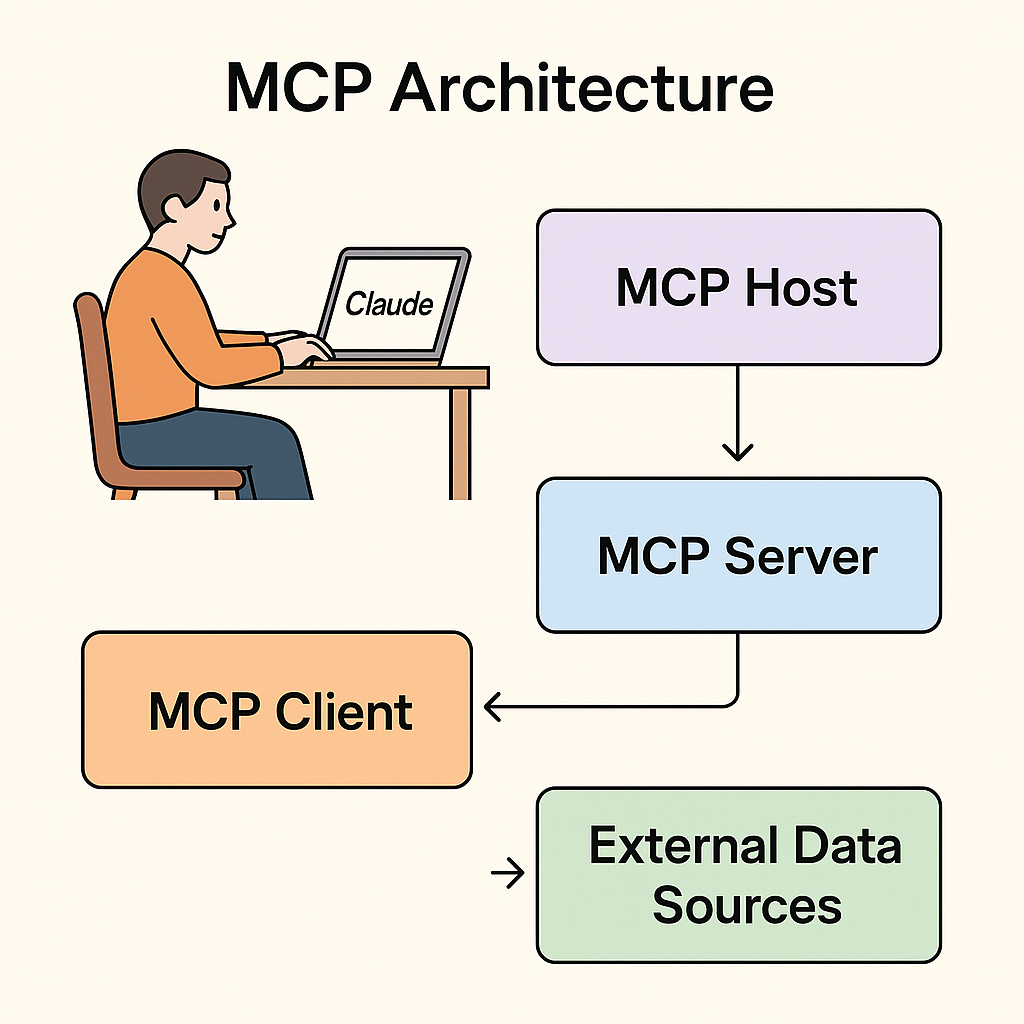
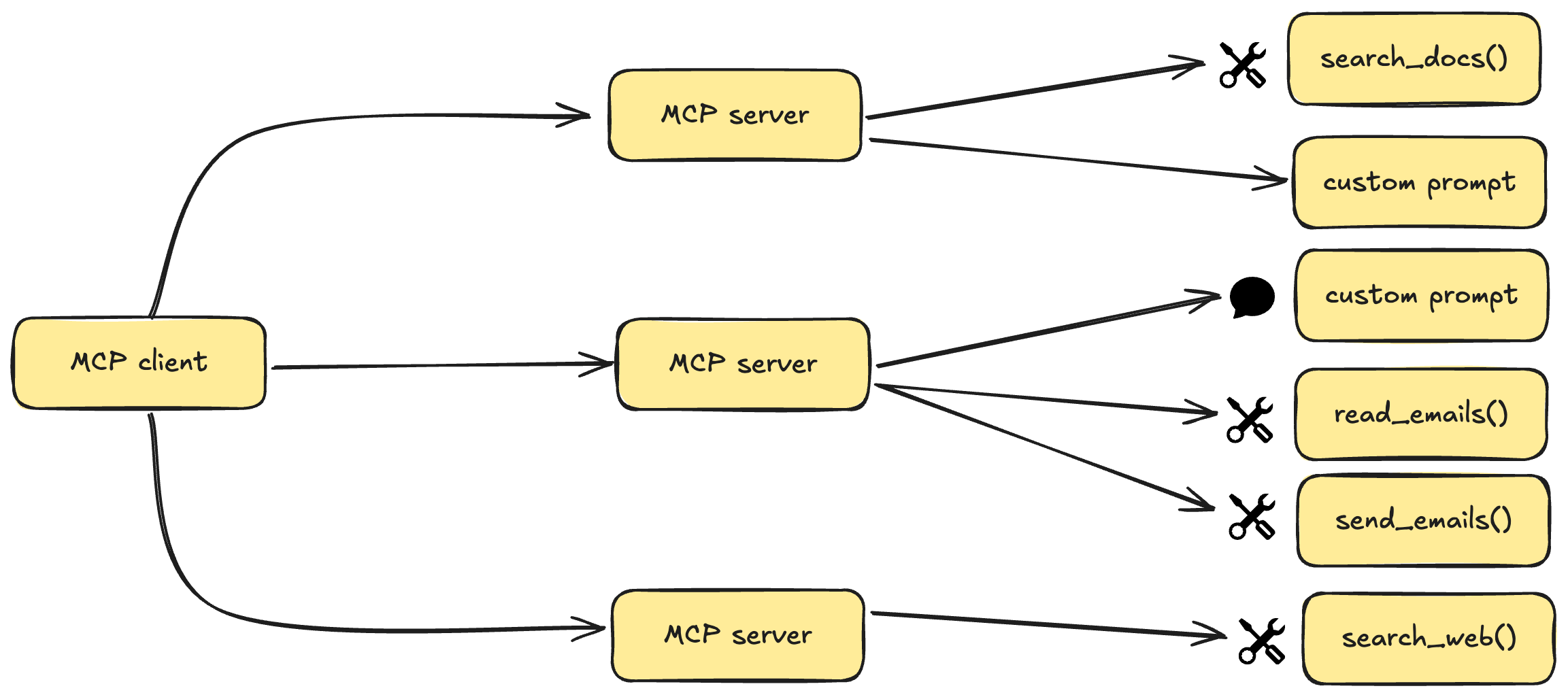
MCP (Model Context Protocol) is an open protocol that standardizes how applications provide context to Large Language Models. Think of it as a universal connector that lets AI assistants like Claude access external data sources and tools.
Related MCP server: Needle MCP Server
Documentation Search Tool: Search through documentation of popular AI libraries
Supported Libraries:
Smart Extraction: Intelligently parses HTML content to extract the most relevant information
Configurable Results: Limit the amount of text returned based on your needs
The server uses the Serper API to perform Google searches with site-specific queries
It fetches the content from the search results
BeautifulSoup extracts the most relevant text from main content areas
Claude can access this information through the get_docs tool
Python 3.11 or higher
uv package manager
A Serper API key
curl -LsSf https://astral.sh/uv/install.sh | sh# Clone or download the project
cd documentation
# Create and activate virtual environment
uv venv
# On Windows:
.venv\Scripts\activate
# On macOS/Linux:
source .venv/bin/activate
# Install dependencies
uv pip install -e .Create a .env file in the project directory with your Serper API key:
SERPER_API_KEY=your_serper_api_key_hereYou can get a Serper API key by signing up at serper.dev.
Edit your Claude Desktop configuration file at:
Windows: /C:/Users/[Your Username]/AppData/Roaming/Claude/claude_desktop_config.json
macOS: ~/Library/Application Support/Claude/claude_desktop_config.json
Add the following to the mcpServers section:
"documentation": {
  "command": "uv",
  "args": [
    "--directory",
    "/ABSOLUTE/PATH/TO/YOUR/documentation",
    "run",
    "main.py"
  ]
}
Replace /ABSOLUTE/PATH/TO/YOUR/documentation with the absolute path to your project directory.
Close and reopen Claude Desktop to apply the new configuration.
Once connected, you can ask Claude to use the documentation tool:
"Can you look up information about vector stores in LangChain documentation?"
Claude will use the get_docs tool to search for relevant information and provide you with documentation excerpts.
The get_docs tool accepts the following parameters:
query: The search term (e.g., "vector stores", "embedding models")
library: Which library to search (langchain, llama-index, or openai)
max_chars: Maximum characters to return (default: 1000)
Claude can't find the server: Verify the path in /C:/Users/fcbsa/AppData/Roaming/Claude/claude_desktop_config.json is correct
Search returns no results: Check your Serper API key and internet connection
Timeout errors: The server might be experiencing connectivity issues or rate limits
This project is provided as an educational example of MCP server implementation.
Built using the MCP SDK
Powered by Serper API for Google search integration
Uses BeautifulSoup4 for HTML parsing
Inspired by the growing MCP community
This MCP server enhances Claude's capabilities by providing direct access to documentation resources. Explore, learn, and build better AI applications with contextual knowledge from the docs!
Search the docs for a given query and library.
Supports langchain, llama-index, and openai.

Args:
    query: The query to search for (e.g.: "Chroma DB").
    library: The library to search in. One of langchain, llama-index, openai.
    max_chars: Maximum characters to return (default: 1000 for free tier).

Returns:
    Text from the documentation.
| Name | Required | Description | Default |
|---|---|---|---|
| query | Yes | ||
| library | Yes | ||
| max_chars | No |
Does the description disclose side effects, auth requirements, rate limits, or destructive behavior?
With no annotations provided, the description carries the full burden of behavioral disclosure. It adds some context: it specifies supported libraries and mentions a default for max_chars tied to a free tier, hinting at potential rate limits or tier restrictions. However, it doesn't cover other behavioral aspects like error handling, response format details, or authentication needs, leaving gaps.
Agents need to know what a tool does to the world before calling it. Descriptions should go beyond structured annotations to explain consequences.
Is the description appropriately sized, front-loaded, and free of redundancy?
The description is well-structured and front-loaded with the core purpose, followed by clear sections for Args and Returns. Each sentence adds value without redundancy, making it efficient and easy to parse.
Shorter descriptions cost fewer tokens and are easier for agents to parse. Every sentence should earn its place.
Given the tool's complexity, does the description cover enough for an agent to succeed on first attempt?
Given no annotations and no output schema, the description provides basic purpose and parameter info but lacks details on return format (beyond 'Text from the documentation'), error cases, or advanced usage. For a search tool with 3 parameters, this is adequate but has clear gaps in completeness.
Complex tools with many parameters or behaviors need more documentation. Simple tools need less. This dimension scales expectations accordingly.
Does the description clarify parameter syntax, constraints, interactions, or defaults beyond what the schema provides?
Schema description coverage is 0%, so the description must compensate. It adds meaning for all three parameters: query (with an example), library (lists allowed values), and max_chars (explains default and tier context). This provides clear semantics beyond the bare schema, though it doesn't fully detail constraints like character limits beyond the default.
Input schemas describe structure but not intent. Descriptions should explain non-obvious parameter relationships and valid value ranges.
Does the description clearly state what the tool does and how it differs from similar tools?
The description clearly states the tool's purpose: 'Search the docs for a given query and library.' It specifies the verb ('Search') and resource ('docs'), and lists the supported libraries. However, without sibling tools, it cannot differentiate from alternatives, preventing a score of 5.
Agents choose between tools based on descriptions. A clear purpose with a specific verb and resource helps agents select the right tool.
Does the description explain when to use this tool, when not to, or what alternatives exist?
The description implies usage by listing supported libraries and mentioning a default for max_chars, but it lacks explicit guidance on when to use this tool versus alternatives. Since no sibling tools are provided, there are no explicit alternatives to compare against, keeping the score at a baseline of implied usage.
Agents often have multiple tools that could apply. Explicit usage guidance like "use X instead of Y when Z" prevents misuse.
Recent tool additions, removals, and schema changes observed during successful MCP inspections.
get_docsScored across 1 tool
With only one tool, there is no possibility of ambiguity or overlap between tools. The single tool 'get_docs' has a clearly defined and distinct purpose of searching documentation for specified libraries.
With only one tool, naming consistency is inherently perfect. The tool name 'get_docs' follows a clear verb_noun pattern that would be consistent if more tools were added.
A single tool for a documentation server feels insufficient for the apparent scope. While the tool covers search functionality, typical documentation servers would benefit from additional tools like list_libraries, get_document, or browse_topics to provide more complete coverage.
The tool surface is severely incomplete for a documentation server. While search functionality is provided, there are significant gaps: no way to list available libraries, browse documentation structure, get specific documents by reference, or access metadata about documentation resources. This will likely cause agent failures when trying to comprehensively work with documentation.
Augments MCP Server - A comprehensive framework documentation provider for Claude Code
Your docs site. No editor to open. Just ask Claude.
Search and read the Claude Platform documentation and API reference.
An MCP server that gives your AI access to the source code and docs of all public github repos