


GenieOS MCP Serverofficial
A
licenseA
qualityC
maintenanceStdio bridge for editors to connect to the GenieOS MCP server, enabling AI agents to interact with GenieOS via Streamable HTTP transport.
64
9 npm
MIT

The Kunobi MCP Server bridges AI assistants to the Kunobi desktop IDE for platform engineering, enabling AI-driven management of Kubernetes, FluxCD, ArgoCD, and Helm.
Check Kunobi Status (kunobi_status): Determine if Kunobi is installed, running, and what tools are currently available through it (e.g., app_info, query_store, list_stores).
Launch Kunobi (kunobi_launch): Start the Kunobi desktop application, optionally specifying a variant (e.g., "Kunobi Dev"); defaults to the first installed one.
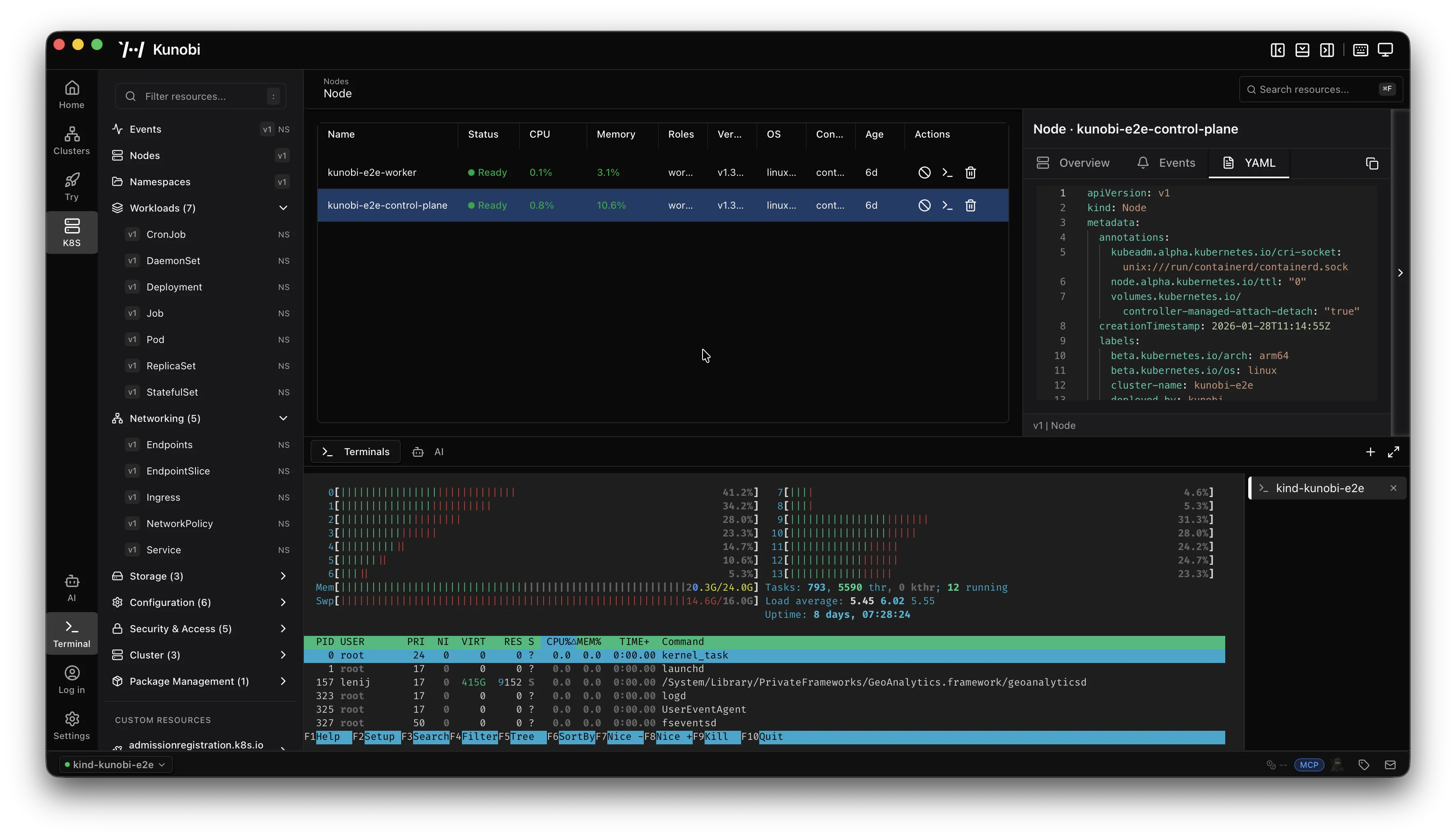
Dynamic Tool Access: When Kunobi is running with MCP enabled, additional tools for managing Kubernetes clusters, FluxCD, ArgoCD, and Helm automatically become available, including real-time cluster visibility, resource browsing, YAML editing, and embedded terminal access.
Auto-reconnect: The server automatically detects when Kunobi stops or restarts and updates tool availability without requiring an MCP server restart.
Real-time Oversight: Users can visually monitor all AI-driven operations through Kunobi's interface while AI assistants perform management tasks.
Enables AI assistants to manage and monitor ArgoCD deployments and resources through the Kunobi platform.
Enables AI assistants to manage and monitor FluxCD resources and deployments through the Kunobi platform.
Provides tools for managing Helm charts and releases via the Kunobi desktop IDE.
Enables real-time Kubernetes cluster visibility, resource browsing, and management through the Kunobi desktop platform.
Click on "Deploy Server".
Wait a few minutes for the server to deploy. Once ready, it will show a "Started" state.
In the chat, type @ followed by the MCP server name and your instructions, e.g., "@Kunobi MCP Server query the store for the most recent entries"
That's it! The server will respond to your query, and you can continue using it as needed.
Here is a step-by-step guide with screenshots.
MCP bridge to Kunobi, a desktop platform management IDE. AI assistants manage Kubernetes, FluxCD, ArgoCD, and Helm while users maintain real-time visual oversight.
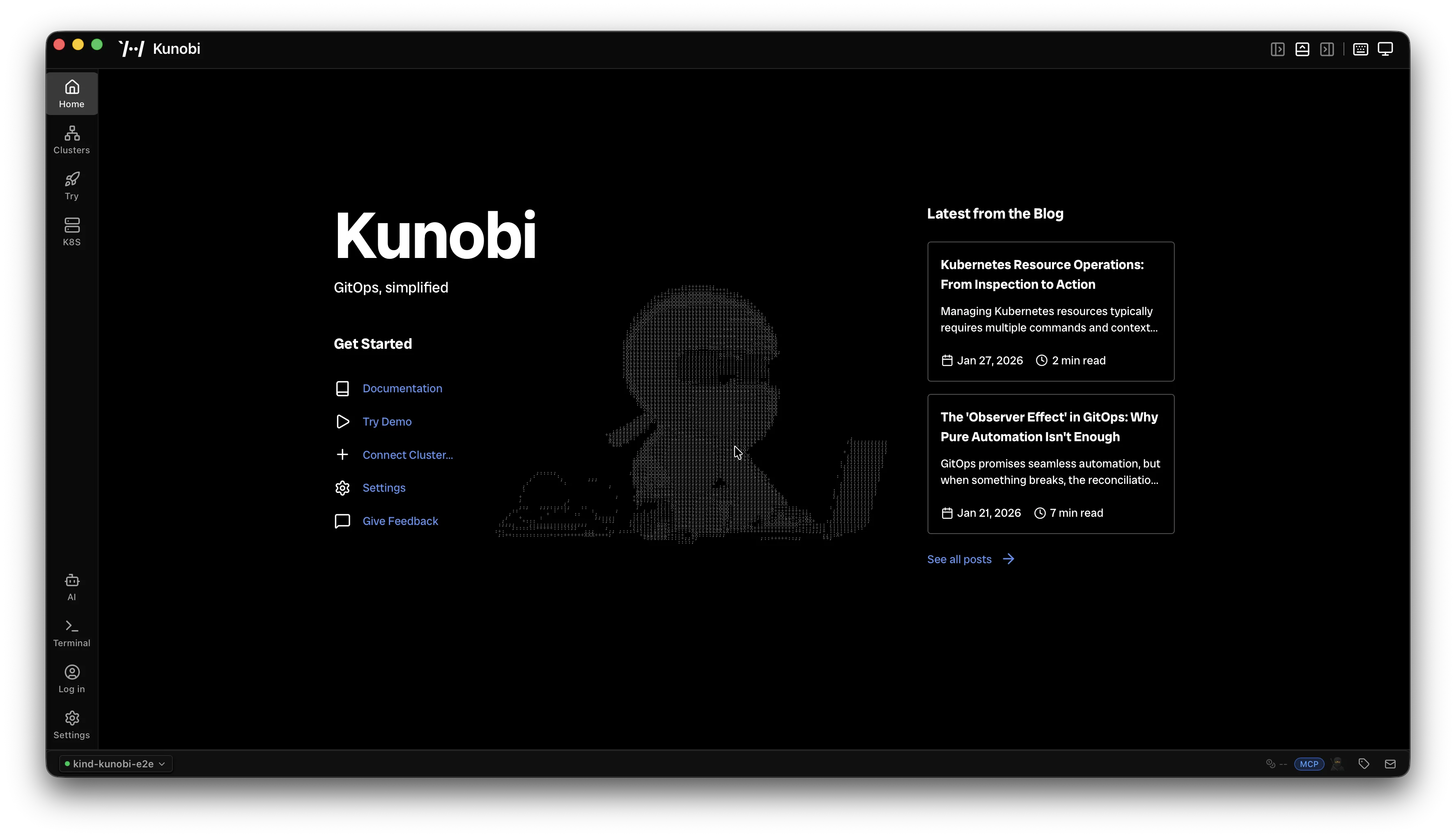
Kunobi is a desktop IDE for platform engineering — built with Rust and React, no Electron.
Real-time cluster visibility with resource browser, YAML editor, and embedded terminal
Native FluxCD, ArgoCD, and Helm support
Built-in MCP server for AI assistants (Claude Code, Cursor, Windsurf, Codex CLI, Gemini CLI, GitHub Copilot CLI)
Available on macOS, Windows, and Linux
No account required, no cloud dependency
Related MCP server: hermes-platform-mcp
Enable MCP in Kunobi under Settings > AI & MCP, then install:
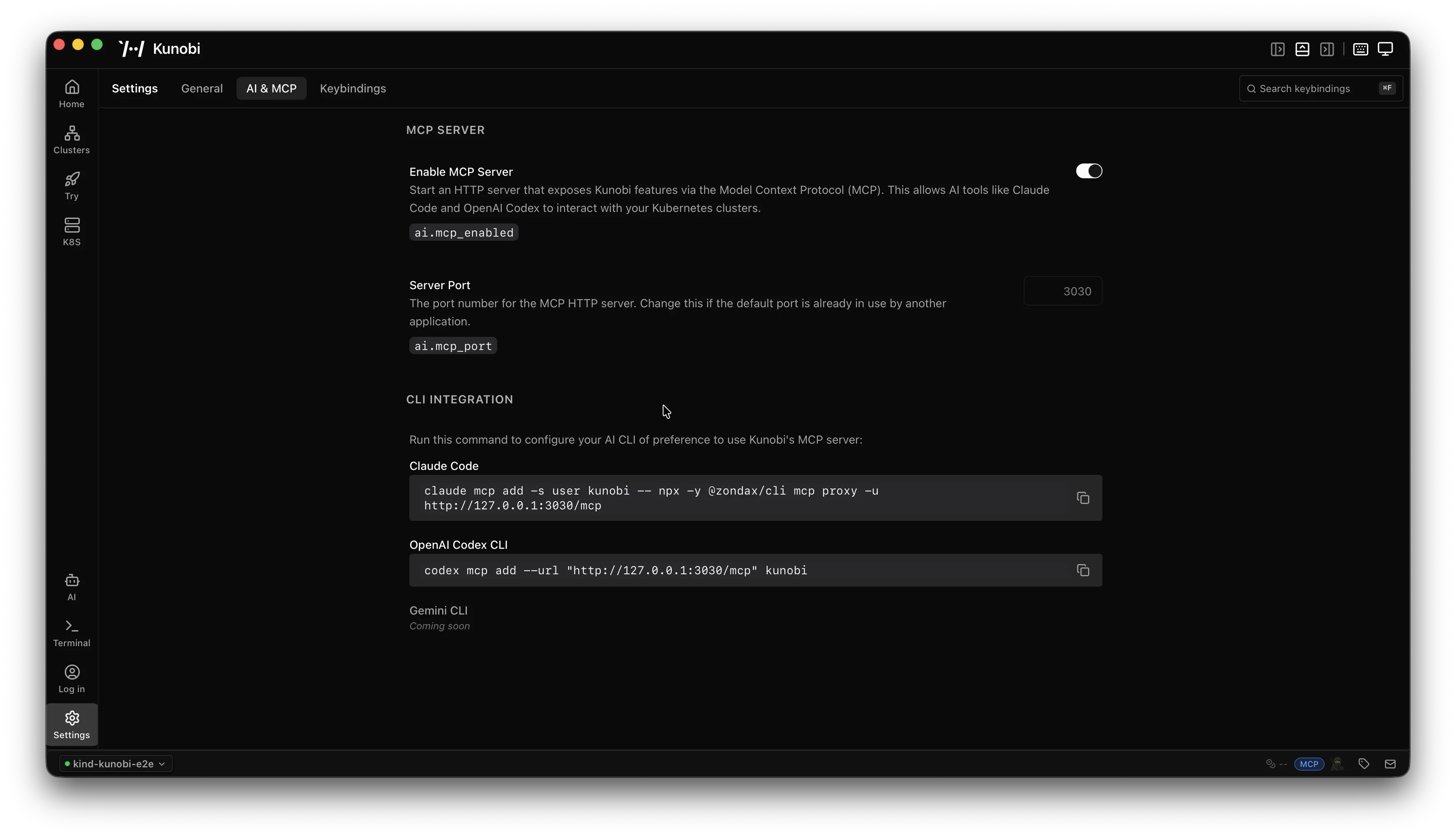
Register with all your AI clients in one step:
npx @kunobi/mcp --installThis interactively detects your installed AI clients and registers the server with them. Supported clients:
Claude Code — project or user scope
Claude Desktop — user scope
Cursor — project or user scope
Windsurf — project or user scope
Codex CLI — project or user scope
Gemini CLI — project or user scope
GitHub Copilot CLI — user scope
To remove the server from all clients:
npx @kunobi/mcp --uninstallinstall pins your clients to an exact version (e.g. @kunobi/mcp@1.2.3) so each
launch runs from the npm cache instead of resolving latest from the registry on
every spawn — startup stays fast and can't stall on the network. When a newer
version is published, the server tells you on connect; apply it with:
npx @kunobi/mcp upgradeThis re-pins every client where Kunobi is registered to the newest version and warms the cache. Restart your AI client to load it (the new version takes effect on the next start).
Installed before pinning existed? Pin your current version in place — no upgrade, no registry call:
npx @kunobi/mcp pinIf you ran an older build, the server also hints this on connect when it detects
an unpinned config. Silence the hint with MCP_KUNOBI_NO_PIN_HINT=1.
Prefer always-latest? Opt back out — each launch will resolve the newest version again (slower startup, and can stall on the registry):
npx @kunobi/mcp unpinIf you prefer manual setup, add the following to your client's MCP config:
{
  "mcpServers": {
    "kunobi": {
      "command": "npx",
      "args": ["-y", "@kunobi/mcp"]
    }
  }
}AI assistant <--stdio--> @kunobi/mcp <--HTTP--> Kunobi variants
│
├── keeps one MCP connection per configured variant
├── retries disconnected variants every 5s
└── manages one bundler per variantThe server keeps a persistent MCP connection for each configured Kunobi variant. When a variant is available, its tools are registered with a variant__ prefix (e.g., dev__list_clusters, stable__query_store). When a variant briefly drops, the hub keeps the last-known surface stable while it reconnects in the background. If the disconnect outlives the reconnect grace window, the stale registrations are removed.
Kunobi ships multiple release channels that run on different ports. This MCP server discovers all of them simultaneously:
Variant | Default port | Tool prefix |
legacy | 3030 |
|
stable | 3200 |
|
unstable | 3300 |
|
dev | 3400 |
|
local | 3500 |
|
e2e | 3600 |
|
These defaults are auto-generated into ~/.config/kunobi/mcp.json on first run. You can add custom variants or change ports — see Configuration.
These are always available, even when no Kunobi instance is running:
kunobi_status — reports all variant connection states, ports, and tool counts
kunobi_launch — launches a Kunobi variant by name
kunobi_refresh — forces an immediate reconnect attempt across all configured variants
kunobi_call — stable entrypoint for variant tools (variant, tool, arguments)
Use the stable path below for the most reliable MCP client behavior:
Call kunobi_status
Read kunobi://tools to discover full downstream tool schemas and metadata
Execute via kunobi_call(variant, tool, arguments)
When a Kunobi variant is detected, its tools appear automatically with a variant prefix. For example, if dev and stable are both running:
dev__app_info, dev__query_store, dev__list_stores, ...
stable__app_info, stable__query_store, stable__list_stores, ...
Tools appear dynamically as variants start, and they are withdrawn only after a sustained disconnect — no MCP server restart needed.
These dynamic variant__tool entries are still supported, but some MCP clients may not refresh dynamic tool lists reliably. Use kunobi_call as the primary path when in doubt.
Resources exposed by Kunobi variants are proxied through automatically. When a variant connects, its resources become available to the AI client with variant-namespaced URIs to avoid collisions between multiple running variants.
The server also provides built-in resources:
kunobi://status — JSON snapshot of all variant connection states, ports, and capability counts. Supports subscriptions — clients receive notifications/resources/updated whenever variants connect or disconnect.
kunobi://tools — JSON discovery document listing each variant status plus full downstream tool, resource, and prompt metadata for kunobi_call.
Prompts from Kunobi variants are registered with a variant__ prefix (e.g., dev__setup_cluster). They appear and disappear alongside their variant, just like tools.
Variant-to-port mappings are stored in ~/.config/kunobi/mcp.json (auto-generated on first run with defaults). You can edit this file directly or use the CLI:
# List all configured variants and their connection status
kunobi-mcp list

# Add a custom variant
kunobi-mcp add juan 4200

# Remove a variant
kunobi-mcp remove juanEnv var | Default | Description |
|
| Reconnect interval in ms |
| — |
|
|
| Set |
| — | Set |
Priority: config file defaults → MCP_KUNOBI_VARIANTS env var (merges on top).
kunobi-mcp [command] [options]Command | Description |
| Show configured variants and connection status |
| Add or update a variant |
| Remove a variant |
| Register this MCP server with your AI clients (pinned to the current version) |
| Remove this MCP server from your AI clients |
| Pin your AI clients to the current version (faster, hang-proof startup) |
| Revert to always-latest ( |
| Re-pin your AI clients to the latest published version (restart to apply) |
| Show help message |
| Show version number |
(no command, piped) | Start the stdio MCP server (used by AI clients) |
pnpm install
pnpm build
pnpm test
For local development against @kunobi/mcp-bundler:
pnpm dev:link    # link local bundler
pnpm dev:unlink # revert to npm versionStable tool entrypoint for Kunobi operations. Call a variant tool via (variant, tool, arguments), e.g. variant="dev", tool="k8s". Use kunobi://tools to discover full downstream tool schemas and metadata.
| Name | Required | Description | Default |
|---|---|---|---|
| tool | Yes | Remote tool name without variant prefix, e.g. "k8s". | |
| variant | Yes | Kunobi variant name, e.g. "dev", "stable", "local". | |
| arguments | No | Arguments object passed to the target variant tool. Match the selected tool inputSchema from kunobi://tools. |
Does the description disclose side effects, auth requirements, rate limits, or destructive behavior?
Annotations already indicate it is not read-only, not destructive, and open world. The description adds that it calls variant tools, but does not disclose additional behaviors such as error handling or state changes. With annotations covering safety, this is adequate but not exceptional.
Agents need to know what a tool does to the world before calling it. Descriptions should go beyond structured annotations to explain consequences.
Is the description appropriately sized, front-loaded, and free of redundancy?
The description is highly concise with two sentences, front-loaded with the core purpose. Every sentence adds value without redundancy or excess.
Shorter descriptions cost fewer tokens and are easier for agents to parse. Every sentence should earn its place.
Given the tool's complexity, does the description cover enough for an agent to succeed on first attempt?
Given the generic delegator nature, the description adequately explains how to use the tool and where to discover downstream schemas. It does not cover error cases or return behavior, but these are derivative of the called tool and thus acceptable.
Complex tools with many parameters or behaviors need more documentation. Simple tools need less. This dimension scales expectations accordingly.
Does the description clarify parameter syntax, constraints, interactions, or defaults beyond what the schema provides?
Schema description coverage is 100%; each parameter has a description. The description adds an example and reference to kunobi://tools for full schemas, but does not significantly enhance understanding beyond the schema. For instance, it does not highlight that 'arguments' is optional.
Input schemas describe structure but not intent. Descriptions should explain non-obvious parameter relationships and valid value ranges.
Does the description clearly state what the tool does and how it differs from similar tools?
The description clearly states the tool is a stable entrypoint for Kunobi operations to call a variant tool via (variant, tool, arguments). It specifies the resource and action but does not explicitly differentiate from siblings like kunobi_launch, kunobi_refresh, and kunobi_status.
Agents choose between tools based on descriptions. A clear purpose with a specific verb and resource helps agents select the right tool.
Does the description explain when to use this tool, when not to, or what alternatives exist?
The description provides an example and mentions using kunobi://tools for discovery, implying when to use this tool (to call a specific remote tool). However, it lacks explicit guidance on when not to use it or how it compares to sibling tools.
Agents often have multiple tools that could apply. Explicit usage guidance like "use X instead of Y when Z" prevents misuse.
Check which Kunobi variants are currently connected to this hub. Reports each variant's port, connection status, available tools, and reconnect timing. Call this before using Kunobi tools to understand what's available.
| Name | Required | Description | Default |
|---|---|---|---|
No parameters | |||
Does the description disclose side effects, auth requirements, rate limits, or destructive behavior?
The description discloses specific behavioral details—reports port, connection status, available tools, and reconnect timing—beyond the annotations (readOnlyHint). No contradictions.
Agents need to know what a tool does to the world before calling it. Descriptions should go beyond structured annotations to explain consequences.
Is the description appropriately sized, front-loaded, and free of redundancy?
Three sentences, no waste. First sentence declares purpose, second lists outputs, third gives usage. Front-loaded and efficient.
Shorter descriptions cost fewer tokens and are easier for agents to parse. Every sentence should earn its place.
Given the tool's complexity, does the description cover enough for an agent to succeed on first attempt?
Given no parameters, good annotations, and lack of output schema, the description fully covers what the tool does, what it returns, and when to use it. Complete for its simplicity.
Complex tools with many parameters or behaviors need more documentation. Simple tools need less. This dimension scales expectations accordingly.
Does the description clarify parameter syntax, constraints, interactions, or defaults beyond what the schema provides?
No parameters exist (schema coverage 100%), so the description need not add parameter info. Baseline for 0 params is 4; description does not need to compensate.
Input schemas describe structure but not intent. Descriptions should explain non-obvious parameter relationships and valid value ranges.
Does the description clearly state what the tool does and how it differs from similar tools?
The description clearly states the tool checks which Kunobi variants are connected to the hub, using a specific verb ('Check') and resource. It distinguishes from siblings (call, launch, refresh) by focusing on connectivity status.
Agents choose between tools based on descriptions. A clear purpose with a specific verb and resource helps agents select the right tool.
Does the description explain when to use this tool, when not to, or what alternatives exist?
The description explicitly recommends calling this tool before using other Kunobi tools to understand what's available, providing strong usage guidance.
Agents often have multiple tools that could apply. Explicit usage guidance like "use X instead of Y when Z" prevents misuse.
Recent tool additions, removals, and schema changes observed during successful MCP inspections.
v0.0.19kunobi_launchkunobi_refreshv0.0.15kunobi_callkunobi_refreshv0.0.1kunobi_launchkunobi_statusScored across 2 tools
Each tool has a clear and distinct purpose: 'kunobi_call' is for executing operations on variants, while 'kunobi_status' is for checking connection status and available tools. There is no overlap in functionality.
Both tool names follow a consistent 'kunobi_<verb>' pattern (kunobi_call, kunobi_status), making them predictable and easy to understand.
With only 2 tools, the server feels thin for a hub that presumably provides many downstream tools. However, the tools serve as a lightweight entry point, so the count is borderline acceptable.
The server covers the core lifecycle for a tool hub: discovery (via kunobi_call with 'kunobi://tools'), execution (kunobi_call), and status monitoring (kunobi_status). Missing are variant management tools like registration or shutdown, but these are minor gaps.
Talk to your public-facing AI from any MCP client — Claude, ChatGPT, Cursor, Cline, Windsurf.
Human-input bridge for AI agents with voice-first answer links, MCP tools, and HTTP APIs.
Zero-setup MCP gateway securely connecting AI to your tools with authentication and workflows
Remote streamable-HTTP MCP server running on a single Cloudflare Worker. Your assistant gets live Airbnb, Amazon, Booking.com, Google Flights, Maps and Reddit data, social search on X, Instagram and TikTok, the Meta Ad Library, and image/video generation without any keys. Connect your own accounts to let it send WhatsApp or Telegram messages, work an IMAP inbox, manage Meta Ads campaigns and publish to X and LinkedIn. OAuth 2.1 with PKCE; stored credentials are AES-256-GCM encrypted.