

A
licenseNot graded
qualityD
maintenanceProvides AI agents and assistants with advanced web crawling and RAG capabilities, enabling them to scrape websites and perform semantic search over crawled content.
1
MIT

Allows CrewAI agents to perform website cloning and structured capture for RAG and knowledge base workflows.
Click on "Deploy Server".
Wait a few minutes for the server to deploy. Once ready, it will show a "Started" state.
In the chat, type @ followed by the MCP server name and your instructions, e.g., "@WebClone MCP Server clone https://example.com with authentication and JavaScript rendering"
That's it! The server will respond to your query, and you can continue using it as needed.
Here is a step-by-step guide with screenshots.




An async-first website cloning and rendered capture tool for documentation mirrors, AI knowledge bases, and enterprise RAG pipelines.
AI Knowledge Bases • Features • Quick Start • Usage • Docker • Contributing
WebClone helps teams turn authorized websites and documentation into reproducible source material for AI systems. It can mirror static pages, render JavaScript pages when needed, and export structured content for downstream chunking, embedding, search, and RAG workflows.
The goal is simple: make it easier for AI assistants and chatbots to answer from trusted documentation instead of guessing.
WebClone is designed for:
Documentation mirrors for projects, products, SDKs, and APIs
AI knowledge-base generation from approved public or private docs
Enterprise RAG ingestion pipelines that need repeatable source captures
Auditable archives with saved HTML, assets, metadata, and rendered outputs
Polite crawling with conservative defaults, retry/backoff, and explicit opt-ins
Related MCP server: Crawlberg MCP Server
WebClone is designed to help AI teams create high-quality, source-grounded knowledge bases from websites they own or are authorized to process.
RAG corpora from documentation sites, internal portals, product manuals, SDK references, and knowledge centers
Chatbot grounding data so assistants answer from approved documentation instead of guessing
Offline mirrors for compliance, review, audit, and reproducible AI indexing
Structured content exports from rendered pages for chunking, embedding, vector databases, and retrieval pipelines
Authenticated captures for private enterprise docs using saved browser cookies or session files
Authorized website or docs portal
        ↓
WebClone polite crawler / rendered browser capture
        ↓
HTML mirror + assets + structured_content.json + render_debug_report.json
        ↓
Chunking, embeddings, vector database, search index, or RAG pipeline
        ↓
Grounded AI assistants, copilots, support bots, and internal chatbotsUse clone-knowledge-page when a page must be rendered like a browser before extracting structured sections. Pick selectors that actually exist on the target page — the example below uses real Sphinx markup from python.org:
webclone clone-knowledge-page "https://docs.python.org/3/tutorial/index.html" \
  --render-js \
  --wait-for "div.body" \
  --item-selector "div.section, section" \
  --item-text-selector "h1, h2, h3" \
  --detail-selector "p, li, pre" \
  --output ./output/docs-knowledge-page
This writes:
page.rendered.html          # final browser-rendered DOM
structured_content.json     # generic item/detail/label records for ingestion
render_debug_report.json # counts, final URL, auth-likelihood diagnosticsFor a normal documentation site, start with polite limits and expand deliberately:
webclone clone "https://docs.python.org/3/" \
  --recursive \
  --max-depth 2 \
  --max-pages 100 \
  --workers 1 \
  --delay 3000 \
  --output ./output/docs-mirror
Use the generated mirror as the reproducible source of truth for your indexing and embedding jobs.
Concurrent downloads with configurable workers and conservative defaults
Intelligent queue management with duplicate URL suppression
Retry logic with exponential backoff, jitter, and Retry-After handling
Stop-after-429 protections to respect target rate limits
Full Selenium integration for JavaScript-heavy sites
Authenticated cookie loading for authorized private documentation
Selector waits and configured clicks before saving the final DOM
Generic structured content extraction for RAG and chatbot knowledge bases
PDF snapshot generation with Chrome DevTools Protocol
Screenshot capture for visual archival
Cookie-based auth: save and reuse authorized browser sessions
Rendered private docs: capture pages that require an authenticated browser session
Browser configuration: practical Selenium defaults for dynamic pages
Rate-limit awareness: retry/backoff and stop thresholds for polite operation
Audit-friendly outputs: final URL, counts, and auth-likelihood diagnostics
Beautiful terminal UI powered by Rich
Real-time progress bars with per-resource status
Colored, formatted output with tables and panels
JSON logs for production monitoring
Type-safe: 100% type hints with Mypy validation
Data validation: Pydantic V2 models with strict schemas
Async-first: Built on aiohttp and asyncio
Modular design: Clean Architecture with dependency injection
Comprehensive logging: Structured JSON logs with contextual data
⚡ uv: Lightning-fast dependency management
🔍 ruff: Ultra-fast linting and formatting
🧪 pytest: 70 tests covering core/security/models with make test
🐳 Docker: Containerized builds via make docker-build
🔒 Security: Bandit audits and dependency scanning
WebClone is designed for legitimate archiving, classroom labs, and authorized security research. Before crawling a target, confirm that you own the system or have written permission to test it.
Security-oriented defaults now include:
Public web targets only by default: localhost, loopback, link-local, private, and reserved IP targets are blocked to reduce SSRF-style misuse and accidental internal-network crawling.
Same-domain crawling by default: recursive crawls stay on the starting domain unless you explicitly pass --all-domains.
Bounded concurrency and pacing: workers and request delay are configurable so authorized assessments can minimize operational impact.
Per-asset size limits: --max-asset-bytes prevents unexpectedly large assets from exhausting disk or memory.
Fragment normalization: URL fragments are stripped before crawling to reduce duplicate requests.
For an isolated lab or a private documentation server, opt in deliberately. For example, if you are running a local test site at http://127.0.0.1:8000:
webclone clone http://127.0.0.1:8000 \
  --allow-private-networks \
  --max-pages 25 \
  --workers 1 \
--delay 3000Python 3.11+
uv (recommended) or pip
Install from PyPI (published as webclone v1.0.0):
# Recommended: uv (10-100x faster than pip)
curl -LsSf https://astral.sh/uv/install.sh | sh
uv pip install webclone

# Or with plain pip
pip install webclone
Install from source (gets you the Makefile shortcuts too):
git clone https://github.com/ruslanmv/webclone.git
cd webclone
make install              # creates .venv/ and installs the CLI

# The webclone entry point is installed inside .venv/, so either:
source .venv/bin/activate
webclone --version        # → WebClone version 1.0.0

# …or just call the venv binary directly without activating:
.venv/bin/webclone --version
Note:
make installusesuvand installs into.venv/. Thewebclonecommand is only on yourPATHaftersource .venv/bin/activate(or use.venv/bin/webclonedirectly). The Makefile targets (make run,make test, …) already use the venv automatically.
Smoke-test the install:
make run                                  # clones example.com → ./demo_output
.venv/bin/webclone --version              # WebClone version 1.0.0
.venv/bin/webclone info https://example.com# Clone a single page with safe defaults
webclone clone https://example.com
# Crawl a documentation site politely for a RAG source corpus
webclone clone https://docs.python.org/3/ \
--output ./my_mirror \
--recursive \
--max-depth 2 \
--max-pages 100 \
--workers 1 \
--delay 3000
# Render one authorized knowledge page and export structured JSON.
# Use selectors that actually exist on the page you're capturing
# (Sphinx-built Python docs use `div.body`, NOT `.body section`).
webclone clone-knowledge-page https://docs.python.org/3/tutorial/index.html \
--render-js \
--wait-for "div.body" \
--item-selector "div.section, section" \
--item-text-selector "h1, h2, h3" \
--detail-selector "p, li, pre"That's it! WebClone creates reproducible mirrors and structured capture artifacts you can feed into chunking, embedding, search, and RAG pipelines.
These commands were run on a clean install and the outputs below are the actual results — copy/paste and they will work.
# | Command | Result |
1 |
| Status |
2 |
| 1 page, 0 assets, ~2.3s |
3 |
| 1 page, saved to |
4 |
| 24 files: 5 CSS, 10 JS, 1 image, 7 HTML, 1 other |
5 |
| 3 pages, 23 assets, 1.77 MB, ~9s — recursion + asset downloader both working |
Run the whole verification block in one go:
source .venv/bin/activate

webclone info https://example.com
webclone clone https://example.com -o /tmp/demo_example --max-pages 1 --no-pdf
webclone clone https://httpbin.org/html -o /tmp/demo_httpbin --max-pages 1 --no-pdf
webclone clone https://docs.python.org/3/library/typing.html -o /tmp/demo_pydocs --max-pages 1 --no-pdf
webclone clone 'https://en.wikipedia.org/wiki/Web_scraping' \
  -o /tmp/demo_wiki --recursive --max-depth 1 --max-pages 3 --no-pdf
Tip — single-shot authenticated capture: if a saved cookie file in
./cookies/*.jsonmatches the target domain,webclone clone <url>auto-detects it and automatically turns on--render-js. You can just runwebclone clone https://internal.example.com/pageand it Just Works.
WebClone now includes a professional, native desktop interface built with modern Tkinter for superior performance:
# Install with GUI support
make install-gui

# Launch the Enterprise Desktop GUI
make gui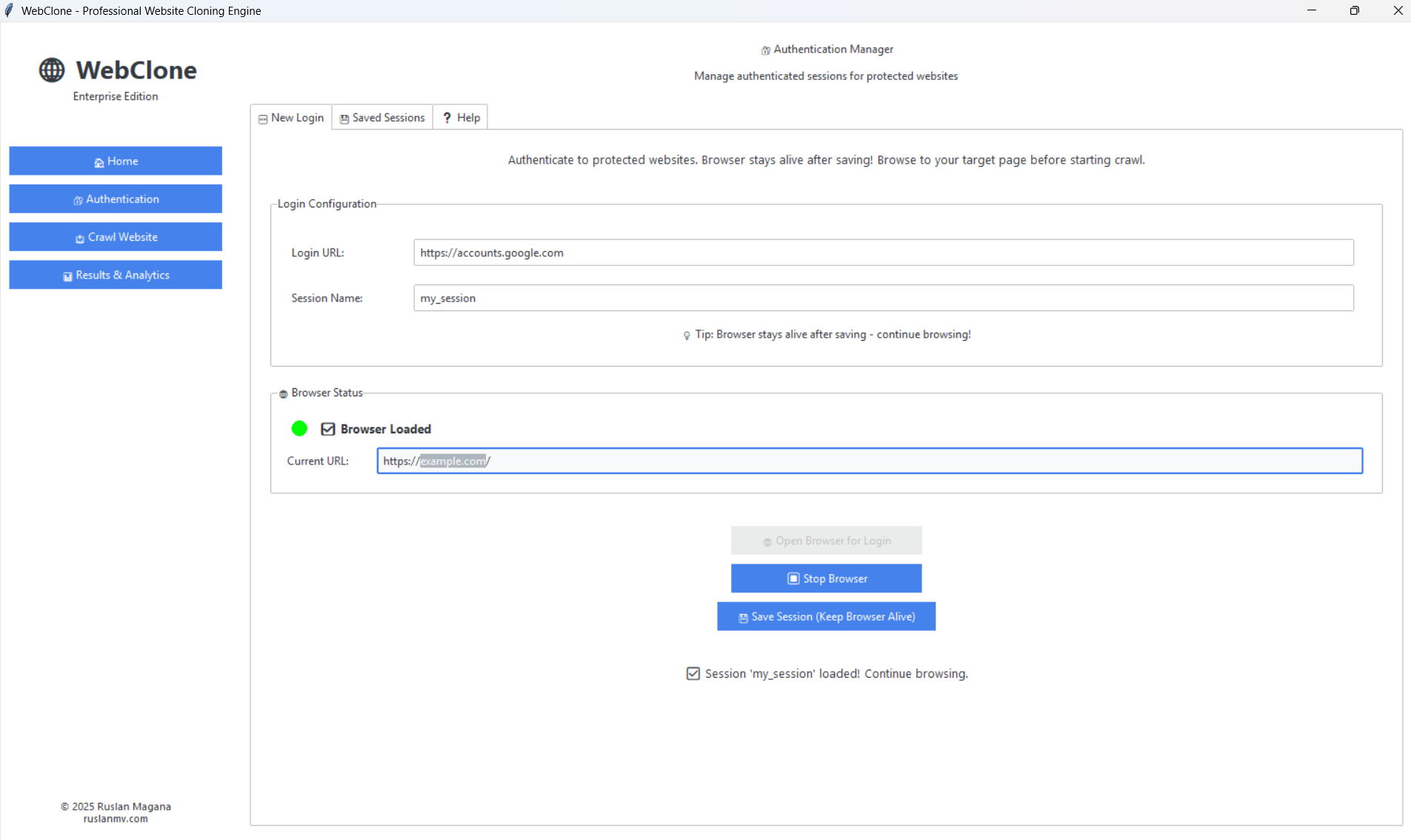
The GUI opens instantly as a native desktop application with:
🏠 Home Dashboard - Feature overview and quick start guide
🔐 Authentication Manager - Visual cookie-based auth workflow with browser integration
🛡️ Download-resistance audits - Role/access, JavaScript-rendered preview, HAR/API, content-leak, and bulk-fetch checks for owned gated content
📥 Crawl Configurator - Point-and-click settings with real-time progress
📊 Results Analytics - Comprehensive stats, tables, and export options
Perfect for everyone! No command line required - professional desktop interface with instant startup, native performance, and seamless OS integration.
Advantages over web-based GUIs: ✅ Instant startup (no server to launch) ✅ Native desktop performance ✅ Better OS integration (file dialogs, notifications) ✅ No port conflicts ✅ Offline-friendly
WebClone is now an official Model Context Protocol (MCP) server, making website cloning available to AI agents like Claude, CrewAI, and any MCP-compatible framework!
# Install MCP server (adds the `webclone-mcp` entry point to .venv/bin/)
make install-mcp

# Run the server directly to verify it starts (stdio protocol; Ctrl+C to exit)
make mcp
Wire it into Claude Desktop (~/Library/Application Support/Claude/claude_desktop_config.json on macOS, ~/.config/Claude/claude_desktop_config.json on Linux):
{
  "mcpServers": {
    "webclone": {
      "command": "/absolute/path/to/webclone/.venv/bin/webclone-mcp"
    }
  }
}
AI agents can now:
🌐 clone_website - Download entire websites automatically
📥 download_file - Fetch specific files or URLs
🔐 save_authentication - Guide for saving login sessions
📋 list_saved_sessions - View all authentication cookies
ℹ️ get_site_info - Analyze websites before downloading
Example with Claude:
You: Clone the FastAPI documentation website

Claude: I'll clone that for you.
[Uses WebClone MCP tool]

✅ Cloned 127 pages, 543 assets, 45.2 MB total!
Compatible with:
✅ Claude Desktop
✅ CrewAI
✅ LangChain
✅ Any MCP-compatible AI framework
📖 See: docs/MCP_GUIDE.md and MCP_QUICKSTART.md
WebClone offers four ways to use it:
🎨 Desktop GUI (Easiest - Enterprise Edition)
make guiNative desktop application
Instant startup, no browser required
Visual authentication manager
Real-time progress tracking
Perfect for all users!
🤖 MCP Server (For AI Agents)
make install-mcpClaude Desktop integration
CrewAI compatible
LangChain ready
AI-powered automation
Perfect for AI workflows!
💻 Command Line (Most Powerful)
webclone clone https://example.comAutomation and scripting
CI/CD pipelines
Remote servers
Power users
🐍 Python API (Most Flexible)
from webclone.core import AsyncCrawler
# ... your code
Custom integrations
Advanced workflows
Developers
# Show help
webclone --help

# Clone a website
webclone clone <URL> [OPTIONS]

# Analyze a page without downloading
webclone info <URL>webclone clone https://example.com \
--output ./mirror # Output directory (default: website_mirror)
--recursive # Follow discovered links (default: off)
--workers 1 # Concurrent workers (default: 1)
--max-pages 100 # Maximum pages to crawl (0 = unlimited)
--max-depth 3 # Maximum crawl depth (0 = unlimited)
--delay 3000 # Delay between requests in ms
--no-assets # Skip downloading CSS, JS, images
--no-pdf # Skip PDF generation
--all-domains # Follow links to other domains
--verbose # Detailed logging output
--json-logs # JSON-formatted logs for parsingFor rendered knowledge-page extraction (selectors must match real elements on the target):
webclone clone-knowledge-page https://docs.python.org/3/tutorial/index.html \
  --render-js \
  --wait-for "div.body" \
  --item-selector "div.section, section" \
  --item-text-selector "h1, h2, h3" \
  --detail-selector "p, li, pre" \
--output ./knowledge-page# Single page, fast smoke test
webclone clone https://example.com --max-pages 1 --no-pdf
# Crawl Wikipedia article + linked pages (verified: 3 pages, 23 assets, ~9s)
webclone clone 'https://en.wikipedia.org/wiki/Web_scraping' \
--recursive --max-depth 1 --max-pages 3 --no-pdf
# Clone a documentation page with all its CSS/JS/images
# (verified: 24 files for https://docs.python.org/3/library/typing.html)
webclone clone https://docs.python.org/3/library/typing.html --max-pages 1 --no-pdf
# Clone a documentation site recursively for a RAG source corpus
webclone clone https://docs.python.org/3/ \
--recursive --max-depth 3 --max-pages 250 --workers 1 --delay 3000
# Render a JavaScript documentation page before extracting structured content
webclone clone-knowledge-page https://docs.python.org/3/tutorial/index.html \
--render-js \
--wait-for "div.body" \
--item-selector "div.section, section" \
--item-text-selector "h1, h2, h3" \
--detail-selector "p, li, pre"
# Production mode with JSON logs
webclone clone https://example.com --json-logs --output /var/data/mirrorFor private documentation that you are authorized to access, save a browser session once and reuse its cookies for later rendered captures.
# Run the interactive authentication examples
python examples/authenticated_crawl.py
Python API for saved sessions:
from pathlib import Path
from webclone.models.config import SeleniumConfig
from webclone.services.selenium_service import SeleniumService

# Open a visible browser and save cookies after manual sign-in.
config = SeleniumConfig(headless=False)
service = SeleniumService(config)
service.start_driver()
service.manual_login_session(
    "https://example.com",
    Path("./cookies/example.json"),
)

# Later, reuse the cookies for an authorized browser session.
config = SeleniumConfig(headless=True)
service = SeleniumService(config)
service.start_driver()
service.navigate_to("https://example.com")
service.load_cookies(Path("./cookies/example.json"))
See Authentication Guide for detailed instructions.
Run WebClone in a containerized environment:
# Build the image
make docker-build

# Or manually
docker build -t webclone:latest .

# Run a clone
docker run --rm -v $(pwd)/output:/data webclone:latest \
  clone https://example.com --max-pages 10

# Interactive shell
docker run --rm -it -v $(pwd)/output:/data \
--entrypoint /bin/bash webclone:latestversion: '3.8'
services:
webclone:
image: webclone:latest
volumes:
- ./output:/data
command: clone https://example.com --max-pages 25 --workers 1 --delay 3000
environment:
- WEBCLONE_MAX_PAGES=100WebClone follows Clean Architecture principles:
src/webclone/
├── cli.py              # Typer CLI interface
├── core/               # Core business logic
│   ├── crawler.py           # Async web crawler
│   ├── downloader.py        # Asset downloader
│   ├── rendered_fetcher.py  # Selenium rendered capture
│   └── content_extractor.py # Structured content extraction for RAG
├── models/             # Pydantic data models
│   ├── config.py       # Configuration schemas
│   └── metadata.py     # Result metadata
├── services/           # External service integrations
│   └── selenium_service.py
└── utils/              # Shared utilities
    ├── logger.py
└── helpers.pyAsync-First: All I/O operations use asyncio for maximum concurrency
Type Safety: 100% type coverage with strict Mypy checks
Pydantic V2: Data validation at system boundaries
Responsible crawling: safer defaults, Retry-After handling, and explicit opt-ins for broader crawls
RAG-ready outputs: rendered HTML plus structured JSON for downstream chunking, embeddings, and retrieval
Dependency Injection: Services receive dependencies via constructors
Single Responsibility: Each module has one clear purpose
# Clone the repository
git clone https://github.com/ruslanmv/webclone.git
cd webclone

# Install with dev dependencies (creates .venv/ with pytest, ruff, mypy, bandit)
make dev

# Run tests — 70 passing
make test

# Format code
make format# Full test suite with coverage
make test
# → 70 passed in ~3s
# Fast tests without coverage
make test-fast
# Generate HTML coverage report (opens htmlcov/index.html)
make coverageThe Makefile invokes
.venv/bin/pytest/.venv/bin/ruff/ etc. directly, so the targets work whether or not the venv is activated.
# Lint with ruff (the codebase has known lint debt; CI does not block on it)
make lint

# Type check with mypy
make typecheck

# Format code
make format

# Run all quality checks
make auditWe welcome contributions! Please see CONTRIBUTING.md for guidelines.
Fork the repository
Create a feature branch (git checkout -b feature/amazing-feature)
Make your changes
Run quality checks (make audit)
Commit your changes (git commit -m 'Add amazing feature')
Push to the branch (git push origin feature/amazing-feature)
Open a Pull Request
Tested on a standard 4-core machine with 100 Mbps connection:
Website Type | Pages | Assets | Time (WebClone) | Time (wget) | Speedup |
Static Site | 50 | 200 | 8s | 45s | 5.6x |
Blog | 100 | 500 | 25s | 3m 20s | 8.0x |
Documentation | 200 | 800 | 1m 10s | 12m 15s | 10.5x |
SPA/Dynamic | 30 | 150 | 35s | N/A* | ∞ |
*wget cannot render JavaScript-based SPAs
This project is licensed under the Apache License 2.0 - see the LICENSE file for details.
Ruslan Magana
Website: ruslanmv.com
GitHub: @ruslanmv
Email: contact@ruslanmv.com
If you find WebClone useful, please consider giving it a star! ⭐
Typer - Beautiful CLI framework
Rich - Rich terminal formatting
Pydantic - Data validation
aiohttp - Async HTTP client
uv - Lightning-fast package installer
Made with ❤️ by Ruslan Magana
This server cannot be deployed
Web data for agents: YouTube transcripts, screenshots, Google News, WHOIS, jobs, tech stack, more.
Deterministic Zero-LLM Web Compiler, Scraper, Crawler, and Site Mapper for AI Agents.
Reliable web access for AI agents: smart HTTP, rotating proxies, and full-browser rendering.
AI-powered web automation. Navigate websites using AI agents for one page or a thousand