A
licenseNot graded
qualityD
maintenanceProvides tools to interact with RunwayML and Luma AI APIs for video and image generation, including text-to-video, image-to-video, prompt enhancement, and management of generations.
17
ISC

Based on the provided schema, this MCP server lets you generate/edit Runway media and manage tasks and organization info.
Generate a video from an image and optional text prompt (requires promptImage, ratio, duration; defaults: 1280:720, 5s).
Generate an image from a text prompt and optional tagged reference images (requires promptText, ratio; default 1920:1080).
Upscale a video to higher resolution (requires videoUri).
Edit a video with a text prompt and optional tagged reference images (requires promptText, videoUri, ratio; default 1280:720).
Get details/status of a task by taskId.
Cancel or delete a task by taskId.
Get organization info such as credit balance and usage.
Note: README also lists runway_listModels and runway_generateAudio, but they are not present in the provided server schema.
Click on "Deploy Server".
Wait a few minutes for the server to deploy. Once ready, it will show a "Started" state.
In the chat, type @ followed by the MCP server name and your instructions, e.g., "@Runway API MCP Server generate a video of a cat flying through space from this image"
That's it! The server will respond to your query, and you can continue using it as needed.
Here is a step-by-step guide with screenshots.
This repository has been archived.
If you're a developer looking to integrate with the Runway API, see: https://dev.runwayml.com/agents
For other use cases, see: https://runway.com/mcp
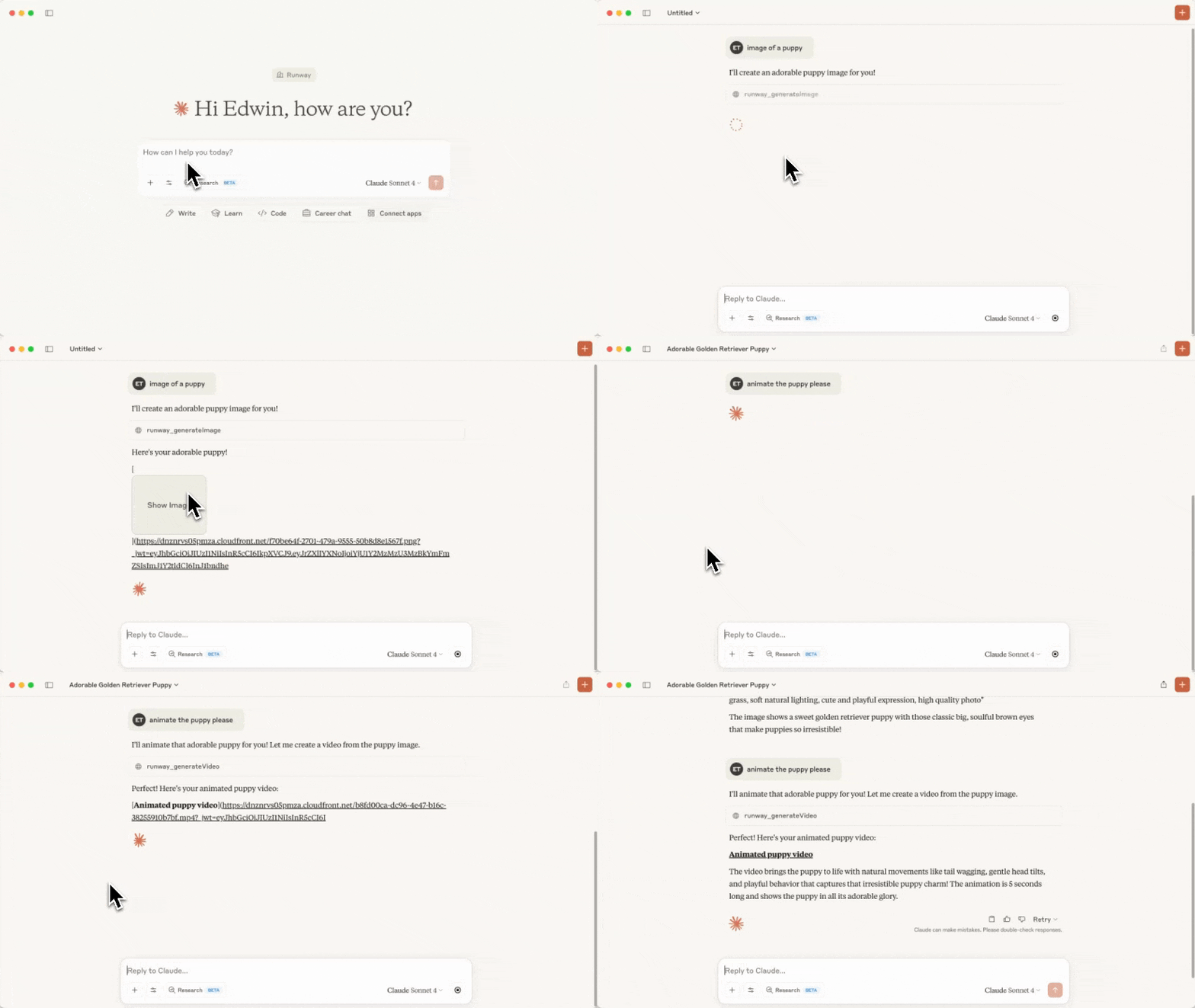
Video sped up for demo purposes
This repository holds the code for a MCP server that calls the Runway API.
The following tools are available in this MCP:
Tool Name | Description | Parameters |
| Lists available models per capability and the recommended default for each | (none) |
| Generates a video from an image and a text prompt | - promptImage - promptText (optional) - ratio - duration - model (optional) |
| Generates an image from a text prompt, and reference images | - promptText - referenceImages (note that uploaded images won't work as references, only previously generated ones, or URLs to images will work.) - ratio - model (optional) |
| Upscale a video to a higher resolution | - videoUri - model (optional) |
| Edits a video, optionally provide reference images. | - videoUri, referenceImages, promptText - model (optional) |
| Generates spoken audio (text-to-speech) from text | - promptText - voice (optional) - model (optional) |
| Gets the details of a task | - taskId |
| Cancels or deletes a task | - taskId |
| Get organization information | |
Generation tools accept an optional model parameter to override the recommended
default. Recommended models: Nano Banana Pro (gemini_image3_pro) for images, Seedance
(seedance2) for video, and Aleph (aleph2) for video editing. Valid ratio,
duration, and other parameter values are model-specific, so runway_listModels returns
the exact valid values and required parameters for every model — call it before choosing a
ratio/duration.
Before any generation request is sent to the Runway API, the server validates the payload against OpenAPI-derived per-model constraints (allowed enums, numeric ranges, string lengths, required fields). Invalid payloads fail locally with a readable error and never hit the network.
Related MCP server: Runware MCP Server
Before starting, you'll need to have setup your Developer account on the Runway API, setup Billing, and also created an API Key.
You'll also need Node.js setup.
Clone this repository and save it to a folder on your computer. Remember where you saved this folder because you'll need it in a later step.
Run npm install in the folder, then npm run build. You should now see a new folder called build with a index.js file inside. If you later modify any source files, run npm run build again to pick up the changes.
This installs the server as an unpacked Claude Desktop extension, so you don't have to edit any config files by hand.
Launch Claude Desktop and open Settings.
Go to Extensions, then Advanced Settings.
Click Install Unpacked Extension and select the folder you cloned in step 1 (for example /Users/edwin/runway-api-mcp-server). Click Install on the prompt.
Get your API key from https://dev.runwayml.com, paste it into the installed extension's settings, then Enable the extension.
Now, try asking Claude to generate an image!
Alternatively, register the server manually through Claude's config file.
Follow the MCP quickstart instructions to setup a config file for Claude. If you already have it, open it by running:
MacOS
open ~/Library/Application\ Support/Claude/claude_desktop_config.jsonWindows
notepad %APPDATA%\Claude\claude_desktop_config.jsonAdd the runway-api-mcp-server to the config, make sure to replace the file path and Runway API key.
{
  "mcpServers": {
    "runway-api-mcp-server": {
      "command": "node",
      "args": [
        "<ABSOLUTE_PATH_TO_YOUR_CLONED_REPO_FROM_STEP_1>/build/index.js"
      ],
      "env": {
        "RUNWAYML_API_SECRET": "<YOUR_RUNWAY_API_KEY_HERE>",
        "MCP_TOOL_TIMEOUT": "1000000"
      }
    }
  }
}
Now restart Claude Desktop, and you should see the runway-api-mcp-server in Claude's tools:
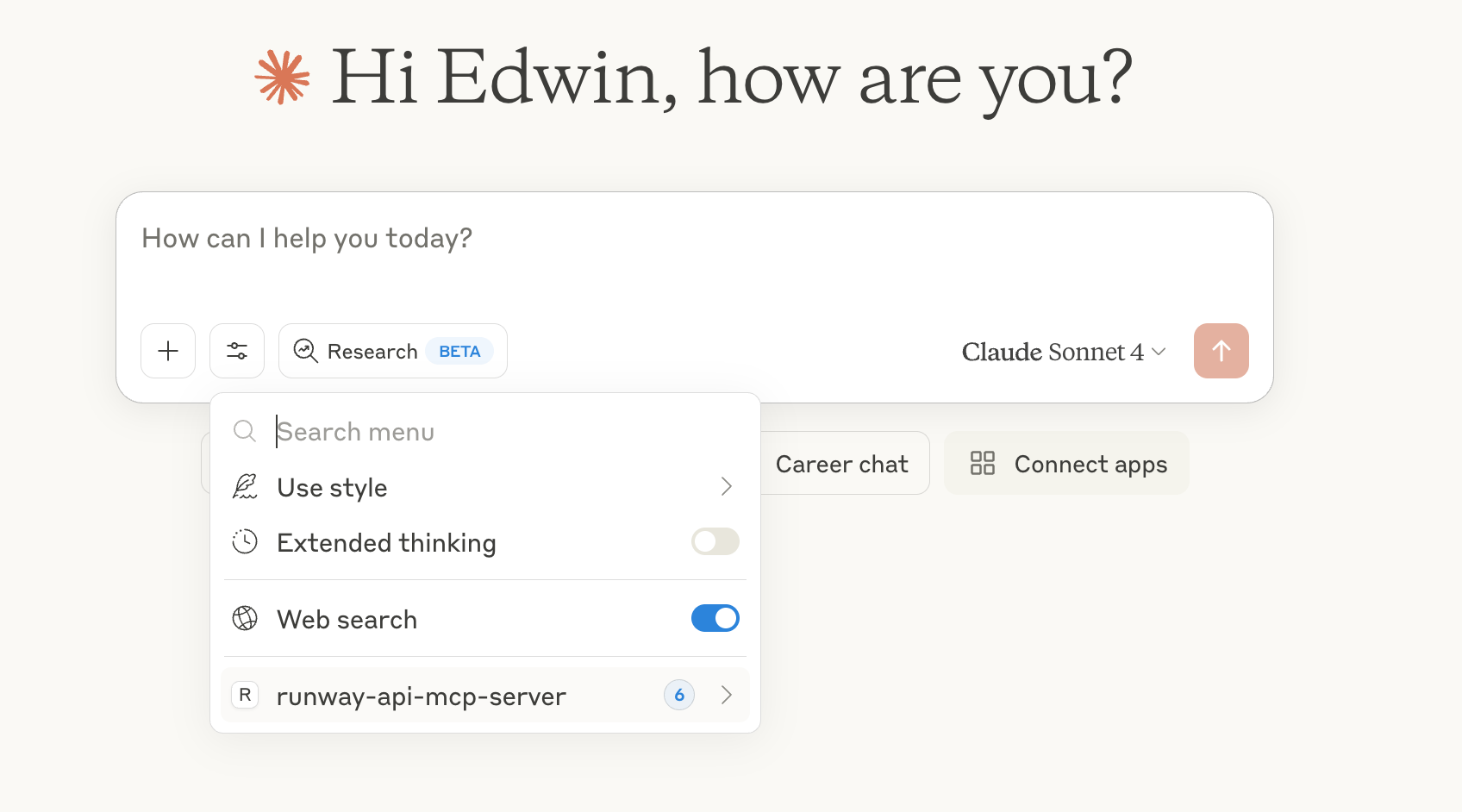
Now, try asking Claude to generate images or videos!
Images generated by the Runway API lives only for 24 hours at the generated link. There is no way to recover them after this link expires. Make sure to download the images before they expire.
The same code can run as an HTTP MCP server, which lets clients like claude.ai web, Cursor, Zed, and Windsurf connect to a single hosted URL instead of installing the extension locally.
RUNWAYML_API_SECRET=key_xxx npm run start:http
# server listens on http://0.0.0.0:3000/mcp
curl http://127.0.0.1:3000/healthz   # → {"ok":true}
To test from web clients (claude.ai) without deploying, use a tunnel that
returns HTTPS. Cloudflared works; ngrok is currently blocked by Anthropic's
connector backend:
cloudflared tunnel --url http://127.0.0.1:3000Use the printed https://<random>.trycloudflare.com/mcp as the connector URL.
Railway deploys the HTTP server with zero config.
npm i -g @railway/cli           # one-time
railway login
railway init                    # create a new project, link this folder
railway up                      # builds & deploys
railway domain                  # provisions https://<your-app>.up.railway.app
Set environment variables in the Railway dashboard (or railway variables):
Variable | Required | Purpose |
| optional | Server-side API key. Used as fallback when |
| yes | Set to |
| auto | Injected by Railway. The server reads |
Connect from claude.ai web:
Settings → Connectors → Add custom connector
URL: https://<your-app>.up.railway.app/mcp
Leave OAuth fields blank (Bearer-key flow)
For public, multi-tenant hosting, every user supplies their own Runway API key:
curl -X POST https://<your-app>.up.railway.app/mcp \
  -H "Content-Type: application/json" \
  -H "Accept: application/json, text/event-stream" \
  -H "Authorization: Bearer <user_runway_key>" \
  -d '{"jsonrpc":"2.0","id":1,"method":"tools/list"}'
When REQUIRE_AUTH=true, requests without a Bearer header receive a 401.
Bearer keys take priority over RUNWAYML_API_SECRET even when both are set.
Deletes or cancels a given task.
| Name | Required | Description | Default |
|---|---|---|---|
| taskId | Yes |
Does the description disclose side effects, auth requirements, rate limits, or destructive behavior?
With no annotations provided, the description carries the full burden of behavioral disclosure. It states the action ('deletes or cancels') but doesn't clarify whether this is reversible, requires specific permissions, affects related resources, or has side effects like rate limits. This is a significant gap for a destructive operation.
Agents need to know what a tool does to the world before calling it. Descriptions should go beyond structured annotations to explain consequences.
Is the description appropriately sized, front-loaded, and free of redundancy?
The description is a single, efficient sentence that directly states the tool's purpose without unnecessary words. It is appropriately sized and front-loaded, making it easy to parse quickly.
Shorter descriptions cost fewer tokens and are easier for agents to parse. Every sentence should earn its place.
Given the tool's complexity, does the description cover enough for an agent to succeed on first attempt?
For a destructive tool with no annotations, 0% schema coverage, and no output schema, the description is incomplete. It lacks critical details like behavioral traits, parameter meaning, and expected outcomes, leaving the agent with insufficient context for safe and effective use.
Complex tools with many parameters or behaviors need more documentation. Simple tools need less. This dimension scales expectations accordingly.
Does the description clarify parameter syntax, constraints, interactions, or defaults beyond what the schema provides?
The input schema has 1 parameter with 0% description coverage, so the description must compensate. It mentions 'a given task' but doesn't explain what taskId represents (e.g., format, source, or constraints), adding minimal value beyond the schema's basic structure.
Input schemas describe structure but not intent. Descriptions should explain non-obvious parameter relationships and valid value ranges.
Does the description clearly state what the tool does and how it differs from similar tools?
The description clearly states the action ('deletes or cancels') and the target resource ('a given task'), which is specific and unambiguous. However, it doesn't differentiate this tool from its siblings (like runway_editVideo or runway_getTask), which would require a 5.
Agents choose between tools based on descriptions. A clear purpose with a specific verb and resource helps agents select the right tool.
Does the description explain when to use this tool, when not to, or what alternatives exist?
The description provides no guidance on when to use this tool versus alternatives. It doesn't mention prerequisites (e.g., needing an existing task), exclusions, or sibling tools, leaving the agent to infer usage from context alone.
Agents often have multiple tools that could apply. Explicit usage guidance like "use X instead of Y when Z" prevents misuse.
Edit a video using Runway Aleph. promptText is a prompt for the video. videoUri takes in a url of a video or a data uri of a video. Accepted Ratio values are 1280:720, 720:1280, 1104:832, 960:960, 832:1104, 1584:672, 848:480, 640:480. Use 1280:720 by default. It also accepts reference images, in the form of either a url or a base64 encoded image. Each reference image has a tag, which is a string that refers to the image from the user prompt. For example, if the user prompt is "IMG_1 on a red background", and the reference image has the tag "IMG_1", the model will use that reference image to generate the image.
| Name | Required | Description | Default |
|---|---|---|---|
| promptText | Yes | ||
| ratio | Yes | ||
| referenceImages | No | ||
| videoUri | Yes |
Does the description disclose side effects, auth requirements, rate limits, or destructive behavior?
With no annotations provided, the description carries the full burden of behavioral disclosure. It describes what the tool does (edit video) and lists accepted ratios and reference image usage, but lacks critical behavioral details: it doesn't mention whether this is a read-only or destructive operation, expected processing time, rate limits, authentication needs, error handling, or output format. The description covers functional aspects but misses operational traits essential for an AI agent.
Agents need to know what a tool does to the world before calling it. Descriptions should go beyond structured annotations to explain consequences.
Is the description appropriately sized, front-loaded, and free of redundancy?
The description is appropriately sized and front-loaded, starting with the core purpose. It efficiently lists parameter details without unnecessary fluff. However, the explanation of reference images is slightly verbose (e.g., the example with 'IMG_1'), which could be tightened. Overall, most sentences earn their place by clarifying parameters, but minor improvements in brevity are possible.
Shorter descriptions cost fewer tokens and are easier for agents to parse. Every sentence should earn its place.
Given the tool's complexity, does the description cover enough for an agent to succeed on first attempt?
Given the tool's complexity (video editing with 4 parameters), no annotations, and no output schema, the description is moderately complete. It covers parameter semantics well but lacks behavioral transparency and usage guidelines. For a tool with no structured safety or output information, it should provide more context on what the tool returns or potential side effects, leaving gaps that could hinder an AI agent's effective use.
Complex tools with many parameters or behaviors need more documentation. Simple tools need less. This dimension scales expectations accordingly.
Does the description clarify parameter syntax, constraints, interactions, or defaults beyond what the schema provides?
The description adds significant meaning beyond the input schema, which has 0% schema description coverage. It explains that 'promptText' is a prompt for the video, 'videoUri' accepts a URL or data URI, 'ratio' has specific accepted values with a default of 1280:720, and 'referenceImages' include tags that link to user prompts. This compensates fully for the schema's lack of descriptions, providing clear semantics for all 4 parameters.
Input schemas describe structure but not intent. Descriptions should explain non-obvious parameter relationships and valid value ranges.
Does the description clearly state what the tool does and how it differs from similar tools?
The description clearly states the tool's purpose: 'Edit a video using Runway Aleph.' It specifies the action (edit), resource (video), and technology (Runway Aleph), which distinguishes it from sibling tools like runway_generateVideo (generation) or runway_upscaleVideo (enhancement). However, it doesn't explicitly contrast with all siblings, such as runway_cancelTask or runway_getTask, leaving some ambiguity.
Agents choose between tools based on descriptions. A clear purpose with a specific verb and resource helps agents select the right tool.
Does the description explain when to use this tool, when not to, or what alternatives exist?
The description provides no guidance on when to use this tool versus alternatives. It mentions 'promptText' and 'videoUri' but doesn't explain scenarios where editing is preferred over generating a new video (runway_generateVideo) or upscaling (runway_upscaleVideo). There's no mention of prerequisites, constraints, or typical use cases, relying solely on parameter descriptions without contextual advice.
Agents often have multiple tools that could apply. Explicit usage guidance like "use X instead of Y when Z" prevents misuse.
Generate an image from a text prompt and optional reference images. Available ratios are 1920:1080, 1080:1920, 1024:1024, 1360:768, 1080:1080, 1168:880, 1440:1080, 1080:1440, 1808:768, 2112:912, 1280:720, 720:1280, 720:720, 960:720, 720:960, 1680:720. Use 1920:1080 by default. It also accepts reference images, in the form of either a url or a base64 encoded image. Each reference image has a tag, which is a string that refers to the image from the user prompt. For example, if the user prompt is "IMG_1 on a red background", and the reference image has the tag "IMG_1", the model will use that reference image to generate the image. The return of this function will contain a url to the generated image.
| Name | Required | Description | Default |
|---|---|---|---|
| promptText | Yes | ||
| ratio | Yes | ||
| referenceImages | No |
Does the description disclose side effects, auth requirements, rate limits, or destructive behavior?
With no annotations provided, the description carries the full burden. It discloses key behavioral traits: the tool generates images, accepts reference images with tags, and returns a URL. However, it misses details like rate limits, authentication needs, or error handling. It does not contradict annotations (none provided).
Agents need to know what a tool does to the world before calling it. Descriptions should go beyond structured annotations to explain consequences.
Is the description appropriately sized, front-loaded, and free of redundancy?
The description is appropriately sized and front-loaded, starting with the core purpose. Every sentence adds value (e.g., ratio options, reference image mechanics, return format). It could be slightly more structured but avoids redundancy and is efficient.
Shorter descriptions cost fewer tokens and are easier for agents to parse. Every sentence should earn its place.
Given the tool's complexity, does the description cover enough for an agent to succeed on first attempt?
Given no annotations, no output schema, and 0% schema coverage, the description does well by explaining parameters and return values. However, for a generative tool with siblings, it lacks details on limitations (e.g., prompt length, image size) and error cases, leaving some gaps in completeness.
Complex tools with many parameters or behaviors need more documentation. Simple tools need less. This dimension scales expectations accordingly.
Does the description clarify parameter syntax, constraints, interactions, or defaults beyond what the schema provides?
Schema description coverage is 0%, so the description must compensate. It adds significant meaning: it explains 'ratio' with available values and a default, and details 'referenceImages' with tags and usage examples. It covers all 3 parameters (promptText, ratio, referenceImages) beyond the schema, though not exhaustively for each.
Input schemas describe structure but not intent. Descriptions should explain non-obvious parameter relationships and valid value ranges.
Does the description clearly state what the tool does and how it differs from similar tools?
The description clearly states the tool's purpose: 'Generate an image from a text prompt and optional reference images.' It specifies the verb ('generate'), resource ('image'), and distinguishes from siblings like runway_generateVideo (image vs. video generation) and runway_editVideo (generation vs. editing).
Agents choose between tools based on descriptions. A clear purpose with a specific verb and resource helps agents select the right tool.
Does the description explain when to use this tool, when not to, or what alternatives exist?
The description implies usage through examples (e.g., 'if the user prompt is "IMG_1 on a red background"') but does not explicitly state when to use this tool versus alternatives like runway_generateVideo or runway_upscaleVideo. It provides context for reference images but lacks clear when/when-not guidance.
Agents often have multiple tools that could apply. Explicit usage guidance like "use X instead of Y when Z" prevents misuse.
Generate a video from an image and a text prompt. Accepted ratios are 1280:720, 720:1280, 1104:832, 832:1104, 960:960, 1584:672. Use 1280:720 by default. For duration, there are only either 5 or 10 seconds. Use 5 seconds by default. If the user asks to generate a video, always first use generateImage to generate an image first, then use the image to generate a video.
| Name | Required | Description | Default |
|---|---|---|---|
| duration | Yes | ||
| promptImage | Yes | ||
| promptText | No | ||
| ratio | Yes |
Does the description disclose side effects, auth requirements, rate limits, or destructive behavior?
With no annotations provided, the description carries the full burden of behavioral disclosure. It adds valuable context beyond the schema: it specifies accepted ratios (e.g., 1280:720), default ratio (1280:720), allowed durations (5 or 10 seconds), and default duration (5 seconds). However, it does not mention other behavioral aspects like rate limits, authentication needs, or error handling, leaving some gaps.
Agents need to know what a tool does to the world before calling it. Descriptions should go beyond structured annotations to explain consequences.
Is the description appropriately sized, front-loaded, and free of redundancy?
The description is appropriately sized and front-loaded: the first sentence states the core purpose, followed by specific constraints (ratios, durations) and usage guidelines. Every sentence adds essential information without redundancy, making it efficient and well-structured.
Shorter descriptions cost fewer tokens and are easier for agents to parse. Every sentence should earn its place.
Given the tool's complexity, does the description cover enough for an agent to succeed on first attempt?
Given the complexity (video generation tool with 4 parameters), no annotations, and no output schema, the description is mostly complete. It covers purpose, constraints, defaults, and usage flow, but lacks details on output format, error cases, or authentication requirements, which could be important for an AI agent to use it correctly.
Complex tools with many parameters or behaviors need more documentation. Simple tools need less. This dimension scales expectations accordingly.
Does the description clarify parameter syntax, constraints, interactions, or defaults beyond what the schema provides?
The schema description coverage is 0%, so the description must compensate. It adds significant meaning beyond the schema: it explains that 'ratio' accepts specific values (e.g., 1280:720) and defaults to 1280:720, and 'duration' is either 5 or 10 seconds with a default of 5. This clarifies the semantics of two key parameters, though it does not detail 'promptImage' or 'promptText' beyond their names.
Input schemas describe structure but not intent. Descriptions should explain non-obvious parameter relationships and valid value ranges.
Does the description clearly state what the tool does and how it differs from similar tools?
The description clearly states the tool's purpose: 'Generate a video from an image and a text prompt.' It specifies the verb ('generate'), resource ('video'), and inputs ('image' and 'text prompt'), distinguishing it from siblings like runway_generateImage (which generates images) and runway_editVideo (which edits existing videos).
Agents choose between tools based on descriptions. A clear purpose with a specific verb and resource helps agents select the right tool.
Does the description explain when to use this tool, when not to, or what alternatives exist?
The description provides explicit usage guidelines: 'If the user asks to generate a video, always first use generateImage to generate an image first, then use the image to generate a video.' This clearly states when to use this tool (after generating an image) and references an alternative (runway_generateImage) for the prerequisite step.
Agents often have multiple tools that could apply. Explicit usage guidance like "use X instead of Y when Z" prevents misuse.
Returns details like credit balance, usage details, and organization information.
| Name | Required | Description | Default |
|---|---|---|---|
No parameters | |||
Does the description disclose side effects, auth requirements, rate limits, or destructive behavior?
With no annotations provided, the description carries the full burden of behavioral disclosure. It states it 'Returns details,' implying a read-only operation, but doesn't cover other traits like error handling, rate limits, authentication needs, or response format. This is a significant gap for a tool with zero annotation coverage.
Agents need to know what a tool does to the world before calling it. Descriptions should go beyond structured annotations to explain consequences.
Is the description appropriately sized, front-loaded, and free of redundancy?
The description is a single, efficient sentence that directly states the tool's purpose without waste. It's appropriately sized for a simple tool with no parameters, though it could be slightly more structured by front-loading key details more explicitly.
Shorter descriptions cost fewer tokens and are easier for agents to parse. Every sentence should earn its place.
Given the tool's complexity, does the description cover enough for an agent to succeed on first attempt?
Given the tool's simplicity (0 parameters, no output schema), the description is minimal. However, it lacks completeness for an informational tool: it doesn't specify what 'details' include beyond examples, doesn't mention error cases or data format, and with no annotations, it fails to provide sufficient context for reliable use.
Complex tools with many parameters or behaviors need more documentation. Simple tools need less. This dimension scales expectations accordingly.
Does the description clarify parameter syntax, constraints, interactions, or defaults beyond what the schema provides?
The tool has 0 parameters, and schema description coverage is 100%, so there are no parameters to document. The description doesn't need to add parameter semantics, and it appropriately doesn't mention any. Baseline for 0 parameters is 4, as it avoids unnecessary information.
Input schemas describe structure but not intent. Descriptions should explain non-obvious parameter relationships and valid value ranges.
Does the description clearly state what the tool does and how it differs from similar tools?
The description clearly states the tool's purpose with a specific verb ('Returns') and resource ('details like credit balance, usage details, and organization information'), making it easy to understand what it does. However, it doesn't explicitly differentiate from sibling tools like 'runway_getTask' which might also retrieve information, so it doesn't reach the highest score.
Agents choose between tools based on descriptions. A clear purpose with a specific verb and resource helps agents select the right tool.
Does the description explain when to use this tool, when not to, or what alternatives exist?
The description provides no guidance on when to use this tool versus alternatives. It doesn't mention any context, prerequisites, or exclusions, such as when to choose this over 'runway_getTask' or other sibling tools, leaving the agent with minimal usage direction.
Agents often have multiple tools that could apply. Explicit usage guidance like "use X instead of Y when Z" prevents misuse.
Get the details of a task, if the task status is 'SUCCEEDED', there will be a 'url' field in the response. If the task status is 'FAILED', there will be a 'error' field in the response. If the task status is 'PENDING' or 'RUNNING', you can call this tool again in 5 seconds to get the task details.
| Name | Required | Description | Default |
|---|---|---|---|
| taskId | Yes |
Does the description disclose side effects, auth requirements, rate limits, or destructive behavior?
With no annotations provided, the description carries the full burden of behavioral disclosure. It effectively describes key behaviors: the response varies by task status (e.g., 'url' for 'SUCCEEDED', 'error' for 'FAILED'), and it specifies retry timing (5 seconds for 'PENDING' or 'RUNNING'). This adds valuable context beyond basic input-output, though it could mention error handling or rate limits.
Agents need to know what a tool does to the world before calling it. Descriptions should go beyond structured annotations to explain consequences.
Is the description appropriately sized, front-loaded, and free of redundancy?
The description is appropriately sized and front-loaded, with three sentences that each add value: the first states the purpose, the second details response fields by status, and the third provides retry guidance. There is no wasted text, making it efficient and well-structured.
Shorter descriptions cost fewer tokens and are easier for agents to parse. Every sentence should earn its place.
Given the tool's complexity, does the description cover enough for an agent to succeed on first attempt?
Given the tool's moderate complexity (1 parameter, no output schema, no annotations), the description is fairly complete. It covers purpose, response behavior, and usage timing, but lacks details on parameter meaning, error cases beyond 'FAILED', or integration with sibling tools. This leaves minor gaps in full contextual understanding.
Complex tools with many parameters or behaviors need more documentation. Simple tools need less. This dimension scales expectations accordingly.
Does the description clarify parameter syntax, constraints, interactions, or defaults beyond what the schema provides?
The input schema has 1 parameter with 0% description coverage, so the description must compensate. It doesn't explicitly mention the 'taskId' parameter or its semantics, leaving it undocumented. However, the context implies the parameter is used to identify a task, providing minimal but insufficient detail for full understanding.
Input schemas describe structure but not intent. Descriptions should explain non-obvious parameter relationships and valid value ranges.
Does the description clearly state what the tool does and how it differs from similar tools?
The description clearly states the tool's purpose: 'Get the details of a task.' It specifies the verb ('Get') and resource ('task'), making the function unambiguous. However, it doesn't explicitly differentiate from sibling tools like 'runway_cancelTask' or 'runway_getOrg', which prevents a perfect score.
Agents choose between tools based on descriptions. A clear purpose with a specific verb and resource helps agents select the right tool.
Does the description explain when to use this tool, when not to, or what alternatives exist?
The description provides clear context on when to use this tool: to retrieve task details, with specific guidance on retrying for 'PENDING' or 'RUNNING' statuses. It implies usage for monitoring task progress but doesn't explicitly state when not to use it or name alternatives among siblings, such as for task cancellation or editing.
Agents often have multiple tools that could apply. Explicit usage guidance like "use X instead of Y when Z" prevents misuse.
Upscale a video to a higher resolution. videoUri takes in a url of a video or a data uri of a video.
| Name | Required | Description | Default |
|---|---|---|---|
| videoUri | Yes |
Does the description disclose side effects, auth requirements, rate limits, or destructive behavior?
With no annotations provided, the description carries the full burden of behavioral disclosure. It states the action ('upscale') but doesn't cover critical traits such as processing time, rate limits, authentication needs, output format, or potential side effects (e.g., file size changes). This leaves significant gaps in understanding how the tool behaves in practice.
Agents need to know what a tool does to the world before calling it. Descriptions should go beyond structured annotations to explain consequences.
Is the description appropriately sized, front-loaded, and free of redundancy?
The description is highly concise and front-loaded, with two sentences that directly address the tool's function and parameter usage without any wasted words. Each sentence earns its place by providing essential information efficiently, making it easy to scan and understand quickly.
Shorter descriptions cost fewer tokens and are easier for agents to parse. Every sentence should earn its place.
Given the tool's complexity, does the description cover enough for an agent to succeed on first attempt?
Given the tool's complexity (video processing), lack of annotations, no output schema, and low schema coverage, the description is incomplete. It doesn't explain what the upscaled output looks like (e.g., resolution options, format), potential errors, or integration details, leaving too many unknowns for effective use by an AI agent.
Complex tools with many parameters or behaviors need more documentation. Simple tools need less. This dimension scales expectations accordingly.
Does the description clarify parameter syntax, constraints, interactions, or defaults beyond what the schema provides?
The description adds some meaning by explaining that 'videoUri' accepts 'a url of a video or a data uri of a video,' which clarifies the parameter's purpose beyond the schema's basic type. However, with 0% schema description coverage and only one parameter, this is adequate but minimal—it doesn't detail constraints like supported URL formats or video specifications, keeping it at the baseline.
Input schemas describe structure but not intent. Descriptions should explain non-obvious parameter relationships and valid value ranges.
Does the description clearly state what the tool does and how it differs from similar tools?
The description clearly states the tool's purpose with a specific verb ('upscale') and resource ('video'), and specifies the target outcome ('to a higher resolution'). It distinguishes from siblings like 'editVideo' or 'generateVideo' by focusing on resolution enhancement rather than editing or creation. However, it doesn't explicitly contrast with all siblings, keeping it at 4 instead of 5.
Agents choose between tools based on descriptions. A clear purpose with a specific verb and resource helps agents select the right tool.
Does the description explain when to use this tool, when not to, or what alternatives exist?
The description provides no guidance on when to use this tool versus alternatives. It doesn't mention prerequisites (e.g., input video format requirements), when not to use it (e.g., for non-video files), or compare it to sibling tools like 'editVideo' for other modifications. This lack of contextual usage information results in a minimal score.
Agents often have multiple tools that could apply. Explicit usage guidance like "use X instead of Y when Z" prevents misuse.
Recent tool additions, removals, and schema changes observed during successful MCP inspections.
v1.0.0runway_cancelTaskrunway_editVideorunway_generateImagerunway_generateVideorunway_getOrgrunway_getTaskrunway_upscaleVideoScored across 7 tools
Each tool has a clearly distinct purpose: cancelTask, editVideo, generateImage, generateVideo, getOrg, getTask, and upscaleVideo. There is no overlap in functionality; for example, generateImage and generateVideo serve different media types, and getTask and cancelTask manage tasks distinctly. The descriptions reinforce these distinctions, making misselection unlikely.
All tools follow a consistent snake_case naming pattern with the prefix 'runway_' followed by a verb_noun structure (e.g., runway_cancelTask, runway_generateImage). This uniformity makes the tool set predictable and easy to navigate, with no deviations in style or convention.
With 7 tools, the server is well-scoped for a video and image generation API. Each tool serves a specific, necessary function—covering task management, media generation, editing, upscaling, and organization details—without being overly sparse or bloated. The count aligns perfectly with the domain's typical operations.
The tool set covers core workflows for video and image generation, including create (generateImage/generateVideo), read (getTask/getOrg), update (editVideo/upscaleVideo), and delete (cancelTask). A minor gap is the lack of a tool for deleting or managing generated media files, but agents can work around this using existing tools for task cancellation and retrieval.
Create AI images and videos, manage projects and credits, and use workspace campaign context.
Image and video AI tools and your own pipelines, run from any AI assistant.
Create and manage cinematic AI video renders through the Future Video Studio Agent API.
LLM chat, text tools, image generation, editing, batch image jobs, and asynchronous video generation