
mdeditdiff
by roy-vinay
README.md
<picture>
<source media="(prefers-color-scheme: dark)" srcset=".github/assets/masthead-dark.svg">
<img src=".github/assets/masthead-light.svg" width="100%" alt="mdEditDiff: tracks what changed in Markdown documents since each person or AI agent last read them, across sessions and coding tools. By Vinay Roy.">
</picture>
<p> </p>
**[Website and live demo](https://roy-vinay.github.io/mdeditdiff/)** · [Download for Mac](https://github.com/roy-vinay/mdeditdiff/releases/latest/download/mdEditDiff-macOS.zip)
mdEditDiff is a free, open-source tool (MIT license) for anyone who works on Markdown files alongside AI
agents. It has two parts: a command-line tool and MCP server for agents, and a native Mac app for people.
Coding agents can already notice when a file changes. mdEditDiff answers a narrower question that they and git
don't answer together: **what changed in this document since this particular person or agent last read it?**
It keeps a private change history for every Markdown file you work on, including edits nobody committed, and
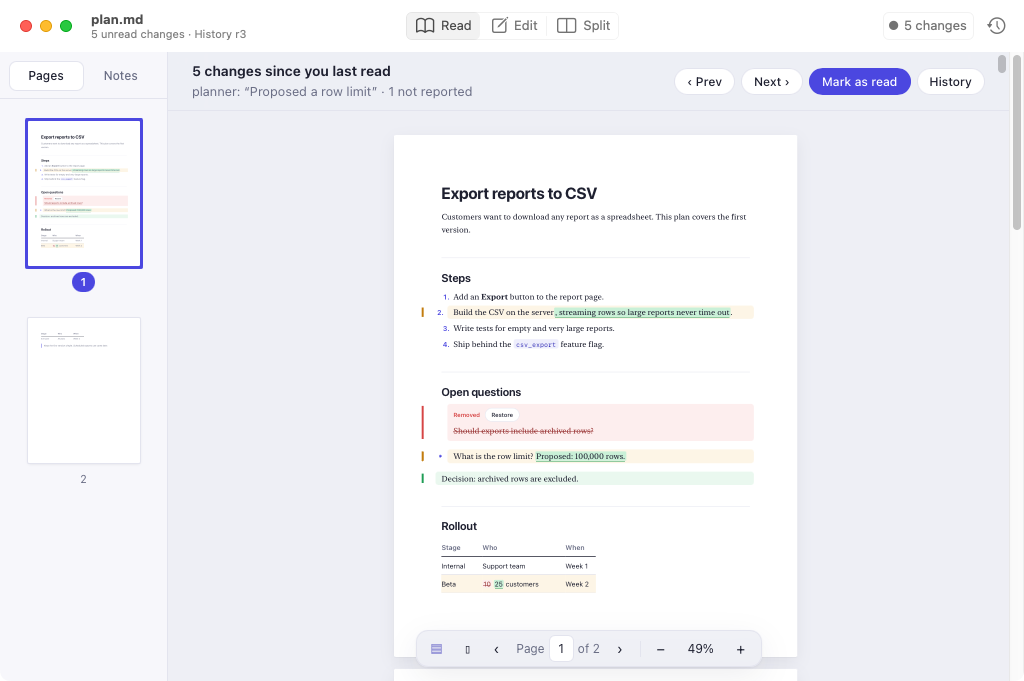
remembers where each reader last looked, across sessions and across tools. Open a plan in the Mac app and you see exactly what changed since you
last read it, highlighted in the document, with each agent's note, and one click brings back anything that
was removed. Your agents ask the same history what changed and get back only the changed parts, word by
word, instead of re-reading the whole file.
[Get it](#get-it) · [See it in action](#see-it-in-action) · [The Mac app](#the-mac-app) · [Use it with an agent](#use-it-with-an-agent) · [Contribute](#contribute)
The same story from the agents' side, in a terminal:

## The problem
AI agents increasingly coordinate through Markdown files. One agent writes a plan, another implements it,
a person corrects a step, and the first agent revises it again. Coding agents do this constantly with
files like `plan.md`, `spec.md`, `NOTES.md`, `CLAUDE.md` and `AGENTS.md`.
Every one of those readers needs the answer to the same question: **what changed since I last looked, and
who says they changed it?** Today's tools each answer part of it:
- **Re-reading the whole file** costs tokens on every turn, and an agent comparing two long versions in
its head easily misses a removed sentence.
- **`git diff`** compares against the last commit, not against what *this* reader saw, and agents often
write many versions between commits. It also shows raw line diffs, where a rewrapped paragraph looks
like a full rewrite.
- **Notes from the last writer** ("I updated step 3") depend on the writer remembering, and can be wrong.
- **Coding agents' built-in change detection.** Claude Code, for example, notices when a file it read during
a session changes on disk, whoever changed it, and shows the agent what changed. That covers one session of
one tool. It resets when the session ends, and it isn't shared: Codex doesn't know what Claude Code saw,
and neither tool knows what you have read.
The result: agents act on stale plans, people can't tell what an agent rewrote, and when two writers edit
at once, the last write silently wins.
## How it compares
| | Baseline for "what changed" | Uncommitted edits | Across sessions | Across tools | Who changed it | For people |
| --- | --- | --- | --- | --- | --- | --- |
| **git** | The last commit, the same for everyone | No | Yes | Yes | Commit author | Yes, as line diffs |
| **Editor history** (for example VS Code's Timeline) | Saved versions in that editor | Yes, in that editor | Yes | No | No | Yes |
| **Coding agents' change detection** | What that agent read this session | Yes | No | No | No | No |
| **mdEditDiff** | What **each reader** last saw | Yes | Yes | Yes, through the CLI and MCP | Only when the writer reports it | Yes, the Mac app |
mdEditDiff doesn't replace git: commit as usual. It fills the gap between commits and between tools.
[`examples/cross-tool.sh`](examples/cross-tool.sh) shows it: Claude Code, Codex and a person share a plan over
three days in separate sessions, and each gets only the changes since its own last read, while `git diff`
shows one diff for everyone.
## How it works
```mermaid
sequenceDiagram
participant P as Planner agent
participant F as plan.md + history
participant H as You
participant I as Implementer agent
P->>F: writes the plan, checkpoint "First plan" (r1)
I->>F: changes_since → first look, full text
H->>F: edits two steps in the Mac app and saves (r2, under your name)
P->>F: revises, checkpoint "Proposed a row limit" (r3)
I->>F: changes_since → only what changed since r1, and who reported it
```
1. **Every version is kept.** Each time an agent or the app touches a file through mdEditDiff, the file's
current content is recorded as a revision (`r1`, `r2`, ...) if it changed. The history lives in a
private folder on your computer, compressed and deduplicated. Nothing is written next to your files.
2. **Every reader has a bookmark.** Each reader name (`planner`, `implementer`, your Mac user name) has its
own "last looked" revision for each file. Two agents can be at different points and both get correct
answers.
3. **Answers are about meaning, not bytes.** The file is split into Markdown blocks (headings, paragraphs,
list items, table rows, code blocks), matched up, and compared word by word inside the blocks that
changed. Rewrapping a paragraph or renumbering a list isn't a change. Each change says which section
it's in.
4. **Who changed what is recorded when people say so.** Agents call `checkpoint` with their name and a
one-line note after editing; the Mac app does this for you on every save. Anything nobody reported is
labeled "changed outside, not reported", so you always know what is unaccounted for.
Everything stays on your computer. There is no account, no cloud service and no telemetry, and none of
the tools ever modify your files.
## Who it's for and when to use it
| You are | Use it to |
| --- | --- |
| **A developer working with coding agents** (Claude Code, Cursor, Codex) | See exactly what the agent changed in its plan or spec since you last read it, correct it in a proper editor, and get back anything it deleted. |
| **Building multi-agent workflows** | Let a planner, implementer and reviewer share one plan file. Each asks what changed since its last turn instead of re-reading everything, and leaves a note for the next. |
| **Running long agent sessions** | Keep a running log of every version of a living document (`NOTES.md`, `TODO.md`, a design doc), with each writer's reported changes and notes, without committing to git every few minutes. |
| **Writing or reviewing docs** | Read READMEs and specs as formatted documents on your Mac, make small fixes, and save without your editor reformatting the whole file. |
When it helps most: any Markdown file that **more than one writer** touches, especially when some of them
are agents. For a file only you edit, the Mac app is still a pleasant reader and editor, but the change
tracking matters less.
## Get it
### The Mac app
Requires macOS 14 (Sonoma) or later, on Apple silicon or Intel.
1. Download **mdEditDiff-macOS.zip** from the
[latest release](https://github.com/roy-vinay/mdeditdiff/releases/latest).
2. Unzip it and drag **mdEditDiff.app** into **Applications**.
3. Allow it to open the first time. The app isn't notarized by Apple yet, so macOS blocks it with
*"Apple could not verify mdEditDiff"*. Click **Done**, then either:
- open **System Settings > Privacy & Security**, scroll down, click **Open Anyway**, and confirm; or
- run `xattr -dr com.apple.quarantine /Applications/mdEditDiff.app` in Terminal.
4. Open a file: right-click any `.md` file in Finder and choose **Open With > mdEditDiff**. To make it the
default, select a `.md` file, press ⌘I, pick mdEditDiff under **Open with**, and click **Change All**.
### The command-line tool and MCP server
Requires Node.js 20 or later (check with `node -v`; get it from [nodejs.org](https://nodejs.org)).
```bash
npm install -g mdeditdiff
mdeditdiff --help
```
Or run it without installing: `npx mdeditdiff --help`.
Connect it to Claude Code:
```bash
claude mcp add mdeditdiff -- mdeditdiff mcp
```
With the tool installed, the Mac app records each save in the shared history, and the window subtitle shows
the current revision (for example "History r4").
## See it in action
The walkthrough plays out the story in the animation above, using a temporary folder with its own history,
so it never touches your files. It runs from a clone of the repository:
```bash
git clone https://github.com/roy-vinay/mdeditdiff
cd mdeditdiff
npm install
npm run walkthrough
```
It walks through six steps: a planner agent writes `plan.md`, an implementer reads it, you edit it without
telling anyone, the planner checks what changed before revising, the implementer asks what changed and gets
back four precise changes, and the full history shows who did what.
To see the Mac app side, open [`examples/plan.md`](https://github.com/roy-vinay/mdeditdiff/blob/main/examples/plan.md) in mdEditDiff, switch to Edit (⌘2), change a
step, and save. With the command-line tool installed, then run:
```bash
mdeditdiff changes examples/plan.md --reader me # first time: the full text
# edit and save the file in the app again, then:
mdeditdiff changes examples/plan.md --reader me # just your edit, labeled with your name
```
## The Mac app
A native macOS reader and editor for Markdown, built for checking and fixing documents that agents write.
It opens files from Finder as formatted documents, shows what changed since you last read them, and is
careful never to change anything you didn't.
### What's available today
| Feature | Status |
| --- | --- |
| Read, Edit and Split modes | Available |
| Saves that never touch what you didn't change | Available |
| Safe preview (no scripts, no remote images) | Available |
| Changes since you last read, highlighted in the document, with each agent's note | Available (needs the command-line tool) |
| Restore a removed passage, compare with any earlier version, restore a whole version | Available (needs the command-line tool) |
| Live refresh when an agent edits an open file; a choice when you have unsaved edits | Available |
| Find in Read mode and in the preview of Split mode | Available |
| Pages (US Letter or A4) with numbered thumbnails, Go to Page, zoom, and two pages side by side, like Preview | Available |
| Notarized download, settings window, Open Recent | Planned |
| Highlights in five colors and notes on the text, kept when the text changes, with a Notes list | Available |
| Export and import of notes, highlights in Edit mode, a folder view of unread changes | Planned |
### Changes since you last read
When you open a file that changed since you last read it, a bar at the top says how many changes there are
and who reported them, for example *"5 changes since you last read · planner: "Proposed a row limit" · 1 not
reported"*. In the document:
- **Added** blocks have a green bar and background.
- **Changed** blocks have an amber bar, with inserted words underlined in green and removed words struck
through, while links and formatting keep working.
- **Removed** passages appear struck through where they used to be, with a **Restore** button that puts
them back as an unsaved edit you can undo or save.
Move between changes with **Next** and **Previous** (⌘] and ⌘[). **Mark as read** (⇧⌘K) clears the
highlights; closing the window does the same, so next time you only see what's new. Your own saves never
count as unread changes for you.
**Version history** (⇧⌘H) lists every version, newest first, with who reported it and their note.
**Compare** shows what changed since any earlier version; **Restore** brings a whole version back as an
unsaved edit.
**If an agent edits a file you have open**, the document refreshes and the new changes light up. If you have
unsaved edits, nothing is replaced: you choose to compare the two versions, keep your edits, or load the
other version.
All of this uses the shared history from the command-line tool, so install it too
([Get it](#the-command-line-tool-and-mcp-server)). Without it the app still reads and edits, but doesn't
track changes.
### Three modes
| Mode | Shortcut | What you see | Use it to |
| --- | --- | --- | --- |
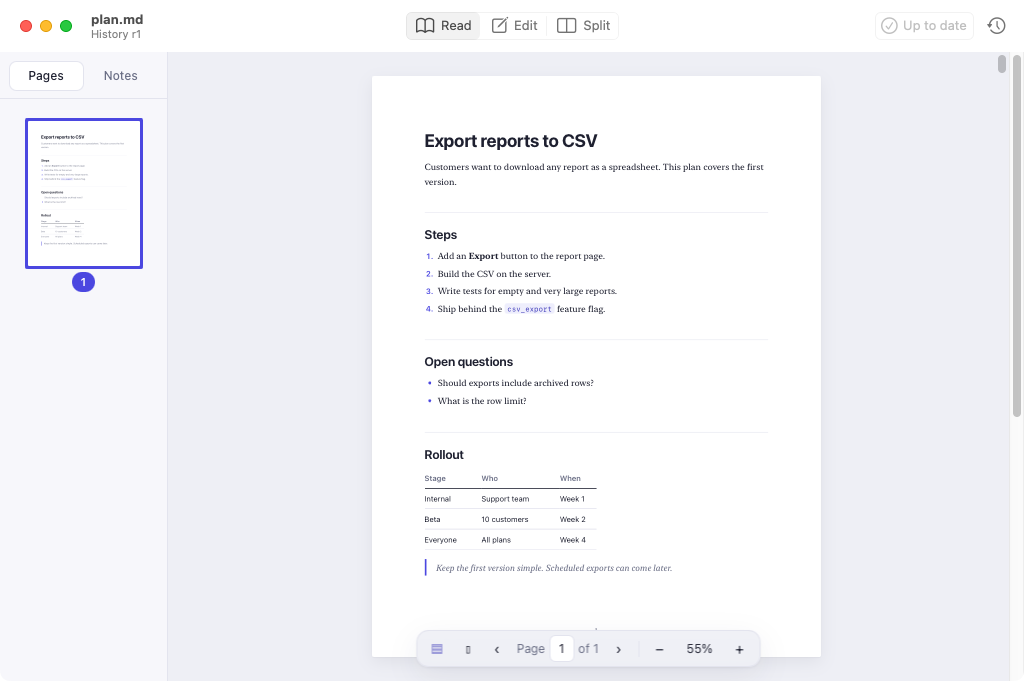
| **Read** | ⌘1 | The formatted document, laid out on pages with thumbnails on the left, like a PDF in Preview. Files open in Read mode. | Review a plan or README without Markdown symbols in the way. |
| **Edit** | ⌘2 | The raw Markdown in a plain-text editor with light syntax coloring. | Make changes with full control over the source. |
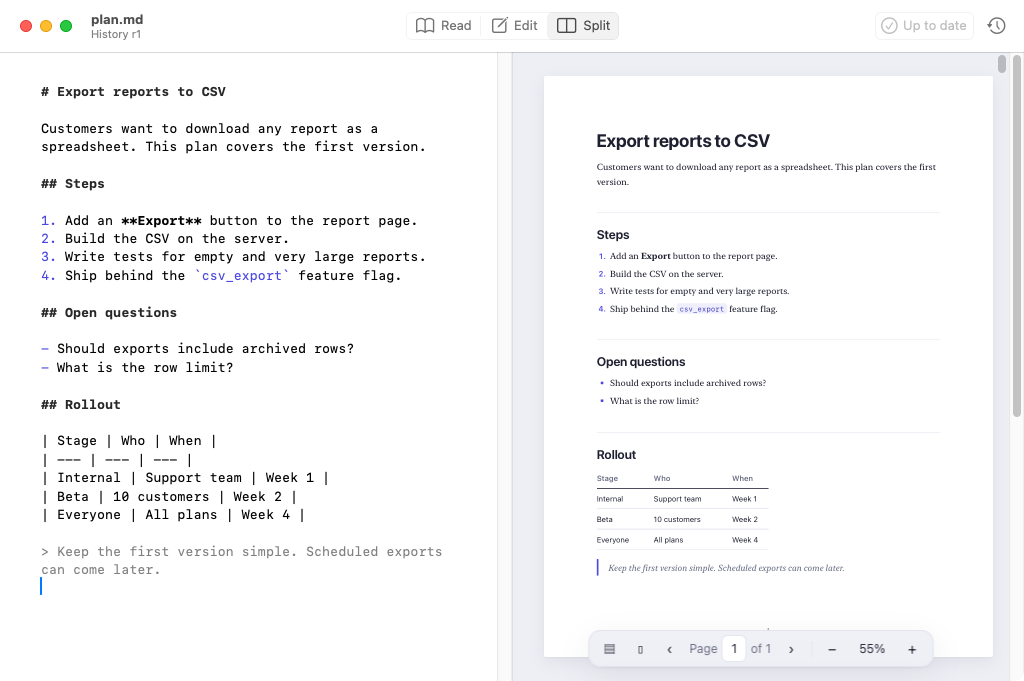
| **Split** | ⌘3 | The editor on the left and a live preview on the right, updating as you type. | Edit while checking how the result looks. |
⇧⌘M cycles through the modes, and the Read / Edit / Split switch sits in the middle of the toolbar. On the right, the toolbar shows how many unread changes there are (click to jump to the next one) and opens version history.
### Pages, like Preview
Read mode lays the document out on pages, with numbered thumbnails on the left. Click a thumbnail to jump
to that page; as you scroll, the selected thumbnail follows. The bar at the bottom shows "Page 3 of 12":
type a page number to go there, and use − and + to zoom.
- **Page size:** US Letter by default, or A4 (**View > Page Size**). Margins are one inch.
- **Fits the window:** pages open sized so the whole page is in view. ⌘+ and ⌘− zoom, ⌘0 is actual size,
⌘9 fits the page again, and **View > Fit Width** fills the width. Zooming never changes the page count.
- **Two pages side by side**, like an open book: **View > Two Pages** (⌃⌘2) or the ▯▯ button in the page
bar. **View > Single Page** (⌃⌘1) goes back. Next and previous move by a pair of pages.
- **Pages are only a view.** Markdown has no pages, so nothing is ever added to your file. Page numbers
come from the current text, font size and page size, and they update as the text changes, keeping your
place by the text you were reading.
- **Breaks you'd expect:** headings stay with the text after them, long paragraphs, lists, tables and code
continue on the next page (a table repeats its header), and nothing is cut off. Find works across page
breaks.
- **Prefer one long page?** Choose **View > Continuous Scroll**. Thumbnails hide with **View > Page
Thumbnails** (⌥⌘2) or the ▤ button. The app remembers these choices.
### Highlights and notes
Select text in Read mode (or the preview in Split mode) and a small bar appears: pick a color to
highlight it, or choose **Add Note**. You can also right-click the selection, or use **Edit > Highlight**
(⌃⌘H) and **Edit > Add Note** (⌃⌘N).
- **Notes** show as a marker in the margin next to their passage. Click the marker to open or close the
note; Escape closes it. Notes save as you type.
- **Click a highlight** to change its color, add a note, remove the highlight, or delete it.
- **Notes and Highlights** (⌥⌘3, or the Notes tab in the sidebar) lists them in document order. Click one
to jump to it.
- **They stay on their text.** When you or an agent edit the file, highlights and notes move with their
passage. If the passage is removed, rewritten, or now appears more than once, the note isn't moved to a
guess; it waits under **Needs Reattachment** until you select the right text and choose **Reattach to
Selection**.
- **Private and separate.** They're kept by the app on your Mac, never inside the Markdown file, and
agents never see them. See [docs/ANNOTATIONS.md](https://github.com/roy-vinay/mdeditdiff/blob/main/docs/ANNOTATIONS.md) for where and how.
- Each color also has its own underline style (solid, double, dotted, dashed, wavy), so they can be told
apart without color.
### Day and night icon
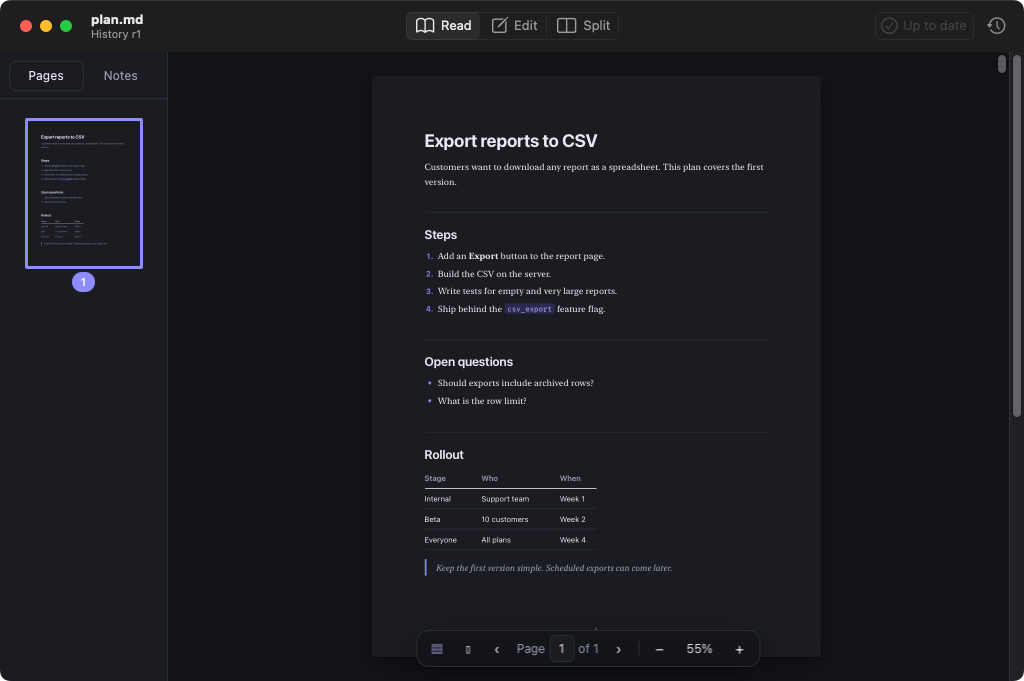
The app icon is white by day and graphite black at night. It follows your Mac's Light and Dark mode, so
with **System Settings > Appearance** set to **Auto** it switches with the time of day. The Dock icon
switches while the app is running; on macOS versions that support dark app icons, Finder shows the
matching icon too.
### Saving you can trust
- **Nothing changes unless you changed it.** Opening and saving a file without edits writes back the exact
original bytes. When you do edit, the file keeps its line endings (Unix, Windows or classic Mac), its
byte-order mark if it had one, and whether it ends with a newline. Your git diffs show only your edit.
- **No surprise autosave.** The app never saves over your file on its own. A dot in the close button means
unsaved changes, closing asks whether to save, and **File > Revert to Saved** throws edits away.
- **No reformatting.** Smart quotes, smart dashes, auto-correct and auto-links are off, so Markdown and code
stay exactly as you type them. Paste is always plain text.
- **UTF-8 only, on purpose.** A file in another encoding gets a clear message instead of being converted.
### A preview that's safe to open
- Raw HTML and `<script>` tags in a document are shown as text, never run.
- `javascript:` and other unsafe links are removed.
- Remote images are not downloaded; a notice shows where they would be. Local images load relative to the
document.
- Web links open in your browser. Links to other `.md` files open in mdEditDiff, and links to anything
else are shown in Finder rather than opened.
### Shared history
With the command-line tool installed, every save is recorded as a checkpoint under your Mac user name, with
the note "Saved in mdEditDiff". Agents asking `changes_since` then see your edits labeled with your name
instead of "changed outside, not reported", and the window subtitle shows the file's current revision.
### Shortcuts
| Action | Shortcut |
| --- | --- |
| Open / New | ⌘O / ⌘N (new documents open in Edit mode) |
| Read / Edit / Split | ⌘1 / ⌘2 / ⌘3, or ⇧⌘M to cycle |
| Save / Save As | ⌘S / ⇧⌘S |
| Find / Find and Replace | ⌘F / ⌥⌘F (replace works in Edit mode) |
| Find next / previous, Use selection for Find | ⌘G / ⇧⌘G, ⌘E |
| Zoom in / out, actual size, fit page (pages) | ⌘+ / ⌘− / ⌘0 / ⌘9 |
| Single page / Two pages | ⌃⌘1 / ⌃⌘2 |
| Bigger / smaller text (editor and continuous scroll) | ⌘+ / ⌘− |
| Next / Previous page (a pair in two-page view), Go to Page | → / ←, or ⌥⌘↓ / ⌥⌘↑; ⌥⌘G |
| Show or hide page thumbnails | ⌥⌘2 |
| Highlight, Add Note | ⌃⌘H, ⌃⌘N |
| Notes and Highlights | ⌥⌘3 |
| Next / Previous change | ⌘] / ⌘[ |
| Mark as read | ⇧⌘K |
| Version history | ⇧⌘H |
Settings, for now, are set in Terminal (a settings window is planned):
```bash
defaults write io.github.roy-vinay.mdeditdiff DefaultMode split # open files in split (or edit, read)
defaults write io.github.roy-vinay.mdeditdiff Appearance dark # or light; delete the key to follow the system
defaults write io.github.roy-vinay.mdeditdiff MarkReadOnClose -bool false # keep changes unread after closing
```
### Roadmap
- A signed and notarized download through GitHub Releases.
- A settings window and Open Recent.
- Notes and comments from people, page thumbnails, and a folder view of unread changes across a project.
### Build it yourself
Needs Xcode or the Swift toolchain:
```bash
cd app
swift test # byte-exact saving and editor tests
./scripts/build-app.sh # creates build/mdEditDiff.app and build/mdEditDiff-macOS.zip
```
## What an agent gets back
From the walkthrough: a planner wrote a plan, a person removed a question, tightened a step and recorded a
decision without telling anyone, and the planner then proposed a row limit and checked in. The
implementer asks what changed:
```
$ mdeditdiff changes plan.md --reader implementer
plan.md: 4 changes (2 modified, 1 added, 1 removed) since r1, your last look, up to r3. Marked as seen.
By: r2 changed outside, not reported; r3 planner: "Proposed a row limit"
Word changes are shown as [-removed-] {+added+}.
~ modified Export reports to CSV > Steps (list-item, line 8)
Build the CSV on the server{+, streaming rows so large reports never time out+}.
- removed Export reports to CSV > Open questions (list-item, was line 14)
- Should exports include archived rows?
~ modified Export reports to CSV > Open questions (list-item, line 14)
What is the row limit? {+Proposed: 100,000 rows.+}
+ added Export reports to CSV > Open questions (paragraph, line 16)
Decision: archived rows are excluded.
```
Four precise changes, each with its section, instead of the whole plan. Unchanged sections are never
repeated. Add `--json` for structured output ([format](https://github.com/roy-vinay/mdeditdiff/blob/main/docs/FORMAT.md)).
## Use it with an agent
**MCP (Claude Code, Cursor, and other MCP clients).** Add a server that runs `mdeditdiff mcp`, as shown
in [Get it](#the-command-line-tool-and-mcp-server) for Claude Code. In clients configured with JSON:
```json
{ "mcpServers": { "mdeditdiff": { "command": "mdeditdiff", "args": ["mcp"] } } }
```
The server offers six tools: `changes_since`, `mark_seen`, `checkpoint`, `history`, `diff`, and
`get_revision`. None of them changes a file.
**Command line.** Any agent that can run shell commands can use the same operations:
```bash
mdeditdiff changes plan.md --reader implementer # what changed since I last looked
mdeditdiff checkpoint plan.md --author implementer --note "Split step 4 into two steps"
```
**Give each tool its own reader name.** The history is shared, so name readers by who is reading: for example
`MDEDITDIFF_READER=claude-code` in Claude Code's MCP settings, `MDEDITDIFF_READER=codex` for Codex, and your
own name in the Mac app. Each then gets the changes since its own last look, even in a new session.
**Tell your agents the protocol.** Paste this into your agent instructions (for example `CLAUDE.md` or
`AGENTS.md`):
> Shared Markdown files (plans, specs, notes) are tracked with mdeditdiff. Use a stable reader name for
> yourself, such as your role. Before working from a shared file, call `changes_since` instead of
> re-reading the whole file. Right after you edit a shared file, call `checkpoint` with your name and a
> one-line note saying what you changed.
## Commands
| Command | What it does |
| --- | --- |
| `changes <file> --reader <name>` | Changes since this reader last looked, then marks the current version as seen. `--peek` leaves the "last looked" point where it is; `--full` adds the full current text; `--with-base` (with `--json`) adds the text the reader last saw. The first call for a reader returns the whole file. |
| `seen <file> --reader <name>` | Marks the current version as seen without showing anything. |
| `checkpoint <file> --author <name> [--note <text>]` | Records the current version with your name and a short note. |
| `history <file>` | Lists revisions, newest first, and where each reader last looked. |
| `diff <file> <from> [<to>]` | Compares any two revisions, for example `r2 r5` or `r2 latest`. |
| `show <file> <revision>` | Prints a revision's full text, for example to recover a deleted section. |
| `watch <file or folder>...` | Keeps running and records a revision each time a Markdown file is saved. |
| `mcp` | Runs the MCP server. |
`--reader` and `--author` can also come from `MDEDITDIFF_READER` and `MDEDITDIFF_AUTHOR`.
## Under the hood
- **Storage.** History lives in a per-user folder (on macOS, `~/Library/Application Support/mdeditdiff`;
on Linux, `~/.local/share/mdeditdiff`; or `$MDEDITDIFF_HOME`). File contents are stored once each,
gzip-compressed and named by their SHA-256 hash; a small index per document lists revisions and reader
bookmarks.
- **Concurrency.** Calls on the same file are serialized with a lock, so several agents can use it at once
without losing revisions.
- **Limits.** Only Markdown files (`.md`, `.markdown`, `.mdx` and similar) are accepted. Each file keeps up
to 500 revisions; the oldest are pruned first, except versions a reader still uses as its bookmark.
- **Diff details** and the JSON response format are in [docs/FORMAT.md](https://github.com/roy-vinay/mdeditdiff/blob/main/docs/FORMAT.md).
## What it can and can't tell you
- **Edits between calls are merged.** If a person and an agent both edit the file before anyone calls
mdeditdiff, their edits land in one revision. Run `mdeditdiff watch <folder>` in the background, or have
agents call `changes_since` before they edit, to keep edits separate.
- **Authorship is self-reported.** A checkpoint says who claims a change. mdeditdiff labels everything
else "changed outside, not reported", and won't let an agent claim a version that may hold someone
else's edits.
- **One file at a time.** History follows the file's path. Renaming a file starts a new history.
- **UTF-8 only.** Other encodings are refused rather than guessed.
- **Moves are not detected.** A moved paragraph shows as removed in one place and added in another.
## About
<a href="https://www.linkedin.com/in/royvinay"><picture><source media="(prefers-color-scheme: dark)" srcset="https://raw.githubusercontent.com/roy-vinay/roy-vinay/main/cards/about-dark.svg"><img src="https://raw.githubusercontent.com/roy-vinay/roy-vinay/main/cards/about-light.svg" width="100%" alt="About Vinay Roy: VP of Product at Burq.ai, leading Product and AI. Career from NVIDIA (2008), Qualcomm, Apple (Sidecar), Zeus Living, Vista, and a founding product role at an AI SaaS startup, to Burq.ai. Seven years as Head Instructor for the AI/ML executive program at UC Berkeley Executive Education. 3 US patents, MBA from Berkeley Haas, MS from IIT Roorkee."></picture></a>
VP of Product at [Burq.ai](https://burq.ai), leading Product and AI.
Before Burq, I was the founding product leader at an AI SaaS startup, taking it from zero to product-market fit and building multi-agent systems in production. Before that, I led a global team of about 80 across Product, Data Science and Analytics at Vista, the private aviation group behind VistaJet and XO. Earlier: marketplace growth at Zeus Living, macOS and iOS features at Apple (including Sidecar), and engineering teams at Qualcomm and NVIDIA.
For seven years I was Head Instructor for the AI/ML executive program at UC Berkeley Executive Education, teaching more than 10,000 business leaders. 3 US patents, MBA from Berkeley Haas, MS from IIT Roorkee. San Jose, CA.
<picture>
<source media="(prefers-color-scheme: dark)" srcset="https://raw.githubusercontent.com/roy-vinay/roy-vinay/main/dark_mode.svg">
<img alt="ASCII portrait of Vinay Roy. VP of Product at Burq.ai; builds AI, agents, evals and decision systems." src="https://raw.githubusercontent.com/roy-vinay/roy-vinay/main/light_mode.svg" width="985">
</picture>
## Contribute
mdEditDiff is open source under the MIT license, and contributions are welcome: bug reports, ideas and
pull requests. Open an [issue](https://github.com/roy-vinay/mdeditdiff/issues) to report a problem or
suggest a feature.
### Develop
```bash
npm install
npm test # unit, acceptance, two-agent simulation, concurrency, MCP and preview tests
# (the preview's change-highlighting tests run in Chromium when Playwright's browser is installed)
npm run bundle # after changing src/diff.ts: rebuilds the Mac app's copy of the diff engine
```
Releases are built by CI: bump the version in `package.json`, `src/version.ts` and `app/Info.plist`, add a
[CHANGELOG](CHANGELOG.md) entry, and merge to `main`. The release workflow sees the new version, tests
everything, builds the app and the CLI package, and publishes them with checksums under the tag
`mdeditdiff-v<version>`.
CI runs the tests on Linux and macOS with Node 20 and 22, builds and tests the Mac app, launches it, and
takes the screenshots on this page. To regenerate the terminal animation:
`./examples/walkthrough.sh | python3 examples/make_terminal_svg.py > docs/img/walkthrough.svg`.
Licensed under the [MIT license](LICENSE). The Mac app bundles [markdown-it](https://github.com/markdown-it/markdown-it)
(MIT) for its preview.
---
[](LICENSE) 
<sub>Licensed under the <a href="LICENSE">MIT License</a>.</sub>
<sub><strong>Independently developed.</strong> Not affiliated with or endorsed by my employer.</sub><br>
<sub><strong>Confidentiality:</strong> No proprietary code, data, or confidential information is included.</sub>
This server cannot be deployed
Maintenance
ActivityMaintained
ResponsivenessNo issues