
Odoo Claude MCP
<div align="center">
# Odoo Claude MCP
**Production-grade Model Context Protocol (MCP) server suite for Odoo ERP**
**Odoo MCP server for Claude Code and Claude.ai** — turn any **self-hosted Odoo** instance (15 → 19) into an **AI assistant** via the **Model Context Protocol**. 197+ tools, multi-tenant, **Bulgaria localization** (НАП, ДДС, ЕИК) included.
_Connect Claude, Claude Code, and any MCP-compatible client to Odoo, GitHub, filesystem, Portainer, Teams, and more — through a unified, authenticated gateway._
[](LICENSE)
[](https://www.odoo.com)
[](https://modelcontextprotocol.io)
[](https://www.docker.com)
[](https://github.com/rosenvladimirov)
[Quick Start](#-quick-start) · [Why this vs alternatives?](#-why-this-vs-alternatives) · [Use Cases](#-use-cases) · [Architecture](#-architecture) · [MCP Servers](#-mcp-servers) · [Companion Modules](#-companion-odoo-modules--theme) · [Deployment](#%EF%B8%8F-deployment)
> **Two tracks.** You are on branch `3.0` — the preview track for integrators, current **v3.3.8**. The stable track is branch [`2.0`](https://github.com/rosenvladimirov/odoo-claude-mcp/tree/2.0), current **v2.31.0**. All releases: [Releases](https://github.com/rosenvladimirov/odoo-claude-mcp/releases) · details in [Two Tracks](#-two-tracks--which-branch-do-you-want).
**[🇧🇬 Български README](README_BG.md)**
</div>
---
<div align="center">
### See Claude editing a live Odoo sale order — real CRUD, real auto-recalculation

**▶ Watch the full 4-minute demo:** [Running Odoo 18 Entirely Through AI — Claude Code + MCP Server](https://www.youtube.com/watch?v=1zPNxUV76ws)
</div>
---
## 🎯 What is odoo-claude-mcp?
`odoo-claude-mcp` is a **self-hosted MCP server suite** that turns any Odoo instance into a first-class citizen in the Claude ecosystem. It exposes Odoo data and operations through the Model Context Protocol, while bundling complementary MCP servers for everything an Odoo developer, consultant, or business user needs — GitHub, OCA modules, Kubernetes/Portainer, Microsoft Teams, and a full Claude Code terminal running in the browser.
Unlike single-purpose MCP wrappers, this stack is built for **real production use**:
- 🔐 **Unified authentication** across all MCP endpoints via token-based auth
- 🏢 **Multi-connection, multi-tenant** — one stack serves dozens of Odoo databases
- 🌐 **Claude.ai connector ready** — public HTTPS endpoint with token auth
- ☸️ **K3s / Kubernetes native** with Kustomize overlays for dev and prod
- 🐳 **Docker Compose** for solo developers and small teams
- 🖥️ **Web-based terminal** — xterm.js + tmux + Claude Code in the browser
- 📦 **Odoo module deployment** via direct RPC (no filesystem access needed)
- 🔍 **Qdrant vector store** integration for semantic search across records
- 🤖 **Ollama integration** for local LLMs and privacy-first deployments
---
## 🚀 Quick Start
### Option 1: Docker Compose (local dev)
```bash
git clone https://github.com/rosenvladimirov/odoo-claude-mcp.git
cd odoo-claude-mcp
# Configure
cp .env.example .env
nano .env # set ODOO_URL, DB, credentials, tokens
# Create the shared Cloudflare tunnel network (one-time per host)
docker network create cloudflare-net
# Start the stack
docker compose up -d
# Verify
docker compose ps
curl http://localhost:8084/health
```
> **No Cloudflare tunnel?** If you're deploying locally without a Cloudflare sidecar, use the override file instead of creating the external network:
> ```bash
> docker compose -f docker-compose.yml -f docker-compose.local.yml up -d
> ```
> This turns `cloudflare-net` into a regular Docker bridge network created on demand.
> **Optional services (Portainer / Teams).** The default `docker compose up -d` starts only the core stack (Odoo RPC, Filesystem, OCA, EE, GitHub, Qdrant, Ollama, Claude Terminal). To also enable the **Portainer MCP** or **Microsoft Teams MCP**, opt in with a Compose profile:
> ```bash
> docker compose --profile portainer up -d # core + Portainer
> docker compose --profile teams up -d # core + Teams
> docker compose --profile full up -d # everything
> ```
> Each optional service has its own required env vars (see `.env.example`). Without them the service container would crash-loop, so they're skipped by default.
> **First-run troubleshooting.** If `docker compose ps` shows `mcp-odoo-rpc` in `Restarting` state, it means the values in `.env` (`ODOO_URL`, `ODOO_DB`, `ODOO_USERNAME`, `ODOO_API_KEY`/`ODOO_PASSWORD`) don't point to a reachable Odoo instance. Edit `.env` to match a real Odoo and re-run `docker compose up -d`. The healthcheck `curl http://localhost:8084/health` will succeed only after `mcp-odoo-rpc` is `Up`.
### Option 2: Quick installer script
**Linux / macOS:**
```bash
curl -fsSL https://raw.githubusercontent.com/rosenvladimirov/odoo-claude-mcp/2.0/install.sh | bash
```
**Windows (PowerShell as Administrator):**
```powershell
iwr -useb https://raw.githubusercontent.com/rosenvladimirov/odoo-claude-mcp/2.0/install.ps1 | iex
```
### Option 3: Connect to Claude Code
After the stack is running, add it to Claude Code:
```bash
claude mcp add odoo-mcp \
--url https://your-domain.com/mcp \
--header "Authorization: Bearer YOUR_TOKEN"
```
Or use the included `.mcp.json`:
```bash
cp claude-terminal/.mcp.json ~/.config/claude-code/mcp.json
```
---
## ⚖️ Why this vs alternatives?
| Capability | Raw XML-RPC | Single-purpose MCP-Odoo wrappers | **odoo-claude-mcp** |
|---|---|---|---|
| **Auth** | Per-call password | Single shared token | ✅ Bearer + per-user profiles + OAuth |
| **Multi-tenant** | ❌ One DB per process | ⚠️ Single connection | ✅ N tenants per stack |
| **Tools available** | ~6 RPC verbs | 20–40 | ✅ **197+** (92 native + 105 proxied) |
| **Memory / context layer** | ❌ | ❌ | ✅ Qdrant vector + Ollama embeddings, per-user + shared |
| **Skills / orchestration** | ❌ | ❌ | ✅ `ai.skill` records + memory packs |
| **Web terminal in browser** | ❌ | ❌ | ✅ xterm.js + tmux + Claude Code |
| **GitHub / Portainer / Teams / OCA** | ❌ | ❌ | ✅ 8 federated MCP servers |
| **Bulgaria localization** | ❌ | ❌ | ✅ НАП-ready, fiscal positions, VAT |
| **Production deployment** | DIY | Docker only | ✅ Docker Compose + K3s/Kustomize |
| **Audit logging / rate limit** | ❌ | ⚠️ | ✅ Per-user logs, Cloudflare AI Gateway |
| **License** | LGPL (client lib) | Mixed (some MIT, some commercial) | ✅ AGPL-3.0 (open, share-alike) |
The shorter version: most other MCP-Odoo bridges are great for "one developer wants to talk to one Odoo." `odoo-claude-mcp` is for **teams, agencies, and SaaS providers** that need multi-user, multi-database, audited deployments with a unified AI surface.
---
## 🎨 Use Cases
### For Odoo Developers
- **Live module development** with Claude assisting directly on your running instance
- **RPC-based module deployment** — update code, views, data without filesystem access
- **Multi-environment workflows** — dev, staging, production from a single Claude session
- **OCA contribution flows** — clone, search, test, submit PRs through Claude
### For Odoo Consultants
- **Manage multiple client databases** from one authenticated session
- **Per-client memory** — Claude remembers context for each customer
- **Shared team knowledge** — `memory_share` distributes institutional know-how
- **НАП / Bulgaria localization** — built-in tools for fiscal positions, VAT compliance
### For Business Users
- **"Ask Claude about our sales data"** — natural language queries against real Odoo records
- **Document extraction workflows** — vision LLMs parse invoices into `account.move`
- **Semantic search** — find similar records, contracts, tickets across the whole database
- **Email & calendar integration** — Claude coordinates work across Odoo, Gmail, Calendar
### For Platform Operators (SaaS / MSP)
- **Multi-tenant hosting** — each client gets an isolated MCP endpoint
- **Billing integration** — usage tracking per tenant via Cloudflare AI Gateway
- **White-label terminals** — brand `claude-terminal` for your customers
- **Kubernetes scaling** — scale MCP replicas independently based on load
---
## 🏗 Architecture
```mermaid
flowchart TD
A["🧑 Claude.ai · Claude Code · Claude Desktop · IDE"]
A -->|HTTPS + Bearer token| B
subgraph GW["odoo-claude-mcp gateway"]
B["Unified MCP Router · server.py<br/>• Proxies to 7 backend MCP servers<br/>• Per-user profiles & connections<br/>• Shared memory store · audit log"]
end
B --> C1["odoo-rpc-mcp<br/>(core, 100+ tools)"]
B --> C2["ee-mcp<br/>(Odoo EE)"]
B --> C3["oca-mcp<br/>(OCA repos)"]
B --> C4["github-mcp"]
B --> C5["portainer-mcp"]
B --> C6["filesystem-mcp"]
B --> C7["teams-mcp"]
B --> C8["claude-terminal<br/>(xterm.js + tmux)"]
C1 --> D1["Odoo 15→19<br/>(N tenants)"]
C1 --> D2["Qdrant<br/>(vector DB)"]
C1 --> D3["Ollama<br/>(local LLMs)"]
classDef gw fill:#e0e7ff,stroke:#4338ca,color:#1e1b4b;
classDef be fill:#f3f4f6,stroke:#6b7280,color:#111827;
classDef st fill:#fef3c7,stroke:#d97706,color:#451a03;
class B gw;
class C1,C2,C3,C4,C5,C6,C7,C8 be;
class D1,D2,D3 st;
```
---
## 🧰 MCP Servers
### Core: `odoo-rpc-mcp`
The flagship MCP server. **197+ MCP tools** (92 native + 105 proxied across Portainer, GitHub, Teams, EE, OCA, filesystem) covering every aspect of Odoo development and operations.
**Capabilities:**
- **CRUD & Search**: `odoo_search_read`, `odoo_create`, `odoo_write`, `odoo_unlink`, `odoo_execute`
- **Introspection**: `odoo_fields_get`, `odoo_list_models`, `odoo_module_info`
- **Multi-connection**: Switch between databases on the fly — `odoo_connect`, `user_connection_activate`
- **Web session support**: `odoo_web_login`, `odoo_web_call`, `odoo_web_export`, `odoo_web_report`
- **File operations**: `odoo_attachment_upload`, `odoo_attachment_download`, `public_access_download`
- **Reporting**: `odoo_report`, `public_access_report_pdf`, `public_access_report_xlsx`
- **Portal access**: `public_access_portal_orders`, `public_access_portal_invoices`, `public_access_portal_tickets`
- **Bulgaria l10n**: `odoo_fp_configure`, `odoo_fp_list`, `odoo_fp_details` — fiscal positions tailored for НАП compliance
- **Translations** ★ 2.10: `odoo_list_translatable_fields`, `odoo_get_field_translations`, `odoo_translate_field` (simple translate=True), `odoo_translate_html` (html_translate / xml_translate with `extract`/`terms`/`replace` modes). Version-aware (Odoo 16+ native JSONB API, <16 ir.translation fallback). Auto-ZWSP marks identical translations as "kept intentionally" so the website editor stops flagging them as untranslated.
- **Website snippets** ★ 2.10: `odoo_website_list_snippets`, `odoo_website_list_page_snippets`, `odoo_website_add_snippet`, `odoo_website_update_snippet`, `odoo_website_remove_snippet`. Lxml-based HTML parsing with xpath substitutions — covers blog posts, website pages (via arch_db), product descriptions, mega-menus. Supports background image swaps, CTA insertions, position-relative placement (end/begin/after/before/replace).
- **AI integration**: `ai_tokenize_record`, `ai_search_similar`, `ai_collection_info` — Qdrant vector embeddings per Odoo record
- **Memory system**: Per-user and shared memory with `memory_read`, `memory_write`, `memory_share`, `memory_pull`
- **Google services**: OAuth, Gmail search/read/send, Calendar CRUD
- **Telegram**: MTProto client — send messages, search contacts, read dialogs
- **SSH & Git**: Remote command execution, git operations
### `ee-mcp` — Odoo Enterprise Tools
Tools specific to Odoo Enterprise workflows:
- License validation & status checks
- EE module repository management
- Dependency analysis (CE + EE)
- Selective EE module linking into CE addons paths
- Conflict detection between Enterprise and OCA modules
### `oca-mcp` — OCA Module Management
Deep integration with the Odoo Community Association ecosystem:
- Clone individual OCA repos or `oca-clone-everything`
- Search across all local OCA repos
- Generate READMEs, icons, requirements.txt via `oca-gen-*`
- Version migration via `oca-migrate-branch`
- Changelog generation from newsfragments
### `claude-terminal` — Browser-based Claude Code
A complete **xterm.js + tmux + Claude Code** setup running in a Docker container:
- WebSocket gateway (`gateway.js`) with session isolation
- Per-user tmux sessions that persist across reconnects
- Themable terminal (see `themes.json` — includes Catppuccin, Dracula, Tokyo Night, Gruvbox, etc.)
- Landing page (`landing.html`) for public deployments
- Authenticated via the same token system as other MCP servers
### Infrastructure MCPs
- **`github-mcp`** — GitHub API wrapper (search code, issues, PRs, repos)
- **`portainer-mcp`** — Docker/Kubernetes environment management
- **`teams-mcp`** — Microsoft Teams messaging integration
- **`filesystem-mcp`** — Scoped filesystem operations for AI agents
---
## 📦 Companion Odoo Modules & Theme
The MCP stack is paired with several **Odoo modules and a website
theme**. Together they turn any Odoo instance into a fully MCP-aware,
multi-tenant, billing-ready AI workstation — with an optional editorial
website skin on top.
### `l10n_bg_claude_terminal` — Odoo ↔ MCP integration (free / LGPL-3)
Odoo module that exposes MCP + Claude Terminal configuration as user
preferences and company settings. Works on **Odoo 16, 18 and 19** (each
major series has a dedicated branch).
**Repos:**
- **Odoo 18**: [`l10n-bulgaria` → `l10n_bg_claude_terminal`](https://github.com/rosenvladimirov/l10n-bulgaria/tree/18.0/l10n_bg_claude_terminal) · current: **18.0.1.36.1**
- **Odoo 19**: [`l10n-bulgaria` → `l10n_bg_claude_terminal`](https://github.com/rosenvladimirov/l10n-bulgaria/tree/19.0/l10n_bg_claude_terminal) · current: **19.0.1.34.1**
- **Odoo 16**: same repo, branch `16.0`
> 🌍 **Non-Bulgarian deployments?** Use the international fork
> [`rosenvladimirov/odoo-mcp-terminal`](https://github.com/rosenvladimirov/odoo-mcp-terminal)
> — same module, redistributed **without** the BG localization
> dependencies (no НАП fields, no Bulgarian transliteration mixin).
> Branches `16.0` / `18.0` / `19.0`, AGPL-3.0. Recommended for any
> Odoo instance outside Bulgaria.
**What it adds to Odoo:**
- Per-user **MCP endpoint + Bearer token** config (Odoo UI → Preferences)
- Per-user **Odoo RPC connector** (URL, DB, API key, protocol,
`verify_ssl` flag with TOFU cert pinning)
- Per-user **Web Session** credentials (for MCP's web session support)
- Per-user **Anthropic API key / OAuth token** passthrough (billing
account or Claude Pro/Teams/Max)
- **Telegram + Viber** MTProto / bot token config
- **18 terminal themes** (Catppuccin, Dracula, Tokyo Night, Gruvbox, …)
- **Claude.ai OAuth login** button → one-click auth to Claude API
- **Live refresh bus** — MCP `odoo_create` / `odoo_write` triggers open
form / list views to update in real time (no full reload)
- **Test Connections** button — smoke-tests Odoo RPC + MCP + Web Session
+ Qdrant + Ollama in one click (sticky notifications)
- **Save to MCP** button — register the user's Odoo alias into the MCP
connection store without touching `/data/connections.json` manually
- **Dynamic XML-RPC db list** — populates the Database dropdown from
the Odoo instance's `list_dbs()` (multi-tenant friendly)
### `l10n_bg_ai_billing` — SaaS billing module (OPL-1, paid)
Odoo module for hosting providers and reseller tier management.
Tracks per-user MCP usage, calculates bills, provisions Portainer
stacks per tenant, ships licensed memory packs.
**Repo:**
- **Odoo 19**: [`OCA/l10n-bulgaria-expert` → `l10n_bg_ai_billing`](https://github.com/rosenvladimirov/l10n-bulgaria-expert/tree/19.0/l10n_bg_ai_billing) · current: **19.0.1.3.0**
**What it adds:**
- 8 models: `ai.billing.{bundle, tenant, usage.line, invoice.batch,
skill.catalog, memory.pack, memory.deployment, tenant.addon}`
- **Bundle pricing** — Starter €49 / Business €129 / Professional €299
/ Enterprise €599 tiers with per-user / per-call / per-skill usage
meters
- **Millicents precision** (\$0.00001) on usage lines — prevents the
30–40% rounding loss common on cent-based billing
- **Portainer client wrapper** — `portainer.client` wizard creates a
per-tenant MCP stack with auto-provisioned port, env, and network
- **AES-256 encrypted ZIP export** (via `pyzipper`) of tenant config
bundles for offline demos or DR backups
- **Skill catalog** — `ai.skill` records with L1/L2/L3 disclosure tiers
- **Memory packs** — versioned markdown playbooks distributable to
tenants via MCP `/admin/memory/upload` endpoint
- **BG Trade Registry integration** — fetches EIK / VAT / legal form
from portal.registryagency.bg for tenant bootstrap
- **sale.order integration** — selling a bundle SKU auto-provisions
the tenant + deploys memory + activates skills
- **MCP Terminal addons** — extra per-tenant features (dedicated
subdomain, white-label branding)
**Dependency on the MCP stack:** uses the `MCP_ADMIN_TOKEN` endpoint
family (`/admin/memory/*`) added in `odoo-rpc-mcp` 2.8.0.
### `odoo-mcp-theme` — Custom Odoo website theme (free / AGPL-3)
Editorial **"paper" theme** purpose-built for the MCP Works landing
site and any Odoo website that wants a clean, content-first
presentation.
**Repo:**
[`rosenvladimirov/odoo-mcp-theme`](https://github.com/rosenvladimirov/odoo-mcp-theme)
· branch **19.0** · current: **19.0.x**
**What it ships:**
- **OKLCH paper/ink + indigo** colour system — perceptually-uniform
palette that prints well, scans well, and adapts to dark mode without
losing contrast
- **Custom snippets** — pricing cards (5-tier layout), feature grids,
setup-wizard CTAs, demo-link blocks, MCP architecture diagrams
- **Vertical timeline language switcher** — replaces Odoo's default
language dropdown with a sidebar timeline (works well for trilingual
EN / BG / RU sites)
- **Editorial typography** — measured for long-form posts, runs ≤ 70
chars per line, optimised vertical rhythm
- **Fully `#wrapwrap`-scoped** — no leakage into Odoo backend or
Website Builder editor (avoids the `$o-color-palettes-name` global
leak that breaks editor UI in older themes)
Installable on any Odoo 19 instance. Drop it into your addons path,
install via Apps, then assign in **Website → Configuration → Themes**.
### Installation order
```
odoo-mcp-theme ← optional: editorial website skin
l10n_bg_claude_terminal ← every user of the MCP terminal
↓
l10n_bg_ai_billing ← hosting providers / resellers / BL-tier ops
```
`l10n_bg_ai_billing` depends on `l10n_bg_claude_terminal` — installing
the billing module auto-pulls the terminal integration.
`odoo-mcp-theme` is independent and can be used with or without the
MCP stack.
---
## ☸️ Deployment
### Kubernetes / K3s (recommended for production)
Full Kustomize-based deployment in `k3s/`:
```
k3s/
├── base/ # Base manifests
│ ├── namespace.yaml
│ ├── configmaps.yaml
│ ├── secrets.example.yaml
│ ├── pvcs.yaml
│ ├── odoo-rpc-mcp.yaml
│ ├── ee-mcp.yaml
│ ├── oca-mcp.yaml
│ ├── github-mcp.yaml
│ ├── teams-mcp.yaml
│ ├── portainer-mcp.yaml
│ ├── filesystem-mcp.yaml
│ ├── claude-terminal.yaml
│ ├── qdrant.yaml
│ ├── ollama.yaml
│ └── ingress.yaml
└── overlays/
├── direct/ # NodePort + cert-manager-example
└── prod/ # Ingress with TLS for public endpoints
```
**Deploy:**
```bash
cd k3s/overlays/prod
cp .env.example .env
cp ../../base/secrets.example.yaml secrets.yaml
# edit secrets.yaml with real values
kubectl apply -k .
kubectl -n odoo-claude-mcp get pods
```
See [`k3s/README.md`](k3s/README.md) for complete deployment guide including cert-manager, Cloudflare tunnels, and horizontal scaling.
### Public deployment pattern
For Claude.ai connector access, the recommended production topology is:
```
Internet → Cloudflare (DNS + WAF) → Nginx reverse proxy → MCP gateway
│
▼
Backend MCP servers
```
Token-based authentication on the gateway ensures only authorized Claude sessions connect. Cloudflare's Zero Trust or simple tunnel setup both work.
---
## 🔌 Claude.ai Connector
The stack is designed to be registered as a **Custom Connector** in Claude.ai (Team/Enterprise) or via the API.
**Configuration:**
1. Deploy the stack with a public HTTPS endpoint (e.g., `https://mcp.yourdomain.com`)
2. Generate a user token (see `odoo_connect_cli.py` or Qt GUI)
3. In Claude.ai Settings → Connectors → Add Custom Connector:
- **URL**: `https://mcp.yourdomain.com/mcp`
- **Auth**: Bearer token
4. The gateway will expose all MCP tools to your Claude conversations
**Security features:**
- Per-user profile isolation (`/data/users/{username}/`)
- Shared memory vs. personal memory separation
- Connection-level access control (users only see their own Odoo connections)
- All tool calls logged per user
---
## 🛠 Developer Tools
Beyond MCP servers, the repo includes standalone desktop and CLI tools:
### Connection Manager
**`tools/odoo_connect_qt.py`** — PyQt6 desktop GUI for managing Odoo connections, SSH keys, and MCP endpoints. Cross-platform (Linux/Windows/macOS).
**`tools/odoo_connect.py`** — GTK4/Adwaita alternative for Linux/GNOME users.
**`odoo-rpc-mcp/odoo_connect_cli.py`** — Terminal CLI for CI/CD and scripting.
### Module Analyzer
**`tools/odoo_module_analyzer.py`** — Analyzes Odoo module source for:
- Manifest validation
- Dependency graph extraction
- Model relationships
- View definitions
- Security rules
### GLB Viewer
**`tools/glb_viewer.py`** — 3D model inspection tool for the MRP Design Matrix workflows.
### Windows Installer
Pre-packaged NSIS installer (`packaging/windows/`) produced automatically via GitHub Actions (`.github/workflows/build-windows.yml`).
---
## 📚 Documentation
- **[README_BG.md](README_BG.md)** — Пълна документация на български
- **[CHANGELOG.md](CHANGELOG.md)** — Version history and release notes
- **[claude-terminal/CLAUDE.md](claude-terminal/CLAUDE.md)** — Claude Code workspace documentation
- **[k3s/README.md](k3s/README.md)** — Kubernetes deployment guide
---
## 🔐 Security
- **No credentials in code** — all secrets via environment variables or Kubernetes secrets
- **Token-based MCP auth** — no shared passwords
- **Per-user data isolation** — filesystem and memory scoped to authenticated user
- **OAuth for third-party services** — Google, GitHub, Telegram all use standard OAuth flows
- **Connection encryption** — HTTPS/WSS everywhere in production deployments
- **Rate limiting** — via Cloudflare AI Gateway or ingress controller
- **Audit logging** — all MCP tool calls logged with user context
- **Admin console behind a second factor** — TOTP (RFC 6238) with one-time recovery codes,
optional `MCP_ADMIN_REQUIRE_TOTP` policy, every session-issuing path gated ★ new in 3.3.8 (see below)
**Reporting security issues:** please email `vladimirov.rosen@gmail.com` rather than opening a public issue.
### Admin console (`/admin`)
A hidden web console inside `odoo-rpc-mcp` for the people who operate a
stack: per-user Odoo connections, user provisioning with one-time keys,
backups and filestore. Optional and off unless configured.
| Env | Meaning |
|---|---|
| `MCP_ADMIN_PATH_PREFIX` | Mount path, default `/admin`; empty disables the console |
| `MCP_BOOTSTRAP_ADMIN` | Odoo login that becomes admin on first sign-in |
| `MCP_SECRET_TOKEN` / `MCP_ADMIN_SESSION_SECRET` | Signs session cookies. **Required** — the console refuses to mount without one |
| `MCP_KEY_PEPPER` | ≥32 chars. Encrypts TOTP secrets at rest (same pepper as `identify_totp_*`) |
| `MCP_ADMIN_REQUIRE_TOTP` | `admins` or `all` — hold users in scope on the Security page until they enrol a second factor |
| `MCP_ADMIN_KNOCK_TOKEN`, `MCP_ADMIN_ALLOWED_IPS` | Optional knock token (`?k=`) and IP/CIDR allowlist |
**Second factor.** Each user enrols TOTP from *Security*: password → QR →
confirming code → eight one-time recovery codes. Once enrolled, every way of
obtaining a session (MCP password, Odoo re-auth, one-time key) asks for the
code. Secrets live in `/data/users/<login>/totp.json`; an admin can reset a
user's factor from *Users*, and the last admin recovers by deleting that file
on the volume. Everything is written to `/data/admin_audit.log` — never the
secret or a code.
---
## 🌍 Bulgaria Localization
This project is maintained by the **[OCA `l10n-bulgaria`](https://github.com/OCA/l10n-bulgaria) maintainer**. Bulgarian-specific features are first-class:
- **НАП integration** — fiscal position tax action maps, VAT reports
- **`l10n_bg_*` module family** support — fiscal positions, VAT reports, payroll, HR
- **Образец 1** — monthly NAP declaration (Наредба №Н-13/2019)
- **Bulgarian partner identification** — UIC/ЕИК, legal forms, NACE activity codes
- **Transliteration** — BG ⇄ EN ⇄ GR mixin for partner names
- **НАП справка-декларация** — SQL-engine based audit reports
See the [Bulgaria-specific OCA modules](https://github.com/OCA/l10n-bulgaria) for the complete ecosystem.
---
## ❓ FAQ
**Does it work with Odoo Enterprise?**
Yes. Odoo 15→19 (Community + Enterprise) are all supported via XML-RPC + JSON-RPC. EE-specific tools (license check, EE module discovery, dependency analysis) live in the dedicated `ee-mcp` server. No Odoo SH-specific hooks — works on any self-hosted Odoo (bare metal, Docker, K3s, Odoo SH outbound).
**Is this OCA-approved / on the Odoo Apps Store?**
The companion modules (`l10n_bg_claude_terminal`, the broader `l10n-bulgaria` family) are maintained by the [OCA `l10n-bulgaria` maintainer](https://github.com/OCA/l10n-bulgaria). The MCP server itself is an independent project (not an Odoo app), AGPL-3.0, distributed via Docker Hub + GitHub. Track 3.x will publish a SaaS billing module on the Odoo Apps Store separately.
**BYOK (bring your own Anthropic key) — is it safe?**
Yes. Each authenticated user can configure their own Anthropic API key via the Odoo UI (`Preferences → Claude Terminal`). Keys are stored encrypted in the per-user profile (`/data/users/{username}/`) and never leak to other tenants. The server never bundles a shared Anthropic key into multi-tenant deployments.
**Can one stack serve multiple Odoo databases?**
Yes — that's the core design. One MCP server instance proxies to N Odoo connections, each with its own credentials, language, and timezone. `odoo_connect` / `user_connection_activate` switch the active database mid-session. Per-user memory namespaces keep context isolated.
**Does it require Cloudflare?**
No. Cloudflare is the recommended production topology (Tunnel + WAF + AI Gateway), but the stack runs fine behind any reverse proxy (Nginx, Traefik, Caddy) or directly on a LAN/VPN. The `docker-compose.local.yml` override removes the Cloudflare network requirement for local dev.
**What's the difference between this and Rutger Klabbers's `odoo-mcp-pro`?**
Different scope. `odoo-mcp-pro` is a focused single-user/single-DB Odoo MCP wrapper. `odoo-claude-mcp` is a multi-tenant gateway with 7+ federated MCP servers (Odoo + GitHub + OCA + Portainer + filesystem + Teams + claude-terminal), per-user authentication, audit logging, and a companion Odoo billing module for SaaS providers. Both projects are open source — pick the one that matches your deployment shape.
**Can I run only the parts I need?**
Yes. Compose profiles gate optional services: `docker compose up -d` starts only the core (no Portainer, no Teams). Use `--profile portainer` / `--profile teams` / `--profile full` to add them. K3s overlays are similarly modular.
---
## 🛤 Two Tracks — Which Branch Do You Want?
This project ships on **two parallel branches**, each targeting a different
audience. Most users want **Track 2.x**; the 3.x track is for integrators
building hosted offerings on top of the stack.
### 🧑💼 Track 2.x — End Users (current stable, `branch 2.0`)
**Who:** Odoo end-users, accountants, Bulgarian SMEs, developers who work
with a single Odoo stack, content teams managing website/blog.
**What you get:**
- All **188+ MCP tools** for day-to-day Odoo work (CRUD, search, RPC,
introspection, attachments, reports, web session)
- **Multi-language field management** (`odoo_translate_field` +
`odoo_translate_html` + 2 helpers — covers blog.post, product
descriptions, website pages, arch_db) ★ new in 2.10
- **Website snippet management** (list / add / update / remove
snippets on blog posts and pages, with background image swaps and
substitutions) ★ new in 2.10
- **Bulgaria localization** (fiscal positions, VAT, НАП integration)
- **AI tokenizer** (Qdrant + Ollama embeddings per Odoo record)
- **Memory system** (shared + per-user + licensed memory packs)
- **Google / Telegram / Teams** integration
- **Claude.ai connector** — Bearer-token HTTPS endpoint ready
**Docker tags:** `:latest`, `:stable`, `:2.x.y` (current: **2.31.0**)
**Documentation:** this README
### 🔧 Track 3.x — Implementers / Integrators (preview, `branch 3.0`)
**Who:** Odoo implementation partners, OCA community contributors,
SaaS MSPs running multiple client instances, integrator agencies.
**What's planned (development — not production yet):**
- **Admin lifecycle tools** — `odoo_module_install/upgrade/uninstall/
diff`, `odoo_config_apply`, `odoo_health_check`, `odoo_backup_db /
restore_db`
- **Industry skill packs** — Manufacturing, Retail, Services, BG
Localization, AI Accounting Assistant. Each pack = modules +
`ai.skill` records + memory packs + pipeline steps.
- **Demo builder** — one-command generator of fresh demo
environments (`mcp demo create --industry=... --seed=...`).
Tenant + Odoo DB + demo data + skills + memory in < 5 minutes.
- **Module dev + test toolkit** — `odoo_module_scaffold / lint /
test / install_from_path / explain`, `odoo_xml_validate`.
**Already shipping on 3.x:** self-service provisioning (`/provision`), supervisor + fleet
tools, OAuth hardening with mandatory PKCE (3.3.6), TOTP second factor for MCP
name-identify (3.3.0) and for the admin console (3.3.8, see *Security* above).
**Docker tags:** `:next`, `:3.x.y` (current: **3.3.8**)
**Documentation:** [`docs/integrator-platform.md`](docs/integrator-platform.md)
(coming soon — see project memory `roadmap_integrator_platform.md`
for the full 4-track spec)
**Positioning:** the 3.x track shifts buyer persona from the final
Odoo user to the integrator / partner / agency — giving them the
tools to deploy, configure, and demo Odoo + AI workflows for their
own clients at scale.
---
## 🗺 Roadmap
- [x] **Billing module** — `l10n_bg_ai_billing` 19.0.1.3.0 shipped (4 tiers, millicents precision, Portainer auto-provisioning)
- [x] **Invoice AI integration** — `l10n_bg_ai_pipeline` + `l10n_bg_ai_invoice_glue` shipped (98.5% conf EAD OCR, Odoo 18+19, end-to-end tokenize)
- [x] **Self-service tenant provisioning** — v3 `/provision` endpoint LIVE on `mcp.odoo-shell.space` (Apr 2026)
- [ ] **Multi-tenant admin dashboard** — admin UI for managing hosted MCP instances
- [ ] **Skills marketplace** — publish and subscribe to pre-built Odoo workflows (`ai.skill` records + memory packs)
- [ ] **Audit log UI** — searchable web UI for MCP tool call history
- [ ] **Self-healing connections** — automatic retry with token refresh on auth failures
---
## 🤝 Contributing
Contributions welcome! This project follows OCA conventions:
1. Fork the repo
2. Create a feature branch (`git checkout -b feature/amazing-thing`)
3. Follow PEP 8 / Odoo coding guidelines
4. Add tests where applicable
5. Submit a PR with a clear description
For large changes, please open an issue first to discuss approach.
---
## 📜 License
This project is licensed under the **AGPL-3.0** license. See [LICENSE](LICENSE) for details.
---
## 🙏 Credits & Acknowledgements
- **[Anthropic](https://www.anthropic.com/)** — Claude, Claude Code, and the Model Context Protocol specification
- **[Odoo SA](https://www.odoo.com/)** — The ERP platform this project extends
- **[Odoo Community Association (OCA)](https://odoo-community.org/)** — The open-source Odoo ecosystem
- **[xterm.js](https://xtermjs.org/)**, **[tmux](https://github.com/tmux/tmux)** — Terminal layer
- **[Qdrant](https://qdrant.tech/)** — Vector database
- **[Ollama](https://ollama.com/)** — Local LLM inference
---
## ⭐ Star History
[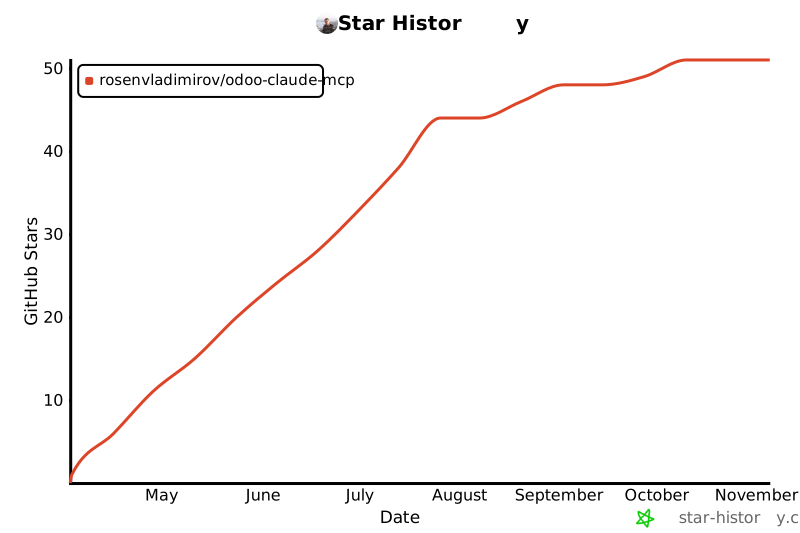](https://star-history.com/#rosenvladimirov/odoo-claude-mcp&Date)
If this project helps you, please consider [starring the repo](https://github.com/rosenvladimirov/odoo-claude-mcp) — it helps others discover the work and motivates further development.
---
## 👤 Maintainer
**Rosen Vladimirov** — Terraros Commerce Ltd.
Odoo Silver Partner · OCA `l10n-bulgaria` maintainer · 10+ years of Odoo specialization
📧 Email: vladimirov.rosen@gmail.com
🐙 GitHub: [@rosenvladimirov](https://github.com/rosenvladimirov)
🏢 Company: Terraros Комерс ЕООД · Bulgaria
<div align="center">
---
**Made with ❤️ and ☕ in Bulgaria** 🇧🇬
</div>TDQS
Scored across 138 tools
Many tools have clear distinct purposes, but there are several overlapping pairs like odoo_search vs odoo_search_read vs odoo_search_count, odoo_report vs odoo_web_report vs public_access_report_pdf, and odoo_execute vs odoo_web_call. The separation between web-session and XML-RPC tools is subtle and could cause misselection. Some AI and stock tools are also highly specialized, but their descriptions help.
Most tools follow a consistent snake_case prefix_domain_action pattern (e.g., odoo_read, telegram_send_message, google_calendar_list). Some outliers like identify, who_am_i, and open_connection_manager break the pattern but are still readable. Overall the naming is predictable and grouped by domain.
138 tools is far beyond any reasonable scope for a single MCP server. Even for a multi-domain personal assistant, this is excessive and will overwhelm an agent's tool selection. The server would benefit from splitting into separate MCP servers per domain (Odoo, Telegram, Google, AI, etc.).
The tool surface covers a wide range of operations across Odoo (CRUD, web, reports, translations, website snippets, fiscal positions, stock), Telegram, Google (Gmail, Calendar), AI pipelines, and memory. Some minor gaps exist (e.g., no Gmail draft/delete, no Odoo user management), but core workflows are well covered. The sheer number suggests high coverage, though it could be more focused.