
OKE MCP Server
by ronsevetoci
README.md
# OKE MCP Server
Model Context Protocol (MCP) server for **Oracle Container Engine for Kubernetes (OKE)**. It lets MCP‑aware chat clients (e.g. Claude Desktop, VS Code Agent, custom CLI) **inspect, query and troubleshoot** your OKE clusters through a small set of safe, composable tools.
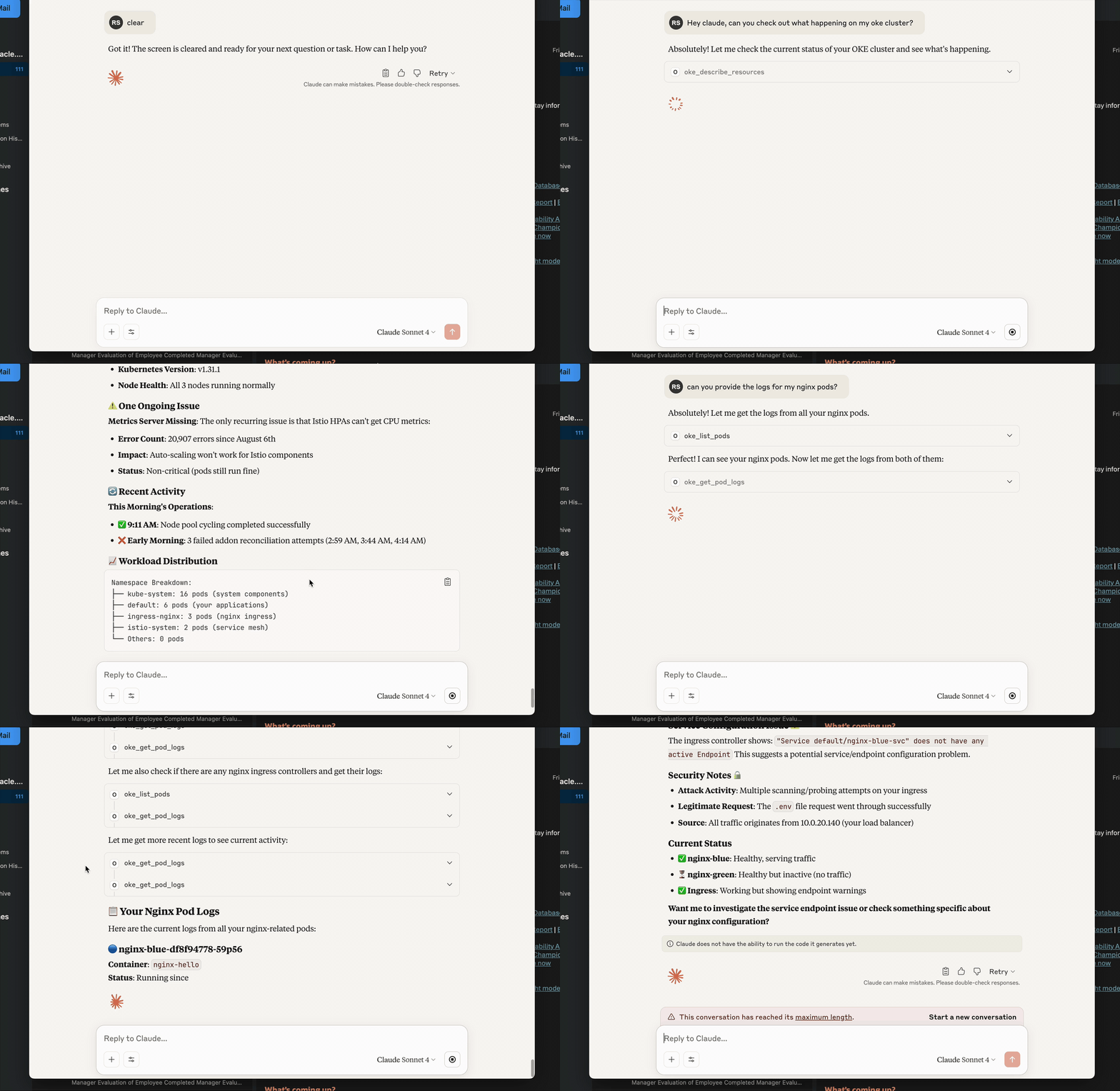
---
## ✨ Highlights
- **Lean, LLM‑friendly APIs** – small, consistent payloads (`{items,next,error}` / `{item,error}`) with optional `verbose` and `hints`.
- **OCI auth that “just works”** – supports **security token** (local dev) and **API keys**.
- **No venv required** – run with **uvx**: `uvx oke-mcp-server --transport stdio`.
- **Token rotation** – refresh without restart using the `auth_refresh` tool.
- **Production‑ready ergonomics** – clear errors, pagination, predictable shapes.
---
## Requirements
- **Python** 3.10+ (3.11+ recommended)
- **uv** (recommended): <https://github.com/astral-sh/uv>
- **OCI credentials** configured locally (see below)
Optional:
- MCP host/client (Claude Desktop, VS Code Agent Mode, etc.)
---
## Install & Run (recommended)
Run the published package with uvx:
```bash
uvx oke-mcp-server --transport stdio
```
Or run a specific version:
```bash
uvx --from oke-mcp-server==0.2.* oke-mcp-server --transport stdio
```
> The server speaks MCP over **stdio**. Most MCP hosts handle initialization automatically. For raw testing you can still send JSON‑RPC (see “Quick JSON‑RPC test”).
---
## Configure Authentication
### Option A — Security Token (best for local dev)
1. Sign in via the OCI Console/CLI to obtain a **security token**.
2. In your `~/.oci/config` profile (e.g. `DEFAULT`) include:
```ini
[DEFAULT]
tenancy=ocid1.tenancy.oc1..aaaa...
region=eu-frankfurt-1
user=ocid1.user.oc1..aaaa... # usually present; not used by STS signer
key_file=/path/to/your/api_key.pem # keep if you also use API key flows
fingerprint=XX:XX:... # same as above
security_token_file=/path/to/token # REQUIRED for STS
```
3. Export (or set in your MCP host env):
```bash
export OCI_CLI_AUTH=security_token
```
4. (When the token expires) call the MCP tool:
```json
{"jsonrpc":"2.0","id":1,"method":"tools/call","params":{"name":"auth_refresh","arguments":{}}}
```
### Option B — API Key
Use your standard `~/.oci/config` profile with `user`, `key_file`, `fingerprint`, `tenancy`, `region`. Do **not** set `OCI_CLI_AUTH=security_token`.
> The server also honors `OKE_COMPARTMENT_ID` and `OKE_CLUSTER_ID` environment variables as defaults.
---
## Using with an MCP Host
### Claude Desktop (example)
Settings → MCP Servers → Add:
```json
{
"name": "oke",
"command": "uvx",
"args": ["oke-mcp-server", "--transport", "stdio"],
"env": {
"OCI_CLI_AUTH": "security_token",
"OKE_COMPARTMENT_ID": "ocid1.compartment.oc1..aaaa...",
"OKE_CLUSTER_ID": "ocid1.cluster.oc1.eu-frankfurt-1.aaaa..."
}
}
```
That’s it—Claude will list the tools and can call them during chat.
---
## Quick JSON‑RPC test (manual)
Start the server:
```bash
uvx oke-mcp-server --transport stdio
```
Then send:
```json
{"jsonrpc":"2.0","id":0,"method":"initialize","params":{"protocolVersion":"2024-11-05","capabilities":{},"clientInfo":{"name":"manual","version":"0.0.0"}}}
{"jsonrpc":"2.0","method":"notifications/initialized","params":{}}
{"jsonrpc":"2.0","id":1,"method":"tools/list"}
{"jsonrpc":"2.0","id":2,"method":"tools/call","params":{"name":"meta_health","arguments":{}}}
```
---
## Tools (stable set)
All list tools return:
```json
{ "items": [...], "next": "<token|null>", "error": null, "meta": { ... } }
```
Single‑item tools return:
```json
{ "item": { ... }, "error": null, "meta": { ... } }
```
Common inputs:
- `limit` (default 20), `continue_token` (pagination)
- `verbose: bool` (include extra details)
- `hints: bool` (include lightweight graph hints where applicable)
- `auth: "security_token" | null` (override; otherwise server uses env/defaults)
### Meta / Config
- **meta_health** → `{server, version, defaults, effective}`
- **meta_env** → redacted env snapshot for diagnostics
- **auth_refresh** → re‑loads auth (use after rotating security token)
- **config_get_effective_defaults / config_set_defaults** → manage fallback OCIDs
### OKE / Kubernetes
- **k8s_list** — list Pods, Services, Namespaces, Nodes, Deployments, ReplicaSets, Endpoints, EndpointSlices, Ingress, Gateway, HTTPRoute, PVC, PV, StorageClass
- **k8s_get** — get a single resource by kind/namespace/name
- **oke_get_pod_logs** — stream recent logs from a container (supports `tail_lines`, `since_seconds`, `previous`, `timestamps`)
- **oke_list_clusters / oke_get_cluster** — cluster discovery and details (OCI)
> For public logs on OKE, ensure worker nodes allow the API->kubelet path: **TCP/10250** from the control‑plane CIDR/NSG. Timeouts when calling `read_namespaced_pod_log` typically mean this network path is blocked.
---
## Troubleshooting
| Symptom | Likely Cause | Fix |
|---|---|---|
| `{'user':'missing'}` from OCI SDK | No valid signer or profile | Set `OCI_CLI_AUTH=security_token` **or** ensure `~/.oci/config` has `user/key_file/fingerprint` |
| TLS bundle not found | Wrong Python cert path | Ensure `certifi` is installed in the environment running the server |
| Logs 500 / i/o timeout to `:10250` | Control‑plane → node kubelet blocked | Open **TCP/10250** from API endpoint CIDR in Security List / NSG |
| Tool says `cluster_id required` | No defaults present | Set `OKE_CLUSTER_ID` env or call `config_set_defaults` |
---
## Project Structure
```
oke_mcp_server/
__init__.py
main.py
auth.py
config_store.py
tools/
k8s.py
oke_cluster.py
pyproject.toml
Makefile
```This server cannot be deployed
Maintenance
ActivityInactive
ResponsivenessNo issues