
A
licenseNot graded
qualityD
maintenanceEnables interaction with Notion workspaces through the Notion API. Provides tools to search, read, create, and update Notion pages and databases with real-time synchronization.
MIT

Provides tools for interacting with Notion's API, enabling operations like searching pages, creating comments, adding pages, and managing workspace content programmatically.
This server does not currently have a deployable release on Glama. Follow the repository's setup instructions to install and configure it for your MCP client, including any required credentials and local dependencies.
This project implements an MCP server for the Notion API.
Go to https://www.notion.so/profile/integrations and create a new internal integration or select an existing one.
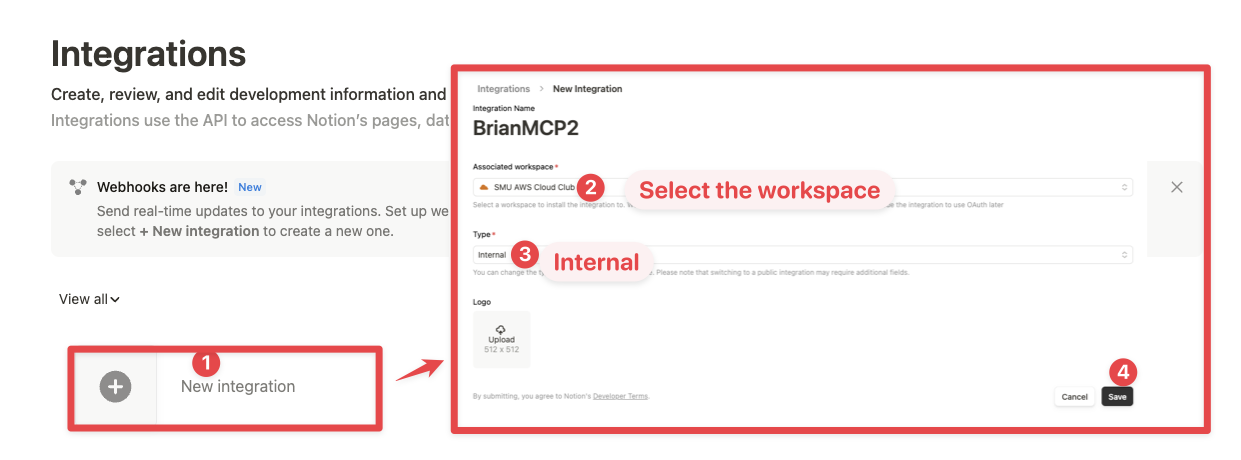
While we limit the scope of Notion API's exposed (for example, you will not be able to delete databases via MCP), there is a non-zero risk to workspace data by exposing it to LLMs. Security-conscious users may want to further configure the Integration's Capabilities.
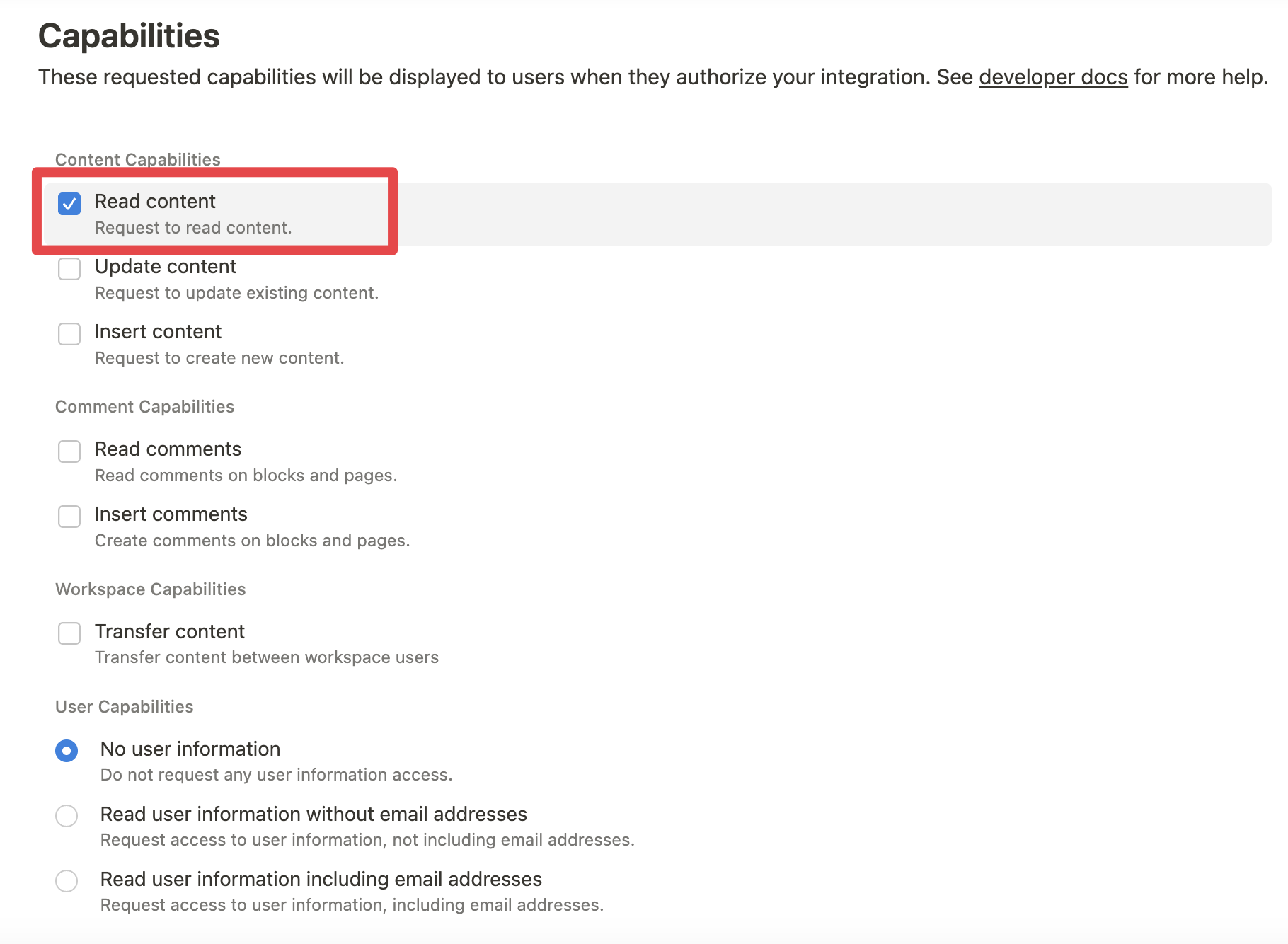
For example, you can create a read-only integration token by giving only "Read content" access from the "Configuration" tab:
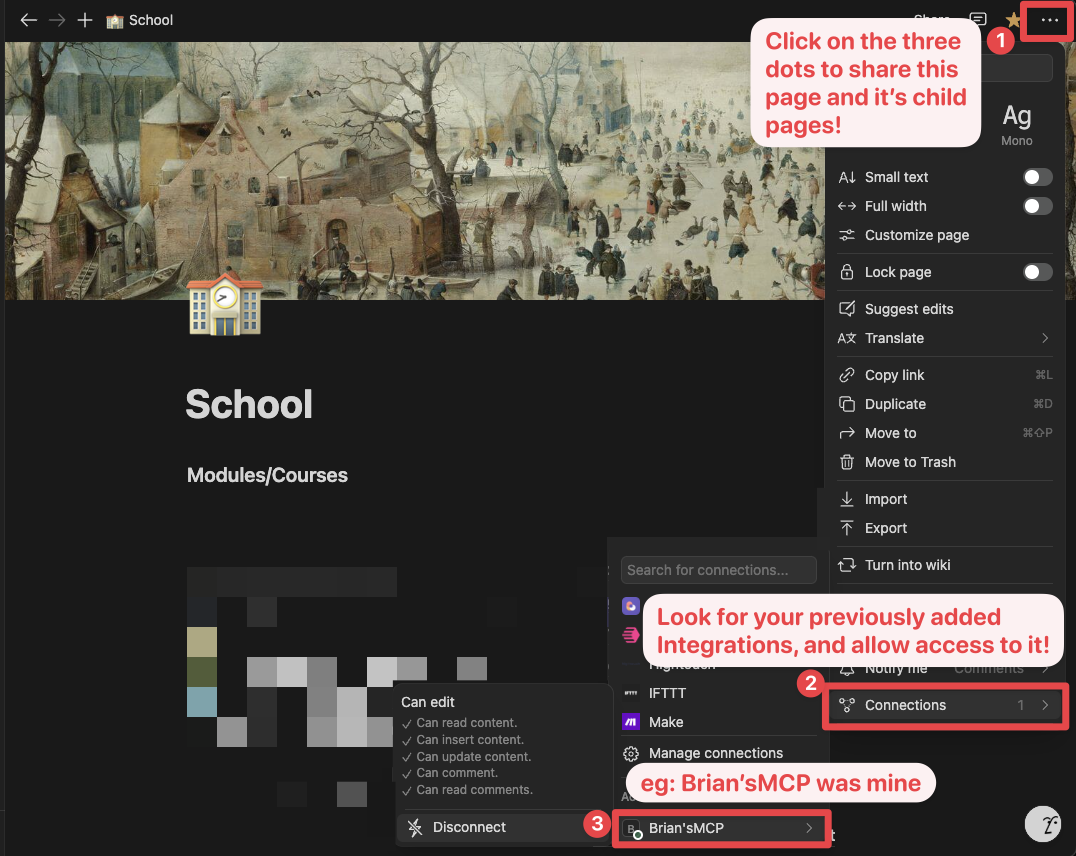
Ensure relevant pages and databases are connected to your integration.
To do this, you'll need to visit that page, and click on the 3 dots, and select "Connect to integration".
Add the following to your .cursor/mcp.json or claude_desktop_config.json (MacOS: ~/Library/Application\ Support/Claude/claude_desktop_config.json)
{
  "mcpServers": {
    "notionApi": {
      "command": "npx",
      "args": ["-y", "@notionhq/notion-mcp-server"],
      "env": {
        "OPENAPI_MCP_HEADERS": "{\"Authorization\": \"Bearer ntn_****\", \"Notion-Version\": \"2022-06-28\" }"
      }
    }
  }
}There are two options for running the MCP server with Docker:
Add the following to your .cursor/mcp.json or claude_desktop_config.json:
{
  "mcpServers": {
    "notionApi": {
      "command": "docker",
      "args": [
        "run",
        "--rm",
        "-i",
        "-e", "OPENAPI_MCP_HEADERS",
        "mcp/notion"
      ],
      "env": {
        "OPENAPI_MCP_HEADERS": "{\"Authorization\":\"Bearer ntn_****\",\"Notion-Version\":\"2022-06-28\"}"
      }
    }
  }
}
This approach:
Uses the official Docker Hub image
Properly handles JSON escaping via environment variables
Provides a more reliable configuration method
You can also build and run the Docker image locally. First, build the Docker image:
docker-compose buildThen, add the following to your .cursor/mcp.json or claude_desktop_config.json:
{
  "mcpServers": {
    "notionApi": {
      "command": "docker",
      "args": [
        "run",
        "--rm",
        "-i",
        "-e",
        "OPENAPI_MCP_HEADERS={\"Authorization\": \"Bearer ntn_****\", \"Notion-Version\": \"2022-06-28\"}",
        "notion-mcp-server"
      ]
    }
  }
}
Don't forget to replace ntn_**** with your integration secret. Find it from your integration configuration tab:
Using the following instruction
Comment "Hello MCP" on page "Getting started"AI will correctly plan two API calls, v1/search and v1/comments, to achieve the task
Similarly, the following instruction will result in a new page named "Notion MCP" added to parent page "Development"
Add a page titled "Notion MCP" to page "Development"You may also reference content ID directly
Get the content of page 1a6b35e6e67f802fa7e1d27686f017f2Build
npm run buildExecute
npx -y --prefix /path/to/local/notion-mcp-server @notionhq/notion-mcp-serverPublish
npm publish --access publicRecent tool additions, removals, and schema changes observed during successful MCP inspections.
Loading tool schema changelog…
This server cannot be deployed
Create, search and manage Knowtis collaborative notes from AI assistants.
Docs, tables, issues, projects, calendar and designs of an Airsurf workspace: search, read, write.
Search 16,000+ API operations and 95 built tools by need, then call any of them by name
Streamline your Attio workflows using natural language to search, create, update, and organize com…