
Rhylthyme MCP Server
# Rhylthyme MCP server
[](https://claude.ai/directory/rhylthyme)
[](https://mcpservers.org/servers/rhylthyme/rhylthyme-mcp)
A [Model Context Protocol](https://modelcontextprotocol.io/) server for
schedules that a person executes: cooking several dishes so they finish
together, running a bench protocol with overlapping incubations, calling
an event, running a workout. An agent describes the process, the server
validates and analyzes the resulting program, and publishes it as a live
timeline on [rhylthyme.com](https://www.rhylthyme.com) that the person
follows on their phone.
This repository is the source of the server that runs at
`mcp.rhylthyme.com`. It is the same code as `mcp-api/` in the
rhylthyme-server application, copied here with the static assets it
needs so it can be read, tested and self-hosted.
## Try it: ask for a workout
Connect the server (in claude.ai, Claude Desktop or mobile, add
[Rhylthyme from the Claude Connectors Directory](https://claude.ai/directory/rhylthyme);
in Claude Code, `/plugin marketplace add rhylthyme/rhylthyme-mcp`
then `/plugin install rhylthyme@rhylthyme`; anywhere else, add
`https://mcp.rhylthyme.com/gym/mcp` as a connector), then say what you want in
plain words:
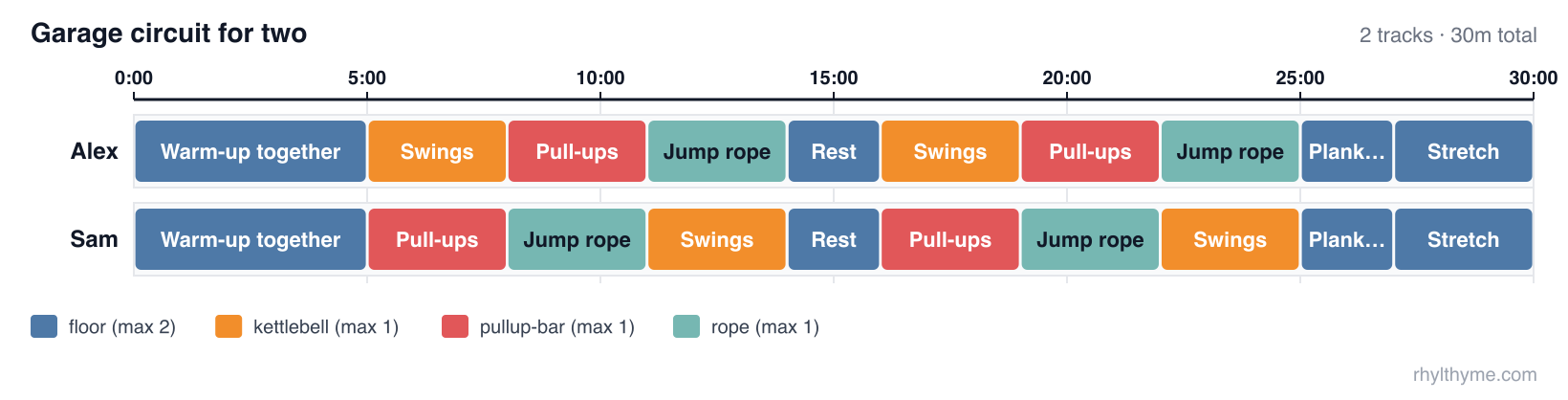
> Two of us in a garage gym: one kettlebell, one pull-up bar, one jump rope.
> Thirty minutes, two rounds, and nobody stands around waiting for equipment.
> Make it a Rhylthyme timeline.
You write no JSON. The assistant does, and the server keeps it honest. With
that prompt Claude made three tool calls:
| Call | What came back |
|---|---|
| `validate_program` | `✅ Program is valid — 2 tracks, 20 steps, 30m makespan.` |
| `analyze_schedule` | `Resource conflicts: none.` Each station has capacity 1, so this is the proof that Alex and Sam never want the kettlebell at the same moment |
| `visualize_schedule` | a link, [gym.rhylthyme.com?share=4995ef1b88744e80](https://gym.rhylthyme.com?share=4995ef1b88744e80), with rest timers and interval beeps, and a text chart for the chat: |
```
0 15m 30m
Alex │░Warm-…░▒S…▒░Pu…░▒Ju…▒░░░▒Sw…▒░Pu…░▒Ju…▒░░░▒St…▒│
Sam │░Warm-…░▒P…▒░Ju…░▒Sw…▒░░░▒Pu…▒░Ju…░▒Sw…▒░░░▒St…▒│
```
Ask "show me a picture" and `preview_timeline` returns an image in the chat.
For one coloured by station, which makes the rotation obvious, save the
program the assistant wrote (ours is [`examples/recipe/garage-circuit.json`](examples/recipe/garage-circuit.json)) and run:
```bash
npx -y github:rhylthyme/rhylthyme-timeline garage-circuit.json -o garage-circuit.png \
--style web --palette tableau --color-by task
```
Then push on it: "add a third person", "we only have 20 minutes", "swap the
rope for burpees". The assistant edits the program and the server checks it
again.
## This repository and rhylthyme
Two repositories do related things and are easy to confuse. This one is the
**server an AI assistant talks to**. [rhylthyme](https://github.com/rhylthyme/rhylthyme)
(formerly rhylthyme-cli-runner) is the **command a person types**.
| | [rhylthyme-mcp](https://github.com/rhylthyme/rhylthyme-mcp) | [rhylthyme](https://github.com/rhylthyme/rhylthyme) |
|---|---|---|
| What it is | The MCP **server**: the tools an AI assistant calls | A command-line **program**: the `rhylthyme` command |
| Who uses it | Claude, ChatGPT, Cursor or any MCP client, on a person's behalf | A person at a terminal, a script, or CI |
| Where it runs | Hosted at `mcp.rhylthyme.com`; nothing to install | On your machine: `pip install rhylthyme` |
| Language | JavaScript (Node 20+) | Python 3.12+ |
| Input | A program the assistant builds in conversation | A program file on disk (JSON or YAML) |
| Validate a program | `validate_program` | `rhylthyme validate` (works offline) |
| Timing, conflicts, deadlines | `analyze_schedule` | `rhylthyme analyze` (asks the server) |
| Publish a live timeline | `visualize_schedule` | `rhylthyme publish` (asks the server) |
| Run a schedule with timers | no: it hands back a link to the web timeline | `rhylthyme run`, an interactive terminal runner |
| Recorded runs, calibration | reads runs saved to an account | records runs locally; `rhylthyme runs`, `rhylthyme calibrate` |
| Catalog search, imports, account library | yes | no |
| Also in the repository | the `rhylthyme-mcp` PyPI package (a stdio bridge to the hosted server), the Claude plugin marketplace | the Claude skill's source, the prompt-evaluation harness and its results, `rhylthyme mcp-test` |
How they fit together: the command-line tool is one of this server's clients.
`rhylthyme analyze`, `publish`, `generate` and `mcp-test` are MCP calls to
`mcp.rhylthyme.com`; `rhylthyme validate`, `run`, `runs` and `calibrate` never
touch the network. Each has its own validator for the same program schema
(JavaScript here, Python there), so a program is checked again when it is
published.
Use this repository to connect an assistant, to read or self-host the server,
or to change a tool. Use rhylthyme if you have a program file and a
terminal, want timers in the terminal, or keep run records.
Two names to keep apart: `rhylthyme-mcp` on PyPI is this server's stdio bridge
(command `rhylthyme-mcp`, source in [`python/`](python)); `rhylthyme`
on PyPI is the command-line tool (command `rhylthyme`; it was published as
`rhylthyme-cli-runner` before 0.5.0). The program format
itself is defined in [rhylthyme-spec](https://github.com/rhylthyme/rhylthyme-spec),
with examples in [rhylthyme-examples](https://github.com/rhylthyme/rhylthyme-examples).
## Endpoints
| URL | Server name | Adds |
|---|---|---|
| `https://mcp.rhylthyme.com/mcp` | `rhylthyme-mcp` | generic scheduler |
| `https://mcp.rhylthyme.com/kitchen/mcp` | `rhylthyme-kitchen-mcp` | `cook_recipe`, `whats_for_dinner` |
| `https://mcp.rhylthyme.com/lab/mcp` | `rhylthyme-lab-mcp` | `run_protocol`, `random_protocol`, Benchling import |
| `https://mcp.rhylthyme.com/events/mcp` | `rhylthyme-events-mcp` | `plan_event`, `random_event_template` |
| `https://mcp.rhylthyme.com/gym/mcp` | `rhylthyme-gym-mcp` | `start_workout`, `surprise_workout` |
Transport: Streamable HTTP, stateless. No sign-in is needed for the public
catalog or the pure tools; account tools use the person's Rhylthyme account
through OAuth 2.1, or a pasted token from the `login` tool in clients without
OAuth. Server `instructions` describing the workflow are sent at
`initialize`.
## Quickstart: timelines from the command line
The `rhylthyme` CLI can drive this server directly: describe what you
need in plain language and get back a live timeline URL, a program file,
or both.
```bash
pip install rhylthyme # Python 3.12+
rhylthyme login # opens rhylthyme.com in your browser
rhylthyme generate "roast chicken, potatoes and green beans for 6" \
-e kitchen --by 19:00 --with "one oven, four burners, one cook"
```
`login` signs you in through the browser and hands the session back to a
one-shot listener on `127.0.0.1`. It is stored in
`~/.config/rhylthyme/credentials.json` (mode 0600) and renews itself, so
you only log in once. `generate` then calls two tools on this server:
1. **`import_text`** on the endpoint for `-e` (`/kitchen/mcp`,
`/lab/mcp`, …) turns the request into a validated multi-track program.
It runs four model turns server-side, which is why it needs a sign-in;
it takes 20–60 seconds and is capped per day.
2. **`visualize_schedule`** publishes that program and returns the
live-timeline URL on the matching subdomain.
It prints the ASCII Gantt, the itinerary and the URL. More examples:
```bash
# A lab protocol from a file; save the program and run it in the terminal
rhylthyme generate -e lab -f western_blot.txt -o blot.json --run
# Pipe a run sheet in; print only the URL
pbpaste | rhylthyme generate -e events --by "doors at 18:30" -q
# Program JSON only, no published timeline; machine-readable output
rhylthyme generate -e gym "45 minute upper-body circuit, two people, one bench" --no-publish --json
```
| Flag | Meaning |
|---|---|
| `-e, --env` | `generic` (default), `kitchen`, `lab`, `events` or `gym`. Picks the endpoint and the timeline site. |
| `--by` | When everything must be finished: `19:00`, `dinner at 7pm`. |
| `--with` | Equipment and people limits in your own words. |
| `-f, --file` | Read the request or source text from a file, or `-` for stdin. |
| `-o, --output` | Save the program JSON. |
| `--run` | Run the program in the terminal runner afterwards. |
| `--open` | Open the live timeline in a browser. |
| `--no-publish`, `--json`, `-q` | Skip publishing; print JSON; print only the URL. |
To check a server (this one, or your own deployment) end to end:
```bash
rhylthyme mcp-test # all five hosted endpoints, read-only
rhylthyme mcp-test --url http://localhost:3000/mcp -e generic --publish
```
`rhylthyme whoami` shows the stored sign-in; `rhylthyme logout` forgets it.
On a machine without a browser, set `RHYLTHYME_TOKEN` to an access token
from <https://www.rhylthyme.com/mcp/auth> (it lasts about an hour), or
run `rhylthyme login --token <token>`. `RHYLTHYME_MCP_URL` points the CLI
at a self-hosted server.
## Connect
**Claude Code**
```bash
claude mcp add --transport http rhylthyme https://mcp.rhylthyme.com/mcp
claude mcp add --transport http rhylthyme-kitchen https://mcp.rhylthyme.com/kitchen/mcp
```
**Claude Desktop / claude.ai**: Customize → Connectors, search for
*Rhylthyme* and click Connect. For one of the other URLs above: Customize →
Connectors → Add → *Add custom connector* → paste the URL → Continue. Public tools work immediately;
run `login` only to save to your own account.
**Claude Code plugin** (the hosted server plus a skill that teaches Claude to
author, validate and analyze schedules):
These are two commands. Send the first on its own:
```
/plugin marketplace add rhylthyme/rhylthyme-mcp
```
then, once it says the marketplace was added, the second:
```
/plugin install rhylthyme@rhylthyme
```
**ChatGPT**: Settings → Apps & Connectors → Advanced settings → turn on
*Developer mode*, then *Create* a connector with one of the URLs above as the
MCP server URL. Without a connector ChatGPT cannot call these tools and falls
back to browsing the website.
**Cursor** (`.cursor/mcp.json`):
```json
{ "mcpServers": { "rhylthyme": { "url": "https://mcp.rhylthyme.com/kitchen/mcp" } } }
```
**Claude API** (MCP connector, one request):
```python
import anthropic
client = anthropic.Anthropic()
resp = client.beta.messages.create(
model="claude-opus-5", max_tokens=16000,
betas=["mcp-client-2025-11-20"],
mcp_servers=[{"type": "url", "url": "https://mcp.rhylthyme.com/kitchen/mcp", "name": "rhylthyme"}],
tools=[{"type": "mcp_toolset", "mcp_server_name": "rhylthyme"}],
messages=[{"role": "user", "content": "Plan Thanksgiving for 8 with one oven, dinner at 6pm."}],
)
```
**Reviewing an import.** `review_program` (an account tool) has a model read an
imported program against its source and return findings: wrong durations,
dropped steps, bad ordering, a total that disagrees with the source. Call it
after `import_from_source` or `import_text`, apply what it says, and validate
again.
**Clients that can only launch a command**: `pip install rhylthyme-mcp` gives a
`rhylthyme-mcp` command, a stdio bridge that passes every request through to
the hosted server (source in [`python/`](python)):
```json
{ "mcpServers": { "rhylthyme": { "command": "rhylthyme-mcp", "args": ["kitchen"] } } }
```
**No MCP client at all** (an agent with a shell, a script): the server is
stateless, so one POST works with no handshake and no account.
```bash
curl -s https://mcp.rhylthyme.com/mcp \
-H 'Content-Type: application/json' -H 'Accept: application/json' \
-d '{"jsonrpc":"2.0","id":1,"method":"tools/call",
"params":{"name":"validate_program","arguments":{"program":{"programId":"x","name":"x","tracks":[]}}}}'
```
`visualize_schedule` called the same way returns the live-timeline URL in
`result.structuredContent.url`. Or use the CLI in the quickstart above.
## Tools
| Tool | Annotations | What it does |
|---|---|---|
| `validate_program` | read-only, pure | Structural and scheduling checks (duplicate/missing ids, dangling references, cycles, within-track overlaps, tasks without a resource constraint, unparseable durations, choice references). Every finding carries a `code`, `message` and `fix` hint. Structured output. |
| `analyze_schedule` | read-only, pure | Resolved start/end per step, makespan, the dependency chain that determines it, resource-conflict windows, per-track slack, peak concurrency vs. declared actors. Pass `finishAt` or `startAt` (ISO 8601) for wall-clock start times. Structured output. |
| `visualize_schedule` | publishes | Validates (refuses invalid programs unless `allowInvalid`), creates a share record, returns a markdown preview (cover image, equipment, ingredients, ASCII Gantt, itinerary, schedule check), an inline PNG of the timeline and the live URL. Structured output. |
| `preview_timeline` | publishes a share record | PNG of the timeline only, no prose. |
| `search_public_recipes` | read-only | Keyword search over the public catalog; `environment` selects kitchen (default), laboratory, event or gym. Structured output. |
| `load_public_recipe` | read-only | Full summary and live URL for one catalog entry. |
| `cook_recipe` / `run_protocol` / `plan_event` / `start_workout` | read-only | One-shot on each vertical: top catalog match → live URL. |
| `whats_for_dinner` / `random_protocol` / `random_event_template` / `surprise_workout` | read-only | Random catalog pick on each vertical. |
| `import_from_source` | read-only | Spoonacular, TheMealDB, protocols.io, Cooklang, Opentrons Protocol API scripts, Benchling → validated program JSON. `search` needs no token; `import` and `random` need the user's token. |
| `create_environment` | pure | Equipment limits and actor types → environment JSON. |
| `login` | — | Returns the sign-in URL, then verifies a pasted token. |
| `list_my_programs`, `load_program`, `save_program` | account | The user's own library; `save_program` validates first. |
| `get_renderer_source` | read-only | Source of the Apache-2.0 timeline renderer, for HTML artifacts whose sandbox blocks external scripts. |
Annotations (`readOnlyHint`, `destructiveHint`, `idempotentHint`,
`openWorldHint`) are set on every tool; four tools also declare an
`outputSchema` and return `structuredContent`. Failures set `isError`
and say what to do next.
## Resources and prompt
- `rhylthyme://schema/program`: the program JSON Schema (0.3.0-alpha)
- `rhylthyme://guide/authoring`: one-page authoring rules, trigger vocabulary, how to make tracks finish together, repeated work (`replicates`, per-instance `instances: "each"` chains, `"all"` barriers and `maxInFlight`), choice branching
- `rhylthyme://guide/tools`: the long form of every tool description. The tool list itself is kept to about 3,600 tokens so it is cheap to keep connected
- `rhylthyme://examples/{breakfast_schedule, lab_experiment, stir_fry_with_choice, hiit_cardio_workout, corporate_presentation, cookies_three_trays}`: complete valid programs (`cookies_three_trays` is the 0.3.0-alpha per-instance / in-flight worked example)
- prompt `plan_schedule(goal, finishAt?, constraints?)`: walks the model through search → build → validate → analyze → visualize, and names `replicates` / `instances` / `maxInFlight` in its constraints step
## What a program looks like
```json
{
"schemaVersion": "0.1.0",
"programId": "eggs-and-toast",
"name": "Eggs and toast",
"tracks": [
{ "trackId": "eggs", "name": "Eggs", "steps": [
{ "stepId": "whisk", "name": "Whisk", "task": "prep",
"duration": { "type": "fixed", "seconds": 60 },
"startTrigger": { "type": "programStart" } },
{ "stepId": "cook", "name": "Cook", "task": "stove",
"duration": { "type": "variable", "minSeconds": 120, "maxSeconds": 240, "defaultSeconds": 180 },
"startTrigger": { "type": "afterStep", "stepId": "whisk" } } ] },
{ "trackId": "toast", "name": "Toast", "steps": [
{ "stepId": "toast", "name": "Toast", "task": "toaster",
"duration": { "type": "fixed", "seconds": 180 },
"startTrigger": { "type": "afterStep", "stepId": "cook", "event": "start", "offsetSeconds": 60 } } ] }
],
"resourceConstraints": [
{ "task": "prep", "maxConcurrent": 1 },
{ "task": "stove", "maxConcurrent": 2 },
{ "task": "toaster", "maxConcurrent": 1 }
]
}
```
Steps in one track run sequentially; parallel work goes in separate
tracks; every `task` needs a resource constraint; durations and offsets
take seconds or strings like `"5m"`. Triggers: `programStart`,
`programStartOffset`, `afterStep` (end or `event: "start"`, signed offset),
`afterStepWithBuffer`, `manual`, `onAbort`, or `{logic: all|any, triggers}`.
Durations: `fixed`, `variable` (ended early by the executor), `indefinite`
(ended by the executor).
## Self-hosting
```bash
git clone https://github.com/rhylthyme/rhylthyme-mcp
cd rhylthyme-mcp
npm install # Node 20 or newer
npm test # SDK in-memory + HTTP entry-point tests, no network
PORT=3000 npm start # http://localhost:3000/mcp and the four vertical paths
npm run stdio # the same server over stdio (add kitchen, lab, events or gym)
```
Stdio clients run it as a local process, for example in Claude Desktop:
`{"command": "node", "args": ["/path/to/rhylthyme-mcp/src/stdio.js"]}`.
Docker: `docker build -t rhylthyme-mcp . && docker run -p 3000:3000 rhylthyme-mcp`.
Vercel: `vercel` in the repository root; `vercel.json` rewrites the endpoint
paths to the function.
What self-hosting does and does not give you: validation, timing analysis,
the renderer, resources and prompts run in your process. Catalog search,
sharing (`visualize_schedule`), imports and account tools call the public
API at `https://www.rhylthyme.com` (`API_BASE` in `mcp-api/index.js`), so
those still depend on the hosted service. The PNG preview route
`/api/og/timeline.png` additionally needs `SUPABASE_URL` and
`SUPABASE_ANON_KEY` for read access to shared programs; nothing else does.
## Layout
- `mcp-api/index.js`: tool, resource and prompt registration; vertical detection; OG-image route; Vercel handler
- `mcp-api/schedule.js`: validator and analyzer (pure)
- `static/js/timeline-render.js`: timing engine and SVG Gantt (also published as [`@rhylthyme/timeline`](https://github.com/rhylthyme/rhylthyme-timeline))
- `static/schema/`, `static/examples/`: the resources
- `src/index.js`: standalone HTTP runner
- `src/stdio.js`: standalone stdio runner (same tools, resources and prompts)
- `mcp-api/server.json`: MCP registry manifest
- `.claude-plugin/marketplace.json`, `plugins/rhylthyme/`: the Claude plugin marketplace and plugin (`claude plugin validate .`); the skill in it is a checked copy of `skills/rhylthyme` in [rhylthyme](https://github.com/rhylthyme/rhylthyme)
- `python/`: the `rhylthyme-mcp` PyPI package, a stdio bridge to the hosted server (`cd python && PYTHONPATH=src pytest tests`)
## Known limitations
- `login` hands the user a URL and expects a pasted, short-lived access token that then travels as a tool argument; it is outside MCP's OAuth 2.1 flow. Hosts that require OAuth for authenticated servers can still use every public tool.
- `search_public_recipes` searches one environment at a time; the generic endpoint defaults to kitchen.
- Tool annotations are self-declared hints; hosts may ignore them.
## License
Apache-2.0, like the rest of Rhylthyme. (This repository was MIT until
September 2026.)
TDQS
Scored across 19 tools
Most tools target distinct resources and actions, and descriptions carefully separate public vs. account-scoped variants (list_public_runs vs list_runs, load_public_recipe vs load_program). A few pairs risk confusion: validate_program vs review_program (structural checks vs model reading against source), and analyze_schedule-with-history vs calibrate_program both derive durations from recorded runs, while visualize_schedule and preview_timeline both produce timeline imagery.
Names follow a clean snake_case verb_noun pattern throughout (list_runs, load_program, validate_program, save_program, preview_timeline). The only deviation is the bare 'login', which lacks a noun but is a widely understood special case.
19 tools is on the heavy side, but the domain genuinely spans public catalog browsing, imports, validation/analysis, visualization/rendering, and run-based calibration, so most tools earn their place. It is slightly over what a single-purpose server needs but not bloated.
The program lifecycle is well covered: import (source/text), validate, analyze, save/update, load, list, review, calibrate, plus run listing/inspection and rendering. Gaps exist—no explicit delete/remove program and no tool to record a run (only list/load runs), which agents must work around.