
Graphiti Local

# Graphiti Local
**Local memory for your agents. You approve what they learn.**
Retrieve project decisions through six read-only MCP tools or the `kg` CLI.
Proposed updates stay in a separate queue until a human approves and applies them.
Ollama handles local inference; embedded LadybugDB stores the graph. No Docker or
cloud API key is needed for the local setup.
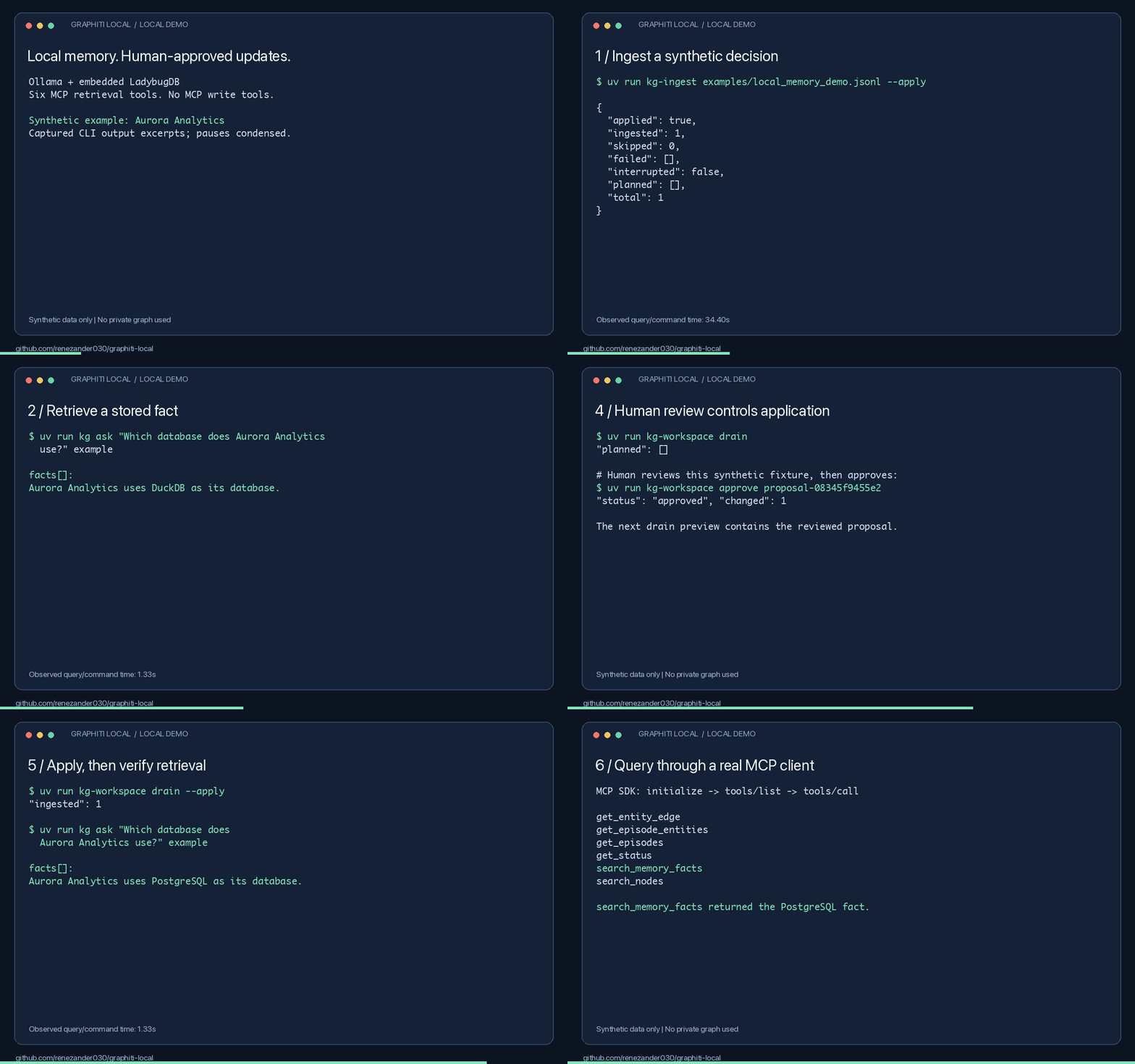
*Captured output excerpts with pauses condensed. [Measured results and limitations](docs/local-demo-results.md).*
## Try it in one command
```bash
uvx --from git+https://github.com/renezander030/graphiti-local kg-demo
```
Answers a question against a small synthetic graph shipped with the package. No Ollama,
no model downloads, no database setup: retrieval runs on keywords alone, so nothing
contacts a model. Ask your own question by passing it as an argument.
This is the read path only. Building a graph from your own text needs extraction, which
needs a model, and that is the full setup below.
## Try it locally
Install [uv](https://docs.astral.sh/uv/getting-started/installation/) and
[Ollama](https://docs.ollama.com/quickstart), then start Ollama. Setup downloads
need internet access. Run these commands in bash or zsh:
```bash
git clone https://github.com/renezander030/graphiti-local.git
cd graphiti-local
uv sync --frozen
ollama pull qwen2.5:7b
ollama pull nomic-embed-text
export GRAPHITI_LOCAL_CONFIG="$PWD/config/ollama.example.yaml"
export KG_WORKSPACE_DIR="$PWD/workspace/local-demo"
export KG_LADYBUG_PATH="$KG_WORKSPACE_DIR/graph.ladybug"
uv run --frozen kg-ladybug-setup --database "$KG_LADYBUG_PATH" --apply
uv run --frozen kg doctor
uv run --frozen kg-ingest examples/local_memory_demo.jsonl --apply
uv run --frozen kg ask "Which database does Aurora Analytics use?" example
```
The synthetic example returns **DuckDB**. Follow the [complete walkthrough](docs/local-quickstart.md)
to propose PostgreSQL, review and apply that update, and retrieve it from an MCP client.
Model extraction can be wrong; inspect the returned facts and validity timestamps.
To review extraction before it touches the configured graph, run
`kg-ingest INPUT --review-output review.jsonl`, inspect the snapshot, and mark every
fact in the generated `review.jsonl.review.jsonl` file as `accept`, `refuse`, or
`contested`. The printed restore command refuses unresolved decisions and promotes a
checksum-sealed snapshot containing accepted facts only. Searches return current facts
by default; `kg ask --history` is the explicit historical view.
`kg-ingest` also accepts a Markdown/text file or a directory tree directly. Large
documents split at stable text boundaries. Transient writes retry with one stable
episode id; `ingest-receipts.jsonl` and `ingest-failures.jsonl` in the workspace show
exactly what landed and what still needs attention.
## Multiple users on Ladybug
Give each user a group, and each group its own Ladybug file:
```yaml
graph:
groups: [alice, bob]
database:
provider: ladybug
ladybug:
layout: per-group # default: single, one file for every group
directory: ./workspace/groups
server:
transport: streamable-http
auth:
tokens:
- {name: alice, token: "${ALICE_TOKEN}", groups: [alice]}
- {name: bob, token: "${BOB_TOKEN}", groups: [bob]}
```
Each file is named by the SHA-256 of its group, so no group id can point outside the
directory. Reads, `kg ask` and the drain open only the file of the group they address;
a token granted `alice` never opens Bob's file. A read names one group, or the token's
single group is used. For a tenant boundary inside one database server, use FalkorDB
or Neo4j.
## Is it a fit?
Use it for local agent memory with explicit human review. Skip it if you need
agents to write through MCP or want a hosted service without local setup.
FalkorDB and Neo4j are also supported.
- [Setup and MCP configuration](docs/local-quickstart.md)
- [Commands, ingestion, backups, and deployment](docs/reference.md)
- [Privacy](PRIVACY.md) · [Security](SECURITY.md) · [Container discovery](docs/container.md)
- [Report a successful or blocked setup](https://github.com/renezander030/graphiti-local/issues/new?template=setup-result.yml)
If this helps your workflow, star the repository and share your setup result.
Maintained by [René Zander](https://renezander.com/projects/graphiti-local/), who builds context layers for AI agents on temporal knowledge graphs.
Independent community project built on [Graphiti](https://github.com/getzep/graphiti),
not affiliated with or endorsed by Zep. [Apache-2.0](LICENSE).
<!-- mcp-name: io.github.renezander030/graphiti-local -->
TDQS
Scored across 6 tools
Each tool targets a distinct resource-action: searching entities (search_nodes), listing episodes (get_episodes), searching facts (search_memory_facts), fetching a single edge (get_entity_edge), tracing provenance (get_episode_entities), and health (get_status). Mild overlap exists between search_memory_facts and get_entity_edge (both about fact edges) and between search_nodes and get_episode_entities (both surface entities), but descriptions differentiate them adequately.
All names follow a clean snake_case verb_noun pattern (search_*, get_*). Minor inconsistency: only search_memory_facts carries the 'memory' qualifier while its sibling search_nodes targets entities, and the get_* prefix is overloaded across heterogeneous resources.
Six tools is a reasonable, well-scoped set for a graph-memory server, with each tool covering a distinct retrieval need. It leans slightly thin—no ingestion or mutation tools—but the read surface is coherent.
The surface is entirely read-only: no operations to add episodes/entities/facts, update them, or delete them, which would normally be part of a knowledge-graph lifecycle. As a local read consumer of an externally built graph this may be intentional, but the missing write/traversal operations are a notable gap.