
audit-sherpa-mcp
README.md
# audit-sherpa
[](https://www.npmjs.com/package/audit-sherpa)
[](https://www.npmjs.com/package/audit-sherpa)
[](https://github.com/ramprakashram/audit-sherpa/blob/main/LICENSE)
**npm:** [npmjs.com/package/audit-sherpa](https://www.npmjs.com/package/audit-sherpa) · **GitHub:** [ramprakashram/audit-sherpa](https://github.com/ramprakashram/audit-sherpa)
> Your guide through `npm audit`. Run one command and get an **interactive terminal session**: browse vulnerabilities in a clean, filterable table, pick exactly what to fix (production only, direct only, or hand-picked packages), watch the fixes run live, and roll back if needed. Includes an MCP server, so AI agents can debug and fix vulnerabilities for you.
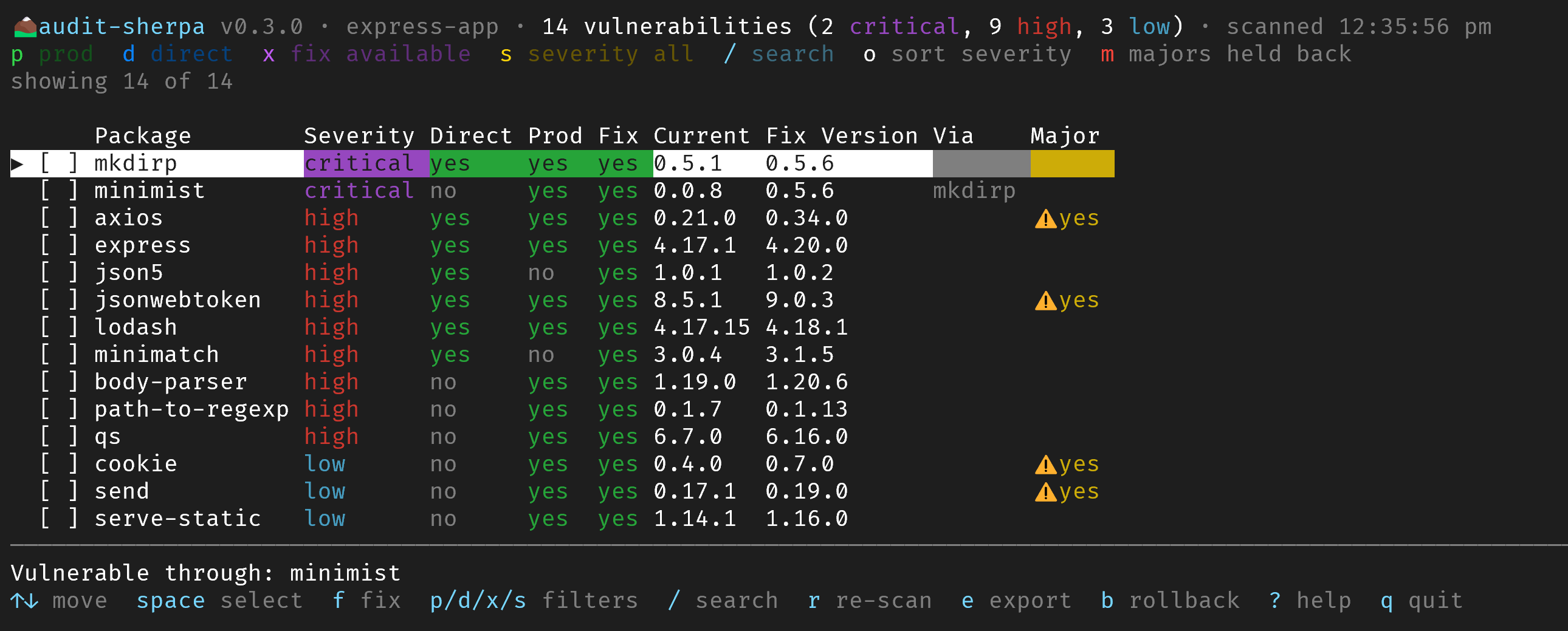
## Quick start
```bash
npx audit-sherpa
```
That's it. `audit-sherpa` with no subcommand opens an **interactive session** that stays open until you press `q`. It is still a CLI that runs in your terminal, like `htop` or `lazygit`, so you don't have to retype a command for each step.
For scripts, CI and AI agents there are also one-shot subcommands (`list`, `fix`, `rollback`, `mcp`). See [One-shot commands](#one-shot-commands).
## Features
- **Interactive session (default).** A full-screen terminal UI that stays open: filter with single keys, multi-select packages, preview the fix plan, watch fixes run live, then roll back or re-scan.
- **Readable report.** Runs `npm audit --json` (auditReportVersion 2) and shows package, severity, direct/transitive, prod/dev, fix availability, current version, fix version, the package that gets bumped (`Via`), and a separate `Major` (breaking-change) column.
- **Filters.** Production only, direct only, fix available, severity (`critical|high|moderate|low|info|all`), package names, and search. A colour-coded legend shows which filters are active.
- **Selective fixes.** Fix production deps only, direct deps only, everything in view, or hand-picked packages. The fix plan shows each package's current version and the version it will be upgraded to.
- **Safe fix versions.** Fix versions are checked against *all* known advisories, not only the ones affecting the installed version. npm alone sometimes suggests a version that is still vulnerable.
- **Breaking-change guard.** Semver-major updates are held back unless you confirm (`m` in the session, or `--allow-major`).
- **Live progress.** A spinner for each fix with streaming npm output, and a before/after vulnerability count.
- **Safety net.** Automatic backup of `package.json` and `package-lock.json`, per-fix revert on failure, rollback to any backup, `--dry-run`, optional `--ignore-scripts`, and an `npm ls` health check after fixing.
- **Custom registries and clear errors.** `--registry <url>`, and npm's real error message with a hint when `npm audit` fails.
- **Fast startup.** Fix versions are resolved through the registry HTTP API in parallel, with a live "Booting up Audit Sherpa…" progress screen.
- **Exports.** JSON and Markdown reports, plus `--fail-on <severity>` for CI.
- **MCP server.** `audit_list`, `audit_fix_plan`, `audit_fix` and `audit_rollback` tools for Claude, Copilot, Cursor and other MCP clients.
## Install
```bash
npm install -g audit-sherpa # then run: audit-sherpa
npx audit-sherpa # or run it without installing
```
Requires Node.js >= 22.12, npm >= 7, and a `package-lock.json` in the project.
## Interactive mode (default)
```bash
audit-sherpa # start the session in the current project
audit-sherpa -C ../other-project # in another project
audit-sherpa --prod --severity high # start with filters already applied
audit-sherpa --ignore-scripts # run fixes and rollbacks without npm install scripts
audit-sherpa --registry https://registry.npmjs.org/ # use a specific registry
audit-sherpa ui # same as running with no subcommand (alias: i)
```
### A typical session
**1. Boot.** audit-sherpa runs `npm audit` and resolves safe fix versions, showing each step and how long it took.
**2. Browse and filter.** Every vulnerability is listed with its severity, whether it is direct and/or a production dependency, the current version, the fix version, and whether the fix is a semver-major update. Toggle filters with single keys (`p` production, `d` direct, `x` fix available, `s` severity, `/` search, `c` clear). The header legend gives each filter its own colour, and active filters show as filled badges with ✓. Press `enter` on a row to see all of its advisories.
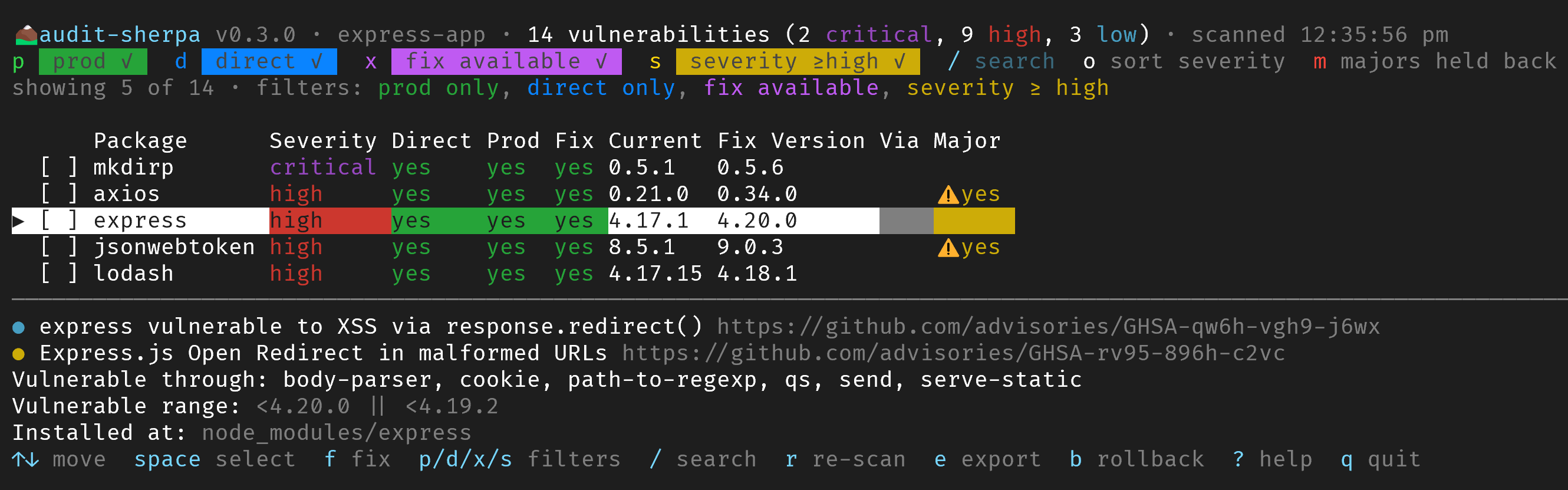
**3. Select and fix.** Select packages with `space` (`a` selects everything in view), then press `f` and choose what to fix: the selected packages, everything in view, production only, or direct only.

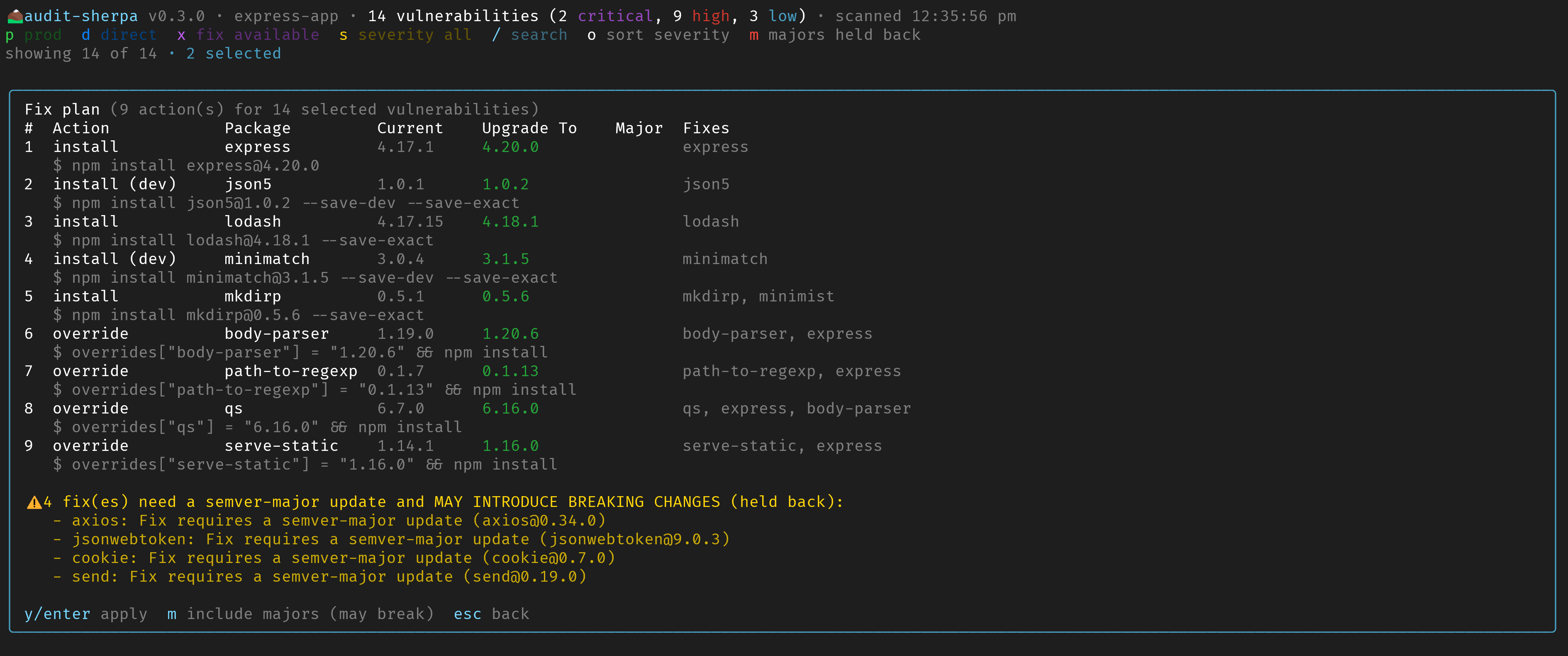
**4. Review the plan.** Nothing changes until you confirm. The plan shows the action (`install` or `override`), the package, its **current** version, the version it will be **upgraded to**, which vulnerabilities it fixes, and whether it is a semver-major update. Majors are held back unless you press `m`. Press `y`/`enter` to apply or `esc` to go back.
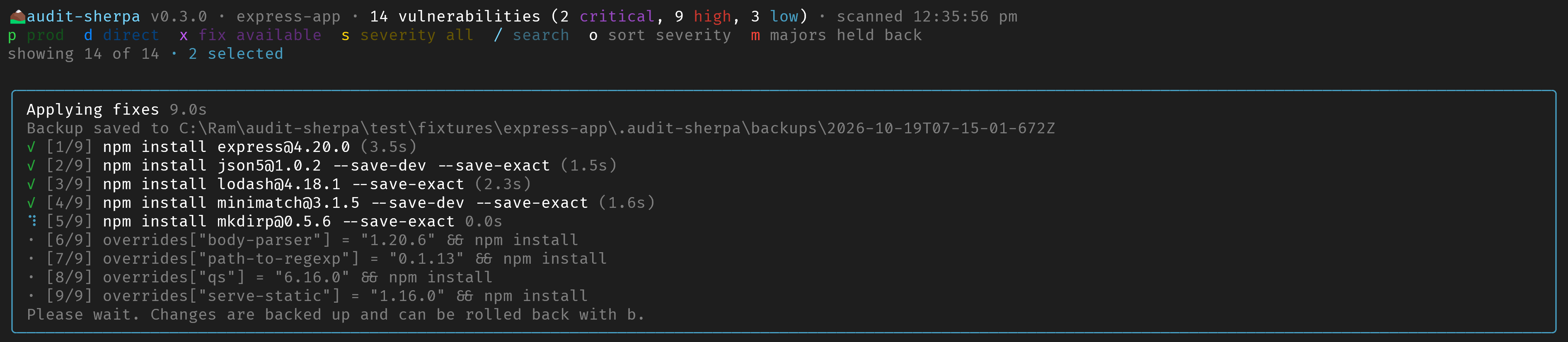
**5. Watch it run.** Each fix runs on its own with a spinner and live npm output. A failed fix is reverted without stopping the others.
**6. Result.** You get the before → after vulnerability count, then the table re-scans automatically. Press `b` at any time to roll back to an earlier backup.


### Keys
| Key | Action |
| --- | --- |
| `↑` `↓` / `j` `k`, `PgUp` `PgDn`, `g` `G` | Move and scroll |
| `space` | Select or unselect the package (fixable rows only) |
| `a` / `n` | Select all fixable rows in view / clear the selection |
| `p` / `d` / `x` | Toggle production only / direct only / fix available |
| `s` / `S` | Cycle minimum severity / toggle exact severity match |
| `/` | Search by package name (`esc` clears) |
| `c` | Clear all filters |
| `o` | Cycle sort: severity, name, scope |
| `enter` | Show all advisories and details for the current row |
| `f` | Fix: selected packages, everything in view, production only, or direct only. Shows the plan first |
| `m` | Allow or hold back semver-major (potentially breaking) updates |
| `r` | Re-run npm audit |
| `e` | Export the current view to JSON or Markdown |
| `b` | Backups: roll back to any earlier backup |
| `?` | Help |
| `q` | Quit (asks first while a fix is running) |
The session needs an interactive terminal. When output is piped or running in CI, or with `--json`, `--md`, `--fail-on` or `--no-tui`, audit-sherpa prints the one-shot table instead.
## One-shot commands
Use these in scripts, CI, or when you just want a quick printout. They take the same filter options as the interactive session.
### List vulnerabilities
```bash
audit-sherpa list # print the table and exit
audit-sherpa list --prod # production dependencies only
audit-sherpa list --direct # direct dependencies only
audit-sherpa list --fixable # only vulnerabilities with a fix available
audit-sherpa --no-tui --severity high # same as `list`; high and critical
audit-sherpa --severity moderate --severity-exact
audit-sherpa --details # include advisory titles and links
audit-sherpa --json # JSON to stdout
audit-sherpa --json report.json --md report.md
audit-sherpa --prod --fail-on high # exit code 1 for CI if a high/critical prod vuln exists
```
### Fix vulnerabilities
```bash
audit-sherpa fix # prompts: choose all / prod / direct / pick packages, then exits
audit-sherpa fix --prod -y # fix all production vulnerabilities without prompts
audit-sherpa fix --direct -y # fix direct dependencies only
audit-sherpa fix --packages lodash qs # fix specific packages
audit-sherpa fix --severity critical --dry-run
audit-sherpa fix --allow-major -y # include semver-major (potentially breaking) updates
audit-sherpa fix --prod -y --ignore-scripts # don't run install scripts of updated packages
```
| Option | Description |
| --- | --- |
| `-p, --prod` | Only production dependencies |
| `-d, --direct` | Only direct dependencies |
| `-s, --severity <level>` | Minimum severity: `all` (default), `critical`, `high`, `moderate`, `low`, `info` |
| `--severity-exact` | Match the severity exactly |
| `-F, --fixable` | Only vulnerabilities that have a fix available |
| `--packages <names...>` | Only these vulnerable packages (space or comma separated) |
| `-i, --interactive` | Always show the interactive selector |
| `--allow-major` | Allow semver-major updates. **These may contain breaking changes.** |
| `--dry-run` | Show the fix plan and commands without changing anything |
| `-y, --yes` | No prompts. Semver-major fixes are still skipped unless `--allow-major` is set |
| `--no-backup` | Do not back up `package.json` / lockfile |
| `--ignore-scripts` | Run `npm install` with `--ignore-scripts`. See [Install scripts](#install-scripts---ignore-scripts) |
| `--registry <url>` | npm registry for audit, fixes and version lookups, like `npm --registry`. Scoped registries in `.npmrc` still apply. `NPM_CONFIG_REGISTRY` also works |
| `--no-registry` | Do not query the registry to resolve or verify fix versions |
| `--input <file>` | Use an existing `npm audit --json` output instead of running npm audit |
| `-C, --cwd <dir>` | Project directory |
### Roll back
```bash
audit-sherpa rollback # restore the latest backup and run npm install
audit-sherpa rollback --list # list backups
audit-sherpa rollback --no-install
audit-sherpa rollback --ignore-scripts
```
Backups are stored in `.audit-sherpa/backups/` inside your project. The last 10 are kept, and the folder ignores itself in git.
## Install scripts (`--ignore-scripts`)
By default, fixes and rollbacks run `npm install` normally, so packages with install scripts (`preinstall`, `install`, `postinstall`, `prepare`) are built and keep working.
Add `--ignore-scripts` (or `ignoreScripts: true` in the MCP tools) to skip those scripts:
- **Safer.** Install scripts are how malicious package versions usually run code, and a fix installs new versions.
- **Faster, fewer build failures.** Native modules are not compiled during the fix.
- **But** packages that need their scripts may not work until you run `npm rebuild`. Examples are native addons (`bcrypt`, `sharp`, `sqlite3`), binary downloaders (`esbuild`, `puppeteer`, `playwright`, `cypress`) and git-hook installers (`husky`). Your project's own `prepare`/`postinstall` scripts are skipped too. `npm ls` does not detect this, so audit-sherpa reminds you after the fix.
If you already have `ignore-scripts=true` in `.npmrc`, it is respected either way.
## Custom registries and errors
```bash
audit-sherpa --registry https://registry.npmjs.org/
audit-sherpa fix --prod --registry=https://npm.example.com/
```
When `npm audit` fails, audit-sherpa shows npm's own error together with a hint and the path to npm's debug log. For example:
```text
✗ npm audit failed (E405): 405 Method Not Allowed - POST https://npm.example.com/-/npm/v1/security/audits/quick
Hint: This registry does not support npm audit (common with private registries and mirrors such as Artifactory, Nexus or Verdaccio). Point the audit at a registry that does, for example: --registry https://registry.npmjs.org/
npm log: C:\Users\you\AppData\Local\npm-cache\_logs\…-debug-0.log
```
There are also hints for authentication (401/403), DNS, connection, timeout and TLS certificate errors.
## How fixes work
| Situation | Action |
| --- | --- |
| Vulnerable **direct** dependency | `npm install <pkg>@<safe-version>`. The dependency section (`--save-dev`, etc.) and exact pinning are preserved. |
| **Transitive** dependency fixed by bumping a direct parent (from npm's `fixAvailable`) | `npm install <parent>@<version>` |
| Other **transitive** dependencies | Adds `"overrides": { "<pkg>": "<safe-version>" }` to `package.json` and runs `npm install`. |
| Package vulnerable only **through its dependencies** | Fixes those dependencies instead. |
The "safe version" is the lowest published version that is outside every known advisory range. It stays on the current major line when possible. Otherwise the fix is flagged **⚠ major**.
Each fix runs on its own. If one fails, only that change is reverted and the rest continue. An override is skipped when an earlier update has already removed the vulnerable version. It is also skipped when it would force other, unaffected copies of the package onto a different major version.
## MCP server (for AI agents)
`audit-sherpa mcp` (or the `audit-sherpa-mcp` binary) starts a Model Context Protocol server over stdio.
| Tool | Description |
| --- | --- |
| `audit_list` | Normalized vulnerabilities with filters (`prodOnly`, `directOnly`, `fixableOnly`, `severity`, `packages`) |
| `audit_fix_plan` | Preview fix actions without changing anything |
| `audit_fix` | Apply fixes (supports `dryRun`, `allowMajor`, `ignoreScripts`). Reports MCP progress notifications |
| `audit_rollback` | Restore the last backup (supports `install`, `ignoreScripts`) |
Every tool accepts a `cwd` (absolute project path). It defaults to the server's working directory. To use a custom registry, add `"--registry", "https://…"` after `"mcp"` in `args`.
**VS Code** (`.vscode/mcp.json`)
```json
{
"servers": {
"audit-sherpa": { "type": "stdio", "command": "npx", "args": ["-y", "audit-sherpa", "mcp"] }
}
}
```
**GitHub Copilot CLI** (`~/.copilot/mcp-config.json`)
```json
{
"mcpServers": {
"audit-sherpa": { "type": "local", "command": "npx", "args": ["-y", "audit-sherpa", "mcp"], "tools": ["*"] }
}
}
```
**Claude Desktop / Cursor**
```json
{
"mcpServers": {
"audit-sherpa": { "command": "npx", "args": ["-y", "audit-sherpa", "mcp"] }
}
}
```
Example prompt: *"Use audit-sherpa to list the high and critical production vulnerabilities in this repo, then fix the direct ones without breaking changes."*
## Programmatic API
Most people only need the CLI. If you want to build your own tooling (custom CI gates, reports, bots), the same building blocks are exported as a Node.js library:
```ts
import { scan, filterVulnerabilities, buildFixPlan, applyFixPlan, readPackageJson } from 'audit-sherpa';
const result = await scan({ cwd: process.cwd() });
const prod = filterVulnerabilities(result.vulnerabilities, { prodOnly: true, severity: 'high' });
const plan = buildFixPlan(prod, await readPackageJson(process.cwd()), { all: result.vulnerabilities });
await applyFixPlan(plan, { onEvent: (e) => console.log(e.type) });
```
## Development
```bash
npm install
npm test # vitest
npm run typecheck
npm run build # tsup -> dist/
```
## License
MIT
This server cannot be deployed
Maintenance
ActivityMaintained
ResponsivenessNo recent community issues