
forecast-mcp
README.md
# timesfm-mcp
[](https://github.com/ramdhavepreetam/timesfm-mcp/actions/workflows/ci.yml)
[](https://pypi.org/project/timesfm-mcp/)
[](https://github.com/ramdhavepreetam/timesfm-mcp/tree/main/docs)
**MCP server for Google's TimesFM 2.5 — give any AI agent zero-config time-series forecasting.**
Plug [TimesFM 2.5](https://github.com/google-research/timesfm), Google's 200M-parameter foundation model for time-series, directly into Claude Code, Claude Desktop, Cursor, or any MCP client. The agent calls `forecast`, gets point predictions + uncertainty bands + a trend/seasonality summary, and writes the explanation itself.
No ML configuration. No data pipelines. One line to run.
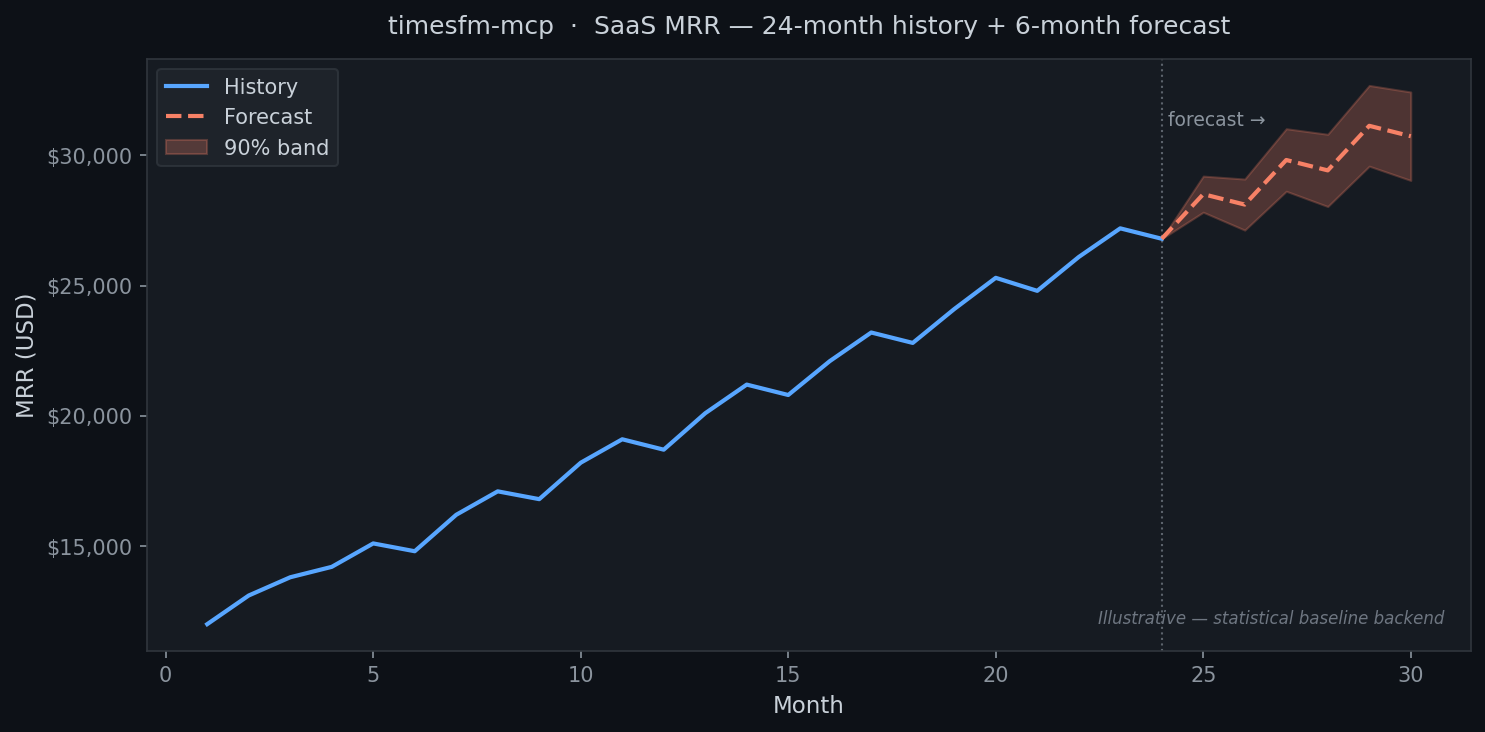
*Chart generated with the statistical baseline. See "Enable TimesFM 2.5" below to use the full neural model.*
## Quickstart (30 seconds)
```bash
uvx timesfm-mcp # runs over stdio for local agents
```
Add to your Claude Desktop / Claude Code / Cursor config:
```json
{
"mcpServers": {
"forecast": { "command": "uvx", "args": ["timesfm-mcp"] }
}
}
```
Then ask your agent: *"Forecast the next 6 months from this revenue data and tell me what to expect."*
## Enable TimesFM 2.5 (optional)
> **System requirements:** ≥ 16 GB RAM · ~800 MB disk (model weights, downloaded on first use) · PyTorch
>
> **Not sure?** Skip this — `uvx timesfm-mcp` already works great on any machine.
```bash
pip install "timesfm-mcp[timesfm]"
```
The TimesFM 2.5 source is bundled inside this package (Apache-2.0, Google LLC) — no separate git clone needed. The server auto-detects it and upgrades automatically; no config change required.
## Two backends, zero config
| Backend | When active | System requirement | Install |
|---------|------------|-------------------|---------|
| **Statistical baseline** | Always — default | **Any machine** | `uvx timesfm-mcp` |
| **TimesFM 2.5** (Google) | When installed | **≥ 16 GB RAM + ~800 MB disk** | `pip install "timesfm-mcp[timesfm]"` |
**Start with the baseline.** It runs on any machine, installs in seconds, and delivers production-ready forecasts. Upgrade to TimesFM only if you need the neural model's extra accuracy and have the RAM for it.
## Tools
| Tool | What it does |
|------|--------------|
| `forecast` | Forecast a single series with optional uncertainty bands |
| `list_backends` | Report which engine is active (timesfm / baseline) |
| `backtest` | Hold out the last N points — compare TimesFM vs baseline MAE/sMAPE |
## Supported clients
Works with any MCP-compatible agent. Verified configs in [Client Setup](https://github.com/ramdhavepreetam/timesfm-mcp/blob/main/docs/client-setup.md):
| Client | Config |
|--------|--------|
| **Claude Desktop** | `claude_desktop_config.json` |
| **Claude Code** | `claude mcp add forecast -- uvx timesfm-mcp` |
| **GitHub Copilot** (VS Code) | `.vscode/mcp.json` |
| **Cursor** | `~/.cursor/mcp.json` |
| **Windsurf** | `~/.codeium/windsurf/mcp_config.json` |
| **Cline** (VS Code) | Cline MCP settings panel |
| **Continue.dev** | `~/.continue/config.json` |
| **Zed** | `~/.config/zed/settings.json` |
## Documentation
Full docs in the **[docs/](https://github.com/ramdhavepreetam/timesfm-mcp/tree/main/docs)** folder:
- [Getting Started](https://github.com/ramdhavepreetam/timesfm-mcp/blob/main/docs/getting-started.md) — installation and first forecast
- [Client Setup](https://github.com/ramdhavepreetam/timesfm-mcp/blob/main/docs/client-setup.md) — config for all 8 supported clients
- [Tool Reference](https://github.com/ramdhavepreetam/timesfm-mcp/blob/main/docs/tool-reference.md) — full parameter docs
- [Cookbook](https://github.com/ramdhavepreetam/timesfm-mcp/blob/main/docs/cookbook.md) — SaaS MRR, e-commerce demand, traffic, cloud spend
- [How It Works](https://github.com/ramdhavepreetam/timesfm-mcp/blob/main/docs/how-it-works.md) — the math and model
## Migrating from forecast-mcp
`timesfm-mcp` is the renamed continuation of `forecast-mcp`. Update your install:
```bash
pip install timesfm-mcp # replaces: pip install forecast-mcp
uvx timesfm-mcp # replaces: uvx forecast-mcp
```
Update your agent config: change `"args": ["forecast-mcp"]` → `"args": ["timesfm-mcp"]`.
## License
Apache-2.0
TDQS
B3.4/5.0
Scored across 3 tools
Disambiguation5/5
Each tool has a distinct, non-overlapping purpose: backtesting, forecasting, and engine info. No ambiguity between them.
Naming Consistency4/5
All tools use imperative verbs, but 'backtest' and 'forecast' are single words while 'list_backends' uses an underscore. Slight inconsistency in formatting.
Tool Count5/5
Three tools is well-scoped for a focused forecasting server. Each tool is essential and contributes to the core workflow.
Completeness4/5
Covers the main actions: forecast, backtest, and engine info. Minor gaps like listing available models or settings, but acceptable for this domain.
Maintenance
ActivityInactive
ResponsivenessNo issues