
OpenSCAD MCP Server
Click on "Install Server".
Wait a few minutes for the server to deploy. Once ready, it will show a "Started" state.
In the chat, type
@followed by the MCP server name and your instructions, e.g., "@OpenSCAD MCP Serverrender a cube with a sphere next to it and save as /tmp/shapes.png"
That's it! The server will respond to your query, and you can continue using it as needed.
Here is a step-by-step guide with screenshots.
OpenSCAD MCP Server
A Model Context Protocol (MCP) server that provides OpenSCAD rendering capabilities. This server allows you to render OpenSCAD code to PNG images through a standardized MCP interface.
Features
Headless OpenSCAD Rendering: Execute OpenSCAD code and generate PNG images without a GUI
Flexible Camera Control: Support for custom camera positioning and orientation
Cross-Platform: Configurable OpenSCAD binary path for different operating systems
Related MCP server: Excalidraw MCP Server
Prerequisites
Node.js: Version 18 or higher
OpenSCAD: Nightly (dev) version must be installed on your system. Download and install from OpenSCAD.org.
Installation
Clone this repository:
git clone https://github.com/rahulgarg123/openscad-mcp.git
cd openscad-mcp
Install dependencies:
npm installBuild the project:
npm run build
Configuration
OpenSCAD Binary Path
By default, the server looks for OpenSCAD at /Applications/OpenSCAD.app/Contents/MacOS/OpenSCAD (macOS path). You can customize this by setting the OPENSCAD_BINARY environment variable.
Usage as MCP Server in Gemini-cli
In your gemini settings.json file, e.g., ~/.gemini/settings.json, add the following:
  "mcpServers": {
    "openscad": {
      "command": "node",
      "args": ["/path/to/openscad-mcp/dist/index.js"],
      "env": {
        "OPENSCAD_BINARY": "/path/to/OpenSCAD/binary"
      }
    }
  }
Use included GEMINI.md file in the folder you want to generate openSCAD code in.
Available Tools
render_openscad
Renders OpenSCAD code to a PNG image file.
Parameters:
code(string, required): The OpenSCAD code to renderoutput_path(string, required): Path where the rendered PNG image should be savedcamera(string, optional): Camera parameters in one of these formats:translate_x,y,z,rot_x,y,z,dist- Translation, rotation, and distanceeye_x,y,z,center_x,y,z- Eye position and center point
Example Request:
{
  "jsonrpc": "2.0",
  "id": 1,
  "method": "tools/call",
  "params": {
    "name": "render_openscad",
    "arguments": {
      "code": "cube([20, 30, 10]); translate([25, 0, 0]) sphere(r=8);",
      "output_path": "/tmp/my_render.png",
      "camera": "0,0,0,60,0,315,100"
    }
  }
}
Response:
{
  "jsonrpc": "2.0",
  "id": 1,
  "result": {
    "content": [
      {
        "type": "text",
        "text": "OpenSCAD rendering completed successfully\n\nOutput:\n...\n\nRendered image saved to: /tmp/my_render.png"
      }
    ]
  }
}
Examples with gemini-cli
Prompt:
Generate openscad code for a very beautiful and unique planter. Iterate as many times as possible on the design, looking at the rendering in each iteration and improving it. The goal is to generate a unique and aesthetic planter design amenable for 3D printing.
|
First Iteration |
|
Final Iteration |
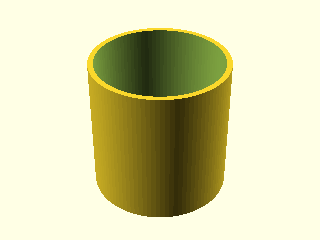
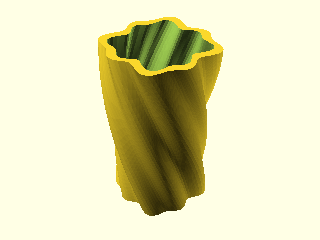
Generated OpenSCAD code:
module unique_planter(
    height = 100,
    width = 50,
    wall_thickness = 4,
    twist = 90,
    freq = 8,
    amp = 2,
    drainage_hole_rad = 5
) {
    $fn=100;
    difference() {
        linear_extrude(height = height, scale = 1.2, twist = twist, slices = 200) {
            polygon([
                for (a = [0:360/$fn:359])
                let (r = width/2 + amp*sin(a*freq) + amp*sin(a*freq/2))
                [r*cos(a), r*sin(a)]
            ]);
        }
        translate([0,0,wall_thickness]) {
            linear_extrude(height = height, scale = 1.2, twist = twist, slices = 200) {
                polygon([
                    for (a = [0:360/$fn:359])
                    let (r = width/2 - wall_thickness + amp*sin(a*freq) + amp*sin(a*freq/2))
                    [r*cos(a), r*sin(a)]
                ]);
            }
        }
        translate([0,0,-1]) {
            cylinder(h = wall_thickness+2, r = drainage_hole_rad);
        }
    }
}

unique_planter();
Testing
Run the included tests to verify everything works:
node test_client.jsDevelopment
Scripts
npm run build: Compile TypeScript to JavaScriptnpm run start: Start the MCP servernpm run dev: Watch mode for development
Project Structure
openscad-mcp/
├── src/
│   └── index.ts          # Main MCP server implementation
├── dist/                 # Compiled JavaScript output
├── test_client.js        # Basic test client
├── test.scad            # Sample OpenSCAD file
├── package.json         # Node.js dependencies and scripts
├── tsconfig.json        # TypeScript configuration
└── README.md           # This file
Troubleshooting
OpenSCAD Not Found
Error: spawn /Applications/OpenSCAD.app/Contents/MacOS/OpenSCAD ENOENTSolution: Verify OpenSCAD is installed and set the correct OPENSCAD_BINARY path.
Permission Denied
Error: EACCES: permission denied, open '/path/to/output.png'Solution: Ensure the output directory exists and is writable.
Rendering Timeout
Error: Command failed: timeoutSolution: Simplify your OpenSCAD code or increase the timeout in the source code.
Contributing
Fork the repository
Create a feature branch
Make your changes
Add tests for new functionality
Submit a pull request
Links

Resources
Unclaimed servers have limited discoverability.
Looking for Admin?
If you are the server author, to access and configure the admin panel.
Tools
Appeared in Searches
Latest Blog Posts
MCP directory API
We provide all the information about MCP servers via our MCP API.
curl -X GET 'https://glama.ai/api/mcp/v1/servers/rahulgarg123/openscad-mcp'
If you have feedback or need assistance with the MCP directory API, please join our Discord server