OpenSCAD MCP Server
A Model Context Protocol (MCP) server that provides OpenSCAD rendering capabilities. This server allows you to render OpenSCAD code to PNG images through a standardized MCP interface.
Features
Headless OpenSCAD Rendering: Execute OpenSCAD code and generate PNG images without a GUI
Flexible Camera Control: Support for custom camera positioning and orientation
Cross-Platform: Configurable OpenSCAD binary path for different operating systems
Related MCP server: OpenSCAD MCP Server
Prerequisites
Installation
Clone this repository:
git clone https://github.com/rahulgarg123/openscad-mcp.git
cd openscad-mcp
Install dependencies:
Build the project:
Configuration
OpenSCAD Binary Path
By default, the server looks for OpenSCAD at /Applications/OpenSCAD.app/Contents/MacOS/OpenSCAD (macOS path). You can customize this by setting the OPENSCAD_BINARY environment variable.
Usage as MCP Server in Gemini-cli
In your gemini settings.json file, e.g., ~/.gemini/settings.json, add the following:
  "mcpServers": {
    "openscad": {
      "command": "node",
      "args": ["/path/to/openscad-mcp/dist/index.js"],
      "env": {
        "OPENSCAD_BINARY": "/path/to/OpenSCAD/binary"
      }
    }
  }
Use included GEMINI.md file in the folder you want to generate openSCAD code in.
Available Tools
render_openscad
Renders OpenSCAD code to a PNG image file.
Parameters:
code (string, required): The OpenSCAD code to render
output_path (string, required): Path where the rendered PNG image should be saved
camera (string, optional): Camera parameters in one of these formats:
translate_x,y,z,rot_x,y,z,dist - Translation, rotation, and distance
eye_x,y,z,center_x,y,z - Eye position and center point
Example Request:
{
  "jsonrpc": "2.0",
  "id": 1,
  "method": "tools/call",
  "params": {
    "name": "render_openscad",
    "arguments": {
      "code": "cube([20, 30, 10]); translate([25, 0, 0]) sphere(r=8);",
      "output_path": "/tmp/my_render.png",
      "camera": "0,0,0,60,0,315,100"
    }
  }
}
Response:
{
  "jsonrpc": "2.0",
  "id": 1,
  "result": {
    "content": [
      {
        "type": "text",
        "text": "OpenSCAD rendering completed successfully\n\nOutput:\n...\n\nRendered image saved to: /tmp/my_render.png"
      }
    ]
  }
}
Examples with gemini-cli
Prompt:
Generate openscad code for a very beautiful and unique planter. Iterate as many times as possible on the design, looking at the rendering in each iteration and improving it. The goal is to generate a unique and aesthetic planter design amenable for 3D printing.
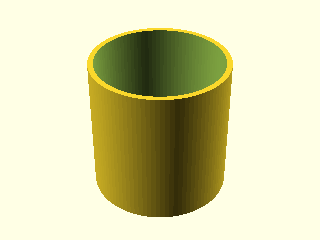
|
First Iteration |
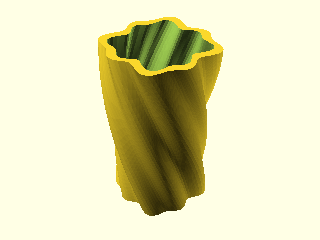
|
Final Iteration |
Generated OpenSCAD code:
module unique_planter(
    height = 100,
    width = 50,
    wall_thickness = 4,
    twist = 90,
    freq = 8,
    amp = 2,
    drainage_hole_rad = 5
) {
    $fn=100;
    difference() {
        linear_extrude(height = height, scale = 1.2, twist = twist, slices = 200) {
            polygon([
                for (a = [0:360/$fn:359])
                let (r = width/2 + amp*sin(a*freq) + amp*sin(a*freq/2))
                [r*cos(a), r*sin(a)]
            ]);
        }
        translate([0,0,wall_thickness]) {
            linear_extrude(height = height, scale = 1.2, twist = twist, slices = 200) {
                polygon([
                    for (a = [0:360/$fn:359])
                    let (r = width/2 - wall_thickness + amp*sin(a*freq) + amp*sin(a*freq/2))
                    [r*cos(a), r*sin(a)]
                ]);
            }
        }
        translate([0,0,-1]) {
            cylinder(h = wall_thickness+2, r = drainage_hole_rad);
        }
    }
}

unique_planter();
Testing
Run the included tests to verify everything works:
Development
Scripts
npm run build: Compile TypeScript to JavaScript
npm run start: Start the MCP server
npm run dev: Watch mode for development
Project Structure
openscad-mcp/
├── src/
│   └── index.ts          # Main MCP server implementation
├── dist/                 # Compiled JavaScript output
├── test_client.js        # Basic test client
├── test.scad            # Sample OpenSCAD file
├── package.json         # Node.js dependencies and scripts
├── tsconfig.json        # TypeScript configuration
└── README.md           # This file
Troubleshooting
OpenSCAD Not Found
Error: spawn /Applications/OpenSCAD.app/Contents/MacOS/OpenSCAD ENOENT
Solution: Verify OpenSCAD is installed and set the correct OPENSCAD_BINARY path.
Permission Denied
Error: EACCES: permission denied, open '/path/to/output.png'
Solution: Ensure the output directory exists and is writable.
Rendering Timeout
Error: Command failed: timeout
Solution: Simplify your OpenSCAD code or increase the timeout in the source code.
Contributing
Fork the repository
Create a feature branch
Make your changes
Add tests for new functionality
Submit a pull request
Links
