Glama
raeseoklee

MCP Workbench MCP Server

by raeseoklee

English | 한국어

@mcp-workbench/mcp-server

Agent-facing MCP adapter for MCP Workbench — lets AI agents inspect, test, and validate MCP servers through structured tool calls.
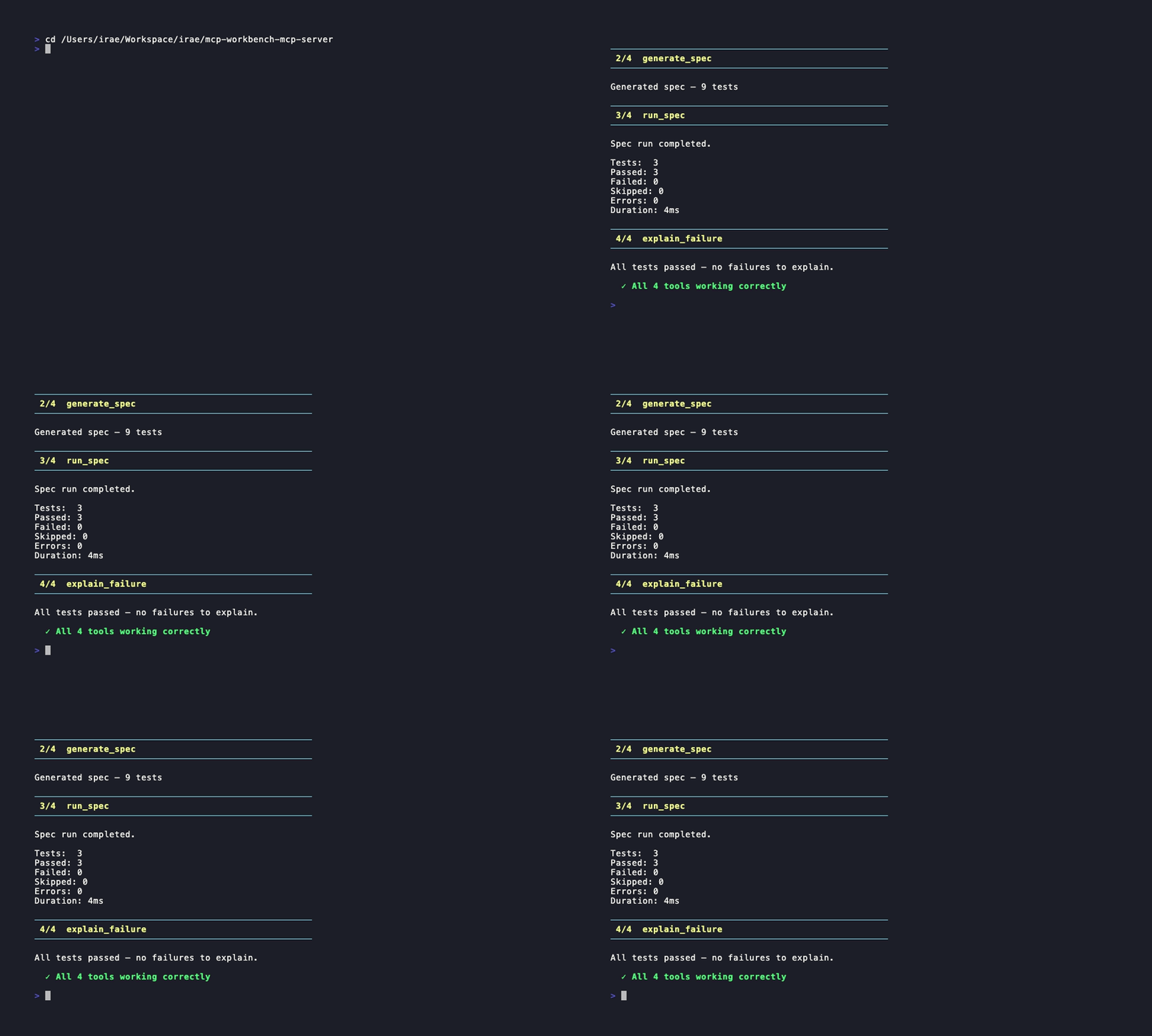
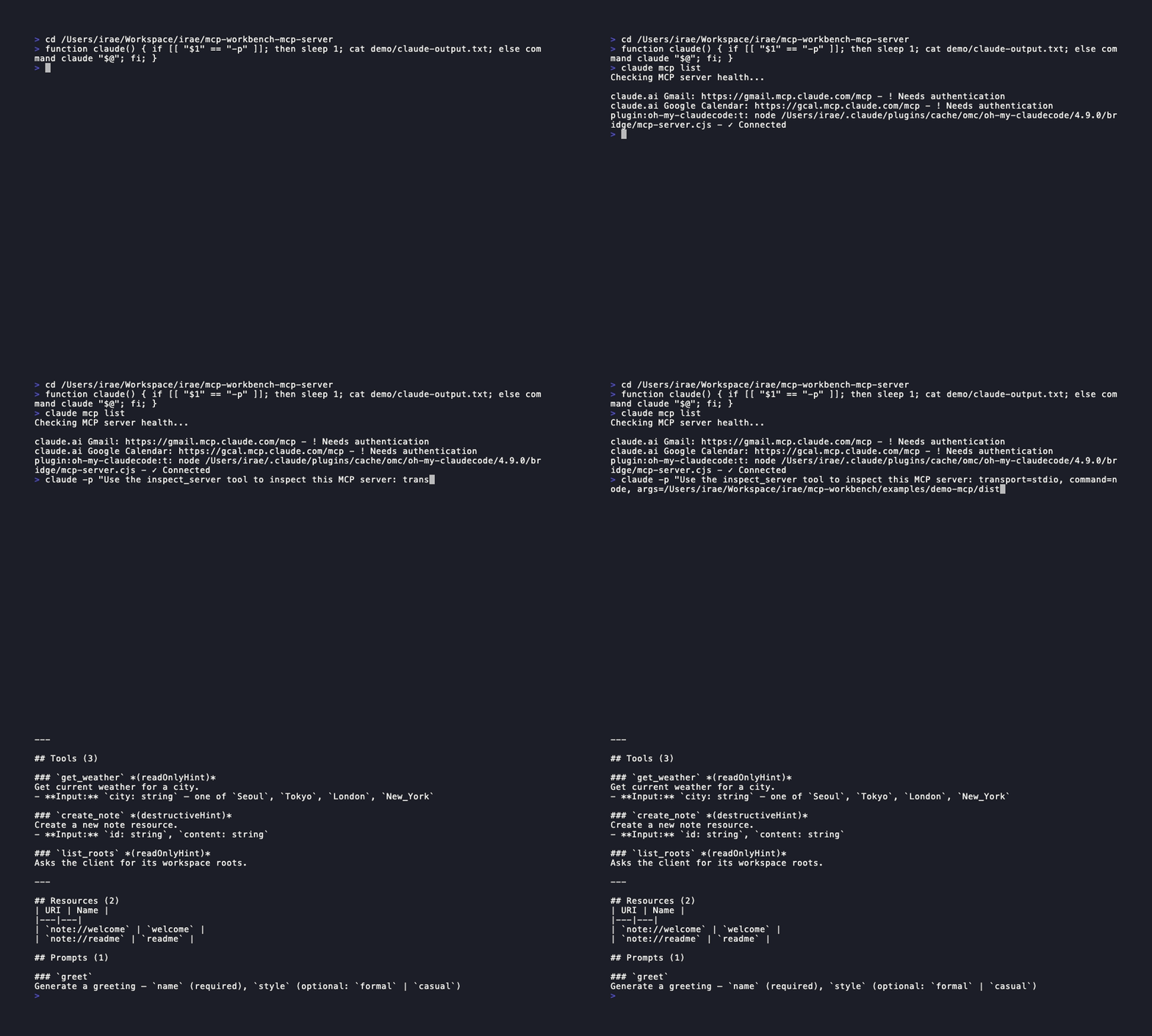
demo

Claude Code demo

claude-demo


Overview

@mcp-workbench/mcp-server wraps the MCP Workbench CLI as an MCP server, exposing its inspect, generate, run, and explain capabilities as structured tools that AI agents can call directly. It spawns the CLI as a subprocess and parses the output into typed responses.

Entry points: @mcp-workbench/cli is the human-facing runner. @mcp-workbench/mcp-server is the agent-facing MCP adapter. Both use the same core engine.


Related MCP server: Des MCP Server Testing MCP Server

Prerequisites

  • Node.js >= 20

  • MCP Workbench CLI must be installed and available on your PATH:

# Primary — scoped package
npm install -g @mcp-workbench/cli

# Alternative — convenience wrapper
npm install -g mcp-workbench-cli

Or set the MCP_WORKBENCH_CLI environment variable to point to the binary.


Installation

npm install -g @mcp-workbench/mcp-server

Or clone and build from source:

git clone https://github.com/raeseoklee/mcp-workbench-mcp-server.git
cd mcp-workbench-mcp-server
npm install
npm run build

Connecting to a Host

Claude Code

claude mcp add mcp-workbench -- npx -y @mcp-workbench/mcp-server

OpenAI Codex CLI

codex mcp add mcp-workbench -- npx -y @mcp-workbench/mcp-server

Or add to ~/.codex/config.toml:

[mcp_servers.mcp-workbench]
command = "npx"
args    = ["-y", "@mcp-workbench/mcp-server"]
enabled = true

Claude Desktop

Add to your claude_desktop_config.json:

{
  "mcpServers": {
    "mcp-workbench": {
      "command": "npx",
      "args": ["-y", "@mcp-workbench/mcp-server"]
    }
  }
}

Cursor

Add to .cursor/mcp.json:

{
  "mcpServers": {
    "mcp-workbench": {
      "command": "npx",
      "args": ["-y", "@mcp-workbench/mcp-server"]
    }
  }
}

Available Tools

inspect_server

Connect to an MCP server and inspect its capabilities, version, and supported features.

Inputs:

Field

Type

Required

Description

transport

"stdio" | "streamable-http"

Yes

Transport type

url

string

No

Server URL (required for streamable-http)

command

string

No

Command to launch server (required for stdio)

args

string | string[]

No

Arguments for the server command

headers

Record<string, string>

No

HTTP headers (e.g. Authorization)

timeoutMs

number

No

Timeout in ms (default: 30000)

Output: Human-readable summary + structured JSON:

{
  "serverName": "my-server",
  "serverVersion": "1.0.0",
  "protocolVersion": "2025-11-25",
  "capabilities": {
    "tools": true,
    "resources": true,
    "prompts": false,
    "completions": false,
    "logging": false
  }
}

generate_spec

Auto-generate a YAML test spec by discovering server capabilities. Partial discovery is supported automatically by the underlying CLI.

Inputs:

Field

Type

Required

Description

transport

"stdio" | "streamable-http"

Yes

Transport type

url

string

No

Server URL

command

string

No

Server command

args

string | string[]

No

Server arguments

headers

Record<string, string>

No

HTTP headers

include

Array<"tools" | "resources" | "prompts">

No

Only include these types

exclude

Array<"tools" | "resources" | "prompts">

No

Exclude these types

depth

"shallow" | "deep"

No

Discovery depth (shallow = list only, deep = call each)

timeoutMs

number

No

Timeout in ms

Output: Human-readable summary + structured JSON:

{
  "yaml": "apiVersion: mcp-workbench.dev/v0alpha1\n...",
  "testCount": 9,
  "warnings": ["city: TODO_CITY_NAME  # TODO: replace with actual value"]
}

run_spec

Run a YAML test spec against an MCP server. Provide either specText (inline YAML) or specPath (path to a file). At least one is required.

Inputs:

Field

Type

Required

Description

specText

string

No*

Inline YAML spec content

specPath

string

No*

Path to a YAML spec file

timeoutMs

number

No

Timeout in ms

*At least one of specText or specPath must be provided.

Output: Human-readable summary + structured JSON:

{
  "total": 3,
  "passed": 3,
  "failed": 0,
  "skipped": 0,
  "errors": 0,
  "durationMs": 4,
  "failures": []
}

explain_failure

Analyze test run results and explain failures with heuristic classification and actionable recommendations.

Inputs:

Field

Type

Required

Description

runResult

RunReport

Yes

The structured result from run_spec

Output: Human-readable summary + structured JSON:

{
  "summary": "All tests passed",
  "causes": [],
  "recommendations": []
}

Internationalization

Tool text summaries support multiple languages. Structured JSON outputs are always language-neutral.

Locale

Language

en

English (default)

ko

Korean

Set language via environment variable:

MCP_WORKBENCH_LANG=ko node dist/index.js

Only user-facing text summaries are translated. Tool names, schema fields, and JSON output keys are always in English.


Example Use Cases

  • "Inspect this server and tell me what capabilities it has"

  • "Generate a YAML test spec for this server"

  • "Run this spec and explain any failures"


Security Considerations

  • Authentication headers are passed per-call and not persisted

  • No tokens or credentials are stored by this server

  • Tokens are not echoed back in tool outputs

  • The server spawns mcp-workbench CLI as a subprocess with the current environment

  • Spec files written to temp directories are cleaned up after use


MVP Limitations

  • specText in run_spec uses a temporary file internally

  • Headers in run_spec are not forwarded to the underlying server — headers must be embedded in the spec YAML itself

  • explain_failure is heuristic-based, not AI-powered

  • generate_spec test count detection is regex-based

  • Only stdio transport is supported for connecting to this MCP server itself

  • No streaming of test results (waits for full completion)

  • No caching of inspection or generation results between calls


Development

npm install
npm run build
npm test

Roadmap

v0.1 (current):

  • inspect_server, generate_spec, run_spec, explain_failure

  • Claude Code integration demo

v0.2:

  • Structured outputs via outputSchema (when SDK support lands)

  • Spec diff support

v0.3:

  • AI-assisted assertions

  • Merge/update existing spec


License

Apache-2.0

Available Tools

4 tools
explain_failureA

Analyze test run results and explain failures with heuristic classification and actionable recommendations. Pass the structured result from run_spec.

ParametersJSON Schema
NameRequiredDescriptionDefault
runResultYesThe RunReport object from a run_spec call

TDQS

A3.9/5.0
Behavior2/5

Does the description disclose side effects, auth requirements, rate limits, or destructive behavior?

No annotations are present, so the description bears full responsibility for behavioral disclosure. It mentions heuristic classification and recommendations but does not describe any side effects, authorization needs, rate limits, or what happens with invalid input. The brief description leaves significant behavioral ambiguity.

Agents need to know what a tool does to the world before calling it. Descriptions should go beyond structured annotations to explain consequences.

Conciseness5/5

Is the description appropriately sized, front-loaded, and free of redundancy?

The description is a single, concise sentence that conveys the purpose and input requirement without redundancy. Every word serves a purpose, making it highly efficient.

Shorter descriptions cost fewer tokens and are easier for agents to parse. Every sentence should earn its place.

Completeness3/5

Given the tool's complexity, does the description cover enough for an agent to succeed on first attempt?

While the input schema is fully described, the tool has no output schema, and the description lacks details about the output format or structure. The mention of 'heuristic classification and actionable recommendations' is vague, leaving the agent uncertain about what the tool returns.

Complex tools with many parameters or behaviors need more documentation. Simple tools need less. This dimension scales expectations accordingly.

Parameters4/5

Does the description clarify parameter syntax, constraints, interactions, or defaults beyond what the schema provides?

The input schema has 100% description coverage, detailing all nested properties. The description adds meaning by specifying that the runResult parameter should be the structured result from run_spec, which contextualizes the parameter beyond the schema.

Input schemas describe structure but not intent. Descriptions should explain non-obvious parameter relationships and valid value ranges.

Purpose5/5

Does the description clearly state what the tool does and how it differs from similar tools?

The description clearly states the tool analyzes test run results to explain failures with heuristic classification and actionable recommendations. It specifies the input source as 'the structured result from run_spec,' which differentiates it from sibling tools like generate_spec, inspect_server, and run_spec.

Agents choose between tools based on descriptions. A clear purpose with a specific verb and resource helps agents select the right tool.

Usage Guidelines4/5

Does the description explain when to use this tool, when not to, or what alternatives exist?

The description implicitly guides usage by requiring the structured result from run_spec, indicating it should be used after a run_spec call. However, it does not explicitly state when not to use it or provide alternative tools for similar purposes.

Agents often have multiple tools that could apply. Explicit usage guidance like "use X instead of Y when Z" prevents misuse.

generate_specB

Generate a YAML test spec by discovering the capabilities of an MCP server. Returns a ready-to-run spec.

ParametersJSON Schema
NameRequiredDescriptionDefault
transportYesTransport type to use for connecting to the server
urlNoServer URL (required for streamable-http transport)
commandNoCommand to launch the server (required for stdio transport)
argsNoArguments to pass to the server command
headersNoHTTP headers to send (e.g. Authorization)
includeNoOnly include these capability types in the spec
excludeNoExclude these capability types from the spec
depthNoDiscovery depth: shallow (list only) or deep (call each tool/resource/prompt)
timeoutMsNoTimeout in milliseconds (default: 30000)

TDQS

B3.2/5.0
Behavior2/5

Does the description disclose side effects, auth requirements, rate limits, or destructive behavior?

With no annotations provided, the description carries full burden for behavioral disclosure. It mentions discovering capabilities but omits critical details: that it will connect to the server, potentially execute calls (especially with depth='deep'), and that it returns a YAML spec. The actual behavior of initiating network connections and running discovery actions is not transparent.

Agents need to know what a tool does to the world before calling it. Descriptions should go beyond structured annotations to explain consequences.

Conciseness5/5

Is the description appropriately sized, front-loaded, and free of redundancy?

Two sentences with no wasted words. The action and result are front-loaded. Every word adds value, and the structure is clear and direct.

Shorter descriptions cost fewer tokens and are easier for agents to parse. Every sentence should earn its place.

Completeness2/5

Given the tool's complexity, does the description cover enough for an agent to succeed on first attempt?

Given 9 parameters and no output schema, the description is too terse. It does not explain the discovery mechanism, how transport selection affects required parameters, or how the output spec is structured. An agent lacks the operational context needed to invoke the tool correctly, especially for complex scenarios like specifying headers or depth.

Complex tools with many parameters or behaviors need more documentation. Simple tools need less. This dimension scales expectations accordingly.

Parameters3/5

Does the description clarify parameter syntax, constraints, interactions, or defaults beyond what the schema provides?

Schema description coverage is 100%, so baseline is 3. The description does not add parameter-specific semantics beyond what the schema already provides. It does not elaborate on how parameters like depth or include/exclude affect the generated spec.

Input schemas describe structure but not intent. Descriptions should explain non-obvious parameter relationships and valid value ranges.

Purpose5/5

Does the description clearly state what the tool does and how it differs from similar tools?

The description explicitly states the tool generates a YAML test spec by discovering MCP server capabilities and returns a ready-to-run spec. The verb 'generate' is specific, and the resource is clearly a test spec. It distinguishes from sibling tools (explain_failure, inspect_server, run_spec) which serve different purposes.

Agents choose between tools based on descriptions. A clear purpose with a specific verb and resource helps agents select the right tool.

Usage Guidelines2/5

Does the description explain when to use this tool, when not to, or what alternatives exist?

No guidance on when to use this tool versus alternatives. The description does not mention prerequisites, when not to use it, or how it compares to siblings like inspect_server or run_spec. Agents must infer usage context from the name and schema alone.

Agents often have multiple tools that could apply. Explicit usage guidance like "use X instead of Y when Z" prevents misuse.

inspect_serverB

Connect to an MCP server and inspect its capabilities, version, and supported features.

ParametersJSON Schema
NameRequiredDescriptionDefault
transportYesTransport type to use for connecting to the server
urlNoServer URL (required for streamable-http transport)
commandNoCommand to launch the server (required for stdio transport)
argsNoArguments to pass to the server command
headersNoHTTP headers to send (e.g. Authorization)
timeoutMsNoTimeout in milliseconds (default: 30000)

TDQS

B3.2/5.0
Behavior2/5

Does the description disclose side effects, auth requirements, rate limits, or destructive behavior?

No annotations are provided, so the description carries full burden. It implies a read-only inspection but does not disclose connection failure behaviors, timeouts, or side effects. For a tool that connects to an external server, this is insufficient transparency.

Agents need to know what a tool does to the world before calling it. Descriptions should go beyond structured annotations to explain consequences.

Conciseness5/5

Is the description appropriately sized, front-loaded, and free of redundancy?

The description is a single, front-loaded sentence with no unnecessary words. Every part serves to define the tool's core function.

Shorter descriptions cost fewer tokens and are easier for agents to parse. Every sentence should earn its place.

Completeness2/5

Given the tool's complexity, does the description cover enough for an agent to succeed on first attempt?

The description lacks information about return values (no output schema) and does not cover what happens after connection (e.g., what 'inspect' returns). For a tool with 6 parameters and no annotations, this is incomplete.

Complex tools with many parameters or behaviors need more documentation. Simple tools need less. This dimension scales expectations accordingly.

Parameters3/5

Does the description clarify parameter syntax, constraints, interactions, or defaults beyond what the schema provides?

Schema description coverage is 100%, so the schema already documents parameter meanings. The description adds no extra context beyond the schema, meeting the baseline of 3.

Input schemas describe structure but not intent. Descriptions should explain non-obvious parameter relationships and valid value ranges.

Purpose5/5

Does the description clearly state what the tool does and how it differs from similar tools?

The description uses specific verbs and nouns: 'connect to an MCP server and inspect its capabilities, version, and supported features.' It clearly distinguishes from siblings like explain_failure (explain), generate_spec (generate), and run_spec (run), making the tool's purpose unique.

Agents choose between tools based on descriptions. A clear purpose with a specific verb and resource helps agents select the right tool.

Usage Guidelines2/5

Does the description explain when to use this tool, when not to, or what alternatives exist?

The description provides no explicit guidance on when to use this tool versus alternatives. It only states its function, leaving the agent to infer from sibling names. No 'when to use' or 'when not to use' conditions are given.

Agents often have multiple tools that could apply. Explicit usage guidance like "use X instead of Y when Z" prevents misuse.

run_specA

Run a YAML test spec against an MCP server and return results. Provide either specText (inline YAML) or specPath (path to a file). At least one is required.

ParametersJSON Schema
NameRequiredDescriptionDefault
specTextNoInline YAML spec content to run
specPathNoPath to a YAML spec file to run
timeoutMsNoTimeout in milliseconds (default: 30000)

TDQS

A3.7/5.0
Behavior2/5

Does the description disclose side effects, auth requirements, rate limits, or destructive behavior?

No annotations are provided, so the description must fully disclose behavior. It mentions 'return results' but does not specify output format, side effects, or safety profile. Important behavioral details are missing.

Agents need to know what a tool does to the world before calling it. Descriptions should go beyond structured annotations to explain consequences.

Conciseness5/5

Is the description appropriately sized, front-loaded, and free of redundancy?

Two efficient sentences: first states purpose, second clarifies parameter usage. No wasted words.

Shorter descriptions cost fewer tokens and are easier for agents to parse. Every sentence should earn its place.

Completeness3/5

Given the tool's complexity, does the description cover enough for an agent to succeed on first attempt?

Given no annotations or output schema, the description is minimal but covers the core purpose and parameter constraints. It lacks broader context like expected output, error handling, or integration with sibling tools.

Complex tools with many parameters or behaviors need more documentation. Simple tools need less. This dimension scales expectations accordingly.

Parameters4/5

Does the description clarify parameter syntax, constraints, interactions, or defaults beyond what the schema provides?

Schema description coverage is 100%, so baseline is 3. The description adds value by clarifying mutual exclusivity ('either specText...or specPath') and the requirement ('At least one is required'), which is not in the schema.

Input schemas describe structure but not intent. Descriptions should explain non-obvious parameter relationships and valid value ranges.

Purpose5/5

Does the description clearly state what the tool does and how it differs from similar tools?

The description clearly states 'Run a YAML test spec against an MCP server and return results,' providing a specific verb and resource. It distinguishes from sibling tools (explain_failure, generate_spec, inspect_server) by focusing on execution.

Agents choose between tools based on descriptions. A clear purpose with a specific verb and resource helps agents select the right tool.

Usage Guidelines3/5

Does the description explain when to use this tool, when not to, or what alternatives exist?

The description notes that at least one of specText or specPath is required, but lacks explicit guidance on when to use this tool versus siblings or when not to use it. The context is implied by the tool's name and sibling differentiation.

Agents often have multiple tools that could apply. Explicit usage guidance like "use X instead of Y when Z" prevents misuse.

Tool Schema Changelog

Recent tool additions, removals, and schema changes observed during successful MCP inspections.

  1. 1 tool update
    • Changedrun_spec1 field changed
      • removedInput schema / properties / headers
        Removed value: -{
        -  "additionalProperties": {
        -    "type": "string"
        -  },
        -  "description": "HTTP headers (for future use — headers typically come from the spec itself)",
        -  "type": "object"
        -}
  2. 4 tool updatesv0.1.0
    • First observedexplain_failure
    • First observedgenerate_spec
    • First observedinspect_server
    • First observedrun_spec

TDQS

A3.8/5.0

Scored across 4 tools

Disambiguation5/5

Each tool has a distinct purpose: inspect_server discovers server capabilities, generate_spec creates test specs, run_spec executes them, and explain_failure analyzes results. No overlap, clear boundaries.

Naming Consistency5/5

All tool names follow a consistent verb_noun pattern with snake_case (e.g., inspect_server, generate_spec). No mixing of conventions.

Tool Count5/5

With 4 tools, the set is well-scoped for a test workbench: inspect, generate, run, explain. Each tool is essential and the count is neither too few nor too many.

Completeness4/5

The tool surface covers the core workflow (inspect, generate spec, run spec, explain failures) with no critical gaps. Minor missing features like spec validation or listing are acceptable.

Maintenance

ActivityInactive
ResponsivenessNo issues

Related MCP Connectors

Related MCP Servers

  • A
    license
    A
    quality
    A
    maintenance
    A specialized testing harness that enables AI assistants to thoroughly test other MCP servers by connecting to them, discovering their tools/resources/prompts, executing test calls, and performing end-to-end validation with LLM integration.
    14
    4
    MIT