
F
licenseNot graded
qualityD
maintenanceEnables AI assistants to interact with Confluence by converting Markdown documents to professionally styled Confluence pages with Mermaid diagram support.
5 npm
1
-

Enables programmatic interaction with Atlassian Confluence to manage spaces and pages, allowing for automated documentation workflows and content synchronization.
Converts and uploads Markdown documents to Confluence, with support for Mermaid diagrams, code macros, image attachments, and hierarchical page management.
Markdown to Confluence converter — MCP server that uploads Markdown files to Atlassian Confluence with auto-converted Mermaid diagrams, code blocks, and images.

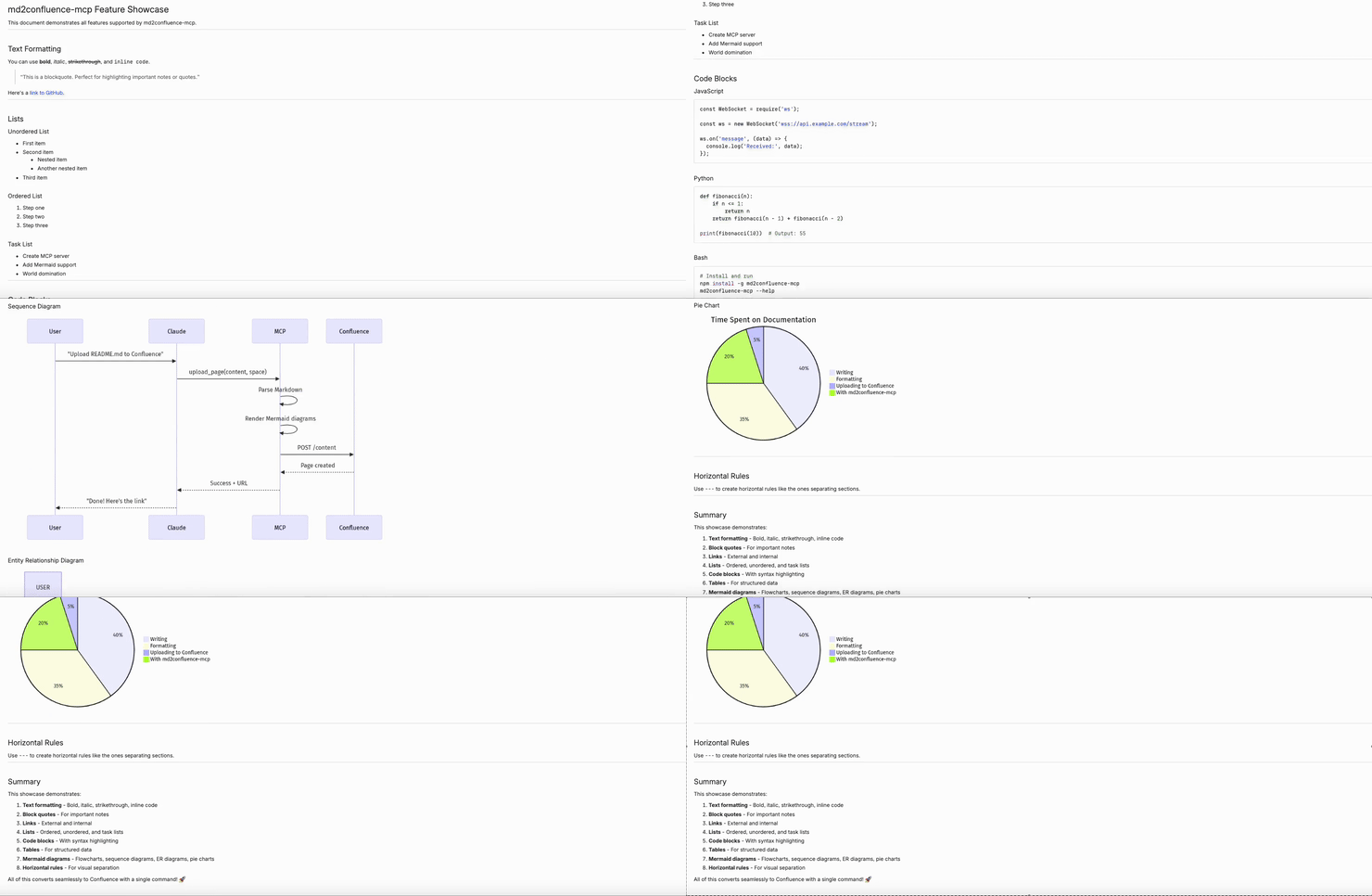
Uploading showcase.md to Confluence with images and Mermaid diagrams
Related MCP server: Confluence MCP Server
✅ Mermaid diagrams → PNG (auto-converted via kroki.io)
✅ Code blocks → Confluence Code macro
✅ Images → Attachments (auto-uploaded)
✅ Tables, links, formatting → Preserved
Add to your Claude Code settings (~/.claude/settings.json):
{
  "mcpServers": {
    "confluence": {
      "command": "npx",
      "args": ["-y", "md2confluence-mcp"],
      "env": {
        "CONFLUENCE_URL": "https://your-domain.atlassian.net/wiki",
        "CONFLUENCE_EMAIL": "your@email.com",
        "CONFLUENCE_TOKEN": "YOUR_API_TOKEN"
      }
    }
  }
}Add to your project's .mcp.json:
{
  "mcpServers": {
    "confluence": {
      "command": "npx",
      "args": ["-y", "md2confluence-mcp"],
      "env": {
        "CONFLUENCE_URL": "https://your-domain.atlassian.net/wiki",
        "CONFLUENCE_EMAIL": "your@email.com",
        "CONFLUENCE_TOKEN": "YOUR_API_TOKEN"
      }
    }
  }
}Click "Create API token"
Copy the token to CONFLUENCE_TOKEN
Once configured, Claude Code can use these tools automatically.
"Upload README.md to my personal Confluence space""Upload this document to my Confluence space""Upload docs/SETUP.md to Confluence here: https://company.atlassian.net/wiki/spaces/TEAM/overview""Create a new page in https://company.atlassian.net/wiki/spaces/~712020170fdaa4716743419285f156aa587665/overview with this content""Update this Confluence page with the latest content: https://company.atlassian.net/wiki/spaces/TEAM/pages/123456/My+Page""Sync docs/API.md to https://company.atlassian.net/wiki/spaces/EN/pages/789012/API+Reference""Create a new page under https://company.atlassian.net/wiki/spaces/TEAM/pages/123456/Parent+Page""Add a sub-page to this page: https://company.atlassian.net/wiki/spaces/EN/pages/789012/Guide""Show me available Confluence spaces""Find Confluence pages about authentication in the EN space"Type | Format | Example |
Global space | Short key |
|
Personal space |
|
|
Tip: You can extract the space key from a Confluence URL:
https://company.atlassian.net/wiki/spaces/TEAM/overview
                                        ^^^^ space key

https://company.atlassian.net/wiki/spaces/~712020.../overview
^^^^^^^^^^ personal space keyTool | Description |
| Create a new Confluence page from Markdown |
| Update an existing page |
| Create a new page under an existing page |
| Sync a local file to an existing page |
| List available spaces |
| Search for pages |
flowchart LR
    A["Markdown"] --> B["Parse"]
    B --> C["Mermaid → kroki.io → PNG"]
    C --> D["Convert to Confluence HTML"]
    D --> E["Upload via REST API"]
    E --> F["Attach images"]
Parse - Extract content, remove front matter
Render - Convert Mermaid diagrams to PNG via kroki.io
Convert - Transform Markdown to Confluence storage format
Upload - Create/update page via Confluence REST API
Attach - Upload images as page attachments
Variable | Required | Description |
| ✅ | e.g., |
| ✅ | Your Atlassian account email |
| ✅ | API token |
# Clone
git clone https://github.com/Gyeom/md2confluence-mcp.git
cd md2confluence-mcp

# Install dependencies
npm install

# Build
npm run build

# Test locally
CONFLUENCE_URL=... CONFLUENCE_EMAIL=... CONFLUENCE_TOKEN=... npm startMIT
kroki.io - Diagram rendering API
Model Context Protocol - MCP SDK
Create a NEW page as a child (sub-page) of an existing page.
⚠️ MUST USE THIS TOOL WHEN:
User wants to create a page "under", "below", "하위에", or "beneath" another page
User provides a parent page URL and wants NEW content added as a sub-page
User says "put this under [page]", "[page] 하위에 넣어줘", "add as child of [page]"
❌ WARNING: upload_page with a page URL will UPDATE that page, NOT create a child. ✅ ALWAYS use create_child_page for hierarchical page creation.
| Name | Required | Description | Default |
|---|---|---|---|
| content | Yes | Markdown content to upload | |
| title | Yes | Page title | |
| parentPageUrl | Yes | Parent page URL. The new page will be created as a child of this page. |
Does the description disclose side effects, auth requirements, rate limits, or destructive behavior?
With no annotations provided, the description carries the full burden of behavioral disclosure. It clearly indicates this is a creation/mutation operation (not read-only), specifies the hierarchical relationship aspect, and warns about the destructive nature of the alternative tool (upload_page updates existing pages). However, it doesn't mention permissions, rate limits, or what happens on success/failure.
Agents need to know what a tool does to the world before calling it. Descriptions should go beyond structured annotations to explain consequences.
Is the description appropriately sized, front-loaded, and free of redundancy?
The description is well-structured with clear sections (purpose, usage guidelines, warnings) and uses bullet points efficiently. While slightly longer than minimal, every sentence adds value by clarifying usage scenarios and differentiating from alternatives, with no redundant information.
Shorter descriptions cost fewer tokens and are easier for agents to parse. Every sentence should earn its place.
Given the tool's complexity, does the description cover enough for an agent to succeed on first attempt?
For a creation tool with no annotations and no output schema, the description does an excellent job explaining when to use it and distinguishing it from alternatives. It covers the core behavioral context well, though it could benefit from mentioning what happens on success (e.g., returns new page URL) or failure conditions.
Complex tools with many parameters or behaviors need more documentation. Simple tools need less. This dimension scales expectations accordingly.
Does the description clarify parameter syntax, constraints, interactions, or defaults beyond what the schema provides?
Schema description coverage is 100%, so the schema already documents all three parameters thoroughly. The description doesn't add any parameter-specific information beyond what's in the schema descriptions, maintaining the baseline score for high schema coverage.
Input schemas describe structure but not intent. Descriptions should explain non-obvious parameter relationships and valid value ranges.
Does the description clearly state what the tool does and how it differs from similar tools?
The description clearly states the specific action ('Create a NEW page as a child') and resource ('sub-page of an existing page'), distinguishing it from sibling tools like upload_page which updates instead of creates. The purpose is unambiguous and directly addresses hierarchical page creation.
Agents choose between tools based on descriptions. A clear purpose with a specific verb and resource helps agents select the right tool.
Does the description explain when to use this tool, when not to, or what alternatives exist?
The description provides explicit guidance with dedicated 'MUST USE THIS TOOL WHEN' and 'WARNING' sections, including multilingual examples and clear alternatives (upload_page for updates). It explicitly states when to use this tool versus other options, making selection straightforward for an agent.
Agents often have multiple tools that could apply. Explicit usage guidance like "use X instead of Y when Z" prevents misuse.
List available Confluence spaces. NOTE: Do NOT use this before upload_page. Only use when user explicitly asks to browse/list spaces. For uploads, ask user directly for space key or URL.
| Name | Required | Description | Default |
|---|---|---|---|
| limit | No | Max spaces to return | |
| type | No | Space type: global, personal, or all (default) | all |
Does the description disclose side effects, auth requirements, rate limits, or destructive behavior?
With no annotations provided, the description carries the full burden of behavioral disclosure. It adds useful context about workflow constraints (not to use before upload_page) but doesn't describe response format, pagination, error conditions, or authentication requirements. The description provides some behavioral context but leaves significant gaps.
Agents need to know what a tool does to the world before calling it. Descriptions should go beyond structured annotations to explain consequences.
Is the description appropriately sized, front-loaded, and free of redundancy?
The description is efficiently structured in two sentences with zero wasted words. The first sentence states the purpose, the second provides crucial usage guidelines. Every sentence earns its place by adding distinct value.
Shorter descriptions cost fewer tokens and are easier for agents to parse. Every sentence should earn its place.
Given the tool's complexity, does the description cover enough for an agent to succeed on first attempt?
For a read-only listing tool with 2 documented parameters and no output schema, the description provides strong purpose clarity and usage guidelines. However, without annotations or output schema, it lacks information about response format and error handling. The description is mostly complete but could benefit from mentioning what information is returned about spaces.
Complex tools with many parameters or behaviors need more documentation. Simple tools need less. This dimension scales expectations accordingly.
Does the description clarify parameter syntax, constraints, interactions, or defaults beyond what the schema provides?
Schema description coverage is 100%, so the schema already fully documents both parameters (limit and type with enum values). The description adds no parameter-specific information beyond what's in the schema, meeting the baseline expectation when schema coverage is complete.
Input schemas describe structure but not intent. Descriptions should explain non-obvious parameter relationships and valid value ranges.
Does the description clearly state what the tool does and how it differs from similar tools?
The description clearly states the verb 'List' and the resource 'available Confluence spaces', making the purpose specific and unambiguous. It distinguishes this tool from siblings like 'search_pages' or 'upload_page' by focusing on space listing rather than page operations.
Agents choose between tools based on descriptions. A clear purpose with a specific verb and resource helps agents select the right tool.
Does the description explain when to use this tool, when not to, or what alternatives exist?
The description provides explicit guidance on when to use ('when user explicitly asks to browse/list spaces') and when not to use ('Do NOT use this before upload_page'), including a clear alternative ('ask user directly for space key or URL'). This directly addresses usage context relative to sibling tools.
Agents often have multiple tools that could apply. Explicit usage guidance like "use X instead of Y when Z" prevents misuse.
Search for Confluence pages
| Name | Required | Description | Default |
|---|---|---|---|
| query | Yes | Search query | |
| spaceKey | No | Limit to specific space | |
| limit | No | Max results |
Does the description disclose side effects, auth requirements, rate limits, or destructive behavior?
With no annotations provided, the description carries the full burden of behavioral disclosure. It only states the basic action ('Search') without detailing aspects like whether it's read-only (implied but not explicit), authentication needs, rate limits, pagination, or error handling. This leaves significant gaps for a search tool with multiple parameters.
Agents need to know what a tool does to the world before calling it. Descriptions should go beyond structured annotations to explain consequences.
Is the description appropriately sized, front-loaded, and free of redundancy?
The description is a single, efficient sentence with zero waste—'Search for Confluence pages' directly conveys the core action and target. It's appropriately sized and front-loaded, making it easy to parse without unnecessary elaboration.
Shorter descriptions cost fewer tokens and are easier for agents to parse. Every sentence should earn its place.
Given the tool's complexity, does the description cover enough for an agent to succeed on first attempt?
Given the complexity of a search tool with 3 parameters, no annotations, and no output schema, the description is incomplete. It doesn't cover behavioral traits, usage context, or result format, which are essential for effective tool invocation. The schema handles parameters, but overall guidance is lacking.
Complex tools with many parameters or behaviors need more documentation. Simple tools need less. This dimension scales expectations accordingly.
Does the description clarify parameter syntax, constraints, interactions, or defaults beyond what the schema provides?
The schema description coverage is 100%, so the schema already documents all parameters (query, spaceKey, limit) with descriptions. The description adds no additional meaning beyond what the schema provides, such as explaining search syntax or result ordering. Baseline 3 is appropriate as the schema handles parameter documentation adequately.
Input schemas describe structure but not intent. Descriptions should explain non-obvious parameter relationships and valid value ranges.
Does the description clearly state what the tool does and how it differs from similar tools?
The description 'Search for Confluence pages' clearly states the verb ('Search') and resource ('Confluence pages'), but it's vague about scope and doesn't differentiate from potential siblings like 'list_spaces' or 'update_page'. It specifies the type of content but not the search behavior or result format.
Agents choose between tools based on descriptions. A clear purpose with a specific verb and resource helps agents select the right tool.
Does the description explain when to use this tool, when not to, or what alternatives exist?
No guidance is provided on when to use this tool versus alternatives. It doesn't mention prerequisites, context for searching, or how it differs from other tools like 'list_spaces' (which might list without querying) or 'update_page' (for modifications). The description lacks any when-to-use or when-not-to-use indicators.
Agents often have multiple tools that could apply. Explicit usage guidance like "use X instead of Y when Z" prevents misuse.
Sync a LOCAL file to a Confluence page. This tool reads the file directly from the filesystem.
⚠️ CRITICAL INSTRUCTIONS FOR AI:
file_path MUST be the EXACT path specified by the user
Do NOT infer or guess file path based on Confluence page title or URL content
If user says "sync readme.md to URL", find "readme.md" file, NOT files matching page title
If multiple files match, ask user to specify the exact path
This tool handles file reading internally - just pass the path
Examples:
User: "sync readme.md to https://..." → file_path: "/path/to/readme.md" (find readme.md)
User: "sync /docs/guide.md to https://..." → file_path: "/docs/guide.md" (exact path)
| Name | Required | Description | Default |
|---|---|---|---|
| file_path | Yes | Exact local file path to sync. Use the path specified by user, NOT inferred from Confluence URL. | |
| page_url | Yes | Confluence page URL to update | |
| title | No | Override page title (optional) |
Does the description disclose side effects, auth requirements, rate limits, or destructive behavior?
With no annotations provided, the description carries full burden and adds valuable behavioral context: it discloses that the tool reads files directly from the filesystem, handles file reading internally, and includes critical instructions about path handling and user interaction for ambiguities. However, it doesn't mention potential errors, permissions, or rate limits.
Agents need to know what a tool does to the world before calling it. Descriptions should go beyond structured annotations to explain consequences.
Is the description appropriately sized, front-loaded, and free of redundancy?
The description is appropriately sized but could be more front-loaded; the purpose is clear in the first sentence, but the critical instructions and examples are lengthy. Every sentence adds value, but the structure could be tighter by integrating examples more succinctly.
Shorter descriptions cost fewer tokens and are easier for agents to parse. Every sentence should earn its place.
Given the tool's complexity, does the description cover enough for an agent to succeed on first attempt?
Given no annotations and no output schema, the description does well by covering purpose, usage guidelines, and parameter semantics with examples. It addresses key complexities like file path handling. However, it lacks details on error cases, response format, or confirmation of success, leaving some gaps for a mutation tool.
Complex tools with many parameters or behaviors need more documentation. Simple tools need less. This dimension scales expectations accordingly.
Does the description clarify parameter syntax, constraints, interactions, or defaults beyond what the schema provides?
Schema description coverage is 100%, so the baseline is 3. The description adds meaningful context beyond the schema: it emphasizes that 'file_path' must be exact and not inferred, provides examples of usage, and clarifies the tool's internal handling of file reading. This compensates well, though it doesn't detail optional 'title' parameter usage.
Input schemas describe structure but not intent. Descriptions should explain non-obvious parameter relationships and valid value ranges.
Does the description clearly state what the tool does and how it differs from similar tools?
The description clearly states the specific action ('sync a LOCAL file to a Confluence page') and resource ('file from the filesystem'), distinguishing it from sibling tools like 'update_page' or 'upload_page' which don't mention local file reading. It explicitly mentions the filesystem source, making the purpose distinct.
Agents choose between tools based on descriptions. A clear purpose with a specific verb and resource helps agents select the right tool.
Does the description explain when to use this tool, when not to, or what alternatives exist?
The description provides explicit guidance on when to use this tool vs. alternatives through critical instructions: it specifies to use exact file paths from user input, not inferred from URLs, and to ask for clarification if multiple files match. This clearly defines the tool's context and exclusions compared to other page-update tools.
Agents often have multiple tools that could apply. Explicit usage guidance like "use X instead of Y when Z" prevents misuse.
Update an existing Confluence page with Markdown content
| Name | Required | Description | Default |
|---|---|---|---|
| content | Yes | Markdown content | |
| pageId | Yes | Existing page ID | |
| title | No | New title (optional) |
Does the description disclose side effects, auth requirements, rate limits, or destructive behavior?
With no annotations provided, the description carries the full burden of behavioral disclosure. It states the tool updates pages but doesn't cover permissions needed, whether changes are reversible, rate limits, or what happens to existing content not mentioned. This is a significant gap for a mutation tool.
Agents need to know what a tool does to the world before calling it. Descriptions should go beyond structured annotations to explain consequences.
Is the description appropriately sized, front-loaded, and free of redundancy?
The description is a single, efficient sentence with zero waste. It's front-loaded with the core action and resource, making it easy to scan and understand quickly.
Shorter descriptions cost fewer tokens and are easier for agents to parse. Every sentence should earn its place.
Given the tool's complexity, does the description cover enough for an agent to succeed on first attempt?
For a mutation tool with no annotations and no output schema, the description is incomplete. It lacks details on behavioral traits, error handling, return values, and usage context. Given the complexity of updating a Confluence page, more guidance is needed.
Complex tools with many parameters or behaviors need more documentation. Simple tools need less. This dimension scales expectations accordingly.
Does the description clarify parameter syntax, constraints, interactions, or defaults beyond what the schema provides?
Schema description coverage is 100%, so the schema already documents all parameters. The description adds minimal value by mentioning 'Markdown content' and 'existing page', which are already in the schema. Baseline 3 is appropriate when the schema does the heavy lifting.
Input schemas describe structure but not intent. Descriptions should explain non-obvious parameter relationships and valid value ranges.
Does the description clearly state what the tool does and how it differs from similar tools?
The description clearly states the verb ('Update') and resource ('existing Confluence page'), specifying it's for modification rather than creation. It distinguishes from siblings like 'create_child_page' by focusing on updates, though it doesn't explicitly contrast with 'upload_page' which might have overlapping functionality.
Agents choose between tools based on descriptions. A clear purpose with a specific verb and resource helps agents select the right tool.
Does the description explain when to use this tool, when not to, or what alternatives exist?
No guidance is provided on when to use this tool versus alternatives like 'upload_page' or 'create_child_page'. The description implies usage for updating existing pages but doesn't mention prerequisites, constraints, or scenarios where other tools would be more appropriate.
Agents often have multiple tools that could apply. Explicit usage guidance like "use X instead of Y when Z" prevents misuse.
Upload Markdown to Confluence at SPACE ROOT level or UPDATE existing page.
⚠️ ROUTING RULES:
Page URL provided → UPDATES that existing page (ignores parentId)
Space key/URL only → Creates NEW page at space root level
❌ DO NOT use this tool to create child/sub-pages. ✅ Use 'create_child_page' tool instead for hierarchical pages.
Mermaid diagrams are auto-converted to images.
| Name | Required | Description | Default |
|---|---|---|---|
| content | Yes | Markdown content to upload | |
| title | Yes | Page title | |
| space | Yes | Space key or space URL for new page creation, OR page URL to update existing page. |
Does the description disclose side effects, auth requirements, rate limits, or destructive behavior?
With no annotations provided, the description carries full burden and adds valuable behavioral context beyond basic functionality. It explains the routing logic based on input type, specifies that parentId is ignored during updates, and mentions that Mermaid diagrams are auto-converted to images. However, it doesn't cover permission requirements, rate limits, or error conditions.
Agents need to know what a tool does to the world before calling it. Descriptions should go beyond structured annotations to explain consequences.
Is the description appropriately sized, front-loaded, and free of redundancy?
The description is efficiently structured with clear sections (main purpose, routing rules, do's/don'ts, special feature). Every sentence earns its place by providing essential guidance. The use of emojis and formatting makes it scannable while remaining concise.
Shorter descriptions cost fewer tokens and are easier for agents to parse. Every sentence should earn its place.
Given the tool's complexity, does the description cover enough for an agent to succeed on first attempt?
For a 3-parameter tool with no annotations and no output schema, the description provides good contextual coverage. It explains the dual create/update behavior, routing logic, sibling tool relationships, and a special feature (Mermaid conversion). However, it doesn't describe what the tool returns or potential error conditions.
Complex tools with many parameters or behaviors need more documentation. Simple tools need less. This dimension scales expectations accordingly.
Does the description clarify parameter syntax, constraints, interactions, or defaults beyond what the schema provides?
Schema description coverage is 100%, so the schema already documents all three parameters. The description adds some semantic context by explaining how the 'space' parameter behaves differently depending on whether it's a space key/URL or page URL, but doesn't provide additional meaning beyond what the schema descriptions already cover.
Input schemas describe structure but not intent. Descriptions should explain non-obvious parameter relationships and valid value ranges.
Does the description clearly state what the tool does and how it differs from similar tools?
The description clearly states the tool's purpose with specific verbs ('Upload Markdown to Confluence', 'UPDATE existing page') and resources ('at SPACE ROOT level'). It explicitly distinguishes from sibling tools by stating 'DO NOT use this tool to create child/sub-pages' and directing users to 'create_child_page' instead.
Agents choose between tools based on descriptions. A clear purpose with a specific verb and resource helps agents select the right tool.
Does the description explain when to use this tool, when not to, or what alternatives exist?
The description provides explicit routing rules with clear when/when-not guidance: 'Page URL provided → UPDATES that existing page', 'Space key/URL only → Creates NEW page at space root level', and '❌ DO NOT use this tool to create child/sub-pages. ✅ Use 'create_child_page' tool instead'. It names the specific alternative tool for hierarchical pages.
Agents often have multiple tools that could apply. Explicit usage guidance like "use X instead of Y when Z" prevents misuse.
Recent tool additions, removals, and schema changes observed during successful MCP inspections.
v0.1.10create_child_pagelist_spacessearch_pagessync_fileupdate_pageupload_pageScored across 6 tools
The tools are mostly distinct with clear purposes, but there is some potential confusion between 'upload_page' and 'create_child_page' for page creation scenarios, as both involve creating pages but under different conditions. The descriptions provide explicit routing rules to mitigate this, but an agent might still need to carefully parse user intent to choose correctly.
All tool names follow a consistent snake_case pattern with clear verb_noun structures (e.g., create_child_page, list_spaces, search_pages, sync_file, update_page, upload_page). This consistency makes the tool set predictable and easy to understand at a glance.
With 6 tools, the server is well-scoped for its purpose of managing Confluence pages from Markdown files. The count is appropriate, covering key operations like listing, searching, creating, updating, and syncing without being overwhelming or too sparse.
The tool set covers essential CRUD-like operations for Confluence pages (create, update, sync, list, search), but there are minor gaps such as the lack of a delete_page tool for full lifecycle management. However, agents can likely work around this by using other methods or the existing tools for most workflows.
Publish markdown documents as public share links with mermaid diagrams. Built by AutEng.ai
Use your own Word templates to convert Markdown → DOCX/PDF/HTML from any MCP-compatible AI.
Clean, repair, and convert AI-generated Markdown to HTML/PDF/DOCX/PNG; save and share documents.
Documents to Markdown: PDF, DOCX, PPTX, XLSX, HTML. Scanned PDF pages read by AI.