Glama

orly-mcp

MCP Tool PyPI version Python versions

Cooked myself with my own MCP tool :/

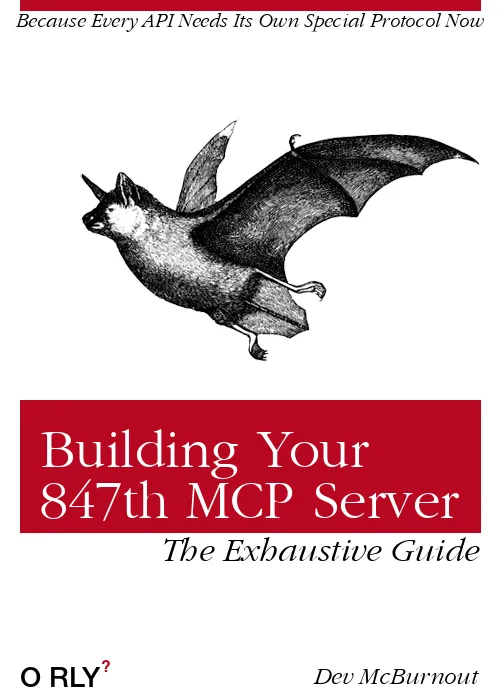
An MCP (Model Context Protocol) server for generating O'RLY? (O'Reilly parody) book covers that display directly in Claude Desktop application.

Quick Start

Install on MCP Server

simply add the following to your mcp configuration:

// ... other MCP servers ...
"mcp-orly": {
    "command": "uvx",
    "args": [
        "orly-mcp@latest"
    ]
}
// ... other MCP servers ...

Local Development

# Clone the repository
git clone [your-repo-url]
cd orly-mcp

# Create a virtual environment and install dependencies
uv venv .venv
uv pip install -r requirements.txt

# Test a sample image generation
uv run python test_mcp.py

# Run comprehensive tests
uv run python test_comprehensive.py

# Start the MCP server for development
python start_server.py

Related MCP server: LibraLM MCP Server

Claude Desktop Configuration

Add this MCP server to your Claude Desktop configuration file (claude_desktop_config.json):

{
  "mcpServers": {
    "orly-local": {
      "command": "uv",
      "args": [
        "run",
        "--with", "fastmcp",
        "--with", "pillow",
        "--with", "fonttools",
        "--with", "requests",
        "python",
        "/path/to/your/orly-mcp/orly_mcp/server.py"
      ],
      "cwd": "/path/to/your/orly-mcp"
    }
  }
}

Important: Replace /path/to/your/orly-mcp with your actual project path.

Alternative: Package Installation

# Install in editable mode
uv pip install -e .

# Claude Desktop config
{
  "mcpServers": {
    "orly-local": {
      "command": "uvx",
      "args": ["--from", "/your/path/to/orly-mcp", "orly-mcp"]
    }
  }
}

Troubleshooting

"ModuleNotFoundError: No module named 'mcp'" Error

If you see this error, the MCP dependencies aren't available:

cd /path/to/your/orly-mcp
uv pip install -r requirements.txt

Make sure your Claude Desktop configuration includes all required dependencies with --with flags.

"ModuleNotFoundError: No module named 'fontTools'" Error

Ensure all dependencies are specified in your Claude Desktop configuration:

"args": [
  "run",
  "--with", "fastmcp",
  "--with", "pillow",
  "--with", "fonttools", 
  "--with", "requests",
  "python",
  "/your/path/to/orly_mcp/server.py"
]

Testing Your Setup

Run the comprehensive test to verify everything works:

uv run python test_comprehensive.py

Using the ORLY Tool in Claude

Once configured, you can ask Claude to generate O'RLY book covers like this:

  • "Create an O'RLY book cover with the title 'Advanced Debugging' and author 'Jane Developer'"

  • "Generate a book cover titled 'Machine Learning Mistakes' with subtitle 'What Could Go Wrong?' by 'AI Enthusiast'"

  • "Make an O'RLY cover for 'CSS Grid Mastery' with theme 7 and image 15"

✨ The generated book cover images will be displayed directly in the chat!

The tool supports these parameters:

  • title (required): Main book title

  • subtitle (optional): Text at the top of the cover

  • author (optional): Author name (bottom right)

  • image_code (optional): Animal/object image 1-40 (random if not specified)

  • theme (optional): Color theme 0-16 (random if not specified)

  • guide_text_placement (optional): Position of guide text - 'top_left', 'top_right', 'bottom_left', 'bottom_right'

  • guide_text (optional): Custom guide text (defaults to "The Definitive Guide")

License

This project is licensed under the MIT License - see the LICENSE.txt file for details.

The original O'RLY book cover generation code in the orly_generator/ directory is based on work by Charles Berlin (2016) and is also licensed under the MIT License - see orly_generator/LICENSE.txt for details.

Acknowledgments

This project builds upon the excellent work by Charles Berlin. The core image generation code in the orly_generator/ directory is adapted from his original O-RLY-Book-Generator repository, updated to work with Python 3 and integrated into an MCP tool for usage with MCP clients like Claude Desktop.

Publish

(More for Chris, the Author, since he never uses Python and will forget this)

You can quickly publish a new version using twine:

uv run twine upload dist/*

You'll be prompted to enter your PyPI API token.

You can quickly publish a new version using twine:

# Install dev dependencies (includes build and twine)
uv sync --group dev

# Build the package
uv run python -m build

# Check the built package
uv run twine check dist/*

# Publish to TestPyPI first for testing (optional)
uv run twine upload --repository testpypi dist/*

# Publish to PyPI
uv run twine upload dist/*

Make sure to:

  1. Update the version number in pyproject.toml

  2. Test the package locally with uv run python test_comprehensive.py

  3. Build and publish

For authentication, you'll need PyPI API tokens configured in your ~/.pypirc file or set as environment variables.ons/orly-mcp.svg)](https://pypi.org/project/orly-mcp/)

Available Tools

1 tool
generate_orly_coverA

Generate an O'RLY? book cover image.

This tool creates a parody book cover in the style of O'Reilly books with custom title, subtitle, author, and styling options.
The generated image will be displayed directly in the chat.

Args:
    title (str): The main title for the book cover
    subtitle (str): The subtitle text (appears at the top)
    author (str): The author name (appears at the bottom right)
    image_code (str, optional): Image code 1-40 for the animal/object on the cover. Defaults to random.
    theme (str, optional): Color theme 0-16. Defaults to random.
    guide_text_placement (str, optional): Where to place "guide" text - 'top_left', 'top_right', 'bottom_left', 'bottom_right'. Defaults to 'bottom_right'.
    guide_text (str, optional): The guide text to display. Defaults to 'The Definitive Guide' As often as possible, try not to just use "The Definitive Guide" but something more creative.
    scale (float, optional): Scale factor for image resolution. 1.0 = 500x700px, 2.0 = 1000x1400px, 3.0 = 1500x2100px (default). Higher values create larger, higher resolution images.

Returns:
    Image: The generated O'RLY? book cover image that will be displayed in chat.
ParametersJSON Schema
NameRequiredDescriptionDefault
authorNoAnonymous
guide_textNoThe Definitive Guide
guide_text_placementNobottom_right
image_codeNo
scaleNo
subtitleNo
themeNo
titleYes

TDQS

A4.2/5.0
Behavior4/5

Does the description disclose side effects, auth requirements, rate limits, or destructive behavior?

With no annotations provided, the description carries the full burden. It effectively discloses key behaviors: the tool creates an image, displays it directly in chat, includes default values for optional parameters, and provides resolution details. It doesn't mention rate limits, authentication needs, or error conditions, but covers the core functionality well.

Agents need to know what a tool does to the world before calling it. Descriptions should go beyond structured annotations to explain consequences.

Conciseness4/5

Is the description appropriately sized, front-loaded, and free of redundancy?

The description is well-structured with a clear purpose statement followed by detailed parameter explanations and return information. It's appropriately sized for an 8-parameter tool, though the parameter section is lengthy. Every sentence adds value, but it could be slightly more front-loaded.

Shorter descriptions cost fewer tokens and are easier for agents to parse. Every sentence should earn its place.

Completeness4/5

Given the tool's complexity, does the description cover enough for an agent to succeed on first attempt?

Given the tool's moderate complexity (8 parameters, no output schema, no annotations), the description is quite complete. It explains what the tool does, all parameters, and the return format. It lacks details on error handling or advanced usage scenarios, but covers the essentials effectively.

Complex tools with many parameters or behaviors need more documentation. Simple tools need less. This dimension scales expectations accordingly.

Parameters5/5

Does the description clarify parameter syntax, constraints, interactions, or defaults beyond what the schema provides?

Schema description coverage is 0%, so the description must compensate fully. It does so by explaining all 8 parameters in detail, including their purposes, default values, and effects (e.g., scale factor impacts resolution). This adds significant meaning beyond the bare schema.

Input schemas describe structure but not intent. Descriptions should explain non-obvious parameter relationships and valid value ranges.

Purpose5/5

Does the description clearly state what the tool does and how it differs from similar tools?

The description clearly states the tool's purpose: 'creates a parody book cover in the style of O'Reilly books with custom title, subtitle, author, and styling options.' It specifies the exact resource (O'RLY? book cover image) and action (generate/creates). With no sibling tools, this level of specificity is excellent.

Agents choose between tools based on descriptions. A clear purpose with a specific verb and resource helps agents select the right tool.

Usage Guidelines3/5

Does the description explain when to use this tool, when not to, or what alternatives exist?

The description implies usage context through the tool's purpose (generating parody book covers) but doesn't explicitly state when to use it versus alternatives. With no sibling tools, there's no need for differentiation, but it lacks explicit guidance on scenarios or prerequisites for use.

Agents often have multiple tools that could apply. Explicit usage guidance like "use X instead of Y when Z" prevents misuse.

TDQS

A4.1/5.0
Disambiguation5/5

With only one tool, there is no possibility of confusion or overlap with other tools. The tool's purpose is singular and clearly defined as generating O'RLY? book covers.

Naming Consistency5/5

The single tool name 'generate_orly_cover' follows a clear verb_noun pattern, and there are no other tools to create inconsistency. The naming is straightforward and descriptive.

Tool Count2/5

A single tool is too few for a server's purpose, as it limits functionality and suggests an incomplete or overly narrow scope. Typically, a well-scoped server should have 3-15 tools to cover a domain adequately.

Completeness3/5

The tool provides a specific function (generating book covers) with extensive customization options, but the server lacks related operations such as listing, editing, or managing covers. This creates a notable gap in the surface for a book cover generation domain.

Maintenance

ActivityInactive
ResponsivenessNo issues

Resources

Unclaimed servers have limited discoverability.

Looking for Admin?

If you are the server author, to access and configure the admin panel.

Related MCP Connectors

Related MCP Servers

Latest Blog Posts

MCP directory API

We provide all the information about MCP servers via our MCP API.

curl -X GET 'https://glama.ai/api/mcp/v1/servers/princefishthrower/orly-mcp'

If you have feedback or need assistance with the MCP directory API, please join our Discord server