
kairn
Officialby primeline-ai
README.md
# Kairn
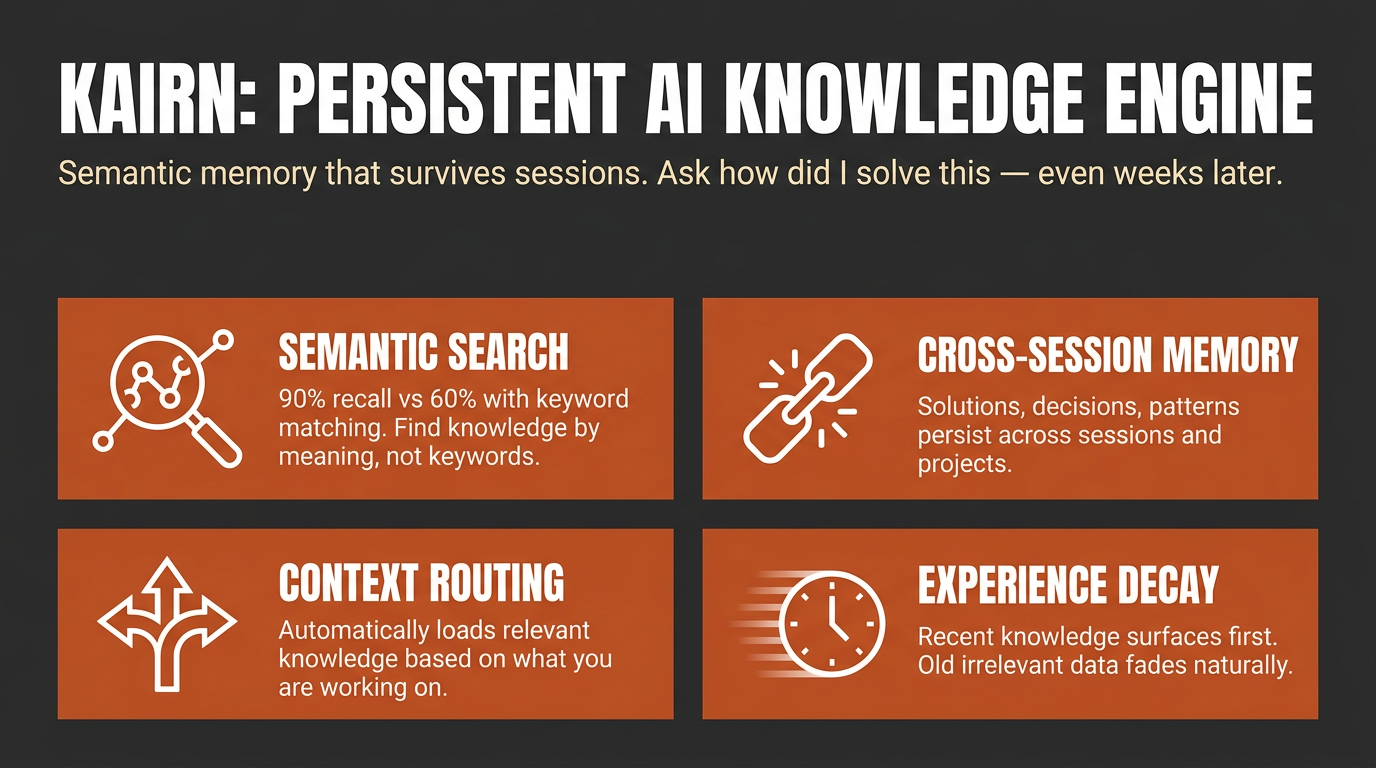
<video src="https://github.com/user-attachments/assets/dbaea32c-f88c-4669-935e-2912ef7d7857" controls>Watch the 30-second tour on <a href="https://github.com/primeline-ai/kairn">GitHub</a>.</video>
> Context-aware knowledge engine for AI assistants.
<!-- mcp-name: io.github.primeline-ai/kairn -->
**Status: pre-1.0.** In daily use since February 2026, with a test suite that runs on Linux, macOS and Windows (see [Development](https://github.com/primeline-ai/kairn/blob/v0.3.2/README.md#development)) and a published
[LongMemEval-S benchmark](https://github.com/primeline-ai/kairn/blob/v0.3.2/README.md#benchmarks) (measured before 0.3.0). Interfaces may still change between
releases until 1.0. Feedback and issues welcome.
Other tools give your AI a memory. **Kairn** gives it a knowledge graph with intelligent context routing. It knows what to load, when to load it, and how much - so your AI stays focused, not overwhelmed.
```bash
pip install kairn-ai
kairn init ~/brain
kairn serve ~/brain
```
Claude Code and Codex each take one line; `--init` creates `~/brain` and its database on first start, so this works even without `kairn init`:
```bash
claude mcp add kairn -- kairn serve --init ~/brain
codex mcp add kairn -- kairn serve --init ~/brain
```
Or install it as a one-click bundle, no Python setup required: download the
`.mcpb` file from the [latest release](https://github.com/primeline-ai/kairn/releases/latest)
and open it with a bundle-aware app such as Claude Desktop.
For other clients, see [Quick Start](https://github.com/primeline-ai/kairn/blob/v0.3.2/README.md#quick-start) below. New to Kairn? Jump to [First 5 Minutes](https://github.com/primeline-ai/kairn/blob/v0.3.2/README.md#first-5-minutes).
## Install routes
| Route | Who it is for | Command |
|---|---|---|
| PyPI | anyone with Python, and every MCP client | `pip install kairn-ai` |
| MCP Bundle (`.mcpb`) | Claude Desktop and other bundle-aware apps; no Python install needed | download from [Releases](https://github.com/primeline-ai/kairn/releases) and open it |
| Claude Code | one line, uses the PyPI install | `claude mcp add kairn -- kairn serve --init ~/brain` |
| Codex | one line, uses the PyPI install | `codex mcp add kairn -- kairn serve --init ~/brain` |
The bundle carries no Kairn source of its own. It declares `kairn-ai` as a
dependency and the host resolves it with `uv`, so a bundle install and a
`pip install` run identical code. Where the database lives is configurable when
you install the bundle; it defaults to `~/.kairn` and never leaves your machine.
## Why Kairn?
Every AI conversation starts from scratch. Previous insights, decisions, and patterns - gone. Existing memory tools store flat key-value pairs that can't represent relationships or surface the *right* context at the *right* time.
Kairn is different:
- **Context Router + Progressive Disclosure** - Automatically loads relevant subgraphs based on keywords, starting with summaries and drilling into details only when needed. No other tool does this.
- **Knowledge Graph with FTS5** - Not flat storage. Typed relationships (`depends-on`, `resolves`, `causes`) between nodes with provenance tracking and full-text search across everything.
- **Experience Decay + Auto-Promotion** - Experiences lose relevance over time (biological decay model). Frequently-accessed experiences auto-promote to permanent knowledge. Your AI naturally forgets what doesn't matter.
- **22 MCP Tools** - Works with Claude Code, Codex, Claude Desktop, Cursor, VS Code, Windsurf, and any MCP client. Includes `kn_judge` for 5-verb relationship judgments and `kn_doctor` for read-only health diagnostics.
- **Per-Workspace Isolation** - Each workspace is its own isolated SQLite store. JWT auth and role-based access control (owner / maintainer / contributor / reader) ship for team deployments.
## Quick Start
### Claude Desktop
Add to `~/Library/Application Support/Claude/claude_desktop_config.json` on macOS or `%APPDATA%\Claude\claude_desktop_config.json` on Windows:
```json
{
"mcpServers": {
"kairn": {
"command": "kairn",
"args": ["serve", "--init", "~/brain"]
}
}
}
```
### Cursor
Add to `.cursor/mcp.json`:
```json
{
"mcpServers": {
"kairn": {
"command": "kairn",
"args": ["serve", "--init", "~/brain"]
}
}
}
```
### VS Code
Add to `.vscode/mcp.json`:
```json
{
"servers": {
"kairn": {
"type": "stdio",
"command": "kairn",
"args": ["serve", "--init", "~/brain"]
}
}
}
```
### Windsurf
Add to `~/.codeium/windsurf/mcp_config.json`:
```json
{
"mcpServers": {
"kairn": {
"command": "kairn",
"args": ["serve", "--init", "~/brain"]
}
}
}
```
Restart your editor. Kairn's 22 tools appear in the MCP section.
## First 5 Minutes
A guided first run, end to end:
```bash
pip install kairn-ai
kairn init ~/brain # creates the workspace + database (optional: serve --init does it on first start)
```
Add the one-liner from above (or your client's Quick Start snippet), then restart the client. Once connected, ask your assistant to remember something:
> "Remember that we chose Postgres over SQLite for the analytics service because we needed concurrent writers."
That calls `kn_learn` under the hood and returns a JSON envelope like this (captured from a real run, via `kairn learn`, the CLI mirror of the tool):
```json
{"_v": "1.0", "stored_as": "node", "node_id": "002d9c22", "experience_id": "d0710c2f", "type": "decision", "confidence": "high", "namespace": "knowledge", "candidates": []}
```
Start a **new** session and ask it to recall the same thing - that calls `kn_recall` and surfaces what you just stored, no re-explaining required:
```json
{"_v": "1.0", "count": 2, "results": [
{"source": "node", "id": "002d9c22", "name": "Decision: we chose Postgres over SQLite for the analytics service beca", "type": "learned_decision", "namespace": "knowledge", "description": "we chose Postgres over SQLite for the analytics service because we needed concurrent writers", "relevance": 1e-06, "relevance_kind": "match"},
{"source": "experience", "id": "d0710c2f", "type": "decision", "namespace": "knowledge", "content": "we chose Postgres over SQLite for the analytics service because we needed concurrent writers", "confidence": "high", "relevance": 1e-06, "relevance_kind": "match_recency"}
]}
```
`kn_learn` stored both a permanent graph node and a decaying experience (high confidence does both, see [Confidence routing](https://github.com/primeline-ai/kairn/blob/v0.3.2/README.md#decay-model)); `kn_recall` found both from a three-word topic.
**Read `relevance_kind` before you read `relevance`.** `match` is lexical match strength (bm25). `match_recency` is match strength with a small recency nudge, a factor between 0.9 and 1.1, on an experience found by a text search. `recency` is pure time-decay on an experience listed with no search text: it says how old the row is, not whether it matched. `similarity` is embedding cosine on the semantic-recall path, and `unscored` marks a row the surface had no ranking for and filled in with a constant, from crossref or a text-less browse query. Both rows above show `1e-06` because SQLite's bm25 gives almost no weight to a word that appears in most entries. On a store with one fact every word does, so the score sits at SQLite's floor. It is not a bad match. After eight more unrelated facts, the same recall measured about 0.5 for both rows. On a store this small, a topic with a word the fact does not contain can score 0.0, and the row is still returned. Scores are only comparable within one result set and are not comparable across kinds, so do not sort a mixed result set on `relevance` alone. Same caution for `min_relevance` on `kn_recall`: it gates nodes on match strength and experiences on recency, one number against two scales. On a small store, a value such as 0.1 drops the node and keeps the experience (measured). On `kn_memories` and `kn_prune`, which see experiences only, it is recency - and on `kn_prune` it **deletes**.
Run `kairn status ~/brain` any time as a smoke test - if it prints a JSON stats block (nodes/edges/experiences counts), the workspace is healthy. For a scripted tour, `kairn demo` adds sample data (two nodes, one edge and two experiences, measured) to the workspace it is given, so give it a throwaway one: `kairn init ~/kairn-tour && kairn demo ~/kairn-tour`.
### Which tool when
22 tools is a lot to hold in your head on day one. Most sessions only need these:
| You want to... | Use | Why |
|---|---|---|
| Remember something new (a decision, gotcha, pattern, solution) | `kn_learn` | Default entry point - auto-routes to a permanent node (high confidence) or a decaying experience (medium/low), no need to decide yourself |
| Capture a stated user preference the moment it is expressed | `kn_preference` | Dedicated preference write path - you (the calling model) state the preference as one explicit sentence; stored with the longest half-life of any type |
| Add a permanent named concept you already know is durable | `kn_add` | Skips decay entirely - for structural knowledge, not day-to-day experience |
| Log a one-off experience with explicit confidence/decay control | `kn_save` | Lower-level primitive `kn_learn` wraps - reach for it when you want to set confidence/decay yourself |
| Search the permanent knowledge graph by text, type, tags, or namespace | `kn_query` | You're looking for nodes, not decaying experiences |
| Search saved experiences, ranked by relevance and decay | `kn_memories` | You're looking for experience content (solutions, gotchas, workarounds), not graph nodes |
| Surface everything relevant to a topic in one call | `kn_recall` (flat list) or `kn_context` (subgraph, progressive disclosure: summary first, full detail on demand) | You don't know yet whether the answer is a node or an experience - let Kairn search both |
Everything else (`kn_crossref`, `kn_related`, `kn_connect`, `kn_judge`, `kn_project`/`kn_projects`/`kn_log`, `kn_idea`/`kn_ideas`, `kn_promote_pending`, `kn_prune`, `kn_remove`, `kn_status`, `kn_doctor`) is advanced usage - see the full [22 Tools](https://github.com/primeline-ai/kairn/blob/v0.3.2/README.md#22-tools-kn_-prefix) reference below once you're past the basics.
## 22 Tools (kn_ prefix)
All tools follow MCP protocol with JSON responses.
### Graph (6)
| Tool | Description |
|------|-------------|
| `kn_add` | Add node to knowledge graph |
| `kn_connect` | Create typed edge between nodes (lax-mode vocabulary) |
| `kn_judge` | Record 5-verb judgment edge (strict mode: `conflicts_with` / `supersedes` / `compatible` / `scoped` / `related`) |
| `kn_query` | Search by text, type, tags, namespace |
| `kn_remove` | Soft-delete node or edge (undo-safe) |
| `kn_status` | Graph stats, health, system overview |
### Project Memory (3)
| Tool | Description |
|------|-------------|
| `kn_project` | Create or update project |
| `kn_projects` | List projects, switch active |
| `kn_log` | Log progress or failure entry |
### Experience Memory (5)
| Tool | Description |
|------|-------------|
| `kn_save` | Save experience with decay |
| `kn_preference` | Capture a stated user preference at utterance time (longest half-life) |
| `kn_memories` | Decay-aware experience search |
| `kn_prune` | Remove expired experiences |
| `kn_promote_pending` | Promote high-access experiences to permanent nodes |
### Ideas (2)
| Tool | Description |
|------|-------------|
| `kn_idea` | Create or update idea |
| `kn_ideas` | List/filter ideas by status, category |
### Intelligence (5)
| Tool | Description |
|------|-------------|
| `kn_learn` | Store knowledge with confidence routing |
| `kn_recall` | Surface relevant past knowledge |
| `kn_crossref` | Find similar past solutions in the current workspace |
| `kn_context` | Keywords → relevant subgraph with progressive disclosure |
| `kn_related` | Graph traversal (BFS) to find connected nodes |
### Diagnostic (1)
| Tool | Description |
|------|-------------|
| `kn_doctor` | Read-only health checks (lock mode, FTS5 parity, promotion backlog, namespace sprawl, orphan edges) - returns structured envelope with per-check verdicts and roll-up summary |
## Resources & Prompts
**Resources** (read-only context for MCP clients):
- `kn://status` - Graph overview, active project
- `kn://projects` - All projects with recent progress
- `kn://memories` - Recent high-relevance experiences
**Prompts** (session management):
- `kn_bootup` - Load active project, recent progress, and top memories (session start)
- `kn_review` - Summarize session and suggest next steps (session end)
## How It Works
### Architecture
```
Any MCP Client (Claude, Cursor, VS Code)
│
▼ MCP Protocol (stdio)
FastMCP Server (22 tools)
│
┌────┼────┐
▼ ▼ ▼
Graph Memory Intelligence
Engine Engine Layer
│ │ │
└────┼──────┘
▼
SQLite + FTS5
(per-workspace)
```
### Decay Model
Experiences decrease in relevance exponentially:
```
relevance(t) = initial_score × e^(-decay_rate × days)
```
| Type | Half-life | Notes |
|------|-----------|-------|
| solution | 120 days | Stable, durable |
| pattern | 90 days | Architectural knowledge |
| decision | 100 days | Context-dependent |
| workaround | 40 days | Temporary fixes fade fast |
| gotcha | 70 days | Tricky pitfalls stay relevant |
| preference | 180 days | Durable user preferences - initial estimate, not yet tail-calibrated |
Half-lives are calibrated against the real access tail of a production experience store, not guessed (one exception: `preference` is a new type with no access history yet, so its value is a documented initial estimate until real data accumulates).
**Confidence routing** via `kn_learn`:
- `high` → Permanent node + experience (no decay)
- `medium` → Experience with 2× decay
- `low` → Experience with 4× decay
- Auto-promotion: 5+ accesses → permanent node
- Node access tracking: `kn_recall`, `kn_context`, and `kn_crossref` log which nodes were accessed, feeding the decay and promotion pipeline
## Benchmarks
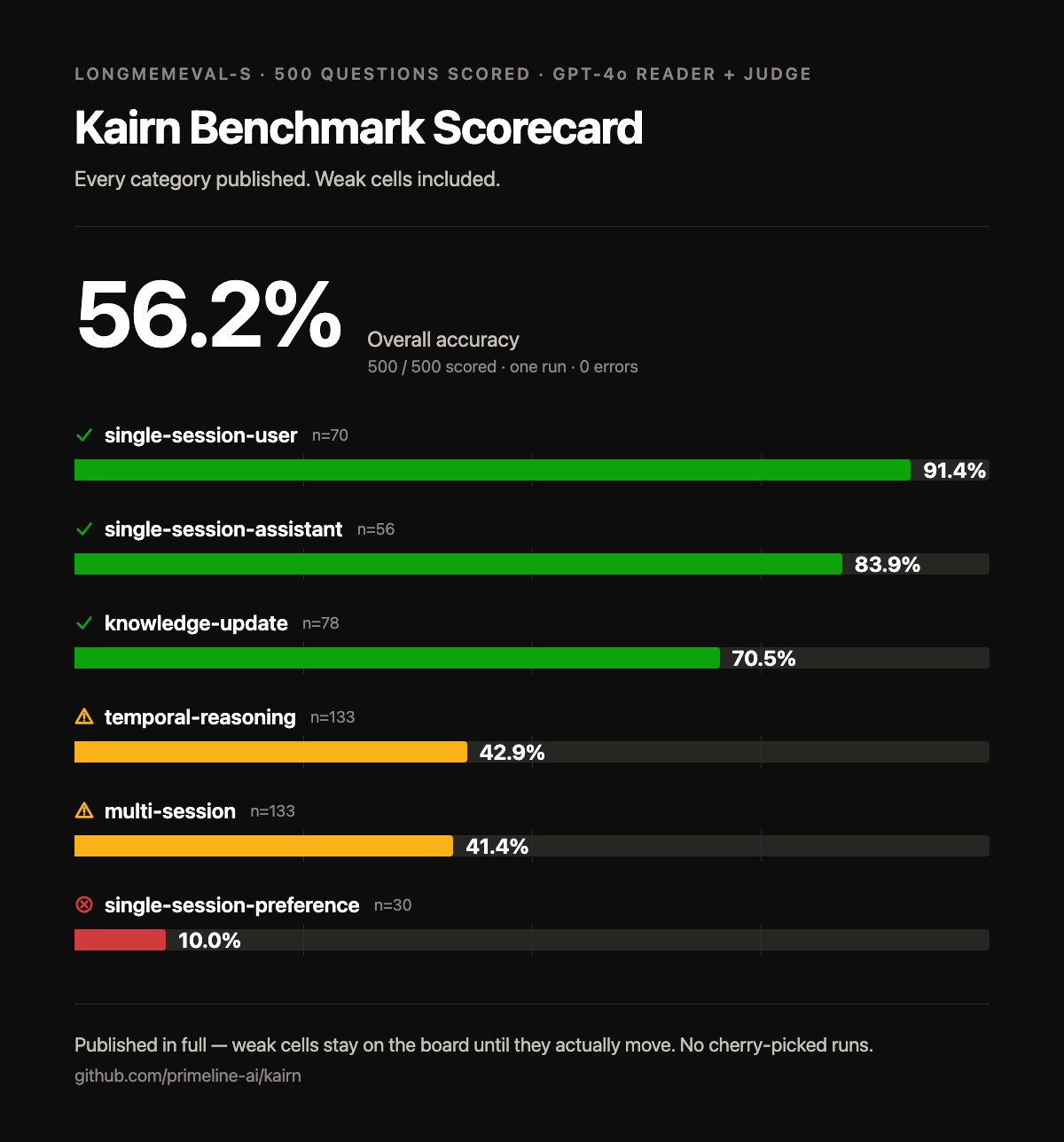
Kairn scored **56.2% overall on LongMemEval-S** in the 2026-06-12 run (500/500 questions scored,
GPT-4o reader + judge, single run, 0 errors). These are the real per-category
numbers, including the bad ones - each red cell links to its diagnosis:
| Category | n | Accuracy | Diagnosis |
|----------|----|----------|-----------|
| single-session-user | 70 | 91.4% | - |
| single-session-assistant | 56 | 83.9% | - |
| knowledge-update | 78 | 70.5% | - |
| temporal-reasoning | 133 | 42.9% | [why](https://github.com/primeline-ai/kairn/blob/main/BENCHMARKS.md#temporal-reasoning-429) |
| multi-session | 133 | 41.4% | [why](https://github.com/primeline-ai/kairn/blob/main/BENCHMARKS.md#multi-session-414) |
| single-session-preference | 30 | 10.0% | [why](https://github.com/primeline-ai/kairn/blob/main/BENCHMARKS.md#single-session-preference-100) |
The 500 questions include 30 abstention variants (the right answer is to
decline); they are counted inside their categories above and scored
separately: Kairn declines correctly on **96.7%** of them.
Recall latency was ~1.4 ms per query in that run (FTS5, in-process, no network). Protocol,
honesty notes, and reproduction steps: [BENCHMARKS.md](https://github.com/primeline-ai/kairn/blob/main/BENCHMARKS.md).
These numbers were measured on 2026-06-12, before the recall changes in 0.3.0 (match-aware experience scoring, coverage-weighted node relevance), and have not been re-measured on 0.3.0 yet. A weak cell stays on the board until the number actually moves. No cherry-picked runs, no hidden categories.
## CLI
```bash
kairn init [<path>] # Initialize workspace; defaults to ~/.kairn
kairn serve [<path>] # Start MCP server (stdio); defaults to ~/.kairn
kairn serve --init [<path>] # Create workspace if needed and start MCP server; defaults to ~/.kairn
kairn status <path> # Graph stats
kairn workspace create <name> # Team feature: separate store under ~/.kairn/workspaces, not usable by the <path> commands
kairn workspace join <workspace_id> --token TOKEN # Team feature: needs KAIRN_JWT_SECRET
kairn workspace leave <workspace_id> # Leave workspace
kairn demo <path> # Scripted tour that adds sample data
kairn benchmark [--nodes N] # Performance benchmarks in a temporary workspace
kairn token-audit <path> # Audit tool token usage
kairn learn <path> --content TEXT --type TYPE # Store knowledge; TYPE is decision, pattern, solution, workaround, gotcha or preference
kairn recall <path> --topic TEXT # Recall knowledge from nodes and experiences
kairn context <path> --keywords TEXT # Get relevant context
kairn memories <path> # Search or list experiences
kairn crossref <path> --problem TEXT # Find related solutions
kairn add <path> --name TEXT --type TYPE # Add node
kairn connect <path> --source-id ID --target-id ID --edge-type TYPE # Connect nodes
kairn judge <path> --source-id ID --target-id ID --relation RELATION # Record relationship judgment
kairn doctor <path> # Check graph health
kairn remove <path> # Remove node or edge using options
kairn query <path> # Query nodes
kairn related <path> --node-id ID # Traverse related nodes
kairn prune <path> # Delete experiences below recency threshold
kairn promote-pending <path> # Promote pending knowledge
kairn project <path> --name TEXT # Create or update project
kairn projects <path> # List or select projects
kairn log <path> --project-id ID --action TEXT # Record project progress or failure
kairn idea <path> --title TEXT # Create or update idea
kairn ideas <path> # List ideas
kairn import git <path> <repos>... # Import git commit history (zero-LLM, offline)
kairn import claude-code <path> # Import Claude Code session history (zero-LLM, offline)
```
Run `kairn <command> --help` for every option.
### Importing your history
`kairn import git <workspace> <repo>...` backfills a Kairn store from one or
more local git repositories at $0 - no LLM calls, no network calls. Conventional-commit
prefixes map to experience types (`fix:` -> solution, `feat:`/`refactor:`/`perf:` -> pattern,
everything else -> decision); merge commits are skipped. Imported experiences land in a
dedicated `imported-git` namespace, separate from your organic knowledge, so they're always
distinguishable and a bad import is fully reversible.
```bash
kairn import git ~/brain ~/code/my-project --dry-run # Preview first
kairn import git ~/brain ~/code/my-project # Then import for real
kairn import git ~/brain ~/code/proj-a ~/code/proj-b --since 2026-01-01
```
Idempotent - re-running only imports commits that weren't already imported, so it's safe
to run again as a repo's history grows.
#### Claude Code transcripts
`kairn import claude-code <workspace>` backfills your Kairn store from your existing
Claude Code session history, also at $0 and fully offline. With no `--root` given it scans
`~/.claude/projects`; `--root PATH` is a repeatable override for any other folder. Imported experiences land in their own
`imported-claude-code` namespace, so they stay distinct from your organic knowledge and a
bad import is reversible.
```bash
kairn import claude-code ~/brain --dry-run # Review exactly what would be stored
kairn import claude-code ~/brain # Import (prompts once before writing)
kairn import claude-code ~/brain --root ~/other/projects --since 2026-01-01 --yes
```
**What gets stored (coarse mode):** one experience per session - the session's title plus
your first prompt of that session. This is deliberately a low-detail, high-precision summary
rather than a fine-grained per-decision extraction: a zero-LLM rule-based extractor cannot
reliably tell a captured decision from ordinary planning chatter, so `import claude-code`
imports a clean session-level pointer instead of noisy fragments. It is not a full transcript
archive, and it is not a one-time migration - it is idempotent and meant to be re-run as your
history grows.
**Privacy.** Every stored string is passed through a deterministic secret redactor first
(API keys, `Authorization`/`Bearer` headers, `password=`/`token=`/`secret=` assignments,
common vendor key shapes, private-key blocks, URL-embedded credentials). Tool outputs and
tool-call blocks are never read, only your own prompt text. The redactor is defense in depth,
not the only control: a real (non-dry-run) run is gated behind an explicit confirmation, and
`--dry-run` shows you the exact post-redaction text before anything is written. Redaction is
bounded by its rule set, so `--dry-run` review before a first real import is recommended;
nothing ever leaves your machine.
## Install as a plugin
The plugin needs [uv](https://docs.astral.sh/uv/getting-started/installation/).
Claude Code:
```bash
claude plugin marketplace add primeline-ai/kairn
claude plugin install kairn@kairn
```
Codex:
```bash
codex plugin marketplace add primeline-ai/kairn
codex plugin add kairn@kairn
```
If you already added Kairn with `claude mcp add kairn` or `codex mcp add kairn`, remove that entry first with `claude mcp remove kairn` or `codex mcp remove kairn`, or keep only one installation route, because both use the name `kairn`.
See [the plugin README](https://github.com/primeline-ai/kairn/blob/main/plugin/README.md) for what it does and the `codex exec` approval note.
## Configuration
```bash
KAIRN_WORKSPACE=~/brain # Sets where config.yaml is read from and where 'kairn workspace' keeps team data; 'kairn serve' opens the store at the given path, or ~/.kairn without one, regardless of KAIRN_WORKSPACE
KAIRN_JWT_SECRET=<your-secret> # Required for team features
KAIRN_LOG_LEVEL=WARNING # Level of Kairn's log lines on stderr: DEBUG, INFO, WARNING, ERROR or CRITICAL; default INFO; overrides log_level in config.yaml
```
Settings live in `<workspace>/config.yaml`; `kairn init` writes it and `serve --init` does not, so create it by hand if you started with `serve --init`. Without it the defaults apply. Semantic recall is opt-in and off by default. It reranks recall with embeddings from a local Ollama server, so stored content never leaves your machine.
```yaml
semantic_recall: true
embedding_model: bge-m3 # ollama pull bge-m3
embedding_host: http://localhost:11434
semantic_recall_floor: 0.5 # cosine floor below which semantic recall abstains
semantic_recall_top_n: 30 # keyword candidates reranked by embeddings
experience_min_match: 0.0 # match floor for experience recall, 0.0-1.0; 0 turns it off
```
## Development
```bash
git clone https://github.com/primeline-ai/kairn
cd kairn
pip install -e ".[dev,team]"
pytest tests/ -v --cov
ruff check src/ && ruff format src/
```
Cutting a release: see [RELEASING.md](RELEASING.md).
### Project Structure
```
src/kairn/
├── server.py # FastMCP server + 22 tools
├── cli.py # CLI commands
├── config.py # Configuration
├── core/
│ ├── graph.py # GraphEngine (6 tools)
│ ├── memory.py # ProjectMemory (3 tools)
│ ├── experience.py # ExperienceEngine (4 tools)
│ ├── ideas.py # IdeaEngine (2 tools)
│ ├── intelligence.py # IntelligenceLayer (5 tools)
│ └── router.py # ContextRouter
├── storage/
│ ├── base.py # Storage interface
│ └── sqlite_store.py # SQLite + FTS5 implementation
├── models/ # Data models
├── events/ # Event bus
└── auth/ # JWT + RBAC (team feature)
```
## Performance
Measure it yourself rather than trusting this table:
```bash
kairn benchmark --nodes 100
```
It runs in a temporary workspace that it removes afterwards, so your data is not touched. The numbers come from a fresh, empty store in the system temp folder, so they show the shape of Kairn's speed, not the speed of your own store or disk.
One run of that command, 100 nodes, on an Apple M4 Pro:
| Operation | Measured |
|-----------|----------|
| Insert | 0.8ms per node (1,252 ops/sec) |
| FTS5 query | 0.2ms (5,121 ops/sec) |
| Graph traversal | 6.3ms (160 ops/sec) |
Single run on one machine, so treat it as a shape rather than a spec - which is
why the command is above the table. `kn_connect` and `kn_crossref` used to
appear here with figures the benchmark does not produce; they have been removed
rather than estimated.
## Used By
| Project | What It Uses Kairn For |
|---------|----------------------|
| [Quantum Lens](https://github.com/primeline-ai/quantum-lens) | Persistent insight storage, cross-analysis pattern tracking, lens effectiveness metrics |
| [Claude Code Starter System](https://github.com/primeline-ai/claude-code-starter-system) | Session memory, project state, learning persistence |
## License
MIT
---
## Part of the PrimeLine Ecosystem
| Tool | What It Does | Deep Dive |
|------|-------------|-----------|
| [**Evolving Lite**](https://github.com/primeline-ai/evolving-lite) | Self-improving Claude Code plugin - memory, delegation, self-correction | [Blog](https://primeline.cc/blog/knowledge-architecture) |
| [**Kairn**](https://github.com/primeline-ai/kairn) | Persistent knowledge graph with context routing for AI | [Blog](https://primeline.cc/blog/knowledge-architecture) |
| [**tmux Orchestration**](https://github.com/primeline-ai/claude-tmux-orchestration) | Parallel Claude Code sessions with heartbeat monitoring | [Blog](https://primeline.cc/blog/tmux-orchestration) |
| [**UPF**](https://github.com/primeline-ai/universal-planning-framework) | 3-stage planning with adversarial hardening | [Blog](https://primeline.cc/blog/planning-framework-dsv-reasoning) |
| [**Quantum Lens**](https://github.com/primeline-ai/quantum-lens) | 7 cognitive lenses for multi-perspective analysis | [Blog](https://primeline.cc/blog/quantum-lens-multi-agent-analysis) |
| [**PrimeLine Skills**](https://github.com/primeline-ai/primeline-skills) | 5 production-grade workflow skills for Claude Code | [Blog](https://primeline.cc/blog/score-based-auto-delegation) |
| [**Starter System**](https://github.com/primeline-ai/claude-code-starter-system) | Lightweight session memory and handoffs | [Blog](https://primeline.cc/blog/session-management) |
**[@PrimeLineAI](https://x.com/PrimeLineAI)** · [primeline.cc](https://primeline.cc) · [Free Guide](https://primeline.cc/guide)
This server cannot be deployed
Maintenance
ActivityActive
ResponsivenessNo recent community issues