
A
licenseA
qualityD
maintenanceProvides tools for retrieving and processing documentation through vector search, enabling AI assistants to augment their responses with relevant documentation context.
7
15 npm
1
MIT

Click on "Deploy Server".
Wait a few minutes for the server to deploy. Once ready, it will show a "Started" state.
In the chat, type @ followed by the MCP server name and your instructions, e.g., "@Cloudscape Docs MCP Server how do I create a modal dialog with a form?"
That's it! The server will respond to your query, and you can continue using it as needed.
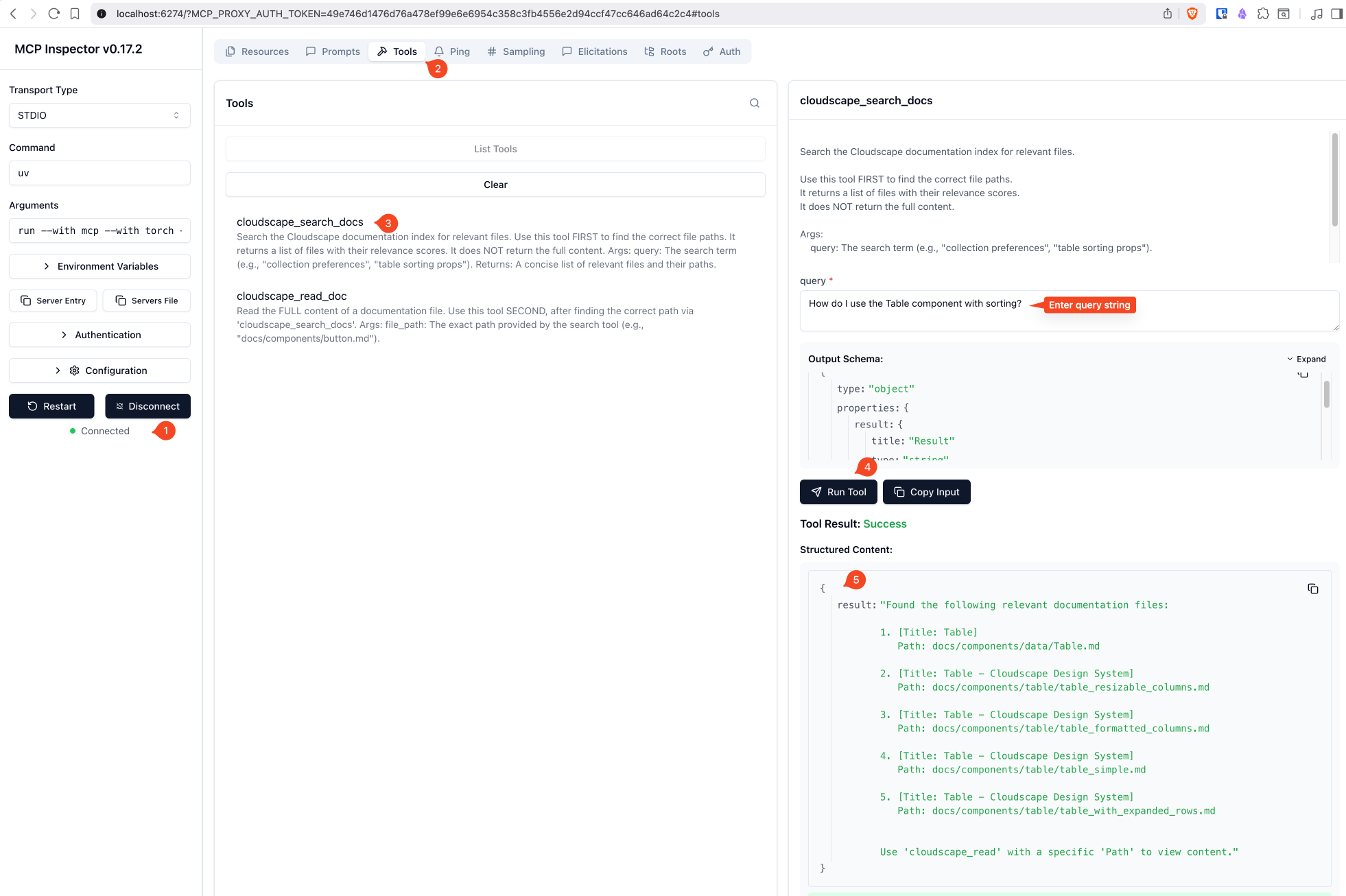
Here is a step-by-step guide with screenshots.
A Model Context Protocol (MCP) server that provides semantic search over AWS Cloudscape Design System documentation. Built for AI agents and coding assistants to efficiently query component documentation.
Semantic Search - Find relevant documentation using natural language queries powered by Alibaba GTE Multilingual Base model
Token Efficient - Returns concise file lists first, full content on demand
Hardware Optimized - Automatic detection of Apple Silicon (MPS), CUDA, or CPU
Local Vector Store - Uses LanceDB for fast, file-based vector search
Related MCP server: Markdown RAG MCP
This server uses the MCP stdio transport protocol.
Streamable HTTP transport coming soon.
Tool | Description |
| Search the documentation index. Returns top 5 relevant files with titles and paths. |
| Read the full content of a specific documentation file. |
Python 3.13+
~3GB disk space for the embedding model
8GB+ RAM recommended
# Clone the repository
git clone https://github.com/praveenc/cloudscape-docs-mcp.git
cd cloudscape-docs-mcp

# Create virtual environment and install dependencies
uv sync

# Or with pip
pip install -e .Place your Cloudscape documentation files in the docs/ directory. Supported formats:
.md (Markdown)
.txt (Plain text)
.tsx / .ts (TypeScript/React)
Run the ingestion script to create the vector database:
uv run ingest.pyThis will:
Scan all files in docs/
Chunk content into ~2000 character segments
Generate embeddings using Alibaba GTE Multilingual Base embedding model
Store vectors in data/lancedb/
Note: Running
uv run ingest.pymultiple times is safe but performs a full re-index each time. The script usesmode="overwrite"which drops and recreates the database table. There is no incremental update or change detection—all documents are re-scanned and re-embedded on every run. This is idempotent (same docs produce the same result) but computationally expensive for large documentation sets.
uv run server.pyAdd to your mcp.json:
{
  "mcpServers": {
    "cloudscape-docs": {
      "command": "uv",
      "args": ["run", "--directory", "/path/to/cloudscape-docs-mcp", "python", "server.py"]
    }
  }
}Add to your MCP settings:
{
  "cloudscape-docs": {
    "command": "uv",
    "args": ["run", "--directory", "/path/to/cloudscape-docs-mcp", "python", "server.py"]
  }
}Add to your Zed settings (settings.json):
{
  "context_servers": {
    "cloudscape-docs": {
      "command": {
        "path": "uv",
        "args": ["run", "--directory", "/path/to/cloudscape-docs-mcp", "python", "server.py"]
      }
    }
  }
}Once connected, an AI assistant can:
Search for components:
User: "How do I use the Table component with sorting?"
Agent: [calls cloudscape_search_docs("table sorting")]
Read specific documentation:
Agent: [calls cloudscape_read_doc("docs/components/table/sorting.md")]cloudscape-docs-mcp/
├── server.py # MCP server with search/read tools
├── ingest.py # Documentation indexing script
├── pyproject.toml # Project dependencies
├── docs/ # Documentation files (partially curated)
│ ├── components/ # Component documentation
│ ├── foundations/ # Design foundations
│ └── genai_patterns/# GenAI UI patterns
└── data/ # Generated vector database (gitignored)
└── lancedb/Key settings in server.py and ingest.py:
Variable | Default | Description |
|
| |
|
| Vector dimensions |
|
| Max search results returned |
|
| Documentation source directory |
|
| Vector database location |
# Install dev dependencies
uv sync --group dev

# Run with MCP inspector
npx @modelcontextprotocol/inspector uv --directory /path/to/cloudscape_docs run server.py
# Alternatively, use mcp cli to launch the server
mcp dev server.pyMIT License - See LICENSE for details.
Read the FULL content of a documentation file.
Use this tool SECOND, after finding the correct path via 'cloudscape_search_docs'.
Args: file_path: The exact path provided by the search tool (e.g., "docs/components/button.md").
| Name | Required | Description | Default |
|---|---|---|---|
| file_path | Yes |
| Name | Required | Description |
|---|---|---|
| result | Yes |
Does the description disclose side effects, auth requirements, rate limits, or destructive behavior?
With no annotations, the description carries full behavioral disclosure. It highlights 'FULL content', indicating no truncation, and gives a realistic example. However, it doesn't mention error handling or edge cases, but for a simple read tool this is acceptable.
Agents need to know what a tool does to the world before calling it. Descriptions should go beyond structured annotations to explain consequences.
Is the description appropriately sized, front-loaded, and free of redundancy?
The description is brief, with each sentence providing necessary information. The Args formatting is clean and front-loaded with the core purpose.
Shorter descriptions cost fewer tokens and are easier for agents to parse. Every sentence should earn its place.
Given the tool's complexity, does the description cover enough for an agent to succeed on first attempt?
The tool is simple with one parameter, and an output schema exists, so the description doesn't need to explain return values. It covers purpose, usage order, and parameter semantics, making it contextually complete.
Complex tools with many parameters or behaviors need more documentation. Simple tools need less. This dimension scales expectations accordingly.
Does the description clarify parameter syntax, constraints, interactions, or defaults beyond what the schema provides?
The schema has no description for the file_path parameter (0% coverage), but the description's Args section adds meaning with an example and specifies it should be the exact path from search. This compensates well for the missing schema description.
Input schemas describe structure but not intent. Descriptions should explain non-obvious parameter relationships and valid value ranges.
Does the description clearly state what the tool does and how it differs from similar tools?
The description clearly states the tool reads the full content of a documentation file, using the verb 'Read' and a specific resource. It differentiates from the sibling search tool by implying this is the retrieval step after finding the path.
Agents choose between tools based on descriptions. A clear purpose with a specific verb and resource helps agents select the right tool.
Does the description explain when to use this tool, when not to, or what alternatives exist?
It explicitly instructs to use this tool second, after using 'cloudscape_search_docs', providing clear sequencing and naming the alternative tool. This is strong guidance for when to use vs not.
Agents often have multiple tools that could apply. Explicit usage guidance like "use X instead of Y when Z" prevents misuse.
Search the Cloudscape documentation index for relevant files.
Use this tool FIRST to find the correct file paths. It returns a list of files with their relevance scores. It does NOT return the full content.
Args: query: The search term (e.g., "collection preferences", "table sorting props").
Returns: A concise list of relevant files and their paths.
| Name | Required | Description | Default |
|---|---|---|---|
| query | Yes |
| Name | Required | Description |
|---|---|---|
| result | Yes |
Does the description disclose side effects, auth requirements, rate limits, or destructive behavior?
There are no annotations, so the description carries the behavioral burden. It discloses that the result is a list of files with relevance scores and not full content, which is useful. It does not discuss potential side effects (though search is likely read-only), result limits, or search semantics, so it is only minimally transparent.
Agents need to know what a tool does to the world before calling it. Descriptions should go beyond structured annotations to explain consequences.
Is the description appropriately sized, front-loaded, and free of redundancy?
The description is compact and well-structured with separate Args and Returns sections. Every sentence contributes: purpose, usage guidance, return behavior, and an example query. No redundancy or filler.
Shorter descriptions cost fewer tokens and are easier for agents to parse. Every sentence should earn its place.
Given the tool's complexity, does the description cover enough for an agent to succeed on first attempt?
For a one-parameter search tool with an output schema, the description is sufficient: it explains when to use it, the parameter, and the return nature. It could be slightly stronger by explicitly pointing to the sibling read tool for full content, but the content limitation already hints at the workflow.
Complex tools with many parameters or behaviors need more documentation. Simple tools need less. This dimension scales expectations accordingly.
Does the description clarify parameter syntax, constraints, interactions, or defaults beyond what the schema provides?
The schema has only a bare 'query' string with no description; the description compensates by providing the intended use ('The search term') and concrete examples ('collection preferences', 'table sorting props'). This adds meaning the schema lacks.
Input schemas describe structure but not intent. Descriptions should explain non-obvious parameter relationships and valid value ranges.
Does the description clearly state what the tool does and how it differs from similar tools?
The description uses the specific verb 'Search' and identifies the resource ('Cloudscape documentation index') and the result (relevant files). It clearly distinguishes from sibling cloudscape_read_doc by focusing on path discovery rather than content retrieval.
Agents choose between tools based on descriptions. A clear purpose with a specific verb and resource helps agents select the right tool.
Does the description explain when to use this tool, when not to, or what alternatives exist?
It explicitly says to use this tool FIRST to find correct file paths and notes it does NOT return full content, which implies the sibling read tool should be used afterward. However, it does not explicitly name an alternative or state when not to use it beyond the content limitation.
Agents often have multiple tools that could apply. Explicit usage guidance like "use X instead of Y when Z" prevents misuse.
Recent tool additions, removals, and schema changes observed during successful MCP inspections.
v1.0.1cloudscape_read_doccloudscape_search_docsScored across 2 tools
The two tools have completely distinct purposes: one searches for relevant files, the other reads a specific file's content. There is no overlap or ambiguity between them.
Both tools follow the same verb_noun pattern with a consistent prefix: 'cloudscape_search_docs' and 'cloudscape_read_doc'. The naming is predictable and clear.
With only two tools, the set feels thin but is reasonable for a documentation search and read workflow. It is minimal yet sufficient for the stated purpose.
The core workflow of searching and reading documentation is fully covered. A minor gap is the lack of a way to list all documents or browse by category, but agents can typically work around this via search.
Versioned documentation registry and semantic search for AI tools and coding assistants.
Ingest, manage, and retrieve documents for RAG-powered AI applications
Provide your AI coding tools with token-efficient access to up-to-date technical documentation for…
Search your knowledge bases from any AI assistant using hybrid RAG.