
clinic-frontdesk-mcp
# clinic-frontdesk-mcp
**Give your LLM a front desk.**
[](https://github.com/prashant-cr/Clinic-front-desk-MCP-server/actions/workflows/ci.yml)
[](https://www.python.org/downloads/)
[](LICENSE)
[](https://modelcontextprotocol.io)
[](tests)
An open-source [MCP](https://modelcontextprotocol.io) server that turns any MCP-compatible client —
Claude Desktop, Claude Code, or your own agent — into an AI receptionist for a small medical clinic.
It handles the front desk: booking and rescheduling appointments, registering patients, taking
pre-visit intake, sending reminders, and answering questions about timings, fees and location.
The LLM is the brain; this server is the hands.
```text
You: Book Mr. Shah with Dr. Mehta tomorrow evening for a diabetes follow-up.
Claude: Dr. Mehta has 6:00, 6:30 and 7:00 PM open tomorrow. Which suits him?
You: 6 PM.
Claude: Booked — Rajesh Shah with Dr. Anjali Mehta on Mon 10 Aug 2026 at 6:00 PM,
for diabetes follow-up. A reminder goes out 24 hours before. Reference #1.
You: He's had a headache for three days, should he take something?
Claude: I can't advise on that one — it's best discussed with the doctor. Dr. Mehta
has 11:00 AM free on Tuesday if you'd like to bring the visit forward.
You: Cancel it, actually.
Claude: That's Rajesh Shah with Dr. Mehta, Mon 6:00 PM, diabetes follow-up.
Shall I cancel it? ← nothing has happened yet
```
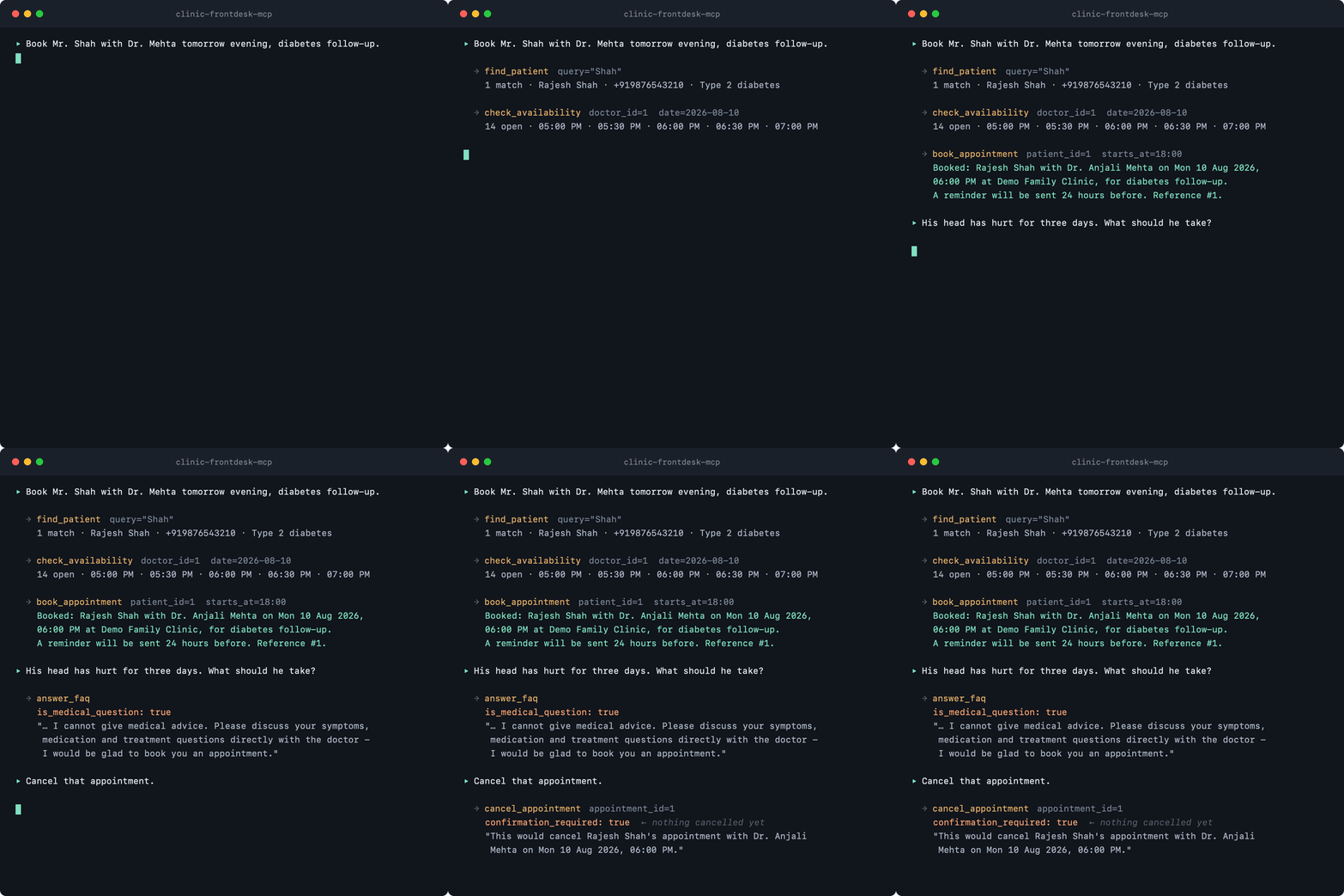
Behind those four turns: a patient lookup, a live availability check, a transactional booking, a
queued reminder, a clinical question routed away from the model's own opinion, and a destructive
action held back for confirmation.
Here is the same conversation from the server's side — the tools the model reaches for, and what
comes back. Every line was captured from a real session; nothing here is mocked up.
## Why it's not just a CRUD wrapper
A calendar with tool descriptions bolted on gets the happy path right and the other paths wrong.
The interesting work here is in the failure modes:
| The awkward bit | How it's handled |
| --- | --- |
| Two agents grab the same slot at once | Overlap check + insert in one `BEGIN IMMEDIATE` transaction, behind a partial unique index — [details](#no-double-booking) |
| Clocks jump forward and back | Non-existent wall-clock slots skipped, ambiguous ones offered once, durations measured in real elapsed time |
| "Should he take something for the headache?" | A curated clinical vocabulary short-circuits to the doctor redirect — a rule, not a similarity score that can drift |
| The FAQ has no good answer | Returns `match: none` so the agent escalates instead of inventing clinic policy |
| The requested slot is gone | Returns the nearest alternatives, not a bare error, so the conversation keeps moving |
| Logs are patient records too | Names collapse to initials, phone numbers are masked, before anything is written |
## What it will not do
This server handles **logistics only**. It has no clinical knowledge and is not a medical device.
- **No clinical advice.** Medical questions return the clinic's standard "please discuss this with
the doctor" response, with an offer to book an appointment. This is enforced in code, not left to
the model's judgement — see [Clinical safety](#clinical-safety).
- **No diagnoses stored.** Intake records what the patient said, in their words.
- **Confirmation before destructive actions.** `cancel_appointment` does nothing without an explicit
`confirm=true`; called without it, it returns a preview to read back to the caller.
## Privacy
Patient data stays on the machine running the server, in a single SQLite file. There are no
external calls in v1 unless you explicitly configure the optional Twilio adapter.
Logs go to **stderr only** (stdout is the MCP transport) and PII is redacted before anything is
written: phone numbers are masked and names collapse to initials. The `audit_log` table records
every write action in the same redacted form.
The database is not encrypted at rest. Store `CLINIC_DB_PATH` on an encrypted volume and treat that
file as you would any other patient record.
## Setting it up — no coding required
This server has no screen of its own. It plugs into an app you already talk to — **Claude Desktop**
is the easiest one — and that app grows a set of front-desk abilities. You do the talking; it does
the booking.
Setup is five steps and takes about ten minutes. Exactly one of them uses a terminal, and it's a
single line you copy and paste.
### 1. Install Claude Desktop
Download it from [claude.ai/download](https://claude.ai/download), install it like any other app,
and sign in.
### 2. Install `uv`
`uv` is a small free tool that fetches and runs this server for you. It brings its own copy of
Python, so there is nothing else to install.
Open a terminal — on a Mac press <kbd>⌘</kbd>+<kbd>Space</kbd>, type `Terminal`, press Enter; on
Windows click Start, type `PowerShell`, press Enter — then paste **one** of these and press Enter:
```bash
# macOS or Linux
curl -LsSf https://astral.sh/uv/install.sh | sh
```
```powershell
# Windows
powershell -ExecutionPolicy ByPass -c "irm https://astral.sh/uv/install.ps1 | iex"
```
Close the terminal window when it finishes. That's the last command you'll type.
### 3. Open Claude's settings file
In Claude Desktop, go to **Settings → Developer → Edit Config**. That opens a file called
`claude_desktop_config.json` in a text editor. If you'd rather open it by hand, it lives at:
- **macOS:** `~/Library/Application Support/Claude/claude_desktop_config.json`
- **Windows:** `%APPDATA%\Claude\claude_desktop_config.json`
### 4. Paste in the clinic
Replace everything in that file with the block below, then save. If the file already has other
entries under `mcpServers`, add just the `"clinic-frontdesk"` section alongside them.
```json
{
"mcpServers": {
"clinic-frontdesk": {
"command": "uvx",
"args": [
"--from",
"git+https://github.com/prashant-cr/Clinic-front-desk-MCP-server",
"clinic-frontdesk-mcp"
],
"env": {
"CLINIC_DB_PATH": "/Users/you/clinic-data/clinic.db",
"CLINIC_NAME": "Demo Family Clinic",
"CLINIC_TIMEZONE": "Asia/Kolkata"
}
}
}
}
```
Three things to change for your clinic:
| Line | Change it to |
| --- | --- |
| `CLINIC_DB_PATH` | Where the patient file should live. Windows example: `C:\\Users\\you\\clinic-data\\clinic.db`. Must be a **full** path — see the warning below |
| `CLINIC_NAME` | Your clinic's name, as it should read in confirmations and reminders |
| `CLINIC_TIMEZONE` | Your timezone, in [IANA form](https://en.wikipedia.org/wiki/List_of_tz_database_time_zones) — `Asia/Kolkata`, `Europe/London`, `America/New_York` |
Use a **full** path for `CLINIC_DB_PATH`, starting from the drive or your home folder. Claude Desktop
doesn't start the server from any particular folder, so a short path like `clinic.db` ends up
somewhere you won't find it.
### 5. Restart Claude Desktop
Quit it completely — <kbd>⌘</kbd>+<kbd>Q</kbd> on a Mac, or right-click the taskbar icon and Quit on
Windows; closing the window isn't enough — then open it again. The first launch takes a few extra
seconds while `uv` downloads the server.
### Check it worked
Look for the tools icon near the message box; `clinic-frontdesk` should be listed. Then just ask:
> **Who are the doctors at the clinic?**
If you get three doctors and their hours back, you're done. The first run creates the patient file
and fills it with a demo clinic — three doctors, four patients and a small FAQ — so you have
something to practise on before real data goes in.
Pick the **`receptionist_system`** prompt in Claude's prompt menu to put it into a warm, careful
receptionist frame of mind, with the safety rules already in place.
### Talking to it
Plain sentences work. There are no commands to memorise.
| Say something like | What happens |
| --- | --- |
| *"What's free with Dr. Mehta on Thursday afternoon?"* | Reads out the open slots |
| *"Book Mrs. Rao with Dr. Iyer on Tuesday at 11, for a vaccination."* | Checks the slot, books it, reads the booking back |
| *"New patient — Anil Kumar, 98200 12345."* | Registers him, or finds him if that number is already on file |
| *"Move appointment 14 to Friday morning."* | Reschedules and moves the reminder with it |
| *"Cancel appointment 14."* | Shows you the appointment and waits for you to confirm |
| *"What's on today?"* | Each doctor's day: appointments, gaps, missing intake forms |
| *"Do you take insurance?"* | Answers from the clinic FAQ, or says it doesn't know |
Ask it a medical question and it won't answer one — it will point the caller to the doctor and offer
an appointment. That's deliberate; see [What it will not do](#what-it-will-not-do).
### If something goes wrong
| What you see | Try this |
| --- | --- |
| No `clinic-frontdesk` in the tools list | Quit Claude Desktop completely and reopen it. Check the config file for a missing comma or bracket |
| "command not found: uvx" in the logs | `uv` isn't installed, or the terminal was open before you installed it. Redo step 2, then restart Claude Desktop |
| It answers but never books anything | It's answering from memory rather than the tools. Ask directly: *"Use the clinic tools to check Dr. Mehta's availability tomorrow."* |
| Times look wrong | `CLINIC_TIMEZONE` is off. Fix it and restart Claude Desktop |
| You want to start with an empty clinic | Add `"CLINIC_SEED": "false"` to the `env` block, delete the `clinic.db` file, and restart |
### Where your data lives
Everything sits in the single file at `CLINIC_DB_PATH` on your own machine. Nothing is uploaded
anywhere. **To back it up, copy that file** — the way you'd copy a photo — and keep the copy
somewhere safe and encrypted. To move to a new computer, install the server there and copy the file
across.
## Try it: a five-step demo
Start a conversation with the server connected and try these in order. The first run seeds a demo
clinic with three doctors, four patients and a FAQ.
1. **"Who are the doctors at the clinic and when do they work?"**
→ `list_doctors`. Dr. Mehta (general practice, split morning/evening shifts), Dr. Iyer
(pediatrics, 20-minute slots), Dr. Sheikh (dermatology, 45-minute consultations).
2. **"What's open with Dr. Mehta next Monday evening?"**
→ `check_availability`. Returns real bookable slots in clinic-local time, past ones excluded.
3. **"Book Mr. Shah with Dr. Mehta tomorrow evening for a diabetes follow-up."**
→ `find_patient`, then `book_appointment`. Read back the confirmation. A reminder is queued for
24 hours before. Try booking the same slot again — you will get the nearest alternatives instead
of a bare failure.
4. **"He's been tired in the afternoons for about two months, takes metformin 500mg twice daily,
allergic to penicillin."**
→ `submit_intake`. Then ask **"what will the doctor see?"** → `get_intake` returns a
one-paragraph brief a doctor can read in ten seconds.
5. **"Actually, can we move that to Wednesday morning? And what are your consultation fees?"**
→ `reschedule_appointment` (old → new summary, reminder re-queued) and `answer_faq`.
Then try the guardrails:
- **"He's had a bad headache for three days — should he take something for it?"**
→ the doctor redirect, not advice.
- **"Cancel his appointment."**
→ a preview and a request to confirm. Nothing is cancelled until you say yes.
- **"What's the wifi password?"**
→ `match: none`, so the agent offers to check with the front desk rather than inventing an answer.
## For developers
```bash
# Run straight from the repository, no clone needed
uvx --from git+https://github.com/prashant-cr/Clinic-front-desk-MCP-server clinic-frontdesk-mcp
# Or clone and install
git clone https://github.com/prashant-cr/Clinic-front-desk-MCP-server
cd Clinic-front-desk-MCP-server
uv pip install -e .
# With the optional SMS adapter
uv pip install -e '.[twilio]'
```
Requirements: Python 3.11 or newer, and nothing else — SQLite is created and seeded on first run.
> **Not yet on PyPI.** Until the first release, use the git forms above. After publication,
> `uvx clinic-frontdesk-mcp` becomes the one-line install and the config `args` shorten to
> `["clinic-frontdesk-mcp"]`. If you cloned the repo, point `command` at
> `/path/to/repo/.venv/bin/clinic-frontdesk-mcp` with `"args": []`.
### Other MCP clients
Any MCP-compatible client works — the server speaks stdio and nothing else. **Claude Code:**
```bash
claude mcp add clinic-frontdesk \
--env CLINIC_DB_PATH=/absolute/path/to/clinic.db \
--env CLINIC_TIMEZONE=Asia/Kolkata \
-- uvx --from git+https://github.com/prashant-cr/Clinic-front-desk-MCP-server clinic-frontdesk-mcp
```
For other clients, give them the same command, arguments and environment variables as the JSON above
in whatever format they use.
## Tools
### Read
| Tool | What it does |
| --- | --- |
| `list_doctors` | Doctors with specialty and usual weekly hours |
| `check_availability` | Open slots for a doctor; falls back to the next three openings when a day is full |
| `find_patient` | Partial search by name or phone. Returns **all** matches — never guesses |
| `get_appointments` | Filter by patient, doctor, date and status |
| `get_intake` | Intake form plus the ten-second `doctor_brief` |
| `answer_faq` | Best FAQ match with a confidence level, or `match: none` to escalate |
| `daily_summary` | Per-doctor view of a day: appointments, merged free blocks, pending intakes, unsent reminders |
### Write
Every write appends a PII-redacted row to `audit_log`.
| Tool | What it does |
| --- | --- |
| `register_patient` | Creates a patient, or returns the existing record for that phone number |
| `book_appointment` | Validates and books, queues a 24-hour reminder, returns a read-back confirmation |
| `reschedule_appointment` | Moves the appointment and re-queues the reminder |
| `cancel_appointment` | **Requires `confirm=true`.** Without it, returns a preview |
| `submit_intake` | Stores intake and regenerates the doctor brief. Re-submitting replaces it |
| `send_reminder` | Sends one reminder immediately |
| `process_due_reminders` | Sends every reminder that has come due. Run periodically |
| `add_faq` | Lets staff grow the FAQ through the agent |
## Configuration
All settings are environment variables, all with defaults — the server starts with no configuration
at all.
| Variable | Default | Purpose |
| --- | --- | --- |
| `CLINIC_DB_PATH` | `./clinic.db` | SQLite file. Created and seeded on first run |
| `CLINIC_NAME` | `Demo Family Clinic` | Name used in confirmations and reminders |
| `CLINIC_TIMEZONE` | `Asia/Kolkata` | IANA zone. All tool input and output is in this zone |
| `CLINIC_SEED` | `true` | Load demo data when the database is first created |
| `CLINIC_LOG_LEVEL` | `INFO` | Log verbosity (stderr) |
| `TWILIO_ACCOUNT_SID` | – | All three needed for SMS; otherwise reminders print to stderr |
| `TWILIO_AUTH_TOKEN` | – | |
| `TWILIO_FROM_NUMBER` | – | |
Seeding happens **only** when the database file is created. Restarting never duplicates demo rows
or resurrects deleted records. Set `CLINIC_SEED=false` to start empty for a real clinic.
## How it works
```text
caller ──▶ Claude Desktop / Claude Code / your agent ← the brain: language, judgement
│ MCP over stdio
▼
┌───────────────────────┐
│ server.py │ 14 tools, thin — no logic lives here
├───────────────────────┤
│ scheduling patients │ slot maths, conflicts, intake
│ faq notifs │ matching, clinical routing, reminders
├───────────────────────┤
│ db.py → clinic.db │ SQLite on your disk. UTC in, local out
└───────────────────────┘ every write mirrored to a redacted audit_log
│
└─▶ stderr (redacted logs) · Twilio SMS (optional, off by default)
```
Nothing leaves the machine unless you configure the Twilio adapter yourself.
### Time
Every timestamp is stored in UTC and every tool input and output is in clinic-local time.
`scheduling.py` is the single conversion boundary — nothing above it touches UTC, nothing below it
touches local time.
Slots come from a weekly template in `schedules`, overridden per-day by `schedule_exceptions`
(a holiday closes the day; a time override replaces that day's windows). Slots that would run past
the end of a window are dropped, so a 10:00–12:30 window in 20-minute slots ends at 12:20.
DST is handled explicitly: a slot at a wall-clock time that does not exist (spring forward) is
skipped, and an ambiguous hour (fall back) is offered once. Slot durations are real elapsed time, so
consecutive slots never overlap across a transition.
### No double-booking
Two layers, because SQLite has no exclusion constraint:
1. A partial unique index on `(doctor_id, starts_at_utc)` for active appointments.
2. An overlap check and the insert inside one `BEGIN IMMEDIATE` transaction, which closes the
check-then-insert race the index alone cannot cover for *partial* overlaps.
### Clinical safety
Routing medical questions to the doctor is a **rule**, not a similarity score. Scoring failed it in
both directions during development: *"I have a bad headache for 3 days"* fell below the escalation
floor purely for being a long sentence, while the generic keyword `take` pulled *"do you take
insurance?"* toward the medical entry.
A curated `CLINICAL_TERMS` vocabulary in `faq.py` now short-circuits to the redirect entry, which
the seed marks with the reserved keyword `medical`. You can reword that answer for your clinic —
just keep the keyword on it.
## Development
```bash
uv venv
uv pip install -e '.[dev]'
uv run pytest -q # 248 tests
uv run ruff check . && uv run ruff format --check .
uv run mypy src/
```
Inspect the server with the [MCP Inspector](https://github.com/modelcontextprotocol/inspector),
pointing it at the installed entry point — the same command Claude Desktop runs:
```bash
# Interactive browser UI
npx @modelcontextprotocol/inspector .venv/bin/clinic-frontdesk-mcp
# Or drive it from the terminal
npx @modelcontextprotocol/inspector --cli .venv/bin/clinic-frontdesk-mcp --method tools/list
npx @modelcontextprotocol/inspector --cli .venv/bin/clinic-frontdesk-mcp \
--method tools/call --tool-name list_doctors
```
Note that `mcp dev src/clinic_frontdesk_mcp/server.py:mcp` does **not** work here: it loads the
file as a standalone module, which breaks the package-relative imports. Point the Inspector at the
entry point instead, as above — it also exercises the real console script rather than a
special-cased import.
### Layout
```
src/clinic_frontdesk_mcp/
├── server.py # MCP tool definitions only — thin, delegates everything
├── scheduling.py # slot maths, conflict detection, the local<->UTC boundary
├── patients.py # patient records and intake
├── faq.py # FAQ matching and clinical-question detection
├── notifications.py # reminder delivery adapters
├── db.py # schema, migrations, seeding, redacted audit log
├── models.py # domain dataclasses
└── config.py # environment configuration
```
Business logic lives in the domain modules and is testable without MCP. If a tool body in
`server.py` grows past a screen, the logic belongs somewhere else.
## Not in v1
No web UI, no authentication or multi-tenancy, no real WhatsApp integration (the adapter interface
is there), no EMR/FHIR integration, no payments, no multi-clinic support.
## License
MIT — see [LICENSE](LICENSE).
TDQS
Scored across 15 tools
Each tool targets a distinct entity and action: doctors, availability, patients, appointments (book/reschedule/cancel/list), intake, reminders, FAQ, and daily summary. There is no overlap in purpose, and descriptions clarify any potential boundary cases.
All tool names use snake_case and follow a mostly verb_noun pattern (list_doctors, book_appointment, cancel_appointment). The only minor deviation is daily_summary, but it is still a clear noun phrase and consistent in style.
15 tools is at the upper edge of the recommended range but each tool earns its place by covering a distinct front-desk operation. The set is well-scoped for a clinic front desk, neither too thin nor bloated.
The tool set covers the core lifecycle: patients (find/register), appointments (book/reschedule/cancel/list), intake (get/submit), reminders (send/process), and FAQ (answer/add). Minor gaps exist such as no patient update or explicit completion/no-show status change, but these are not critical for the front-desk purpose.