

A
licenseA
qualityF
maintenanceFacilitates controlling Apple Music on macOS via AppleScript through MCP commands, allowing users to manage playback, search for tracks, and create playlists.
10
91
MIT

Enables searching the Apple Music catalog and provides tools to manage playlists, browse library songs, and access personalized music recommendations.
Click on "Deploy Server".
Wait a few minutes for the server to deploy. Once ready, it will show a "Started" state.
In the chat, type @ followed by the MCP server name and your instructions, e.g., "@Apple Music MCP Server create a 'Focus' playlist and add some lo-fi tracks to it"
That's it! The server will respond to your query, and you can continue using it as needed.
Here is a step-by-step guide with screenshots.
An MCP (Model Context Protocol) server that integrates with Apple Music, allowing Claude and other MCP clients to search the catalog, manage playlists, and access your library.
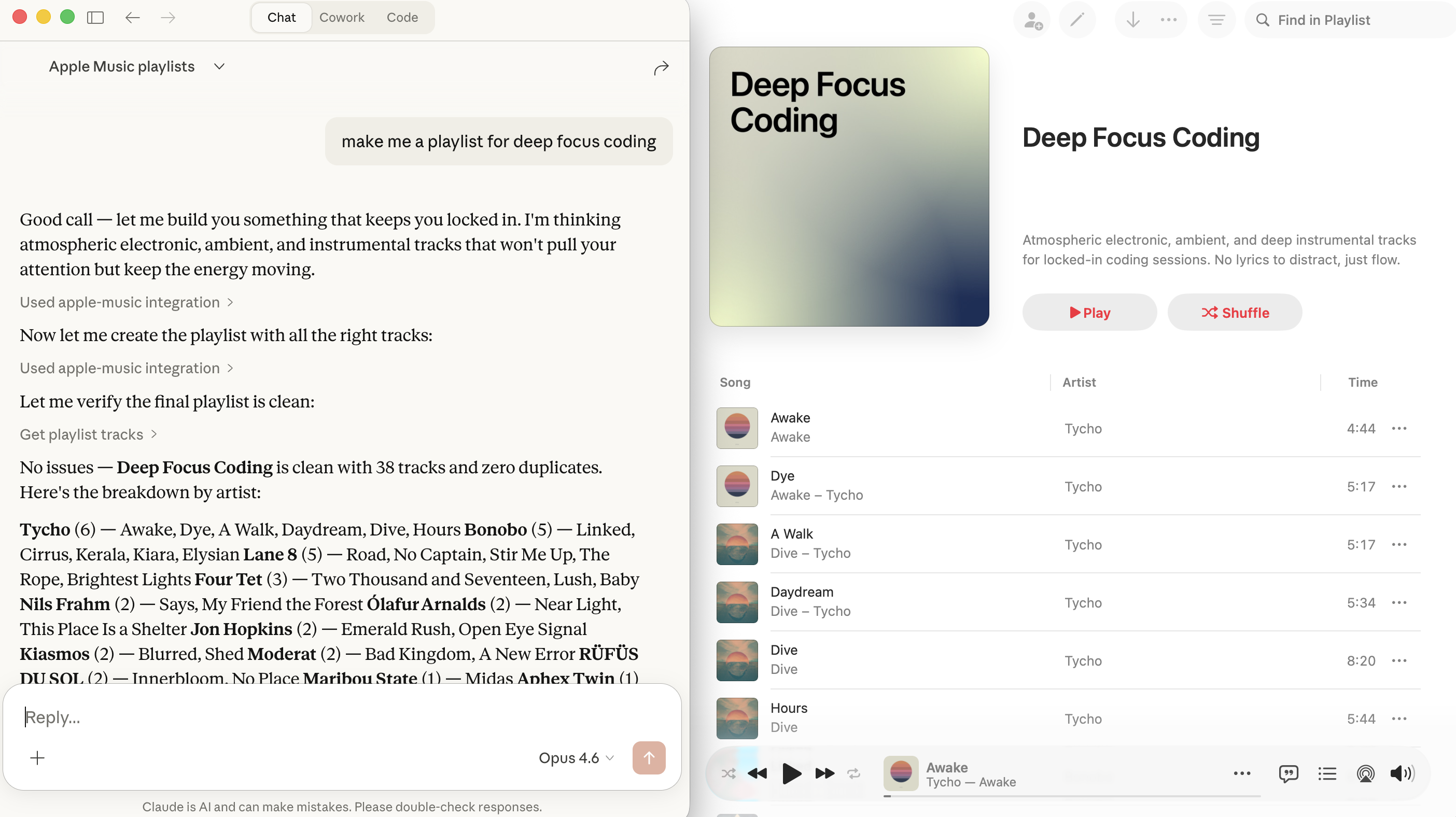
Search the Apple Music catalog (songs, albums, artists, playlists)
List your playlists and browse their tracks
Create new playlists with optional initial tracks
Add tracks to existing playlists
Browse your library songs
View recently played tracks
Get personalized recommendations
Related MCP server: Sound
Node.js 18+
An Apple Developer Program membership
A MusicKit identifier and private key
Go to Apple Developer > Certificates, Identifiers & Profiles
Click + to register a new identifier
Select MusicKit IDs (or Media IDs)
Enter a description (e.g., "MCP Server") and an identifier (e.g., com.yourname.musicmcp)
Click Continue and Register
Go to Apple Developer > Keys
Click + to create a new key
Name it (e.g., "MusicKit MCP Key")
Check MusicKit and configure it with your MusicKit identifier
Click Continue and Register
Download the .p8 file (you can only download it once!)
Note the Key ID shown on the page
Your Team ID is visible at the top right of the Apple Developer portal, or under Membership Details.
git clone <this-repo>
cd AppleMusicMCP
npm install
npm run buildThe server is configured via environment variables:
Variable | Required | Description |
| Yes | Your Apple Developer Team ID |
| Yes | Your MusicKit Key ID (from the key you created) |
| Yes | Absolute path to your |
| No | ISO 3166 alpha-2 country code (default: |
| No | Config directory path (default: |
| No | Port for auth server (default: |
Before using library features (playlists, library songs, recommendations), you need to authorize with your Apple Music account:
APPLE_MUSIC_TEAM_ID=YOUR_TEAM_ID \
APPLE_MUSIC_KEY_ID=YOUR_KEY_ID \
APPLE_MUSIC_PRIVATE_KEY_PATH=/path/to/AuthKey.p8 \
node dist/index.js auth
This will:
Open your browser to a local authorization page
You click "Authorize with Apple Music" and sign in with your Apple ID
The Music User Token is captured and stored in ~/.apple-music-mcp/tokens.json
The token is valid for approximately 6 months
Note: Catalog search works without authorization. Only library/personal features require it.
Add this to your Claude Desktop config (~/Library/Application Support/Claude/claude_desktop_config.json):
{
  "mcpServers": {
    "apple-music": {
      "command": "node",
      "args": ["/absolute/path/to/AppleMusicMCP/dist/index.js"],
      "env": {
        "APPLE_MUSIC_TEAM_ID": "YOUR_TEAM_ID",
        "APPLE_MUSIC_KEY_ID": "YOUR_KEY_ID",
        "APPLE_MUSIC_PRIVATE_KEY_PATH": "/absolute/path/to/AuthKey_XXXXXXXX.p8",
        "APPLE_MUSIC_STOREFRONT": "us"
      }
    }
  }
}Add to your Claude Code settings (.claude/settings.json or global settings):
{
  "mcpServers": {
    "apple-music": {
      "command": "node",
      "args": ["/absolute/path/to/AppleMusicMCP/dist/index.js"],
      "env": {
        "APPLE_MUSIC_TEAM_ID": "YOUR_TEAM_ID",
        "APPLE_MUSIC_KEY_ID": "YOUR_KEY_ID",
        "APPLE_MUSIC_PRIVATE_KEY_PATH": "/absolute/path/to/AuthKey_XXXXXXXX.p8"
      }
    }
  }
}search_musicSearch the Apple Music catalog.
query (string, required): Search term
types (array, optional): ["songs", "albums", "artists", "playlists"] (default: songs, albums, artists)
limit (number, optional): 1-25 results per type (default: 10)
storefront (string, optional): Country code
get_user_playlistsList your playlists.
limit (number, optional): 1-100 (default: 25)
offset (number, optional): Pagination offset
get_playlist_tracksGet tracks from a playlist.
playlist_id (string, required): Playlist ID
limit (number, optional): 1-100 (default: 100)
offset (number, optional): Pagination offset
create_playlistCreate a new playlist.
name (string, required): Playlist name
description (string, optional): Playlist description
track_ids (string[], optional): Song IDs to add initially
add_tracks_to_playlistAdd tracks to an existing playlist.
playlist_id (string, required): Playlist ID
track_ids (string[], required): Song IDs to add (max 100)
remove_tracks_from_playlistRemove tracks from a playlist (limited Apple API support).
playlist_id (string, required): Playlist ID
track_ids (string[], required): Song IDs to remove
get_library_songsGet songs from your library.
limit (number, optional): 1-100 (default: 25)
offset (number, optional): Pagination offset
get_recently_playedGet recently played tracks.
limit (number, optional): 1-10 (default: 10)
get_recommendationsGet personalized music recommendations.
limit (number, optional): 1-30 recommendation groups (default: 10)
Once configured, you can ask Claude things like:
"Search for Taylor Swift songs on Apple Music"
"Show me my Apple Music playlists"
"Create a new playlist called 'Road Trip' with some rock songs"
"What have I been listening to recently?"
"Get my music recommendations"
"Add the song 'Bohemian Rhapsody' to my Road Trip playlist"
Run the auth flow: node dist/index.js auth
Your developer token may be invalid. Check your Team ID, Key ID, and private key path.
Your Music User Token may have expired (they last ~6 months). Re-run: node dist/index.js auth
Ensure port 7829 isn't in use. Set a different port with APPLE_MUSIC_AUTH_PORT.
This is a known Apple Music API limitation. The API has limited DELETE support for playlist tracks. Use the workaround: create a new playlist with the tracks you want to keep.
npm run dev    # Run with tsx (no build needed)
npm run build  # Compile TypeScript
npm start # Run compiled versionTransport: stdio (JSON-RPC over stdin/stdout)
API: Direct REST calls to api.music.apple.com/v1/
Auth: ES256 JWT developer tokens + browser-based MusicKit JS for user tokens
Caching: In-memory with per-endpoint TTLs
Error handling: Typed errors with helpful messages and retry logic for rate limits
This server cannot be deployed
Create, inspect, and manage Wubble music, speech, voice, and sound-effect requests through MCP.
Automate 1,000+ services from any MCP-compatible AI agent: build Applets, run actions and queries.
iTunes Search MCP — Apple's public catalog search
The CWI Discovery Engine is the MCP server for the Cumulative Web Inc music catalog — 28 tools for AI agents: catalog search, track/artist/release lookups, semantic and mood-based sync search, Radio 365 live stream data, playlist pitching, sync-brief submission, airplay requests, featured nominations, label info, events, lyrics, press kits, videos, genres, playlists and recommendations. No authentication required. Free.