
worktree-switcher
by pioootrek
README.md
# Worktree Control
**One dev port per project. Shared context for you and your coding agents.**
Switch a development server between Git worktrees without changing its port.
Queue builds and tests, see which code they checked, and keep the tasks,
discussions and decisions that the next session will need.
Worktree Control runs on your machine with a browser dashboard, CLI and MCP
server. It supports Node.js and Django servers and verification-only projects such as Godot, stores state in SQLite, and
needs no hosted account. It is MIT licensed.
[Website](https://pioootrek.github.io/worktree-control/) · [Why I built it](https://pioootrek.github.io/worktree-control/blog/managing-the-agents/) · [Try it locally](#quick-start) · [Connect your agent](#mcp-for-coding-agents) · [Project knowledge](#keep-project-context-between-sessions) · [Documentation](#documentation)
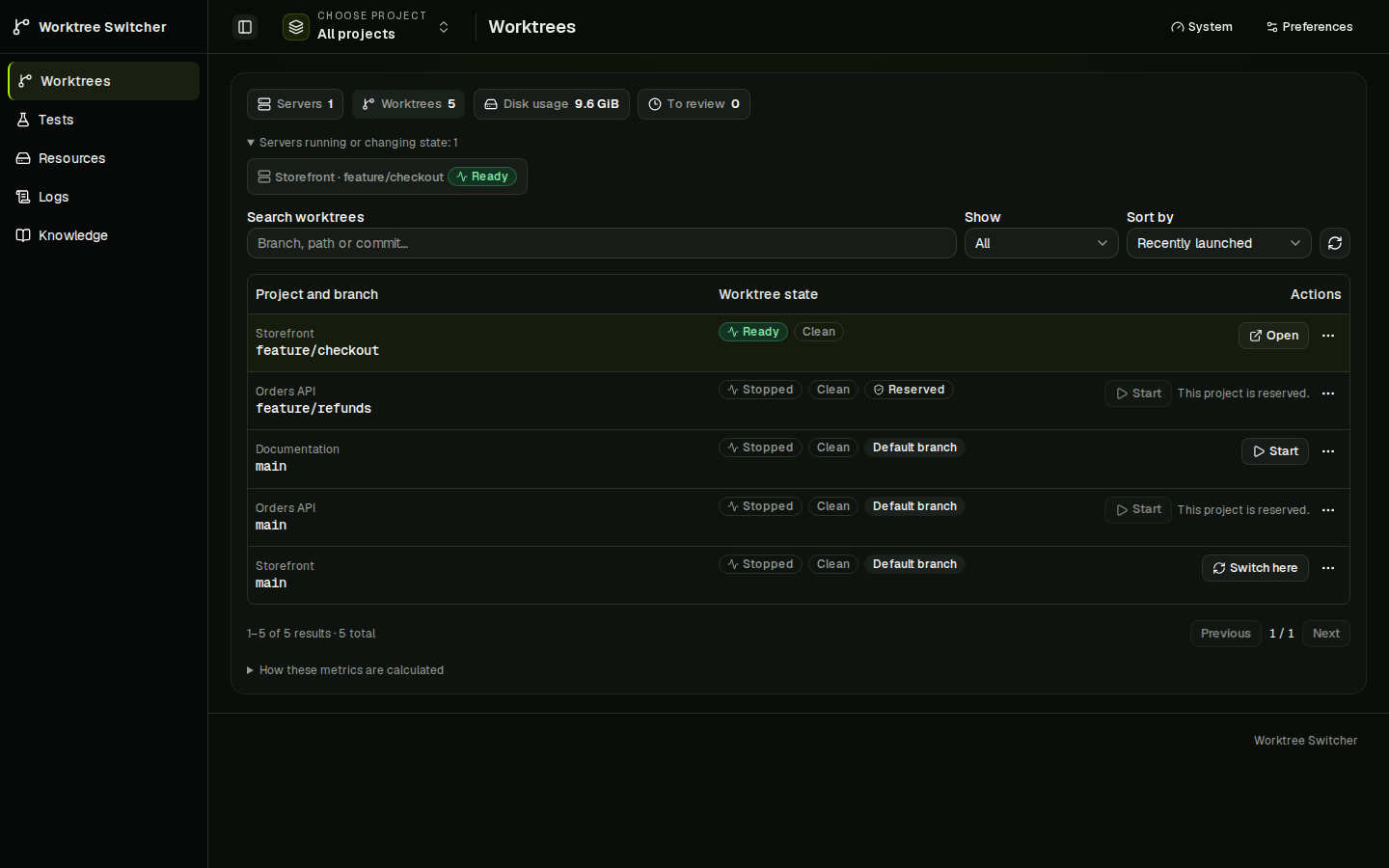
*Screenshots show the current dashboard with fictional demo data. The interface supports English and Polish, dark and light themes, and mobile layouts.*
## Keep development servers predictable
Your frontend can run `feature/checkout` on port 3000 while the API stays on
`main` at port 4000. Switching one project leaves the others alone.
- Pin a worktree with a human lock while you use it.
- Let an agent claim a project, start or switch its server, and release the claim when it finishes. Release leaves the server running.
- Inspect the branch, local changes, server state and logs before taking action.
- Check worktree disk usage and remove a stopped, unlocked Next.js worktree's `.next` cache with confirmation.
Use your existing editor and Git tools to create worktrees. Worktree Control discovers
them. Humans and agents must use its controller for ownership rules to apply;
it cannot prevent an unrelated terminal from starting another process.
## Know what passed
Run a discovered test, lint, typecheck or build preset against a specific
worktree. A shared queue limits concurrent checks and allows at most one active
run per worktree. Submitting a test does not move or reserve the dev server.
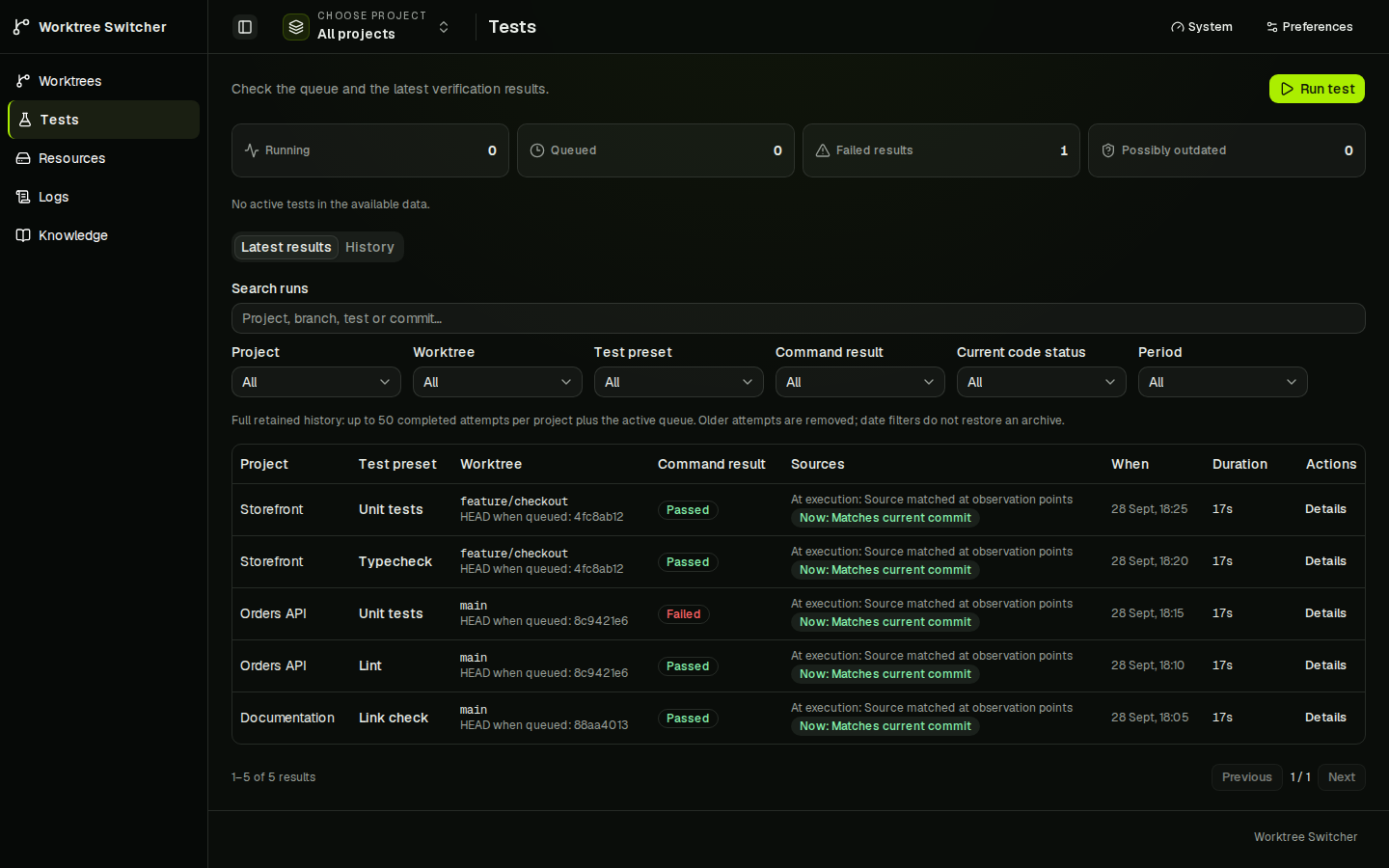
A passing command and a result that applies to your current code are separate
things. Tests shows the command outcome, Git observations around the run, current
relevance and output. Dirty or changed source stays visible. Local checks use
the worktree's files, including uncommitted edits; they are not immutable snapshots.
## Keep project context between sessions
Knowledge gives humans and agents the same project records through the dashboard,
MCP and CLI. It works without a running dev server or a Git repository.
- **Backlog:** capture a task, set its priority and status, and link the discussion that led to it.
- **Discussions:** keep findings, questions and replies together. Turn an agreed next step into a task.
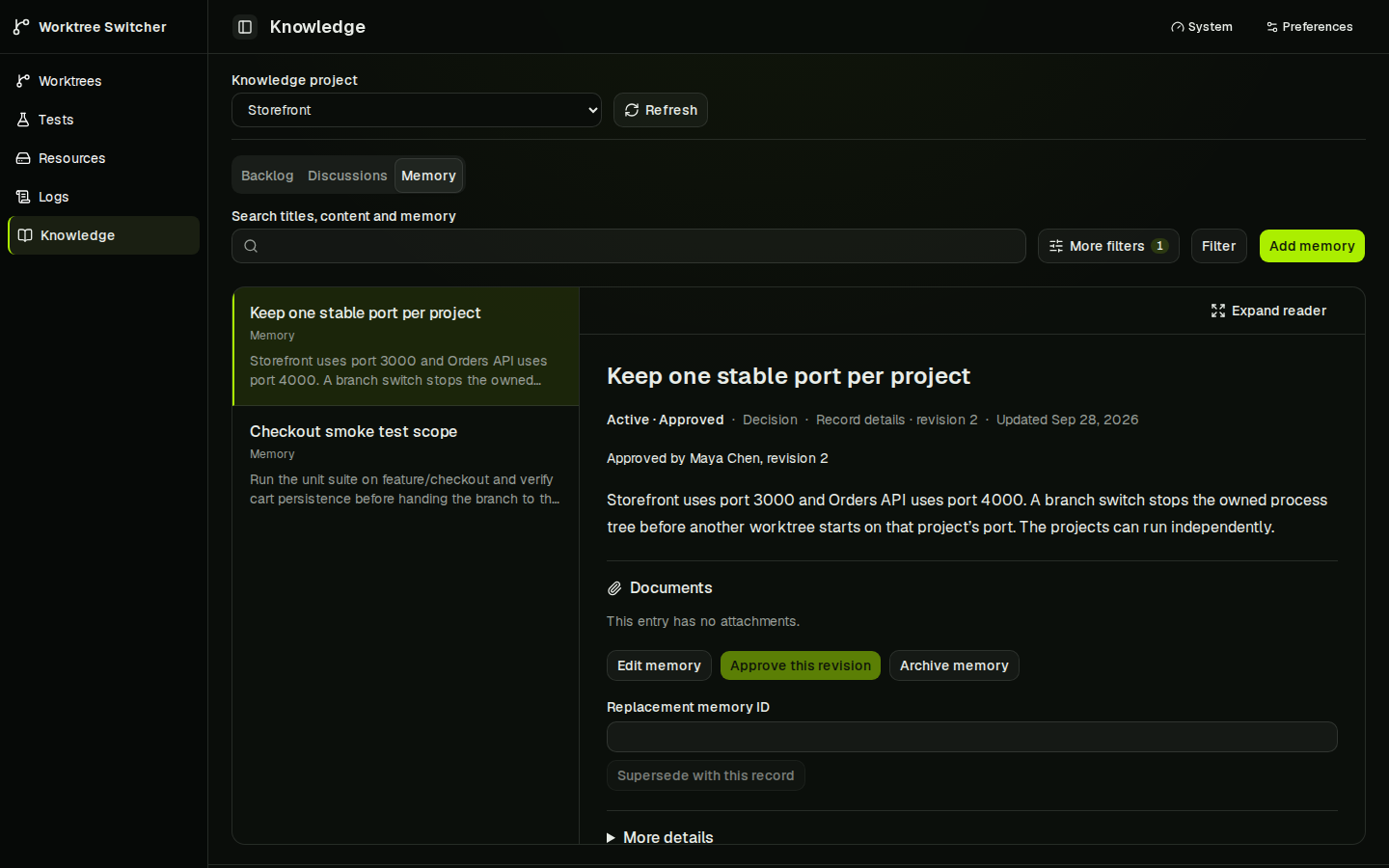
- **Memory:** retain decisions and notes with sources, revision history and explicit approval.
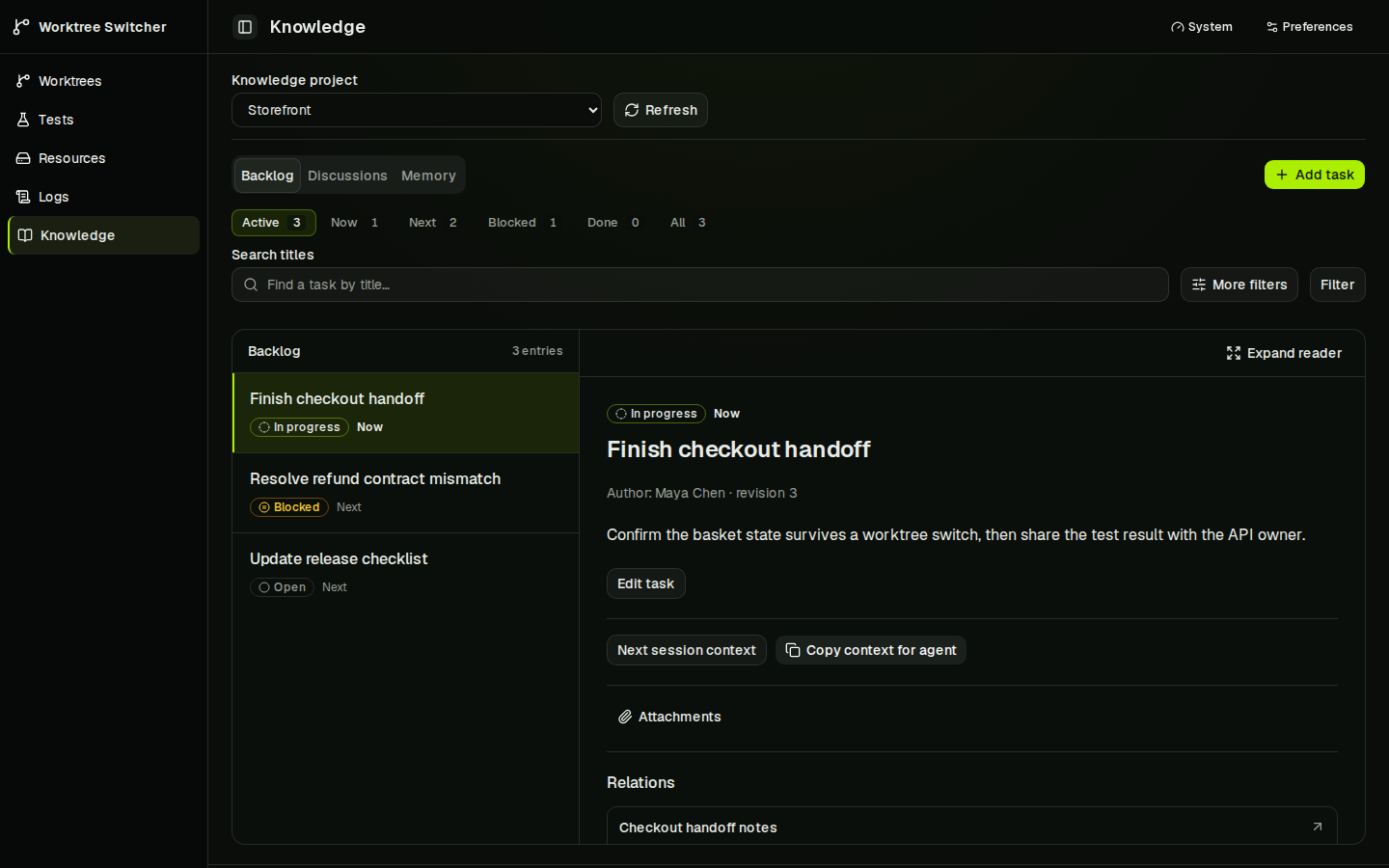
Follow named links between records, search titles and content, and jump to the
reply that matched. Open attached documents in the reader. A task's **Next
session context** collects linked memory and source revisions for a handoff;
you can export that context as Markdown or JSON.
<details>
<summary>See the Memory reader</summary>
</details>
Search currently covers record titles and bodies. Attached documents can be
read in the dashboard but are not yet included in search.
Hub import, attachments, backup and project transfer are implemented. An existing
Hub project still needs a reviewed migration and a clear choice of where future
writes belong. See the [knowledge delivery plan](https://github.com/pioootrek/worktree-control/blob/main/docs/shared-project-memory-plan.md).
## Quick start
**Status:** pre-1.0 (`0.1.1`). The local controller is in daily use by its
author. Linux x64 is verified; macOS and Windows are unverified. The CLI and
data model may change; see the [changelog](CHANGELOG.md).
Install [Node.js 22 or newer](https://nodejs.org/) and Git, then install and
start the controller:
```bash
npm install --global worktree-control
worktree-control start --host 127.0.0.1
```
The first start prints the installation token once. Save it in a password
manager; it is not shown again, and `worktree-control auth token rotate` issues
a new one. Open the controller's printed address and sign in with that token.
The token is printed only to an interactive terminal; in scripts and CI run
`worktree-control auth token generate` first. To keep the controller running
after you close the terminal, run
`worktree-control service install --host 127.0.0.1` instead of `start`. It
prints the token the same way if none exists yet; see
[Run it in the background](#run-it-in-the-background). A global install into the
system npm prefix may need elevated rights. The
[installation guide](docs/package-trial.md) shows a user-owned prefix and how to
install a checksum-verified tarball from CI instead of the registry.
The installed commands are `worktree-control` and the short alias `wtc`. The
product was named Worktree Switcher until 2026-10-05. To move an existing
installation, see
[upgrading an existing installation](docs/user-service.md#upgrading-an-existing-installation).
### Not the `worktree-switcher` package on npm
The npm package `worktree-switcher` by YitFei
([github.com/YitFei/worktree-switcher](https://github.com/YitFei/worktree-switcher))
is a different, unrelated project. It is a Windows-only command-line tool
(`wts`), published on 2026-10-05, and its documentation cites this repository as
the origin of the core idea. It is not a fork of this repository and was written
independently; this project has not reviewed its code. This project targets
Linux (macOS unverified), is published as `worktree-control`, and installs the
commands `worktree-control` and `wtc`.
### Build from source
Install the [pnpm](https://pnpm.io/installation) version declared in
[`package.json`](https://github.com/pioootrek/worktree-control/blob/main/package.json)
(currently `11.22.0`), then:
```bash
git clone https://github.com/pioootrek/worktree-control.git
cd worktree-control
pnpm install --frozen-lockfile
pnpm build
node dist/cli/index.js start --host 127.0.0.1
```
Other commands in this README that begin with `node dist/cli/index.js` run from
a source build. With the npm package, use `worktree-control` in their place.
### Add a project
1. Select **Add project**, choose a local Git repository and assign a port.
2. Choose a discovered worktree and select **Start**.
3. Open the app, then **Switch** to another worktree at the same address.
4. Open **Tests** and run a discovered preset. Install the project's dependencies first.
The command above binds the dashboard to loopback on port `47831`. MCP uses
loopback port `47832`. Without `--host`, the dashboard defaults to `0.0.0.0`.
For another device, use the [HTTPS setup](#self-hosting-and-https).
Existing installations keep legacy authentication until explicitly migrated.
Read the [upgrade notes](docs/authentication.md#upgrade-notes-and-breaking-changes)
before changing modes or credentials.
### Run it in the background
Stop the foreground controller first, then:
```bash
worktree-control service install --host 127.0.0.1
worktree-control service status
worktree-control service open
```
The installer uses a Linux systemd user service or a macOS LaunchAgent. It needs
no `sudo` and does not change your firewall. See the [user-service guide](docs/user-service.md)
for updates, removal and platform limitations.
## MCP for coding agents
Keep your existing MCP-capable editor or coding client. Get the connection
configuration from:
```bash
worktree-control config mcp
```
In token mode, this prints a bearer-token placeholder. Supply the installation
token privately in your client's configuration, or set `WORKTREE_CONTROL_TOKEN`
before running the command to include it in the output. Do not commit that output.
For a managed dev server:
```text
list_projects → list_worktrees → get_project_status → claim_project
→ get_project_status → work with the server → release_project_claim
```
For a finite check:
```text
list_test_presets → run_test → get_test_run_status → get_test_run
```
Use the exact path returned by `list_worktrees`. Reuse the idempotency key when
retrying the same submission. Claims expire and belong to the creating MCP
session; an agent cannot force-release someone else's reservation. Automatic
renewal stops 15 minutes after the session's last tool call, so a claim lapses
at most 45 minutes after an agent stops using MCP.
The [bundled agent skill](https://github.com/pioootrek/worktree-control/blob/main/skills/worktree-control/SKILL.md)
teaches this workflow. It is included in the npm package. For Codex, copy it
from the installed package, found through the `worktree-control` command so a
user-owned `--prefix` works too (or copy `skills/worktree-control` from a checkout):
```bash
codex_skill_dir="${CODEX_HOME:-$HOME/.codex}/skills"
mkdir -p "$codex_skill_dir"
package_dir="$(dirname "$(dirname "$(dirname "$(readlink -f "$(command -v worktree-control)")")")")"
cp -R "$package_dir/skills/worktree-control" "$codex_skill_dir/"
```
Restart the agent session and configure MCP separately. In the managed project's
agent instructions, add:
```md
Use the worktree-control skill and MCP tools before starting or switching this
project's development server. Honor existing claims. Use its managed test queue
for available verification presets.
```
The repository root also contains [`server.json`](https://github.com/pioootrek/worktree-control/blob/main/server.json)
for the official MCP Registry. [Distribution](https://github.com/pioootrek/worktree-control/blob/main/docs/distribution.md)
covers publishing it and listing the project in MCP directories.
Knowledge tools include `knowledge_create_thread`, `knowledge_create_reply`,
`knowledge_create_task` and `knowledge_update_task`. An agent can save a finding
for you to read in the dashboard without editing repository files.
<details>
<summary>Use project knowledge from the CLI</summary>
In token mode, set `WORKTREE_CONTROL_TOKEN` privately before running these
commands. The installation token grants full access. Scoped agent credentials
and legacy owner sessions use their explicit project grants; see
[authentication](docs/authentication.md).
From the built checkout, create a knowledge project and list the available ones:
```bash
node dist/cli/index.js identity create-knowledge-project --name "My project"
node dist/cli/index.js knowledge projects
```
Create a memory entry using a source record and its current revision:
```bash
node dist/cli/index.js knowledge create_memory --input-file memory.json
```
Example `memory.json`, with your project, task ID and source revision:
```json
{
"projectId": "<project-id>",
"title": "Keep checkout state on the server",
"body": "Store the cart server-side so checkout survives a page reload.",
"category": "decision",
"tags": ["checkout"],
"legacyId": null,
"sources": [{ "kind": "task", "id": "<task-id>", "revision": 1 }],
"idempotencyKey": "checkout-state-decision-1"
}
```
Memory requires a source record or an explicit HTTP/HTTPS link. Approval is an
explicit owner operation; saving a decision does not approve it. Editing an
approved entry clears its current approval while retaining history.
```bash
node dist/cli/index.js knowledge search --json '{"projectId":"<project-id>","query":"checkout"}'
node dist/cli/index.js knowledge task_context --json '{"projectId":"<project-id>","taskId":"<task-id>"}'
node dist/cli/index.js knowledge export_context --json '{"projectId":"<project-id>","taskId":"<task-id>","format":"markdown"}'
```
Reuse the same idempotency key and input after a lost response. Updates require
`expectedRevision` to avoid overwriting someone else's changes. Lists and context
exports are paginated; follow `nextOffset`. Context exports contain source IDs
and revisions, not a model-generated summary, and are not project backups.
</details>
## Supported projects
| Project | How Worktree Control starts it |
| --- | --- |
| Node.js | Detects pnpm, npm, Yarn or Bun and the project's `dev` script |
| Next.js | Passes the configured `PORT`; supports optional development HTTPS |
| Vite, Astro and Nuxt | Passes the framework's supported port arguments |
| Angular | Uses `dev: ng serve` or the standard `start: ng serve` |
| Django | Runs a root-level `manage.py` with `.venv/bin/python`, `venv/bin/python` or `python3` |
| Godot / verification only | No managed server; finite verification presets run through the test queue |
Use `worktree-control project add /path/to/repo --preset none` for a
verification-only repository, including one without `package.json` or `manage.py`.
Automatic detection chooses `none` for a root `project.godot` when neither
Node.js nor Django is detected. The configured port remains reserved in project
configuration but is unused. The dashboard shows **No server** and offers no
server controls or HTTPS settings. Runtime operations and MCP `claim_project`
(which starts a server) refuse these projects before acquiring a lease or capacity.
Run tests directly without a runtime claim; existing reservations still apply.
For Godot, a root `project.godot` and `scripts/project.sh` expose `godot:check`
and `godot:export-macos`. They execute `bash scripts/project.sh check` and
`bash scripts/project.sh export-macos` in the exact worktree, preserving the
public script's setup and resource guards. Without that script there are no
Godot presets. Worktree Control does not locate Godot or start an editor.
Use a test environment profile for script inputs such as `GODOT_BIN`.
Each worktree needs its own installed dependencies and runtime setup. Server
profiles provide named environment overrides. Tests have separate environment
policies and queue limits.
Every managed server starts without a shell and receives the project's port as
the `PORT` environment variable. A package script such as `dev` is run by the
package manager, which may use a shell, so `$PORT` in that script resolves there.
The command is derived from the launch preset, not entered as free text, so
there is no custom command in which to write `$PORT`. Profiles cannot override
`PORT`.
Resources shows cached worktree disk usage and Linux process-group RAM/CPU.
Logs can be filtered, searched, paused and exported. macOS reports unavailable
process metrics, and its service lifecycle still needs real-host verification.
Windows process-tree and service management are unsupported.
**Test analysis** shows retained verification history, phase timings and passive
per-run Linux RAM/CPU observations. Process outcomes and source evidence remain
separate; missing or partial measurements are labelled. See the
[history API and resource semantics](https://github.com/pioootrek/worktree-control/blob/main/docs/verification-history-api.md).
## Self-hosting and HTTPS
One Node.js controller serves the exported dashboard, owns SQLite, and manages
local repositories and processes. Next.js builds the UI; it is not a second
resident server. You can use the browser on another device.
For HTTPS, follow [Protect the controller with HTTPS](docs/controller-https.md).
Keep the controller on loopback behind Caddy and configure `--public-url`.
The dashboard proxy does not expose the loopback MCP listener. A managed
Next.js app's development HTTPS is a separate project setting.
To open a project at a readable address such as `http://frontend.localhost`
instead of its port number, see
[stable local hostnames](https://github.com/pioootrek/worktree-control/blob/main/docs/local-hostnames.md).
The controller does not manage that proxy.
Worktree Control executes project code under your OS user. Use trusted repositories and
clients; process ownership and preset validation are not a sandbox.
- `token` mode requires the installation token for browser, API, MCP and online CLI access.
- `open` mode removes authentication and is intended for trusted loopback use.
- The controller stops only process trees it owns, never an unknown process on an occupied port.
- Literal environment values are stored in SQLite. Keep secrets out of those profiles; worker-side secret references remain planned.
Data defaults to `~/.local/share/worktree-control`; runtime state and logs use
`~/.local/state/worktree-control`. The controller respects `XDG_DATA_HOME` and
`XDG_STATE_HOME`, and startup options can override these paths. Without explicit
paths, an existing pre-rename `worktree-switcher` directory is used while the
corresponding `worktree-control` directory does not exist; data is never moved.
## Optional user export schedules
User schedules default to off, independently of installation backups. An
operator enables only the supported scope and allowed project/target IDs:
```sh
worktree-control start --user-backup-enabled \
--user-backup-scopes knowledge-discussions \
--user-backup-projects <knowledge-project-id> \
--user-backup-target local=/private/user-exports \
--user-backup-min-interval-seconds 3600 --user-backup-max-schedules 4 \
--user-backup-max-bytes 67108864 --user-backup-timeout-seconds 30 \
--user-backup-queue-limit 2 --user-backup-retain-count 10 \
--user-backup-retain-days 30
```
`service install --refresh` preserves omitted installed settings. Explicit
user-policy options replace only that setting; repeated `--user-backup-target`
options replace the entire target list. Use `--unset --user-backup-enabled` to
disable schedules, or `--unset STARTUP_FLAG` to reset another inherited option.
Preview changes with `service install --refresh --print`. An unreadable or
unsupported definition is refused before changing the service; inspect and
reconcile it first.
Repeat `--user-backup-target`
for up to 16 private local targets; projects are a comma-separated allowlist.
The only supported scope is current discussion text (`knowledge-discussions`).
It excludes history, authorship, import sources, identities, credentials,
attachments, tasks and memories. The existing full project transfer format is
not exposed to schedules. Export content remains user-authored project data.
Scoped owner/agent credentials with current `knowledge:read` and `knowledge:export`
grants open **System → My export schedules**. The panel accepts a separate scoped
credential when the dashboard uses an installation token. Its session changes
neither the installation session nor service policy. They manage only their own records
and download only authorized complete exports. Installation/open/legacy/worker
identities cannot own a user schedule. Expired or revoked activation credentials
block execution; edit with a current credential to reactivate. This version uses
the existing principal types and does not add a SaaS account provider.
Limits: minimum interval 60–2,592,000 seconds, schedules per principal 1–32,
bytes per principal 1 MiB–1 GiB, cooperative timeout 1–300 seconds, pending jobs
per principal 1–32, retention maximum 1–100 copies and 1–365 days. Defaults are
shown above. The shared `--backup-queue-limit` (default four) also bounds all
pending/running service backups and user exports. Only one executes at a time;
queued service jobs have priority. A discussion export has at most 1000 threads,
1000 replies and a complete JSON envelope smaller than 4 MiB. Oversize content
is refused. Synchronous bounded phases can exceed the timeout before its next
check; no successful publication occurs after a failed deadline check.
Creating, enabling or editing increments the version and sets the next UTC
instant to now plus the interval. Disabling clears that instant and keeps copies.
An overdue schedule attempts only one slot, then advances to a future instant.
Queued work of an old version fails. Retry a lost mutation with its original
idempotency key; status failure for one request keeps the available panel visible.
No HTTP operation modifies operator policy or grants restore authority.
Checksummed private application records live beside the installation operation
ledger, outside SQLite snapshots. This keeps configuration, versions, deadlines
and receipt keys from rolling back during restore; transfer to a new host is
outside this feature. There are at most 256 schedules, 2048 execution records
and 1024 mutation receipts globally, also bounded by a 4 MiB record. Each schedule
retains its last four receipts, so repeated edits cannot consume another
schedule's history or prevent disabling at the receipt bound. Fetch
`mutationGeneration` from the overview and construct fresh keys with
`userScheduleMutationKey(generation, scheduleId, expectedVersion, nonce)`.
Keep the original key for retries. Compacted keys return `expired` (410);
durable versions prevent replay. Format-1 ledgers migrate automatically, retaining
four receipts per schedule; unknown old opaque keys expire. Older controllers
refuse the new format. Do not delete or reset the ledger to clear limits.
A restore receipt changes the validation generation; even an admitted restore
that later fails requires explicit revalidation. S4u rejects credentials issued
before that restore boundary, including credentials resurrected by offline
restore. Issue a fresh scoped credential and save the schedule again.
Retention runs after success on an enabled current version. It removes only
verified artifacts of that owner, schedule, project and target, preserves the
newest and leaves installation/manual/pre-migration/recovery/unknown material
untouched. Retention failure is visible. Disabled schedules perform no deletion.
An operator can reclaim a complete user export, including staging left before
publication, when its execution is `failed`, `interrupted` or `succeeded`,
through the running controller's private admin socket:
```bash
worktree-control backup user-cleanup list
worktree-control backup user-cleanup preview <execution-id>
worktree-control backup user-cleanup cleanup <execution-id> <confirmation-id>
```
The list reads candidate metadata; preview validates one complete export and
shows its original execution state. Cleanup may remove a successful copy,
including the last one, only through this explicit operator confirmation.
When retained successful copies fill an owner quota or the global execution
history, this command releases capacity. Automatic retention still requires a
new successful export and never discards the last copy to make space.
Use the confirmation returned by preview. It binds the execution, configured
target, checksum and file identity; a changed file needs inspection, not a new
path argument. Cleanup checks the ledger and complete envelope, refuses active
exports, unknown material, symlinks and unknown hardlinks, and removes a remaining
staging alias only when it belongs to that same inode. A staging-only export
requires a complete matching envelope and the same identity checks. The original execution
outcome stays unchanged. This operation is unavailable to scoped or installation
HTTP/MCP clients and does not open an offline database owner.
A separate private recovery journal records intent before deletion. Unsettled
cleanup remains charged to the original owner even if the file appears absent.
After interruption or a filesystem error, repeat the same execution and
confirmation IDs; if persistence was uncertain, restart the controller through
its normal operator lifecycle first. Space is released only after directory
synchronization and durable settlement. Replays never delete newly created
material. The journal holds at most 2048 entries and 4 MiB, outside mutation
history. Pending intents stay pinned; completed receipts follow the existing
bounded execution history. An expired execution ID is refused and cannot start
a second cleanup. Staging remains charged and keeps its execution record even
when a timeout or crash occurred before publication was recorded. Final/staging
hardlinks count once. Corrupt or unrecognized evidence requires separate
inspection and is not deleted by this operation.
Local exports require a surviving host and filesystem.
## Optional installation backups
The independent monitor runs once in a separate CLI process:
```bash
worktree-control backup monitor # disabled, no probe or alerts
worktree-control backup monitor --enabled \
--warn-after-seconds 2700 --critical-after-seconds 3600 --timeout-ms 5000
```
It reads a small, owner-only controller metadata reply without opening SQLite,
scanning backups, starting the controller or sending notifications. Configure an
external scheduler and notification delivery separately. Exit codes are `0` for
healthy or disabled, `1` for warning, `2` for critical and `3` for unknown.
An enabled probe reports an absent, unreadable, incompatible or timed-out
controller as unknown. An available controller with both service scheduling and
remote transfer off produces no stale-backup alerts. Local-only scheduling
produces no remote alerts; enabled remote transfer is monitored even when copies
are created manually and the local service schedule is off.
Thresholds belong to this CLI invocation and cannot modify service policy.
Invalid invocation options also return safe JSON with `unknown`, exit `3` and
`invalid_options`, without echoing the arguments or checking the controller.
Local and remote ages use the recorded snapshot creation request time, including
queue delay. A recent upload completion never refreshes the remote data age.
Failed attempts, unavailable local copy paths, retention errors and maintenance
are reported separately. The reply contains no filesystem paths, credentials,
actors or backup contents. It checks recorded evidence and local file types;
it does not rehash copies, contact the remote repository, or prove restoration.
`remoteReachability: not-checked` and `recovery: not-measured` preserve those limits.
Encrypted transfer defaults to off and is independent of the local schedule.
The first adapter uses an existing restic HTTPS REST repository. Provision the
repository and preserve its password outside the source host before enabling
transfer; Worktree Control never initializes, prunes or changes its keys.
All policy comes from operator CLI arguments. Only credentials are read from
private files: a restic repository password file and a JSON file containing
`{"username":"...","password":"..."}` for the REST server. Keep both files
in a private directory, owned by the controller user, mode `0600`, without
symlink or hardlink aliases. The executable must be an absolute, trusted restic
path. Obtain the repository's cryptographic ID with `restic cat config`.
```sh
worktree-control start --backup-dir /private/installation-copies \
--backup-remote-enabled --backup-remote-restic /usr/bin/restic \
--backup-remote-repository rest:https://backup.example.test/installation/ \
--backup-remote-repository-id <64-character-repository-id> \
--backup-remote-password-file /private/backup-secrets/repository-password \
--backup-remote-credentials-file /private/backup-secrets/rest-credentials.json \
--backup-remote-pending-limit 4 --backup-remote-attempt-limit 3 \
--backup-remote-retry-seconds 300 --backup-remote-timeout-seconds 300 \
--backup-remote-upload-kib-per-second 10240
```
Use `--backup-remote-ca-file <private-pem-file>` when an explicit CA is required;
otherwise restic verifies HTTPS using system roots. Userinfo, query strings,
HTTP and other backends are rejected. Repository/password commands and ambient
restic credentials or proxy settings are not inherited. TLS and authenticated
encryption are supplied by [restic](https://restic.readthedocs.io/en/stable/030_preparing_a_new_repo.html).
New successful installation backups created in the configured catalog are
eligible while transfer is enabled. Explicit CLI destination copies, migration
copies and scoped user exports are not automatically transferred. Every upload
shares the existing single backup/export executor. A stable installation ID,
backup ID, manifest hash and repository ID fence retries; confirmation reads
back the authenticated manifest and checks the exact remote file inventory.
An incomplete snapshot never counts as confirmation. No remote retention is
performed; the repository owner must manage it separately.
```sh
worktree-control backup remote status
worktree-control backup remote retry <backup-id> --generation <next-generation>
```
These commands require the running controller's private administrative socket.
Status separates local success from remote confirmation and always labels
recovery `not-measured`. Data age uses the conservative local admission time,
not upload completion. Automatic attempts are bounded per round; an explicit
retry increments the reported generation by one and admits a fresh bounded
round. Repeating an accepted generation replays its status. Unknown final
attempts after a crash first reconcile without authorizing a new upload.
Pending/failed sources remain protected from local retention, including when
transfer is disabled. Their limit rejects new catalog backups before copying;
it never deletes pending data to make room. Local backups with an explicit
destination remain available for operator rescue. Confirmed receipt history
compacts only after the source and its durable service operation have retired,
using the existing service replay fence; latest confirmation remains visible.
`service install --refresh` preserves and revalidates omitted installed local
and remote settings. Explicit options replace only that setting. Use
`--unset --backup-interval-seconds` to disable the automatic local schedule,
or `--backup-remote-disabled` to disable remote transfer;
this preserves retry material and makes no background connections or alarms.
Remote policy/status is not available through dashboard, HTTP or MCP actions.
The cryptographic repository ID fences receipts; changing the HTTPS hostname,
port, path or trailing slash for that same repository preserves pending work.
For a different repository ID, stop the controller and explicitly rebind:
```sh
worktree-control backup remote rebind --from <current-destination-id> \
--target-config /private/backup-secrets/new-restic.json --generation <next-generation>
```
Use the active `destinationId` from `backup remote status` for `--from`; it is
SHA256 of the restic repository ID, not the raw `repositoryId` from `cat config`.
Prepare the new startup parameters and a maintenance window first. Keep any
supervised service stopped without automatic restart while changing the binding;
refresh its configuration before resuming. Rebind does not change the service.
An enabled startup with stale repository parameters fails closed. An explicit
`--backup-remote-disabled` startup permits local operation while preserving old
pins if the new policy cannot yet be installed.
The private JSON uses the existing restic configuration fields: `executable`,
`repository`, `repositoryId`, `passwordFile`, `credentialsFile`, optional `caFile`,
`uploadKiBPerSecond` and `policy`. The command authenticates the target with a
read-only repository check under the existing controller and canonical database
owner locks. Unfinished restores refuse rebind without performing recovery.
One atomic ledger publication archives all old receipts, confirmations and
uncertain-source pins. The new target initially has no confirmed protection.
Matching retries replay the accepted generation; stale or conflicting requests
refuse. Rebind does not change startup arguments or service configuration: start
with the new target policy separately. Never delete the ledger to retarget.
At most four archived bindings and a 4MiB ledger are retained. Limits refuse
new publication without dropping evidence. Private `backup remote status`
separates active destination/generation/confirmation from archived receipt and
pin counts. Historic receipts prevent automatic uploads of old copies. To
select one archived source still present in the configured catalog:
```sh
worktree-control backup remote reupload <backup-id>
```
This requires the running controller's private administrative socket and verifies
the archived manifest identity and original data age. Duplicate admission is
idempotent; failed transfers require an explicit retry generation. Confirmation
on the new target never releases an uncertain old-target pin. Disabled transfer
preserves this material without making background connections.
Reconciliation inventories at most 256 matching snapshots in 512KiB, then
validates at most 32 new candidates per pass. Authenticated ID/tree proofs and
budgets persist across restart and inventory reordering. Only a full successful
authenticated mismatch proves a partial copy; errors, malformed or truncated
output remain unknown and cannot authorize another write. Read output is bounded
to 256MiB per pass and eight automatic passes (2GiB reserved total), preserving
the per-command 8MiB manifest and 64MiB tree limits. Upload progress has a separate
64MiB bound. Global proof limits are 256 per receipt and 1,024 across all bindings.
Confirmation and rebind discard disposable proof/inventory caches while retaining
receipts, original identities, budget counters, confirmations and uncertain pins.
Continuations share the existing executor and configured retry spacing.
Changed inventory fails closed as `remote_inventory_changed` until an explicit
`backup remote retry <backup-id> --generation <next-generation>` renews the
inventory fence and budgets while retaining stable source identity and proofs.
This also handles an uncertain upload that may already have created a snapshot:
renewal authenticates the current inventory before any new write. Multiple
complete candidates, unknown reads or exhausted capacity leave the source
protected. The application never runs `forget`, `prune` or remote deletion.
Keep local rescue material and use separately held maintenance credentials for
any independent repository investigation; do not remove unknown or last copies.
To recover, use a trusted restic and separately held repository password/backend
credentials to restore the full confirmed snapshot ID into an empty private
directory (`restic restore <snapshot-id> --target <directory> --verify`). Run
`worktree-control backup restore <directory> --data-dir <fresh-data-dir>
--state-dir <fresh-state-dir>` with the controller stopped. The existing restore
validates schema, integrity, references and attachments before publication.
Check restored records and attachment bytes through authenticated clients,
rotate credentials after an incident, and configure startup policy separately.
Keep the source/current state before any rollback after new writes. A transfer
receipt is not a recovery drill or a host-loss RPO/RTO guarantee: the finite monitor reports ledger metadata, while operational key custody and
real-host recovery measurements require a separate operator rehearsal. The
installed upgrade/recovery fixture described below provides isolated evidence.
Automatic backups and browser create/restore actions default to off. Only the
installation operator selects policy, through `start` or `service install`
arguments. A directory alone enables neither automation nor web actions.
```sh
worktree-control start --backup-dir /private/installation-copies \
--backup-interval-seconds 1800 --backup-retain-count 30 \
--backup-retain-days 30 --backup-max-bytes 17179869184 \
--backup-timeout-seconds 300 --backup-queue-limit 4 \
--backup-ui-actions create,restore
```
The same options are preserved by `service install --refresh`. The interval is
60–2,592,000 seconds. Retention defaults to 30 copies and 30 days; the budget
defaults to 16 GiB, the cooperative execution timeout to 300 seconds, and the
pending/running request bound to four. These are application limits, independent
of host process limits. A timed-out operation cannot publish a successful copy;
synchronous filesystem work may take longer before reaching its next limit check.
`--backup-before-migration --backup-dir <directory>` retains its independent,
default-off migration gate. This local policy does not enable remote transfer
or attachment store garbage collection. Configure the optional remote transfer
separately as described above. Local copies require a surviving host and
filesystem to be useful.
```sh
worktree-control backup now --idempotency-key operator-request-1
worktree-control backup status --idempotency-key operator-request-1
worktree-control backup list
worktree-control backup create /private/manual-copy --idempotency-key manual-1
worktree-control backup restore backup-<uuid> --idempotency-key restore-1
worktree-control backup status backup-<uuid> --idempotency-key restore-1
```
Online CLI administration uses the existing owner-only Unix socket. A missing
channel refuses the operation without opening another SQLite owner. Online
restore selects an ID from the configured catalog. Offline `backup create` and
`backup restore` still accept a directory under the singleton lock; restore
requires explicit local administration. Keep the same idempotency key when
retrying a request. Failed or interrupted backup keys return their original
result; a new attempt requires a new key.
The operator dashboard is under **System → Installation backups**. It requires
the current installation token. Legacy pairing, project credentials and open
mode cannot browse or operate installation backups. Policy is read-only;
`--backup-ui-actions none|create|restore|create,restore` controls the two web
mutations. The list reports verification at publication; restore preview and
admission independently validate the complete artifact again.
Online catalog restore explicitly replaces the entire installation and loses
later changes.
A durable receipt precedes maintenance. Maintenance stops owned managed processes
and finite tests, closes SQLite, executes the recoverable replacement, and
rebuilds the controller with the same startup arguments. Current installation
authentication is fenced outside the restored database. Restored sessions and
scoped credentials are revoked; issue fresh credentials after reconnecting.
Offline CLI access is refused while an executing handoff still needs this fence;
start the controller to complete recovery first. Offline directory restore
preserves credentials and grants from the snapshot; inspect and revoke stale
credentials/grants as needed before exposing the recovered installation.
Use **Refresh status** after a disconnect, or retry the retained request with its
original key. This never repeats an already completed restore.
Retention runs only after a successful scheduled backup. Disabling the schedule
preserves copies and runs no retention. Manual copies, pre-migration copies,
unknown material, the latest recovery points and all admitted restore sources
are protected. Retention refuses altered candidates. Operation records stay
outside SQLite, capped at 1,024 per installation. Old service records without
remaining copies are pruned beyond the last 50, with a durable deadline watermark
preventing replay. Manual idempotency records remain; reaching the cap refuses new
admission and requires operator review. Interrupted private staging and previous
restore generations remain available for recovery and may consume disk.
## Roadmap
Local server switching, verification and shared knowledge are available on
`main`. Remote verification is still in development: the planned workflow is to
push a commit, ask a customer-owned worker to check that exact SHA, and read the
result in your existing client. Authorization, persistence and workspace
foundations are merged; connected-worker dispatch and the complete remote
workflow are not yet available. See the [remote verification plan](https://github.com/pioootrek/worktree-control/blob/main/docs/remote-verification-plan.md).
Optional account login, agent-fleet coordination and maintainer-operated hosting
are planned. There is no hosted signup or pricing offer today. Self-hosting is
intended to remain complete and independent. Read Knowledge memory `570757852db162a0d3c6d2c252b26e7e` and its `implementation-plan.md` attachment through the [knowledge workflow](https://github.com/pioootrek/worktree-control/blob/main/docs/knowledge/AGENTS.md).
## Documentation
| Guide | What it covers |
| --- | --- |
| [Authentication](docs/authentication.md) | Tokens, open mode, rotation and upgrades |
| [User service](docs/user-service.md) | Installation, lifecycle, logs and removal |
| [Installation](docs/package-trial.md) | npm install, verified tarball, checksums and user-prefix installation |
| [Changelog](CHANGELOG.md) | Release notes, the rename from worktree-switcher, platform status and known limitations |
| [Controller HTTPS](docs/controller-https.md) | Caddy, certificates and access from another device |
| [Reservations and MCP](docs/reservations-and-mcp.md) | Claims, locks, client integration and permissions |
| [Knowledge delivery](https://github.com/pioootrek/worktree-control/blob/main/docs/shared-project-memory-plan.md) | Discussions, backlog, memory, import and remaining migration work |
| [Knowledge evidence](docs/knowledge-evidence.md) | Attachment policy, logical capacity, preflight and evidence bundles |
| [Architecture](https://github.com/pioootrek/worktree-control/blob/main/docs/architecture.md) | Controller, persistence and module boundaries |
| [UI standards](https://github.com/pioootrek/worktree-control/blob/main/docs/ui-standards.md) | Layout, readers, focus and interaction rules |
| [Backlog workflow](https://github.com/pioootrek/worktree-control/blob/main/docs/knowledge/AGENTS.md) | Tasks, discussions and historical sources in Knowledge |
## Contributing and feedback
Try one repository with your usual coding client. [Open an issue](https://github.com/pioootrek/worktree-control/issues/new)
with your OS, framework, MCP client and the step that helped or got in the way.
Leave out tokens, private access links and secrets.
Read [AGENTS.md](https://github.com/pioootrek/worktree-control/blob/main/AGENTS.md)
for development and resource rules. The usual source checks are:
```bash
pnpm check
pnpm build
pnpm test:ui
pnpm smoke:package
```
Browser tests exercise the exported UI with a fixture API. CI also covers the
real controller, HTTPS, E2E flows and the installed package. Use the managed test
queue when this repository is registered in Worktree Control.
## Installed upgrade and recovery acceptance
`pnpm test:package:upgrade` uses the existing trial packer and production-prefix
installer to exercise exact historical `a727fd8ff01e141c6494615531e27e72a23f6320`
(schema 24) and the clean current commit. The historical reference does not
identify the version currently deployed. Build both clean checkouts with their
original frozen lockfiles and use the historical checkout's `package:trial` to
produce its tarball and `provenance.json`. Configure these explicit local inputs
in the registered project's clean test environment profile:
```text
WORKTREE_CONTROL_TEST_OLD_ARTIFACT=<historical-tarball>
WORKTREE_CONTROL_TEST_OLD_PROVENANCE=<historical-provenance.json>
WORKTREE_CONTROL_TEST_RESTIC=<local-restic-executable>
WORKTREE_CONTROL_TEST_REST_SERVER=<local-rest-server-executable>
WORKTREE_CONTROL_TEST_UPGRADE_REPORT=<new-local-report-file> # optional
```
Run the discovered build and `test:package:upgrade` presets sequentially through
the managed queue. The optional report file must not already exist. The driver
verifies both artifact digests, installs separate production prefixes, checks
historical business content/history/audit/attachments and tenant authorization,
and exercises default-off and enabled pre-migration policy, controlled process
crashes, replacement of an existing generation and source-deleted recovery from
a disposable authenticated HTTPS repository. All local derivative copies are
removed before remote recovery. The repository script supplies fixture
supervision and syscall interception; application CLI, HTTP, dashboard assets
and native dependencies come from the installed packages. This supplements the
existing crash matrices and separate CI service-lifecycle tests.
The historical positive fixture uses the documented service umask `0077`.
Foreground `0022` is tested separately: current startup refuses unsafe data
permissions before migration and preserves database bytes, schema and modes.
Inspect the owner and permissions of your own directories before rollout;
permission changes require an explicit operator decision. The historical API
supports `derived_from` through `task_from_thread`, with owner-only approval
permission; arbitrary `create_relation` is outside its capabilities. Historical
backup commands use `WORKTREE_SWITCHER_DATA_DIR` and
`WORKTREE_SWITCHER_STATE_DIR`, since that release predates the rename and does
not strip path flags from strict backup arguments; it ignores the
`WORKTREE_CONTROL_*` names.
Account for writes made after upgrade before historical recovery. Restore the
old snapshot into a separate private directory and run old code there; never
open a migrated database with old code. This offline full recovery preserves
historical owner/agent credentials and checks scoped grants again; the existing
online restore security fence has separate acceptance coverage. Record actual
loss windows and end-to-end recovery time during an operator rehearsal. The
fixture does not establish physical power-loss durability or real-host/offsite
RPO/RTO, provision a destination or keys, or change host services.
`test:package:upgrade:driver` is a finite diagnostic preset using the same packer,
installer and driver, without the normal package smoke. Its evidence is labelled
as debug evidence; final acceptance requires `test:package:upgrade`.
## License
[MIT](LICENSE). See [THIRD_PARTY_NOTICES.md](THIRD_PARTY_NOTICES.md) for dependency attribution.
This server cannot be deployed
Maintenance
ActivityActive
ResponsivenessNo issues