mcp-pdf-reader
Allows running the PDF Reader MCP server in a Docker container, with specific configuration instructions for connecting VS Code or Claude Desktop to the containerized server.
Uses the Model Context Protocol Python SDK from GitHub to implement PDF reading functionality, with references to creating issues on GitHub for support.
Provides specific configuration path information for Claude Desktop integration on macOS systems.
Supports publishing the MCP server as a package to PyPI, with instructions for building distributions and setting PyPI credentials.
Click on "Deploy Server".
Wait a few minutes for the server to deploy. Once ready, it will show a "Started" state.
In the chat, type
@followed by the MCP server name and your instructions, e.g., "@mcp-pdf-readersummarize the PDF at /docs/report.pdf"
That's it! The server will respond to your query, and you can continue using it as needed.
Here is a step-by-step guide with screenshots.
PDF Reader MCP Server for VS Code
An MCP server that enables VS Code to view and analyze PDF documents using the Model Context Protocol (MCP).
This project was created using the Model Context Protocol Python SDK based on FastMCP.
Features
Open and read PDF documents
Extract text from PDFs (whole document or specific pages)
View PDF metadata
Generate summaries of PDF content
Extract text from specific pages or page ranges
Analyze PDF content and answer questions about it
Related MCP server: Re:portFlow
Installation
Ensure you have Python 3.13+ installed
Clone this repository
Create a virtual environment:
uv venv .venv
source .venv/bin/activateInstall dependencies:
uv pip install -e .Docker
You can also run this MCP server using Docker:
Build the Docker Image
docker build -t pdf-reader-mcp .Run the Container
docker run --name pdf-reader-mcp -it pdf-reader-mcpUse with VS Code or Claude Desktop
When using Docker, update your MCP configuration to use the Docker container:
VS Code Configuration (Docker)
{
"servers": {
"pdf-reader": {
"type": "stdio",
"command": "docker",
"args": [
"run",
"--rm",
"-i",
"pdf-reader-mcp"
]
}
}
}Claude Desktop Configuration (Docker)
{
"mcpServers": {
"pdf-reader-mcp": {
"command": "docker",
"args": [
"run",
"--rm",
"-i",
"pdf-reader-mcp"
]
}
}
}Usage
This MCP server integrates with VS Code's MCP client to provide PDF reading capabilities. See the Tools and Prompts section below for details on available functionality.
Examples
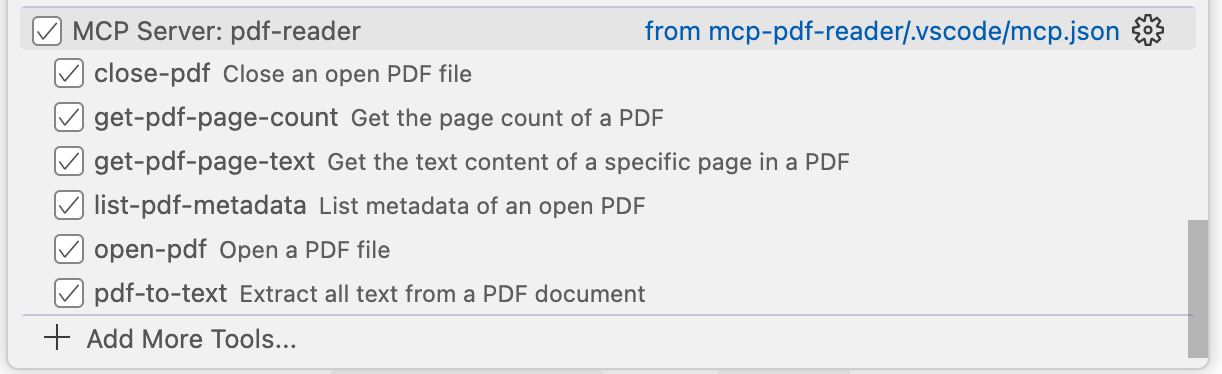
MCP Tools in VS Code Copilot
This image shows the PDF Reader tools available in VS Code through the MCP protocol:
Example Usage
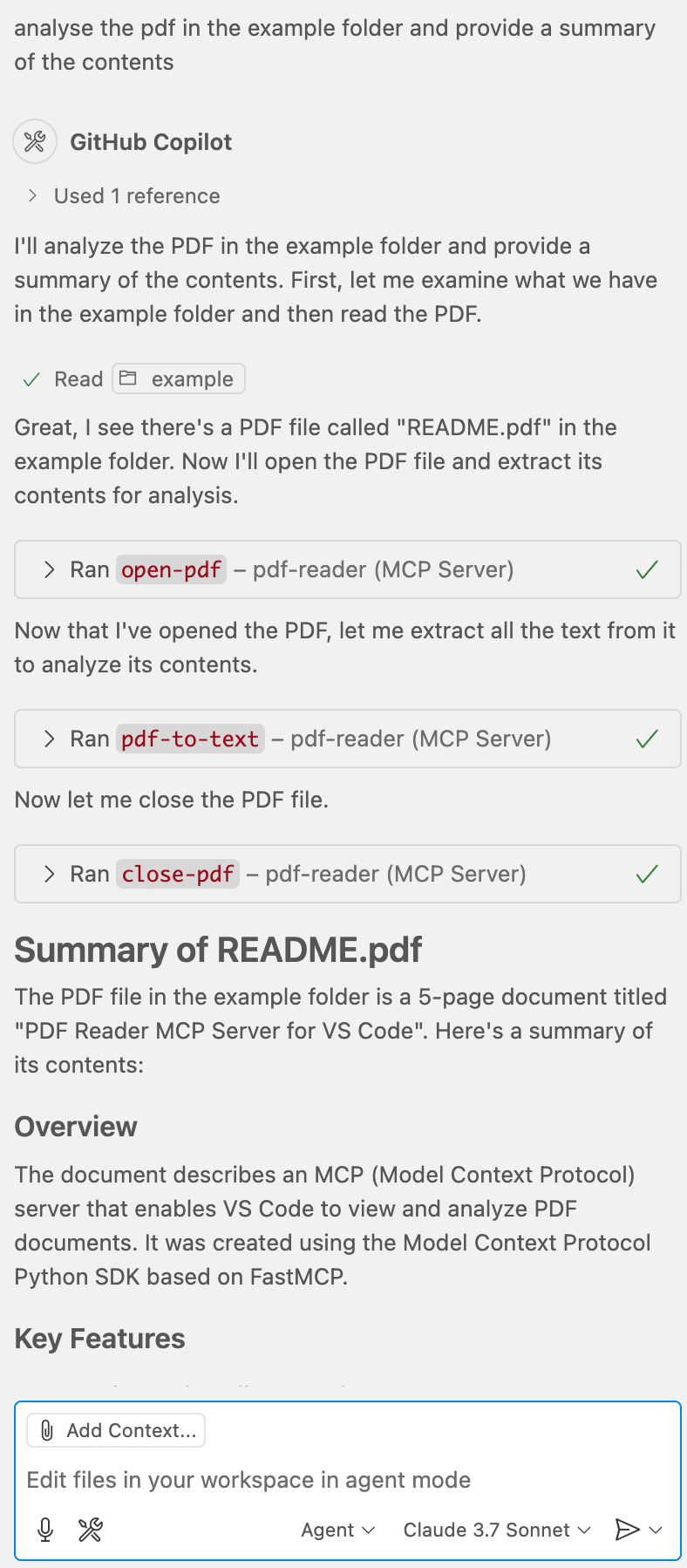
Here's an example of using the PDF Reader to analyze a document:
VS Code Configuration
The server is configured to run in VS Code through the .vscode/mcp.json file. VS Code must have the MCP extension installed to use this server.
To install the VS Code MCP extension:
Open VS Code
Go to Extensions (Ctrl+Shift+X or Cmd+Shift+X)
Search for "Model Context Protocol"
Install the extension from Microsoft
Once the extension is installed, VS Code will be able to communicate with this MCP server according to the configuration in your .vscode/mcp.json file. You can use the MCP server through VS Code's Copilot or any other MCP client built into VS Code.
Development
To make changes to this project:
Modify the code in the
src/pdf_reader_mcpdirectoryInstall in development mode:
uv pip install -e .Test your changes in VS Code
Requirements
Python 3.13+
PyPDF2 3.0.0+
MCP SDK 1.9.0+ (from github.com/modelcontextprotocol/python-sdk)
VS Code with MCP extension
Tools and Prompts
Tools
The server implements the following tools:
open-pdf: Open a PDF file
Takes
pathas a required string argumentReturns a unique PDF ID for referencing in other operations
close-pdf: Close an open PDF file
Takes
pdf_idas a required string argument
list-pdf-metadata: View metadata of an open PDF
Takes
pdf_idas a required string argument
get-pdf-page-count: Get the total number of pages in a PDF
Takes
pdf_idas a required string argument
get-pdf-page-text: Get the text content of a specific page in a PDF
Takes
pdf_idas a required string argumentTakes
page_numberas a required integer argument (0-based index)
pdf-to-text: Extract all text from a PDF document
Takes
pdf_idas a required string argumentOptional
include_page_numbersas a boolean (default: true)Optional
start_pageandend_pageas integers to extract a specific range
Prompts
The server provides the following prompts:
summarize-pdf: Generate a summary of a PDF document
Required
pdf_idargument that identifies the PDFOptional
styleargument to control detail level (brief/detailed)
extract-text-from-pdf: Extract text from specific pages or page ranges
Required
pdf_idargumentOptional page or page range arguments (
page,start_page,end_page)
analyze-pdf: Analyze a PDF and answer questions about its content
Required
pdf_idargumentRequired
questionargument specifying what to analyzeOptional
page_rangeargument to focus on specific pages
Quickstart
Install
VS Code
Configure VS Code to use the MCP server by editing .vscode/mcp.json in your project:
{
"servers": {
"pdf-reader": {
"type": "stdio",
"command": "uv",
"args": [
"--directory",
"${workspaceFolder}",
"run",
"python",
"-c",
"from pdf_reader_mcp import main; main()"
]
}
}
}{
"servers": {
"pdf-reader": {
"type": "stdio",
"command": "pdf-reader-mcp"
}
}
}Claude Desktop
On MacOS: ~/Library/Application\ Support/Claude/claude_desktop_config.json
On Windows: %APPDATA%/Claude/claude_desktop_config.json
{
"mcpServers": {
"pdf-reader-mcp": {
"command": "uv",
"args": [
"--directory",
"${workspaceFolder}",
"run",
"pdf-reader-mcp"
]
}
}
}{
"mcpServers": {
"pdf-reader-mcp": {
"command": "uvx",
"args": [
"pdf-reader-mcp"
]
}
}
}Development
Building and Publishing
To prepare the package for distribution:
Sync dependencies and update lockfile:
uv syncBuild package distributions:
uv buildThis will create source and wheel distributions in the dist/ directory.
Publish to PyPI:
uv publishNote: You'll need to set PyPI credentials via environment variables or command flags:
Token:
--tokenorUV_PUBLISH_TOKENOr username/password:
--username/UV_PUBLISH_USERNAMEand--password/UV_PUBLISH_PASSWORD
Debugging
Since MCP servers run over stdio, debugging can be challenging. For the best debugging experience, we strongly recommend using the MCP Inspector.
You can launch the MCP Inspector via npm with this command:
npx @modelcontextprotocol/inspector uv --directory "${workspaceFolder}" run pdf-reader-mcpUpon launching, the Inspector will display a URL that you can access in your browser to begin debugging.
Contributing
Fork the repo
Create a new branch (
feature-branch)Commit your changes
Push to your branch and submit a PR!
License
This project is licensed under the MIT License.
Contact
For questions or support, reach out via GitHub Issues.
Available Tools
6 toolsclose-pdfC
Close an open PDF file
| Name | Required | Description | Default |
|---|---|---|---|
| pdf_id | Yes | ID of the PDF to close |
TDQS
Does the description disclose side effects, auth requirements, rate limits, or destructive behavior?
With no annotations provided, the description carries full burden but only states the basic action. It doesn't disclose behavioral traits like whether closing frees resources, requires specific permissions, affects other operations, or has side effects (e.g., unsaved changes lost). The description is minimal and lacks context beyond the core function.
Agents need to know what a tool does to the world before calling it. Descriptions should go beyond structured annotations to explain consequences.
Is the description appropriately sized, front-loaded, and free of redundancy?
The description is a single, efficient sentence with zero waste. It's appropriately sized for a simple tool and front-loaded with the core action, making it easy to parse quickly.
Shorter descriptions cost fewer tokens and are easier for agents to parse. Every sentence should earn its place.
Given the tool's complexity, does the description cover enough for an agent to succeed on first attempt?
Given no annotations and no output schema, the description is incomplete for a mutation tool. It doesn't explain what happens after closing (e.g., success confirmation, error handling, or resource implications), leaving gaps in understanding the tool's full behavior and outcomes.
Complex tools with many parameters or behaviors need more documentation. Simple tools need less. This dimension scales expectations accordingly.
Does the description clarify parameter syntax, constraints, interactions, or defaults beyond what the schema provides?
Schema description coverage is 100%, with the single parameter 'pdf_id' documented as 'ID of the PDF to close'. The description adds no additional meaning beyond what the schema provides, such as format examples or source of the ID. Baseline 3 is appropriate when schema does the heavy lifting.
Input schemas describe structure but not intent. Descriptions should explain non-obvious parameter relationships and valid value ranges.
Does the description clearly state what the tool does and how it differs from similar tools?
The description clearly states the action ('close') and target resource ('an open PDF file'), providing specific verb+resource pairing. However, it doesn't differentiate from sibling tools like 'open-pdf' or 'pdf-to-text' beyond the obvious inverse relationship, missing explicit sibling distinction.
Agents choose between tools based on descriptions. A clear purpose with a specific verb and resource helps agents select the right tool.
Does the description explain when to use this tool, when not to, or what alternatives exist?
The description provides no guidance on when to use this tool versus alternatives. It doesn't mention prerequisites (e.g., PDF must be open), exclusions, or relationships with sibling tools like 'open-pdf' for reopening or 'pdf-to-text' for conversion before closing.
Agents often have multiple tools that could apply. Explicit usage guidance like "use X instead of Y when Z" prevents misuse.
get-pdf-page-countC
Get the page count of a PDF
| Name | Required | Description | Default |
|---|---|---|---|
| pdf_id | Yes | ID of the PDF to get page count for |
TDQS
Does the description disclose side effects, auth requirements, rate limits, or destructive behavior?
With no annotations provided, the description carries the full burden of behavioral disclosure. It states what the tool does but lacks details on error handling, performance (e.g., speed for large PDFs), or side effects (e.g., whether it opens/reads the PDF file). This is a significant gap for a tool with no structured safety hints.
Agents need to know what a tool does to the world before calling it. Descriptions should go beyond structured annotations to explain consequences.
Is the description appropriately sized, front-loaded, and free of redundancy?
The description is a single, direct sentence with zero wasted words. It's front-loaded with the core purpose, making it highly efficient and easy to parse for an AI agent.
Shorter descriptions cost fewer tokens and are easier for agents to parse. Every sentence should earn its place.
Given the tool's complexity, does the description cover enough for an agent to succeed on first attempt?
Given the lack of annotations and output schema, the description is incomplete. It doesn't explain what the tool returns (e.g., integer count, error formats) or behavioral traits like resource usage. For a tool with no structured context, more detail is needed to guide effective use.
Complex tools with many parameters or behaviors need more documentation. Simple tools need less. This dimension scales expectations accordingly.
Does the description clarify parameter syntax, constraints, interactions, or defaults beyond what the schema provides?
The input schema has 100% description coverage, with the 'pdf_id' parameter clearly documented. The description adds no additional parameter semantics beyond what the schema provides, such as format examples or constraints. Baseline 3 is appropriate since the schema does the heavy lifting.
Input schemas describe structure but not intent. Descriptions should explain non-obvious parameter relationships and valid value ranges.
Does the description clearly state what the tool does and how it differs from similar tools?
The description clearly states the tool's purpose with a specific verb ('Get') and resource ('page count of a PDF'), making it immediately understandable. However, it doesn't explicitly differentiate from sibling tools like 'get-pdf-page-text' or 'list-pdf-metadata', which also retrieve PDF information but serve different purposes.
Agents choose between tools based on descriptions. A clear purpose with a specific verb and resource helps agents select the right tool.
Does the description explain when to use this tool, when not to, or what alternatives exist?
The description provides no guidance on when to use this tool versus alternatives. It doesn't mention scenarios where page count is needed over other PDF operations, nor does it reference sibling tools for comparison, leaving the agent to infer usage from tool names alone.
Agents often have multiple tools that could apply. Explicit usage guidance like "use X instead of Y when Z" prevents misuse.
get-pdf-page-textC
Get the text content of a specific page in a PDF
| Name | Required | Description | Default |
|---|---|---|---|
| pdf_id | Yes | ID of the PDF to get page text from | |
| page_number | Yes | Page number (0-based index) |
TDQS
Does the description disclose side effects, auth requirements, rate limits, or destructive behavior?
No annotations are provided, so the description carries the full burden of behavioral disclosure. While it states what the tool does, it doesn't mention important behavioral aspects like whether this is a read-only operation, what format the text is returned in, potential errors (e.g., invalid page numbers), or performance characteristics. For a tool with zero annotation coverage, this leaves significant gaps.
Agents need to know what a tool does to the world before calling it. Descriptions should go beyond structured annotations to explain consequences.
Is the description appropriately sized, front-loaded, and free of redundancy?
The description is extremely concise and front-loaded with exactly one sentence that directly states the tool's purpose. There's no wasted language or unnecessary elaboration, making it easy to parse while conveying the essential information.
Shorter descriptions cost fewer tokens and are easier for agents to parse. Every sentence should earn its place.
Given the tool's complexity, does the description cover enough for an agent to succeed on first attempt?
Given that there are no annotations and no output schema, the description is insufficiently complete. It doesn't explain what the return value looks like (e.g., plain text, structured data), potential limitations, or how it interacts with sibling tools. For a tool with 2 parameters and no structured behavioral hints, more context is needed to help an agent use it effectively.
Complex tools with many parameters or behaviors need more documentation. Simple tools need less. This dimension scales expectations accordingly.
Does the description clarify parameter syntax, constraints, interactions, or defaults beyond what the schema provides?
The description doesn't add any parameter-specific information beyond what's already in the schema, which has 100% coverage with clear descriptions for both parameters. The baseline score of 3 is appropriate since the schema adequately documents the parameters, though the description could have added context like how to obtain the pdf_id or page numbering conventions.
Input schemas describe structure but not intent. Descriptions should explain non-obvious parameter relationships and valid value ranges.
Does the description clearly state what the tool does and how it differs from similar tools?
The description clearly states the tool's purpose with a specific verb ('Get') and resource ('text content of a specific page in a PDF'), making it easy to understand what the tool does. However, it doesn't explicitly distinguish itself from sibling tools like 'pdf-to-text' or 'get-pdf-page-count', which could cause confusion about when to use each one.
Agents choose between tools based on descriptions. A clear purpose with a specific verb and resource helps agents select the right tool.
Does the description explain when to use this tool, when not to, or what alternatives exist?
The description provides no guidance on when to use this tool versus alternatives. With siblings like 'pdf-to-text' (which might extract all pages) and 'get-pdf-page-count' (which returns metadata), there's no indication of when this single-page extraction tool is preferred or what prerequisites might be needed (e.g., whether the PDF must be opened first).
Agents often have multiple tools that could apply. Explicit usage guidance like "use X instead of Y when Z" prevents misuse.
list-pdf-metadataC
List metadata of an open PDF
| Name | Required | Description | Default |
|---|---|---|---|
| pdf_id | Yes | ID of the PDF to get metadata for |
TDQS
Does the description disclose side effects, auth requirements, rate limits, or destructive behavior?
With no annotations provided, the description carries the full burden of behavioral disclosure. It mentions 'open PDF', implying a prerequisite state, but doesn't detail what metadata is returned (e.g., author, creation date, page count), error handling, or performance aspects. This leaves significant gaps in understanding the tool's behavior.
Agents need to know what a tool does to the world before calling it. Descriptions should go beyond structured annotations to explain consequences.
Is the description appropriately sized, front-loaded, and free of redundancy?
The description is a single, efficient sentence that directly states the tool's purpose without unnecessary words. It is front-loaded and appropriately sized for a simple tool, making it easy to parse and understand quickly.
Shorter descriptions cost fewer tokens and are easier for agents to parse. Every sentence should earn its place.
Given the tool's complexity, does the description cover enough for an agent to succeed on first attempt?
For a tool with no annotations and no output schema, the description is incomplete. It doesn't explain what metadata is returned (e.g., structured data like JSON or plain text), potential errors, or how it interacts with sibling tools. This lack of context makes it inadequate for fully understanding the tool's use in complex scenarios.
Complex tools with many parameters or behaviors need more documentation. Simple tools need less. This dimension scales expectations accordingly.
Does the description clarify parameter syntax, constraints, interactions, or defaults beyond what the schema provides?
The input schema has 100% description coverage, clearly documenting the 'pdf_id' parameter. The description adds no additional meaning beyond this, such as format examples or constraints. Given the high schema coverage, a baseline score of 3 is appropriate, as the schema adequately handles parameter semantics.
Input schemas describe structure but not intent. Descriptions should explain non-obvious parameter relationships and valid value ranges.
Does the description clearly state what the tool does and how it differs from similar tools?
The description clearly states the verb ('List') and resource ('metadata of an open PDF'), making the purpose specific and understandable. However, it doesn't explicitly differentiate from sibling tools like 'get-pdf-page-count' or 'open-pdf', which might also involve PDF metadata or operations, leaving some ambiguity about its unique role.
Agents choose between tools based on descriptions. A clear purpose with a specific verb and resource helps agents select the right tool.
Does the description explain when to use this tool, when not to, or what alternatives exist?
The description provides no guidance on when to use this tool versus alternatives, such as when to prefer 'list-pdf-metadata' over 'open-pdf' or other siblings. It lacks context on prerequisites (e.g., the PDF must be open) or exclusions, offering minimal usage direction.
Agents often have multiple tools that could apply. Explicit usage guidance like "use X instead of Y when Z" prevents misuse.
open-pdfC
Open a PDF file
| Name | Required | Description | Default |
|---|---|---|---|
| path | Yes | Path to the PDF file |
TDQS
Does the description disclose side effects, auth requirements, rate limits, or destructive behavior?
With no annotations provided, the description carries the full burden of behavioral disclosure. 'Open a PDF file' implies a read operation but lacks details on what 'open' entails—whether it loads the file into memory, displays it, returns a handle, or has side effects like locking the file. It doesn't address permissions, error handling, or performance considerations. While it hints at a non-destructive action, the description is too vague to provide meaningful behavioral context beyond the basic verb.
Agents need to know what a tool does to the world before calling it. Descriptions should go beyond structured annotations to explain consequences.
Is the description appropriately sized, front-loaded, and free of redundancy?
The description 'Open a PDF file' is extremely concise—a single, front-loaded sentence with zero wasted words. It directly communicates the core action without unnecessary elaboration, making it easy for an agent to parse quickly. This efficiency is ideal for a simple tool, though it may trade off detail for brevity.
Shorter descriptions cost fewer tokens and are easier for agents to parse. Every sentence should earn its place.
Given the tool's complexity, does the description cover enough for an agent to succeed on first attempt?
Given the tool's simplicity (1 parameter, no output schema, no annotations), the description is incomplete. It doesn't explain what happens after opening (e.g., returns a file handle, triggers a viewer) or address potential complexities like file format validation or error cases. While conciseness is high, the lack of behavioral and usage context makes it inadequate for an agent to fully understand the tool's role, especially with siblings available for related operations.
Complex tools with many parameters or behaviors need more documentation. Simple tools need less. This dimension scales expectations accordingly.
Does the description clarify parameter syntax, constraints, interactions, or defaults beyond what the schema provides?
The input schema has 100% description coverage, with the 'path' parameter fully documented in the schema. The description adds no additional semantic information about the parameter, such as path format examples (e.g., relative vs. absolute) or constraints. Since the schema does the heavy lifting, the baseline score of 3 is appropriate, as the description doesn't compensate but also doesn't detract from the schema's clarity.
Input schemas describe structure but not intent. Descriptions should explain non-obvious parameter relationships and valid value ranges.
Does the description clearly state what the tool does and how it differs from similar tools?
The description 'Open a PDF file' clearly states the action (open) and resource (PDF file), making the purpose immediately understandable. It doesn't explicitly differentiate from siblings like 'close-pdf' or 'get-pdf-page-text', but the verb 'open' implies initialization or access rather than closing or extraction, providing some implicit distinction. However, it lacks the specificity needed for a perfect score, such as clarifying what 'open' means in this context (e.g., loading for viewing vs. processing).
Agents choose between tools based on descriptions. A clear purpose with a specific verb and resource helps agents select the right tool.
Does the description explain when to use this tool, when not to, or what alternatives exist?
The description provides no guidance on when to use this tool versus alternatives. It doesn't mention prerequisites (e.g., file must exist), exclusions (e.g., not for editing), or comparisons to siblings like 'pdf-to-text' for text extraction or 'get-pdf-page-count' for metadata. This leaves the agent to infer usage from the tool name alone, which is insufficient for effective tool selection in a multi-tool environment.
Agents often have multiple tools that could apply. Explicit usage guidance like "use X instead of Y when Z" prevents misuse.
pdf-to-textC
Extract all text from a PDF document
| Name | Required | Description | Default |
|---|---|---|---|
| pdf_id | Yes | ID of the PDF to extract text from | |
| include_page_numbers | No | Whether to include page number markers in the output | |
| start_page | No | Start page number (0-based, inclusive) | |
| end_page | No | End page number (0-based, inclusive) |
TDQS
Does the description disclose side effects, auth requirements, rate limits, or destructive behavior?
With no annotations provided, the description carries full burden for behavioral disclosure. While 'extract all text' implies a read operation, it doesn't specify whether this requires authentication, what happens with large PDFs, if there are rate limits, or what the output format looks like. The description is too minimal for a tool that processes documents.
Agents need to know what a tool does to the world before calling it. Descriptions should go beyond structured annotations to explain consequences.
Is the description appropriately sized, front-loaded, and free of redundancy?
The description is a single, efficient sentence that states exactly what the tool does without any wasted words. It's appropriately sized for a straightforward extraction tool and gets directly to the point.
Shorter descriptions cost fewer tokens and are easier for agents to parse. Every sentence should earn its place.
Given the tool's complexity, does the description cover enough for an agent to succeed on first attempt?
For a PDF processing tool with 4 parameters and no annotations or output schema, the description is insufficient. It doesn't explain what 'extract all text' means operationally, what format the text is returned in, whether formatting is preserved, or how it handles complex PDF elements like images or tables.
Complex tools with many parameters or behaviors need more documentation. Simple tools need less. This dimension scales expectations accordingly.
Does the description clarify parameter syntax, constraints, interactions, or defaults beyond what the schema provides?
Schema description coverage is 100%, so the schema already documents all parameters thoroughly. The description adds no additional parameter information beyond what's in the schema, but since the schema is complete, this meets the baseline expectation.
Input schemas describe structure but not intent. Descriptions should explain non-obvious parameter relationships and valid value ranges.
Does the description clearly state what the tool does and how it differs from similar tools?
The description clearly states the verb ('extract') and resource ('text from a PDF document'), making the purpose immediately understandable. However, it doesn't differentiate from sibling tools like 'get-pdf-page-text' which also extracts text, leaving room for confusion about when to use each.
Agents choose between tools based on descriptions. A clear purpose with a specific verb and resource helps agents select the right tool.
Does the description explain when to use this tool, when not to, or what alternatives exist?
The description provides no guidance on when to use this tool versus alternatives like 'get-pdf-page-text' (which extracts text from specific pages) or 'list-pdf-metadata' (which might provide document information). There's no mention of prerequisites, limitations, or typical use cases.
Agents often have multiple tools that could apply. Explicit usage guidance like "use X instead of Y when Z" prevents misuse.
Tool Schema Changelog
Recent tool additions, removals, and schema changes observed during successful MCP inspections.
6 tool updates
- First observed
close-pdf - First observed
get-pdf-page-count - First observed
get-pdf-page-text - First observed
list-pdf-metadata - First observed
open-pdf - First observed
pdf-to-text
TDQS
Scored across 6 tools
Each tool has a clearly distinct purpose targeting different PDF operations: opening/closing files, retrieving metadata, page-specific text, full text extraction, and page counting. There is no overlap in functionality that would cause agent confusion.
The naming follows a consistent pattern with hyphen-separated descriptive names (e.g., open-pdf, get-pdf-page-text), but there is a minor deviation with 'pdf-to-text' which uses 'to' instead of a verb like 'extract'. Overall, the pattern is highly readable and predictable.
With 6 tools, this server is well-scoped for PDF reading operations. Each tool serves a specific, essential function (open, close, metadata, page count, page text, full text), and there are no extraneous or missing tools for the domain.
The toolset provides complete coverage for PDF reading: open/close lifecycle, metadata access, page-level and full-text extraction, and page counting. There are no obvious gaps; agents can perform all core PDF reading tasks without dead ends.
Maintenance
Related MCP Connectors
MCP server for the PDFGate API. Generate PDFs, manage documents and handle e-signatures.
MCP server for Api2Pdf — generate PDFs & images from HTML, URLs or office files; merge, barcodes.
MCP Server for Slima - AI Writing IDE for Novel Authors with AI Beta Reader.
Related MCP Servers
- AlicenseAqualityCmaintenanceAn MCP server for reading, rendering, and searching PDF files, specifically optimized for LLMs to extract text, tables, and technical diagrams. It enables metadata retrieval, multi-format text extraction, and page-to-image rendering using PyMuPDF.577MIT

Re:portFlowofficial
AlicenseAqualityAmaintenanceReportFlow MCP Server - PDF report generation for Claude and AI agents1038 npm1MIT- AlicenseAqualityCmaintenanceProvides PDF reading, text search, navigation, and form filling capabilities through MCP, with cross-platform PDF viewer integration for seamless document interaction.79MIT
- MIT