
OpenAI MCP Server
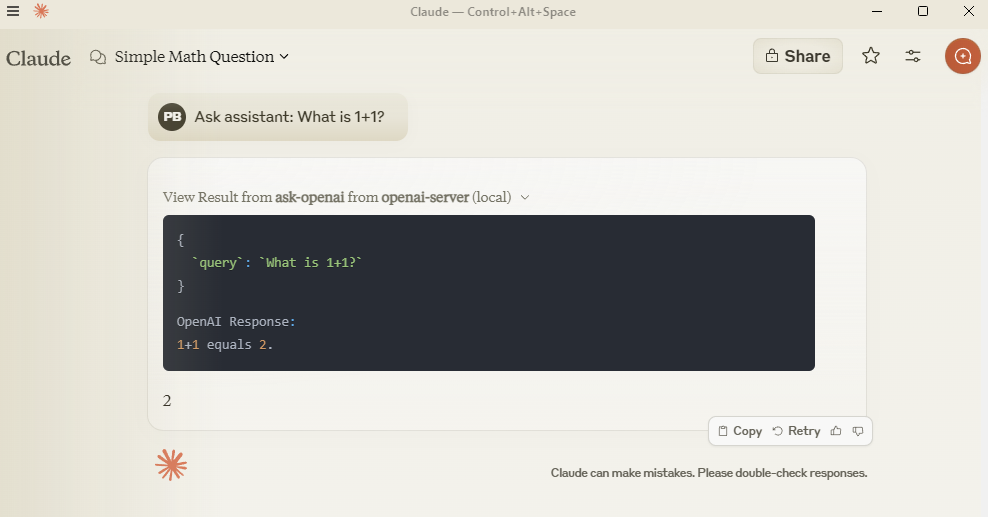
With the OpenAI MCP Server, you can query OpenAI models directly from Claude using the MCP protocol.
Ask OpenAI models questions: Use the
ask-openaiendpoint to interact with GPT-4 or GPT-3.5-turbo modelsCustomize query parameters: Control response length with
max_tokens(1-4000) and creativity/randomness withtemperature(0-2)Integration with Claude: Configure the server in Claude Desktop for seamless use of OpenAI models
Local development: Clone, install, and test the server locally for debugging or customization
Allows querying OpenAI models directly from Claude using MCP protocol
Click on "Install Server".
Wait a few minutes for the server to deploy. Once ready, it will show a "Started" state.
In the chat, type
@followed by the MCP server name and your instructions, e.g., "@OpenAI MCP Serversummarize this article in 3 bullet points"
That's it! The server will respond to your query, and you can continue using it as needed.
Here is a step-by-step guide with screenshots.
OpenAI MCP Server
Query OpenAI models directly from Claude using MCP protocol.
Setup
Add to claude_desktop_config.json:
{
  "mcpServers": {
    "openai-server": {
      "command": "python",
      "args": ["-m", "src.mcp_server_openai.server"],
      "env": {
        "PYTHONPATH": "C:/path/to/your/mcp-server-openai",
        "OPENAI_API_KEY": "your-key-here"
      }
    }
  }
}
Related MCP server: OpenAI MCP Server
Development
git clone https://github.com/pierrebrunelle/mcp-server-openai
cd mcp-server-openai
pip install -e .
Testing
# Run tests from project root
pytest -v test_openai.py -s

# Sample test output:
Testing OpenAI API call...
OpenAI Response: Hello! I'm doing well, thank you for asking...
PASSED
License
MIT License

Resources
Unclaimed servers have limited discoverability.
Looking for Admin?
If you are the server author, to access and configure the admin panel.
Tools
Latest Blog Posts
MCP directory API
We provide all the information about MCP servers via our MCP API.
curl -X GET 'https://glama.ai/api/mcp/v1/servers/pierrebrunelle/mcp-server-openai'
If you have feedback or need assistance with the MCP directory API, please join our Discord server