

A
licenseB
qualityC
maintenanceA Model Context Protocol (MCP) server that lets you seamlessly use OpenAI's models right from Claude.
1
180 npm
77
MIT

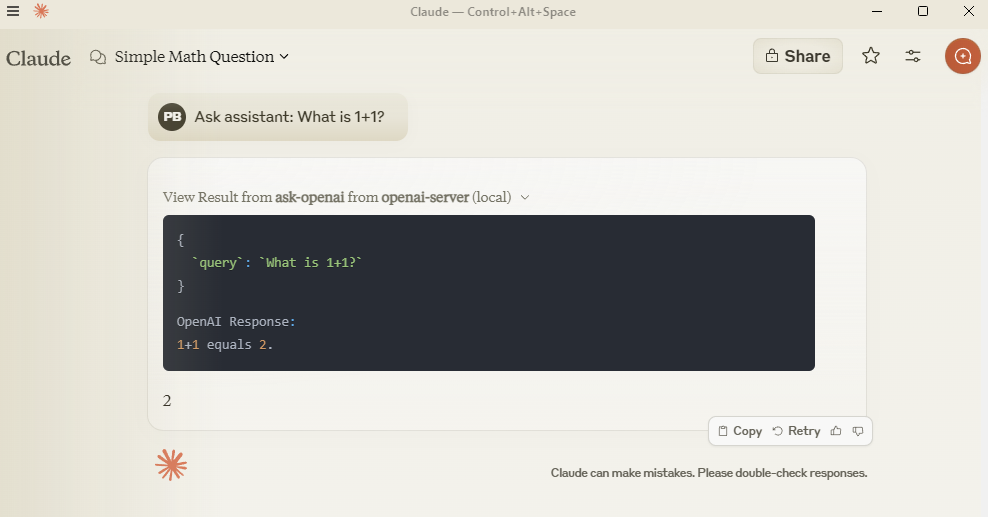
With the OpenAI MCP Server, you can query OpenAI models directly from Claude using the MCP protocol.
Ask OpenAI models questions: Use the ask-openai endpoint to interact with GPT-4 or GPT-3.5-turbo models
Customize query parameters: Control response length with max_tokens (1-4000) and creativity/randomness with temperature (0-2)
Integration with Claude: Configure the server in Claude Desktop for seamless use of OpenAI models
Local development: Clone, install, and test the server locally for debugging or customization
Allows querying OpenAI models directly from Claude using MCP protocol
Click on "Deploy Server".
Wait a few minutes for the server to deploy. Once ready, it will show a "Started" state.
In the chat, type @ followed by the MCP server name and your instructions, e.g., "@OpenAI MCP Server summarize this article in 3 bullet points"
That's it! The server will respond to your query, and you can continue using it as needed.
Here is a step-by-step guide with screenshots.
Query OpenAI models directly from Claude using MCP protocol.
Add to claude_desktop_config.json:
{
  "mcpServers": {
    "openai-server": {
      "command": "python",
      "args": ["-m", "src.mcp_server_openai.server"],
      "env": {
        "PYTHONPATH": "C:/path/to/your/mcp-server-openai",
        "OPENAI_API_KEY": "your-key-here"
      }
    }
  }
}
Related MCP server: OpenAI MCP Server
git clone https://github.com/pierrebrunelle/mcp-server-openai
cd mcp-server-openai
pip install -e .# Run tests from project root
pytest -v test_openai.py -s
# Sample test output:
Testing OpenAI API call...
OpenAI Response: Hello! I'm doing well, thank you for asking...
PASSEDMIT License
Ask my assistant models a direct question
| Name | Required | Description | Default |
|---|---|---|---|
| query | Yes | Ask assistant | |
| model | No | gpt-4 | |
| temperature | No | ||
| max_tokens | No |
Does the description disclose side effects, auth requirements, rate limits, or destructive behavior?
No annotations are provided, so the description carries the full burden of behavioral disclosure. It mentions 'ask' and 'direct question,' implying a read-only query, but fails to detail authentication needs, rate limits, response format, or potential costs. This is a significant gap for an AI interaction tool with no annotation coverage.
Agents need to know what a tool does to the world before calling it. Descriptions should go beyond structured annotations to explain consequences.
Is the description appropriately sized, front-loaded, and free of redundancy?
The description is a single, efficient sentence with no wasted words, making it appropriately concise. However, it lacks front-loading of critical information, as it doesn't immediately clarify the tool's core function beyond a vague phrase.
Shorter descriptions cost fewer tokens and are easier for agents to parse. Every sentence should earn its place.
Given the tool's complexity, does the description cover enough for an agent to succeed on first attempt?
Given the complexity of interacting with AI models, no annotations, no output schema, and low schema coverage, the description is incomplete. It doesn't address behavioral traits, parameter meanings, or expected outputs, leaving the agent under-informed for effective tool use.
Complex tools with many parameters or behaviors need more documentation. Simple tools need less. This dimension scales expectations accordingly.
Does the description clarify parameter syntax, constraints, interactions, or defaults beyond what the schema provides?
Schema description coverage is low at 25%, with only the 'query' parameter having a minimal description ('Ask assistant'). The tool description adds no parameter semantics beyond what the schema provides, failing to compensate for the coverage gap. It doesn't explain the purpose of model selection, temperature, or max_tokens.
Input schemas describe structure but not intent. Descriptions should explain non-obvious parameter relationships and valid value ranges.
Does the description clearly state what the tool does and how it differs from similar tools?
The description 'Ask my assistant models a direct question' states a purpose (asking questions to AI models) but is vague about what 'assistant models' refers to and lacks specificity about the resource or scope. It doesn't distinguish from siblings (none exist), but the phrasing is somewhat unclear rather than tautological.
Agents choose between tools based on descriptions. A clear purpose with a specific verb and resource helps agents select the right tool.
Does the description explain when to use this tool, when not to, or what alternatives exist?
The description provides no guidance on when to use this tool versus alternatives, prerequisites, or exclusions. It merely states what the tool does without context for application, leaving the agent to infer usage scenarios.
Agents often have multiple tools that could apply. Explicit usage guidance like "use X instead of Y when Z" prevents misuse.
Recent tool additions, removals, and schema changes observed during successful MCP inspections.
ask-openaiScored across 1 tool
With only one tool, there is no possibility of ambiguity or overlap between tools. The tool 'ask-openai' has a clear and singular purpose, making it impossible for an agent to misselect between tools.
Since there is only one tool, naming consistency is inherently perfect. The tool name 'ask-openai' follows a verb_noun pattern, and with no other tools to compare against, there are no inconsistencies.
A single tool is generally too few for a server's purpose, as it limits functionality and scope. For an 'OpenAI MCP Server', one might expect more comprehensive coverage such as different model interactions, fine-tuning, or other API endpoints, making this feel thin and under-scoped.
The tool set is severely incomplete for an 'OpenAI MCP Server'. With only a direct question tool, it lacks essential operations like model listing, chat completions, embeddings, or file handling, which are core to OpenAI's API. This will likely cause agent failures due to missing functionality.
Talk to your public-facing AI from any MCP client — Claude, ChatGPT, Cursor, Cline, Windsurf.
Use AI models for chat, image, and video generation from Claude Code and other MCP hosts.
Authenticated MCP Agent (Openai)
One MCP endpoint for Claude, GPT & Gemini: 100+ tools + no-code connectors + agent workers.