
A
licenseB
qualityD
maintenanceA Model Context Protocol server that allows secure execution of pre-approved commands, enabling AI assistants to safely interact with the user's system.
1
4 npm
22
ISC

Uses Docker to create isolated containers for safely executing code snippets submitted by AI assistants.
Integrates with Google's Gemini SDK and CLI to provide code execution capabilities for AI interactions.
Enables execution of JavaScript code in a Node.js environment within a secure, isolated container.
Provides alternative containerization using Podman for executing code in secure environments.
Executes Python code snippets in a secure, isolated sandbox environment, capturing output and error streams.
Click on "Deploy Server".
Wait a few minutes for the server to deploy. Once ready, it will show a "Started" state.
In the chat, type @ followed by the MCP server name and your instructions, e.g., "@Code Sandbox MCP Server run a Python script that calculates the first 10 Fibonacci numbers"
That's it! The server will respond to your query, and you can continue using it as needed.
Here is a step-by-step guide with screenshots.
The Code Sandbox MCP Server is a lightweight, STDIO-based Model Context Protocol (MCP) Server, allowing AI assistants and LLM applications to safely execute code snippets using containerized environments. It is uses the llm-sandbox package to execute the code snippets.
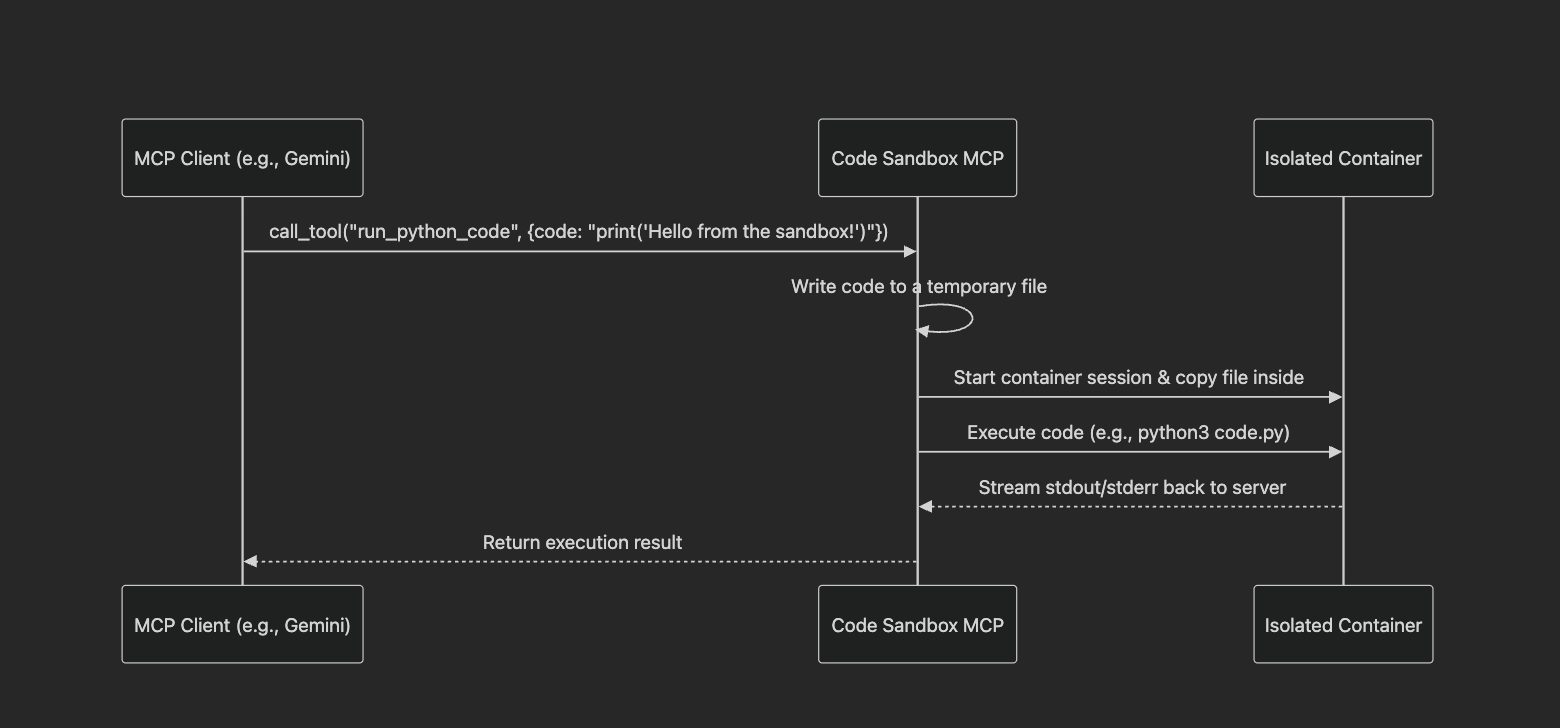
How It Works:
Starts a container session (podman, docker, etc.) and ensures the session is open.
Writes the code to a temporary file on the host.
Copies this temporary file into the container at the configured workdir.
Executes the language-specific commands to run the code, e.g. python python3 -u code.py or javascript node -u code.js
Captures the output and error streams from the container.
Returns the output and error streams to the client.
Stops and removes the container.
Available Tools:
run_python_code - Executes a snippet of Python code in a secure, isolated sandbox.
code (string, required): The Python code to execute.
run_js_code - Executes a snippet of JavaScript (Node.js) code in a secure, isolated sandbox.
code (string, required): The JavaScript code to execute.
pip install git+https://github.com/philschmid/code-sandbox-mcp.gitRelated MCP server: Container-MCP
Examples:
Local Client Python example for running python code
Gemini SDK example for running python code with the Gemini SDK
Calling Gemini from a client example for running python code that uses the Gemini SDK and passes through the Gemini API key
Local Client Javascript example for running javascript code
To use the Code Sandbox MCP server, you need to add it to your MCP client's configuration file (e.g., in your AI assistant's settings). The server is designed to be launched on-demand by the client.
Add the following to your mcpServers configuration:
{
  "mcpServers": {
    "code-sandbox": {
      "command": "code-sandbox-mcp",
    }
  }
}You can pass through environment variables to the sandbox by setting the --pass-through-env flag when starting the MCP server and providing the env when starting the server
{
  "mcpServers": {
    "code-sandbox": {
      "command": "code-sandbox-mcp",
      "args": ["--pass-through-env", "API_KEY,SECRET_TOKEN"]
      "env": {
        "API_KEY": "1234567890",
        "SECRET_TOKEN": "1234567890"
      }
    }
  }
}You can provide a custom container image by setting the CONTAINER_IMAGE and CONTAINER_LANGUAGE environment variables when starting the MCP server. Both variables are required as the CONTAINER_LANGUAGE is used to determine the commands to run in the container and the CONTAINER_IMAGE is used to determine the image to use.
Note: When providing a custom container image both tools will use the same container image.
{
  "mcpServers": {
    "code-sandbox": {
      "command": "code-sandbox-mcp",
      "env": {
        "CONTAINER_IMAGE": "your-own-image",
        "CONTAINER_LANGUAGE": "python" # or "javascript"
      }
    }
  }
}The code-sandbox-mcp server can be used with the Gemini SDK by passing the tools parameter to the generate_content method.
from fastmcp import Client
from google import genai
import asyncio


mcp_client = Client(
    {
        "local_server": {
            "transport": "stdio",
            "command": "code-sandbox-mcp",
        }
    }
)
gemini_client = genai.Client()


async def main():
    async with mcp_client:
        response = await gemini_client.aio.models.generate_content(
            model="gemini-2.5-flash",
            contents="Use Python to ping the google.com website and return the response time.",
            config=genai.types.GenerateContentConfig(
                temperature=0,
                tools=[mcp_client.session],  # Pass the FastMCP client session
            ),
        )
        print(response.text)

if __name__ == "__main__":
asyncio.run(main())The code-sandbox-mcp server can be used with the Gemini CLI. You can configure MCP servers at the global level in the ~/.gemini/settings.json file or in your project's root directory, create or open the .gemini/settings.json file. Within the file, add the mcpServers configuration block.
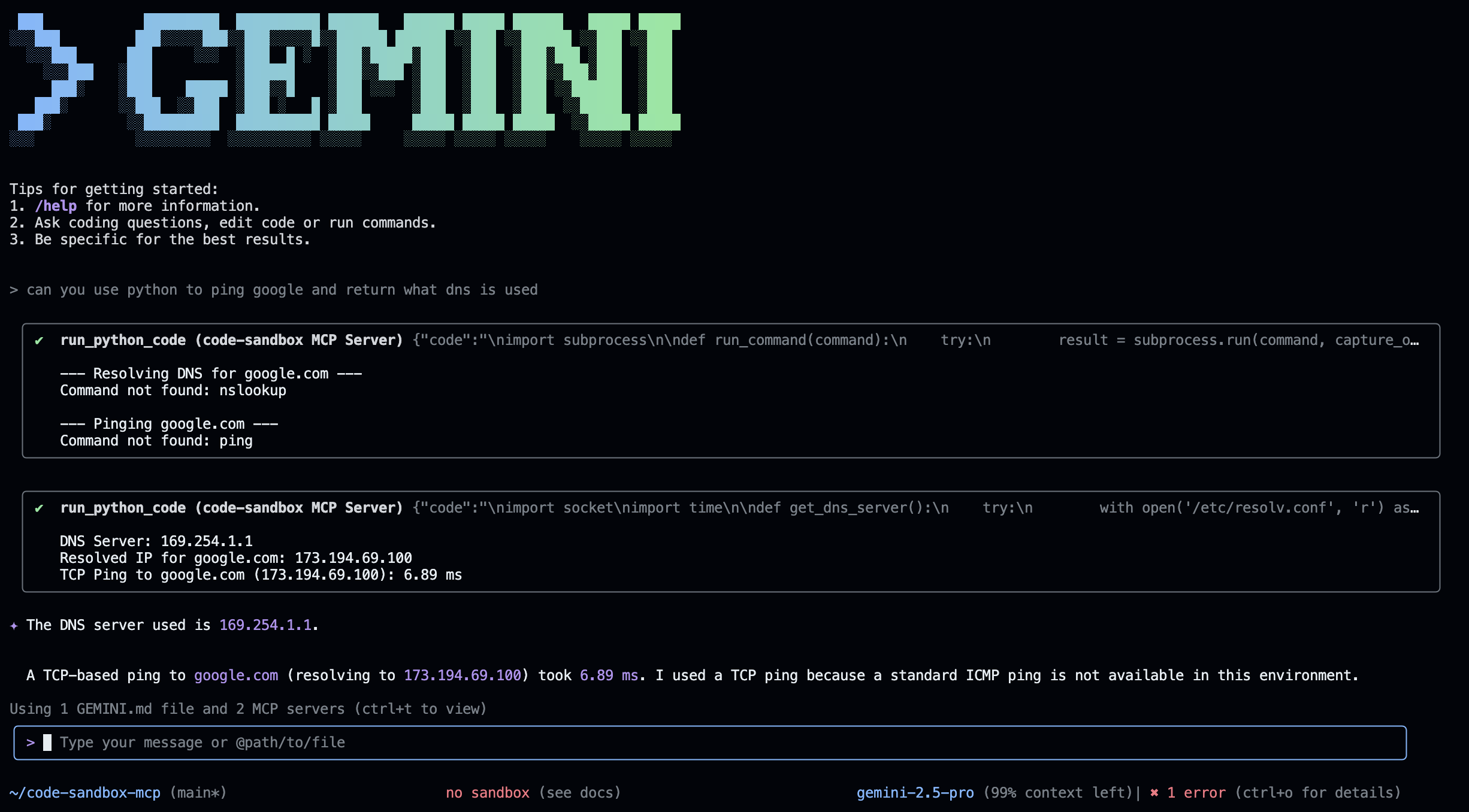
See settings.json for an example and read more about the Gemini CLI
{
  "mcpServers": {
    "code-sandbox": {
      "command": "code-sandbox-mcp",
    }
  }
}The repository comes with 2 container images, which are published on Docker Hub:
philschmi/code-sandbox-python:latest
philschmi/code-sandbox-js:latest
docker build -t philschmi/code-sandbox-python:latest -f containers/Dockerfile.python .
docker build -t philschmi/code-sandbox-js:latest -f containers/Dockerfile.nodejs .
The script will build the image using the current user's account. To update the images you want to use you can either pass the --python-image or --js-image flags when starting the MCP server or update the const.py file.
To push the images to Docker Hub you need to retag the images to your own account and push them.
docker tag philschmi/code-sandbox-python:latest <your-account>/code-sandbox-python:latest
docker push <your-account>/code-sandbox-python:latest
To customize or install additional dependencies you can add them to the Dockerfile and build the image again.
Start the server with streamable-http and test your server using the MCP inspector. Alternatively start inspector and run the server with stdio.
npx @modelcontextprotocol/inspectorTo run the test suite for code-sandbox-mcp and its components, clone the repository and run:
# You may need to install development dependencies first
pip install -e ".[dev]"

# Run the tests
pytest tests/Code Sandbox MCP Server is open source software licensed under the MIT License.
Execute JavaScript code in the sandbox environment and captures the standard output and error.
Inputs: code (required). Returns: Text content for a message.
Execute Python code in the sandbox environment and captures the standard output and error.
Inputs: code (required). Returns: Text content for a message.
Recent tool additions, removals, and schema changes observed during successful MCP inspections.
Loading tool schema changelog…
Scored across 2 tools
The two tools are perfectly distinct, each targeting a different programming language (JavaScript vs Python) with identical functionality otherwise. There is no overlap or ambiguity in purpose, making tool selection straightforward for an agent.
Both tools follow a consistent verb_noun pattern ('run_javascript_code' and 'run_python_code'), using the same verb 'run' and structured noun phrases. This predictability enhances readability and usability.
With only two tools, the server feels under-scoped for a 'Code Sandbox' purpose, as it lacks support for other common languages (e.g., Java, C++, Ruby) or additional sandbox operations (e.g., managing files, setting timeouts). This minimal set limits functionality and may require agents to work around gaps.
The tool surface is severely incomplete for a code sandbox domain, covering only JavaScript and Python execution. Missing are tools for other languages, code analysis, input/output handling, or environment configuration, which are typical for such systems, leading to potential agent failures in broader tasks.
A comprehensive Model Context Protocol (MCP) server that enables AI assistants to interact with yo…
A Model Context Protocol server for Wix AI tools
Enable secure connectivity between Sentry issues and debugging data, and LLM clients, using a Model Context Protocol (MCP) server.
Model Context Protocol server for the Apideck Unified API. Connect any MCP-compatible agent framework to 100+ accounting systems, HRIS platforms, file storage providers, and more through one integration. More information https://www.apideck.com/mcp-server