
Context Loom
# Context Loom
Context Loom turns a chat request and a local project into a smaller, cited prompt you can review
before sending. It preserves your exact message, stays local by default, and separates projected
token savings from usage actually reported by a model provider.
## How it works
1. **Connect a project.** Context Loom indexes eligible text files inside one folder you choose.
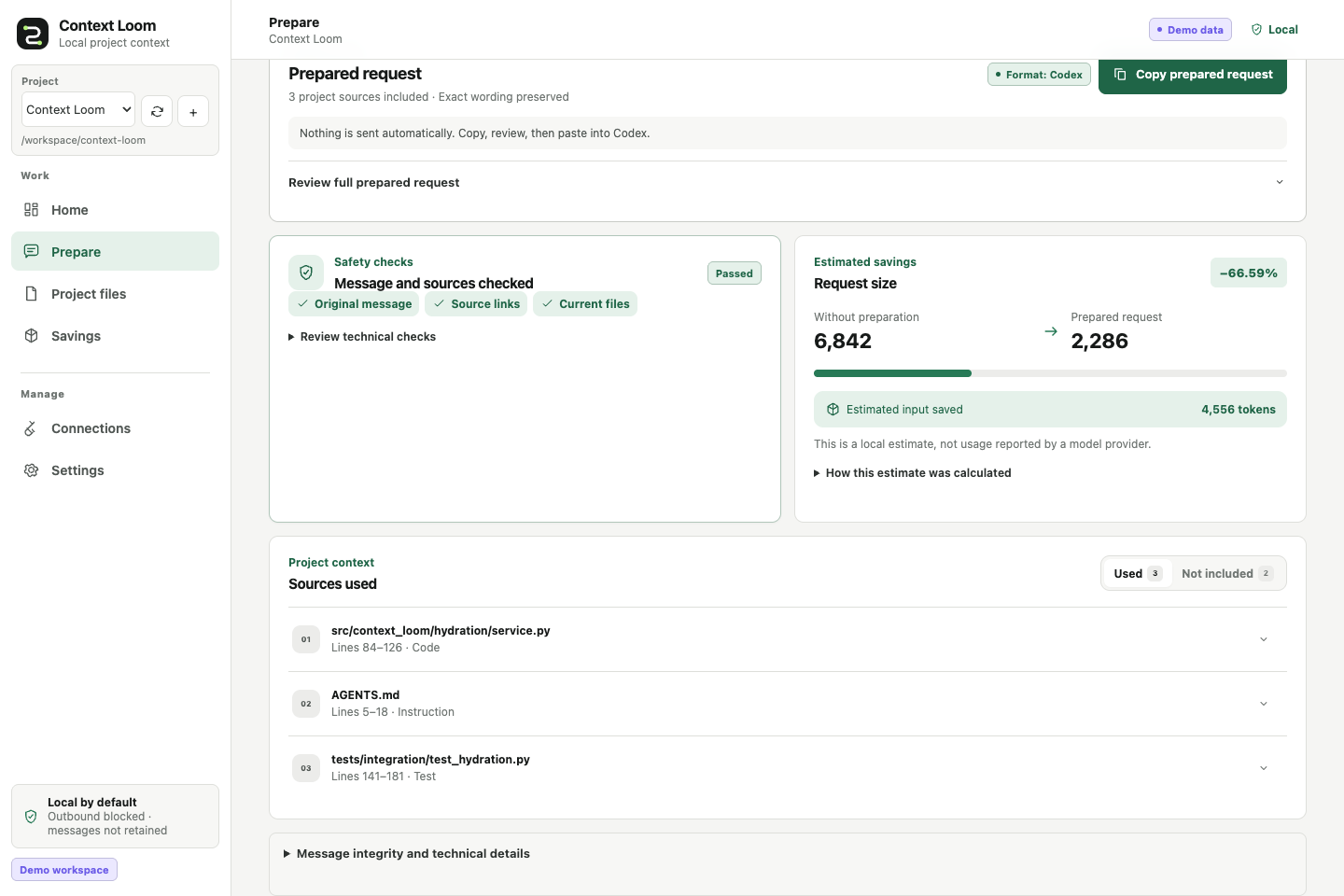
2. **Prepare a message.** Write the request exactly as you want the destination model to receive it.
3. **Review and copy.** Inspect the selected sources, fidelity checks, and complete rendered payload.
4. **Track the conversation.** Reuse a conversation name to see projected and observed token history.
Context Loom never sends the copied payload to a model unless you deliberately use an integration
that performs an outbound request.
## Install from source
The primary install is Node-free and uses the workbench already bundled in the Python package.
Python 3.11-3.13 and [`uv`](https://docs.astral.sh/uv/) are required.
Clone the public source repository and install its bundled workbench:
```bash
git clone https://github.com/ownasquare/context-loom.git
cd context-loom
uv tool install .
context-loom demo
context-loom serve
```
Open `http://127.0.0.1:8768`. Context Loom is not currently distributed through PyPI; the source
install above is the canonical install path.
If you already have a checkout, start at `uv tool install .`. Run `uv tool update-shell` and open a
new terminal if `context-loom` is not found after installation.
## Try the demo
`context-loom demo` creates a private generated project, indexes it, and prepares one sample message.
Start `context-loom serve`, then use **Home**, **Prepare**, **Project files**, and **Savings** to inspect
the complete flow. The demo does not call a provider or require credentials.
## Use your own project
Start the workbench and choose **Add project**, then enter a local folder that the Context Loom
process can read. It scans immediately, and the project switcher can add, select, and rescan multiple
projects.
For a scripted setup:
```bash
context-loom workspace add /absolute/path/to/project --name "My project" --id my-project
context-loom workspace sync my-project
context-loom serve
```
The demo uses `demo-workspace`; the example above uses `my-project`, so the two flows do not collide.
See [Getting started](https://github.com/ownasquare/context-loom/blob/main/docs/getting-started.md)
for the first-success walkthrough and Docker setup.
## Connect a chat tool
Copy and paste is the recommended first integration. Context Loom also offers an MCP server and a
loopback-only HTTP API; provider-shaped output formats are available for advanced use.
```bash
context-loom adapter preview codex
```
`adapter preview` prints a standalone snippet for review. It does not edit harness configuration;
after you add the snippet, the harness starts `context-loom mcp serve --transport stdio` when needed.
See [Harness integrations](https://github.com/ownasquare/context-loom/blob/main/docs/harness-integrations.md)
and [Extending Context Loom](https://github.com/ownasquare/context-loom/blob/main/docs/extending.md).
## Docker
Docker keeps state in a named volume and mounts one chosen project read-only at `/workspace`:
```bash
export CONTEXT_LOOM_PROJECT=/absolute/path/to/project
docker compose up --build --detach
docker compose exec context-loom context-loom workspace add /workspace --name "My project" --id my-project
docker compose exec context-loom context-loom workspace sync my-project
```
Then open `http://127.0.0.1:8768`. Without `CONTEXT_LOOM_PROJECT`, Compose mounts the bundled sample
project. Host paths are not visible inside the container unless they are mounted.
## What Context Loom guarantees
- The exact user message is retained in the canonical envelope and checked at renderer boundaries.
- Selected text remains tied to a current source version, hash, path, and line range.
- Unsafe summarization falls back to extractive or passthrough behavior.
- Telemetry, outbound access, secret-file indexing, and raw-message persistence are off by default.
- Projected, provider-observed, and verified counterfactual token figures remain distinct.
No system can guarantee the same model answer while withholding arbitrary source bytes. Read the
[fidelity contract](https://github.com/ownasquare/context-loom/blob/main/docs/fidelity-contract.md),
[token-accounting contract](https://github.com/ownasquare/context-loom/blob/main/docs/token-accounting.md),
and [limitations](https://github.com/ownasquare/context-loom/blob/main/docs/limitations.md) before
making quality or savings claims.
## Learn and contribute
- [Documentation index](https://github.com/ownasquare/context-loom/tree/main/docs)
- [Troubleshooting](https://github.com/ownasquare/context-loom/blob/main/docs/troubleshooting.md)
- [Security policy](https://github.com/ownasquare/context-loom/blob/main/SECURITY.md)
- [Contributing](https://github.com/ownasquare/context-loom/blob/main/CONTRIBUTING.md)
- [Changelog](https://github.com/ownasquare/context-loom/blob/main/CHANGELOG.md)
Package users do not need Node. Contributors need Node 22 only when changing or validating the React
workbench. Context Loom is currently a local single-user beta; hosted, production, paid-provider, and
real-harness proof remain separate from credential-free local validation.
## License
MIT
TDQS
Scored across 7 tools
Each tool targets a fairly distinct operation within the hydration pipeline: hydrate_message compiles an envelope, get_context reads one by id, explain_selection explains choices, record_usage writes metrics, thread_stats/workspace_status read state, and resolve_resource_version recovers omitted content. Minor overlap exists between hydrate_message and get_context (both concern envelopes) and between record_usage and thread_stats (both concern token metrics), but descriptions keep them separable.
Most tools follow a clear verb_noun pattern (hydrate_message, record_usage, get_context, explain_selection, resolve_resource_version), but thread_stats and workspace_status drop the verb and use noun_noun, breaking the otherwise consistent convention. Still readable and largely predictable.
Seven tools is well-scoped for a context-hydration and usage-tracking server, with each tool covering a distinct part of the pipeline (hydrate, read, explain, record, stats, status, resolve). No redundant or filler tools.
The surface covers the core lifecycle: hydrate, read, explain, record usage, inspect stats/status, and recover omitted resources. Gaps exist for thread deletion/forgetting, listing threads, or bulk config, but agents can work around these for the primary workflows.