F
licenseNot graded
qualityD
maintenanceA Model Context Protocol server that provides stock technical analysis tools (moving averages, RSI, trade recommendations) for AI assistants to analyze stocks and offer trading signals.
-

高度な財務分析、株価モニタリング、リアルタイム市場情報を提供するカスタムモデルコンテキストプロトコル(MCP)サーバー。ポートフォリオ管理、市場サマリー、株価アラート、コンテキストベースの金融インサイトのためのツールとAPIエンドポイントを提供し、Claude Desktopやその他のMCP対応クライアントとのシームレスな統合を実現します。
リアルタイム株価モニタリング: ユーザー定義の株価としきい値の価格変動を追跡し、警告します。
ポートフォリオ管理: 永続的なポートフォリオで追跡対象の株式を追加、削除、表示します。
市場概要: 指数、上昇銘柄/下落銘柄、ニュースの見出しなど、ライブの世界市場データを取得します。
コンテキスト金融インサイト: ユーザークエリを分析し、金融機関を抽出し、関連ニュースを取得して要約し、実用的なプロンプトを生成します。
自動アラート: 価格しきい値、取引機会、システム エラーに関する Telegram 通知を受信します。
カスタマイズ可能な構成: 柔軟なアラートを実現する JSON ベースのセクターおよびストック構成。
堅牢なログ記録とエラー処理: 透明性とトラブルシューティングのための詳細なログとエラー メッセージ。
Related MCP server: My Portfolio MCP Server
financial_context(クエリ: str)
ユーザークエリからティッカーとキーワードを抽出し、関連するニュースを取得して要約し、下流の分析のために構造化されたコンテキストとプロンプトを返します。
市場概要()
指数、主要銘柄、ニュースの見出しなど、世界の市場のライブ概要を返します。
get_portfolio()
ユーザーのポートフォリオで追跡されている株式の現在のリストを取得します。
add_stock(ティッカー: 文字列) / Remove_stock(ティッカー: 文字列)
キャッシュの無効化と検証を行いながら、ポートフォリオに株式を追加または削除します。
ポートフォリオアラート(ランダム文字列: str)
ポートフォリオに対してトリガーされたすべてのアラート、または提供されている場合は特定のティッカーに対してトリガーされたすべてのアラートを返します。
check_stock_alerts(ティッカー: str) / single_stock_alert(ティッカー: str)
詳細なエラー処理とともに、特定の株に関するアラートを返します。
Telegram 統合: 構成された Telegram チャットにフォーマットされたアラートと概要を送信します。
取引機会: 実行可能な取引シグナルを検出し、通知します。
News Summarizer : ローカル LLM (Ollama/Mistral) を使用して、金融ニュース記事の詳細な感情タグ付き要約を生成します。
プロンプト ビルダー: 下流の LLM またはアシスタントで使用するための市場を意識したプロンプトを構築します。
config/
  alerts_config.json         # Main alert configuration (sector/ticker/thresholds)
  tech_alerts_config.json    # Tech sector-specific alerts
services/
  alerts.py                  # Core alert logic
  tech_alerts.py             # Tech sector alert logic
  telegram_alerts.py         # Telegram integration
  market_summary.py          # Market data and news
  summarizer.py              # News summarization (LLM)
  fetcher.py                 # Web data fetching
  context_builder.py         # Prompt/context construction
  intent_parser.py           # Financial entity extraction
  portfolio.py               # Portfolio management
server.py                    # MCP server entry point and API definitions
requirements.txt # Python dependenciesconfig/alerts_config.json )カスタマイズ可能な上限/下限価格しきい値と説明を使用して、セクター別に株式を整理します。
構造例:
{
  "Tech Giants": {
    "AAPL": {"above": 200, "below": 180, "description": "Apple Inc."}
  },
  "Financial": {
    "JPM": {"above": 160, "below": 140, "description": "JPMorgan Chase"}
  }
}これらを.envファイルまたはシステム環境に設定します。
TELEGRAM_BOT_TOKEN=your_bot_token
TELEGRAM_CHAT_ID=your_chat_id
SERPAPI_API_KEY=your_serpapi_keyPython 3.7以上
Claude Desktop (またはMCP互換クライアント)
Telegram ボットの認証情報(アラート用)
インターネット接続(市場/ニュースデータ用)
リポジトリのクローンを作成する
git clone <this-repo-url>
cd Finance_MCP_Server
仮想環境の作成と有効化
python -m venv .venv
source .venv/bin/activate  # On Windows: .venv\Scripts\activate
依存関係をインストールする
pip install -r requirements.txt環境変数を設定する
API キーとトークンを使用して、プロジェクト ルートに.envファイルを作成します。
TELEGRAM_BOT_TOKEN=your_bot_token
TELEGRAM_CHAT_ID=your_chat_id
SERPAPI_API_KEY=your_serpapi_key
アラート設定の編集
config/alerts_config.jsonとconfig/tech_alerts_config.jsonを変更して、株式、セクター、しきい値を設定します。
CLIを使用してMCPサーバーをインストールする
MCP CLI を使用して、Claude Desktop のサーバーをインストールして登録します。
mcp install server.py --name "Financial MCP Server"これにより、サーバーがカスタム MCP ツールとして登録され、Claude Desktop やその他の MCP クライアントによって検出可能になります。
MCP CLI経由でMCPサーバーを実行する
MCP CLI を使用してサーバーを起動します。
mcp run server.pyサーバーが起動し、stdio 経由で MCP 要求をリッスンします。
Claudeデスクトップから接続
Claude Desktop で、新しいカスタム MCP サーバー接続を追加します。
実行可能ファイル/コマンドをmcp run server.pyに設定します (または、MCP CLI リストから登録済みの「Financial MCP Server」を選択します)。
Claude Desktop は MCP プロトコルを使用してサーバーと通信し、説明されているすべてのツールとエンドポイントを有効にします。
Financial MCP Server をインストールして登録したら、Claude Desktop の設定に追加できます。claude_desktop_config.json claude_desktop_config.jsonサンプル スニペットを以下に示します。
{
  "mcpServers": {
    "Financial-MCP-Server": {
      "command": "uv",
      "args": [
        "run",
        "--with",
        "mcp[cli]",
        "mcp",
        "run",
        "server.py"
      ],
      "env": {
        "SERPAPI_API_KEY": "",
        "TELEGRAM_BOT_TOKEN": "",
        "TELEGRAM_USER_ID": "",
        "OPENAI_API_KEY": "",
        "ALPHA_VANTAGE_API_KEY": ""
      }
    }
  }
}
必要に応じて、実際の API キーとトークンでenvセクションを更新します。
この構成により、Claude Desktop は正しい環境とコマンドライン引数を使用して Financial MCP Server を起動し、通信できるようになります。
カスタムFinancial MCPサーバーをインストールして接続すると、利用可能なすべてのツールがClaude Desktopのツールメニューに自動的に表示されます。各ツールを個別に有効化または無効化できるため、Claudeインターフェースから金融コンテキスト分析、市場サマリー、ポートフォリオ管理、株価アラートなどの機能に簡単にアクセスできます。
以下は、MCP サーバーのツールが Claude Desktop でどのようにリストされ、切り替えられるかを示すスクリーンショットです。
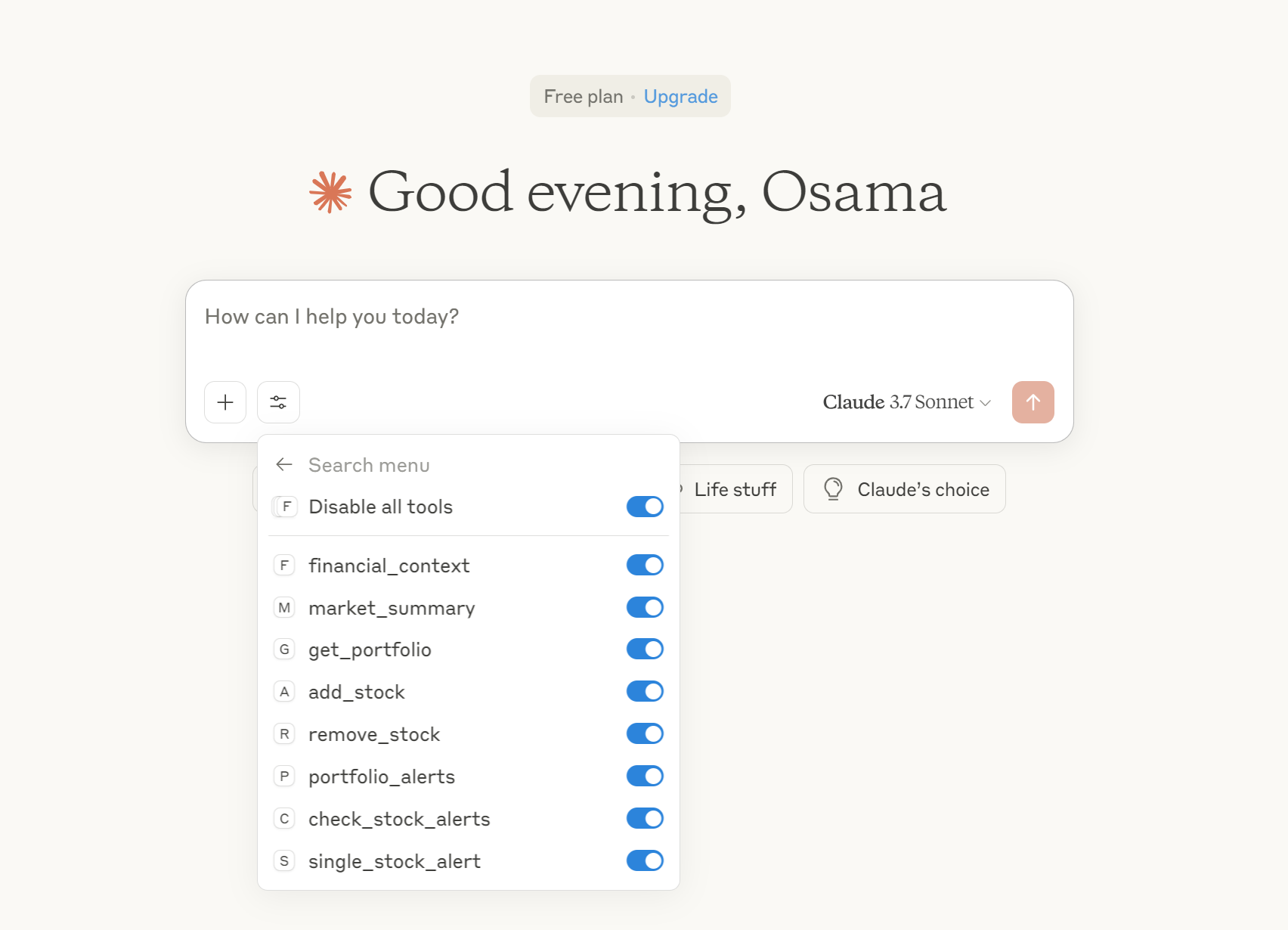
各ツール (例: financial_context 、 market_summary 、 add_stockなど) は、必要に応じて有効または無効にできます。
このシームレスな統合により、Claude Desktop 内で自然言語とツールベースのワークフローを使用して財務分析サーバーと対話できるようになります。
市場概要の取得: market_summaryツールを使用して、ライブ インデックス、動向、ニュースを取得します。
ポートフォリオの管理: 追跡している株式を更新および表示するには、 add_stock 、 remove_stock 、 get_portfolioを使用します。
アラートを受信する: しきい値を設定し、価格の変動や取引機会に関する Telegram 通知を受信します。
コンテキスト分析: financial_contextを使用してクエリを分析し、ティッカーを抽出し、要約されたニュースと市場に対応したプロンプトを取得します。
すべてのログはプロジェクト ルートのfinancial_mcp.logに書き込まれます。
デバッグするには、ログ ファイルをチェックして、環境変数と構成ファイルが正しいことを確認します。
Telegram またはニュースの取得で問題が発生した場合は、API キーとインターネット接続を確認してください。
This server cannot be deployed
Production MCP server for US equity and options intelligence: real-time IV radar, Monte Carlo simulation, options pressure, strategy backtesting, AI prediction, pre-trade risk analysis, and automated stock research reports.
Trading MCP server for AI agents, with live market data, account reads and controlled execution.
A Model Context Protocol server exposing real-time and historical Colombo Stock Exchange (CSE) data to AI agents and LLM applications. Provides quotes and OHLCV price history, full financial statements (income, balance sheet, cash flow), pre-computed technicals (moving averages, RS ratings, volume signals), macroeconomic indicators, corporate actions, and rule-based screening across CSE stocks and sector indices, everything needed to build CSE-aware trading assistants, research tools, and market-analysis agents. This is the official MCP server of www.ceyloncharts.com
MCP server for Financial Modeling Prep API with 250+ financial data tools