
onUI
by onllm-dev
README.md
# onUI
### Annotate Any UI for AI Agents
Lightweight browser extension (Chrome + Edge + Firefox) + local MCP bridge for annotation-first UI pair programming.
Powered by [onLLM.dev](https://onllm.dev).
[](https://github.com/onllm-dev/onUI/stargazers)
[](https://github.com/onllm-dev/onUI/blob/main/LICENSE)
[](https://www.google.com/chrome/)
[](https://www.microsoft.com/edge)
[](https://www.mozilla.org/firefox/)
[](https://buymeacoffee.com/tushar_s)
> [!NOTE]
> `onUI` is now stable and production-ready.
### Demo
<a href="https://github.com/onllm-dev/onUI/raw/main/landing-page/assets/onui-demo.mp4">
<img src="https://github.com/onllm-dev/onUI/raw/main/landing-page/assets/onui-demo-preview.gif" alt="onUI demo — click to play full video" width="720">
</a>
<sub>Click the preview above to play the full demo video.</sub>
## ✨ Why onUI
- 🧩 No integration into app code
- 🎛️ Per-tab ON/OFF control (off by default)
- 🎯 In-page annotation dialog with intent + severity
- ✍️ Draw mode for region annotations (rectangle + ellipse)
- ⚙️ Compact toolbar with pop-out settings (output level + clear on copy)
- 👀 Visual markers and hover targeting
- 🧾 Export outputs in compact / standard / detailed / forensic formats
- 🛡️ Shadow DOM isolation for stable styling
- 🔌 Local MCP server + native bridge (no cloud backend required)
## Install (Current)
### Option A: Browser Extension Stores (recommended)
**Chrome Web Store:**
https://chromewebstore.google.com/detail/onui/hllgijkdhegkpooopdhbfdjialkhlkan?authuser=0&hl=en-GB
**Microsoft Edge Add-ons:**
https://microsoftedge.microsoft.com/addons/detail/onui/fkcmlckehjhcicihbnmhkadfhjhfnond
### Option B: One-command installer from latest GitHub release
Use this if you want the latest version (store updates may lag) or for Firefox:
macOS/Linux:
```bash
curl -fsSL https://github.com/onllm-dev/onUI/releases/latest/download/install.sh | bash
```
macOS/Linux (Firefox artifact):
```bash
curl -fsSL https://github.com/onllm-dev/onUI/releases/latest/download/install.sh | bash -s -- --firefox
```
Windows (PowerShell):
```powershell
irm https://github.com/onllm-dev/onUI/releases/latest/download/install.ps1 | iex
```
Windows (PowerShell, Firefox artifact):
```powershell
iwr https://github.com/onllm-dev/onUI/releases/latest/download/install.ps1 -OutFile install.ps1; .\install.ps1 -Firefox
```
The installer handles extension install and can set up MCP in the same run.
When prompted with `Set up local MCP bridge now? [y/N]`, enter `y` to enable MCP.
Then load it in Chrome or Edge:
1. Open `chrome://extensions` or `edge://extensions`
2. Enable **Developer mode**
3. Click **Load unpacked**
4. Select `~/.onui/extensions/current` (or `%USERPROFILE%\.onui\extensions\current` on Windows)
> Chromium browsers require this final manual step for unpacked extensions.
Firefox (manual from release artifact):
1. Download `onui-firefox-add-ons-vX.Y.Z.zip` from the GitHub release page.
2. Extract it to a local folder.
3. Open `about:debugging#/runtime/this-firefox`.
4. Click **Load Temporary Add-on...**
5. Select the extracted `manifest.json`.
## 🧠 Usage
1. Open any supported website tab.
2. Click the onUI extension icon.
3. Enable `This Tab`.
4. Use the on-page launcher to open the compact toolbar.
5. Toggle **Annotate mode** for element targeting or **Draw mode** for region targeting.
6. Hold `Shift` and click multiple elements to batch-select targets.
7. Release `Shift` to open a shared annotation dialog for selected targets.
8. Save once to create one annotation per selected element (or one region annotation in draw flow).
9. Open toolbar **Settings** to choose output level and configure **Clear on copy**.
10. Copy exported output from the toolbar.
## 🔌 Local MCP Setup
[](https://glama.ai/mcp/servers/onllm-dev/onUI)
Recommended path: use the same installer command above and answer `y` when prompted.
If you want to force MCP setup in non-interactive mode:
macOS/Linux (`--mcp`):
```bash
curl -fsSL https://github.com/onllm-dev/onUI/releases/latest/download/install.sh | bash -s -- --mcp
```
Windows (PowerShell, set env var before running installer):
```powershell
$env:ONUI_INSTALL_MCP=1; irm https://github.com/onllm-dev/onUI/releases/latest/download/install.ps1 | iex
```
MCP setup now uses a prebuilt release bundle (no local build required), but still needs Node 20+.
Manual MCP setup from source is still supported:
```bash
pnpm build:mcp
pnpm setup:mcp
pnpm doctor:mcp
```
### Manual JSON config for custom MCP routers/clients
If your MCP router uses an object-style `mcpServers` map, use this canonical entry:
```json
{
"mcpServers": {
"onui-local": {
"command": "node",
"args": [
"/ABSOLUTE/PATH/TO/onUI/packages/mcp-server/dist/bin/onui-cli.js",
"mcp"
]
}
}
}
```
Use an **absolute path** for `onui-cli.js` (relative paths are often rejected or resolved incorrectly by routers).
If your router uses a list/array schema instead of an object map, adapt the same command/args shape like this:
```json
{
"servers": [
{
"name": "onui-local",
"command": "node",
"args": [
"/ABSOLUTE/PATH/TO/onUI/packages/mcp-server/dist/bin/onui-cli.js",
"mcp"
]
}
]
}
```
> The list example above is a schema adaptation pattern, not a claim about any specific router's exact key names.
Setup/verification notes:
- Run `pnpm build:mcp` first so `packages/mcp-server/dist/bin/onui-cli.js` exists.
- Keep the server entry name as `onui-local`.
- Run `pnpm doctor:mcp` after wiring config to confirm local setup health.
- Auto-registers `onui-local` for Claude Code and Codex when those CLIs are installed.
- Browser support in this release: **Chrome stable + Edge stable + Firefox stable (unpacked)**.
- `@onui/mcp-server` is workspace-local (`private: true`), so run setup/doctor from this repo.
See:
- `docs/mcp-setup.md`
- `docs/doctor.md`
- `docs/release.md`
## Maintainer Build + Release
`app.sh` is the local release entrypoint (no CI/CD dependency).
### Local validation + artifact packaging
```bash
./app.sh --build
```
This runs:
1. Prereq checks (Node 20+, pnpm, git, zip)
2. Build order: `@onui/core` -> `@onui/extension` -> `@onui/mcp-server`
3. MCP tests
4. MCP doctor smoke check (warnings allowed, errors fail)
5. Artifact packaging into `artifacts/vX.Y.Z/`
Artifacts:
1. `onui-extension-unpacked-vX.Y.Z.zip`
2. `onui-chrome-web-store-vX.Y.Z.zip` (manifest `key` stripped for CWS)
3. `onui-edge-add-ons-vX.Y.Z.zip` (manifest `key` stripped for Edge Add-ons)
4. `onui-firefox-add-ons-vX.Y.Z.zip`
5. `onui-mcp-bundle-vX.Y.Z.zip`
6. `install.sh`
7. `install.ps1`
8. `checksums.txt`
### Local release + GitHub publish
```bash
./app.sh --release
```
Release gates:
1. Clean git tree
2. Current branch is `main`
3. `gh auth status` succeeds
Release actions:
1. Auto patch bump from root `package.json`
2. Sync version across extension + MCP runtime strings
3. Run full `--build`
4. Commit + tag `vX.Y.Z`
5. Push commit/tag
6. Create GitHub release with packaged assets
## 🛠️ Development
```bash
pnpm install
pnpm check
pnpm test:coverage
```
## 🗂️ Repository Structure
```text
packages/
core/ Shared annotation/report types + formatters
extension/ Browser extension runtime (background/content/popup)
mcp-server/ Local MCP server + native bridge setup/doctor tooling
```
## ⭐ Support
If onUI is useful to you, please star the repo:
https://github.com/onllm-dev/onUI
It helps other users discover the product.
<a href="https://buymeacoffee.com/tushar_s" target="_blank"><img src="https://cdn.buymeacoffee.com/buttons/v2/default-yellow.png" alt="Buy Me A Coffee" height="48"></a>
### Star History
[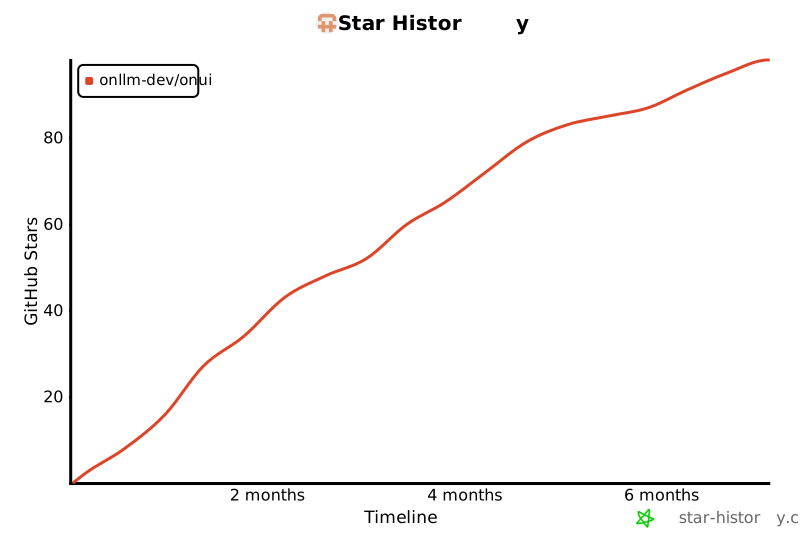](https://star-history.com/#onllm-dev/onUI&Timeline)
## 📄 License
GPL-3.0
This server cannot be deployed
Maintenance
ActivityInactive
ResponsivenessNo issues