
A
licenseNot graded
qualityD
maintenanceGives Claude Code long-term memory that persists across sessions via hybrid BM25 and vector semantic search, with multi-project isolation.
23 npm
8
MIT

A persistent memory system for AI assistants: store, semantically recall, and organize project knowledge with automatic hot-cache promotion, a knowledge graph, and trust scoring.
Store & manage memories: remember facts/patterns with tags, types, categories; delete (forget), list with pagination, and view stats.
Semantic recall: recall with precision/balanced/exploratory modes, confidence gating, composite ranking, and optional knowledge-graph expansion; also recall_by_tag and recall_with_fallback across memory types.
Hot cache control: promote, demote, pin, unpin, and inspect hot_cache_status (metrics, hit rate, tool calls saved) for 0ms context injection.
Knowledge graph: link_memories / unlink_memories with typed relations (relates_to, depends_on, supersedes, contradicts, etc.), get_related_memories, and relationship stats.
Contradiction handling: find_contradictions, mark_contradiction, get_contradictions, and resolve_contradiction (supersede/delete/weaken).
Consolidation: preview and run merging of near-duplicate memories.
Trust scoring: validate_memory, invalidate_memory, and get_trust_history to boost or decay confidence.
Feedback & quality: mark_memory_used and retrieval_quality_stats to track which memories actually help.
Seeding/import: seed_from_text, seed_from_file, and bootstrap_project to populate from docs like README/CLAUDE.md.
Sessions: list/get sessions, view session memories, set topics, summarize sessions, find cross-session patterns, and end_session to consolidate episodic memories.
Pattern mining: log_output, run_mining, mining_status, review/approve/reject candidates, and bulk rejection.
Predictive cache: access_patterns, predict_next, warm_cache, and predictive_cache_status (Markov-chain predictions).
Maintenance & diagnostics: db_maintenance, run_cleanup, db_info, db_rebuild_vectors, validate_embeddings, embedding_info, metrics_status, and audit_history.
Click on "Deploy Server".
Wait a few minutes for the server to deploy. Once ready, it will show a "Started" state.
In the chat, type @ followed by the MCP server name and your instructions, e.g., "@Memory MCP Server remember that we use snake_case for all API endpoints in this project"
That's it! The server will respond to your query, and you can continue using it as needed.
Here is a step-by-step guide with screenshots.





Stop re-explaining your project every session.
Memory MCP learns what matters and keeps it ready — instant recall for the stuff you use most, semantic search for everything else.
Every new chat starts from scratch. You explain your architecture again. You paste the same patterns again. Your context window bloats with repetition.
Other memory solutions help, but they still require tool calls for every lookup — adding latency and eating into Claude's thinking budget.
Memory MCP fixes this with a two-tier architecture:
Hot cache (0ms) — Frequently-used knowledge printed into context by the plugin's SessionStart and UserPromptSubmit hooks before Claude even starts thinking. Claude Code adds a hook's stdout to the conversation, so no tool call is needed.
Cold storage (~50ms) — Everything else, searchable by meaning via semantic similarity.
The system learns what you use and promotes it automatically. Your most valuable knowledge becomes instantly available. No manual curation required.
Related MCP server: CCCMemory MCP
😤 Without Memory MCP | 🎯 With Memory MCP |
"Let me explain our architecture again..." | Project facts persist and isolate per repo |
Copy-paste the same patterns every session | Patterns auto-promoted to instant access |
500k+ token context windows | Hot cache keeps it lean (~20 items) |
Tool call latency on every memory lookup | Hot cache: 0ms — a hook already put it in context |
Stale information lingers forever | Trust scoring demotes outdated facts |
Flat list of disconnected facts | Knowledge graph connects related concepts |
# Install package
uv tool install hot-memory-mcp   # or: pip install hot-memory-mcp

# Add plugin (recommended)
claude plugins add michael-denyer/memory-mcp
The plugin gives you auto-configured hooks and slash commands. Embeddings run on sentence-transformers on every platform, including Apple Silicon.
Add to ~/.claude.json:
{
  "mcpServers": {
    "memory": {
      "command": "memory-mcp"
    }
  }
}
See Reference for full configuration options.
Restart Claude Code. Run memory-mcp-cli bootstrap once to seed memories from your project docs; the hooks inject whatever is promoted, but nothing seeds itself.
First run: Embedding model (~90MB) downloads automatically. Takes 30-60 seconds once.
flowchart LR
    subgraph LLM["Claude"]
        REQ((Request))
    end

    subgraph Hot["HOT CACHE · 0ms"]
        HC[Session context]
        PM[(Promoted memories)]
    end

    subgraph Cold["COLD STORAGE · ~50ms"]
        VS[(Vector search)]
        KG[(Knowledge graph)]
    end

    REQ -->|"hook stdout"| HC
    HC -.->|"draws from"| PM
    REQ -->|"recall()"| VS
    VS <-->|"related"| KG
The hot cache (~10 items) reaches Claude through two plugin hooks. SessionStart runs memory-mcp-cli hot-cache --force and UserPromptSubmit runs memory-mcp-cli hot-cache, and Claude Code adds each command's stdout to the conversation. The command prints only when the text differs from what the session last saw, which is cheap while the set is stable and reprints in full when it shifts. The set combines recent recalls, predicted next memories, and top promoted items. Promoted memories (~20 items) is the backing store of frequently-used memories. Memories used 3+ times auto-promote; unused ones demote after 14 days.
Most memory systems make you pay a tool-call tax on every lookup. Memory MCP's hot cache bypasses this entirely — a hook prints your most-used knowledge into the conversation before Claude starts thinking.
Memory MCP | Generic Memory Servers | |
Hot cache | Injected by a hook at 0ms | Every lookup = tool call |
Self-organizing | Learns and promotes automatically | Manual curation required |
Project-aware | Auto-isolates by git repo | One big pile of memories |
Knowledge graph | Multi-hop recall across concepts | Flat list of facts |
Trust scoring | Outdated info decays and sinks | All memories equal |
Setup | One command, local SQLite | Often needs cloud setup |
The Engram Insight: Human memory doesn't search — frequently-used patterns are already there. That's what hot cache does for Claude.
Slash Command | Tool | Description |
|
| Store a memory with semantic embedding |
|
| Search memories by meaning |
|
| Manage promoted memories |
|
| Show statistics |
|
| Seed from project docs |
— |
| Knowledge graph connections |
See Reference for all 10 slash commands and full tool API.
memory-mcp-cli dashboard # Opens at http://localhost:8765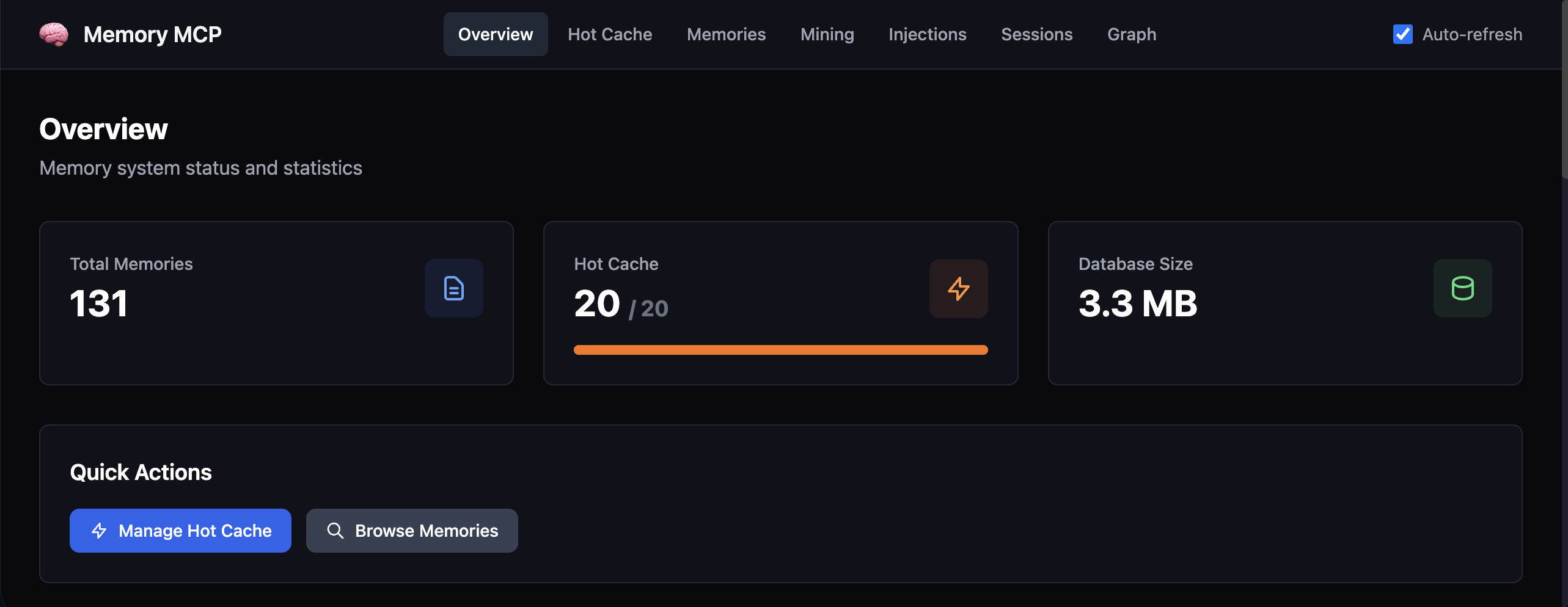
Browse memories, hot cache, injection history, sessions, and the knowledge graph.
Memory MCP is designed to run as three complementary components:
Component | Purpose |
Claude Code Plugin | Hooks that inject the hot cache, plus the |
MCP Server | Core memory tools available to Claude via Model Context Protocol |
Dashboard | Web UI to browse, manage, and debug your memory database |
The plugin is recommended for most users — it auto-configures the MCP server and adds productivity features. Run the dashboard alongside when you want visibility into what's being stored.
Document | Description |
Full API, CLI, configuration, MCP resources | |
Common issues and solutions |
MIT
Bootstrap hot cache from project documentation files.
Scans for common project documentation files (README.md, CLAUDE.md, etc.), parses them into memories, and optionally promotes to hot cache.
This is ideal for quickly populating the hot cache when starting work on a new codebase.
Edge cases handled gracefully:
Empty repo: Returns success with files_found=0 and helpful message
No markdown files: Returns success with message
File read errors: Logged in errors list, continues with other files
Empty files: Skipped silently
Binary files: Skipped with warning
All content already exists: Returns memories_skipped count
Inputs: tags, root_path, memory_type, file_patterns, +1 more. Returns: Response for bootstrap operation.
Run database maintenance (vacuum, analyze, auto-demote stale).
Compacts the database to reclaim unused space, updates query planner statistics, and demotes stale hot memories (if auto_demote is enabled).
Inputs: no named parameters. Returns: Response for maintenance operation.
Remove a memory from hot cache (keeps in cold storage).
Inputs: memory_id (required). Returns: object
End a session and consolidate episodic memories.
Mirrors human memory consolidation: short-term (episodic) memories that prove valuable get promoted to long-term (semantic) storage.
Top episodic memories are selected by salience score (combining importance, trust, access count, and recency). Only memories above the threshold are promoted.
Use this at the end of a conversation to preserve valuable learnings.
Inputs: session_id (required), promote_top, promote_type. Returns: object
Delete a memory permanently.
Inputs: memory_id (required). Returns: object
Show current hot cache contents, stats, and observability metrics.
Returns items sorted by hot_score (highest first), along with:
metrics.hits: Times hot cache resource was read with content
metrics.misses: Times hot cache resource was empty
metrics.evictions: Items removed to make space for new ones
metrics.promotions: Items added to hot cache
effectiveness: Value metrics (hit rate, tool calls saved, most/least used)
avg_hot_score: Average hot score of items (for LRU ranking)
Inputs: no named parameters. Returns: Response for hot cache status.
Create a typed relationship between two memories.
Use this to build a knowledge graph connecting related concepts. Relationships are directional: from_memory -[relation_type]-> to_memory.
Examples:
"Python 3.12 features" -[supersedes]-> "Python 3.11 features"
"Auth implementation" -[depends_on]-> "Database schema"
"API endpoint details" -[elaborates]-> "API overview"
"Project notes" -[mentions]-> "PostgreSQL" (entity extraction)
Inputs: to_memory_id (required), relation_type (required), from_memory_id (required). Returns: result
List stored memories with pagination.
Inputs: limit, offset, memory_type. Returns: result
Mark a memory as actually used/helpful after recall.
Call this when a recalled memory was useful in your response. Helps improve ranking by tracking which memories are valuable.
Inputs: memory_id (required), feedback. Returns: object
Get memory statistics.
Inputs: no named parameters. Returns: Response for stats operation.
Pin a hot cache memory to prevent auto-eviction.
Pinned memories stay in hot cache even when space is needed for new items. Only works on memories already in hot cache.
Inputs: memory_id (required). Returns: object
Manually promote a memory to hot cache for instant recall.
Inputs: memory_id (required). Returns: object
Semantic search with confidence gating and composite ranking.
Modes:
'precision': High threshold (0.8), few results (3), prioritizes similarity
'balanced': Default settings, good for general use
'exploratory': Low threshold (0.5), more results (10), diverse ranking
Returns memories with confidence level and hallucination-prevention guidance.
Inputs: query (required), mode, limit, threshold, +3 more. Returns: Response for recall operation.
Store a new memory. Returns the memory ID.
Inputs: content (required), tags, category, session_id, +1 more. Returns: object
Unpin a memory, making it eligible for auto-eviction from hot cache.
Inputs: memory_id (required). Returns: object
Recent tool additions, removals, and schema changes observed during successful MCP inspections.
Loading tool schema changelog…
Scored across 16 tools
Most tools target distinct actions: remember/recall/forget cover core CRUD, while hot-cache operations (promote, demote, pin, unpin, hot_cache_status) form a coherent group. The subtle pairs (forget vs demote, promote vs pin) could be momentarily confused, but the descriptions clearly disambiguate permanent deletion, eviction eligibility, and eviction prevention.
The set mixes bare verbs (remember, recall, forget, pin, unpin, promote, demote) with verb_noun patterns (list_memories, link_memories, get_related_memories, mark_memory_used, bootstrap_project, end_session) and pure noun forms (memory_stats, hot_cache_status, db_maintenance). It's readable and predictable-ish within sub-groups, but not a single consistent convention.
16 tools is on the heavier side, but the surface is divided into legitimate subsystems (core memory, hot cache, knowledge graph, session consolidation, bootstrap, maintenance), each contributing distinct operations. Nothing feels obviously redundant, though trimming hot-cache bookkeeping could tighten it.
Coverage is broad: create/read/delete memories, semantic recall, graph linking and traversal, hot-cache lifecycle, statistics, maintenance, and session consolidation. The main gap is an explicit update/edit operation for memory content or importance, which agents must work around by forgetting and re-remembering.
Persistent memory for Claude Code and Cursor. Stop re-explaining your project every session.
Private memory for AI agents: save and recall facts across Claude Code, Codex, Cursor and ChatGPT.
Persistent context for Claude. Your AI always knows your projects and next actions across sessions.
A second brain for Claude: remembers your work, plans your day, encrypted under a key only you hold.