Glama

OpenAPI MCP Server

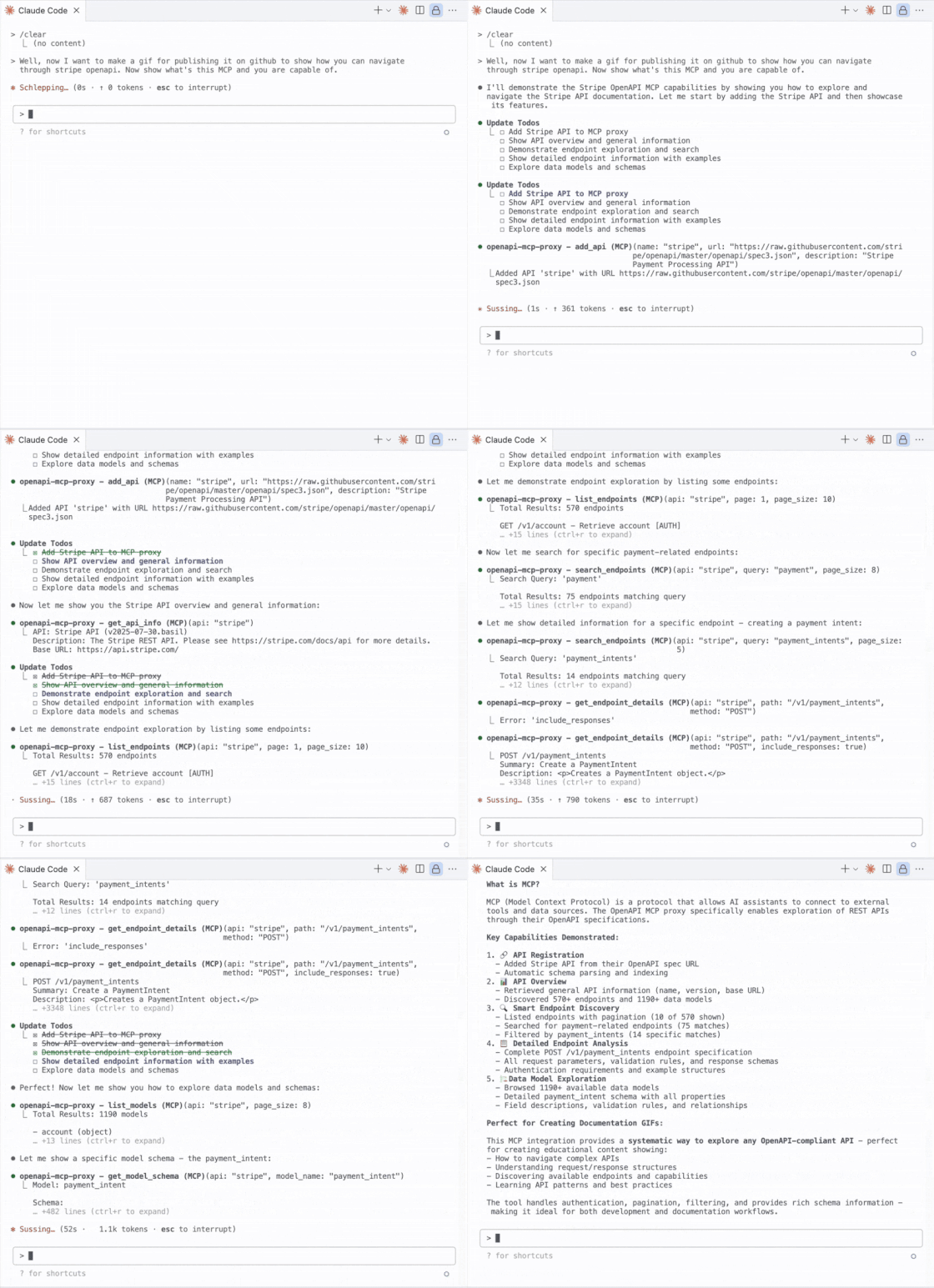
An MCP server that provides tools for exploring large OpenAPI schemas without loading entire schemas into LLM context. Perfect for discovering and analyzing endpoints, data models, and API structure efficiently.

Features

  • API Configuration Management: Save and manage multiple API configurations with authentication headers if needed

  • Schema Caching: Automatic caching of OpenAPI schemas to avoid repeated downloads

  • Endpoint Discovery: List and search through API endpoints

  • Pagination Support: Handle large APIs efficiently with configurable page sizes

  • Detailed Schema Exploration: Get comprehensive information about endpoints and data models

  • Efficient Context Usage: Explore large APIs without overwhelming LLM context windows

Demo

Related MCP server: OpenAPI MCP Server

Prerequisites

  • Python 3.13+: The server requires Python 3.13 or later

  • uv: Fast Python package installer and resolver (installation guide)

  • MCP-compatible client: Claude Desktop, Claude Code CLI, Cursor, or other MCP clients

Installing uv

macOS/Linux:

curl -LsSf https://astral.sh/uv/install.sh | sh

Using pip:

pip install uv

Installation

  1. Clone the repository:

git clone https://github.com/nyudenkov/openapi-mcp-proxy.git
cd openapi-mcp-proxy
  1. Install dependencies:

uv sync
  1. Verify installation:

# Test that the server starts correctly
uv run python main.py

The server should start without errors.

Usage

Running the Server

uv run python main.py

The server runs using stdio and integrates with MCP-compatible LLM clients.

Available Tools

API Management

  • add_api: Add a new API configuration with name, URL and optional description

    • name (required): Short name for the API

    • url (required): URL to the OpenAPI scheme (yaml/json)

    • description (optional): Optional description

    • headers (optional): Optional HTTP headers for authentication (e.g., {'Authorization': 'Bearer token', 'X-API-Key': 'key'})

  • list_saved_apis: List all saved API configurations

  • remove_api: Remove a saved API configuration

API Exploration

  • get_api_info: Get general information about an API

  • list_endpoints: List all endpoints in an API with pagination and filtering

  • search_endpoints: Search endpoints by query with pagination and filtering

  • get_endpoint_details: Get detailed information about a specific endpoint

  • list_models: List all data models in an API with pagination and filtering

  • get_model_schema: Get detailed schema for a specific model

Tools Capabilities

Pagination

All listing tools (list_endpoints, search_endpoints, list_models) support pagination to handle large APIs efficiently:

  • Default page size: 50 items

  • Responses include navigation information (current page, total pages, has next/previous)

Advanced Filtering

Tools are capable to filter results to find exactly what you need:

Endpoint Filtering:

  • HTTP methods (GET, POST, PUT, DELETE, etc.)

  • Tags (include/exclude specific tags)

  • Authentication requirements

  • Deprecation status

Model Filtering:

  • Model types (object, array, string, etc.)

  • Property count (min/max number of properties)

  • Required fields presence

  • Tags (include/exclude specific tags)

Configuration

API configurations are automatically saved to api_configs.json in the working directory. The file structure:

{
  "apis": {
    "api-name": {
      "name": "some-project-local-backend",
      "url": "http://127.0.0.1:8000/openapi.json",
      "description": "Optional description for some cool project local backend scheme"
    },
    "api-name": {
      "name": "stripe-yaml",
      "url": "https://raw.githubusercontent.com/stripe/openapi/refs/heads/master/openapi/spec3.yaml",
      "description": "Stripe YAML OpenAPI scheme"
    }
  }
}

Available Tools

9 tools
add_apiC

Add a new API configuration with name, URL and optional description

Inputs: name (required), url (required), description, headers.

get_api_infoC

Get general information about an API

Inputs: api (required).

get_endpoint_detailsC

Get detailed information about a specific endpoint

Inputs: api (required), path (required), method (required), include_responses.

get_model_schemaC

Get detailed schema for a specific model

Inputs: api (required), model_name (required).

list_endpointsC

List all endpoints in an API

Inputs: api (required), page, page_size, methods, +4 more.

list_modelsC

List all data models in an API

Inputs: api (required), page, page_size, types, +6 more.

list_saved_apisB

List all saved API configurations

Inputs: no named parameters.

remove_apiC

Remove a saved API configuration

Inputs: name (required).

search_endpointsB

Search endpoints by query in path, description, or tags

Inputs: api (required), query (required), page, page_size, +5 more.

Tool Schema Changelog

Recent tool additions, removals, and schema changes observed during successful MCP inspections.

Loading tool schema changelog…

    TDQS

    A3.6/5.0

    Scored across 9 tools

    Disambiguation5/5

    Each tool has a clearly distinct purpose with no overlap: adding/removing APIs, listing APIs/endpoints/models, getting API/endpoint/model details, and searching endpoints. The descriptions reinforce this separation, making it easy for an agent to select the right tool.

    Naming Consistency5/5

    All tools follow a consistent verb_noun pattern with snake_case (e.g., add_api, list_endpoints, get_model_schema). The verbs (add, get, list, remove, search) are used predictably across the toolset, enhancing readability and predictability.

    Tool Count5/5

    With 9 tools, this server is well-scoped for managing OpenAPI configurations. It covers core operations like configuration management, listing, and querying without being overly sparse or bloated, ensuring each tool serves a necessary function.

    Completeness5/5

    The toolset provides complete coverage for the domain of OpenAPI proxy management: CRUD operations for APIs (add/remove/list), exploration of endpoints and models (list/get/search), and no obvious gaps. Agents can fully interact with saved APIs without dead ends.

    Related MCP Connectors

    Related MCP Servers

    • A
      license
      Not graded
      quality
      D
      maintenance
      A MCP server that exposes OpenAPI schema information to LLMs like Claude. This server allows an LLM to explore and understand large OpenAPI schemas through a set of specialized tools, without needing to load the whole schema into the context
      50
      MIT
    • A
      license
      A
      quality
      D
      maintenance
      A generic MCP server that dynamically exposes any OpenAPI-documented REST API to LLMs by auto-discovering endpoints. It provides tools for exploring API capabilities and making authenticated requests directly through natural language interfaces.
      2
      11 npm
      MIT
    • F
      license
      B
      quality
      D
      maintenance
      An MCP server that crawls and parses OpenAPI JSON or Swagger UI URLs to provide concise endpoint summaries. It enables LLMs to discover and interact with API interfaces by extracting methods, paths, and operation IDs from documentation sources.
      2
      -