tfmcp:Terraform 模型上下文协议工具
⚠️ 本项目尚处于实验阶段。功能如有变更,恕不另行通知。请谨慎使用!⚠️
tfmcp 是一个命令行工具,可帮助您通过模型上下文协议 (MCP) 与 Terraform 交互。它允许 LLM 管理和操作您的 Terraform 环境,包括:
🎮 演示
使用 Claude Desktop 查看 tfmcp 的实际操作:
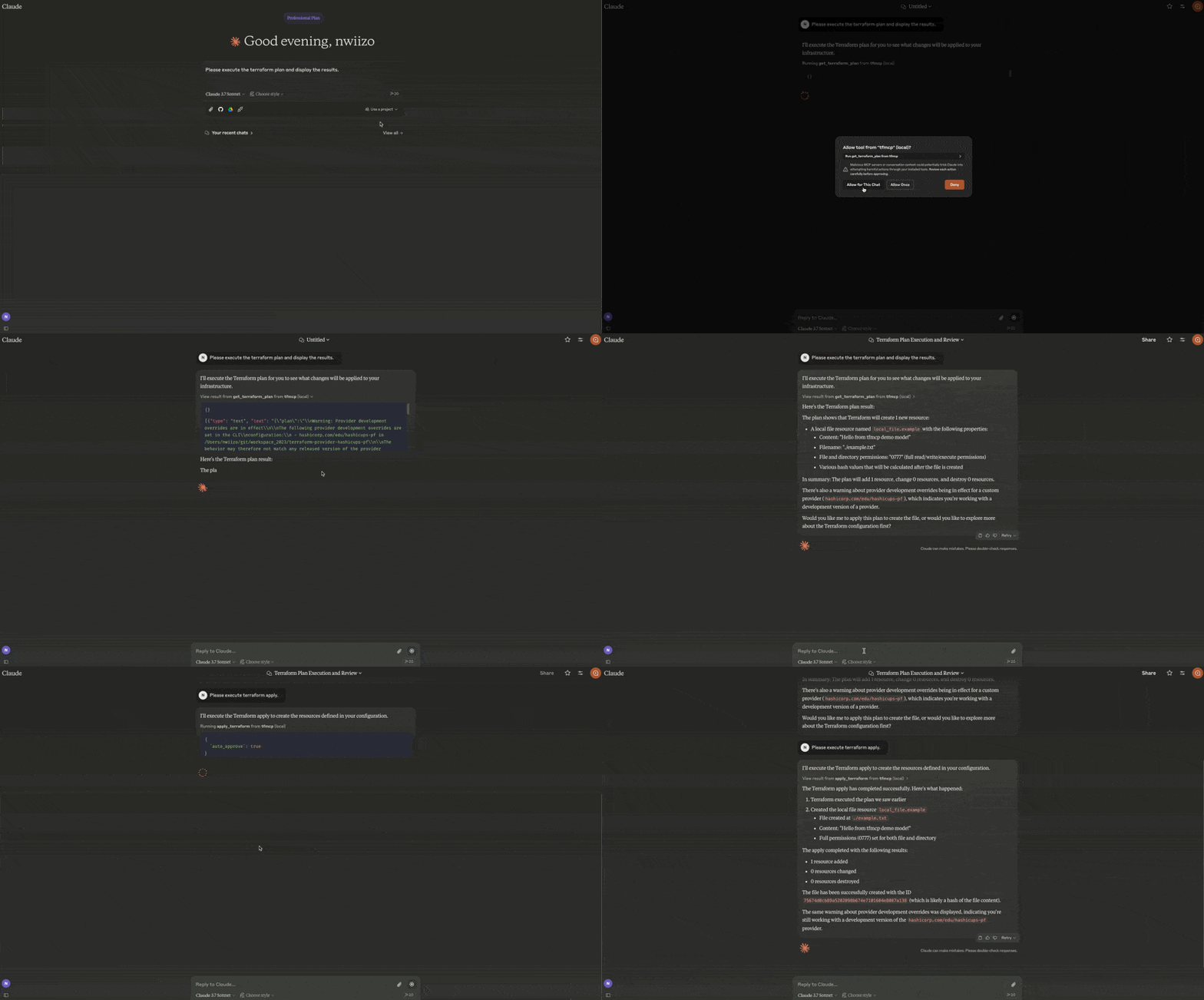
读取 Terraform 配置文件
分析 Terraform 计划输出
应用 Terraform 配置
管理 Terraform 状态
创建和修改 Terraform 配置
Related MCP server: terraform-cloud-mcp
🎉 最新版本
tfmcp 的第一个稳定版本 (v0.1.1) 现已在 Crates.io 上发布!您可以使用 Cargo 轻松安装:
特征
🚀 Terraform 集成
与 Terraform CLI 深度集成以分析和执行操作。
📄 MCP 服务器功能
作为模型上下文协议服务器运行,允许 AI 助手访问和管理 Terraform。
⚡️速度超快
由 Rust 生态系统提供支持的高速处理。
🛠️自动设置
在需要时自动创建示例 Terraform 项目,确保新用户也能顺利操作。
🐳 Docker 支持
在预先安装所有依赖项的容器化环境中运行 tfmcp。
安装
来自源
# Clone the repository
git clone https://github.com/nwiizo/tfmcp
cd tfmcp

# Build and install
cargo install --path .
来自 Crates.io
使用 Docker
# Clone the repository
git clone https://github.com/nwiizo/tfmcp
cd tfmcp

# Build the Docker image
docker build -t tfmcp .

# Run the container
docker run -it tfmcp
要求
用法
$ tfmcp --help
✨ A CLI tool to manage Terraform configurations and operate Terraform through the Model Context Protocol (MCP).

Usage: tfmcp [OPTIONS] [COMMAND]

Commands:
  mcp       Launch tfmcp as an MCP server
  analyze   Analyze Terraform configurations
  help      Print this message or the help of the given subcommand(s)

Options:
  -c, --config <PATH>    Path to the configuration file
  -d, --dir <PATH>       Terraform project directory
  -V, --version          Print version
  -h, --help             Print help
使用 Docker
使用 Docker 时,您可以像这样运行 tfmcp 命令:
# Run as MCP server (default)
docker run -it tfmcp

# Run with specific command and options
docker run -it tfmcp analyze --dir /app/example

# Mount your Terraform project directory
docker run -it -v /path/to/your/terraform:/app/terraform tfmcp --dir /app/terraform

# Set environment variables
docker run -it -e TFMCP_LOG_LEVEL=debug tfmcp
与 Claude Desktop 集成
要将 tfmcp 与 Claude Desktop 一起使用:
如果尚未安装,请安装 tfmcp:
或者,您可以使用 Docker:
找到已安装的 tfmcp 可执行文件的路径:
将以下配置添加到~/Library/Application\ Support/Claude/claude_desktop_config.json :
{
  "mcpServers": {
    "tfmcp": {
      "command": "/path/to/your/tfmcp",  // Replace with the actual path from step 2
      "args": ["mcp"],
      "env": {
        "HOME": "/Users/yourusername",  // Replace with your username
        "PATH": "/usr/local/bin:/usr/bin:/bin:/usr/sbin:/sbin",
        "TERRAFORM_DIR": "/path/to/your/terraform/project"  // Optional: specify your Terraform project
      }
    }
  }
}
如果您将 Docker 与 Claude Desktop 一起使用,则可以像这样设置配置:
{
  "mcpServers": {
    "tfmcp": {
      "command": "docker",
      "args": ["run", "--rm", "-v", "/path/to/your/terraform:/app/terraform", "tfmcp", "mcp"],
      "env": {
        "TERRAFORM_DIR": "/app/terraform"
      }
    }
  }
}
重新启动 Claude Desktop 并启用 tfmcp 工具。
如果 Terraform 示例项目不存在,tfmcp 会自动在~/terraform中创建一个,以确保 Claude 可以立即开始使用 Terraform。该示例项目基于此仓库example/demo目录中的示例。
日志和故障排除
tfmcp 服务器日志可在以下位置获取:
~/Library/Logs/Claude/mcp-server-tfmcp.log
常见问题及解决方案:
Claude 无法连接到服务器:请确保您的配置中 tfmcp 可执行文件的路径正确
Terraform 项目问题:如果未找到任何 Terraform 项目,tfmcp 会自动创建一个示例 Terraform 项目
方法未找到错误:MCP 协议支持包括资源/列表和提示/列表方法
Docker 问题:如果使用 Docker,请确保您的容器具有正确的卷安装和权限
环境变量
TERRAFORM_DIR :设置此项可指定自定义 Terraform 项目目录。如果未设置,tfmcp 将使用命令行参数、配置文件提供的目录,或回退到~/terraform 。您也可以在运行时使用set_terraform_directory工具更改项目目录。
TFMCP_LOG_LEVEL :设置为debug 、 info 、 warn或error来控制日志记录详细程度。
TFMCP_DEMO_MODE :设置为true以启用具有附加安全功能的演示模式。
安全注意事项
使用 tfmcp 时,请注意以下安全注意事项:
tfmcp 代表您执行 Terraform 命令,这些命令可以创建、修改或销毁基础设施
在生产环境中,考虑使用适当的 IAM 权限和角色边界
在应用所有 Terraform 计划之前,请先检查它们,尤其是由 AI 生成的计划
人工智能助手可能会访问 Terraform 状态下的敏感信息
使用 Docker 时,请谨慎使用可能暴露敏感数据的卷挂载
贡献
欢迎贡献代码!欢迎提交 Pull 请求。
分叉存储库
创建你的功能分支( git checkout -b feature/amazing-feature )
提交您的更改( git commit -m 'Add some amazing feature' )
推送到分支( git push origin feature/amazing-feature )
打开拉取请求
路线图
以下是 tfmcp 的一些计划改进和未来功能:
完全的
[x]基本 Terraform 集成
与 Terraform CLI 的核心集成,用于分析和执行操作。
[x] MCP 服务器实现
人工智能助手的模型上下文协议服务器的初步实现。
[x]自动创建项目
添加了在需要时自动创建示例 Terraform 项目的功能。
[x] Claude 桌面集成
支持与Claude Desktop无缝集成。
[x]核心 MCP 方法
实施必要的 MCP 方法,包括资源/列表和提示/列表。
[x]错误处理改进
更好的错误处理和恢复机制,实现稳健运行。
[x]动态项目目录切换
增加了无需重新启动服务即可更改活动 Terraform 项目目录的功能。
[x] Crates.io 出版物
将包发布到 Crates.io 以便通过 Cargo 轻松安装。
[x] Docker 支持
增加了容器化支持,以便于部署和跨平台兼容性。
进行中
[ ]增强地形分析
实现对 Terraform 配置、计划和状态文件的更深入的解析和分析。
[ ]多环境支持
添加对管理多个 Terraform 环境、工作区和模块的支持。
[ ]安全增强
改进安全功能,包括更好的身份验证和授权机制。
[ ]扩展 MCP 协议支持
实施额外的 MCP 方法和功能,以便与 AI 助手进行更丰富的集成。
[ ]交互式TUI
开发基于终端的用户界面,以便于本地使用和调试。
[ ]成本估算
与云提供商定价 API 集成,为 Terraform 计划提供成本估算。
[ ]性能优化
优化大型 Terraform 项目的资源使用和响应时间。
[ ]与其他AI平台的集成
超越 Claude 来支持其他 AI 助手和平台。
[ ]综合测试框架
扩大测试覆盖范围,包括与真实 Terraform 配置的集成测试。
[ ]插件系统
开发插件架构以允许扩展核心功能。
执照
该项目根据 MIT 许可证获得许可 - 有关详细信息,请参阅LICENSE文件。

