
llm-wiki-chrome
# LLM Wiki for Chrome
Public, content-free execution substrate for targeted llm-wiki adapters. It
provides one Chrome extension, one allowlisted Native Messaging host, a private
Unix-socket relay, and a versioned typed-job contract.
The extension and local connector source are public. Browser grants, page data,
credentials, private result slots, and runtime sockets remain local and are
never repository content. Public source availability is not a Chrome Web Store
release or permission to publish user data.
This is **not** an autonomous natural-language browser agent. It exposes a small
structured agent tool surface—shared tabs, accessibility snapshot, viewport
screenshot, semantic click, private text insertion, key chord, and scroll—and
compiles every call into the same exact-target typed protocol. It does not
accept arbitrary JavaScript, raw CDP methods, downloaded code, ambient browser
access, or page-authored actions. Provider-specific adapters still own stronger
routing, authentication, journals, recovery, idempotency, and final read-back
verification for consequential workflows.
[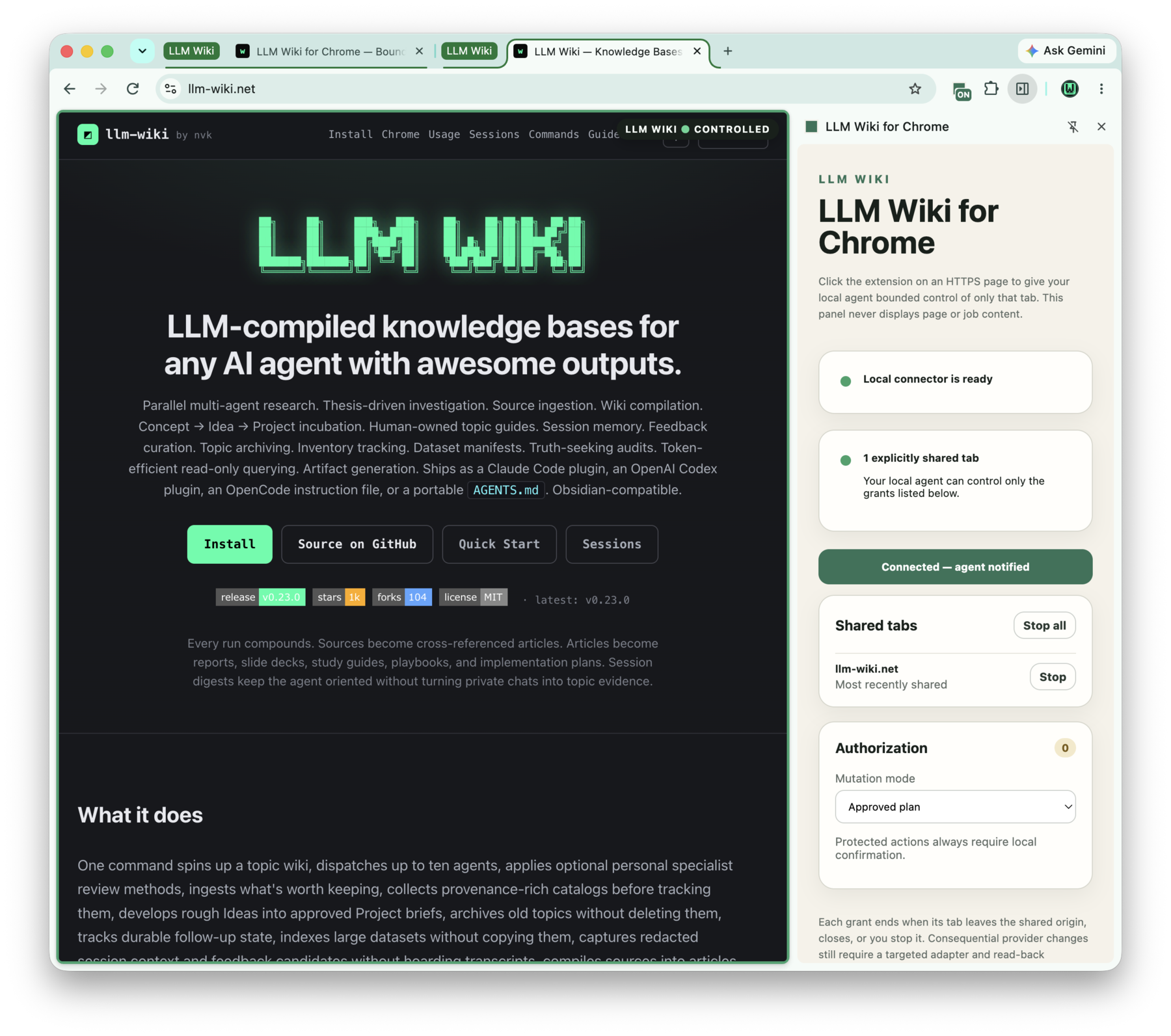](https://llm-wiki.net/chrome/)
[Installation, collaboration, security, and troubleshooting guide →](https://llm-wiki.net/chrome/)
## Click-to-collaborate flow
The extension does not need persistent site access or per-page Chrome host
registration. The user opens an HTTPS page and clicks the extension action.
Its Chrome-facing name is **LLM Wiki for Chrome**; browser-executor terminology
is kept only for the internal protocol and implementation.
That Chrome user gesture creates a fresh ephemeral collaboration grant bound to
the exact tab, URL, and origin. Clicking additional tabs builds an explicit
workspace of up to 16 grants; the executor never enumerates unrelated tabs.
Same-origin navigation rotates the exact grant ID and URL so stale programs
fail closed. A grant is revoked when the tab leaves its origin, closes, or the
user stops that tab or the whole workspace in the side panel.
An active grant is visible on the page as a fixed green outline and
`LLM WIKI • CONTROLLED` pill, plus an `ON` action badge. The marker is packaged,
noninteractive, content-blind, and injected only after the extension click; it
is removed when the grant is revoked and never receives page or job content.
The action listener receives Chrome's `activeTab` grant and synchronously opens
the side panel for that exact tab. Panel load confirms the action-created grant;
a relayed panel message never tries to open the panel or manufacture a user
gesture. Its connect button is a status/retry control, not a substitute for the
toolbar gesture that creates `activeTab` authority. The
connected state means the grant has been published through the live local
connector, so the agent can detect readiness with `browser_status` without
asking the user to inspect extension internals.
The local agent and targeted adapters retrieve the private workspace through
the native socket. A direct agent must first list the exact clicked grants and
name one collaboration ID on every tool call. The server then compiles a fixed
typed program and fails closed if the grant or page has changed. The click
authorizes bounded reads and structured interaction on that exact tab; it never
grants ambient browser access. Consequential provider workflows still use a
targeted adapter for stronger preconditions and independent verification.
Adapter code still has to be installed and trusted once. The collaboration
grant replaces per-resource registration and provider OAuth only for workflows
that can inspect and verify through the browser UI. A targeted adapter may keep
a first-party API as an optional stronger verification path.
Mutation programs may bind a provider-owned revision fingerprint with
`assert_ax_private_sha256`. The executor recomputes the bounded accessibility
projection on the exact exposed tab immediately before the governed mutation
boundary and fails closed on drift. The expected hash remains a private value;
neither it nor the projected page content is shown in the side panel.
Provider adapters use the bundled client directly:
```python
from browser_executor.client import BrowserExecutorClient
executor = BrowserExecutorClient()
collaboration = executor.collaboration_for_url(expected_url)
if collaboration is None:
raise RuntimeError("click the extension on the target page")
# Bind collaboration_id, url, and origin into the signed typed program.
result = executor.run(program, private_values=private_values)
```
Codex and other MCP clients use the provider-neutral direct collaboration
surface instead of constructing programs themselves:
```sh
.venv/bin/python adapter.py mcp-server
```
The MCP server publishes a fixed structured tool inventory covering explicit
tab lifecycle, exact same-origin navigation, waits, accessibility snapshots,
viewport/region/full-page screenshots, element geometry, click/hover/type/
select/drag/key/scroll, bounded diagnostics, registered-root file transfer,
password-manager UI activation, and in-memory workflow drafting. It has no
arbitrary program, CSS selector, script, natural-language execution tool, or
unrelated-tab query. Page content is returned only to the calling local agent
for the active request and is not persisted by this repository or shown in the
side panel.
## Release status
Release `0.1.1` adds lazy native-host discovery retries,
an importable-client path for isolated provider adapters, background-window-safe
exact-tab execution, dead-client cancellation, bounded command and job
watchdogs, semantic document-boundary keys, root-frame-only provider programs,
child-frame accessibility quarantine, and bounded scrolling collection anchored
to an allowlisted provider DOM target. It does not weaken the exact grant, tab,
URL, active-tab, or revision checks.
Release `0.1.0` consolidates the first bounded execution slice:
- strict program hashing and validation;
- cross-language policy-decision tests for the Python client and MV3 validator;
- exact HTTPS target and bounded action declarations;
- click-created active-tab grants with no persistent host permissions;
- a bounded multi-tab collaboration workspace with private exact-URL lookup;
- per-Chrome-instance native sockets aggregated by the local client, so several
Chrome profiles or processes cannot overwrite one another's shared tabs;
- a fixed page outline/pill and toolbar badge showing exactly which tabs are
controlled;
- a green `LLM Wiki` tab group containing only explicit grants;
- same-origin open/navigate/history/reload, exact-tab focus/close, semantic
waits, hover, option selection, drag/drop, and scroll-to-element primitives;
- bounded activation settling, retrying private-value assertions, and adaptive
viewport JPEG quality for transient browser/UI state;
- flattened, bounded accessibility collection across attached child-frame
targets, with session-bound geometry and interactions; semantic AX discovery
also covers open shadow trees without enabling arbitrary DOM traversal;
- region and dimension-capped full-page screenshots, semantic element geometry,
and bounded performance metrics;
- machine-local upload/download roots with realpath checks, completed-download
verification, danger-state enforcement, streaming hashes, and no implicit
filesystem authority;
- manual, approved-plan, and automatic bounded authorization modes with
protected actions always falling back to local confirmation and a
content-free session decision counter;
- content-free completion/attention notifications;
- cancellable in-memory read-only snapshot schedules whose private results are
retrieved once and whose authority expires with the MCP process or tab grant;
- in-memory recording of already-typed agent actions into a hash-bound,
review-required, deliberately non-replayable provider-driver draft;
- password-manager UI activation that never receives a credential value; and
- a provider-driver SDK that binds targeted adapters to the exact grant,
approved plan hash, one mutation callback, and adapter-owned postcondition
verification;
- action-listener tab grant, side-panel status/retry control, and content-free
agent readiness tool;
- a content-free side-panel workspace, progress meter, per-tab revocation, and cancellation;
- separate read and mutation capabilities;
- one governed mutation callback in the Python client;
- stable extension identity and exact native-host origin;
- private local state, short socket paths, message limits, and one active job;
- exact-tab activation and reviewed same-origin navigation;
- a direct local MCP agent surface that makes an extension click immediately
discoverable and controllable by the agent without a provider OAuth grant;
- allowlisted DOM and accessibility-tree reads, waits, and private extraction;
- byte-capped private viewport JPEG capture with no executor-side persistence;
- bounded viewport scrolling, deduplicating long-list collection, and private
AX link/description extraction;
- bounded exact-tab browser-log capture through private result slots;
- bounded exact-tab request metadata capture that strips query strings and
ignores headers, bodies, cookies, initiators, and security details;
- bounded exact-tab console-API capture that retains only scalar arguments and
never evaluates or dereferences remote objects;
- typed click, focus, key-chord, private text-insertion, and retrying
private-value assertion actions;
- cancellation, target-focus drift detection, result-size limits, and
best-effort debugger cleanup (cancellation stops at the next bounded action
and cannot roll back a mutation that already started);
- one-shot pre-mutation authorization before a provider effect; and
- a route-free llm-wiki self-test manifest; and
- a content-free extension status panel with connected, running, authorization,
and failure states.
The release is still an execution substrate, not a provider workflow. Targeted
adapters remain responsible for provider semantics, revision checks, durable
journals, idempotency, and independent read-back verification.
## Repository boundary
Allowed tracked material:
- executable code and extension assets;
- protocol schemas and security documentation; and
- synthetic fixtures and deterministic tests.
Never commit real resource URLs or identifiers, page text, screenshots,
captures, plans, receipts, extracted results, cookies, credentials, browser
storage, or provider corpora. Runtime inputs and outputs stay in the targeted
adapter's separately controlled data plane and should remain in memory whenever
possible.
## Architecture
```text
local agent through fixed MCP tools OR a targeted provider adapter
-> select one exact user-created click grant from the private collaboration workspace
-> deterministic typed program + exact approved plan hash
-> BrowserExecutorClient over a private Unix socket
-> allowlisted Native Messaging host
-> shared MV3 extension on the exact user-exposed tab
-> one-shot before-mutation challenge when required
-> private result slots returned only to the targeted adapter
```
llm-wiki may see this repository's route-free `self-test` adapter
manifest, but it never routes an external edit or research request directly to
the executor.
## Packaging and installation
The installable product is split at Chrome's security boundary:
- **`llm-wiki-chrome` native companion:** the Python client, fixed MCP server,
Native Messaging host, installer, diagnostics, and packaged extension assets;
- **LLM Wiki for Chrome:** the public-source MV3 extension ZIP. Chrome Web Store
publication remains a separate release step requiring explicit approval;
loading the unpacked path remains the development workflow.
The stable Homebrew formula is available from `nvk/tap`:
```sh
brew install nvk/tap/llm-wiki-chrome
llm-wiki-chrome install
llm-wiki-chrome doctor
```
`install` writes the exact-origin Native Messaging registration. It does not
install a daemon: Chrome starts the host on demand and communicates with it over
standard input/output. Each Chrome host creates a private per-process socket
under the deterministic `/tmp/llm-wiki-chrome-<uid>/` runtime directory. The
CLI, MCP server, and targeted adapters discover those sockets automatically.
There is no normal socket argument, port, pairing code, or environment variable.
The existing environment override remains only for exceptional sandboxed or
development setups.
For an unpacked development installation, ask the package for the exact path:
```sh
llm-wiki-chrome extension-path
```
Targeted adapters that run in isolated Python environments can resolve the
package root without copying source into their virtual environment:
```sh
llm-wiki-chrome client-path
```
Load that directory from `chrome://extensions` and run `llm-wiki-chrome doctor`.
`healthy: true` confirms the package and Native Messaging registration;
`connected: true` appears while Chrome has the extension's native port open.
Uninstall only the native companion registration with:
```sh
llm-wiki-chrome uninstall
```
File transfer is disabled by default. Enable only explicit machine-local roots
in `~/.config/llm-wiki/browser-executor.json`:
```json
{
"upload_roots": ["/absolute/private/staging/uploads"],
"download_roots": ["/absolute/private/staging/downloads"]
}
```
Every path rejects a final symlink, resolves its parent chain, and must stay inside a
registered root. Upload values travel only in private slots. Downloads must be
complete, accepted as safe by Chrome, inside a registered root, and are hashed
by the local companion before being returned to the caller.
The side panel offers `Manual`, `Approved plan`, and `Automatic bounded jobs`.
The default is `Approved plan`. File upload, dialog handling, and credential-
broker activation remain protected actions and always require local manual
confirmation. Authorization history is a content-free session counter rather
than a page-content log.
Workflow recording captures only typed operations already requested through
the fixed MCP surface. `browser_record_stop` returns an in-memory, hash-bound,
review-required draft. The generic executor never replays it; a targeted
adapter must review, compile, authorize, journal, and independently verify a
versioned provider workflow. The direct surface permits only bounded in-memory
scheduling of a read-only snapshot while the exact grant and MCP process remain
live. Durable or recurring scheduling, mutations, recovery, and journals remain
in the targeted adapter or external scheduler, never in the extension's intent
layer.
Targeted adapters can centralize the execution boundary with
`browser_executor.driver.ProviderDriverSession`, which rejects plan-hash or
exact-grant drift and requires an adapter-owned `status: verified` postcondition.
Build a deterministic, content-free Chrome Web Store ZIP without publishing it:
```sh
python3 scripts/package_extension.py
```
No release, tag, store upload, or installed upgrade is performed by these build
commands.
## Development
```sh
python3 -m venv .venv
.venv/bin/python -m unittest discover -s tests -v
.venv/bin/python -m compileall -q adapter.py browser_executor tests
node --check extension/service-worker.js
node --check extension/protocol.mjs
node --check extension/executor.mjs
node --check extension/sidepanel.js
```
The deterministic suite is complemented by an isolated real-browser smoke
test. It requires a matching Chrome for Testing and ChromeDriver pair and an
exact approved read target supplied at runtime; it does not touch the normal
Chrome profile or print, persist, or return the captured viewport:
```sh
LLM_WIKI_BROWSER_E2E_TARGET_URL='<exact approved HTTPS target>' \
.venv/bin/python tests/chrome/run_extension_e2e.py \
--chrome '/path/to/Google Chrome for Testing' \
--chromedriver '/path/to/chromedriver'
```
The harness copies the unpacked extension into a temporary directory, adds a
test-only extension page, runs the signed read program in headless Chrome, and
returns only content-free counters. Chrome binaries are not downloaded or
installed by the repository.
The self-test is content-free:
```sh
.venv/bin/python adapter.py describe
.venv/bin/python adapter.py execute --request /private/request.json \
--response /private/response.json
```
Install the source checkout's native host once and register its MCP command:
```sh
.venv/bin/python adapter.py install
codex mcp add llm-wiki-browser \
-- .venv/bin/python adapter.py mcp-server
```
Restarting an agent session after registration makes the fixed tool inventory available.
Chrome still exposes nothing until the user clicks the extension on a specific
HTTPS tab, and stopping the collaboration revokes the grant. An exceptional
runtime that cannot access the private default `/tmp` directory may set
`LLM_WIKI_BROWSER_EXECUTOR_NATIVE_SOCKET` consistently for both commands, but
that is not part of the packaged user flow.
`browser-install` writes an exact-origin Native Messaging manifest and launcher.
Use it only during an explicit installation or migration task. Loading the
unpacked extension, changing a normal Chrome profile, and upgrading an installed
copy are not part of the test suite and require explicit user direction.
## Security model
The executor validates a canonical program hash, plan hash, active
collaboration ID, fixed driver identity/version, exact target, capability, limits, action vocabulary,
private slots, and result allowlist independently in Python and the extension.
There are no persistent host permissions, `<all_urls>` access, or content
scripts; Chrome's `activeTab` grant is created only by the user's extension
click. The interpreter has a fixed CDP method
allowlist and does not accept `Runtime.evaluate`, raw methods, scripts, or
page-generated actions.
The fixed CDP allowlist also includes paired `Log.enable`/`Log.disable` and
`Network.enable`/`Network.disable` windows. The latter retains only bounded
private request method, origin/path, resource type, status, MIME, cache, and
failure scalars; it strips query strings and never retains headers, bodies,
cookies, initiators, security details, or request IDs. Neither capability
exposes raw diagnostic methods or request interception. A separate paired
`Runtime.enable`/`Runtime.disable` window retains only bounded private
`Runtime.consoleAPICalled` types, timestamps, and scalar arguments. It ignores
contexts, stacks, descriptions, previews, and object IDs and never allows
evaluation, compilation, function calls, script execution, or property access.
Each Chrome native-host process binds a unique private socket below the one
configured base path. The client discovers only those strictly named sockets,
aggregates their explicit collaboration workspaces, and routes a job to the
single host that owns its exact grant. This prevents multiple Chrome profiles
from replacing one another's relay while preserving one exact tab per job.
The executor is trusted local code, not an operating-system sandbox. Targeted
adapters remain responsible for authorizing every consequential provider effect
and proving the provider's final state independently. Direct mutation tools
cross one internal one-shot boundary but deliberately do not claim provider
transactional guarantees. See [SECURITY.md](SECURITY.md).
TDQS
Scored across 34 tools
Every tool targets a distinct browser action, from navigation and interaction to recording and scheduling. Detailed descriptions clearly differentiate similar operations like screenshots vs. snapshots, making confusion unlikely.
All tools follow the browser_verb or browser_verb_noun pattern in lowercase snake_case, with no mixing of conventions. The naming is predictable and uniform across all 34 tools.
34 tools cover a wide range of browser automation tasks, including diagnostics, recording, and scheduling. While on the higher side, each tool serves a distinct purpose and the count is reasonable for the domain's scope.
The tool set covers core browser workflows: navigation, interaction, screenshot, form handling, upload/download, and tab management. Minor omissions like direct JavaScript execution or page source retrieval are likely intentional for security, so the surface is well-scoped for its constrained environment.