
Pump.fun MCP Server
by nirholas
README.md
# Pump.fun MCP Server
<!-- three.ws:badges -->
[](https://github.com/nirholas/pump-fun-workers/stargazers) [](https://github.com/nirholas/pump-fun-workers/commits) [](https://github.com/nirholas/pump-fun-workers/pulls) [](https://github.com/nirholas/pump-fun-workers/blob/HEAD/AGENTS.md)
<!-- /three.ws:badges -->
A Cloudflare Worker that implements the [MCP Streamable HTTP](https://modelcontextprotocol.io/specification/2024-11-05/transport#streamable-http) transport for AI agents to interact with pump.fun on Solana.
## Tools (10 read-only tools)
| Tool | Description |
|------|-------------|
| `searchTokens` | Search tokens by name, symbol, or mint address |
| `getTokenDetails` | Full details for a specific token |
| `getBondingCurve` | Bonding curve analysis — reserves, price, graduation % |
| `getTokenTrades` | Recent trade history (buys & sells) |
| `getTrendingTokens` | Top tokens by market cap |
| `getNewTokens` | Most recently launched tokens |
| `getGraduatedTokens` | Tokens that graduated to Raydium AMM |
| `getKingOfTheHill` | Highest market cap token still on bonding curve |
| `getCreatorProfile` | All tokens by a creator + rug-pull risk flags |
| `getTokenHolders` | Top holders with concentration analysis |
All tools are **read-only** — no wallet keys needed. Write operations (buy/sell/create) require client-side wallet signing and are intentionally excluded for safety.
## Deploy
```bash
npm install
npx wrangler deploy
```
### Custom domain
To serve at `pump-fun-sdk.modelcontextprotocol.name` (or any subdomain):
1. Add a CNAME record in Cloudflare DNS pointing to your Worker
2. Add a Custom Domain in the Cloudflare dashboard under Workers → pump-fun-mcp → Settings → Domains & Routes
Or for the path-based gateway pattern (`modelcontextprotocol.name/mcp/pump-fun-sdk`):
1. Uncomment the `[route]` section in `wrangler.toml`
2. Redeploy
## Connect from SperaxOS
The server is registered in `cryptoMcpData.ts` and appears in the MCP marketplace. Users can also add it manually:
```
https://pump-fun-sdk.modelcontextprotocol.name/mcp
```
## Development
```bash
npx wrangler dev # local dev server on :8787
```
Test with curl:
```bash
# Discovery manifest
curl http://localhost:8787/
# Initialize
curl -X POST http://localhost:8787/mcp \
-H 'Content-Type: application/json' \
-d '{"jsonrpc":"2.0","id":1,"method":"initialize","params":{"protocolVersion":"2024-11-05","capabilities":{},"clientInfo":{"name":"test","version":"1.0"}}}'
# List tools
curl -X POST http://localhost:8787/mcp \
-H 'Content-Type: application/json' \
-d '{"jsonrpc":"2.0","id":2,"method":"tools/list","params":{}}'
# Search tokens
curl -X POST http://localhost:8787/mcp \
-H 'Content-Type: application/json' \
-d '{"jsonrpc":"2.0","id":3,"method":"tools/call","params":{"name":"searchTokens","arguments":{"query":"pepe","limit":5}}}'
```
## Architecture
```
AI Agent (SperaxOS)
│
▼
Cloudflare Worker (MCP Streamable HTTP)
│
├── pump.fun API (token data, search, trades)
│ └── frontend-api-v3.pump.fun
│
└── Solana RPC (holder data, on-chain reads)
└── api.mainnet-beta.solana.com
```
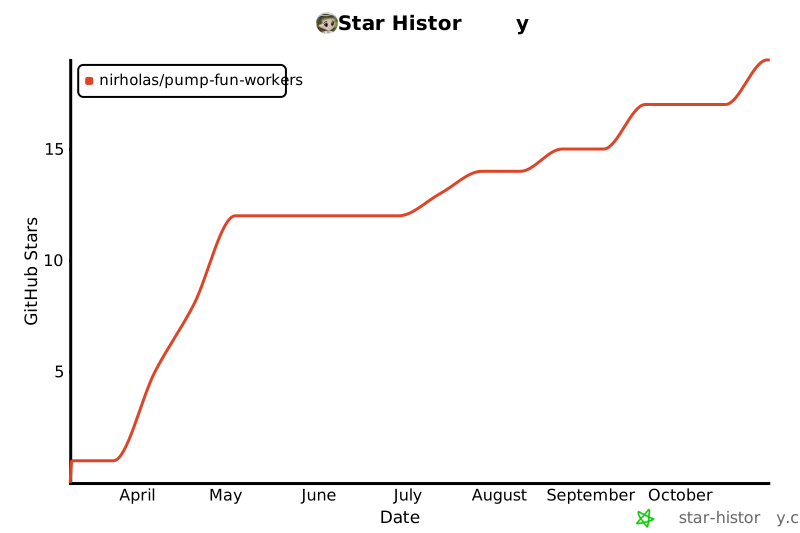
## Star History
[](https://www.star-history.com/#nirholas/pump-fun-workers&Date)
<!-- three.ws:growth -->
## Support the project
If pump-fun-workers saves you time, **[star it on GitHub](https://github.com/nirholas/pump-fun-workers)**. Stars are how other developers and AI agents find the repositories worth trusting, and they cost you one click.
Know someone who would use it? [Post on X](https://twitter.com/intent/tweet?text=pump-fun-workers%3A%20A%20Cloudflare%20Worker%20that%20implements%20the%20MCP%20Streamable%20HTTP%20transport%20for%20AI%20agents%20to%20interact&url=https%3A%2F%2Fgithub.com%2Fnirholas%2Fpump-fun-workers) · [Share on Bluesky](https://bsky.app/intent/compose?text=pump-fun-workers%3A%20A%20Cloudflare%20Worker%20that%20implements%20the%20MCP%20Streamable%20HTTP%20transport%20for%20AI%20agents%20to%20interact%20https%3A%2F%2Fgithub.com%2Fnirholas%2Fpump-fun-workers) · [Share on LinkedIn](https://www.linkedin.com/sharing/share-offsite/?url=https%3A%2F%2Fgithub.com%2Fnirholas%2Fpump-fun-workers) · [Submit to Hacker News](https://news.ycombinator.com/submitlink?u=https%3A%2F%2Fgithub.com%2Fnirholas%2Fpump-fun-workers&t=pump-fun-workers%3A%20A%20Cloudflare%20Worker%20that%20implements%20the%20MCP%20Streamable%20HTTP%20transport%20for%20AI%20agents%20to%20interact) · [Share on Reddit](https://www.reddit.com/submit?url=https%3A%2F%2Fgithub.com%2Fnirholas%2Fpump-fun-workers&title=pump-fun-workers%3A%20A%20Cloudflare%20Worker%20that%20implements%20the%20MCP%20Streamable%20HTTP%20transport%20for%20AI%20agents%20to%20interact)
## Built for AI agents too
Coding agents and LLM tooling can read this repo directly: [AGENTS.md](./AGENTS.md), [llms.txt](./llms.txt), [llms-full.txt](./llms-full.txt). Point an agent at `https://github.com/nirholas/pump-fun-workers` and it has the context it needs.
## More from the same author
- [All repositories by nirholas](https://github.com/nirholas/nirholas#readme): the full catalog, grouped by topic
- [three.ws](https://three.ws): the platform for 3D AI agents with Solana wallets, a skill marketplace and x402 payments
- Questions or ideas: [open an issue](https://github.com/nirholas/pump-fun-workers/issues) or [start a discussion](https://github.com/nirholas/pump-fun-workers/discussions)
## Contributors
[](https://github.com/nirholas/pump-fun-workers/graphs/contributors)
<!-- /three.ws:growth -->
This server cannot be deployed
Maintenance
ActivityMaintained
ResponsivenessNo issues