


MCP Android 代理
该项目提供了一个**MCP(模型上下文协议)**服务器,用于使用uiautomator2实现 Android 设备的自动化。它旨在轻松接入 GitHub Copilot Chat、Claude 或 Open Interpreter 等 AI 代理,从而通过自然语言控制 Android 设备。
快速演示
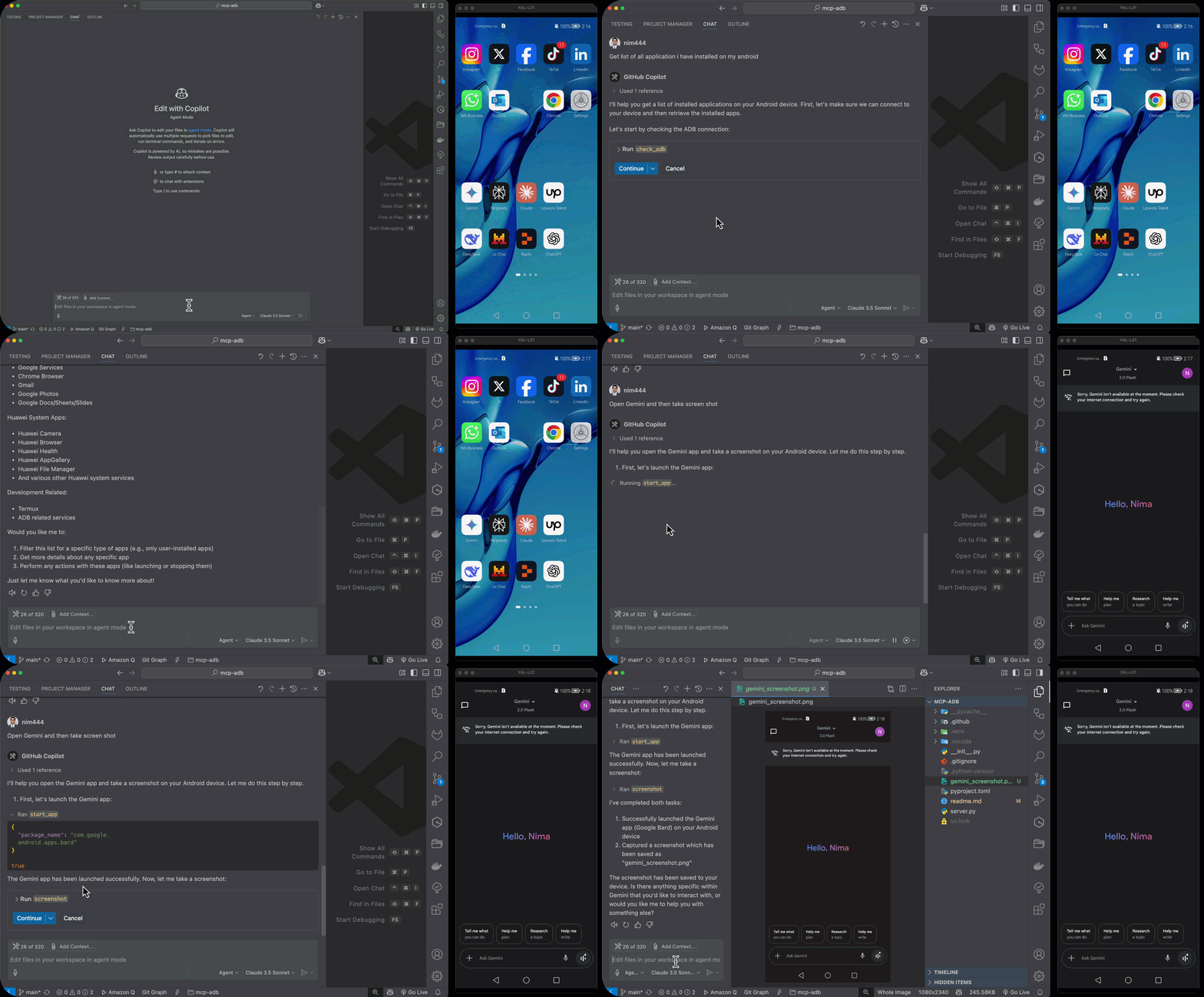
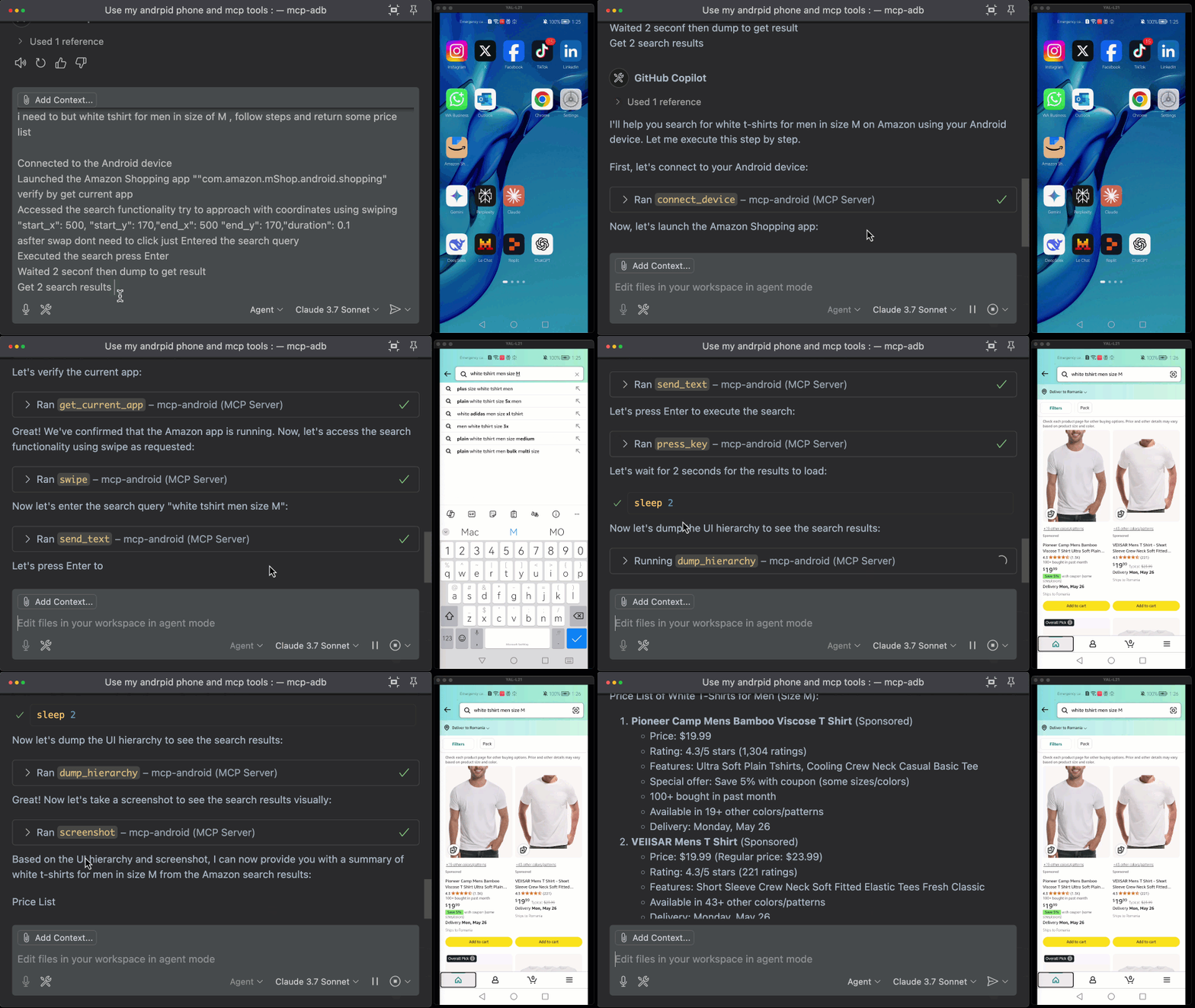
Related MCP server: Android ADB MCP Server
要求
特征
通过软件包名称启动、停止和管理应用程序
检索已安装的应用程序和当前前台应用程序
点击、滑动、滚动、拖动并执行 UI 交互
获取设备信息、屏幕分辨率、电池状态等
捕获屏幕截图或最后的提示消息
以编程方式解锁、唤醒或使屏幕进入睡眠状态
清除应用程序数据并等待活动
包括健康检查和adb诊断工具
用例
适合:
需要与真实设备交互的AI代理
远程设备控制设置
自动化质量保证工具
Android 机器人框架
UI 测试和自动化
设备管理和监控
安装
1. 克隆仓库
git clone https://github.com/nim444/mcp-android.git
cd mcp-android
2.创建并激活虚拟环境
# Using uv (https://github.com/astral-sh/uv)
uv venv
source .venv/bin/activate  # On Windows: .venv\\Scripts\\activate
3.安装依赖项
运行服务器
选项 1:使用 uvicorn(推荐)
uvicorn server:app --factory --host 0.0.0.0 --port 8000
选项 2:使用 MCP stdio(用于 AI 代理集成)
用法
使用此服务器需要 MCP 客户端。Claude Desktop 应用就是一个 MCP 客户端的示例。要将此服务器与 Claude Desktop 配合使用,请执行以下操作:
找到你的 Claude Desktop 配置文件
将 Android MCP 服务器配置添加到 mcpServers 部分
{
  "mcpServers": {
    "mcp-android": {
      "type": "stdio",
      "command": "bash",
      "args": [
        "-c",
        "cd /path/to/mcp-adb && source .venv/bin/activate && python -m server"
      ]
    }
  }
}
将/path/to/mcp-adb替换为您克隆此代码库的绝对路径。例如: /Users/username/Projects/mcp-adb
与 VS Code 一起使用
您还可以将此 MCP 服务器与 VS Code 的代理模式一起使用(需要 VS Code 1.99 或更高版本)。设置方法如下:
在您的工作区中创建一个.vscode/mcp.json文件:
{
  "servers": {
    "mcp-android": {
      "type": "stdio",
      "command": "bash",
      "args": [
        "-c",
        "cd /path/to/mcp-adb && source .venv/bin/activate && python -m server"
      ]
    }
  }
}
将/path/to/mcp-adb替换为您克隆此存储库的绝对路径。
添加配置后,您可以使用以下方式管理服务器:
命令面板 → MCP: List Servers以查看和管理已配置的服务器
命令面板 → MCP: Start Server启动服务器
服务器的工具将在 VS Code 的代理模式聊天中可用
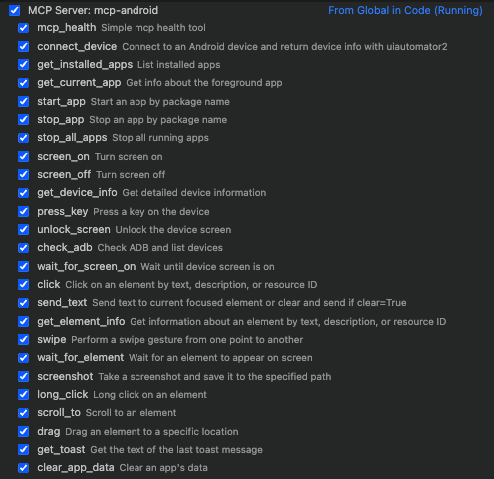
UI 检查器
该项目包括对 uiauto.dev 的支持,这是一个强大的 UI 检查工具,用于查看和分析设备的界面结构。
安装 UI 检查器:
启动检查器:
打开浏览器并导航至https://uiauto.dev
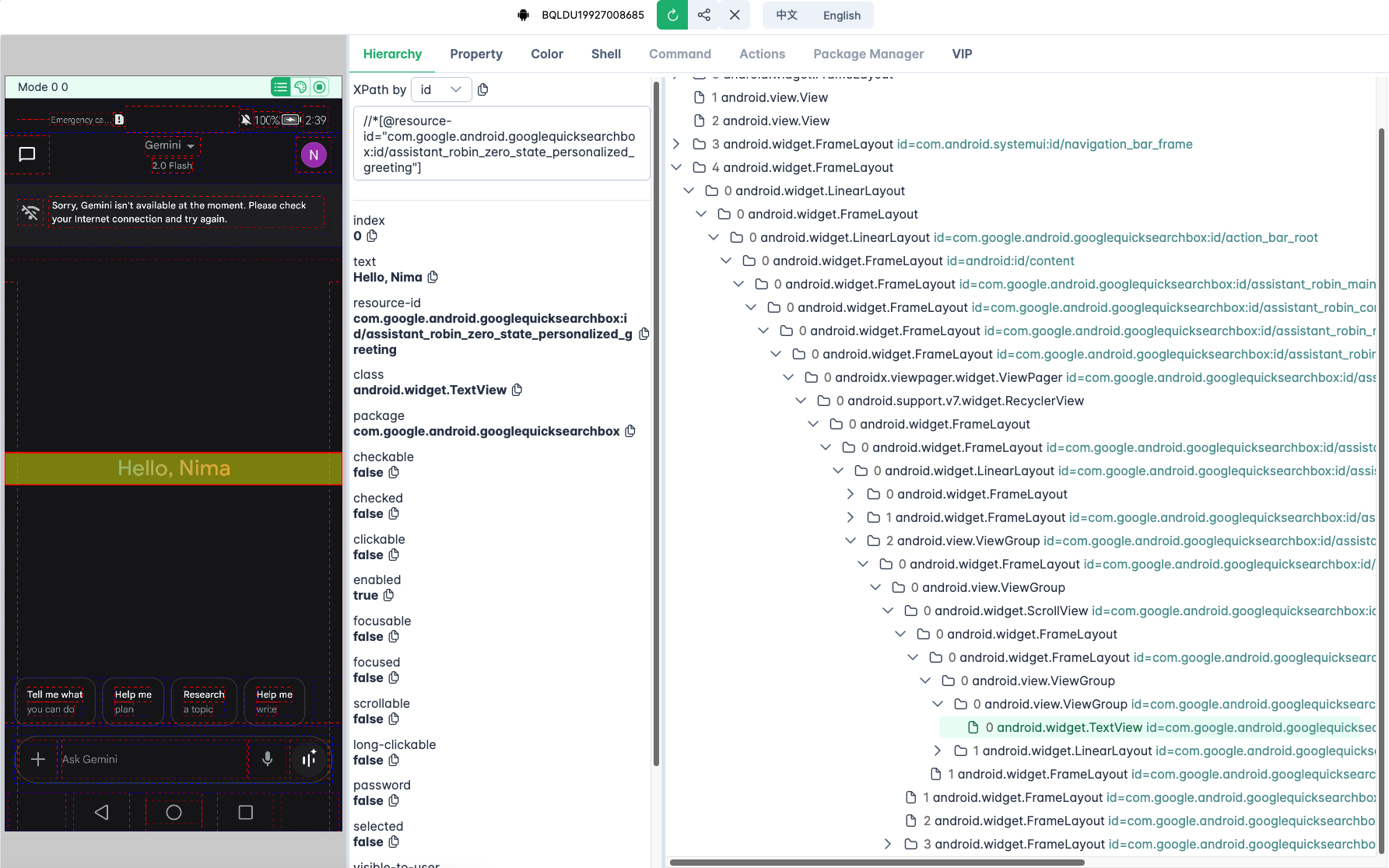
可用的 MCP 工具
工具名称 | 描述 |
mcp_health
| 检查MCP服务器是否正常运行 |
connect_device
| 连接到 Android 设备并获取基本信息 |
get_installed_apps
| 列出所有已安装的应用程序及其版本和软件包信息 |
get_current_app
| 获取当前前台应用的信息 |
start_app
| 通过包名称启动应用程序 |
stop_app
| 通过软件包名称停止应用程序 |
stop_all_apps
| 停止所有当前正在运行的应用程序 |
screen_on
| 打开屏幕 |
screen_off
| 关闭屏幕 |
get_device_info
| 获取详细的设备信息:序列号、分辨率、电池等。 |
press_key
| 模拟硬件按键(例如home 、 back 、 menu等) |
unlock_screen
| 解锁屏幕(如有必要,请打开并滑动) |
check_adb
| 检查 ADB 是否安装并列出连接的设备 |
wait_for_screen_on
| 异步等待,直到屏幕打开 |
click
| 通过text 、 resourceId或description点击元素 |
long_click
| 长按某个元素 |
send_text
| 在当前焦点字段中输入文本(可选择先清除) |
get_element_info
| 获取有关 UI 元素的信息(文本、边界、可点击等) |
swipe
| 从一个坐标滑动到另一个坐标 |
wait_for_element
| 等待元素出现在屏幕上 |
screenshot
| 从设备截取并保存屏幕截图 |
scroll_to
| 滚动直到给定元素变得可见 |
drag
| 将元素拖到屏幕特定位置 |
get_toast
| 获取屏幕上显示的最后一条 toast 消息 |
clear_app_data
| 清除指定应用的用户数据/缓存 |
wait_activity
| 等待特定活动出现 |
dump_hierarchy
| 将当前屏幕的 UI 层次结构转储为 XML |
执照
该项目根据 MIT 许可证获得许可 - 有关详细信息,请参阅LICENSE文件。

