
toolmenu
<p align="center">
<img src="https://raw.githubusercontent.com/niksa90/toolmenu/main/docs/logo.svg" width="120" height="120" alt="toolmenu logo: a plug with a list of tools, one checked">
</p>
<h1 align="center">toolmenu</h1>
<p align="center">
<b>Checks for MCP servers' tool lists: changes that confuse agents, break prompt caches or break clients, caught before your users hit them.</b>
</p>
<p align="center">
[](https://www.npmjs.com/package/toolmenu)
[](https://github.com/niksa90/toolmenu/actions/workflows/ci.yml)
[](https://github.com/niksa90/toolmenu/blob/main/LICENSE)
[](https://modelcontextprotocol.io)
[](https://github.com/niksa90/toolmenu)
</p>
Your MCP server's tool list is the menu every agent reads before it does anything.
toolmenu checks that menu the way clients and agents will meet it: across calls,
connections, clients and releases. No LLM is involved, so the same inputs always give
the same answer and it fits in CI.
```sh
npx toolmenu snapshot -- node dist/server.js # or: npx toolmenu snapshot https://example.com/mcp
npx toolmenu init -- node dist/server.js # CI: a baseline, a workflow, a comment on every PR
```
## What it catches
| | |
|---|---|
| **A menu that changes mid-session** | `session` calls your tools and watches the list. A tool added mid-conversation can rewrite the whole cached prompt: one unlock cost 40–57K tokens of cache in my logs. |
| **Breaking releases** | `diff` compares two menus: removed tools, new required parameters, narrowed types, token growth. It also says whether your version bump is big enough. |
| **The 2026-07-28 protocol** | The tool set must not vary per connection, and results need `resultType`. Elicitation, multi round-trip input and `server/discover` are checked too, as are the 2025 handshakes. |
| **MCP Apps, Tasks, Server Cards** | It reads `ui://` resources as a host does and checks who may see each tool. It catches tasks sent to clients that can't poll them, and Server Cards that contradict the live server. |
| **Your client's view** | `--client claude-code \| claude-api-search \| openai` shows what each client loads, cuts, can find and refuses. |
| **What agents misread** | It flags vague `id`s, IDs no tool returns, instructions buried late in descriptions, and writes without annotations or marked read-only. |
| **Menus that drift** | It catches defaults built from the clock or a hash order, menus that differ per process, per connection or offline, and listings that depend on who asks. |
Every finding says what's wrong, where it is and what toolmenu saw, and ends with a `→ Next:` step.
It runs on the 22-server [bench](bench/README.md) and on hosted servers (GitHub, Atlassian, Sentry,
Notion, Supabase, Vercel…). What it has found on real servers is in
[docs/FINDINGS.md](https://github.com/niksa90/toolmenu/blob/main/docs/FINDINGS.md).
> **Status: 0.25.** Spec in [docs/SPEC.md](https://github.com/niksa90/toolmenu/blob/main/docs/SPEC.md),
> every rule in [docs/RULES.md](docs/RULES.md), changes in [CHANGELOG.md](CHANGELOG.md).
<details>
<summary><b>Why "when it changes" matters</b></summary>
The MCP linters I found grade one snapshot of the menu: tool names, descriptions,
schemas. toolmenu also checks **when** the menu changes:
- **Mid-session.** Most clients put the tool list at the start of the prompt, so any
change to it, even a tool added at the end, means everything after it is processed
again. More on this, with a benchmark of the setups, in
[this write-up](https://niksa.me/agent-tools-design-lessons). `session` pins each
change to the step that caused it, and says where in the list it happened.
- **Per connection.** 2026-07-28 says the tool set **must not** vary per connection or
as a side effect of other requests (the 2025 versions allow it). Per-session
"unlock" designs, like the one I built, are ruled out. `session` tells you whether
yours is one of them. It also checks the menu clients will actually show: a broken
`x-mcp-header` or a `$ref` they can't resolve hides a tool or fails every call to
it. When a tool stops to ask the user something, `session` answers "no" and says
whether the tool can take it.
- **Between releases.** `diff` finds breaking changes and token growth, and checks the
version bump. `history` does it across a package's published releases. It installs
old versions with today's dependencies, so it records what they serve now
(FINDINGS F4).
Run against the reference server, `@modelcontextprotocol/server-everything`, it
reports no false findings ([bench/](bench/README.md)).
</details>
## Start here
Needs Node 22 or later. The GitHub Action brings its own if the runner's Node is older,
for toolmenu only: your server and the job's later steps keep the job's Node.
Your server can be in any language: toolmenu starts it (stdio) or connects to it (HTTP).
One command sets up CI: it snapshots your server into `menu.json` (the baseline) and
writes `.github/workflows/toolmenu.yml` for your project (Node, Python, Go or Rust).
Commit both, open a pull request, and toolmenu comments on it.
```sh
npx toolmenu init -- node dist/server.js # add --with-session to also run session --auto
```
Every value you pass with `--env` or `--header` goes into the workflow as
`${{ secrets.… }}`, never as text (a name like `DATABASE_URL` doesn't say it holds a
password); `init` says which secrets to add. It never overwrites a file.
Run it anywhere in the repository. `.github/workflows/toolmenu.yml` goes to the git
root, and the server starts in CI from the folder you ran `init` in, which is also
where `menu.json` is saved. That's how a monorepo package works: run `init` in
`packages/server`. Paths to files in the repository are made relative, so they work on
the runner. `init` lists anything that won't work there (a file outside the
repository, a `localhost` URL, a virtualenv the runner doesn't have), each with what
to do.
By hand:
```sh
npx toolmenu snapshot -- node dist/server.js # the menu, its findings, menu.json
npx toolmenu diff menu.json new-menu.json # what changed between two releases
npx toolmenu session --auto -- node dist/server.js # call read-only tools, watch the menu
```
HTTP servers work the same way: `npx toolmenu snapshot https://example.com/mcp --header "Authorization: Bearer $TOKEN"`.
Servers behind OAuth (most hosted ones: GitHub, Atlassian, Sentry…): log in once, in a
browser, and `snapshot` and `session` use that login from then on, refreshing it as
needed:
```sh
npx toolmenu auth login https://mcp.example.com/mcp
npx toolmenu snapshot https://mcp.example.com/mcp
```
Logins are stored per server in `~/.config/toolmenu/auth` (readable only by you);
`auth list` and `auth logout <url>` manage them. A server that doesn't allow
dynamic registration needs a pre-registered app: `--client-id` (and
`--client-secret`). Over SSH or in a container, `auth login --no-browser` prints the
login URL instead of opening it: open it on any device, sign in, and paste back the
address the browser ends on (a `localhost` page that doesn't load is expected). In
CI, where nobody can sign in, pass a token as a header.
Both protocol generations are supported: 2026-07-28 (`server/discover`, stateless)
and the 2025 `initialize` handshake, through the official TypeScript SDK.
Every finding and error says what's wrong, where, what toolmenu saw, and ends in a
`→ Next:` step. Findings marked `· unsure` are heuristics (names and words): they say
what was seen, not what it means. `toolmenu explain <rule>` says what a rule checks,
its default level and how to change it (every rule is in [docs/RULES.md](docs/RULES.md)).
Every command has its own help: `toolmenu history --help`.
Behind a proxy (`HTTPS_PROXY`), stdio servers get the proxy and CA settings
(`HTTPS_PROXY`, `NO_PROXY`, `NODE_EXTRA_CA_CERTS`, `SSL_CERT_FILE`, `REQUESTS_CA_BUNDLE`…)
along with the minimal environment, and `NODE_USE_ENV_PROXY=1` so a Node server's
`fetch` uses the proxy. Without them a server that calls an API can't reach it, and
fails as if it were broken.
### Every server you use: `scan`
```sh
npx toolmenu scan ~/Library/Application\ Support/Claude/claude_desktop_config.json
npx toolmenu scan .mcp.json --format markdown
```
`scan` runs `snapshot` on every server in an MCP client config (Claude Desktop, Claude
Code's `.mcp.json`, Cursor, VS Code: the `mcpServers` or `servers` object) or in a
text file with one server per line (a URL or a command, optionally `name<TAB>` first),
four at a time (`--concurrency`), and prints them side by side, then each server's
findings, like this:
```
server tools tokens findings
github 42 ~18K 1 error · 2 warn
filesystem 11 ~2.1K no findings
linear – – not checked: LINEAR_API_KEY is not set (the config refers to it)
```
`${VAR}`, `${VAR:-default}` and `${env:VAR}` in the config are filled from the
environment. A server whose variable isn't set isn't started with an empty
credential: it's a row that says so. A server that couldn't be started or read
makes the exit code 2, because it wasn't checked; one marked `disabled` is listed and
left alone. URLs are printed without their query, which can hold a key. Nothing is
written unless `--out-dir` names a folder for each server's menu file.
## For the agent building your server: `mcp`
`toolmenu mcp` is toolmenu as an MCP server (stdio), so Claude Code, Cursor or any
other client can check the server it's working on while it works. In Claude Code, as a
plugin (the server, and skills for checking a change, checking a release, and setting up CI):
```
/plugin marketplace add niksa90/toolmenu
/plugin install toolmenu@toolmenu
```
Or just the server, in any client: `claude mcp add toolmenu -- npx -y toolmenu mcp`, or
`{"command": "npx", "args": ["-y", "toolmenu", "mcp"]}` in an `mcpServers` config.
| Tool | Runs |
|---|---|
| `snapshot_menu` | `snapshot`: findings and token cost; writes the menu file only with `save_as` |
| `diff_menus` | `diff`: breaking changes, the token change and the version bump between two menu files |
| `check_session` | `session --auto`: calls the read-only tools and reports each menu change |
| `explain_rule` | `explain`: what a rule checks and how to change its level |
Each tool runs the CLI in a child process and returns its text report, so options,
`toolmenu.config.json` and stored OAuth logins work as they do on the command line.
Relative paths resolve from the folder `toolmenu mcp` runs in, or a call's `cwd`.
`snapshot_menu` and `check_session` start the command you give them, as the CLI does;
clients ask before each tool call unless you allow it. toolmenu's own menu passes its
checks with no findings, on both protocols and in a session (the test suite checks).
## In CI: one PR comment
```yaml
# .github/workflows/toolmenu.yml
on: pull_request
permissions:
contents: read
pull-requests: write
jobs:
toolmenu:
runs-on: ubuntu-latest
steps:
- uses: actions/checkout@v7
- uses: actions/setup-node@v7
with: { node-version: 22 }
- run: npm ci && npm run build
- uses: niksa90/toolmenu@v0.25.0
with:
command: node dist/server.js
baseline: menu.json # your committed snapshot
scenario: scenario.yml # optional: run a session too
```
It snapshots the PR's build, diffs it against the baseline as it is on the PR's base
branch (or at the previous tag, on a tag push), runs the scenario, and
posts **one comment that updates on every push**: breaking changes, the token change
("this PR adds ~1,240 tokens to every conversation"), the suggested version bump,
and anything `session` caught. The same report goes to the job summary.
| Input | Default | |
|---|---|---|
| `command` or `url` | | How to start the server over stdio, or its Streamable HTTP endpoint |
| `headers` | | HTTP headers for a `url` server, one `Name: value` per line. Use a secret for keys: `x-api-key: ${{ secrets.MCP_API_KEY }}` |
| `env` | | Environment variables for a `command` server, one `KEY=value` per line |
| `baseline` | `menu.json` | The committed snapshot to diff against |
| `scenario` | | A scenario to run with `session`, or `auto` to build the steps from the menu |
| `catalog` | `false` | `true` also diffs the operations behind a search tool (`snapshot --catalog`) |
| `baseline-from` | `snapshot` | `session` diffs every tool the scenario saw (the union menu), for servers whose tools appear after an unlock |
| `release` | `auto` | Release versions for the bump check. `auto` reads `package.json`, `pyproject.toml` or `Cargo.toml` on the base branch and the head, or compares the tag with the previous one on a tag push. Set `"1.4.0..1.5.0"` yourself, or `off` |
| `fail-on` | `error` | Fail the job on findings at or above this level |
| `comment` | `true` | Post and update the PR comment |
| `sarif` | | A folder to also write the findings to as SARIF, for code scanning (below) |
| `version` | the Action's own | toolmenu version from npm: by default the one matching the Action tag you pinned (`latest` for the newest). The Action installs toolmenu from npm, so it needs a published version |
### In the Security tab: code scanning
With `sarif`, findings also go to GitHub code scanning: alerts in the Security tab,
each on the line of its tool in your `menu.json`, and a code scanning check on the pull
request. GitHub shows an alert inline in the pull request only when that line changed in
it, so most stay in the Security tab and the check. Run the workflow on pushes to your
default branch too, so GitHub has a base to compare a pull request's alerts with. Code scanning is free for public repositories; private ones need GitHub Advanced
Security.
```yaml
on:
pull_request:
push:
branches: [main] # the base GitHub compares a pull request's alerts with
permissions:
contents: read
pull-requests: write
security-events: write # to upload SARIF
steps:
# … checkout, build, as above
- uses: niksa90/toolmenu@v0.25.0
with:
command: node dist/server.js
sarif: toolmenu-sarif
- uses: github/codeql-action/upload-sarif@v4
if: always() # findings fail the toolmenu step; upload them anyway
with:
sarif_file: toolmenu-sarif
```
Outside the Action: `toolmenu snapshot --sarif toolmenu.sarif -- node dist/server.js`
writes the file beside the usual report (`diff` and `session` take `--sarif` too), or
`--format sarif` prints it instead.
### A badge for your README
```sh
npx toolmenu snapshot --badge toolmenu-badge.json -- node dist/server.js
```
writes a [shields.io endpoint](https://shields.io/badges/endpoint-badge) file (tools,
tokens, and errors or warnings, in red, yellow or green) and prints the README line
for it. Commit it with `menu.json`: it changes when the baseline does, so nothing
has to commit from CI. The badge at the top of this README is toolmenu's own MCP
server (`toolmenu mcp`), checked by itself.
Server behind auth, or PRs from forks and Dependabot? See [docs/github-action.md](https://github.com/niksa90/toolmenu/blob/main/docs/github-action.md).
Server that unlocks tools on request? Snapshot the full menu for the baseline and run the session on the default one: [servers that unlock tools](https://github.com/niksa90/toolmenu/blob/main/docs/github-action.md#servers-that-unlock-tools).
PRs without secrets are skipped, and a skipped check still passes; the `skipped` output tells you.
## `session`: the menu changing while the agent works
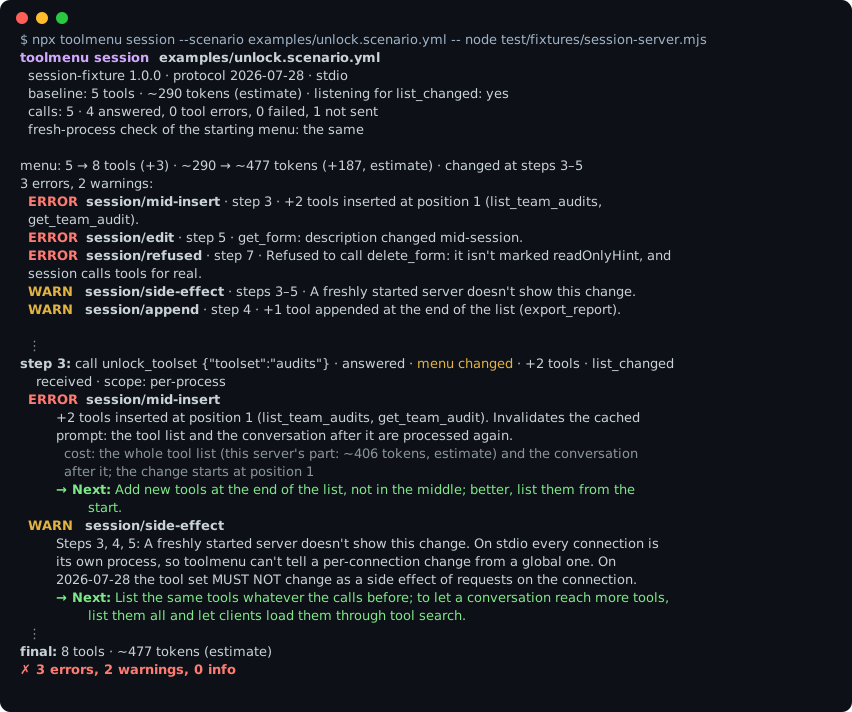
`session` runs a scripted session (the scenario *is* the agent), lists the menu
after every step, and reports each change with the step that caused it.
```yaml
# scenario.yml
allow_writes: false # refuse to call tools not marked readOnlyHint
steps:
- list
- call: search_forms
args: { query: onboarding }
- call: unlock_toolset
args: { toolset: audits }
- wait_for: tools_list_changed # optional; timeout_ms defaults to 5000
```
`--init` writes a starter scenario from the live menu: it calls every read-only tool
that needs no arguments, then repeats one. If a tool looks like it unlocks more tools
(a `domains` or `toolset` parameter with an enum, "unlock" or "capabilities" in its
name, a description that says it enables or loads tools), the starter unlocks
**every** value, listing after each, then repeats the first, so the session sees every
tool behind the unlock. The values come from the parameter's enum or, without one,
from the server's own read-only listing (`list_toolsets`). Lookups that only describe
toolsets (`list_toolsets`, `get_toolset_tools`) aren't unlocks, and one not marked
read-only is suggested, never called. Anything it can't fill in is left as a
commented-out step. An unlock nothing in the menu names, like joining a room that
brings more tools, needs a step you add yourself. A scenario is only as good as its
steps, so the starter is a floor, not a ceiling.
On github-mcp-server 1.0.5 with `--dynamic-toolsets` (3 tools at the start, 19
toolsets), unlocking every toolset reaches 107 tools: all 81 that `--toolsets all`
serves, and 23 issue and pull-request tools that only the dynamic mode has.
| Rule | Default | Catches |
|---|---|---|
| `session/mid-insert`, `session/reorder`, `session/remove`, `session/edit` | error | The menu changing mid-session anywhere but the end, with where the change starts and which value changed. Any change to the tool list invalidates the cached prompt: the whole tool list (its size, estimated) and the conversation after it are processed again |
| `session/append` | warn | Tools added at the end of the list. Still a cache miss for the conversation when your client sends tools at the start of the prompt (Claude's Messages API does); cache-safe only when the client adds new tools after the cached content, as tool search (deferred loading) does |
| `session/connection-local` | error on 2026-07-28 (HTTP) | A change only this connection sees. 2026-07-28: the tool set MUST NOT vary "per-connection or as a side effect of other requests on the connection" |
| `session/side-effect` | warn on 2026-07-28 (stdio) | The same, where stdio can't tell per-connection from global |
| `menu/process-variance`, `menu/connection-variance` | error | Checked before the first step, as in `snapshot` (below) |
| `session/unannounced` | warn | The menu changed without `notifications/tools/list_changed`, although the server declared `listChanged` |
| `session/untested` | warn, error if no call got through | Calls that failed before reaching the tool: authentication, something missing on this machine (no Chrome), the network. One finding for the run, not one per step, so an expired CI secret doesn't pass a run that tested nothing |
| `session/refused`, `session/step-failed` | error | A write the scenario didn't allow, or a call that failed for another reason |
| `session/tool-error` | warn | A tool that answered with an error for another reason (`isError`): the run tested less than it looks. The same error at several steps is one finding that names them |
| `session/known-variance` | info | A mid-session change only in values that already vary from one tools/list to the next: same cause as the finding it names, not counted again |
| `session/assumed-read-only` | info | Tools called on your word (`--assume-read-only`, `assume_read_only`) although the server doesn't mark them readOnlyHint |
| `session/unlock-coverage` | warn | An unlock whose enum lists its values, called with only some of them: the tools behind the rest were never seen, so a baseline from the session misses them. With `--union-out` or `--auto`, an unlock never called at all too, with why `--auto` skipped it |
| `session/nothing-called` | warn | `--auto` called no tools (all open-world, missing values, or not read-only): the run only listed the menu |
| `session/session-lost` | error | The server ended the session after toolmenu opened a second connection with the same credentials (servers with one session per client; 2025-era servers only). The run stops there; rerun with `--processes 1` |
| `session/handle-error` | warn | 2026-07-28: `--auto` called a read-only tool with a handle that can't exist (`toolmenu-unknown-session`), and it answered with a protocol error instead of a tool error the model can read |
| `session/error-not-flagged` | warn | A tool answered with an HTTP error from the API behind it (`{"status":401,"object":"error",…}`) as a plain result, not marked `isError`, so a client that reads `isError` takes the call for a success (Notion's server). An auth one also counts toward `session/untested`. Tools that take a URL are left out: their answer is the page's (heuristic) |
| `session/server-unresponsive` | error | The server stopped answering after a step: even `tools/list` timed out. The run stops there with this one finding, instead of every later step waiting out its timeout (a server that polls a device-code sign-in inside a tool call) |
| `session/handle-roundtrip` | warn | With `--create-handles`: the tool that creates a session, basket or cart was called, and the tools that take it back refused the handle it had just returned (info when its result had no handle to find) |
| `session/rate-limited` | error | The server kept refusing requests for being too many (a 429) after toolmenu waited about a minute, or a tool not marked `readOnlyHint` said it was rate-limited (it isn't called again). The run stops there, with the steps it didn't check; give the run its own server instance or raise the limit for it |
| `session/scope-unchecked` | info | A second server process or connection couldn't start mid-session (a server that holds a file or a port), so whether a change was global wasn't checked. Said once for the run |
**No scenario? `session --auto`** builds the steps from the menu: every read-only tool
whose required arguments the schema itself gives (a `default`, `examples`, an `enum`,
a type or format), cheapest first, then every value of each read-only unlock (outside
`--max-calls`, and the first value twice: a second identical unlock should change
nothing), then the first call again. It never guesses an ID: a tool that needs
`owner`, `repo` or an issue key is skipped, and the report names the flag that fills
it: `--value repo_path=/src/app` fills that parameter on every tool that requires it,
`--value get_issue.issue_key=ABC-1` on one tool, `--values-file values.yml` takes a map
of either. Servers that don't mark their tools `readOnlyHint` (DeepWiki, every
2024-11-05 server) get nothing called unless you vouch for them by name:
`--assume-read-only read_wiki_structure,ask_wiki_question`. Only exact names are
accepted: a pattern would also cover tools a later release adds. A tool marked or
named as a write is never called, and the report says which tools ran on your word.
With `--create-handles` on 2026-07-28, `--auto` also calls the tool that creates a
session, basket or cart (`start_session`; a write, so only with the flag, and never
one marked `destructiveHint`; not locks, leases or checkouts) and gives the tools that
take it back the handle it returned, beside the made-up one.
`--save-scenario auto.yml` writes the steps, with the skipped tools commented out, for
you to fill in. Tools marked `openWorldHint: true` (web
search, fetch, scraping, which can cost API credits) are called only with
`--open-world`, except unlocks: changing the menu is what a session watches, and an
unlock spends no search credits, so it runs even on a server that marks every tool
open-world. A run that ends up calling nothing is `session/nothing-called` (warn),
with why each tool was left out, not a clean pass. On the 22 servers in `bench/`,
`--auto` reaches 60 of 262 read-only tools, 84 with `--open-world`.
**`session` calls tools for real.** Without `allow_writes: true` it refuses any tool
not marked `readOnlyHint: true`. `--plan` prints the steps without connecting.
## `diff`: compare releases
```sh
npx toolmenu diff menu.json new-menu.json
```
```
$ npx toolmenu diff --release 2026.1.14..2026.8.31 fs-2026.1.14.json fs-2026.8.31.json
toolmenu diff secure-filesystem-server 2026.1.14 → 2026.8.31
changes 1 breaking (1 tool) · 0 minor · 3 notice (13 tools)
version suggested bump: major · not checked (calendar version)
tokens ~1,640 → ~1,664 (+24, estimate): this release adds ~24 tokens to every conversation that loads the menu
tools 14 → 14
ERROR diff/safety-hint
`move_file` was marked additive-only and is now destructive (destructiveHint false → true; unset means destructive). Clients that auto-approve additive tools may now ask first.
→ Next: If the tool still never deletes or overwrites, set destructiveHint: false; if it does now, say so in the release notes.
INFO diff/annotations
Annotations changed the same way (openWorldHint (unset) → false) in 13 of 14 tools: read_file, read_text_file, read_media_file, read_multiple_files, write_file, edit_file, … (+7).
…
```
That's two real releases of the official filesystem server. Its calendar versions
promise nothing about compatibility, so the bump isn't judged, but the breaking change
is still an error. Changes are classified
the way OpenAPI breaking-change checkers do it:
| Class | Changes | Rules |
|---|---|---|
| **breaking** (error) | tool removed or renamed, parameter removed, new required parameter, narrower or different type, enum narrowed, unlisted properties now rejected (`additionalProperties: false` added), a tool becoming less safe (no longer read-only, or additive → destructive); with `--lists` on both sides, a prompt removed or newly requiring an argument, a resource template removed | `diff/tool-removed`, `diff/tool-renamed`, `diff/param-removed`, `diff/param-required`, `diff/param-type`, `diff/enum-narrowed`, `diff/properties-closed`, `diff/safety-hint`, `diff/prompt-removed`, `diff/prompt-argument-required`, `diff/resource-template-removed` |
| **minor** (info) | tool added, new optional parameter, parameter now optional, type or enum widened, unlisted properties now accepted (`additionalProperties: false` removed), a prompt or resource template added | `diff/tool-added`, `diff/param-added`, `diff/param-relaxed`, `diff/type-widened`, `diff/enum-widened`, `diff/properties-opened`, `diff/prompt-added`, `diff/resource-template-added` |
| **notice** (info) | optional parameter dropped (extra properties still allowed), description changed (with the text diff: it changes what the agent does), output schema, annotations, other fields, order, a schema restructured but accepting the same input, only the declared `$schema` dialect changed, a prompt's description or optional arguments, resources added or gone (data, so no bump) | `diff/param-dropped`, `diff/description`, `diff/schema-other`, `diff/annotations`, `diff/other`, `diff/order`, `diff/schema-equivalent`, `diff/schema-dialect`, `diff/prompt-changed`, `diff/resources` |
The same rules apply inside parameters: fields of an object parameter, array items,
and the options of an `anyOf`/`oneOf` union (zod's unions, discriminated unions and
`.nullable()`) are compared at every depth, with their path (`gen.body.text`,
`search.filters[].field`, `gen.block(kind="image").url`). Union options are paired by
the value of a discriminator they all fix; without one (a plain `z.union` of objects),
identical options first, so a reorder is no change, then by type and shared property
names. An option gone is breaking, a new one widens. The same change reached through
one shared definition at several places is one finding that lists them (`places` in
`--json`). Local `$ref`s (`#/$defs/…`, `#/definitions/…`) are expanded first,
recursive ones one level deep, so a schema is compared by what it accepts, not how
it's spelled: moving a repeated block into `$defs` is one `diff/schema-equivalent`
notice with its token change ("accepts the same input: ~899 tokens fewer"), and a
breaking change inside `$defs` is breaking. A schema change no rule classifies is
never silent: it's a `diff/schema-other` "review it".
On mongodb-mcp-server 2.1.2 → 3.0.0 this finds `aggregate.pipeline[]…$vectorSearch.numCandidates`
and `.limit` narrowed from `number` to `integer` inside a union, where the whole
`pipeline` used to be one "review it".
Different spellings of the same schema are one schema (`additionalProperties` absent,
`true` or `{}`; zod 4's safe-integer bounds), and a change every tool shares is said
once for the menu: a server moving from zod 3 to zod 4 reads as its real changes (a
field that became required, the patterns zod 4 adds to `email` and `uuid`) plus one
`diff/properties-opened` line ("27 tools now accept properties they don't list … most
likely a schema generator upgrade"), not a "review it" per object.
The same change in many tools is reported once, with the tools it touches (`pageId`
is new and required in 25 of 29 tools, on chrome-devtools-mcp 1.8.0); counts are per
change. When a tool loses a parameter and gains a required one with a close name,
`diff/param-renamed` (warn, unsure) points out the likely rename; both changes stay
breaking. Every breaking finding's next step names the version to release when the
bump is too small.
It also reports the token change per tool and suggests a semver bump. To check the
bump, pass the **release** versions: `--release 1.4.0..1.5.0` (npm, a git tag).
`diff/version-bump` then warns when the release's bump is smaller. Under 1.0.0 it
reads versions as npm's caret does (`^0.2.3` accepts any 0.2.x): breaking changes need
a minor bump, new features a patch, and under 0.1.0 anything goes.
`diff/version-backwards` warns when the version goes down. Calendar versions and prereleases aren't judged. The version in the snapshot is what the
server reports (`serverInfo.version`), which is often not the release: the filesystem
server has said `0.2.0` for 19 releases (FINDINGS F5). It's shown, and only checked
with `--server-version-is-release`. `diff` also enforces an optional `tokenBudget`
(`diff/token-budget`). Order changes are only a notice here: between releases, prompt caches rebuild. Order
matters *within* a session.
### Operations behind a search tool (`--catalog`)
Big servers increasingly keep most operations out of the menu: a small fixed menu, a
search tool, and an execute tool (Sentry's `search_sentry_tools` + `execute_sentry_tool`,
Atlassian's `discover` + `executeRead`). A breaking change to one of those operations
never shows in the menu. `snapshot --catalog` asks the search tool a fixed set of
queries and keeps the operations it returns in `menu.json`; `diff` then compares
operations found in both snapshots with the same rules as tools.
```sh
npx toolmenu snapshot --catalog -- node dist/server.js
```
A search returns only its top matches, so toolmenu crawls the catalog by its own
words: it starts from the search tool's own example phrases and the nouns in your tool
names, then searches for every operation it finds or sees mentioned, until 20 queries
in a row turn up nothing new (at most 200). On Atlassian's hosted server that finds all
154 operations behind its 21 tools; on Sentry's, 65 behind 9, the same on every run.
Queries are paced and a rate limit is waited out. An operation not found this time is a
notice (`diff/catalog-missing`: "not returned by the same queries"), never "removed";
one found only now is `diff/catalog-added`, and catalogs read with different queries,
or partly (a query failed), are `diff/catalog-queries`. To steer it, set
`"catalog": { "queries": [...], "maxQueries": 200, "crawl": true }` in
`toolmenu.config.json` (FINDINGS F15).
A crawl through search is a lower bound, not a proof: an operation that nothing in the
catalog names, and whose words no query uses, stays unfound. On `@sentry/mcp-server`
0.42 (stdio) it finds 63 of the 64 operations in the package's catalog; `whoami` comes
back only when asked for by name. Add queries like that to `catalog.queries`.
**Command routers.** Some servers put their operations behind router tools instead:
one tool per area that takes a `command` and its `parameters`, and lists its commands
when called with `learn: true` (Azure's MCP server serves 71 such tools in front of
~410 operations). `--catalog` detects them (a `command` parameter, an arguments
object, a boolean listing flag, and a description that says "router" or "sub
commands") and calls each once in its listing mode, never with a command, so nothing
runs. Routers whose command is required aren't called. Detection missed one? Name
them: `"catalog": { "routers": ["keyvault", "storage"] }`. A router lists everything
it has, so unlike a search the catalog is complete except for routers that failed
(`catalog/failed` says which, and why).
## `history`: a package's releases, researched
```sh
npx toolmenu history @modelcontextprotocol/server-filesystem --versions 19 --arg /tmp --csv fs.csv
```
It installs each published version into a temp directory (install scripts off),
snapshots it, and diffs it against the previous version that worked. For every
version it records the protocol, the menu, the findings and the **dependency
versions that actually got installed**: an old version installed today resolves its
dependencies today, and can serve a different menu than it shipped with.
It's best effort: packages that need env vars, arguments or auth are recorded as
failed, with a reason, never skipped. **It installs and runs third-party code. Run it
in a container.**
## Where the tokens go
`snapshot` also shows what the menu's tokens are spent on: the biggest tools (split
into description and schema), large enums, and waste you can remove:
- **Repeated blocks**: the same piece of schema at several places, inside one tool (a
`$defs` entry could hold it once: "one ~230-token block ×5 in
content_generateMessageHtml") or across tools (paid once per tool: mongodb-mcp-server
3.0.4 repeats a ~2,200-token `pipeline` schema in 3 tools). Only the largest repeated
block is named, not the pieces inside it.
- **Unused `$defs`**: definitions nothing in the tool refers to. Notion's server 2.5.2
ships the same 9 in all 24 tools, 72% of its menu.
Every tool's estimate is in the menu file, for the ones the summary leaves out:
`jq -r '.tools[] | "\(.tokens)\t\(.name)"' menu.json | sort -rn`.
## `snapshot` rules
Every rule comes from a failure I actually hit building 115 tools for one MCP
server, or from the spec itself. If a rule can't point to one, it doesn't ship.
| Rule | Default | Catches |
|---|---|---|
| `menu/nondeterministic` | error | Two identical `tools/list` calls returning different menus (order, descriptions, schemas, annotations), with the value that differs |
| `menu/process-variance` | error | A second server process, started the same way, serves a different menu, so every restart misses the cache. Seen on mcp-atlassian: a default built from a Python set, in a new order every start (FINDINGS F12). toolmenu runs the main process with `PYTHONHASHSEED=0`, so a Python server's saved menu is reproducible, and the second with another seed. `--processes 1` turns it off |
| `menu/connection-variance` | error (warn on 2025 protocols) | The same over HTTP: a second connection with the same credentials gets a different menu. Retried once before reporting |
| `spec/schema` | error | A `tools/list` result that fails the official schema for its protocol version |
| `spec/tools-capability` | error | The server doesn't declare the `tools` capability, so clients (the official SDK included) never ask for its tools |
| `menu/duplicate-name` | error | Two tools with the same name: only one can be called, and some clients reject the list |
| `naming/route` | error | A `routes.yml` expectation broke: a keyword now matches the wrong tool at least as well as the right one |
| `description/buried` | warn | Instructions to the agent ("use X instead", "don't retry", "never guess one") past the point where your client cuts descriptions: in Claude Code 16,384 characters for a tool loaded through tool search (its default) and 4,096 for one that loads up front, or your `descriptionLimit`. From a real failure: a client cut at 280 characters, and the line that decided routing was at 1,222 |
| `description/cut` | info | Descriptions longer than the client sends, with nothing that reads as an instruction past the cut, as one summary that shows where each one is cut. The model gets a prefix that can read as complete |
| `description/late-instruction` | info | With the default cut: instructions after character 280, which a client that cuts descriptions short would hide, as one summary. Set `descriptionLimit` and `description/buried` checks your real cut instead. (Before 0.13 this was part of `description/cut`; that id's setting still applies.) |
| `naming/vague-id` | warn | Parameters called just `id` that don't say *which* thing, as one summary with a suggested name |
| `ids/authored` | info | An ID the agent must supply that no tool appears to return, so the agent may invent it, one finding per kind of ID (heuristic: IDs from a URL or another tool's text output look the same) |
| `ids/handle-lifetime` | info | 2026-07-28: a tool that creates a handle another tool takes back (`start_session` → `session_id`) doesn't say how long it lasts (heuristic) |
| `write/unannotated` | warn | Tools named like writes (`delete_`, `send_`…) with no annotations, as one summary grouped by the annotation each name suggests |
| `naming/shared-word` | info | Nouns that name different things across tools (`list_team_audits` vs `get_audit_trail`), as one summary |
| `write/read-only-mismatch` | warn | A tool marked `readOnlyHint: true` whose name says it writes (`create_my_account`): clients act on the hint, and `--auto` doesn't call it on the hint alone (heuristic) |
| `write/no-dry-run` | info | Destructive tools with no dry-run parameter or preview tool, as one summary |
| `spec/discover` | info | The server only speaks the 2025 protocol, so 2026-07-28 rules are skipped |
| `spec/deprecated`, `spec/cache-hints` | info | 2026-07-28: deprecated features still advertised; `ttlMs: 0`, or `cacheScope: "public"` on a server that took credentials |
| `lists/variance` | warn | With `--lists`: `prompts/list`, `resources/list` or `resources/templates/list` differs between two calls, or from a second process or connection (2026-07-28: lists no longer vary per connection) |
| `lists/schema` | error | With `--lists`: a list result that doesn't match the official schema (2026-07-28 requires `ttlMs` and `cacheScope` on each), or a declared list that fails to answer (warn; info for Method not found, or a setup failure such as missing credentials) |
| `naming/client-name` | warn | With `--client`: tool names the client's API refuses: `^[a-zA-Z0-9_-]{1,128}$` for the Claude API, `^[a-zA-Z0-9_-]+$` up to 128 for OpenAI's functions. MCP allows names such as `files.read` that neither takes as they are |
| `menu/auth-variance` | info | With `--as` (or `identities` in the config): the tool set differs by identity, what each adds, lacks or defines differently against the first, and its tokens. Allowed by the spec; a baseline of one identity's menu doesn't cover the others. An identity that can't be listed is said here too |
| `spec/cache-scope-public` | warn | 2026-07-28, with `--as`: the tool set differs by identity, and `tools/list` says `cacheScope: "public"`, which lets shared caches serve one caller's list to another |
| `menu/capability-dependent` | info | Tools a server lists only to a client that supports elicitation, or only to one that doesn't. `snapshot` lists as a client with elicitation, so the menu file holds those tools (github-mcp-server 1.14 lists `delete_repository` only to a client that can ask the user to confirm; before 0.22 a baseline missed it), and once more without |
| `menu/network-dependent` | warn | With `--offline-check` (stdio): the menu listed once more with the network cut off (the proxy variables pointed at a closed port, loopback left alone) differs: inite-visibility serves 3 tools offline and 10 online, so a baseline made with the network doesn't match a machine without it. A server that doesn't start offline is info. A server that ignores the proxy variables still reaches the network where the machine has it directly; then nothing is reported, which isn't a pass |
| `auth/invalid-accepted` | warn | HTTP with credentials: the menu listed once more with an invalid credential in the same scheme. A server that serves a menu to it, not 401, gives a client whose token expired no reason to log in again; the agent just has fewer tools (Atlassian Rovo served 4 tools to any `Authorization` header). `--processes 1` turns it off |
The full list, `diff` and `session` rules included, is [docs/RULES.md](docs/RULES.md).
The naming and ID rules are heuristics, tuned on real servers (FINDINGS F7 and
F10) and a private 115-tool one. They're the extras; the change checks are the point.
**Pin routing with `routes.yml`.** Two tools fighting over one word needs a regression
test, not a rename you'll forget:
```yaml
audit:
must_match: [list_team_audits]
must_not_match: [get_audit_trail]
audit trail:
must_not_match: [get_store_scores] # on its own: must not match at all
```
Matching is keyword matching, the way a keyword or BM25 tool search sees the menu: a
tool matches if every word of the route is in its name or description (the exact
phrase scores higher). It can't read "not", and neither can those searches: a
disclaimer like "not the audit trail" puts "audit trail" into exactly the tool you
meant to steer away from, and toolmenu says so.
**Config** (optional `toolmenu.config.json`):
```json
{
"rules": { "naming/shared-word": "off", "ids/authored": "error" },
"ignore": ["debug_*"],
"routes": "routes.yml",
"tokenBudget": 4000,
"descriptionLimit": "claude-code",
"fullDescriptions": ["search_capabilities", "lookup_*"],
"offlineCheck": true
}
```
`offlineCheck` turns on `--offline-check` for every `snapshot` of a stdio server.
`descriptionLimit` is where your client cuts tool descriptions: a number, or a client
whose cut has been reported: `"claude-code"` (the default: Claude Code's own docs,
[code.claude.com/docs/en/mcp](https://code.claude.com/docs/en/mcp), read 2026-11-02:
16,384 characters for a tool loaded through tool search, which is on by default, and
4,096 for a tool that loads up front, marked `_meta["anthropic/alwaysLoad"]: true`;
the cut was 2,048 before v2.1.296), `"claude-code-upfront"` (4,096 for every tool:
Claude Code with tool search off) or
`"amazon-q"` (10,024, reported in
[makenotion/notion-mcp-server#145](https://github.com/makenotion/notion-mcp-server/issues/145)).
Clients that send descriptions in full don't need a setting beyond that. If your own
client cuts shorter, as mine did at 280, set its number. `fullDescriptions` lists the
tools it sends uncut, so the description rules skip them.
### Checking for one client (`--client`)
What an agent sees depends on its client. `snapshot --client <name>` (or `"client"` in the
config) checks the menu against what that client's own docs say, and every value
toolmenu uses names its source and the date it was read (`src/clients.ts`). What a
client doesn't document is left out, not guessed.
| `--client` | Up front | Search | Description cut | Names |
|---|---|---|---|---|
| `claude-code` | tool names; full definitions for tools marked `_meta["anthropic/alwaysLoad"]` | reads a description up to 4,096 characters | 16,384 through search, 4,096 up front | Claude API's |
| `claude-api-search` | nothing from tools you defer (keep the 3–5 used most loaded) | name, description, argument names and descriptions; 5 results by default | none documented | `^[a-zA-Z0-9_-]{1,128}$` |
| `openai` | each deferred function's name and description (its schema loads on demand); a deferred MCP server shows only its own name and description | how many results, and which fields, isn't documented, so `search/findable` doesn't run | none documented | `^[a-zA-Z0-9_-]+$`, up to 128 |
The snapshot adds a line such as `as Claude Code: up front ~524 tokens · on demand ~344
per tool a search loads (largest: update_contacts, ~2,093)`, and `--json` a `client`
object. With a client that defers tools, `search/findable` runs at any menu size.
## What toolmenu can't catch
toolmenu sees what the server sends. Plenty of agent failures happen elsewhere:
- **Routing to a feature with no tools.** If the agent reaches for something your
menu doesn't have, no menu check can see the gap.
- **What the client does with the menu.** Truncating descriptions, sorting or
filtering tools, merging several servers. The description rules use Claude Code's
reported cut unless you set yours (`descriptionLimit`); they can't see your client.
- **Your code and your logs.** A capability check that's answered with one yes/no
for two different behaviours, or a log line that reads the same whether something
happened or not. Those live in the client or the server's code.
- **Whether the agent actually picks the right tool.** That needs evals with a model.
toolmenu stays deterministic on purpose.
## Options
```
--out <path> where to write the menu (default: menu.json)
--no-write don't write the menu file
--routes <path> routes.yml
--config <path> config file (default: toolmenu.config.json, if present)
--format <fmt> text (default), json, github (annotations) or markdown
--fail-on <level> error (default), warn or info
--header <k: v> HTTP header, repeatable
--env <K=V> env var for a stdio server, repeatable (it only gets a
minimal environment otherwise)
--timeout <ms> per-request timeout (default: 30000)
--protocol <p> auto (default), legacy (2025 handshake only) or modern
(2026-07-28 only; an error if the server lacks it)
--processes <n> server processes or connections to compare (default: 2);
1 opens no second one, session's scope check included
--lists <kinds> snapshot: also read and check prompts, resources (comma-separated);
saved in the menu file beside the tools
--client <name> snapshot: check the menu for one client, from its own docs:
claude-code, claude-api-search or openai
--as <name>:<cred> snapshot: list the menu as this identity too, repeatable:
"reader:Authorization: Bearer …" (HTTP) or "admin:ROLE=admin"
(stdio). The first is the menu saved; the others are compared
--offline-check snapshot (stdio): also list the menu with the network cut off
--concurrency <n> scan: servers checked at a time (default: 4)
--out-dir <dir> scan: write each server's menu file there, as <name>.json
```
Exit codes: `0` clean · `1` findings at or above `--fail-on` · `2` couldn't connect
(for `scan`: a server wasn't checked) or bad usage. `toolmenu <command> --help` lists that command's own options.
## Limitations
- **Server order isn't final client order.** Clients merge tools from several servers
and may sort or filter them. A stable server menu is necessary for cache hits, not
sufficient. toolmenu measures what the server controls.
- **Token counts are estimates** (`o200k_base`) of what the model reads: each tool's
name, description and input schema. Output schemas, annotations, icons and `_meta`
stay with the client and aren't counted. Vendors tokenize, cache and bill
differently. `diff` recounts both menus with the toolmenu that runs it, so a
baseline from an older version still compares fairly; a number quoted elsewhere (a
commit message, a dashboard) should say which toolmenu counted it (0.7.1 changed the
count for menus with icons by up to 5×, FINDINGS F7).
- **Heuristic rules say so** in their messages.
- Not a security scanner or a full conformance suite. Other tools do those well.
## About
Built by [Nikša Perović](https://niksa.me) while running a 115-tool MCP server and watching
agents trip over its menu. Every rule started as one of those failures, and the
research behind them is in [docs/FINDINGS.md](https://github.com/niksa90/toolmenu/blob/main/docs/FINDINGS.md). The story of building it, and where it was wrong, is [on niksa.me](https://niksa.me/toolmenu).
Found a false positive, or a failure toolmenu should catch?
[Open an issue](https://github.com/niksa90/toolmenu/issues) with the menu (a
`menu.json` is enough) and what you expected. Changes are listed in
[CHANGELOG.md](https://github.com/niksa90/toolmenu/blob/main/CHANGELOG.md).
## License
MIT
TDQS
Scored across 4 tools
Each tool has a distinct role: snapshot_menu captures a menu, diff_menus compares two saved menus, explain_rule documents rules, and check_session monitors menu changes during a live session. The only mild overlap is between snapshot_menu and check_session, since both list a server's tools and report findings, but the one-shot vs. live-session distinction is made clear in the descriptions.
All four names follow the same snake_case verb_noun pattern (snapshot_menu, explain_rule, diff_menus, check_session) with the noun always referring to the menu/rule/session domain. No mixing of conventions or vague verbs.
Four tools is on the lean side but each maps to a genuinely different workflow (capture, compare, explain, monitor) with no filler. A slightly larger surface might be expected for menu management, but nothing here feels redundant.
The core audit lifecycle is covered: snapshot to a file, diff against a baseline, inspect rules, and verify changes during a session. Minor gaps remain, such as listing or deleting previously saved menu files and configuring rules, but agents can work around these.