Glama
nikkoxgonzales

CRASH - Cascaded Reasoning with Adaptive Step Handling

CRASH.jpg


CRASH

Cascaded Reasoning with Adaptive Step Handling

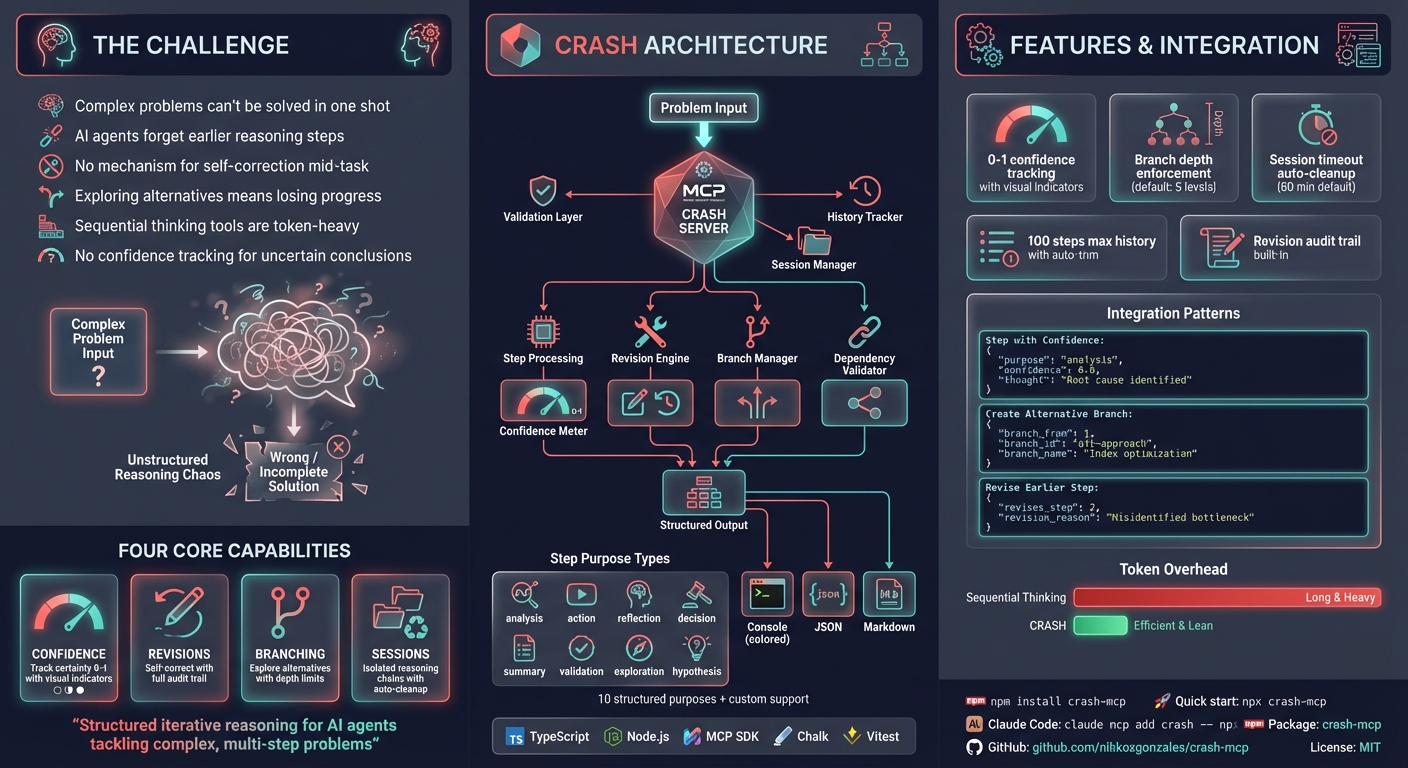
An MCP (Model Context Protocol) server for structured, iterative reasoning. CRASH helps AI assistants break down complex problems into trackable steps with confidence tracking, revision support, and branching for exploring alternatives.

Inspired by MCP Sequential Thinking Server


Related MCP server: Clear Thought 1.5

Why CRASH?

I created this because typing "use sequential_thinking" was cumbersome. Now I can simply say "use crash" instead.

CRASH is more token-efficient than sequential thinking - it doesn't include code in thoughts and has streamlined prompting. It's my go-to solution when an agent can't solve an issue in one shot or when plan mode falls short.

Claude Code's Assessment

CRASH helped significantly for this specific task:

Where CRASH helped:
- Systematic analysis: Forced me to break down the issue methodically
- Solution exploration: Explored multiple approaches before settling on the best one
- Planning validation: Each step built on the previous one logically

The key difference:
CRASH forced me to be more thorough in the analysis phase. Without it, I might have
rushed to implement the first solution rather than exploring cleaner approaches.

Verdict: CRASH adds value for complex problems requiring systematic analysis of
multiple solution paths. For simpler tasks, internal planning is sufficient and faster.

Features

  • Structured reasoning steps - Track thought process, outcomes, and next actions

  • Confidence tracking - Express uncertainty with 0-1 scores, get warnings on low confidence

  • Revision mechanism - Correct previous steps, with original steps marked as revised

  • Branching support - Explore multiple solution paths with depth limits

  • Dependency validation - Declare and validate step dependencies

  • Session management - Group related reasoning chains with automatic timeout cleanup

  • Multiple output formats - Console (colored), JSON, or Markdown

  • Flexible validation - Strict mode for rigid rules, flexible mode for natural language


Installation

npm install crash-mcp

Or use directly with npx:

npx crash-mcp

Quick Setup

Most MCP clients use this JSON configuration:

{
  "mcpServers": {
    "crash": {
      "command": "npx",
      "args": ["-y", "crash-mcp"]
    }
  }
}

Configuration by Client

Client

Setup Method

Claude Code

claude mcp add crash -- npx -y crash-mcp

Cursor

Add to ~/.cursor/mcp.json

VS Code

Add to settings JSON under mcp.servers

Claude Desktop

Add to claude_desktop_config.json

Windsurf

Add to MCP config file

JetBrains

Settings > Tools > AI Assistant > MCP

Others

Use standard MCP JSON config above

Use the cmd wrapper:

{
  "mcpServers": {
    "crash": {
      "command": "cmd",
      "args": ["/c", "npx", "-y", "crash-mcp"]
    }
  }
}
{
  "mcpServers": {
    "crash": {
      "command": "npx",
      "args": ["-y", "crash-mcp"],
      "env": {
        "CRASH_STRICT_MODE": "false",
        "MAX_HISTORY_SIZE": "100",
        "CRASH_OUTPUT_FORMAT": "console",
        "CRASH_SESSION_TIMEOUT": "60",
        "CRASH_MAX_BRANCH_DEPTH": "5"
      }
    }
  }
}
FROM node:18-alpine
WORKDIR /app
RUN npm install -g crash-mcp
CMD ["crash-mcp"]
{
  "mcpServers": {
    "crash": {
      "command": "docker",
      "args": ["run", "-i", "--rm", "crash-mcp"]
    }
  }
}

Bun:

{ "command": "bunx", "args": ["-y", "crash-mcp"] }

Deno:

{
  "command": "deno",
  "args": ["run", "--allow-env", "--allow-net", "npm:crash-mcp"]
}

Configuration

Variable

Default

Description

CRASH_STRICT_MODE

false

Enable strict validation (requires specific prefixes)

MAX_HISTORY_SIZE

100

Maximum steps to retain in history

CRASH_OUTPUT_FORMAT

console

Output format: console, json, markdown

CRASH_NO_COLOR

false

Disable colored console output

CRASH_SESSION_TIMEOUT

60

Session timeout in minutes

CRASH_MAX_BRANCH_DEPTH

5

Maximum branch nesting depth

CRASH_ENABLE_SESSIONS

false

Enable session management


Usage

Required Parameters

Parameter

Type

Description

step_number

integer

Sequential step number (starts at 1)

estimated_total

integer

Estimated total steps (adjustable)

purpose

string

Step category: analysis, action, validation, exploration, hypothesis, correction, planning, or custom

context

string

What's already known to avoid redundancy

thought

string

Current reasoning process

outcome

string

Expected or actual result

next_action

string/object

Next action (simple string or structured with tool details)

rationale

string

Why this next action was chosen

Optional Parameters

Parameter

Type

Description

is_final_step

boolean

Mark as final step to complete reasoning

confidence

number

Confidence level 0-1 (warnings below 0.5)

uncertainty_notes

string

Describe doubts or assumptions

revises_step

integer

Step number being corrected

revision_reason

string

Why revision is needed

branch_from

integer

Step to branch from

branch_id

string

Unique branch identifier

branch_name

string

Human-readable branch name

dependencies

integer[]

Step numbers this depends on

session_id

string

Group related reasoning chains

tools_used

string[]

Tools used in this step

external_context

object

External data relevant to step


Examples

Basic Usage

{
  "step_number": 1,
  "estimated_total": 3,
  "purpose": "analysis",
  "context": "User requested optimization of database queries",
  "thought": "I need to first understand the current query patterns before proposing changes",
  "outcome": "Identified slow queries for optimization",
  "next_action": "analyze query execution plans",
  "rationale": "Understanding execution plans will reveal bottlenecks"
}

With Confidence and Final Step

{
  "step_number": 3,
  "estimated_total": 3,
  "purpose": "summary",
  "context": "Analyzed queries and tested index optimizations",
  "thought": "The index on user_id reduced query time from 2s to 50ms",
  "outcome": "Performance issue resolved with new index",
  "next_action": "document the change",
  "rationale": "Team should know about the optimization",
  "confidence": 0.9,
  "is_final_step": true
}

Revision Example

{
  "step_number": 4,
  "estimated_total": 5,
  "purpose": "correction",
  "context": "Previous analysis missed a critical join condition",
  "thought": "The join was causing a cartesian product, not the index",
  "outcome": "Corrected root cause identification",
  "next_action": "fix the join condition",
  "rationale": "This is the actual performance issue",
  "revises_step": 2,
  "revision_reason": "Overlooked critical join in initial analysis"
}

Branching Example

{
  "step_number": 3,
  "estimated_total": 6,
  "purpose": "exploration",
  "context": "Two optimization approaches identified",
  "thought": "Exploring the indexing approach first as it's lower risk",
  "outcome": "Branch created for index optimization testing",
  "next_action": "test index performance",
  "rationale": "This approach has lower risk than query rewrite",
  "branch_from": 2,
  "branch_id": "index-optimization",
  "branch_name": "Index-based optimization"
}

When to Use CRASH

Good fit:

  • Complex multi-step problem solving

  • Code analysis and optimization

  • System design with multiple considerations

  • Debugging requiring systematic investigation

  • Exploring multiple solution paths

  • Tasks where you need to track confidence

Not needed:

  • Simple, single-step tasks

  • Pure information retrieval

  • Deterministic procedures with no uncertainty


Development

npm install        # Install dependencies
npm run build      # Build TypeScript
npm run dev        # Run with MCP inspector
npm start          # Start built server

Troubleshooting

Try using bunx instead of npx:

{ "command": "bunx", "args": ["-y", "crash-mcp"] }

Try the experimental VM modules flag:

{ "args": ["-y", "--node-options=--experimental-vm-modules", "crash-mcp"] }

Credits

Author

Nikko Gonzales - nikkoxgonzales

License

MIT

Available Tools

1 tool
crashA

Record a structured reasoning step for complex problem-solving.

Use this tool to break down multi-step problems into trackable reasoning steps. Each step captures your current thinking, expected outcome, and planned next action.

WHEN TO USE:

  • Multi-step analysis, debugging, or planning tasks

  • Tasks requiring systematic exploration of options

  • Problems where you need to track confidence or revise earlier thinking

  • Exploring multiple solution paths via branching

WORKFLOW:

  1. Start with step_number=1, estimate your total steps

  2. Describe your thought process, expected outcome, and next action

  3. Continue calling for each reasoning step, adjusting estimated_total as needed

  4. Use confidence (0-1) when uncertain about conclusions

  5. Use revises_step to correct earlier reasoning when you find errors

  6. Use branch_from to explore alternative approaches

  7. Set is_final_step=true when reasoning is complete

Returns JSON summary with step count, completion status, and next action.

ParametersJSON Schema
NameRequiredDescriptionDefault
step_numberYesSequential step number starting from 1. Increment for each new reasoning step.
estimated_totalYesCurrent estimate of total steps needed. Adjust as you learn more about the problem.
purposeYesCategory of this reasoning step. Standard values: analysis (examining information), action (taking an action), reflection (reviewing progress), decision (making a choice), summary (consolidating findings), validation (checking results), exploration (investigating options), hypothesis (forming theories), correction (fixing errors), planning (outlining approach). Custom strings allowed in flexible mode.
contextYesWhat is already known or has been completed. Include relevant findings from previous steps to avoid redundant work.
thoughtYesYour current reasoning process. Express naturally - describe what you are thinking and why.
outcomeYesThe expected or actual result from this step. What did you learn or accomplish?
next_actionYesWhat you will do next. Can be a simple string or structured object with tool details.
rationaleYesWhy you chose this next action. Explain your reasoning for the approach.
is_final_stepNoSet to true to explicitly mark this as the final reasoning step. The reasoning chain will be marked complete.
confidenceNoYour confidence in this step (0-1 scale). Use lower values when uncertain: 0.3 = low confidence, 0.5 = moderate, 0.8+ = high confidence.
uncertainty_notesNoDescribe specific uncertainties or doubts. What assumptions are you making? What could be wrong?
revises_stepNoStep number you are revising or correcting. The original step will be marked as revised.
revision_reasonNoWhy you are revising the earlier step. What was wrong or incomplete?
branch_fromNoStep number to branch from for exploring an alternative approach. Creates a new solution path.
branch_idNoUnique identifier for this branch. Auto-generated if not provided.
branch_nameNoHuman-readable name for this branch (e.g., "Alternative A: Use caching")
tools_usedNoList of tools you used during this step for tracking purposes.
external_contextNoExternal data or tool outputs relevant to this step. Store important results here.
dependenciesNoStep numbers this step depends on. Validated against existing steps in history.
session_idNoSession identifier for grouping related reasoning chains. Sessions expire after configured timeout.

TDQS

A4.3/5.0
Behavior4/5

Does the description disclose side effects, auth requirements, rate limits, or destructive behavior?

With no annotations, the description carries the transparency burden. It explains the recording behavior, revision marking, branching, and finalization, and explicitly discloses the return format: 'Returns JSON summary with step count, completion status, and next action.' It also notes session expiration via the schema. This is sufficient for an agent to understand the tool's effects.

Agents need to know what a tool does to the world before calling it. Descriptions should go beyond structured annotations to explain consequences.

Conciseness4/5

Is the description appropriately sized, front-loaded, and free of redundancy?

The description is well-structured with a clear intro, 'WHEN TO USE' bullets, and a numbered workflow, making it scannable despite its length. It is front-loaded with the purpose statement. Some redundancy exists between workflow steps and schema descriptions, but for 20 parameters the level of detail is appropriate.

Shorter descriptions cost fewer tokens and are easier for agents to parse. Every sentence should earn its place.

Completeness4/5

Given the tool's complexity, does the description cover enough for an agent to succeed on first attempt?

The tool has 20 parameters, no output schema, and no annotations. The description provides the essential context: purpose, use cases, a step-by-step workflow, and a description of the return value. It covers branching, revision, confidence, and completion status. While examples are not provided, the combination of description and schema is sufficient for correct invocation.

Complex tools with many parameters or behaviors need more documentation. Simple tools need less. This dimension scales expectations accordingly.

Parameters4/5

Does the description clarify parameter syntax, constraints, interactions, or defaults beyond what the schema provides?

The schema already provides 100% parameter descriptions, giving a baseline of 3. The description adds value by explaining how parameters are used together in the workflow: 'Start with step_number=1', 'Use confidence (0-1)', 'Use revises_step to correct', 'Use branch_from to explore', and 'Set is_final_step=true'. This inter-parameter guidance goes beyond the standalone schema descriptions.

Input schemas describe structure but not intent. Descriptions should explain non-obvious parameter relationships and valid value ranges.

Purpose5/5

Does the description clearly state what the tool does and how it differs from similar tools?

The first line states the tool's function precisely: 'Record a structured reasoning step for complex problem-solving.' It uses a clear verb ('Record') and resource ('structured reasoning step'), and the 'WHEN TO USE' section further clarifies its scope. Despite the misleading tool name 'crash', the description leaves no doubt about the tool's purpose.

Agents choose between tools based on descriptions. A clear purpose with a specific verb and resource helps agents select the right tool.

Usage Guidelines4/5

Does the description explain when to use this tool, when not to, or what alternatives exist?

A dedicated 'WHEN TO USE' section lists concrete scenarios: multi-step analysis, debugging, planning, systematic exploration, and branching. It also provides a numbered workflow for how to invoke the tool across a reasoning session. However, it does not explicitly state when not to use the tool or mention alternatives, though no sibling tools exist.

Agents often have multiple tools that could apply. Explicit usage guidance like "use X instead of Y when Z" prevents misuse.

Tool Schema Changelog

Recent tool additions, removals, and schema changes observed during successful MCP inspections.

  1. 1 tool updatev1.0.0
    • Changedcrash21 fields changed
      • changedInput schema / properties / branch_from / description
        Previous value: -"Step number to branch from for alternative exploration"New value: +"Step number to branch from for exploring an alternative approach. Creates a new solution path."
      • changedInput schema / properties / branch_id / description
        Previous value: -"Unique identifier for this branch"New value: +"Unique identifier for this branch. Auto-generated if not provided."
      • changedInput schema / properties / branch_name / description
        Previous value: -"Descriptive name for this branch"New value: +"Human-readable name for this branch (e.g., \"Alternative A: Use caching\")"
      • changedInput schema / properties / confidence / description
        Previous value: -"Confidence level in this step (0-1 scale)"New value: +"Your confidence in this step (0-1 scale). Use lower values when uncertain: 0.3 = low confidence, 0.5 = moderate, 0.8+ = high confidence."
      • changedInput schema / properties / context / description
        Previous value: -"What is already known or has been completed to avoid redundancy"New value: +"What is already known or has been completed. Include relevant findings from previous steps to avoid redundant work."
      • changedInput schema / properties / dependencies / description
        Previous value: -"Step numbers this step depends on"New value: +"Step numbers this step depends on. Validated against existing steps in history."
      • changedInput schema / properties / estimated_total / description
        Previous value: -"Current estimate of total steps needed (can be adjusted)"New value: +"Current estimate of total steps needed. Adjust as you learn more about the problem."
      • changedInput schema / properties / external_context / description
        Previous value: -"External data or tool outputs relevant to this step"New value: +"External data or tool outputs relevant to this step. Store important results here."
      • addedInput schema / properties / is_final_step
        Added value: +{
        +  "description": "Set to true to explicitly mark this as the final reasoning step. The reasoning chain will be marked complete.",
        +  "type": "boolean"
        +}
      • changedInput schema / properties / next_action / description
        Previous value: -"Next tool or action to use (string or structured object)"New value: +"What you will do next. Can be a simple string or structured object with tool details."
      • changedInput schema / properties / next_action / oneOf
        Previous value: -[
        -  {
        -    "description": "Simple next action description",
        -    "type": "string"
        -  },
        -  {
        -    "description": "Structured action with tool integration",
        -    "properties": {
        -      "action": {
        -        "description": "Action to perform",
        -        "type": "string"
        -      },
        -      "expectedOutput": {
        -        "description": "What we expect from this action",
        -        "type": "string"
        -      },
        -      "parameters": {
        -        "description": "Parameters for the action",
        -        "type": "object"
        -      },
        -      "tool": {
        -        "description": "Tool name if applicable",
        -        "type": "string"
        -      }
        -    },
        -    "required": [
        -      "action"
        -    ],
        -    "type": "object"
        -  }
        -]New value: +[
        +  {
        +    "description": "Simple description of your next action",
        +    "type": "string"
        +  },
        +  {
        +    "description": "Structured action with tool details",
        +    "properties": {
        +      "action": {
        +        "description": "Specific action to perform",
        +        "type": "string"
        +      },
        +      "expectedOutput": {
        +        "description": "What you expect this action to return",
        +        "type": "string"
        +      },
        +      "parameters": {
        +        "description": "Parameters to pass to the tool",
        +        "type": "object"
        +      },
        +      "tool": {
        +        "description": "Name of tool to use",
        +        "type": "string"
        +      }
        +    },
        +    "required": [
        +      "action"
        +    ],
        +    "type": "object"
        +  }
        +]
      • changedInput schema / properties / outcome / description
        Previous value: -"Expected or actual result from this step"New value: +"The expected or actual result from this step. What did you learn or accomplish?"
      • changedInput schema / properties / purpose / description
        Previous value: -"What this step accomplishes (analysis, action, validation, exploration, hypothesis, correction, planning, or custom)"New value: +"Category of this reasoning step. Standard values: analysis (examining information), action (taking an action), reflection (reviewing progress), decision (making a choice), summary (consolidating findings), validation (checking results), exploration (investigating options), hypothesis (forming theories), correction (fixing errors), planning (outlining approach). Custom strings allowed in flexible mode."
      • changedInput schema / properties / rationale / description
        Previous value: -"Why using this next action (natural language, no prefix required)"New value: +"Why you chose this next action. Explain your reasoning for the approach."
      • changedInput schema / properties / revises_step / description
        Previous value: -"Step number being revised/corrected"New value: +"Step number you are revising or correcting. The original step will be marked as revised."
      • changedInput schema / properties / revision_reason / description
        Previous value: -"Why this revision is needed"New value: +"Why you are revising the earlier step. What was wrong or incomplete?"
      • changedInput schema / properties / session_id / description
        Previous value: -"Session identifier for grouping related reasoning chains"New value: +"Session identifier for grouping related reasoning chains. Sessions expire after configured timeout."
      • changedInput schema / properties / step_number / description
        Previous value: -"Sequential step number"New value: +"Sequential step number starting from 1. Increment for each new reasoning step."
      • changedInput schema / properties / thought / description
        Previous value: -"Current reasoning. Express naturally without forced prefixes."New value: +"Your current reasoning process. Express naturally - describe what you are thinking and why."
      • changedInput schema / properties / tools_used / description
        Previous value: -"Tools used in this step"New value: +"List of tools you used during this step for tracking purposes."
      • changedInput schema / properties / uncertainty_notes / description
        Previous value: -"Notes about uncertainties or doubts"New value: +"Describe specific uncertainties or doubts. What assumptions are you making? What could be wrong?"
  2. 1 tool update
    • First observedcrash

TDQS

A4.1/5.0

Scored across 1 tool

Disambiguation5/5

With only one tool, there is no possibility of ambiguity or overlap between tools. The single tool 'crash' has a clearly defined purpose for structured reasoning steps, so an agent cannot misselect between tools.

Naming Consistency5/5

Since there is only one tool, naming consistency is inherently perfect. The tool name 'crash' follows a single, consistent pattern with no deviations or mixing of conventions to evaluate.

Tool Count2/5

A single tool is too few for the server's purpose of 'Cascaded Reasoning with Adaptive Step Handling,' which implies a multi-step or complex workflow. While the tool is well-described, a single tool feels thin and incomplete for such a domain, limiting functionality and agent capabilities.

Completeness2/5

The tool set is severely incomplete for the stated purpose. Although the 'crash' tool supports recording reasoning steps, there are obvious gaps—such as tools for retrieving, updating, or analyzing recorded steps, or for managing the reasoning process (e.g., starting, pausing, or summarizing). This will likely cause agent failures in complex tasks.

Maintenance

ActivityInactive
ResponsivenessUnresponsive

Related MCP Connectors

Related MCP Servers

  • A
    license
    A
    quality
    D
    maintenance
    Enables structured, step-by-step problem-solving with dynamic revision and branching capabilities. Supports breaking down complex problems into manageable steps while allowing course corrections and alternative reasoning paths.
    1
    85,279
    1
    -
  • A
    license
    Not graded
    quality
    F
    maintenance
    Provides 30+ unified reasoning operations including systematic thinking, mental models, debugging approaches, statistical analysis, interactive notebooks, and advanced problem-solving frameworks for enhanced decision-making and complex reasoning tasks.
    96
    53
    MIT
  • A
    license
    A
    quality
    B
    maintenance
    Enables structured step-by-step reasoning with branching, revisions, and self-critique to help break down complex problems into manageable steps with confidence tracking and thought history search.
    7
    19
    7
    MIT