
Fred St Louis MCP
Click on "Install Server".
Wait a few minutes for the server to deploy. Once ready, it will show a "Started" state.
In the chat, type
@followed by the MCP server name and your instructions, e.g., "@Fred St Louis MCPShow me the latest observations for the US unemployment rate"
That's it! The server will respond to your query, and you can continue using it as needed.
Here is a step-by-step guide with screenshots.
Fred St Louis MCP

Author: Nicolo Ceneda
Contact: n.ceneda20@imperial.ac.uk
Website: nicoloceneda.github.io
Institution: Imperial College London
Course: PhD in Finance
Description
This repository provides an MCP server that lets MCP-compatible clients query and explore economic data from FRED. It exposes structured tools for common workflows (searching series, retrieving observations, browsing categories/releases/tags) and also supports raw endpoint passthrough for advanced use cases.
Supported APIs:
FRED API v1 (
/fred/*)GeoFRED maps API (
/geofred/*)FRED API v2 (
/fred/v2/*)
Requirements
Python
>=3.11A FRED API key from FRED API Keys
Installation Step 1: Cloning and API Key
First, cd into the directory where you want the mcp-fred repository to be created. Then execute the following commands from the terminal.
git clone https://github.com/nicoloceneda/mcp-fred.git
cd mcp-fred
python3 -m venv .venv
.venv/bin/pip install -e .
Create a local .env:
cp .env.example .envThen set:
FRED_API_KEY=your_fred_api_key_hereInstallation Step 2: Configure MCP clients
Path A: Codex CLI
Run once (note: you need to replace /absolute/path/to/ with your actual path):
codex mcp add fred -- /absolute/path/to/mcp-fred/.venv/bin/python /absolute/path/to/mcp-fred/fred_server.pyCheck:
codex mcp list
codex mcp get fred
Successful setup should show:
In
codex mcp list:fredwithStatus=enabledIn
codex mcp get fred:enabled: true
Launch Codex (codex) and verify that the MCP has successfully been installed (/mcp).
Path B: Claude Code CLI
Run once (note: you need to replace /absolute/path/to/ with your actual path):
claude mcp add --transport stdio fred -- /absolute/path/to/mcp-fred/.venv/bin/python /absolute/path/to/mcp-fred/fred_server.pyCheck:
claude mcp list
claude mcp get fred
Launch Claude Code (claude) and verify that the MCP has successfully been installed (/mcp).
Optional: Generic mcpServers JSON config
{
  "mcpServers": {
    "fred": {
      "command": "/absolute/path/to/mcp-fred/.venv/bin/python",
      "args": ["/absolute/path/to/mcp-fred/fred_server.py"],
      "env": {
        "FRED_API_KEY": "your_fred_api_key_here"
      }
    }
  }
}
Optional quick smoke test
Run this script to verify that the MCP server starts, the stdio MCP connection initializes correctly, and a real tool call (search_series) succeeds.
cd mcp-fred
.venv/bin/python - <<'PY'
import asyncio
from mcp import ClientSession, StdioServerParameters
from mcp.client.stdio import stdio_client

async def main():
    params = StdioServerParameters(
        command=".venv/bin/python",
        args=["fred_server.py"],
    )
    async with stdio_client(params) as (r, w):
        async with ClientSession(r, w) as s:
            await s.initialize()
            tools = await s.list_tools()
            print("tool_count =", len(tools.tools))
            out = await s.call_tool("search_series", {"query": "unemployment rate", "limit": 1})
            print(out.content[0].text)

asyncio.run(main())
PY
Examples
$ codex
OpenAI Codex (v0.101.0)
model: gpt-5.3-codex xhigh
directory: ~

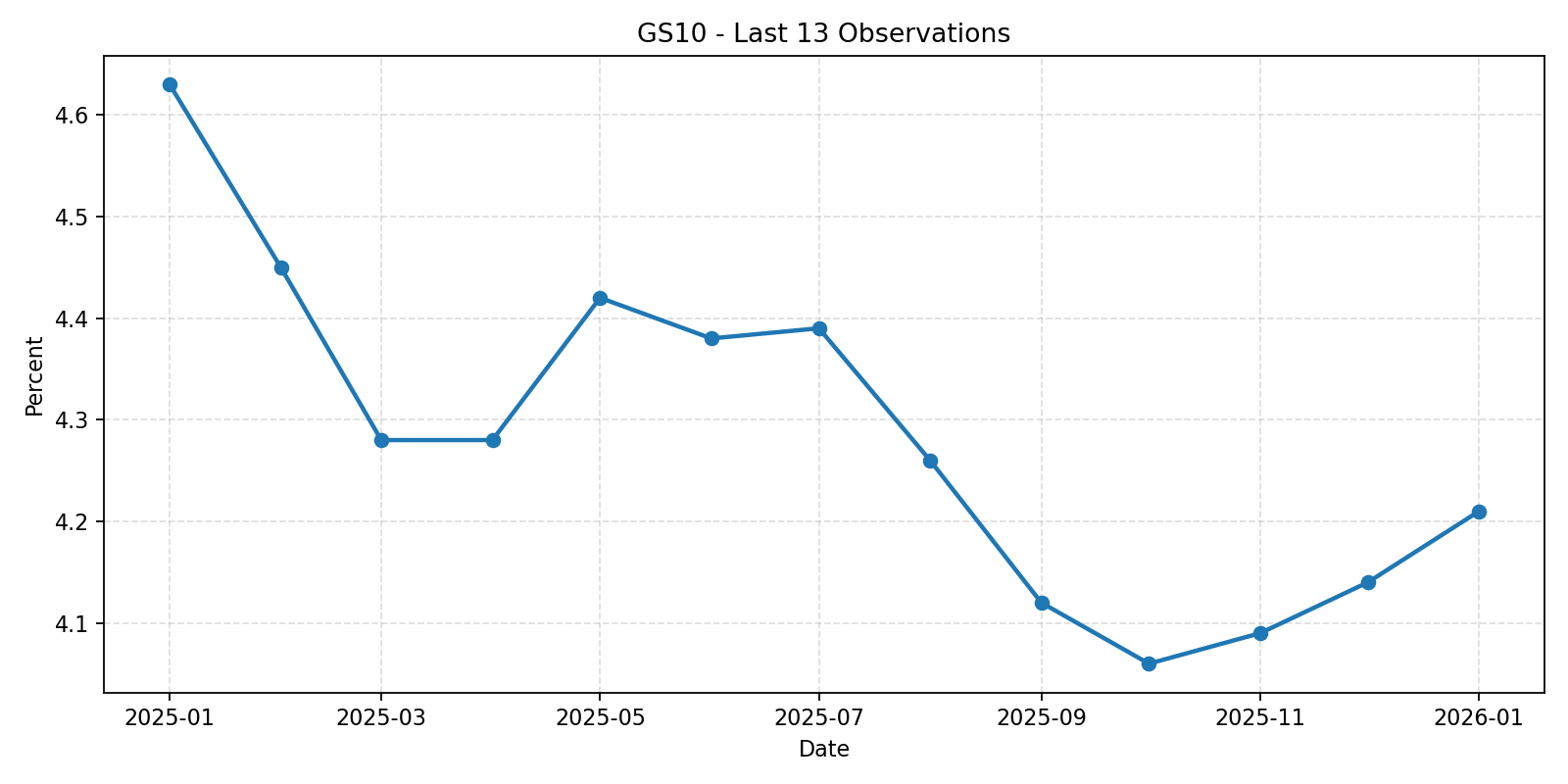
> Use the FRED MCP to retrieve the last 13 values of GS10 and create a matplotlib line chart saved to /Users/nicoloceneda/Desktop/gs10.png.

I’ll fetch the latest 13 GS10 observations via FRED MCP, then generate and save a matplotlib line chart at /Users/nicoloceneda/Desktop/gs10.png.

Called fred.get_observations({"series_id":"GS10","sort_order":"desc","limit":13})
Retrieved the last 13 GS10 observations from FRED and created the matplotlib line chart.
Saved file: /Users/nicoloceneda/Desktop/gs10.png
Values used (most recent first):
2026-01-01: 4.21
2025-12-01: 4.14
2025-11-01: 4.09
2025-10-01: 4.06
2025-09-01: 4.12
2025-08-01: 4.26
2025-07-01: 4.39
2025-06-01: 4.38
2025-05-01: 4.42
2025-04-01: 4.28
2025-03-01: 4.28
2025-02-01: 4.45
2025-01-01: 4.63
Graph generated by MCP:
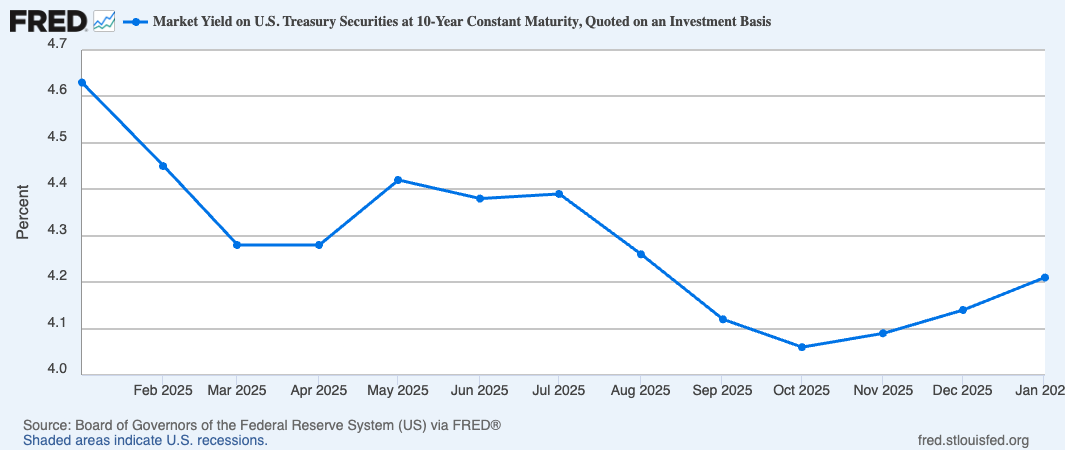
Original graph by FRED:
$ codex
OpenAI Codex (v0.101.0)
model: gpt-5.3-codex xhigh
directory: ~

> Tell me the latest value of US GDP (nominal).

I’ll pull the most recent GDP observation from FRED now and report its date and value.

Called fred.get_observations({"series_id":"GDP","limit":1,"sort_order":"desc"})
Latest FRED nominal U.S. GDP (GDP) is 31,098.027 (billions of dollars, SAAR), for 2025-07-01 (i.e., 2025 Q3).
Functionality and endpoint coverage
The server includes both dedicated tools and generic passthrough tools.
fred_request(endpoint, params_json)for/fred/*geofred_request(endpoint, params_json)for/geofred/*fred_v2_request(endpoint, params_json)for/fred/v2/*
get_category->fred/categoryget_category_children->fred/category/childrenget_category_related->fred/category/relatedget_category_series->fred/category/seriesget_category_tags->fred/category/tagsget_category_related_tags->fred/category/related_tags
get_releases->fred/releasesget_releases_dates->fred/releases/datesget_release->fred/releaseget_release_dates->fred/release/datesget_release_series->fred/release/seriesget_release_sources->fred/release/sourcesget_release_tags->fred/release/tagsget_release_related_tags->fred/release/related_tagsget_release_tables->fred/release/tables
get_series->fred/seriesget_series_categories->fred/series/categoriesget_observations->fred/series/observationsget_series_observations-> alias ofget_observationsget_series_release->fred/series/releasesearch_series->fred/series/searchsearch_series_by_tags->fred/series/search/tagssearch_series_related_tags->fred/series/search/related_tagsget_series_tags->fred/series/tagsget_series_updates->fred/series/updatesget_series_vintage_dates->fred/series/vintagedates
get_sources->fred/sourcesget_source->fred/sourceget_source_releases->fred/source/releases
get_tags->fred/tagsget_related_tags->fred/related_tagsget_tag_series->fred/tags/series
get_map_shape_file->geofred/shapes/fileget_map_series_group->geofred/series/groupget_map_series_data->geofred/series/dataget_map_regional_data->geofred/regional/data
get_release_observations_v2->fred/v2/release/observations
Resources
Unclaimed servers have limited discoverability.
Looking for Admin?
If you are the server author, to access and configure the admin panel.
Latest Blog Posts
MCP directory API
We provide all the information about MCP servers via our MCP API.
curl -X GET 'https://glama.ai/api/mcp/v1/servers/nicoloceneda/mcp-fred'
If you have feedback or need assistance with the MCP directory API, please join our Discord server