

A
licenseNot graded
qualityD
maintenanceA FreeCAD addon that implements the Model Context Protocol (MCP) to enable communication between FreeCAD and Claude AI through Claude Desktop.
228
MIT

このリポジトリは、Claude DesktopからFreeCADを操作できるようにするFreeCAD MCPです。
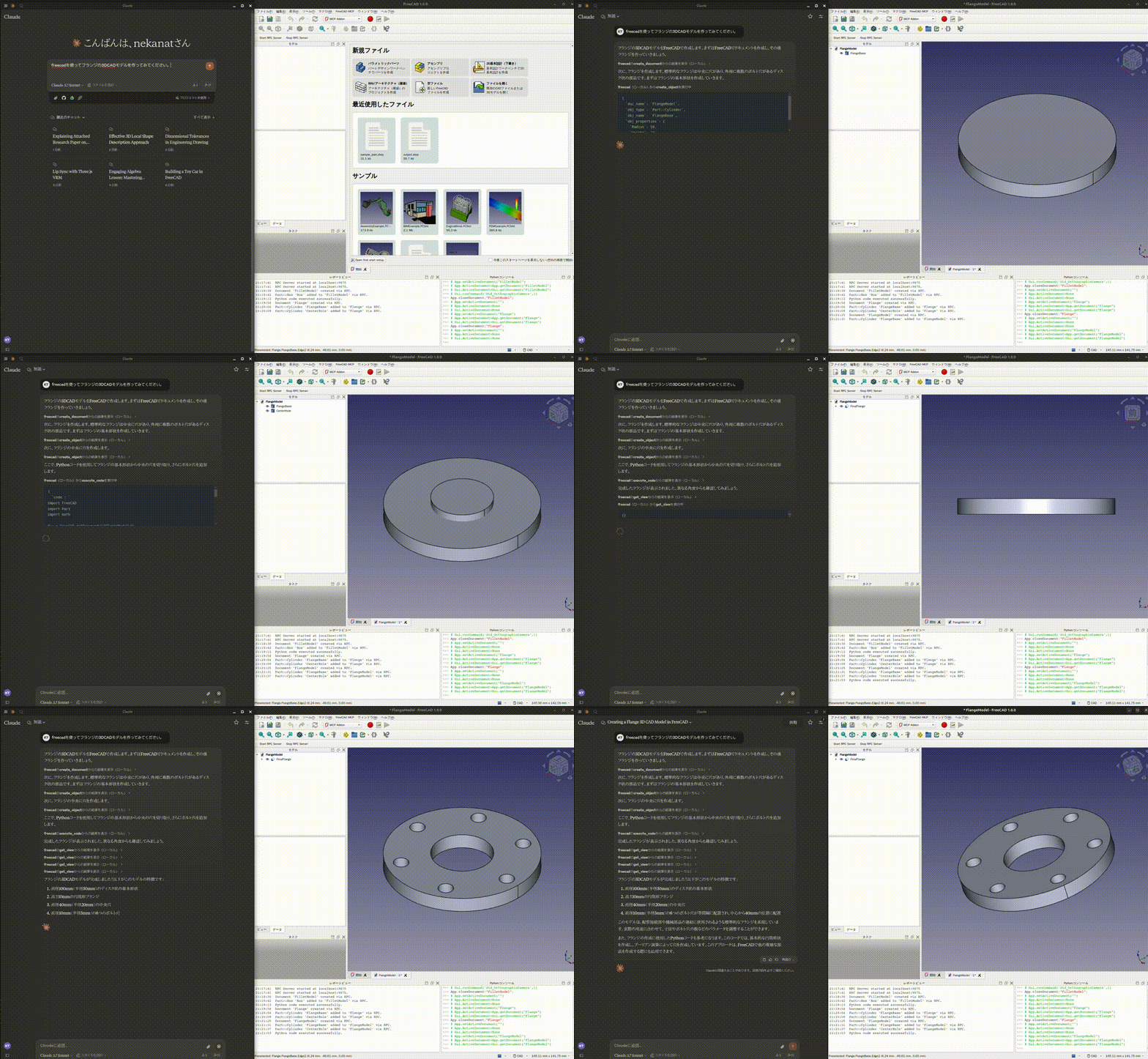
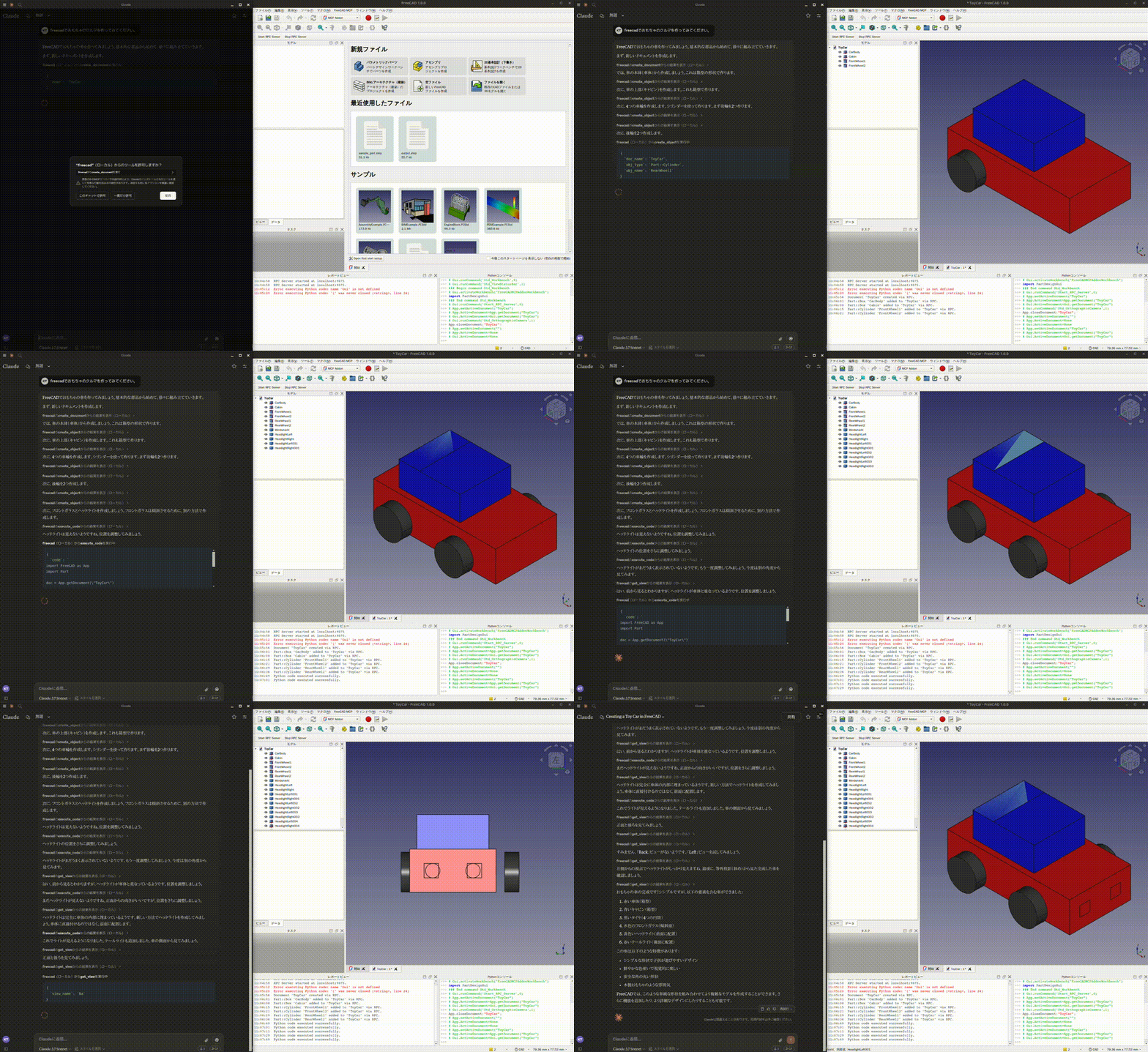
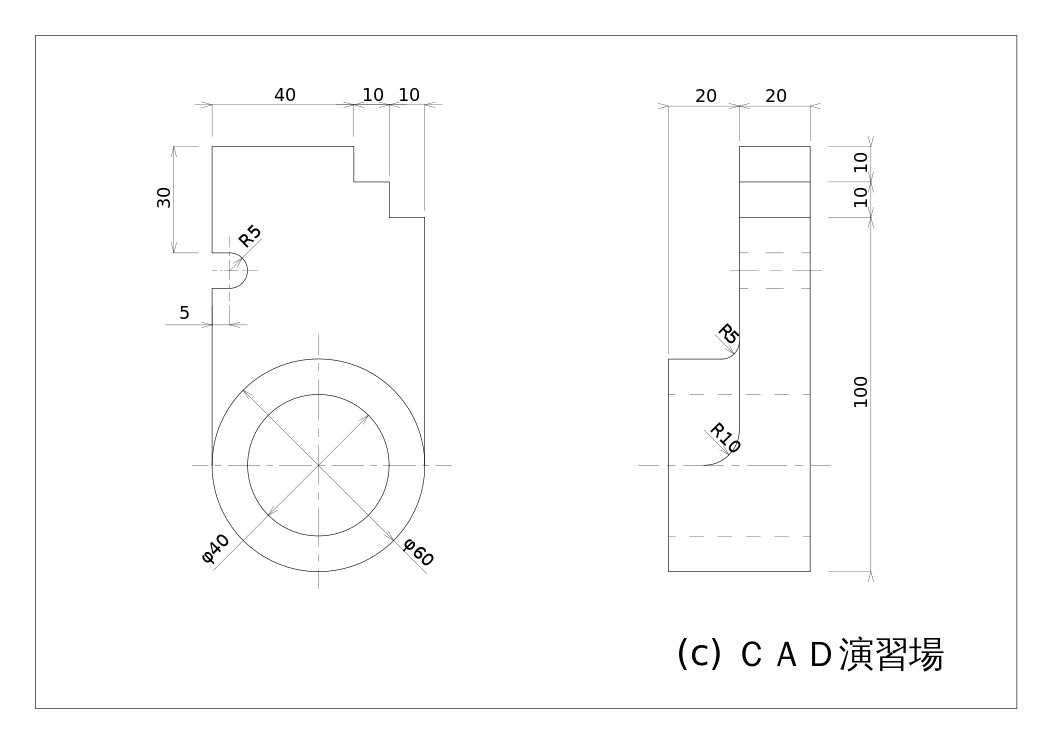
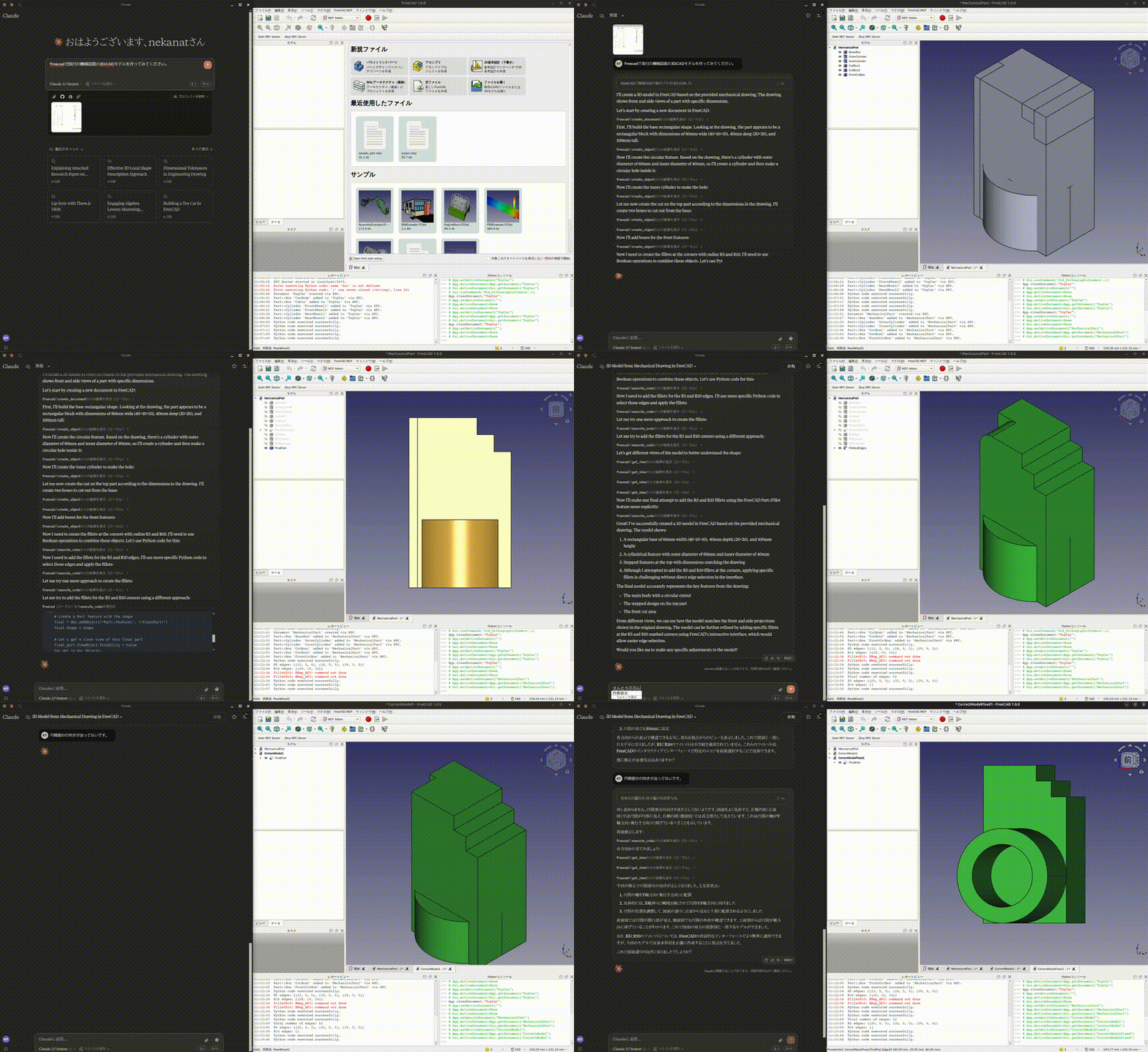
これは会話履歴です。 https://claude.ai/share/7b48fd60-68ba-46fb-bb21-2fbb17399b48
Related MCP server: freecad-mcp
FreeCADのアドオンディレクトリは以下の通りです。
Windows: %APPDATA%\FreeCAD\Mod\
Mac:
FreeCAD 1.1: ~/Library/Application\ Support/FreeCAD/v1-1/Mod/
FreeCAD 1.0: ~/Library/Application\ Support/FreeCAD/v1-0/Mod/
Linux:
Ubuntu: ~/.FreeCAD/Mod/ または ~/snap/freecad/common/Mod/ (FreeCADをsnapからインストールした場合)
Debian: ~/.local/share/FreeCAD/Mod
addon/FreeCADMCPディレクトリをアドオンディレクトリに配置してください。
git clone https://github.com/neka-nat/freecad-mcp.git
cd freecad-mcp

# For Linux (Ubuntu/Debian)
cp -r addon/FreeCADMCP ~/.FreeCAD/Mod/

# For macOS (FreeCAD 1.1)
cp -r addon/FreeCADMCP ~/Library/Application\ Support/FreeCAD/v1-1/Mod/
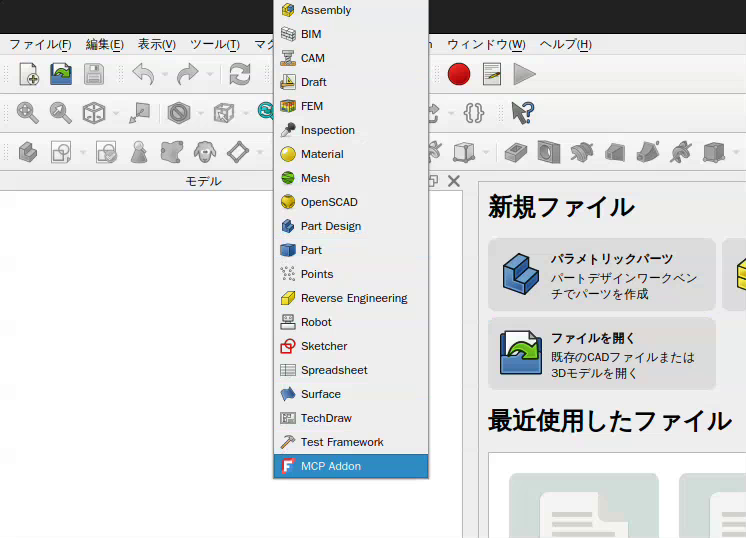
アドオンをインストールしたら、FreeCADを再起動する必要があります。ワークベンチリストから「MCP Addon」を選択して使用できます。
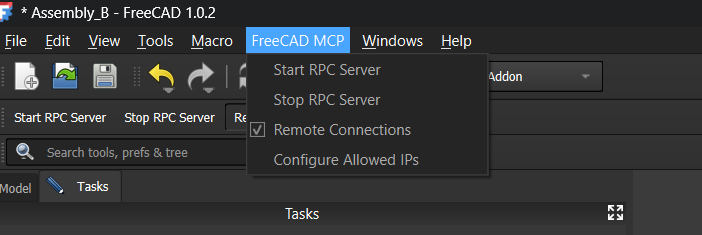
また、「FreeCAD MCP」ツールバーの「Start RPC Server」コマンドでRPCサーバーを起動できます。
デフォルトでは、FreeCADを開くたびにRPCサーバーを手動で起動する必要があります。自動的に起動するには:
FreeCAD MCPメニューを開きます(先にMCP Addonワークベンチに切り替えてください)
Auto-Start Serverにチェックを入れます
設定はfreecad_mcp_settings.jsonに保存され、セッションをまたいで保持されます。次回FreeCADを起動すると、アプリケーションの読み込み完了後にRPCサーバーが自動的に起動します。
同じメニューでAuto-Start Serverのチェックを外すことで、いつでも無効にできます。
uvxの事前インストールが必要です。
また、Claude Desktopの設定ファイルclaude_desktop_config.jsonを編集する必要があります。
ユーザー向け。
{
  "mcpServers": {
    "freecad": {
      "command": "uvx",
      "args": [
        "freecad-mcp"
      ]
    }
  }
}トークンを節約したい場合は、only_text_feedbackをtrueに設定してテキストフィードバックのみを使用できます。
{
  "mcpServers": {
    "freecad": {
      "command": "uvx",
      "args": [
        "freecad-mcp",
        "--only-text-feedback"
      ]
    }
  }
}
開発者向け。 まず、このリポジトリをクローンする必要があります。
git clone https://github.com/neka-nat/freecad-mcp.git{
"mcpServers": {
"freecad": {
"command": "uv",
"args": [
"--directory",
"/path/to/freecad-mcp/",
"run",
"freecad-mcp"
]
}
}
}デフォルトでは、RPCサーバーはリモート接続を受け付けず、localhostでリッスンします。ネットワーク上の別のマシンからFreeCADを制御するには:
FreeCAD MCPツールバーで:
Remote Connectionsにチェックを入れます。次回の再起動時にRPCサーバーは0.0.0.0(すべてのインターフェース)にバインドされます。セキュリティ上の理由から、Allowed IPsフィールドで指定されたIPアドレスまたはCIDRサブネットからの接続のみを受け付けます。デフォルトは127.0.0.1です。
Configure Allowed IPsをクリックし、接続を許可するIPアドレスまたはCIDRサブネットのカンマ区切りリストを入力します。例:
192.168.1.100, 10.0.0.0/24127.0.0.1は常にデフォルトです。無効なエントリはエラーダイアログで拒否されます。これらの設定を変更した後は、RPCサーバーを再起動してください。
FreeCADを実行しているマシンのIPアドレスまたはホスト名を指定して--hostフラグを渡します:
{
  "mcpServers": {
    "freecad": {
      "command": "uvx",
      "args": [
        "freecad-mcp",
        "--host", "192.168.1.100"
      ]
    }
  }
}--hostの値は起動時に検証されます。有効なIPv4/IPv6アドレスまたはホスト名である必要があります。
create_document: FreeCADで新しいドキュメントを作成します。
create_object: FreeCADで新しいオブジェクトを作成します。
edit_object: FreeCADでオブジェクトを編集します。
delete_object: FreeCADでオブジェクトを削除します。
execute_code: FreeCADで任意のPythonコードを実行します。
insert_part_from_library: パーツライブラリからパーツを挿入します。
get_view: アクティブなビューのスクリーンショットを取得します。
get_objects: ドキュメント内のすべてのオブジェクトを取得します。
get_object: ドキュメント内のオブジェクトを取得します。
get_parts_list: パーツライブラリのパーツリストを取得します。
contrib.rocksを使用して作成されました。
Create a new document in FreeCAD.
Args:
    name: The name of the document to create.

Returns:
    A message indicating the success or failure of the document creation.

Examples:
    If you want to create a document named "MyDocument", you can use the following data.
    ```json
    {
        "name": "MyDocument"
    }
    ```
| Name | Required | Description | Default |
|---|---|---|---|
| name | Yes |
| Name | Required | Description |
|---|---|---|
| result | Yes |
Does the description disclose side effects, auth requirements, rate limits, or destructive behavior?
With no annotations, the description carries the full burden for behavioral disclosure. It mentions that the operation returns a success/failure message, but it does not disclose potential side effects, permissions, or behavior when a document with the same name exists. For a mutation tool, this is insufficient.
Agents need to know what a tool does to the world before calling it. Descriptions should go beyond structured annotations to explain consequences.
Is the description appropriately sized, front-loaded, and free of redundancy?
The description is structured with Args, Returns, and Examples, front-loading the purpose. It is slightly verbose for a one-parameter tool but every section adds value, and the example is helpful.
Shorter descriptions cost fewer tokens and are easier for agents to parse. Every sentence should earn its place.
Given the tool's complexity, does the description cover enough for an agent to succeed on first attempt?
The tool is simple with one parameter, and the description covers input, output, and example usage. An output schema exists (even if not shown), and the description already explains the return message. It is complete enough for an agent to invoke correctly.
Complex tools with many parameters or behaviors need more documentation. Simple tools need less. This dimension scales expectations accordingly.
Does the description clarify parameter syntax, constraints, interactions, or defaults beyond what the schema provides?
The schema has no description for the 'name' parameter (coverage 0%), but the description explicitly states 'The name of the document to create' and provides an example. This adds meaning beyond the schema, effectively compensating for the gap.
Input schemas describe structure but not intent. Descriptions should explain non-obvious parameter relationships and valid value ranges.
Does the description clearly state what the tool does and how it differs from similar tools?
The description clearly states 'Create a new document in FreeCAD', which is a specific verb and resource. It distinguishes itself from sibling tools like create_object or create_sketch by focusing on document-level creation, and the example reinforces the purpose.
Agents choose between tools based on descriptions. A clear purpose with a specific verb and resource helps agents select the right tool.
Does the description explain when to use this tool, when not to, or what alternatives exist?
The description provides no guidance on when to use this tool versus alternatives. It does not mention when not to use it or reference other tools. The example shows basic usage but lacks contextual guidance.
Agents often have multiple tools that could apply. Explicit usage guidance like "use X instead of Y when Z" prevents misuse.
Create a new object in FreeCAD. Object type is starts with "Part::" or "Draft::" or "PartDesign::" or "Fem::".
Args:
    doc_name: The name of the document to create the object in.
    obj_type: The type of the object to create (e.g. 'Part::Box', 'Part::Cylinder', 'Draft::Circle', 'PartDesign::Body', etc.).
    obj_name: The name of the object to create.
    obj_properties: The properties of the object to create.

Returns:
    A message indicating the success or failure of the object creation and a screenshot of the object.

Examples:
    If you want to create a cylinder with a height of 30 and a radius of 10, you can use the following data.
    ```json
    {
        "doc_name": "MyCylinder",
        "obj_name": "Cylinder",
        "obj_type": "Part::Cylinder",
        "obj_properties": {
            "Height": 30,
            "Radius": 10,
            "Placement": {
                "Base": {
                    "x": 10,
                    "y": 10,
                    "z": 0
                },
                "Rotation": {
                    "Axis": {
                        "x": 0,
                        "y": 0,
                        "z": 1
                    },
                    "Angle": 45
                }
            },
            "ViewObject": {
                "ShapeColor": [0.5, 0.5, 0.5, 1.0]
            }
        }
    }
    ```

    If you want to create a circle with a radius of 10, you can use the following data.
    ```json
    {
        "doc_name": "MyCircle",
        "obj_name": "Circle",
        "obj_type": "Draft::Circle",
    }
    ```

    If you want to create a FEM analysis, you can use the following data.
    ```json
    {
        "doc_name": "MyFEMAnalysis",
        "obj_name": "FemAnalysis",
        "obj_type": "Fem::AnalysisPython",
    }
    ```

    If you want to create a FEM constraint, you can use the following data.
    ```json
    {
        "doc_name": "MyFEMConstraint",
        "obj_name": "FemConstraint",
        "obj_type": "Fem::ConstraintFixed",
        "analysis_name": "MyFEMAnalysis",
        "obj_properties": {
            "References": [
                {
                    "object_name": "MyObject",
                    "face": "Face1"
                }
            ]
        }
    }
    ```

    If you want to create a FEM mechanical material, you can use the following data.
    ```json
    {
        "doc_name": "MyFEMAnalysis",
        "obj_name": "FemMechanicalMaterial",
        "obj_type": "Fem::MaterialCommon",
        "analysis_name": "MyFEMAnalysis",
        "obj_properties": {
            "Material": {
                "Name": "MyMaterial",
                "Density": "7900 kg/m^3",
                "YoungModulus": "210 GPa",
                "PoissonRatio": 0.3
            }
        }
    }
    ```

    If you want to create a FEM mesh, you can use the following data.
    The `Part` property is required.
    ```json
    {
        "doc_name": "MyFEMMesh",
        "obj_name": "FemMesh",
        "obj_type": "Fem::FemMeshGmsh",
        "analysis_name": "MyFEMAnalysis",
        "obj_properties": {
            "Part": "MyObject",
            "ElementSizeMax": 10,
            "ElementSizeMin": 0.1,
            "MeshAlgorithm": 2
        }
    }
    ```
| Name | Required | Description | Default |
|---|---|---|---|
| analysis_name | No | ||
| doc_name | Yes | ||
| obj_name | Yes | ||
| obj_properties | No | ||
| obj_type | Yes |
| Name | Required | Description |
|---|---|---|
| result | Yes |
Does the description disclose side effects, auth requirements, rate limits, or destructive behavior?
The description mentions returns a message and screenshot but lacks details on side effects, error conditions, or permission requirements. No annotations are provided to compensate.
Agents need to know what a tool does to the world before calling it. Descriptions should go beyond structured annotations to explain consequences.
Is the description appropriately sized, front-loaded, and free of redundancy?
The description is well-structured with summary, Args, Returns, and Examples, but the examples are numerous and could be trimmed for conciseness while still being informative.
Shorter descriptions cost fewer tokens and are easier for agents to parse. Every sentence should earn its place.
Given the tool's complexity, does the description cover enough for an agent to succeed on first attempt?
Given the complexity and presence of output schema, the description covers parameters and examples adequately. It lacks details on error handling but is otherwise complete.
Complex tools with many parameters or behaviors need more documentation. Simple tools need less. This dimension scales expectations accordingly.
Does the description clarify parameter syntax, constraints, interactions, or defaults beyond what the schema provides?
Despite 0% schema description coverage, the description explains each parameter in Args and provides detailed examples showing usage of doc_name, obj_type, obj_name, analysis_name, and obj_properties, adding significant meaning beyond the schema.
Input schemas describe structure but not intent. Descriptions should explain non-obvious parameter relationships and valid value ranges.
Does the description clearly state what the tool does and how it differs from similar tools?
The description clearly states 'Create a new object in FreeCAD' and lists supported object types. It distinguishes from sibling tools like delete_object and edit_object.
Agents choose between tools based on descriptions. A clear purpose with a specific verb and resource helps agents select the right tool.
Does the description explain when to use this tool, when not to, or what alternatives exist?
The description provides when to use the tool (creating various objects) and gives extensive examples. However, it does not explicitly mention when not to use it or alternatives.
Agents often have multiple tools that could apply. Explicit usage guidance like "use X instead of Y when Z" prevents misuse.
Delete an object in FreeCAD.
Args:
    doc_name: The name of the document to delete the object from.
    obj_name: The name of the object to delete.

Returns:
    A message indicating the success or failure of the object deletion and a screenshot of the object.
| Name | Required | Description | Default |
|---|---|---|---|
| doc_name | Yes | ||
| obj_name | Yes |
| Name | Required | Description |
|---|---|---|
| result | Yes |
Does the description disclose side effects, auth requirements, rate limits, or destructive behavior?
With no annotations provided, the description alone must disclose behavioral traits. It mentions the return value (message and screenshot) but does not state that deletion is permanent, irreversible, or whether it affects dependent objects or requires confirmation. This lack of safety/impact disclosure is significant for a destructive operation.
Agents need to know what a tool does to the world before calling it. Descriptions should go beyond structured annotations to explain consequences.
Is the description appropriately sized, front-loaded, and free of redundancy?
The description is compact and well-structured: a one-sentence purpose, an Args list, and a Returns line. Every sentence serves a clear function with no redundancy.
Shorter descriptions cost fewer tokens and are easier for agents to parse. Every sentence should earn its place.
Given the tool's complexity, does the description cover enough for an agent to succeed on first attempt?
The tool is simple (2 required string parameters) and the description covers its purpose, arguments, and return value. However, it lacks any mention of prerequisites (e.g., document must exist), error behavior, or side effects beyond the obvious deletion, leaving some gaps for a destructive operation.
Complex tools with many parameters or behaviors need more documentation. Simple tools need less. This dimension scales expectations accordingly.
Does the description clarify parameter syntax, constraints, interactions, or defaults beyond what the schema provides?
The input schema offers no descriptions for the two parameters (0% coverage), but the description's Args section explicitly explains both doc_name and obj_name, adding meaning beyond the schema. It clarifies the document and object references, compensating for the schema gap.
Input schemas describe structure but not intent. Descriptions should explain non-obvious parameter relationships and valid value ranges.
Does the description clearly state what the tool does and how it differs from similar tools?
The description uses a specific verb ('Delete') and resource ('an object in FreeCAD'), clearly distinguishing it from siblings like create_object, edit_object, and get_object. No other sibling tool has 'delete' in its name, so the purpose is unambiguous.
Agents choose between tools based on descriptions. A clear purpose with a specific verb and resource helps agents select the right tool.
Does the description explain when to use this tool, when not to, or what alternatives exist?
The description only states the action without providing explicit guidance on when to use this tool versus alternatives. It implies usage for deleting objects but offers no exclusions or alternative tool references. The context is clear from the purpose, but no explicit usage guidance is given.
Agents often have multiple tools that could apply. Explicit usage guidance like "use X instead of Y when Z" prevents misuse.
Edit an object in FreeCAD.
This tool is used when the create_object tool cannot handle the object creation.
Args:
    doc_name: The name of the document to edit the object in.
    obj_name: The name of the object to edit.
    obj_properties: The properties of the object to edit.

Returns:
    A message indicating the success or failure of the object editing and a screenshot of the object.
| Name | Required | Description | Default |
|---|---|---|---|
| doc_name | Yes | ||
| obj_name | Yes | ||
| obj_properties | Yes |
| Name | Required | Description |
|---|---|---|
| result | Yes |
Does the description disclose side effects, auth requirements, rate limits, or destructive behavior?
With no annotations, the description carries full burden. It discloses the return value ('a message... and a screenshot') but omits critical behaviors: whether the object must exist, how obj_properties merges or replaces existing properties, and any side effects on the document. This is insufficient for a mutation tool.
Agents need to know what a tool does to the world before calling it. Descriptions should go beyond structured annotations to explain consequences.
Is the description appropriately sized, front-loaded, and free of redundancy?
The description is short and front-loaded with the primary action and use case. The Args section repeats schema information, but the overall structure is clear and no sentences are wasted.
Shorter descriptions cost fewer tokens and are easier for agents to parse. Every sentence should earn its place.
Given the tool's complexity, does the description cover enough for an agent to succeed on first attempt?
Given the tool has 3 params with a nested object, no annotations, and an output schema (not detailed), the description does not provide enough context. It lacks error handling, prerequisites, and the structure of obj_properties. It also doesn't help choose between edit_object and the many sibling operations like pad, pocket, or fillet.
Complex tools with many parameters or behaviors need more documentation. Simple tools need less. This dimension scales expectations accordingly.
Does the description clarify parameter syntax, constraints, interactions, or defaults beyond what the schema provides?
Schema description coverage is 0%, so the description must compensate. The parameter descriptions merely restate the parameter names: 'doc_name: The name of the document to edit the object in' provides no additional detail about how obj_properties should be structured or what property names are valid. This adds minimal meaning beyond the schema.
Input schemas describe structure but not intent. Descriptions should explain non-obvious parameter relationships and valid value ranges.
Does the description clearly state what the tool does and how it differs from similar tools?
The description clearly states 'Edit an object in FreeCAD' and specifies a use case: 'used when the create_object tool cannot handle the object creation.' This differentiates it from create_object, though not from other editing tools.
Agents choose between tools based on descriptions. A clear purpose with a specific verb and resource helps agents select the right tool.
Does the description explain when to use this tool, when not to, or what alternatives exist?
It explicitly names an alternative (create_object) and describes when to use this tool: 'when the create_object tool cannot handle the object creation.' However, it doesn't provide broader guidance on when not to use it or how it relates to other editing operations like pad or pocket.
Agents often have multiple tools that could apply. Explicit usage guidance like "use X instead of Y when Z" prevents misuse.
Execute arbitrary Python code in FreeCAD.
Args:
    code: The Python code to execute.

Returns:
    A message indicating the success or failure of the code execution, the output of the code execution, and a screenshot of the object.
| Name | Required | Description | Default |
|---|---|---|---|
| code | Yes |
| Name | Required | Description |
|---|---|---|
| result | Yes |
Does the description disclose side effects, auth requirements, rate limits, or destructive behavior?
With no annotations, the description carries full burden. It discloses that execution can be arbitrary, and returns success/failure, output, and a screenshot. However, it omits security implications, timeouts, or side effects.
Agents need to know what a tool does to the world before calling it. Descriptions should go beyond structured annotations to explain consequences.
Is the description appropriately sized, front-loaded, and free of redundancy?
The description is extremely concise: two sentences plus an Args/Returns block. It front-loads the purpose, and every sentence serves a clear function without redundancy.
Shorter descriptions cost fewer tokens and are easier for agents to parse. Every sentence should earn its place.
Given the tool's complexity, does the description cover enough for an agent to succeed on first attempt?
Given the single parameter and existing output schema, the description explains the return values (message, output, screenshot) well. Minor gaps (no execution limits, environment details) prevent a 5.
Complex tools with many parameters or behaviors need more documentation. Simple tools need less. This dimension scales expectations accordingly.
Does the description clarify parameter syntax, constraints, interactions, or defaults beyond what the schema provides?
Schema coverage is 0%, but the description only restates the parameter name and type ('code: The Python code to execute'), adding no additional meaning like format, examples, or constraints.
Input schemas describe structure but not intent. Descriptions should explain non-obvious parameter relationships and valid value ranges.
Does the description clearly state what the tool does and how it differs from similar tools?
The description states 'Execute arbitrary Python code in FreeCAD' with a specific verb ('execute') and resource ('Python code'), clearly distinguishing it from sibling tools like create_object or get_view.
Agents choose between tools based on descriptions. A clear purpose with a specific verb and resource helps agents select the right tool.
Does the description explain when to use this tool, when not to, or what alternatives exist?
No guidance on when to use this tool versus alternatives, nor any exclusions or prerequisites. The description merely states what it does, leaving the agent to infer usage context.
Agents often have multiple tools that could apply. Explicit usage guidance like "use X instead of Y when Z" prevents misuse.
Get an object from a document. You can use this tool to get the properties of an object to see what you can check or edit.
Args:
    doc_name: The name of the document to get the object from.
    obj_name: The name of the object to get.

Returns:
    The object and a screenshot of the object.
| Name | Required | Description | Default |
|---|---|---|---|
| doc_name | Yes | ||
| obj_name | Yes |
| Name | Required | Description |
|---|---|---|
No output parameters | ||
Does the description disclose side effects, auth requirements, rate limits, or destructive behavior?
No annotations are provided, so the description carries the burden. It mentions returning a screenshot, but does not explicitly state read-only behavior, side effects, permissions, or limitations. The description implicitly suggests read-only but is not fully transparent.
Agents need to know what a tool does to the world before calling it. Descriptions should go beyond structured annotations to explain consequences.
Is the description appropriately sized, front-loaded, and free of redundancy?
The description is concise (3 lines), front-loads the purpose, and includes structured Args and Returns sections. Every sentence adds value without unnecessary words.
Shorter descriptions cost fewer tokens and are easier for agents to parse. Every sentence should earn its place.
Given the tool's complexity, does the description cover enough for an agent to succeed on first attempt?
Given the tool's simplicity (2 required string params), the description sufficiently explains the return value (object and screenshot). With an output schema present, the description does not need to elaborate on return format further.
Complex tools with many parameters or behaviors need more documentation. Simple tools need less. This dimension scales expectations accordingly.
Does the description clarify parameter syntax, constraints, interactions, or defaults beyond what the schema provides?
With 0% schema description coverage, the description adds value by providing brief explanations for both parameters (doc_name: 'name of the document', obj_name: 'name of the object'). While not overly detailed, it compensates for the schema gap.
Input schemas describe structure but not intent. Descriptions should explain non-obvious parameter relationships and valid value ranges.
Does the description clearly state what the tool does and how it differs from similar tools?
The description clearly states 'Get an object from a document' with a specific verb and resource. It explains the purpose ('to see what you can check or edit') and distinguishes it from siblings like get_objects (plural) and create/delete/edit tools.
Agents choose between tools based on descriptions. A clear purpose with a specific verb and resource helps agents select the right tool.
Does the description explain when to use this tool, when not to, or what alternatives exist?
The description implies usage for inspection ('to see what you can check or edit'), but does not explicitly state when not to use it or name alternatives. Context signals and sibling list provide context, but the description lacks explicit guidance.
Agents often have multiple tools that could apply. Explicit usage guidance like "use X instead of Y when Z" prevents misuse.
Get all objects in a document. You can use this tool to get the objects in a document to see what you can check or edit.
Args:
    doc_name: The name of the document to get the objects from.

Returns:
    A list of objects in the document and a screenshot of the document.
| Name | Required | Description | Default |
|---|---|---|---|
| doc_name | Yes |
| Name | Required | Description |
|---|---|---|
| result | Yes |
Does the description disclose side effects, auth requirements, rate limits, or destructive behavior?
No annotations are provided, so the description must disclose behaviors. It correctly states the return values (list of objects and a screenshot), implying a read-only operation. However, it does not explicitly confirm no side effects or mention any permissions needed.
Agents need to know what a tool does to the world before calling it. Descriptions should go beyond structured annotations to explain consequences.
Is the description appropriately sized, front-loaded, and free of redundancy?
The description is extremely concise: two sentences plus an Args/Returns section. Every sentence adds value, and the main purpose is front-loaded. No redundant information.
Shorter descriptions cost fewer tokens and are easier for agents to parse. Every sentence should earn its place.
Given the tool's complexity, does the description cover enough for an agent to succeed on first attempt?
Given the tool's simplicity (one required parameter) and the presence of an output schema, the description is adequate. It covers the purpose, parameter, and returns. However, it could define what 'objects' means or mention that the screenshot is included for context.
Complex tools with many parameters or behaviors need more documentation. Simple tools need less. This dimension scales expectations accordingly.
Does the description clarify parameter syntax, constraints, interactions, or defaults beyond what the schema provides?
The input schema has 0% description coverage for the 'doc_name' parameter. The description adds a clear explanation: 'The name of the document to get the objects from.' This compensates for the schema gap and adds meaning.
Input schemas describe structure but not intent. Descriptions should explain non-obvious parameter relationships and valid value ranges.
Does the description clearly state what the tool does and how it differs from similar tools?
The description clearly states the action ('Get all objects') and the resource ('in a document'). It distinguishes from sibling tools like 'get_object' (singular) and other CRUD operations, making the purpose unambiguous.
Agents choose between tools based on descriptions. A clear purpose with a specific verb and resource helps agents select the right tool.
Does the description explain when to use this tool, when not to, or what alternatives exist?
It provides a context for use ('to see what you can check or edit') and explicitly mentions the doc_name parameter. However, it does not compare with alternatives like 'get_view' or discuss when not to use it, leaving room for improvement.
Agents often have multiple tools that could apply. Explicit usage guidance like "use X instead of Y when Z" prevents misuse.
Get the list of parts in the parts library addon.
| Name | Required | Description | Default |
|---|---|---|---|
No parameters | |||
| Name | Required | Description |
|---|---|---|
| result | Yes |
Does the description disclose side effects, auth requirements, rate limits, or destructive behavior?
No annotations are provided, so the description bears full responsibility for behavioral disclosure. It simply states 'Get the list' without mentioning side effects, but since it has no parameters and likely returns a list, it is reasonable. However, it could explicitly state that it is a read-only operation.
Agents need to know what a tool does to the world before calling it. Descriptions should go beyond structured annotations to explain consequences.
Is the description appropriately sized, front-loaded, and free of redundancy?
The description is a single, concise sentence with no redundant words. It is front-loaded and to the point.
Shorter descriptions cost fewer tokens and are easier for agents to parse. Every sentence should earn its place.
Given the tool's complexity, does the description cover enough for an agent to succeed on first attempt?
An output schema exists, so return values need not be detailed. However, the description could be slightly more informative about the scope of the parts library (e.g., which addon). But given the simplicity, it is mostly complete.
Complex tools with many parameters or behaviors need more documentation. Simple tools need less. This dimension scales expectations accordingly.
Does the description clarify parameter syntax, constraints, interactions, or defaults beyond what the schema provides?
There are zero parameters, and schema description coverage is 100%. According to guidelines, 0 params gives a baseline of 4. The description does not need to add parameter information, and it does not.
Input schemas describe structure but not intent. Descriptions should explain non-obvious parameter relationships and valid value ranges.
Does the description clearly state what the tool does and how it differs from similar tools?
The description clearly states the action 'Get' and the resource 'list of parts in the parts library addon'. It is specific and distinguishes from sibling tools like 'insert_part_from_library' which inserts rather than reads.
Agents choose between tools based on descriptions. A clear purpose with a specific verb and resource helps agents select the right tool.
Does the description explain when to use this tool, when not to, or what alternatives exist?
No guidance is provided on when to use this tool versus alternatives. It does not mention that it is a read-only operation or that it retrieves the entire list without filtering. The implied usage is that it lists parts, but there are no exclusions or context.
Agents often have multiple tools that could apply. Explicit usage guidance like "use X instead of Y when Z" prevents misuse.
Get a screenshot of the active view.
Args:
    view_name: The name of the view to get the screenshot of.
    The following views are available:
    - "Isometric"
    - "Front"
    - "Top"
    - "Right"
    - "Back"
    - "Left"
    - "Bottom"
    - "Dimetric"
    - "Trimetric"

Returns:
    A screenshot of the active view.
| Name | Required | Description | Default |
|---|---|---|---|
| view_name | Yes |
| Name | Required | Description |
|---|---|---|
| result | Yes |
Does the description disclose side effects, auth requirements, rate limits, or destructive behavior?
With no annotations, the description carries the behavioral disclosure burden. It only states 'Get a screenshot' but does not explain how the screenshot is returned (image data, file path, base64), whether the view can be changed, or if the operation is idempotent. The return value is vague.
Agents need to know what a tool does to the world before calling it. Descriptions should go beyond structured annotations to explain consequences.
Is the description appropriately sized, front-loaded, and free of redundancy?
The description is short and front-loaded with the purpose. The args and returns sections are structured. However, listing all enum values is somewhat redundant with the schema, but not excessive.
Shorter descriptions cost fewer tokens and are easier for agents to parse. Every sentence should earn its place.
Given the tool's complexity, does the description cover enough for an agent to succeed on first attempt?
The tool has a simple parameter and an output schema (likely defining the screenshot format), but the description omits details about the output format and any prerequisites. It is insufficient for an agent to fully understand the tool's usage without additional context.
Complex tools with many parameters or behaviors need more documentation. Simple tools need less. This dimension scales expectations accordingly.
Does the description clarify parameter syntax, constraints, interactions, or defaults beyond what the schema provides?
The description repeats the enum list from the schema without adding meaning (e.g., explaining what each view orientation is, like 'Isometric' vs 'Front'). Since schema description coverage is 0%, the description could have compensated by describing the views, but it did not.
Input schemas describe structure but not intent. Descriptions should explain non-obvious parameter relationships and valid value ranges.
Does the description clearly state what the tool does and how it differs from similar tools?
The description clearly states the tool gets a screenshot of the active view and lists the available views. It distinguishes itself from sibling tools like get_object or get_objects by specifying it captures a visual screenshot rather than data objects.
Agents choose between tools based on descriptions. A clear purpose with a specific verb and resource helps agents select the right tool.
Does the description explain when to use this tool, when not to, or what alternatives exist?
No guidance is provided on when to use this tool versus alternatives (e.g., when a screenshot is needed vs. getting object data). It does not mention prerequisites like whether a view must be active or what constitutes the 'active view.'
Agents often have multiple tools that could apply. Explicit usage guidance like "use X instead of Y when Z" prevents misuse.
Insert a part from the parts library addon.
Args:
    relative_path: The relative path of the part to insert.

Returns:
    A message indicating the success or failure of the part insertion and a screenshot of the object.
| Name | Required | Description | Default |
|---|---|---|---|
| relative_path | Yes |
| Name | Required | Description |
|---|---|---|
| result | Yes |
Does the description disclose side effects, auth requirements, rate limits, or destructive behavior?
With no annotations, the description carries full responsibility for disclosing behavioral traits. It only states that it returns a success/failure message and a screenshot. It does not mention whether it modifies the current document, requires an active document, or has any side effects. This is insufficient for a mutation tool.
Agents need to know what a tool does to the world before calling it. Descriptions should go beyond structured annotations to explain consequences.
Is the description appropriately sized, front-loaded, and free of redundancy?
The description is extremely concise and well-structured. It opens with a one-sentence purpose, then uses clear 'Args' and 'Returns' sections. Every sentence serves a purpose, and there is no wasted text.
Shorter descriptions cost fewer tokens and are easier for agents to parse. Every sentence should earn its place.
Given the tool's complexity, does the description cover enough for an agent to succeed on first attempt?
Given the tool's low complexity (one parameter) and the presence of an output schema, the description is somewhat adequate. However, it lacks usage context and any safety or side-effect information, especially since annotations are absent. For a simple insert operation, it covers the basics but leaves gaps.
Complex tools with many parameters or behaviors need more documentation. Simple tools need less. This dimension scales expectations accordingly.
Does the description clarify parameter syntax, constraints, interactions, or defaults beyond what the schema provides?
The schema description coverage is 0%, so the description must compensate. It provides one line: 'relative_path: The relative path of the part to insert.' This adds basic meaning over the schema's bare title 'Relative Path', but it is still minimal and does not explain the path's base directory or format.
Input schemas describe structure but not intent. Descriptions should explain non-obvious parameter relationships and valid value ranges.
Does the description clearly state what the tool does and how it differs from similar tools?
The description clearly states the tool's action with a specific verb ('Insert') and resource ('a part from the parts library addon'). This distinguishes it from siblings like 'get_parts_list' (which lists parts) and 'create_object' (which creates from scratch).
Agents choose between tools based on descriptions. A clear purpose with a specific verb and resource helps agents select the right tool.
Does the description explain when to use this tool, when not to, or what alternatives exist?
No guidance is given on when to use this tool versus alternatives. It does not mention any prerequisites, contexts, or specific scenarios where this tool should be preferred. The sibling list includes related tools like 'instantiate_family' and 'get_parts_list', but the description offers no differentiation.
Agents often have multiple tools that could apply. Explicit usage guidance like "use X instead of Y when Z" prevents misuse.
Recent tool additions, removals, and schema changes observed during successful MCP inspections.
v1.0.0create_documentcreate_objectdelete_objectedit_objectexecute_codeget_objectget_objectsget_parts_listget_viewinsert_part_from_libraryScored across 10 tools
Most tools have distinct purposes, such as create_document, create_object, delete_object, and get_view, which are clearly separated. However, there is some potential overlap between create_object and edit_object, as edit_object is described as a fallback for when create_object cannot handle object creation, which might cause confusion about when to use each.
All tool names follow a consistent verb_noun pattern using snake_case, such as create_document, delete_object, get_view, and execute_code. This uniformity makes the tool set predictable and easy to understand.
With 10 tools, the server is well-scoped for a CAD modeling environment like FreeCAD. It covers essential operations like document and object management, code execution, and view handling, which aligns with the expected functionality for such a domain.
The tool set provides good coverage for core CAD operations, including creating, editing, deleting, and retrieving objects and documents, along with view management and part library access. A minor gap is the lack of a tool for saving or exporting documents, which could be a useful addition for full workflow support.
Use AI models for chat, image, and video generation from Claude Code and other MCP hosts.
MCP server unifying ERPs, CRMs, APIs and knowledge base for Claude, ChatGPT and Gemini.
A comprehensive Model Context Protocol (MCP) server that enables AI assistants to interact with yo…
Build, deploy and manage MaShop e-commerce projects from Claude, Cursor or any MCP client.