
bezels
by n1th1n-19
README.md
# Bezels
[](https://github.com/n1th1n-19/bezels/actions/workflows/ci.yml) [](LICENSE)
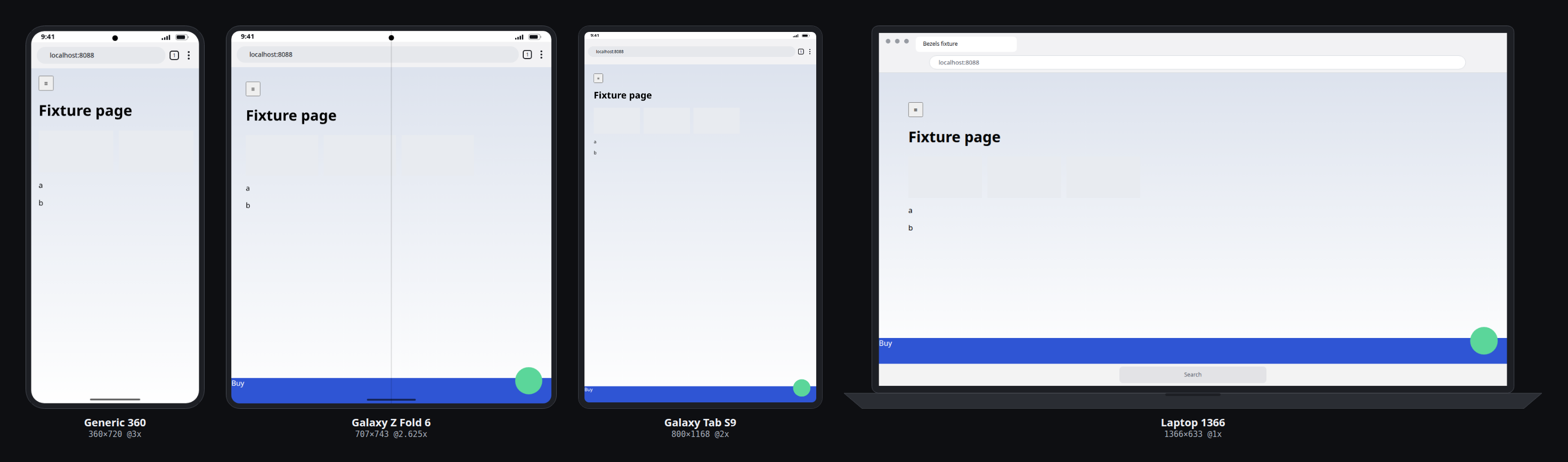
Shows a web page the way it looks on a real phone, foldable, tablet, laptop or desktop **inside that device's browser**. It runs real browser engines with device emulation (Chromium for Android and desktop, WebKit for iPhone and iPad) and draws the device frame around them. Claude Code can drive it as an agent browser over MCP.
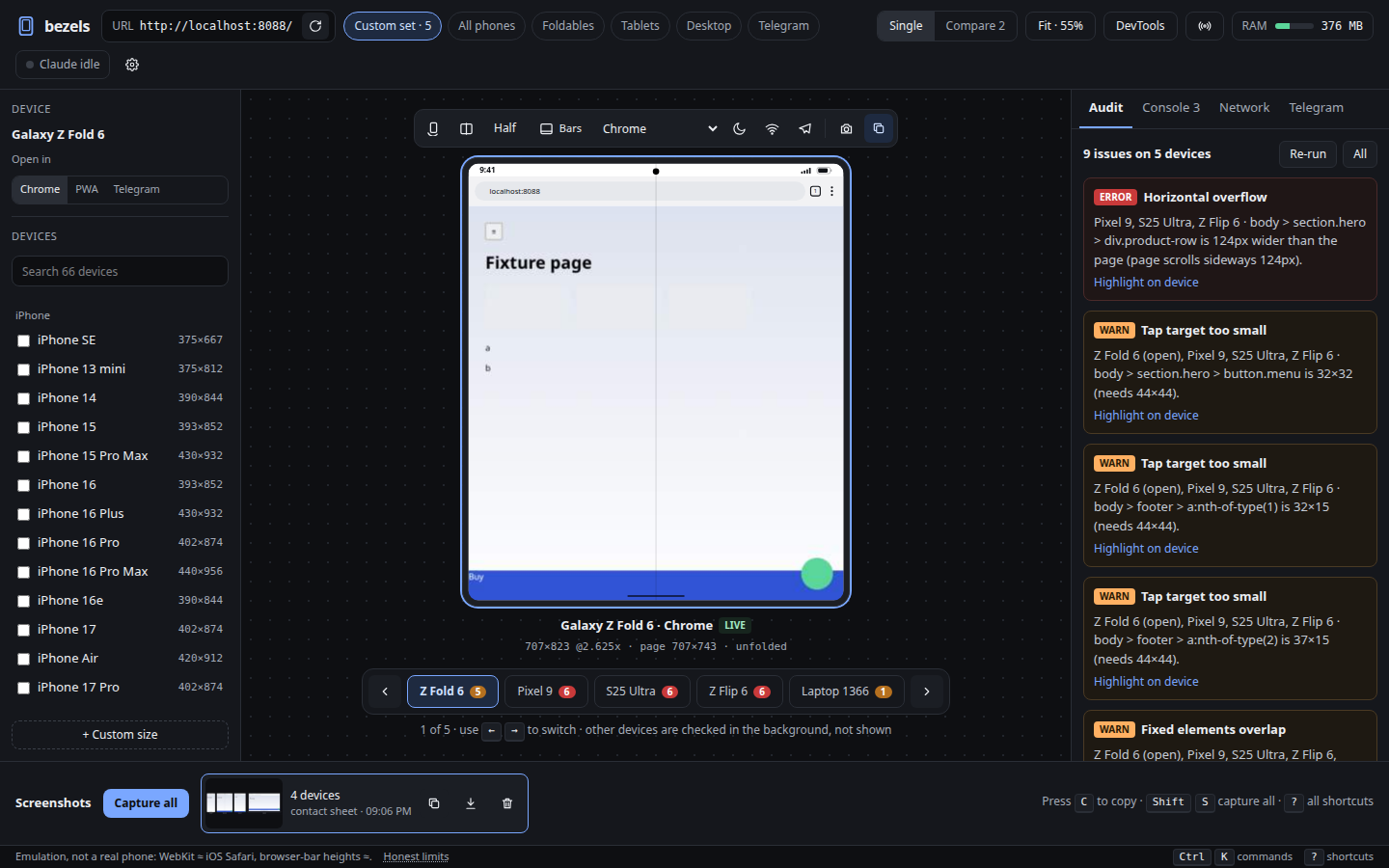
One engine with three ways in:
```
┌────────────── core (Node + TypeScript, one process) ──────────────┐
│ Playwright: one Chromium + one WebKit process, a context per page │
│ deduped pages · live limit · freeze/evict · memory budget │
└──────────┬────────────────────────┬───────────────────────┬────────┘
MCP server (stdio) Web UI (static, served CLI
→ Claude Code by core on :4477, WebSocket) bezels shot/audit
```
The UI and Claude Code see the same sessions. Every action goes through one method table ([src/core/rpc.ts](src/core/rpc.ts)), so anything an MCP tool can do, the UI can do too.
## Install
One line (Linux, macOS; Windows via WSL2). Needs git and Node.js 20+:
```bash
curl -fsSL https://raw.githubusercontent.com/n1th1n-19/bezels/main/install.sh | bash
```
Before touching anything it shows what's already there and what it will install, then asks to continue:
| What | Size | Notes |
|---|---|---|
| Bezels source → `~/.bezels` | ~2 MB | re-running the installer updates it |
| npm packages | ~150 MB | Playwright, MCP SDK, React, Vite |
| Chromium | ~180 MB | Android + desktop devices, shared Playwright cache |
| WebKit | ~100 MB | iPhone + iPad devices (`--no-webkit` to skip) |
| WebKit system libraries | small | Linux only, apt + sudo, **only the packages actually missing** (shown before installing) |
| `~/.local/bin/bezels` | tiny | launcher |
| Claude Code MCP server | — | asks first: `claude mcp add bezels -s user …` |
| `wl-clipboard` / `xclip` | small | optional, asks, only for `bezels shot --copy` |
Prefer to read it first? `curl -fsSL https://raw.githubusercontent.com/n1th1n-19/bezels/main/install.sh -o install.sh && less install.sh && bash install.sh`
Each step shows progress (download %, elapsed time). If one fails, it prints the last lines of its log. Options go after `bash -s --`: `--yes`, `--dir PATH`, `--no-webkit`, `--no-mcp`. From a clone, `./install.sh` installs in place.
### Update, clean up, uninstall
```bash
bezels update # shows new commits, then: git pull, npm ci (only if the lockfile changed), browsers, rebuild
bezels update --check # just show what's new
bezels cleanup # temp files, orphaned thumbnails, browser revisions no project uses; old screenshots (asks)
bezels cleanup --older-than 7
bezels uninstall # lists everything with sizes, asks per item; keeps your screenshots unless you say so
bezels stop # stop a running Bezels (update/uninstall do this for you)
```
All of them show their plan first. `--dry-run` shows only the plan, `--yes` accepts the defaults (screenshots are never deleted by `--yes` alone; add `--all`).
- **Browsers:** Playwright's cache is shared between projects. `uninstall` and `cleanup` only remove browser revisions that no other Playwright project uses.
- **What `uninstall` keeps:** WebKit's apt libraries and Node.js. From a source checkout it also keeps the checkout itself, and only offers to remove `node_modules` and the build output.
## Setup by hand
Requires Node 20+. From source:
```bash
git clone https://github.com/n1th1n-19/bezels && cd bezels
npm ci
npx playwright install --with-deps chromium webkit # --with-deps adds WebKit's system libraries on Linux (sudo)
npm run build
```
Or from npm (Node 20+): `npx bezels serve`, then once: `npx playwright install --with-deps chromium webkit`.
Optional: `sudo apt install wl-clipboard` (Wayland) or `xclip` (X11) for `bezels shot --copy`. The UI copies through the browser and needs neither.
## Use
```bash
node dist/cli.js serve # UI at http://localhost:4477
node dist/cli.js serve --watch ../myapp/src # also reload every device when files change
```
**Claude Code:**
```bash
claude mcp add bezels -- node /abs/path/to/bezels/dist/mcp.js
```
If the UI daemon is already running, the MCP server proxies to it, so you watch Claude work. If it isn't, the MCP process runs the engine itself and serves the UI on the same port.
The intended loop: *open localhost:3000 on `phones,folds` → `audit_all` → fix the CSS → `audit_layout` → `screenshot_matrix`.*
**CLI** (handy for CI). It uses a running daemon when there is one, otherwise runs in-process:
```bash
node dist/cli.js shot http://localhost:3000 --devices phones,folds --framed --out ./shots
node dist/cli.js shot http://localhost:3000 --device iphone-16-pro --framed --copy
node dist/cli.js audit http://localhost:3000 --devices all --json # exits 1 if any error-level issue is found
node dist/cli.js devices
```
Device sets: `phones iphones android folds tablets laptops desktop breakpoints telegram all`, or any device id.
## How the spec gaps were resolved
| Problem | Decision |
|---|---|
| WebKit has no screencast | Chromium streams through the ack-based CDP `Page.startScreencast`, capped at 15 fps. WebKit is polled with JPEG screenshots: about 6 fps right after input, 1 fps when idle. A frame is skipped while one is still in flight and dropped if unchanged, so nothing queues. The UI labels it "live view polled". |
| WebKit has no CDP | Each feature uses Playwright's cross-engine API where one exists (geolocation, timezone, locale, permissions, offline, colour scheme, reduced motion). Everything else is marked **Chromium only** in the UI rather than hidden. On WebKit, safe areas are approximated by rewriting `env(safe-area-inset-*)` rules, and timezone/locale changes rebuild the context. |
| Dedupe rarely triggers | Android uses Chrome's real *reduced* UA (`Android 10; K`), so same-size phones such as Pixel 7/8 or Flip 5/6 really do share one page, as Chrome on those phones would. |
| Name was half-migrated | It's `bezels` everywhere: package, CLI, MCP server and `~/.config/bezels/`. |
| Next.js for a static export | The UI is Vite + React + Tailwind, built to `ui/dist` and served by core's own HTTP server. That gives the same outcome as `output: 'export'` (no second dev server) with a lighter toolchain. The components only use plain React, so moving to Next later is a mechanical change. |
| Mockups reference a missing `support.js` | The mockups were used only as visual reference and rebuilt as components. |
## Memory (spec 2b)
- One browser per engine. WebKit launches only when an Apple device opens, and an engine shuts down after 3 min with no contexts.
- Only the focused device (plus the Compare partner) is live. Others are frozen with `Page.setWebLifecycleState`, then closed when idle or when over `maxMemoryMB`, using LRU order. A closed page reopens at the same URL and scroll position.
- `screenshot_matrix` and `audit_all` run one device at a time, with one context per config group, resizing between devices.
- Captures are streamed to disk. The tray loads 120 px thumbnails, and MCP replies carry a preview of at most 768 px plus the full-res path.
- DevTools data is collected only for the focused device, in capped ring buffers (1,000 console lines, 500 requests). Response bodies are fetched on demand.
- The meter uses PSS from `/proc`, so Chromium's shared pages aren't double-counted. Open it with **Shift+M**; MCP `stats()` returns the same numbers.
`npm run bench` covers idle, 1 live device and a 10-device matrix. It fails if a scenario exceeds the spec target or regresses more than 15% against [bench/baseline.json](bench/baseline.json). On this machine:
| Scenario | Peak | Target |
|---|---|---|
| Idle | 88 MB | 150 MB |
| 1 live device | 240 MB | 500 MB |
| 10-device matrix | 388 MB | 1000 MB |
## Telegram Mini App mode
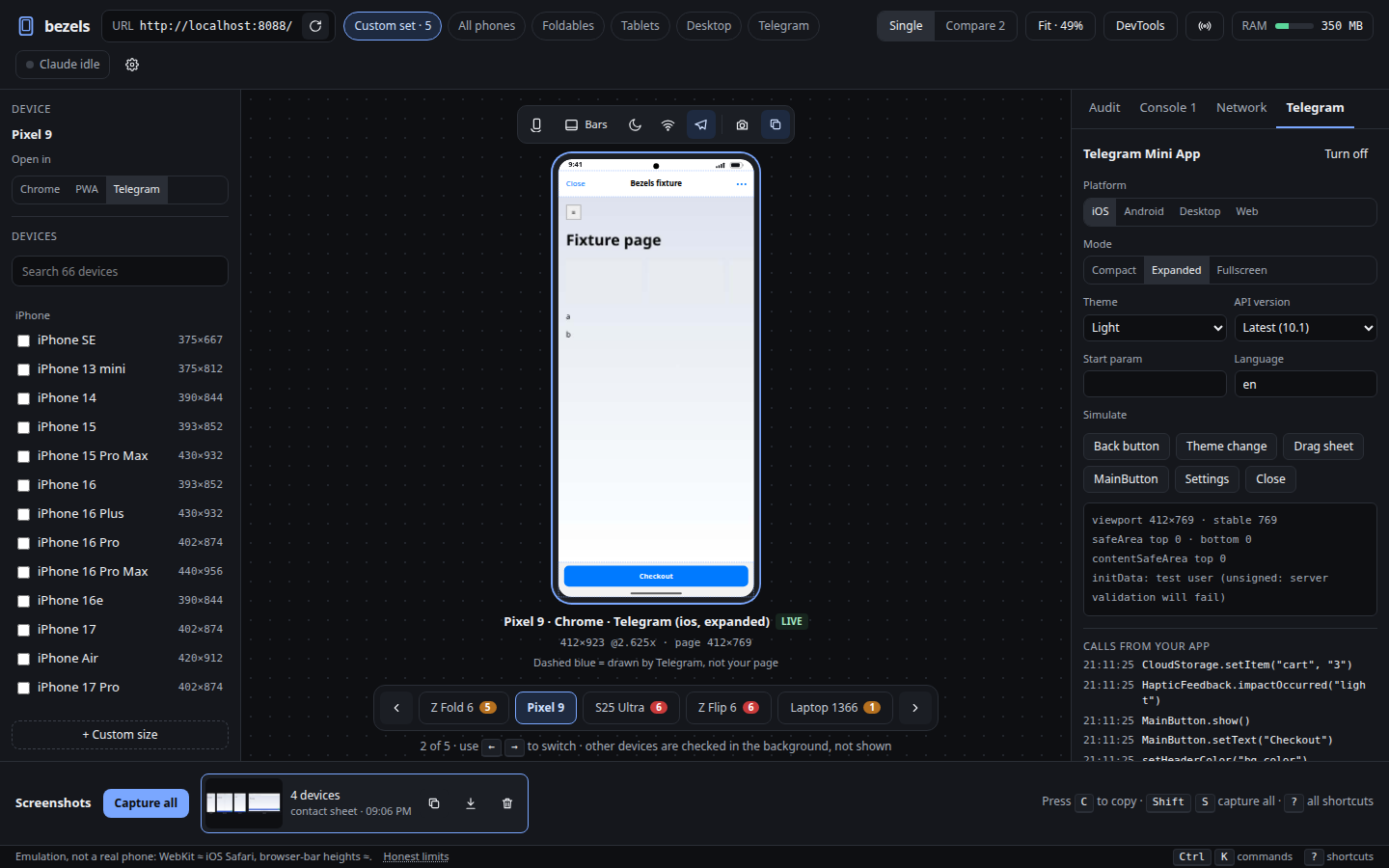
Turn it on with **Shift+T**, or "Open in → Telegram". A mock `Telegram.WebApp` (Bot API 10.1) is injected before page scripts, and the real `telegram-web-app.js` request is intercepted. The mock covers:
- the full `--tg-*` CSS variables
- viewport and stable height
- safe area and content safe area per device and mode
- MainButton, SecondaryButton, BackButton and SettingsButton, drawn by Bezels and clickable
- popups and QR
- CloudStorage, DeviceStorage and SecureStorage, kept in memory
- per-version method gating
initData is **unsigned** by default, so server-side validation fails on purpose. Put `BEZELS_TG_BOT_TOKEN=<test bot token>` in `.env` to sign it exactly like Telegram does. The audit adds checks for vh misuse, content under Telegram UI, unsupported methods, vertical swipes left on, and a missing `ready()`.
## Screenshots
Per device: screen or full page, framed or plain, transparent or solid, 1× or device DPR. **C** copies to the clipboard, **S** saves, **Shift+S** copies a contact sheet of the whole set. Files land in `~/.cache/bezels/shots/` (`2026-11-06_iphone-16-pro_portrait.png`; change it with `shotsDir` in Settings or `BEZELS_SHOTS_DIR`), and Claude Code's captures appear in the same tray. `bezels shot --out ./dir` copies them where you want.
For bulk runs, `screenshot` with `fast: true` skips the frame, device scale and thumbnail: about 30 ms instead of about 300 ms.
## Full screen
**Z** (or the expand button in the top bar) hides every panel: top bar, device list, side panel, DevTools, screenshot tray. The device fills the window and may grow past 100%. A small pill (device ‹ ›, rotate, copy screenshot, browser full screen, exit) fades out while the mouse is still. **g z** also hides the browser's own UI. **Esc** or **Z** brings the panels back; the mode is remembered across reloads.
## Flows: test past the home page
Most apps change screens without changing the URL, so a URL-only check stops at the first screen. Describe the path once and replay it on every device:
```js
run_flow({
name: "suit-roll",
url: "http://localhost:3000",
devices: "phones,folds,tablets",
steps: [
"checkpoint lobby",
"tap PLAY DEMO", "wait PLACE BET", "checkpoint bet",
"tap PLACE BET", { wait: { text: "You won", timeout: 20000 } }, "checkpoint result",
],
})
```
Each device runs in a fresh page, one at a time. Every **checkpoint** takes a screenshot and runs the layout audit. You get:
- pass or fail per device, with the failing step and a screenshot of it;
- issues per checkpoint;
- one framed contact sheet per checkpoint;
- `report.html`: a devices × checkpoints grid linked to every image, ready for a pull request.
A hot reload in the middle of a step is waited out and the step retried once.
Steps: `tap`, `wait` (text, `{selector}`, `{gone}` or milliseconds), `type` (optionally `into`), `press`, `scroll`, `hover`, `goto`, `eval`, `state` (for example rotate mid-flow), `checkpoint`. Text matches visible text, exact first.
- **Save and re-run:** `save_flow` stores a flow, and `run_flow({ name })` re-runs it after every change. From the UI, the command palette (Ctrl+K) lists saved flows as "Run flow: …". From a terminal or CI, `bezels flow suit-roll` (or a `flow.json` file) exits 1 if any device fails.
- **Inside `eval`:** `window.bezels` has `tap`, `waitFor`, `text`, `visible`, `inView`, `rect`, `overlap` and `sleep`, plus `checkpoint(name)`, which screenshots and audits mid-script. Checkpoints come back with the eval result.
- **Your own helpers:** `set_helpers({ target: "http://localhost:3000", js })` saves a script that runs on every page load of that site, in every session and flow, instead of pasting it into each `eval`.
## Layout audit
`audit_layout` (one device), `audit_all` (many) and **A** / **Shift+A** in the UI check for:
- text overlapping text, text cut off with "…", controls or headings partly hidden by an `overflow:hidden` box, containers collapsed to a sliver;
- horizontal overflow, tap targets below the minimum (measured by what a tap actually hits, so invisible enlarged hit areas count), small text;
- content under the notch, browser bars, home indicator or Telegram UI; overlapping fixed bars; unscaled images; plain `100vh` on mobile (`dvh`/`svh` are fine);
- Telegram: API calls above the selected version, vertical swipes left on, `ready()` never called.
Rules are per site and saved with `audit_rules`:
```js
audit_rules({ target: "http://localhost:3000", rules: {
minTextPx: 11, minTapPx: 44,
ignore: ["header.site-nav", ".bottom-bar", ".bg-art"], // site shell, decoration
clippedIsIntended: true, // content cropped by overflow:hidden is on purpose
disable: ["image-oversized"]
}})
```
`audit_layout` and `audit_all` also take `rules` for a one-off override.
## Keyboard
Every action has a key or is in the command palette (**Ctrl/Cmd+K**). **?** shows the cheat sheet. Keys are remappable in Settings (**Ctrl/Cmd+,**) and stored in `~/.config/bezels/keymap.json`, with conflicts flagged. Clicking a device (or pressing **Enter**) sends keystrokes to the page; **Esc** takes them back. `g`-chords (`g e`, `g n`, …) time out after 1 s.
## Security
The server binds to `127.0.0.1` only. RPC and WebSocket requests are rejected unless the Origin is Bezels itself (or comes from no browser at all, as with the CLI and MCP), and a wrong Host header is rejected too, which blocks DNS rebinding. Colours that the page under test passes to `setHeaderColor` and similar calls are validated before they reach the frame SVG.
## Layout
| Path | What |
|---|---|
| [src/shared/devices.ts](src/shared/devices.ts) | 66 devices with a source per entry (`npm run devices:json` → `devices.json`) |
| [src/shared/layout.ts](src/shared/layout.ts) | the realism rule: viewport = screen − status bar − browser bars, per orientation / bars / fold / Telegram |
| [src/shared/frame.ts](src/shared/frame.ts) | SVG device frames, shared by the UI and the screenshot compositor |
| [src/core/host.ts](src/core/host.ts) | one browser context + page: emulation, input, screencast, DevTools buffers |
| [src/core/core.ts](src/core/core.ts) | sessions, dedupe, live limit, budget, captures, audits, sensors, Telegram |
| [src/core/inpage.ts](src/core/inpage.ts) | scripts that run in the page: audit, inspect, overlays, breakpoints, storage, Web Vitals |
| [src/core/telegram.ts](src/core/telegram.ts) | mock `Telegram.WebApp` + initData signing |
| [src/server.ts](src/server.ts), [src/mcp.ts](src/mcp.ts), [src/cli.ts](src/cli.ts) | the three ways in |
| [ui/src](ui/src) | the web UI |
| [desktop/](desktop) | **experimental**, never-built Tauri wrapper with a global Ctrl+Alt+C |
`npm test` runs the self-checks. CI runs them on Ubuntu with both engines: viewport numbers against Playwright's hardware measurements, folds, Telegram layout, initData signing, frame XSS sanitising, keymap conflicts, an end-to-end audit of [test/fixture](test/fixture/index.html) on Chromium, and the same on an iPhone with WebKit.
Chrome user agents follow the Chromium that Playwright actually runs, so they don't go stale. Safari, Chrome-on-iOS and Samsung Internet versions are hand-written; see [CONTRIBUTING.md](CONTRIBUTING.md).
## Honest limits
- iPhone and iPad run Playwright's WebKit, which is close to iOS Safari but not identical. There are no iOS-only quirks, no real address-bar animation and no keyboard resize.
- This is emulation: no real GPU, fonts or performance of the actual phone. Browser-bar heights are measured values (≈).
- Telegram mode is a mock. Do a final check in real Telegram, using the test environment and a test bot.
- For final checks, still test on one real Android (Chrome remote debugging) and one real iPhone.
## Contributing, security, licence
- [CONTRIBUTING.md](CONTRIBUTING.md): setup, and how to add or correct a device. Real-device measurements are the most useful contribution.
- [SECURITY.md](SECURITY.md): the threat model of the local server, and how to report a vulnerability privately.
- [MIT](LICENSE). Bezels drives Playwright (Apache-2.0) and loads axe-core (MPL-2.0) unmodified for accessibility audits. Device names belong to their makers; the frames are generic drawings, not their artwork.
This server cannot be deployed
Maintenance
ActivityMaintained
ResponsivenessNo recent community issues