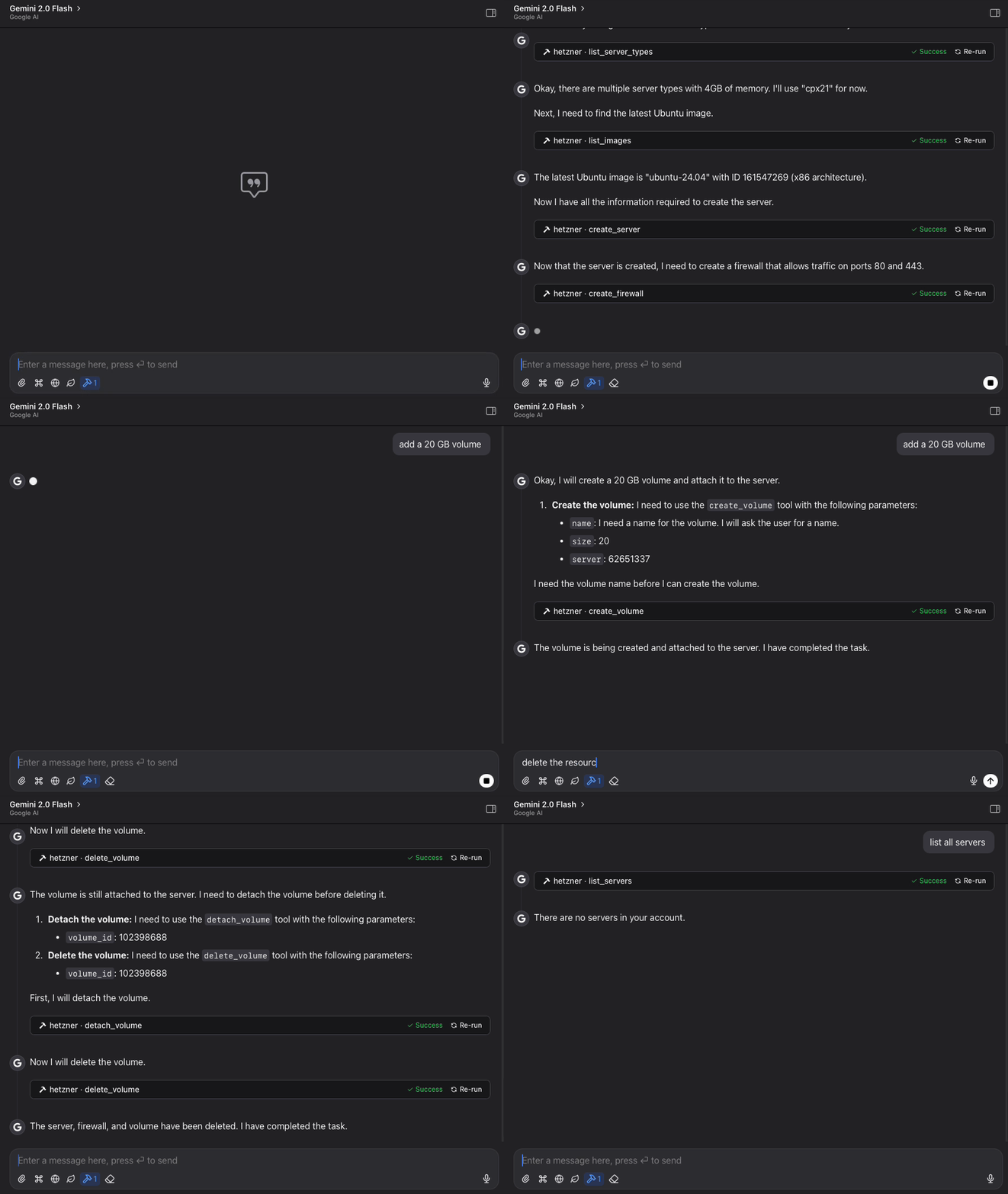
Hetzner Cloud MCP Server
Enables loading environment variables from a .env file, specifically used for storing and accessing the Hetzner Cloud API token required for authentication.
Enables installation via git clone from the repository.
Supports installation directly from GitHub repository using git clone or pip install from the repository URL.
Allows managing Hetzner Cloud resources including servers, volumes, firewalls, and SSH keys. Supports creating, listing, powering on/off servers; creating, attaching, and resizing volumes; managing firewall rules; and working with SSH keys across Hetzner Cloud datacenters.
Requires Python 3.11+ as a runtime environment and supports installation via pip.
Supports working with Ubuntu server images, specifically mentioning Ubuntu 22.04 as an available option when creating servers.
Click on "Deploy Server".
Wait a few minutes for the server to deploy. Once ready, it will show a "Started" state.
In the chat, type
@followed by the MCP server name and your instructions, e.g., "@Hetzner Cloud MCP Server list all my servers and show their current status"
That's it! The server will respond to your query, and you can continue using it as needed.
Here is a step-by-step guide with screenshots.
Hetzner Cloud MCP Server
A Model Context Protocol (MCP) server for interacting with the Hetzner Cloud API. This server allows language models to manage Hetzner Cloud resources through structured functions.

Features
List, create, and manage Hetzner Cloud servers
Create, attach, detach, and resize volumes
Manage firewall rules and apply them to servers
Create and manage SSH keys for secure server access
View available images, server types, and locations
Power on/off and reboot servers
Simple, structured API for language model interaction
Claude Code integration for managing Hetzner resources directly from Claude
Related MCP server: Linode MCP Server
Requirements
Python 3.11+
Hetzner Cloud API token
Installation
Method 1: Direct Installation
Clone this repository:
git clone https://github.com/dkruyt/mcp-hetzner.git
cd mcp-hetznerInstall dependencies:
pip install -e .Create a
.envfile and add your Hetzner Cloud API token:
HCLOUD_TOKEN=your_hetzner_cloud_api_token_hereMethod 2: Install as a Package
# Install directly from the repository
pip install git+https://github.com/dkruyt/mcp-hetzner.gitAfter installing as a package, create a .env file in your working directory with your Hetzner Cloud API token.
Usage
Starting the Server
Option 1: Run the installed package:
# Using default stdio transport
mcp-hetzner
# Using SSE transport
mcp-hetzner --transport sse
# Setting a custom port
mcp-hetzner --transport sse --port 8000Option 2: Run as a module:
python -m mcp_hetzner
# or
python -m mcp_hetzner.serverThe server supports two transport modes:
stdio(default): Standard I/O transport, typically used with Claude Codesse: Server-Sent Events transport, suitable for HTTP clients
By default, the server runs on localhost:8080. You can customize the host and port by:
Setting the
MCP_HOSTandMCP_PORTenvironment variables in your.envfileUsing the
--portcommand line argument (overrides the environment variable)
Using with Claude Code
To use with Claude Code, run the server with SSE transport:
# Start the server with SSE transport
mcp-hetzner --transport sse --port 8080
# In another terminal, connect Claude Code to the server
claude-code --mcp-server localhost:8080Testing the API
A test client is included to verify the server functionality:
python -m mcp_hetzner.clientExample Workflows
Basic Server Management
# List all your servers
list_servers
# Create a new server
create_server {
"name": "web-server",
"server_type": "cx11",
"image": "ubuntu-22.04"
}
# Power operations
power_off {"server_id": 12345}
power_on {"server_id": 12345}
reboot {"server_id": 12345}
# Delete a server when no longer needed
delete_server {"server_id": 12345}Volume Management
# List all volumes
list_volumes
# Create a new volume
create_volume {
"name": "data-volume",
"size": 10,
"location": "nbg1",
"format": "ext4"
}
# Attach volume to a server
attach_volume {
"volume_id": 12345,
"server_id": 67890,
"automount": true
}
# Detach volume from server
detach_volume {
"volume_id": 12345
}
# Resize a volume (can only increase size)
resize_volume {
"volume_id": 12345,
"size": 50
}
# Delete a volume when no longer needed
delete_volume {
"volume_id": 12345
}Firewall Management
# List all firewalls
list_firewalls
# Create a firewall for web servers
create_firewall {
"name": "web-firewall",
"rules": [
{
"direction": "in",
"protocol": "tcp",
"port": "80",
"source_ips": ["0.0.0.0/0", "::/0"]
},
{
"direction": "in",
"protocol": "tcp",
"port": "443",
"source_ips": ["0.0.0.0/0", "::/0"]
}
]
}
# Apply firewall to a server
apply_firewall_to_resources {
"firewall_id": 12345,
"resources": [
{
"type": "server",
"server_id": 67890
}
]
}SSH Key Management
# List all SSH keys
list_ssh_keys
# Create a new SSH key
create_ssh_key {
"name": "my-laptop",
"public_key": "ssh-rsa AAAAB3NzaC1yc2EAAA... user@laptop"
}
# Use the SSH key when creating a server
create_server {
"name": "secure-server",
"server_type": "cx11",
"image": "ubuntu-22.04",
"ssh_keys": [12345]
}
# Update an SSH key's name
update_ssh_key {
"ssh_key_id": 12345,
"name": "work-laptop"
}
# Delete an SSH key
delete_ssh_key {
"ssh_key_id": 12345
}Infrastructure Planning
# Explore available resources
list_server_types
list_images
list_locations
# Get specific server information
get_server {"server_id": 12345}Available Functions
The MCP server provides the following functions:
Server Management
list_servers: List all servers in your Hetzner Cloud accountget_server: Get details about a specific servercreate_server: Create a new serverdelete_server: Delete a serverpower_on: Power on a serverpower_off: Power off a serverreboot: Reboot a server
Volume Management
list_volumes: List all volumes in your Hetzner Cloud accountget_volume: Get details about a specific volumecreate_volume: Create a new volumedelete_volume: Delete a volumeattach_volume: Attach a volume to a serverdetach_volume: Detach a volume from a serverresize_volume: Increase the size of a volume
Firewall Management
list_firewalls: List all firewalls in your Hetzner Cloud accountget_firewall: Get details about a specific firewallcreate_firewall: Create a new firewallupdate_firewall: Update firewall name or labelsdelete_firewall: Delete a firewallset_firewall_rules: Set or update firewall rulesapply_firewall_to_resources: Apply a firewall to servers or server groupsremove_firewall_from_resources: Remove a firewall from servers or server groups
SSH Key Management
list_ssh_keys: List all SSH keys in your Hetzner Cloud accountget_ssh_key: Get details about a specific SSH keycreate_ssh_key: Create a new SSH keyupdate_ssh_key: Update SSH key name or labelsdelete_ssh_key: Delete an SSH key
Information
list_images: List available OS imageslist_server_types: List available server typeslist_locations: List available datacenter locations
License
MIT
Available Tools
30 toolsapply_firewall_to_resourcesB
Apply a firewall to resources.
Applies a firewall to multiple resources like servers or server groups by label.
Examples:
- Apply to server: {"firewall_id": 12345, "resources": [{"type": "server", "server_id": 123}]}
- Apply by label: {"firewall_id": 12345, "resources": [{"type": "label_selector", "label_selector": "env=prod"}]}
Inputs: params (required). Returns: result
attach_volumeC
Attach a volume to a server.
Attaches a volume to a server and optionally mounts it.
Example:
- Attach volume: {"volume_id": 12345, "server_id": 67890}
- Attach and mount: {"volume_id": 12345, "server_id": 67890, "automount": true}
Inputs: params (required). Returns: result
create_firewallC
Create a new firewall.
Creates a new firewall with the specified name, rules, and resources.
Examples:
- Basic firewall: {"name": "web-firewall"}
- With rules: {"name": "web-firewall", "rules": [{"direction": "in", "protocol": "tcp", "port": "80", "source_ips": ["0.0.0.0/0"]}]}
- With resources: {"name": "web-firewall", "rules": [...], "resources": [{"type": "server", "server_id": 123}]}
Inputs: params (required). Returns: result
create_serverC
Create a new server.
Creates a new server with the specified configuration.
Examples:
- Basic server: {"name": "web-server", "server_type": "cx11", "image": "ubuntu-22.04"}
- With SSH keys: {"name": "app-server", "server_type": "cx21", "image": "debian-11", "ssh_keys": [123, 456]}
- Custom location: {"name": "db-server", "server_type": "cx31", "image": "ubuntu-22.04", "location": "fsn1"}
Inputs: params (required). Returns: result
create_ssh_keyB
Create a new SSH key.
Creates a new SSH key with the specified name and public key data.
Examples:
- Basic SSH key: {"name": "my-ssh-key", "public_key": "ssh-rsa AAAAB3NzaC1..."}
- With labels: {"name": "user-key", "public_key": "ssh-rsa AAAAB3NzaC1...", "labels": {"environment": "production"}}
Inputs: params (required). Returns: result
create_volumeB
Create a new volume.
Creates a new volume with the specified configuration.
Examples:
- Basic volume: {"name": "data-volume", "size": 10}
- With location: {"name": "db-volume", "size": 100, "location": "fsn1"}
- Attached to server: {"name": "app-volume", "size": 50, "server": 123456, "automount": true}
- With format: {"name": "log-volume", "size": 20, "format": "ext4"}
Inputs: params (required). Returns: result
delete_firewallC
Delete a firewall.
Permanently deletes a firewall identified by its ID.
Example:
- Delete firewall: {"firewall_id": 12345}
Inputs: params (required). Returns: result
delete_serverC
Delete a server.
Permanently deletes a server identified by its ID.
Example:
- Delete server: {"server_id": 12345}
Inputs: params (required). Returns: result
delete_ssh_keyB
Delete an SSH key.
Permanently deletes an SSH key identified by its ID.
Example:
- Delete SSH key: {"ssh_key_id": 12345}
Inputs: params (required). Returns: result
delete_volumeC
Delete a volume.
Permanently deletes a volume identified by its ID.
Example:
- Delete volume: {"volume_id": 12345}
Inputs: params (required). Returns: result
detach_volumeC
Detach a volume from a server.
Detaches a volume from the server it's currently attached to.
Example:
- Detach volume: {"volume_id": 12345}
Inputs: params (required). Returns: result
get_firewallB
Get details about a specific firewall.
Returns detailed information about a firewall identified by its ID.
Example:
- Get firewall details: {"firewall_id": 12345}
Inputs: params (required). Returns: result
get_serverB
Get details about a specific server.
Returns detailed information about a server identified by its ID.
Example:
- Get server details: {"server_id": 12345}
Inputs: params (required). Returns: result
get_ssh_keyB
Get details about a specific SSH key.
Returns detailed information about an SSH key identified by its ID.
Example:
- Get SSH key details: {"ssh_key_id": 12345}
Inputs: params (required). Returns: result
get_volumeC
Get details about a specific volume.
Returns detailed information about a volume identified by its ID.
Example:
- Get volume details: {"volume_id": 12345}
Inputs: params (required). Returns: result
list_firewallsB
List all firewalls in your Hetzner Cloud account.
Returns a list of all firewall instances with their details.
Example:
- Basic list: list_firewalls()
Inputs: no named parameters. Returns: result
list_imagesB
List available images.
Returns a list of all available OS images that can be used to create servers.
Example:
- List images: list_images()
Inputs: no named parameters. Returns: result
list_locationsB
List available locations.
Returns information about all available datacenter locations.
Example:
- List locations: list_locations()
Inputs: no named parameters. Returns: result
list_serversB
List all servers in your Hetzner Cloud account.
Returns a list of all server instances with their details.
Example:
- Basic list: list_servers()
Inputs: no named parameters. Returns: result
list_server_typesB
List available server types.
Returns information about all available server configurations.
Example:
- List server types: list_server_types()
Inputs: no named parameters. Returns: result
list_ssh_keysB
List all SSH keys in your Hetzner Cloud account.
Returns a list of all SSH key instances with their details.
Example:
- Basic list: list_ssh_keys()
Inputs: no named parameters. Returns: result
list_volumesB
List all volumes in your Hetzner Cloud account.
Returns a list of all volume instances with their details.
Example:
- Basic list: list_volumes()
Inputs: no named parameters. Returns: result
power_offA
Power off a server.
Powers off a server. Note: This is equivalent to pulling the power plug and may cause data loss.
Consider using a graceful shutdown if possible.
Example:
- Power off server: {"server_id": 12345}
Inputs: params (required). Returns: result
power_onB
Power on a server.
Powers on a server that is currently powered off.
Example:
- Power on server: {"server_id": 12345}
Inputs: params (required). Returns: result
rebootA
Reboot a server.
Performs a soft reboot (graceful shutdown and restart) of the server.
Example:
- Reboot server: {"server_id": 12345}
Inputs: params (required). Returns: result
remove_firewall_from_resourcesC
Remove a firewall from resources.
Removes a firewall from multiple resources.
Examples:
- Remove from server: {"firewall_id": 12345, "resources": [{"type": "server", "server_id": 123}]}
- Remove by label: {"firewall_id": 12345, "resources": [{"type": "label_selector", "label_selector": "env=prod"}]}
Inputs: params (required). Returns: result
resize_volumeC
Resize a volume.
Increases the size of a volume (size can only be increased, not decreased).
Example:
- Resize volume: {"volume_id": 12345, "size": 100}
Inputs: params (required). Returns: result
set_firewall_rulesA
Set rules for a firewall.
Sets the rules of a firewall. All existing rules will be overwritten.
Pass an empty rules array to remove all rules.
Example:
- Set rules: {"firewall_id": 12345, "rules": [{"direction": "in", "protocol": "tcp", "port": "80", "source_ips": ["0.0.0.0/0"]}]}
Inputs: params (required). Returns: result
update_firewallB
Update a firewall.
Updates the name or labels of an existing firewall.
Example:
- Update name: {"firewall_id": 12345, "name": "new-name"}
- Update labels: {"firewall_id": 12345, "labels": {"key": "value"}}
Inputs: params (required). Returns: result
update_ssh_keyC
Update an SSH key.
Updates the name or labels of an existing SSH key.
Example:
- Update name: {"ssh_key_id": 12345, "name": "new-key-name"}
- Update labels: {"ssh_key_id": 12345, "name": "existing-name", "labels": {"environment": "staging"}}
Inputs: params (required). Returns: result
Tool Schema Changelog
Recent tool additions, removals, and schema changes observed during successful MCP inspections.
Loading tool schema changelog…
TDQS
Scored across 30 tools
Each tool has a clearly distinct purpose with no overlap. Tools are organized by resource type (firewall, server, SSH key, volume) and action (create, get, list, update, delete, apply/remove, attach/detach, power operations), making it easy for an agent to select the correct one. For example, create_server vs. get_server vs. list_servers are unambiguous.
All tool names follow a consistent verb_noun pattern with snake_case throughout. Verbs like create, get, list, update, delete, apply, attach, detach, power_off, power_on, reboot, resize, set, and remove are used predictably across resources. There are no deviations in naming conventions.
With 30 tools, the count is on the higher side but reasonable for a comprehensive cloud infrastructure server covering multiple resource types (servers, firewalls, SSH keys, volumes, images, locations, server types). Each tool serves a specific purpose, though it might feel slightly heavy compared to simpler servers.
The tool set provides complete CRUD/lifecycle coverage for all core resources (servers, firewalls, SSH keys, volumes), including create, get, list, update, delete, and additional operations like apply/remove firewalls, attach/detach volumes, power management, and resizing. There are no obvious gaps for managing Hetzner Cloud infrastructure.
Maintenance
Related MCP Connectors
A comprehensive Model Context Protocol (MCP) server that enables AI assistants to interact with yo…
An MCP server that provides an API to LLMs to manage their JumpCloud resources.
The Mercado Pago MCP Server implements the Model Context Protocol to provide AI agents and LLMs with access to Mercado Pago's APIs and tools within compatible development environments. It acts as an intermediary that translates Mercado Pago resources into executable functions (tools) that AI applications can invoke to perform actions and automate flows. The server simplifies integration, enables using documentation to implement or improve code, and optimizes operations through natural language interactions without manual implementations.
A Model Context Protocol server for Wix AI tools
Related MCP Servers
- AlicenseNot gradedqualityAmaintenanceA Model Context Protocol server that enables AI assistants to interact with Coolify instances through natural language, allowing management of servers, applications, databases, and deployments.4,835 npm623MIT
- AlicenseBqualityDmaintenanceA Model Context Protocol server that enables Large Language Models like Claude to manage Linode cloud resources, including listing regions, creating, viewing, deleting, and rebooting Linode instances.11MIT
- AlicenseCqualityBmaintenanceA Model Context Protocol server for the Hetzner Cloud API that enables natural language management of cloud infrastructure. Users can list, create, and modify servers, networks, volumes, and load balancers through MCP-compatible clients.162844 npmMIT
- AlicenseNot gradedqualityAmaintenanceModel Context Protocol server for full Hetzner Cloud + Storage API automation. Exposes all official Hetzner operations as MCP tools so AI agents can manage servers, networking, load balancers, firewalls, volumes, DNS zones, and storage boxes from one server.1MIT