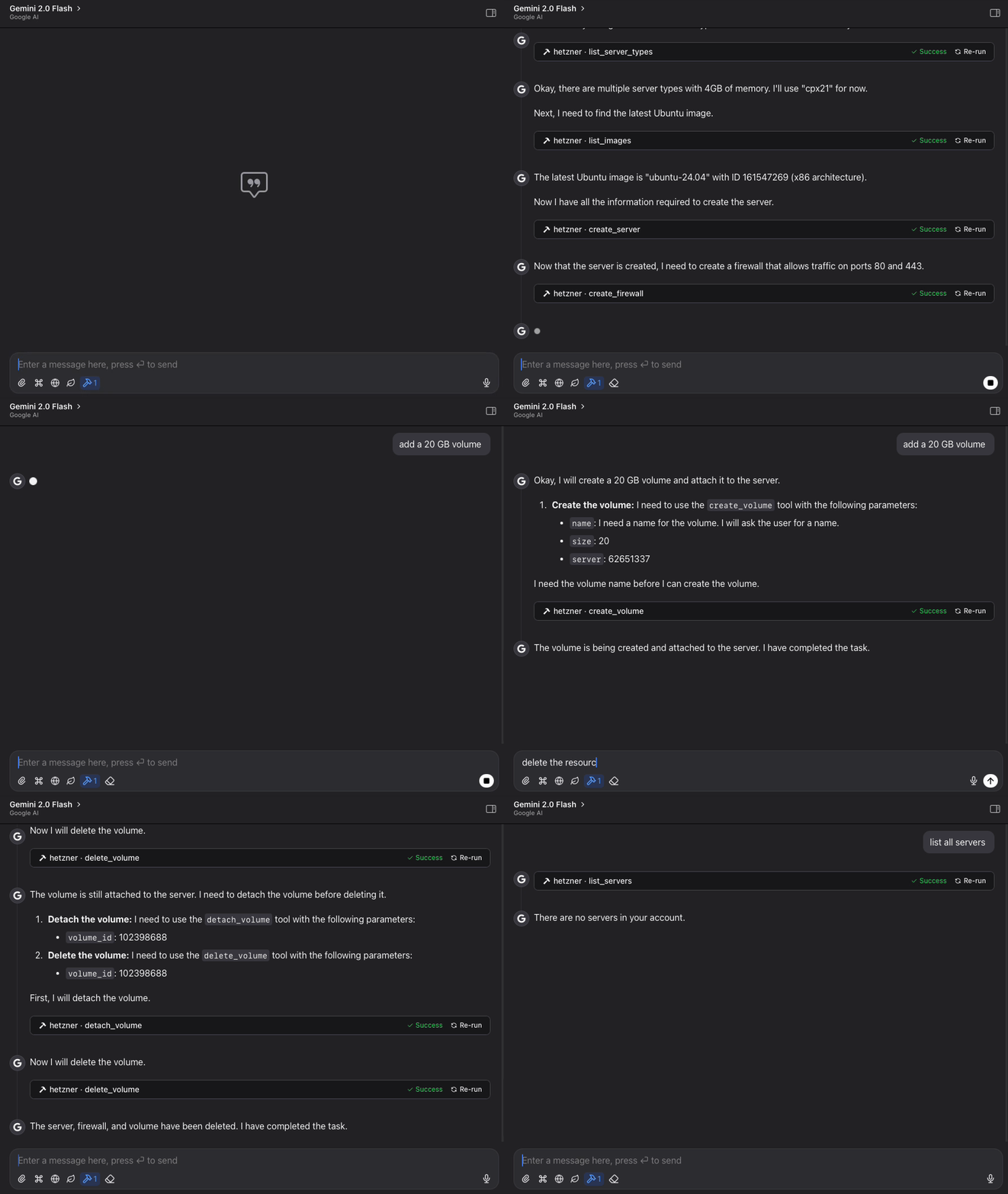
Hetzner Cloud MCP Server
Hetzner 클라우드 MCP 서버
Hetzner Cloud API와 상호 작용하기 위한 모델 컨텍스트 프로토콜(MCP) 서버입니다. 이 서버를 통해 언어 모델은 구조화된 함수를 통해 Hetzner Cloud 리소스를 관리할 수 있습니다.

특징
Hetzner Cloud 서버를 나열, 생성 및 관리합니다.
볼륨 생성, 연결, 분리 및 크기 조정
방화벽 규칙을 관리하고 서버에 적용합니다.
보안 서버 액세스를 위한 SSH 키 생성 및 관리
사용 가능한 이미지, 서버 유형 및 위치 보기
서버 전원 켜기/끄기 및 재부팅
언어 모델 상호작용을 위한 간단하고 구조화된 API
Claude에서 Hetzner 리소스를 직접 관리하기 위한 Claude Code 통합
Related MCP server: Linode MCP Server
요구 사항
파이썬 3.11+
Hetzner Cloud API 토큰
설치
방법 1: 직접 설치
이 저장소를 복제하세요:
지엑스피1
종속성 설치:
pip install -e ..env파일을 만들고 Hetzner Cloud API 토큰을 추가하세요.
HCLOUD_TOKEN=your_hetzner_cloud_api_token_here방법 2: 패키지로 설치
# Install directly from the repository
pip install git+https://github.com/dkruyt/mcp-hetzner.git패키지로 설치한 후 Hetzner Cloud API 토큰을 사용하여 작업 디렉토리에 .env 파일을 만듭니다.
용법
서버 시작
옵션 1: 설치된 패키지를 실행합니다.
# Using default stdio transport
mcp-hetzner
# Using SSE transport
mcp-hetzner --transport sse
# Setting a custom port
mcp-hetzner --transport sse --port 8000옵션 2: 모듈로 실행:
python -m mcp_hetzner
# or
python -m mcp_hetzner.server서버는 두 가지 전송 모드를 지원합니다.
stdio(기본값): 표준 I/O 전송, 일반적으로 Claude Code와 함께 사용됨sse: HTTP 클라이언트에 적합한 Server-Sent Events 전송
기본적으로 서버는 localhost:8080 에서 실행됩니다. 다음과 같이 호스트와 포트를 사용자 지정할 수 있습니다.
.env파일에서MCP_HOST및MCP_PORT환경 변수 설정--port명령줄 인수 사용(환경 변수 무시)
Claude Code와 함께 사용
Claude Code와 함께 사용하려면 SSE 전송으로 서버를 실행하세요.
# Start the server with SSE transport
mcp-hetzner --transport sse --port 8080
# In another terminal, connect Claude Code to the server
claude-code --mcp-server localhost:8080API 테스트
서버 기능을 검증하기 위해 테스트 클라이언트가 포함되었습니다.
python -m mcp_hetzner.client예제 워크플로
기본 서버 관리
# List all your servers
list_servers
# Create a new server
create_server {
"name": "web-server",
"server_type": "cx11",
"image": "ubuntu-22.04"
}
# Power operations
power_off {"server_id": 12345}
power_on {"server_id": 12345}
reboot {"server_id": 12345}
# Delete a server when no longer needed
delete_server {"server_id": 12345}볼륨 관리
# List all volumes
list_volumes
# Create a new volume
create_volume {
"name": "data-volume",
"size": 10,
"location": "nbg1",
"format": "ext4"
}
# Attach volume to a server
attach_volume {
"volume_id": 12345,
"server_id": 67890,
"automount": true
}
# Detach volume from server
detach_volume {
"volume_id": 12345
}
# Resize a volume (can only increase size)
resize_volume {
"volume_id": 12345,
"size": 50
}
# Delete a volume when no longer needed
delete_volume {
"volume_id": 12345
}방화벽 관리
# List all firewalls
list_firewalls
# Create a firewall for web servers
create_firewall {
"name": "web-firewall",
"rules": [
{
"direction": "in",
"protocol": "tcp",
"port": "80",
"source_ips": ["0.0.0.0/0", "::/0"]
},
{
"direction": "in",
"protocol": "tcp",
"port": "443",
"source_ips": ["0.0.0.0/0", "::/0"]
}
]
}
# Apply firewall to a server
apply_firewall_to_resources {
"firewall_id": 12345,
"resources": [
{
"type": "server",
"server_id": 67890
}
]
}SSH 키 관리
# List all SSH keys
list_ssh_keys
# Create a new SSH key
create_ssh_key {
"name": "my-laptop",
"public_key": "ssh-rsa AAAAB3NzaC1yc2EAAA... user@laptop"
}
# Use the SSH key when creating a server
create_server {
"name": "secure-server",
"server_type": "cx11",
"image": "ubuntu-22.04",
"ssh_keys": [12345]
}
# Update an SSH key's name
update_ssh_key {
"ssh_key_id": 12345,
"name": "work-laptop"
}
# Delete an SSH key
delete_ssh_key {
"ssh_key_id": 12345
}인프라 계획
# Explore available resources
list_server_types
list_images
list_locations
# Get specific server information
get_server {"server_id": 12345}사용 가능한 기능
MCP 서버는 다음과 같은 기능을 제공합니다.
서버 관리
list_servers: Hetzner Cloud 계정의 모든 서버를 나열합니다.get_server: 특정 서버에 대한 세부 정보를 가져옵니다.create_server: 새로운 서버를 생성합니다delete_server: 서버 삭제power_on: 서버 전원을 켭니다power_off: 서버 전원을 끕니다reboot: 서버를 재부팅합니다
볼륨 관리
list_volumes: Hetzner Cloud 계정의 모든 볼륨을 나열합니다.get_volume: 특정 볼륨에 대한 세부 정보를 가져옵니다.create_volume: 새로운 볼륨을 생성합니다delete_volume: 볼륨 삭제attach_volume: 서버에 볼륨을 연결합니다.detach_volume: 서버에서 볼륨을 분리합니다.resize_volume: 볼륨의 크기를 늘립니다.
방화벽 관리
list_firewalls: Hetzner Cloud 계정의 모든 방화벽을 나열합니다.get_firewall: 특정 방화벽에 대한 세부 정보를 가져옵니다.create_firewall: 새로운 방화벽을 생성합니다update_firewall: 방화벽 이름 또는 레이블 업데이트delete_firewall: 방화벽 삭제set_firewall_rules: 방화벽 규칙을 설정하거나 업데이트합니다.apply_firewall_to_resources: 서버 또는 서버 그룹에 방화벽을 적용합니다.remove_firewall_from_resources: 서버 또는 서버 그룹에서 방화벽을 제거합니다.
SSH 키 관리
list_ssh_keys: Hetzner Cloud 계정의 모든 SSH 키를 나열합니다.get_ssh_key: 특정 SSH 키에 대한 세부 정보를 가져옵니다.create_ssh_key: 새로운 SSH 키를 생성합니다update_ssh_key: SSH 키 이름 또는 레이블 업데이트delete_ssh_key: SSH 키 삭제
정보
list_images: 사용 가능한 OS 이미지 나열list_server_types: 사용 가능한 서버 유형 나열list_locations: 사용 가능한 데이터 센터 위치 나열
특허
MIT
Available Tools
30 toolsapply_firewall_to_resourcesB
Apply a firewall to resources.
Applies a firewall to multiple resources like servers or server groups by label.
Examples:
- Apply to server: {"firewall_id": 12345, "resources": [{"type": "server", "server_id": 123}]}
- Apply by label: {"firewall_id": 12345, "resources": [{"type": "label_selector", "label_selector": "env=prod"}]}
Inputs: params (required). Returns: result
attach_volumeC
Attach a volume to a server.
Attaches a volume to a server and optionally mounts it.
Example:
- Attach volume: {"volume_id": 12345, "server_id": 67890}
- Attach and mount: {"volume_id": 12345, "server_id": 67890, "automount": true}
Inputs: params (required). Returns: result
create_firewallC
Create a new firewall.
Creates a new firewall with the specified name, rules, and resources.
Examples:
- Basic firewall: {"name": "web-firewall"}
- With rules: {"name": "web-firewall", "rules": [{"direction": "in", "protocol": "tcp", "port": "80", "source_ips": ["0.0.0.0/0"]}]}
- With resources: {"name": "web-firewall", "rules": [...], "resources": [{"type": "server", "server_id": 123}]}
Inputs: params (required). Returns: result
create_serverC
Create a new server.
Creates a new server with the specified configuration.
Examples:
- Basic server: {"name": "web-server", "server_type": "cx11", "image": "ubuntu-22.04"}
- With SSH keys: {"name": "app-server", "server_type": "cx21", "image": "debian-11", "ssh_keys": [123, 456]}
- Custom location: {"name": "db-server", "server_type": "cx31", "image": "ubuntu-22.04", "location": "fsn1"}
Inputs: params (required). Returns: result
create_ssh_keyB
Create a new SSH key.
Creates a new SSH key with the specified name and public key data.
Examples:
- Basic SSH key: {"name": "my-ssh-key", "public_key": "ssh-rsa AAAAB3NzaC1..."}
- With labels: {"name": "user-key", "public_key": "ssh-rsa AAAAB3NzaC1...", "labels": {"environment": "production"}}
Inputs: params (required). Returns: result
create_volumeB
Create a new volume.
Creates a new volume with the specified configuration.
Examples:
- Basic volume: {"name": "data-volume", "size": 10}
- With location: {"name": "db-volume", "size": 100, "location": "fsn1"}
- Attached to server: {"name": "app-volume", "size": 50, "server": 123456, "automount": true}
- With format: {"name": "log-volume", "size": 20, "format": "ext4"}
Inputs: params (required). Returns: result
delete_firewallC
Delete a firewall.
Permanently deletes a firewall identified by its ID.
Example:
- Delete firewall: {"firewall_id": 12345}
Inputs: params (required). Returns: result
delete_serverC
Delete a server.
Permanently deletes a server identified by its ID.
Example:
- Delete server: {"server_id": 12345}
Inputs: params (required). Returns: result
delete_ssh_keyB
Delete an SSH key.
Permanently deletes an SSH key identified by its ID.
Example:
- Delete SSH key: {"ssh_key_id": 12345}
Inputs: params (required). Returns: result
delete_volumeC
Delete a volume.
Permanently deletes a volume identified by its ID.
Example:
- Delete volume: {"volume_id": 12345}
Inputs: params (required). Returns: result
detach_volumeC
Detach a volume from a server.
Detaches a volume from the server it's currently attached to.
Example:
- Detach volume: {"volume_id": 12345}
Inputs: params (required). Returns: result
get_firewallB
Get details about a specific firewall.
Returns detailed information about a firewall identified by its ID.
Example:
- Get firewall details: {"firewall_id": 12345}
Inputs: params (required). Returns: result
get_serverB
Get details about a specific server.
Returns detailed information about a server identified by its ID.
Example:
- Get server details: {"server_id": 12345}
Inputs: params (required). Returns: result
get_ssh_keyB
Get details about a specific SSH key.
Returns detailed information about an SSH key identified by its ID.
Example:
- Get SSH key details: {"ssh_key_id": 12345}
Inputs: params (required). Returns: result
get_volumeC
Get details about a specific volume.
Returns detailed information about a volume identified by its ID.
Example:
- Get volume details: {"volume_id": 12345}
Inputs: params (required). Returns: result
list_firewallsB
List all firewalls in your Hetzner Cloud account.
Returns a list of all firewall instances with their details.
Example:
- Basic list: list_firewalls()
Inputs: no named parameters. Returns: result
list_imagesB
List available images.
Returns a list of all available OS images that can be used to create servers.
Example:
- List images: list_images()
Inputs: no named parameters. Returns: result
list_locationsB
List available locations.
Returns information about all available datacenter locations.
Example:
- List locations: list_locations()
Inputs: no named parameters. Returns: result
list_serversB
List all servers in your Hetzner Cloud account.
Returns a list of all server instances with their details.
Example:
- Basic list: list_servers()
Inputs: no named parameters. Returns: result
list_server_typesB
List available server types.
Returns information about all available server configurations.
Example:
- List server types: list_server_types()
Inputs: no named parameters. Returns: result
list_ssh_keysB
List all SSH keys in your Hetzner Cloud account.
Returns a list of all SSH key instances with their details.
Example:
- Basic list: list_ssh_keys()
Inputs: no named parameters. Returns: result
list_volumesB
List all volumes in your Hetzner Cloud account.
Returns a list of all volume instances with their details.
Example:
- Basic list: list_volumes()
Inputs: no named parameters. Returns: result
power_offA
Power off a server.
Powers off a server. Note: This is equivalent to pulling the power plug and may cause data loss.
Consider using a graceful shutdown if possible.
Example:
- Power off server: {"server_id": 12345}
Inputs: params (required). Returns: result
power_onB
Power on a server.
Powers on a server that is currently powered off.
Example:
- Power on server: {"server_id": 12345}
Inputs: params (required). Returns: result
rebootA
Reboot a server.
Performs a soft reboot (graceful shutdown and restart) of the server.
Example:
- Reboot server: {"server_id": 12345}
Inputs: params (required). Returns: result
remove_firewall_from_resourcesC
Remove a firewall from resources.
Removes a firewall from multiple resources.
Examples:
- Remove from server: {"firewall_id": 12345, "resources": [{"type": "server", "server_id": 123}]}
- Remove by label: {"firewall_id": 12345, "resources": [{"type": "label_selector", "label_selector": "env=prod"}]}
Inputs: params (required). Returns: result
resize_volumeC
Resize a volume.
Increases the size of a volume (size can only be increased, not decreased).
Example:
- Resize volume: {"volume_id": 12345, "size": 100}
Inputs: params (required). Returns: result
set_firewall_rulesA
Set rules for a firewall.
Sets the rules of a firewall. All existing rules will be overwritten.
Pass an empty rules array to remove all rules.
Example:
- Set rules: {"firewall_id": 12345, "rules": [{"direction": "in", "protocol": "tcp", "port": "80", "source_ips": ["0.0.0.0/0"]}]}
Inputs: params (required). Returns: result
update_firewallB
Update a firewall.
Updates the name or labels of an existing firewall.
Example:
- Update name: {"firewall_id": 12345, "name": "new-name"}
- Update labels: {"firewall_id": 12345, "labels": {"key": "value"}}
Inputs: params (required). Returns: result
update_ssh_keyC
Update an SSH key.
Updates the name or labels of an existing SSH key.
Example:
- Update name: {"ssh_key_id": 12345, "name": "new-key-name"}
- Update labels: {"ssh_key_id": 12345, "name": "existing-name", "labels": {"environment": "staging"}}
Inputs: params (required). Returns: result
Tool Schema Changelog
Recent tool additions, removals, and schema changes observed during successful MCP inspections.
Loading tool schema changelog…
TDQS
Scored across 30 tools
Each tool has a clearly distinct purpose with no overlap. Tools are organized by resource type (firewall, server, SSH key, volume) and action (create, get, list, update, delete, apply/remove, attach/detach, power operations), making it easy for an agent to select the correct one. For example, create_server vs. get_server vs. list_servers are unambiguous.
All tool names follow a consistent verb_noun pattern with snake_case throughout. Verbs like create, get, list, update, delete, apply, attach, detach, power_off, power_on, reboot, resize, set, and remove are used predictably across resources. There are no deviations in naming conventions.
With 30 tools, the count is on the higher side but reasonable for a comprehensive cloud infrastructure server covering multiple resource types (servers, firewalls, SSH keys, volumes, images, locations, server types). Each tool serves a specific purpose, though it might feel slightly heavy compared to simpler servers.
The tool set provides complete CRUD/lifecycle coverage for all core resources (servers, firewalls, SSH keys, volumes), including create, get, list, update, delete, and additional operations like apply/remove firewalls, attach/detach volumes, power management, and resizing. There are no obvious gaps for managing Hetzner Cloud infrastructure.
Related MCP Connectors
A comprehensive Model Context Protocol (MCP) server that enables AI assistants to interact with yo…
An MCP server that provides an API to LLMs to manage their JumpCloud resources.
The Mercado Pago MCP Server implements the Model Context Protocol to provide AI agents and LLMs with access to Mercado Pago's APIs and tools within compatible development environments. It acts as an intermediary that translates Mercado Pago resources into executable functions (tools) that AI applications can invoke to perform actions and automate flows. The server simplifies integration, enables using documentation to implement or improve code, and optimizes operations through natural language interactions without manual implementations.
A Model Context Protocol server for Wix AI tools
Related MCP Servers
- AlicenseNot gradedqualityAmaintenanceA Model Context Protocol server that enables AI assistants to interact with Coolify instances through natural language, allowing management of servers, applications, databases, and deployments.3,354 npm628MIT
- AlicenseBqualityDmaintenanceA Model Context Protocol server that enables Large Language Models like Claude to manage Linode cloud resources, including listing regions, creating, viewing, deleting, and rebooting Linode instances.11MIT
- AlicenseCqualityBmaintenanceA Model Context Protocol server for the Hetzner Cloud API that enables natural language management of cloud infrastructure. Users can list, create, and modify servers, networks, volumes, and load balancers through MCP-compatible clients.1621,209 npmMIT
- AlicenseNot gradedqualityAmaintenanceModel Context Protocol server for full Hetzner Cloud + Storage API automation. Exposes all official Hetzner operations as MCP tools so AI agents can manage servers, networking, load balancers, firewalls, volumes, DNS zones, and storage boxes from one server.1MIT