


A
licenseB
qualityB
maintenanceA Model Context Protocol server that connects to a custom JADX fork (JADX-AI) and enables local LLMs to interact with decompiled Android app code for live reverse engineering assistance.
32
795
Apache 2.0

Click on "Deploy Server".
Wait a few minutes for the server to deploy. Once ready, it will show a "Started" state.
In the chat, type @ followed by the MCP server name and your instructions, e.g., "@Jadx MCP Server show me the decompiled source code for MainActivity"
That's it! The server will respond to your query, and you can continue using it as needed.
Here is a step-by-step guide with screenshots.
This project provides a Jadx plugin written in Java, which exposes the Jadx API over HTTP — enabling live interaction through MCP clients like Claude via the Model Context Protocol (MCP). A lightweight FastMCP adapter in Python acts as a bridge between Claude and the plugin. This enables intelligent navigation and automation of reverse engineering workflows, ideal for AI-assisted security analysis of Android apps.
# Clone this repository
git clone https://github.com/mobilehackinglab/jadx-mcp-plugin.git
cd jadx-mcp-plugin

# Create and activate a virtual environment
python3 -m venv venv

# Activate:
source venv/bin/activate      # Linux/Mac
.\venv\Scripts\activate # Windowspip install -r requirements.txt To use this adapter in Claude Desktop, go to File -> Settings -> Developer -> Edit Config -> claude_desktop_config.json and add an MCP server pointing to the Python executable in the venv (to prevent depedency issues) and the full adapter path following below examples:
Windows:
{
  "mcpServers": {
    "Jadx MCP Server": {
      "command": "C:\\Workset\\jadx-mcp-plugin\\venv\\Scripts\\python.exe",
      "args": ["C:\\Workset\\jadx-mcp-plugin\\fastmcp_adapter.py"]
    }
  }
}
MacOS / Linux:
{
  "mcpServers": {
    "Jadx MCP Server": {
      "command": "/Users/yourname/jadx-mcp-plugin/venv/bin/python",
      "args": ["/Users/yourname/jadx-mcp-plugin/fastmcp_adapter.py"]
    }
  }
}
Make sure to restart (Quit) Claude after editing the config.
After restart it should look like this:
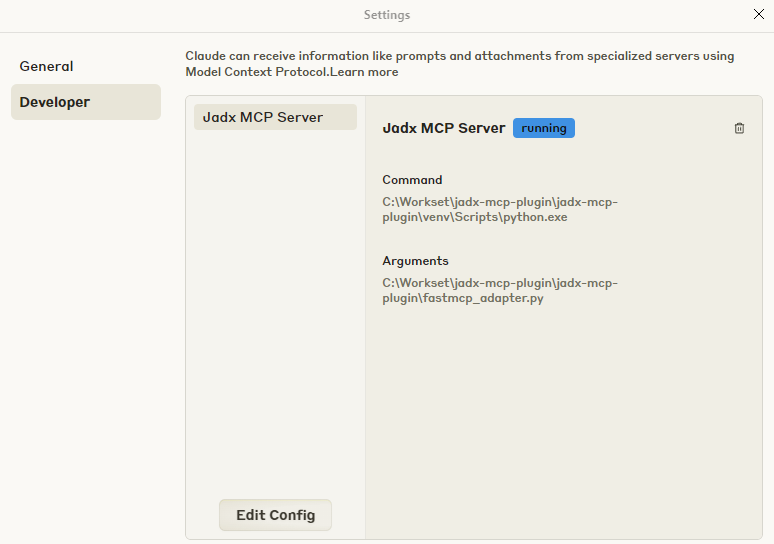
Open Jadx with the latest plugin JAR from the releases placed in its plugins/ folder or load it via Plugins -> install plugin.
Load an APK or DEX file
(Optional) You can specify the HTTP interface address by launching Jadx with:
jadx-gui -Pjadx-mcp.http-interface=http://localhost:8085This is useful if you want to change the default host/port (http://localhost:8085).
Note: If you change the interface address here, make sure to also update the corresponding URL in
fastmcp_adapter.pyto match.
Claude will detect and activate the Jadx MCP Server tools.
You can now list classes, fetch source, inspect methods/fields, and extract code live.
Related MCP server: android-reverse-engineering-mcp-server
Tool | Description |
| Get all decompiled class names |
| Find classes matching a string |
| Get full source of a given class |
| Find methods matching a string |
| List all method names in a class |
| List all field names in a class |
| Extract decompiled code for a method |
The Java plugin is located at:
plugin/src/main/java/com/mobilehackinglab/jadxplugin/McpPlugin.javaIt uses the JadxPlugin API (jadx.api.*) to:
Load decompiled classes and methods
Serve structured data via an embedded HTTP server
Respond to /invoke and /tools endpoints
You can use the following Gradle task to build and install the plugin in one step:
./gradlew installPluginThis uses the
jadx pluginsCLI. Make sure Jadx is installed and available in yourPATH.
For other plugin-related tasks (uninstall, enable/disable), see the task definitions in plugin/build.gradle.
To build the plugin:
./gradlew build
# Output: plugin/build/libs/jadx-mcp-plugin-<version>.jar
Install the plugin JAR using the jadx plugins CLI:
jadx plugins --install-jar path/to/jadx-mcp-plugin-<version>.jarAlternatively, place the built .jar file into your Jadx plugins/ folder, typically located at: ~/.jadx/plugins/
If you place the JAR manually, you’ll also need to enable the plugin through the Jadx GUI or by running:
jadx plugins --enable jadx-mcpThe adapter file is:
fastmcp_adapter.pyIt translates Claude’s MCP tool calls into HTTP POSTs to the running Jadx plugin server. Make sure Jadx is open before starting Claude.
PRs, feature requests, and tool extensions are welcome!
This project is maintained by Mobile Hacking Lab.
This server cannot be deployed
Augments MCP Server - A comprehensive framework documentation provider for Claude Code
Nifra docs, runnable examples, and API types as an MCP server for any AI assistant.
An MCP server that gives your AI access to the source code and docs of all public github repos
Agent-native MCP server over the public saagarpatel.dev corpus. Read-only, stateless.