
hetzner-mcp
<div align="center">
<img src="https://raw.githubusercontent.com/mjmirza/hetzner-mcp/main/assets/hetzner-cloud-logo.png" alt="Hetzner" height="56" />
Manage your entire Hetzner platform from any AI assistant. Cloud servers, networks, volumes, firewalls, load balancers, IPs and DNS, plus Storage Boxes and Robot dedicated servers. One Model Context Protocol server, every surface, tested live, with a hard cost guard so you never get a surprise bill.
[](https://www.npmjs.com/package/hetzner-mcp)
[](#quick-start)
[](LICENSE)
[](CONTRIBUTING.md)
[](package.json)
[](https://github.com/sponsors/mjmirza)
[](https://github.com/mjmirza/hetzner-mcp/stargazers)
[](https://github.com/mjmirza/hetzner-mcp/fork)
[](https://github.com/mjmirza)
**If this saves you time, please [sponsor the project](https://github.com/sponsors/mjmirza), leave a star, and follow along. Sponsorship is what lets me put real hours into building this out.**
[Star](https://github.com/mjmirza/hetzner-mcp) | [Sponsor](https://github.com/sponsors/mjmirza) | [Fork](https://github.com/mjmirza/hetzner-mcp/fork) | [Follow on GitHub](https://github.com/mjmirza) | [Follow on X](https://twitter.com/MirzaJhanzaib) | [next8n.com](https://next8n.com)
<sub>The Hetzner wordmark above is a trademark of Hetzner Online GmbH, shown only to identify the service this tool integrates with. This project is independent and is not affiliated with, endorsed by, or sponsored by Hetzner Online GmbH, and claims no rights to the logo. See <a href="docs/CREDITS.md">docs/CREDITS.md</a>.</sub>
</div>
## See it in 90 seconds
<video src="https://raw.githubusercontent.com/mjmirza/hetzner-mcp/main/assets/video/explainer.mp4" poster="https://raw.githubusercontent.com/mjmirza/hetzner-mcp/main/assets/video/poster.png" controls muted playsinline width="100%"></video>
Can't see the player? [Watch the video](https://github.com/mjmirza/hetzner-mcp/blob/main/assets/video/explainer.mp4).
## What you get
- **Answers from your real account, in plain words.** Ask "what am I running and what does it cost?" and get the list with the monthly price, no Console clicking and no API to learn.
- **No surprise bills.** Reading is always free. Anything that costs money shows its live price and waits for your yes, and it stays off until you turn it on.
- **One page for everything.** A local map shows every project, server, network, volume and IP with its cost, plus a short list of what is worth fixing.
- **Setup that checks itself.** One command asks for your token, confirms with Hetzner that it works, and connects your assistant for you. A second command tells you if anything stopped working.
## From zero to your first answer
About five minutes, and you need Node 18 or newer.
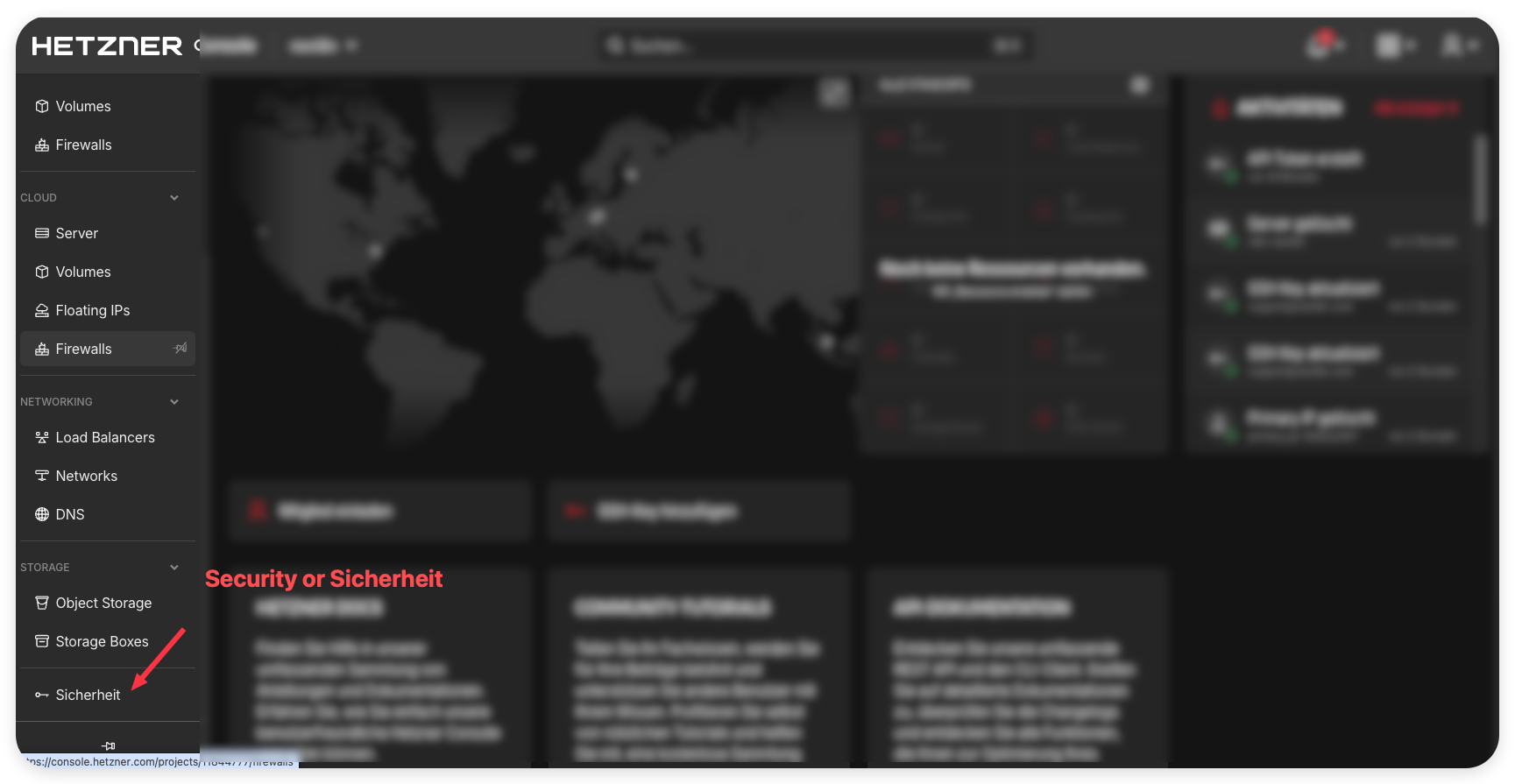
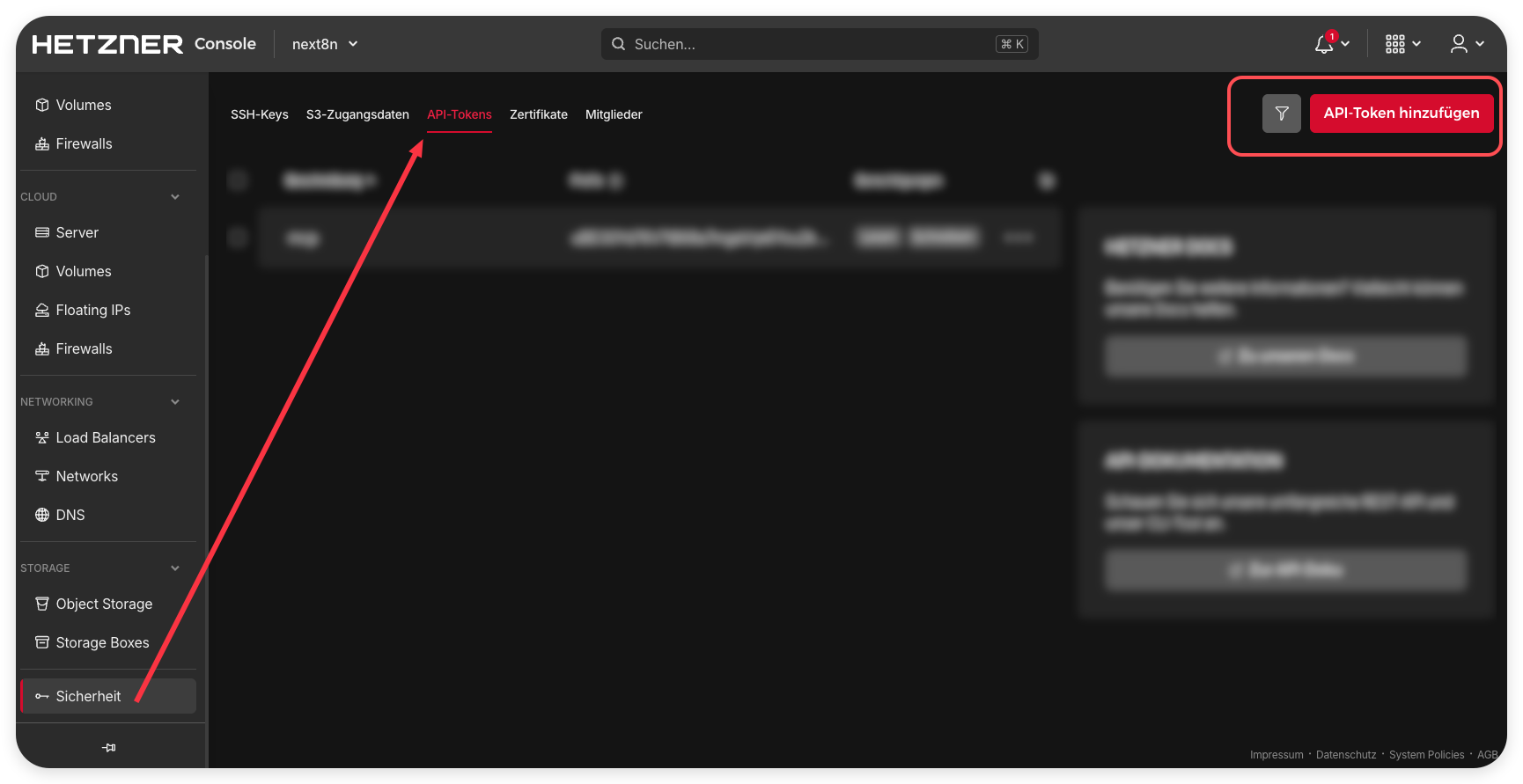
1. **Make a token.** In the [Hetzner Console](https://console.hetzner.com/), open your project, then Security, then API tokens, then Generate API token. Choose Read & Write, and copy it right away, Hetzner shows it only once.
2. **Connect your assistant.** Run the command below and paste the token when asked. It checks the token with Hetzner and sets up Claude Desktop, Claude Code, Cursor, Windsurf or VS Code for you.
```
npx hetzner-mcp setup
```
3. **Restart that app.** Setup prints the exact step for each one.
4. **Ask your first question.** For example, "List my Hetzner servers and show this month cost."
5. **See it all at once.** Run `npx hetzner-mcp map --open`. It uses the token you just saved, so there is nothing else to set up. Just curious? `npx hetzner-mcp map --demo --open` shows a sample first, no account needed.
Something not working? `npx hetzner-mcp doctor` checks the token saved in each app and says what to fix.
## Please sponsor this project
This is built and maintained in the open, for free, under a license that only asks for attribution. If your team relies on it, [becoming a sponsor](https://github.com/sponsors/mjmirza) directly buys the time to cover more endpoints, keep the endpoint audit current as Hetzner changes, and respond to issues and pull requests faster. Even a small monthly amount makes a real difference. Thank you.
## Validated live, not theorized
Every tool and every scenario in this server was run live against the real Hetzner API, not described from theory. 91 automated checks across cloud, Storage Box, and Robot, with 0 failures. Every billed resource was created and then destroyed, a full load balanced stack was deployed and proven to round robin across two backends, and the account was left clean.
| Checks run live | Failures | Tools exercised | Surfaces |
|---|---|---|---|
| 91 | 0 | every registered tool | cloud, storage box, robot |
Read the full [validation report](docs/VALIDATION.md) for the per tool table, the cost discipline, the diagrams, and the exact commands to reproduce it yourself (`npm run validate:live`, `npm run eval`, `npm run deploy:demo`).
## Watch it work
Hetzner, managed from Claude Desktop in plain language. Open a chat, ask in plain words, and the answer comes straight back from your live account. No commands to memorize, no API to learn.
<div align="center">
<a href="https://youtu.be/OhaUP-Fhq_0">
<img src="https://img.youtube.com/vi/OhaUP-Fhq_0/maxresdefault.jpg" alt="Watch the hetzner-mcp demo on YouTube" width="720" />
</a>
<br/>
<sub><a href="https://youtu.be/OhaUP-Fhq_0">Watch the 2 minute demo on YouTube</a></sub>
</div>
## Set up in one command
If you have Node, this is the whole setup.
```
npx hetzner-mcp setup
```
It asks for your Hetzner API token, checks it against the live Hetzner API on the spot, then writes the config for whichever assistant you use. It detects and wires Claude Desktop, Claude Code, Cursor, Windsurf, and VS Code, and backs up any existing config first.
No token yet? The wizard lists the exact steps. In the [Hetzner Console](https://console.hetzner.com/), open your project, then Security, then API tokens, then Generate API token, and choose Read & Write. The same token also covers Storage Boxes. Dedicated (Robot) servers are optional and need separate webservice credentials, which setup explains when you say yes to them.
Check it anytime.
```
npx hetzner-mcp doctor
```
Doctor checks the token saved in each connected assistant against the live API, one free read request, and says in one line what to fix. It writes nothing. Run setup again at any time to replace a token; the previous config is kept as a `.bak` file.
### Where your token is stored
Your token goes nowhere except Hetzner. The wizard saves it locally, inside your assistant's own config file, with owner only file permissions, and never prints it.
| Assistant | Where the token is written |
|---|---|
| Claude Desktop | the Claude config in your user Library (macOS), AppData (Windows), or .config (Linux) |
| Claude Code | `~/.claude.json` |
| Cursor | `~/.cursor/mcp.json` |
| Windsurf | the Windsurf `mcp_config.json` |
| VS Code | `.vscode/mcp.json` in your project (setup warns you, since this file sits in the project and could be committed) |
### Using a different assistant?
hetzner-mcp is a standard MCP server, so it works with any MCP client. For an assistant the wizard does not write to directly, print the block and paste it where that client keeps its MCP servers.
```
npx hetzner-mcp setup --print
```
The block shows placeholders, so it is safe to share or screenshot. Add `--print-secrets` to include the credentials you pass in. For scripts, pipe the token in with `--token-stdin` (or set `HETZNER_CLOUD_TOKEN`) rather than `--token`, which other users on the same computer can see in the process list. The interactive prompts never echo the token or the Robot password.
A note on ChatGPT. OpenAI's MCP support is built around remote connectors rather than a local config file, so the desktop assistants above are the most direct fit for a local server like this. Any client that speaks MCP over stdio needs only the printed block.
## Set it up by pasting one prompt
No setup effort. Copy the block below, paste it into Claude Code, Codex, Cursor, or any AI coding tool, and it installs the server, wires it into your flow, and walks you through the one manual step, getting a token.
```
Set up the hetzner-mcp server from https://github.com/mjmirza/hetzner-mcp so that from now on I can manage my whole Hetzner platform, Cloud servers, networks, volumes, firewalls, load balancers, IPs, DNS, Storage Boxes, and Robot dedicated servers, from this AI assistant, safely.
Steps:
1. Register the MCP server. Run this, replacing MY_TOKEN with my Hetzner Cloud API token:
claude mcp add -s user hetzner -e HETZNER_CLOUD_TOKEN=MY_TOKEN -- npx -y hetzner-mcp
For dedicated servers also add: -e HETZNER_ROBOT_USER=my-ws-user -e HETZNER_ROBOT_PASSWORD=my-ws-password
2. If I do not have a token yet, walk me through it. Hetzner Cloud Console at https://console.hetzner.com, my project, Security, API Tokens, Generate. Choose Read and Write to manage resources. The same token also works for Storage Boxes.
3. Install the provision skill so you can spin up a full stack end to end. Copy skills/hetzner-provision from the repo into my agent skills directory, for Claude Code that is ~/.claude/skills/hetzner-provision/.
4. Add a standing rule for yourself. never create a billed resource without showing me the live price and getting my explicit yes, and always offer to tear down test resources to stop cost.
5. Confirm it works with a free read. list my servers, my storage boxes, and if Robot is set, my dedicated servers.
6. Tell me exactly what you installed and how I provision or tear down anything from now on.
```
Want only a one time look, no install? Paste this instead.
```
Connect to my Hetzner account through the hetzner-mcp server, run npx -y hetzner-mcp with my Cloud API token, then show me everything I am running across Cloud, Storage Box, and Robot, with the monthly cost. Do not create or delete anything. Reads are free.
```
## What this is, in plain words
Hetzner is a hosting company. It runs cloud servers, storage, and physical dedicated servers, and it exposes APIs to control all of it. This project is a small program, an MCP server, that lets an AI assistant like Claude do that controlling for you, safely. You ask in normal language, the assistant calls the right Hetzner endpoint, and the result comes back. You do not need to learn the API. You do need to give it an access token once, which this guide walks you through.
The single most important promise. **Reading and listing are always free, and the tool will never create something that costs money without asking you first and showing you the price.**
## The three surfaces it covers
| Surface | What it manages | Credential needed |
|---|---|---|
| Cloud | servers, networks, volumes, firewalls, load balancers, floating and primary IPs, placement groups, SSH keys, images, certificates, and DNS zones | one Cloud API token |
| Storage Box | backup storage boxes | the same Cloud API token |
| Robot | physical dedicated servers and vSwitches | a separate Robot webservice user and password, only if you use dedicated servers |
All three are live tested against a real account. See [docs/ENDPOINT-AUDIT.md](docs/ENDPOINT-AUDIT.md) for the exact, dated, per endpoint results.
## See your whole estate on one canvas
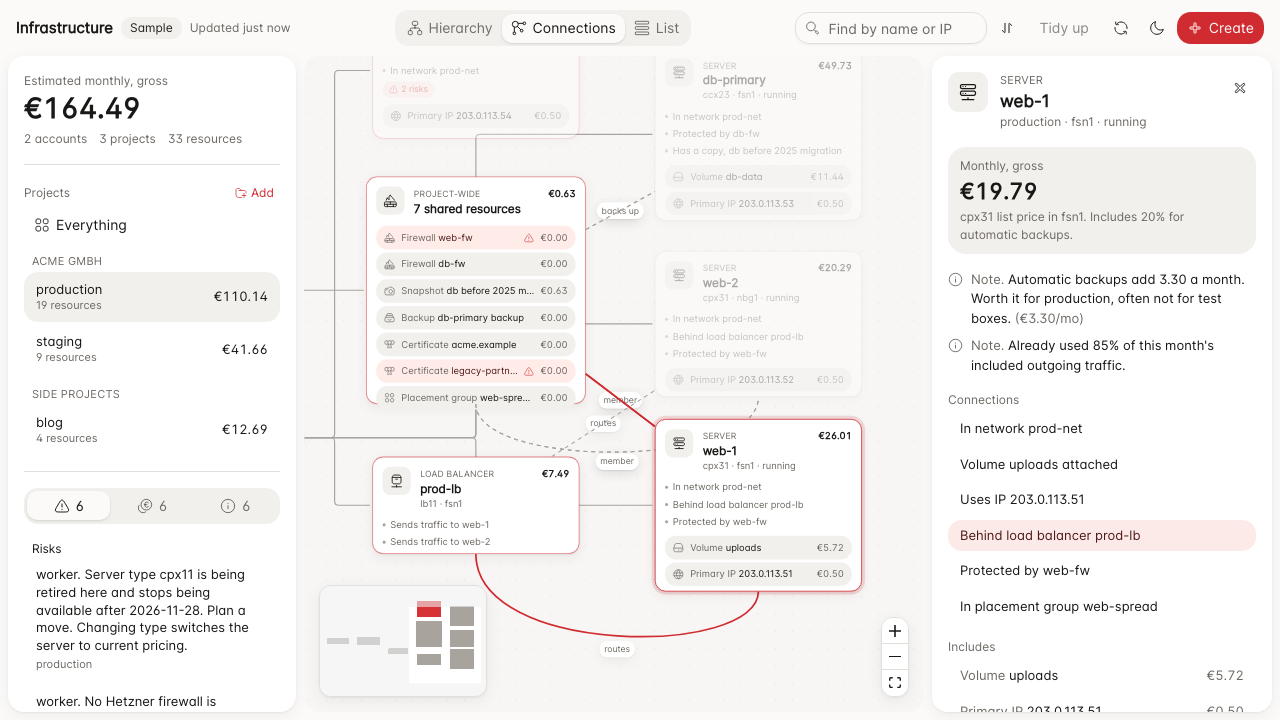
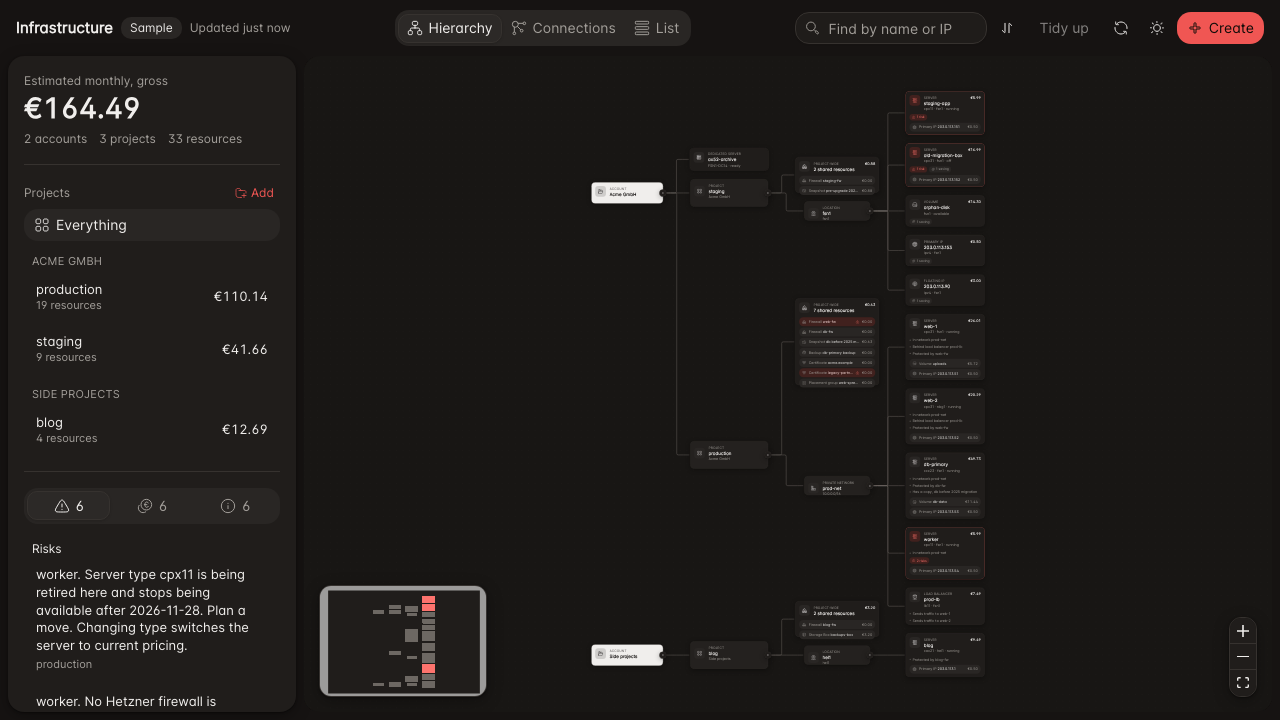
Open a live map of every project, server, network, volume, firewall, load balancer, IP, snapshot, storage box, and dedicated server you run on Hetzner, with the monthly cost on every card.
```bash
npx hetzner-mcp map --open # your account, at http://127.0.0.1:43390
npx hetzner-mcp map --demo --open # a labelled sample estate, nothing needed
```
With no token in your terminal, the map uses the one `setup` saved for your assistant and says which app it came from, so it works straight after setup. A token in the environment always wins.
The address it prints ends in a one-time key (`#k=...`) made fresh at every launch. Only a page opened with that key can call the map's API, so other users on the same computer and other web pages cannot. The key stays in the tab after you open it, so reloading works.
What you get:
- Where the money goes. Monthly cost per account, per project, per resource type, and the top cost drivers.
- Risks to fix. Server types Hetzner is retiring, servers with no firewall, SSH or database ports open to the whole internet, and certificates about to expire.
- What you are paying for and not using. Powered off servers, unattached volumes, unassigned IPs, and snapshots of deleted servers, each with the monthly amount tied to it. One click takes you to it on the canvas.
- A layout that stays readable. Cards are laid out automatically, left to right or top to bottom with one click, cards grow to fit their content, and no card ever overlaps another. Drag cards where you want them, the map remembers, and Reset puts every card back, shows everything again, and centers the map. Turn on Flow to watch dots run along the lines like a workflow executing.
- Plain names instead of codes. A location reads "Falkenstein, Germany", not "fsn1", and a server shows "4 vCPU · 8 GB · 160 GB disk" under its type. Select anything and the side panel explains every code, for example "cpx31 is x86 CPU, shared, regular".
- Three ways to look. Hierarchy shows what sits inside what. Connections also places linked resources next to each other, so you can see which firewall protects which server and which load balancer sends traffic where. List is a calm, flat list grouped by project, most urgent first, with filters for Needs attention, Can save money, and Costs money, and it works well on a phone. Every card also says its links in words, for example "Protected by web-fw".
- How many projects you have, and what each costs. The side panel lists every account and project with its resource count and monthly total. Click one to show only that project.
- Create from the map. Pick Create, choose what you want, and you see the real Hetzner price before anything happens. Billed creates stay off until you start the map with `HETZNER_MCP_ALLOW_BILLED=1`, and even then you tick a box that states the monthly amount. Deleting asks you to type the exact name and tells you what else is affected.
- Add a project from the map. Hetzner has no API to create projects, so the map walks you to the Console, you paste the project's token, it is checked against Hetzner, then saved on this computer only (owner-only file permissions) and never sent back to the page. Tokens from environment variables work too, for example `HETZNER_CLOUD_TOKEN_STAGING`, grouped with `HETZNER_ACCOUNT_STAGING=Acme GmbH`.
### Many clients and accounts with workspaces
A workspace groups the accounts of one client. If you only run your own projects, nothing changes, everything sits in one workspace called Personal. When you manage many clients, the map loads one workspace at a time, so 100 accounts never load at once, and one broken token only marks that project as unreadable.
Import every client token in one go, from a CSV with the columns `workspace,account,project,token` or a JSON array of the same fields.
```bash
npx hetzner-mcp projects import clients.csv --verify # checks each token with one read call
npx hetzner-mcp projects list # tokens shown as ****abcd only
npx hetzner-mcp projects remove "Client A/Client A GmbH/prod"
```
Tokens are saved on this computer only, owner-only file, never printed. Account labels must be unique across workspaces. Environment tokens can join a workspace with `HETZNER_WORKSPACE_STAGING=Client A`, and `HETZNER_WORKSPACE_NAME` renames the default one. Ask your assistant to map one client by passing the workspace name as the `target` of `infra_map`, or one project as `Client A/Client A GmbH/prod`. Every other tool still acts on the `HETZNER_CLOUD_TOKEN` project only.
In the map, a workspace switcher sits at the top of the side panel as soon as there is more than one workspace. It searches by client name, loads only the one you pick, and remembers it next time.
| Your situation | What to set up | What you see |
|---|---|---|
| One account, one project | `HETZNER_CLOUD_TOKEN` | Everything, no switcher |
| One account, several projects | One `HETZNER_CLOUD_TOKEN_<NAME>` per project, or Add project in the map | All projects in one workspace |
| Your own account plus a few clients | `HETZNER_WORKSPACE_<NAME>=Client A` next to each client token | A switcher, one workspace per client |
| An agency with 100+ client accounts | `npx hetzner-mcp projects import clients.csv --verify` | A searchable switcher; only the active client loads |
| One token stops working | Nothing, the rest keep loading | That project is marked unreadable and the audit lists it |
| Dedicated (Robot) servers | `HETZNER_ROBOT_USER` and `HETZNER_ROBOT_PASSWORD` | Listed in the default workspace |
Before you create a server, ask "where can I get a 4 core server right now". The `find_capacity` tool lists what Hetzner can actually sell you today, by location and price, so a create does not fail with resource unavailable.
Your assistant can open it too. Ask it to "map my Hetzner infrastructure" and the `infra_map` tool returns the cost summary, the savings list, and the canvas link, or a Mermaid diagram with `mermaid: true`.
It is local and guarded. It listens on 127.0.0.1 only, refuses requests addressed to any other host name or sent from another website, and never sends your token to the page. Every create and delete goes through the same cost, read-only (`HETZNER_MCP_READONLY=1`), and destructive guards as the MCP tools, and the sample map cannot change anything. Port 43390 is unassigned in the IANA registry; set `HETZNER_MCP_MAP_PORT` to change it, and it moves to the next free port if that one is busy. Costs are estimates from Hetzner list prices, not your invoice, because Hetzner has no Cloud billing API.
### An audit that runs by itself
Every time the map loads, it audits your estate. Nobody has to press a button, and the first audit also runs at the end of `npx hetzner-mcp setup`, so you see what is worth fixing before you ask.
- A score out of 100 and a grade, per project and overall.
- Every finding says what is wrong, why it matters, numbered steps in the Hetzner Console, and the exact sentence to ask your AI, with the monthly saving where there is one.
- Checks include open SSH and database ports, public servers with no firewall, retiring server types, expiring certificates, powered-off servers still billed, unattached volumes and IPs, load balancers with no or one target, production servers without backups, and projects running everything in one location.
- It says out loud what it cannot see, such as settings inside the operating system, so silence never reads as all clear.
```bash
npx hetzner-mcp audit # short summary
npx hetzner-mcp audit --out audit.md # full report with fix steps
npx hetzner-mcp audit --fail-on high # exit 1 in CI when a high or critical finding appears
```
In the map, open the Audit tab. From your AI, the `infra_audit` tool returns the summary first and one finding's steps on request (`finding: 3`), which keeps the conversation short.
### Spend history
Open the Spend tab to see what your Hetzner account has been costing you, month by month. Hetzner has no billing API, so the tab works in two layers.
- **Estimated from your account, with no setup.** Every resource the map already reads has a creation date and a price. From those, the tab shows this month so far, the projected full month, and an estimate for every past month since each resource was created, per project and per resource type, with the top cost drivers. It counts each started hour up to the monthly price, the way Hetzner bills. It is labelled as an estimate everywhere: resources you already deleted are not included, and past months assume today's sizes. Amounts are in euro, net of VAT.
- **Exact, from your invoices, when you want it.** Download your invoice PDFs in the Hetzner Console under Invoices (or at accounts.hetzner.com) and drop them on the Spend tab. The PDF is read in your browser. Only the invoice number, date, per-project totals and line items are kept, saved on this computer next to your projects (owner-only file). Names, addresses, customer numbers and bank details are never read or stored.
Every invoice is checked before it is saved, in the browser and again on this computer. Line items must add up to each project's subtotal, the projects to the invoice total, net plus tax to gross, and the tax to the stated rate. An invoice that does not add up is refused with the exact numbers that disagree, the same invoice is never counted twice, and a project month billed on two invoices is flagged.
With invoices added, each finished month shows the billed amount next to the estimate for the same projects:
| Status | Meaning |
|---|---|
| Matches | The invoice is within 5 % of the estimate |
| Invoice higher | Often resources you already deleted, extra traffic, or a resize during the month |
| Invoice lower | Often credits, or resources turned off for part of the month |
| Invoice missing | The estimate shows usage but no invoice for that month was added, so you know which PDF to download |
A one-line summary sits at the top, for example "12 invoices, all totals check out. 4 of 6 months match the estimate." From your AI, the read-only `spend_history` tool returns the same figures and the same summary. The sample map (`npx hetzner-mcp map --demo`) shows a full example with synthetic invoices.
## Small on tokens, by design
Every answer is shaped to cost your AI as few tokens as possible. Lists come back as a compact view where nested objects collapse to their name (a server type reads `cx23`, not its full price table), empty fields are dropped, and JSON is not indented. Pass `verbose: true` whenever you need everything. Measured on a live account, this cut server type lists by 49%, locations by 47%, and images by 40%.
The tool list itself costs tokens in every conversation. Set `HETZNER_MCP_TOOLS=lean` to skip the 27 list shortcuts; `cloud_request` with GET reads the same data, and the tool list drops from about 9,400 to 5,900 tokens. A test in CI fails if the tool list or the common answers grow past their budget.
## Cost safety, the part you actually worry about
Upgrading from 0.4? Paid resources are now off by default. Rerun `npx hetzner-mcp setup` and answer yes when it asks about paid resources, or add `HETZNER_MCP_ALLOW_BILLED=1` to your client config. Two tools were retired along with the Hetzner endpoints behind them. `cloud_list_datacenters` is replaced by `cloud_list_locations` and `find_capacity`, and `robot_list_storageboxes` by `storagebox_list`.
A wrong API call should never cost you money you did not intend. This tool is built around that.
- Every list and get is free on Hetzner. Use them as much as you like.
- Resources that are free to create, such as SSH keys, networks, firewalls, and placement groups, are created normally.
- Resources that cost money, such as servers, volumes, load balancers, floating and primary IPs, and storage boxes, are guarded. Billed creation is off until you set `HETZNER_MCP_ALLOW_BILLED=1`, and even then the tool refuses each one unless you pass an explicit confirm, after it fetches and shows you the live hourly and monthly price.
- Actions that interrupt a running machine, such as power off, reboot, rebuild, or a password reset, also need an explicit confirm.
- Every write waits for Hetzner to finish the work and tells you if it failed, instead of reporting success while the job is still running.
- Nothing in the test suite leaves a billed resource running. The whole build is tracked in a cost ledger in [docs/ROADMAP.md](docs/ROADMAP.md), with a target of under five cents total.
## Quick start
The fastest path is `npx hetzner-mcp setup` above. The steps below are the manual path, for wiring a client by hand or scripting it in CI.
### Use it with Claude Code or any MCP client
It is published on npm. Point your MCP client at the package and give it your token. This uses npx, so nothing is installed permanently.
```
claude mcp add hetzner -e HETZNER_CLOUD_TOKEN=your-token -- npx -y hetzner-mcp
```
For Robot dedicated servers, also add the webservice credentials.
```
claude mcp add hetzner \
-e HETZNER_CLOUD_TOKEN=your-token \
-e HETZNER_ROBOT_USER=your-ws-user \
-e HETZNER_ROBOT_PASSWORD=your-ws-password \
-- npx -y hetzner-mcp
```
### Installing from GitHub Packages instead of npm
Most people should use the npm commands above. They need no account.
The copy of this package on GitHub Packages is published as `@mjmirza/hetzner-mcp`. The install command GitHub shows on its package page fails when pasted as is, for two reasons that come from GitHub, not from this package. npm looks for the name on npmjs.com unless told otherwise, and GitHub requires a login to download any npm package, even a public one. These steps work:
1. Create a GitHub token (classic) with the `read:packages` scope at https://github.com/settings/tokens
2. Tell npm where the `@mjmirza` packages live and give it the token:
```bash
npm config set @mjmirza:registry https://npm.pkg.github.com
npm config set //npm.pkg.github.com/:_authToken YOUR_GITHUB_TOKEN
```
3. Run it:
```bash
npx @mjmirza/hetzner-mcp setup
```
### Install globally with npm
Install once and the hetzner-mcp command is on your PATH.
```
npm install -g hetzner-mcp
```
Then point your MCP client at the installed command instead of npx.
```
claude mcp add hetzner -e HETZNER_CLOUD_TOKEN=your-token -- hetzner-mcp
```
### Run it from source
```
git clone https://github.com/mjmirza/hetzner-mcp
cd hetzner-mcp
npm install
npm run build
HETZNER_CLOUD_TOKEN=your-token npm start
```
## Getting your credentials
Full, beginner friendly, step by step instructions, including the German console labels, are in [docs/SETUP.md](docs/SETUP.md). The short version.
1. Cloud token. https://console.hetzner.com, your project, Security, API Tokens, Generate. This one token also works for Storage Boxes.
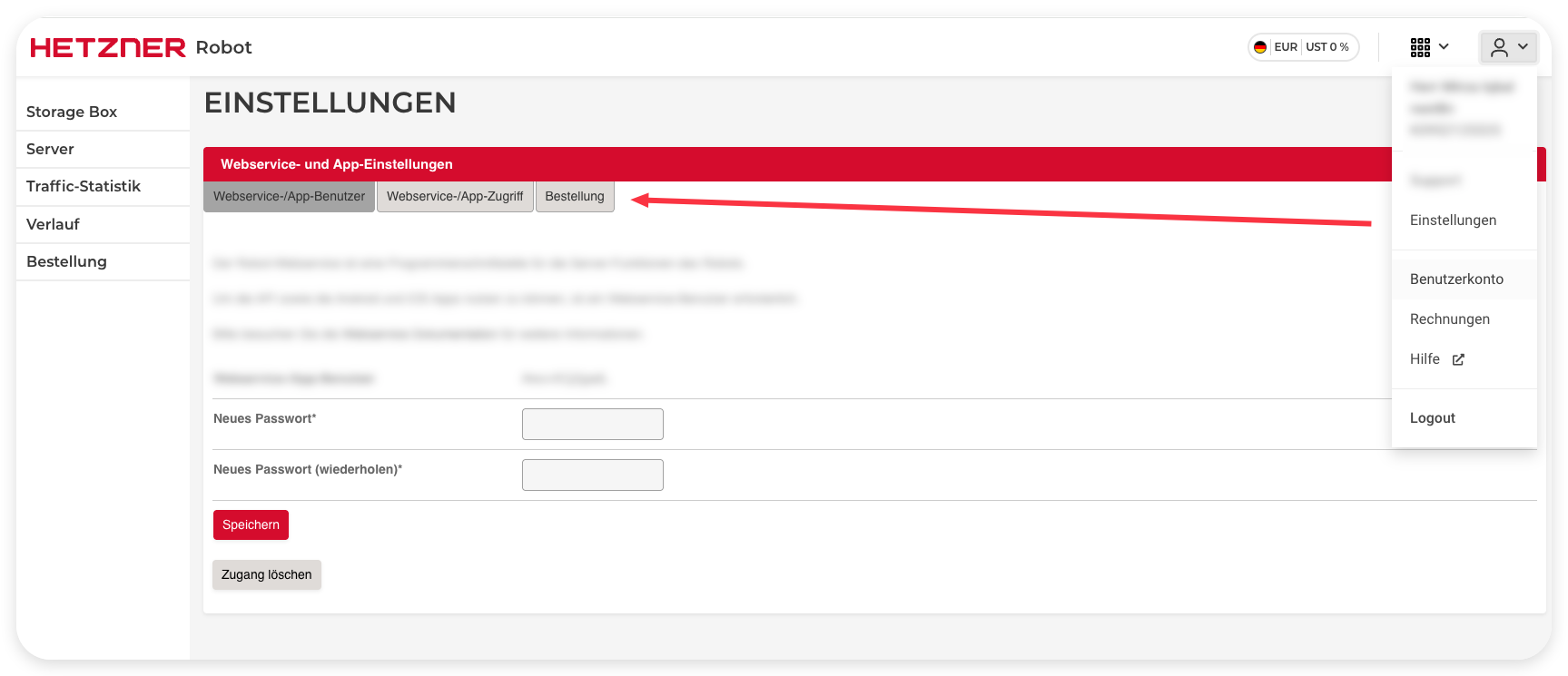
2. Robot user, only for dedicated servers. https://robot.hetzner.com, Settings, Web service and app settings, set a password, the username is assigned to you.
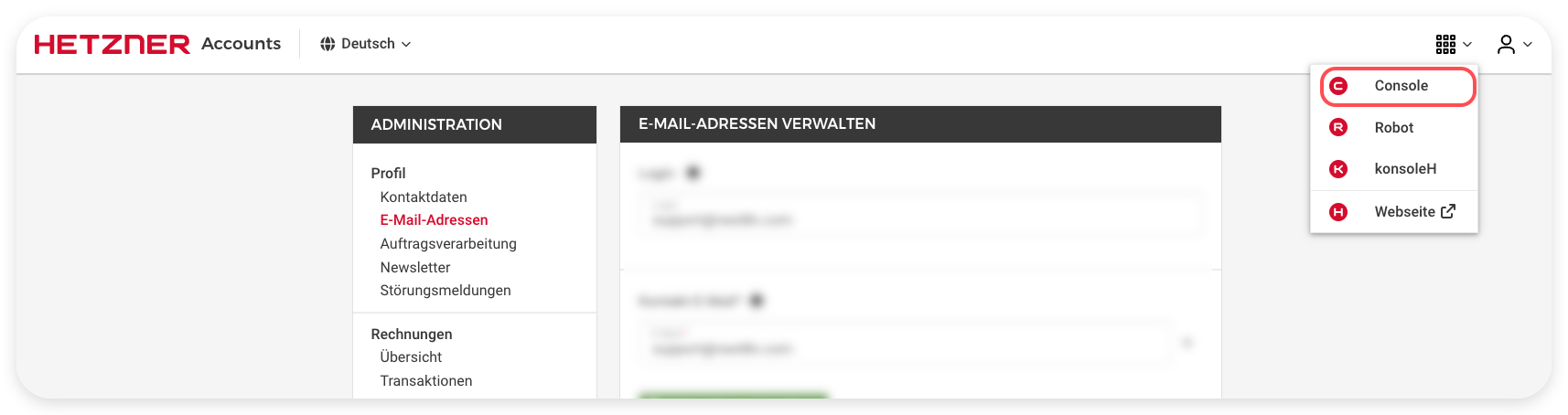
### Visual walkthrough, getting the Cloud token
Open the Cloud Console, then your project.
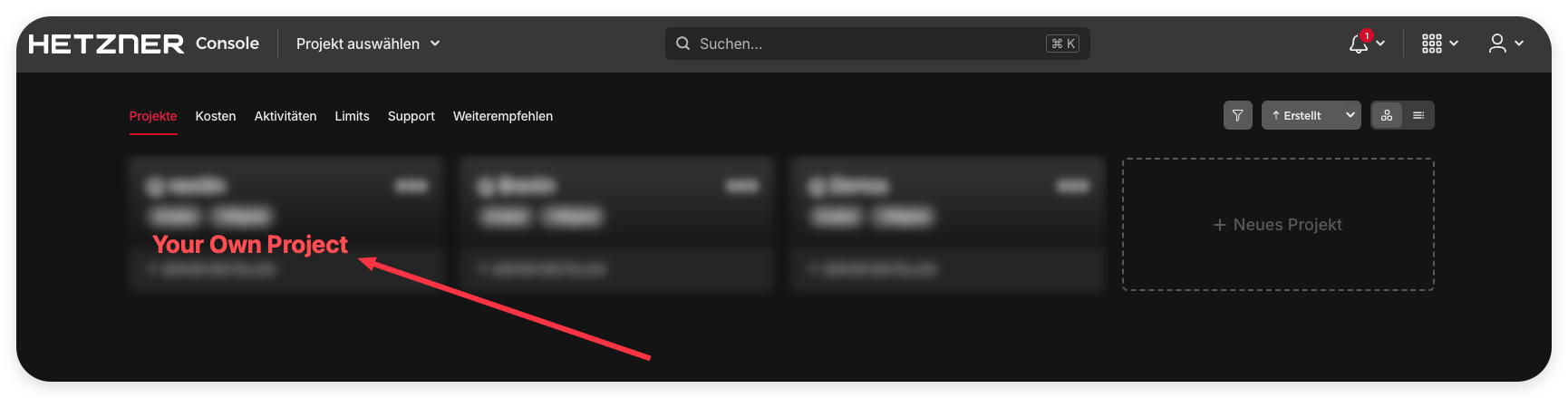
Open Security, then the API Tokens tab, and generate the token.
For dedicated servers, create a Robot webservice user.
## What is tested, and how this compares
This project tests every endpoint live and records the result. The running inventory, including a deprecation log, is in [docs/ENDPOINT-AUDIT.md](docs/ENDPOINT-AUDIT.md).
There is no official Hetzner MCP. Several community servers exist, and this project studied them. The goal here is broader, tested coverage across all three surfaces, a real cost guard, and a documented endpoint audit, rather than Cloud only.
| Project | Surfaces | Notable focus |
|---|---|---|
| this project, hetzner-mcp | Cloud, Storage Box, Robot | full coverage, cost guard, live endpoint audit, contribution loop |
| dkruyt/mcp-hetzner | Cloud | Python, structured functions |
| Xodus-CO/hcloud-mcp | Cloud | standalone, works with many clients |
| lazyants/hetzner-mcp-server | Cloud | servers, networks, volumes, firewalls, load balancers |
| MahdadGhasemian/mcp-hetzner-go | Cloud | Go implementation |
| valerius21/hetzner-mcp | Cloud | Cloud API integration |
| nityeshaga/hetzner-mcp-server | Cloud | aimed at Claude Code |
If another project covers something this one does not, that is a great pull request. See below.
## Why this instead of building your own
You could write your own. Most people say they will and never do, and the ones who do end up rebuilding the same things this already has, tested.
- A cost guard. Your own script will happily create a billed server. This one refuses without a confirm and shows the live price first, which matters most when an AI agent is the one calling it.
- The safety layer. Secret redaction, relative-path-only requests so an agent cannot be pointed at another host, request timeouts, and input validation on every call.
- Coverage that does not rot. Three generic tools reach every endpoint, so it keeps working when Hetzner adds a new one, and every endpoint is validated live, 39 of 39.
Prefer infrastructure as code? Use Terraform or the hcloud CLI, they are excellent for that. This is for the other case, when your AI assistant should do the work in plain language, safely, without you writing or maintaining the glue. It is free at and below a real revenue threshold under the OpenRoots ORA 2.3 license, so if you would rather build on it than from zero, fork it.
Common questions, technical and non technical, are answered in [docs/FAQ.md](docs/FAQ.md).
## Missing something? The contribution loop
This MCP is designed to grow from real use. If you ask it for something it does not cover yet, it will hand you a prefilled link to open a feature request, and if you already have the fix, the steps to open a pull request. Every gap becomes a contribution.
- Open a [feature request or missing endpoint issue](https://github.com/mjmirza/hetzner-mcp/issues/new/choose).
- Read [CONTRIBUTING.md](CONTRIBUTING.md) for the pull request flow.
- Contributors are credited in [docs/CREDITS.md](docs/CREDITS.md).
- Not included yet, on purpose. an on-server service layer (restart services, tail logs,
database health) is a planned, opt-in, allow-listed feature, kept out of the default so
the server stays safe by default. See docs/ROADMAP.md Phase 7, and open an issue if you
want it prioritized.
## Quality
This is engineered, not vibe coded. The repository runs the fallow hygiene gate to block new dead code, builds and type checks in CI, and every endpoint carries a live test result. See [docs/ROADMAP.md](docs/ROADMAP.md) for the full quality and phase plan.
## Real problems this solves
Hetzner is loved for its price, roughly one fifth to one tenth of comparable AWS, but its automation has real friction that users write about.
- "API tokens must be created by hand in the console, you cannot bootstrap them as code." After that one manual step, this MCP automates the rest, and the [setup guide](docs/SETUP.md) makes it foolproof.
- "SSH keys attached at creation cannot be changed later without recreating the server." The MCP exposes the full server and key surface so an agent can script rotation and replacement.
- "Network setup needs extra config files and commands run on the server." The [orchestration skill](skills/hetzner-provision/SKILL.md) builds network, firewall, and server together with cloud-init in one verified flow.
Sourced from real community writeups. See [docs/COMMUNITY-PAINPOINTS.md](docs/COMMUNITY-PAINPOINTS.md) and the market gap in [docs/MARKET-ANALYSIS.md](docs/MARKET-ANALYSIS.md).
## License
OpenRoots Agent License 2.3. Free and unconditional at or below USD 20,000,000 annual revenue, and for any individual, nonprofit, school, or government body at any size. Above that threshold, a small self-reported royalty applies, capped per year. AI training on this code is not granted by either tier and needs a separate Compute license; human reading and search indexing are unaffected. The canonical text lives at [openroots.org/licenses/ora/2.3](https://openroots.org/licenses/ora/2.3). See [LICENSE](LICENSE).
## Disclaimer
Independent community project. Not affiliated with, endorsed by, or sponsored by Hetzner Online GmbH. Hetzner and the Hetzner logo are trademarks of their respective owner. You are responsible for your own Hetzner account, credentials, and any resources you create.
TDQS
Scored across 59 tools
Each named tool targets a distinct resource+action (list/create/delete/attach per resource), so most are easy to tell apart. The three generic *_request tools overlap with every specific tool, creating a dual path an agent must reason about, but their descriptions clearly frame them as fallbacks for missing endpoints.
The dominant pattern is product_verb_noun (cloud_create_server, robot_list_ips, storagebox_list_types), which is predictable and readable. A handful of infra utilities (infra_map, spend_history, find_capacity, contribute_or_report) break the convention, but this is a minor deviation rather than chaos.
59 tools is very heavy for this server and well past the 25-tool threshold, inflated by exhaustive list coverage across cloud/robot/storagebox plus three catch-all request tools that partly duplicate the named tools. The domain is large, but the surface is clearly oversized.
Coverage is broad: list for nearly every resource plus create/delete for servers, volumes, networks, firewalls, load balancers, IPs, keys, and placement groups. Some lifecycle gaps exist (no server start/stop/reboot, no volume resize, no update/edit tools), but the generic *_request tools provide a usable escape hatch so agents are not stranded.